


9 min read

CollaborateMD Digital Intake That Writes Back

CollaborateMD Digital Intake That Writes Back
💡CollaborateMD digital intake forms text link write-back replace 19 pages of paper, plus the manual re-typing behind them. Pawortients tap a secure link and finish intake in minutes. 

This fits primary care, multi-specialty, lab, and diagnostic groups, and the billing companies that serve them. CollaborateMD does offer intake forms. But the data still gets printed, scanned, or saved as a flat file, then re-keyed by hand.

That second touch is where transposed policy numbers and wrong birthdates sneak in. Those small slips bounce clean claims.

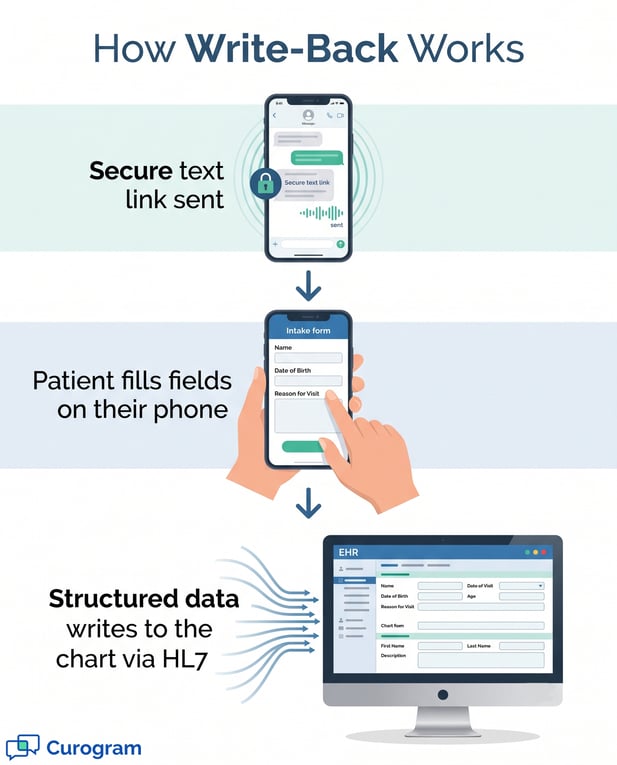
Curogram texts a secure link before the visit. Each completed field then writes back into the structured CollaborateMD chart through the HL7 connection. 

There is no portal to log into and no second touch for staff. Every field lands in the chart with zero keystrokes from your team. Intake stays clean, structured, and ready to bill the first time.

Picture a new patient at your front desk. She holds a clipboard thick with 19 pages of paper. She fills each box by hand, slow and unsure.

Then a staffer takes that packet. He scans it, saves a file, and starts typing. He re-enters the same name, insurance ID, and birthdate she just wrote.

This is the hidden tax on paper intake. The patient types once, and your team types it all again. Every re-typed field is one more chance to fumble a digit.

None of this is anyone's fault, really. The tools just never talked to each other. So the patient typed, and then your team typed again. The gap between them is where money slips out.

A single wrong number on a policy line can bounce a whole claim. Now that claim sits in a denial pile, waiting for rework. The cost is real, and it stacks up fast.

CollaborateMD digital intake forms text link write-back offer a cleaner path. The patient gets a secure text before the visit. She taps the link, fills the form on her phone, and hits send.

There is no app to download and no portal to log into. The visit has not even started, yet her data is done. The completed form writes straight into the CollaborateMD chart. It lands in structured fields, not a flat PDF your staff must re-key.

CollaborateMD is built to hold your chart of record. Curogram is built to fill it, using the three minutes she already spent typing. Together, they close the gap where claims break.

This guide walks through the whole shift. You will see why re-keying costs so much and how self-filing intake works. The goal is simple: let patients type once, and never re-type it again.

The Villain: The Re-Keying Tax

Paper intake feels normal because it always sort of worked. But the real problem is not the paper itself. It is what happens after the patient sets down the pen. The goal is to eliminate paper intake forms in CollaborateMD workflows, and to kill the re-typing behind them.

The Double Touch That Breaks Claims

CollaborateMD genuinely offers intake forms, and that is a real capability. Yet the common workflow still leans on hands. Staff print the form, scan the packet, or save a PDF. Then they type it all into the record by hand.

Intake Touched Twice

The patient fills a paper packet in the waiting room. A staffer scans it, then re-keys demographics and insurance by hand. So the same facts get entered two separate times. That is the double touch, and it hides in plain sight.

Think about how odd that is for a moment. The clinic already owns a system built to store this data. Yet the first stop is still a paper form and a pen. Only later does a human copy it into the software.

Where Errors Sneak In

Every re-typed field carries a small risk. A policy number gets transposed, or a birthdate lands a day off. These are the exact slips that flip a clean claim into a denial. Tired hands make them near the end of a long shift.

A denied claim does not fix itself either. Someone must catch it, find the typo, and resend it. That rework can take days, and the cash waits the whole time. So one bad keystroke can delay payment for weeks.

The Real Cost Of Re-Typing

The tax is not only errors. It is also time, morale, and money bleeding out slowly. Each part feeds the next in a quiet loop. Left alone, that loop just keeps spinning.

19 Pages, One Denial Away

One prospect reported 19 pages of paper for each patient. Every one of those pages holds fields your team must re-enter. And each field is one keystroke away from a denial. That is a lot of surface area for a claim to break.

Multiply that by every new patient each week. The pages pile up, and so does the typing load. Each packet adds more fields and more chances to slip. The paper becomes a slow, steady drain on your team.

Data Entry Your Patients Already Did

Here is the quiet insult in all of it. Your staff spends the day retyping what patients already typed. The reward for that effort is a stack of rejections to work on later. Skilled people end up doing double data entry instead of helping patients.

There is a morale cost hiding here, too. Nobody trained as a biller to retype birthdates all day. The work feels pointless because the patient already did it. Over time, that grind wears good people down. 

Vertical infographic explaining safe digital intake to EHR via HL7 write-back integration

The Guide: The Self-Filing Intake

So, how do you break the double touch for good? You stop treating intake as a form to file. You start treating it as data that files itself. Curogram calls this the self-filing intake, where the form completes itself into the chart.

Secure Text-Link Forms

The front door here is a simple text, not a portal. A CollaborateMD patient intake form text link goes out before the visit. The patient taps it and starts right away. No login screen ever gets in the way.

No App, No Portal Login

Patients do not download anything or create an account. This is pre-visit intake by text, with no portal to log into. The link rides on the same secure channel as 2-Way HIPAA-Compliant Texting. That low friction is why so many finish in minutes.

Portals sound helpful, but most patients never sign in. A password reset alone can sink the whole task. A text skips that wall entirely. The patient just taps and types, so forms get done.

Fields Done Before The Visit

On their phone, patients complete demographic, insurance, HPI, and ROS fields. They do this at home, on the bus, or in the parking lot.

By the time they reach your desk, the form is done. Based on our internal data, over 75% of patients confirm by text before a visit.

Because the work happens early, your lobby moves faster. Nobody sits and scribbles while others wait. Front-desk lines get shorter, and the mood lifts. The visit can start with care, not paperwork.

True Write-Back To The Chart

A form is only useful if the data lands in the right place. This is where write-back separates real integration from a saved file.

One path fills the chart; the other just stores a picture of it. That difference decides whether staff retype or not.

Populated Fields, Not A Flat PDF

The completed intake does not arrive as a flat PDF. It is digital intake that writes back to the CollaborateMD chart as populated fields.

The structured intake data flows into CollaborateMD through the HL7 connection. So staff read a filled chart, not a scan they must retype.

National structured data standards treat this as the base for clean exchange. Populated fields can be checked, matched, and billed with confidence. A flat scan cannot do any of that. That gap is the whole reason write-back matters.

Built For Billing Practices

This matters most for paper-bound practices and the billing teams behind them. Secure online patient forms help a billing practice submit cleaner claims.

The same write-back, no-portal model also powers text-to-pay for balances. Patients finish in minutes, so adoption is easy on both sides of the desk.

For a billing company, dirty input is the real enemy. Every messy chart from a client means more denials to chase. Clean, structured intake flips that story. Better data in means fewer rejections out, month after month.


The Success: Clean Intake, Clean Claim

When the re-keying step vanishes, the whole downstream flow gets calmer. Clean intake is not a nice-to-have. It is the first link in a clean claim. Here is what changes when the chart fills itself.

From Double-Touch To Self-Filing

The shift has a name worth remembering. Call it from double-touch to self-filing. In the old way, data got handled twice. In the new way, the patient handles it once.

19 Pages Become A 3-Minute Text

The 19-page paper packet becomes one short text that the patient can finish anywhere. Most people wrap it up in about three minutes, well before they arrive.

The typing happens once, on a phone, and never gets repeated by your staff. That single change removes the exact manual touch where claim-breaking errors are born.

Three minutes is short enough that patients actually finish the form in one sitting. They tap through simple, plain-language fields on a screen they already know well.

No mailing, no printing, and no pages lost between the lobby and the back office. The form arrives complete and structured, well before the patient ever walks in.

The Re-Keying Step Disappears

With write-back switched on, no one has to re-enter the patient data by hand. The whole re-keying step simply disappears from your team's daily routine.

Fewer keystrokes across the day means far fewer transposed digits slipping through. And fewer transposed digits means fewer denials landing back in your rework queue.

This is the quiet win most teams underrate. You are not just speeding up a task; you are deleting one. A deleted step cannot introduce errors at all. That is how self-filing intake protects the claim.

Cleaner Claims, Calmer Front Desk

The payoff shows up at two places at once. Your front desk feels it, and your billing queue feels it too. One gets calmer mornings; the other gets cleaner claims. Both gains come from the same simple change.

Greet Patients, Not Clipboards

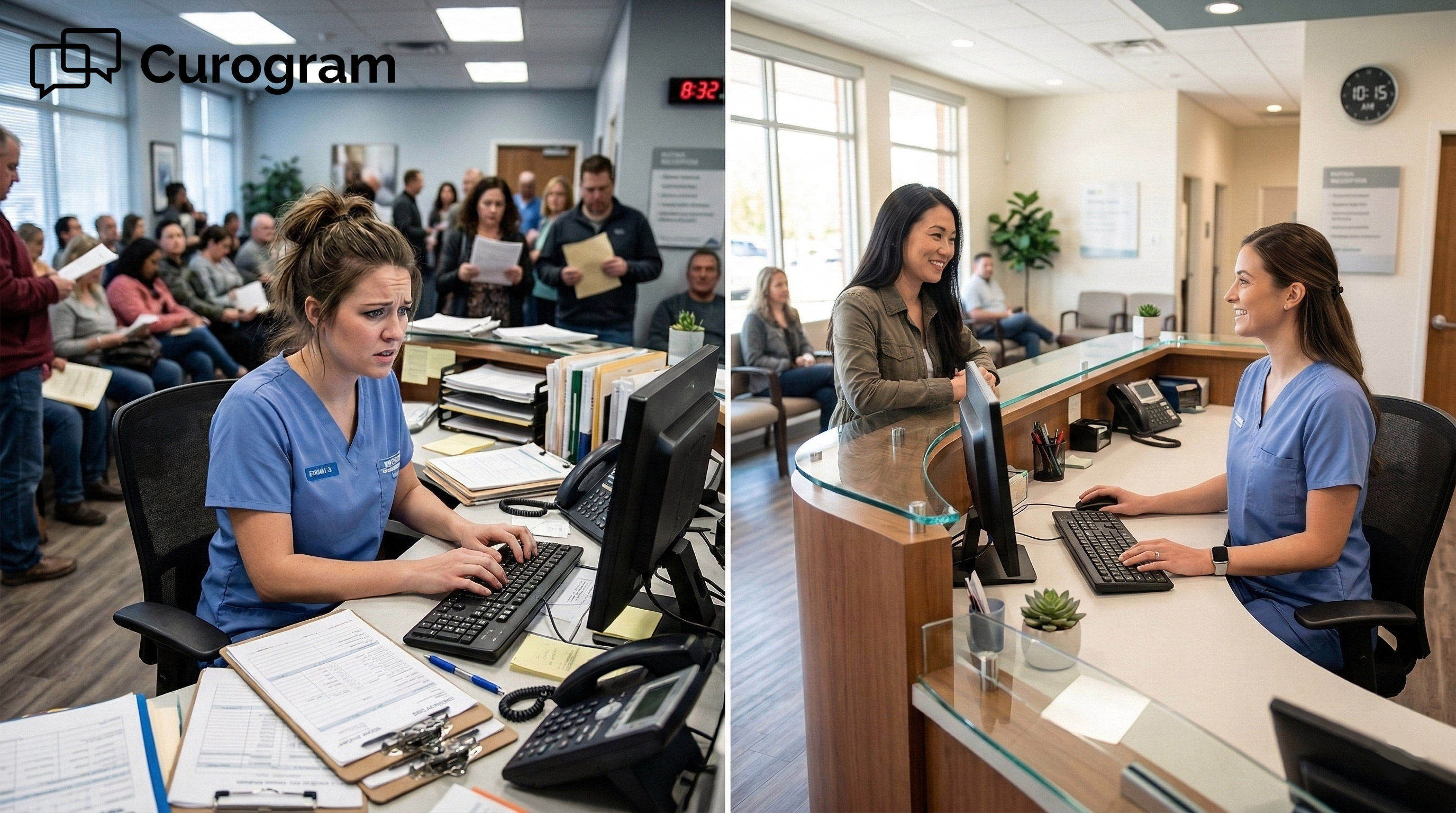
Your staff stop collecting clipboards at the window and start actually greeting people. The first moment of a visit becomes a warm hello, not a clumsy handoff.

That better welcome costs you nothing extra beyond the time you already had. It simply frees the minutes that endless re-keying used to quietly eat.

First impressions set the tone for the whole visit. A warm greeting beats a stack of forms every time. Patients feel seen, not processed. Your staff feels useful, not buried in paperwork.

Bill On Complete Data The First Time

Claims now submit on complete, structured data instead of half-filled guesses. There is no scanned packet sitting in a tray, waiting to be retyped later.

You bill correctly the first time, based on the facts the patient entered themselves. Nothing lingers in a pile, hoping that someone finds a spare minute for it.

Clean claims move faster through every payer step. Fewer land in the denial queue for rework. That means cash arrives sooner and more often.

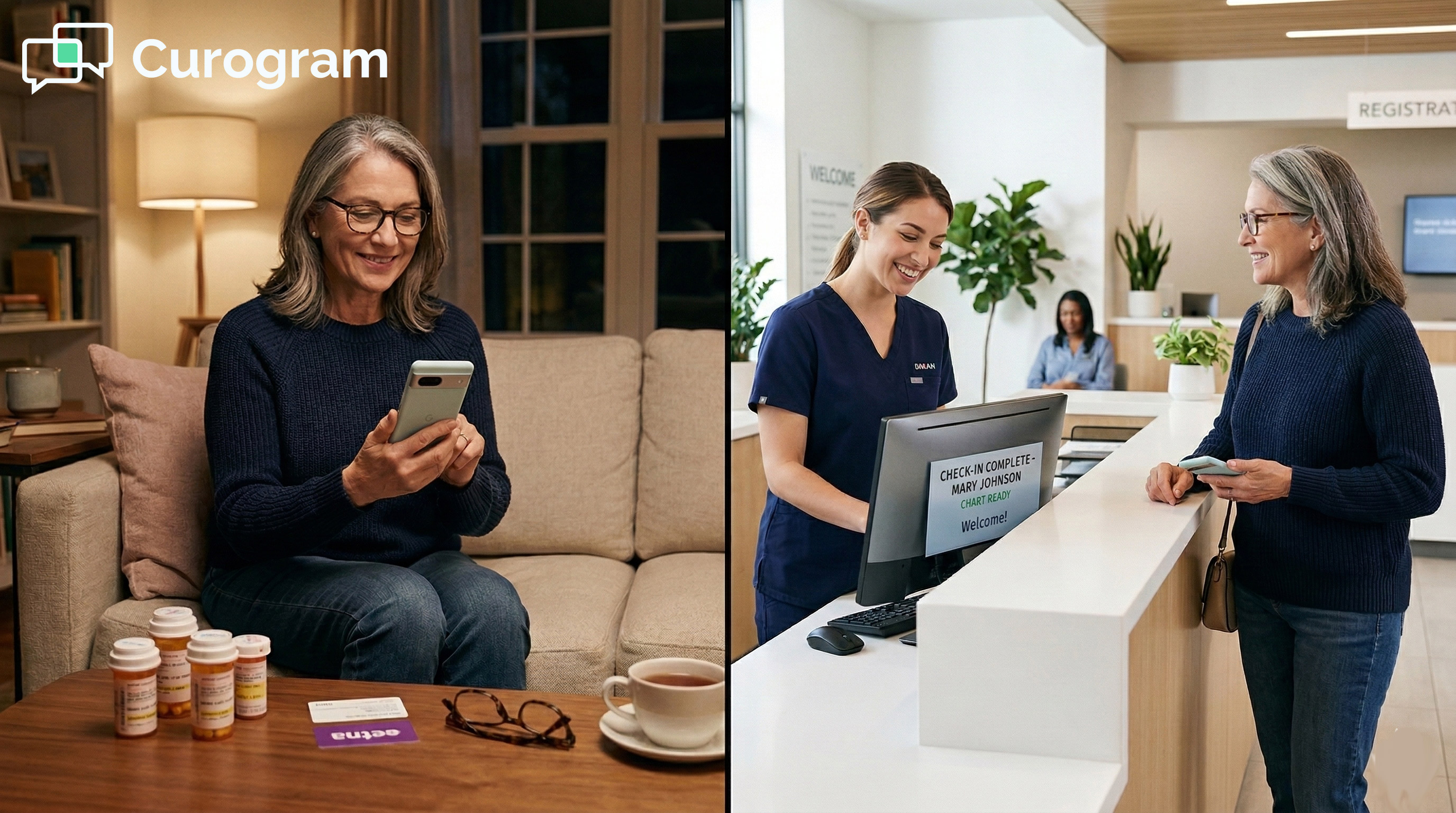
Relaxed patient completing digital intake on their phone in a bright clinic setting

ConclusionComplete Your Revenue Cycle

Paper intake looks harmless, but it hides a costly habit. Your patients type their details once. Then your team types the same details all over again. That second touch is where clean claims quietly go to die.

Now scale that small habit across a single busy week at your front desk. Dozens of packets and thousands of tiny fields all get typed twice by hand.

The odds of a costly error climb higher with every extra keystroke. Those small slips quietly add up to a real and steady revenue leak.

CollaborateMD holds the chart of record, and it does that job well. Curogram fills that chart using the patient own three minutes of typing. One tool owns the record; the other owns the intake. Together, intake stops breaking your claims.

The fix does not ask your team to work harder. It asks them to stop doing a step twice. The patient already typed the data once. Let that first effort be the only effort.

Think of it this way. CollaborateMD is for your chart of record. Curogram is for their three minutes on a phone. When both play their part, the re-keying tax disappears.

The math is not complicated. Stop paying skilled staff to retype what your patients already filled out. Every re-typed field is a denial waiting to happen. Remove the field, and you remove the risk.

Consider what a single denied claim really costs you in the end. There is the lost payment, plus the staff hours spent chasing it down.

Now multiply that quiet cost by every avoidable typo that re-keying invites. Clean intake at the front end saves all of that trouble at the back.

Cleaner intake is not only a billing win hiding in a spreadsheet somewhere. It quietly changes how the whole front desk feels at the start of each morning.

Less mindless typing means more real time for the people in front of you. Your team gets to focus on patients and care, not on packets and clipboards.

CollaborateMD digital intake forms text link write-back give you that clean start. The patient types once, on their phone, before they arrive. Their data lands in structured fields, ready to bill. Your team greets patients instead of chasing rejections.

None of this needs a rip-and-replace project. CollaborateMD stays your system of record. Curogram simply feeds it clean, structured intake. The two work side by side from day one.

Complete your revenue cycle and schedule a demo today.


Frequently Asked Questions

How does a texted intake form stay HIPAA compliant for insurance and clinical data?

Curogram sends the form over a secure, HIPAA-compliant channel under a signed BAA. The patient gives consent first, before any field is shared. From there, demographic, insurance, and clinical data stay protected end-to-end. So the ease of a text never trades away privacy.

How does the data populate CollaborateMD fields instead of just saving a PDF?

The completed form writes back through the HL7 connection into the chart. That means each answer lands in a structured field, not a flat image. Your staff read a filled chart with no retyping needed. This is true write-back, which is the point of the whole workflow.

Why do patients not need a portal or an app to fill out the form?

The form opens with a single tap on a secure text link. It runs right in the phone's browser, so there is nothing to install. Patients skip accounts, passwords, and downloads completely. That is how you reach the many patients who never log into a portal.

Why does re-keying intake cause so many claim denials?

Re-keying means your team types the same data the patient already entered. Each manual field is a chance to transpose a policy number or birthdate. Those small errors are exactly what payers reject. Remove the second touch, and you remove most of that denial risk.

How do billing companies gain from digital intake that writes back?

Billing companies live and die on clean claims from clean data. When intake writes back to the chart, the source data is already structured. That means fewer errors arriving from the practices they serve. Cleaner input at the front leads to fewer denials at the back.


Secure Online Forms for eClinicalWorks | Structured Data Intake

Secure Online Forms for eClinicalWorks | Structured Data Intake

💡 eClinicalWorks secure online forms with structured data intake for enterprise networks replace clipboard-based check-in with text-delivered...
Read More
eCW Patient Digital Forms: Complete Intake at Home, Skip the Clipboard

eCW Patient Digital Forms: Complete Intake at Home, Skip the Clipboard

💡 Curogram delivers the eClinicalWorks patient digital form experience through text — with no app download, no clipboard, and no lobby wait....

Read More
PF Digital Intake Forms | Eliminate Front Desk Data Entry

PF Digital Intake Forms | Eliminate Front Desk Data Entry

💡 Practice Fusion front desk data entry is one of the biggest time drains in small clinics. When a patient fills out a paper form, and staff have...

Read More