

10 min read

PF Digital Intake Forms | Eliminate Front Desk Data Entry

PF Digital Intake Forms | Eliminate Front Desk Data Entry
💡 Practice Fusion front desk data entry is one of the biggest time drains in small clinics. When a patient fills out a paper form, and staff have to retype every field into Practice Fusion, the process eats 10 to 15 minutes per patient.

Curogram's Zero-Entry Check-In fixes this by sending a text link to patients before their visit. Patients complete the form on their phone. The data goes straight into the right chart fields in Practice Fusion, with no retyping required.

For front desk teams managing check-in, phones, and insurance at the same time, this can give back 3 to 7 hours a day that were going to manual data entry.

Your patients fill out forms on their phones every single day. Restaurant reservations. Insurance quotes. Bank applications.

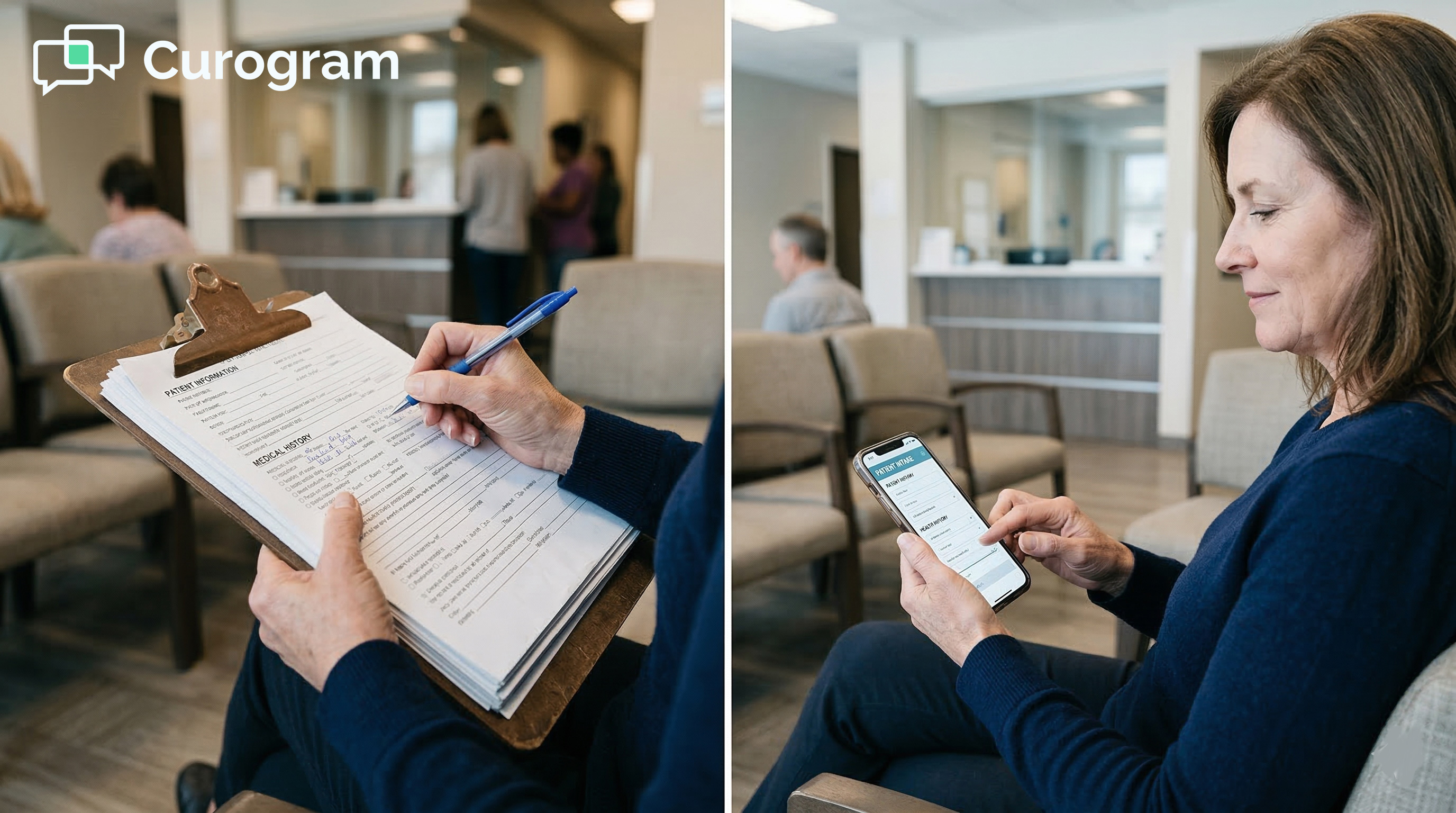
But when they arrive at your Practice Fusion clinic, you hand them a clipboard with 19 pages.

It feels like a small thing. It is not. That clipboard costs your practice more time, money, and goodwill than most owners realize.

For small practices running Practice Fusion, the gap between what's possible and what's actually in place is wider than it should be.

Practice Fusion has a built-in Online Check-In tool. But most small clinics never use it fully. The setup is complex.

Patient adoption is low. The form data often ends up as a flat PDF that staff still have to re-type. So the paper stays.

This is the core problem: the same information gets recorded twice. The patient writes it. Staff types it. Every single visit.

Curogram's Text-to-Chart Pipeline is built to break that cycle. It sends patients a text link before their visit. They complete their intake on their phone.

That data writes directly into Practice Fusion chart notes, structured and ready. No re-entry needed.

This pillar covers everything small Practice Fusion clinics need to know: why paper intake persists, what the pipeline does, what it costs to stay on paper, how a real practice made the switch, and how to measure results.

The Villain: The Double Entry

Most clinics do not consider paper intake a major problem. It feels routine.

But when you add up the time spent on manual chart entry across every patient, every day, the numbers tell a different story. For many small practices, this is one of the highest hidden costs in the building.

What the Workflow Actually Looks Like

The current intake process at most Practice Fusion clinics follows the same loop. The patient gets a clipboard. They write down their information.

Staff collects the form. Then the staff retypes everything, one field at a time, into Practice Fusion.

That second step, the retyping, is where time disappears. A new patient intake packet can take 10 to 15 minutes to enter. A returning patient with updated insurance or a new medication takes 3 to 5 minutes.

Multiply that by 20 to 30 patients a day, and the front desk is spending 3 to 7 hours on transcription alone.

That time is not just lost. It pulls staff away from everything else they need to do. And that is where the real cost shows up.

The Cascade of Delays

Data entry does not happen in a vacuum. While one staff member types a patient's insurance ID from a handwritten form, the phone rings.

While they decode a medication name in shaky cursive, a patient stands at the window waiting. Every minute spent on transcription is a minute not spent on the work that actually needs a human.

This creates a ripple effect. One delayed task pushes the next one back. Chart prep falls behind. Patients wait longer. Staff feel rushed. The day ends with unfinished work and a stack of forms still to process.

Why the Patient Fusion Portal Does Not Fix This

Some clinics have tried using the built-in Patient Fusion portal for digital intake. But in many small practices, it never gets fully set up.

Even when it does, patient adoption is low. Staff often end up printing forms anyway for patients who never completed the portal intake.

The result is a partial solution that still requires manual follow-up. The double-entry problem does not go away. It just gets harder to track.

The Feature: The Zero-Entry Check-In

Curogram's Zero-Entry Check-In is built around one core idea: the patient fills out the form once, and the data goes directly into Practice Fusion.

No paper. No retyping. No gaps between what the patient wrote and what the chart says.

From Text Link to Structured Chart Data

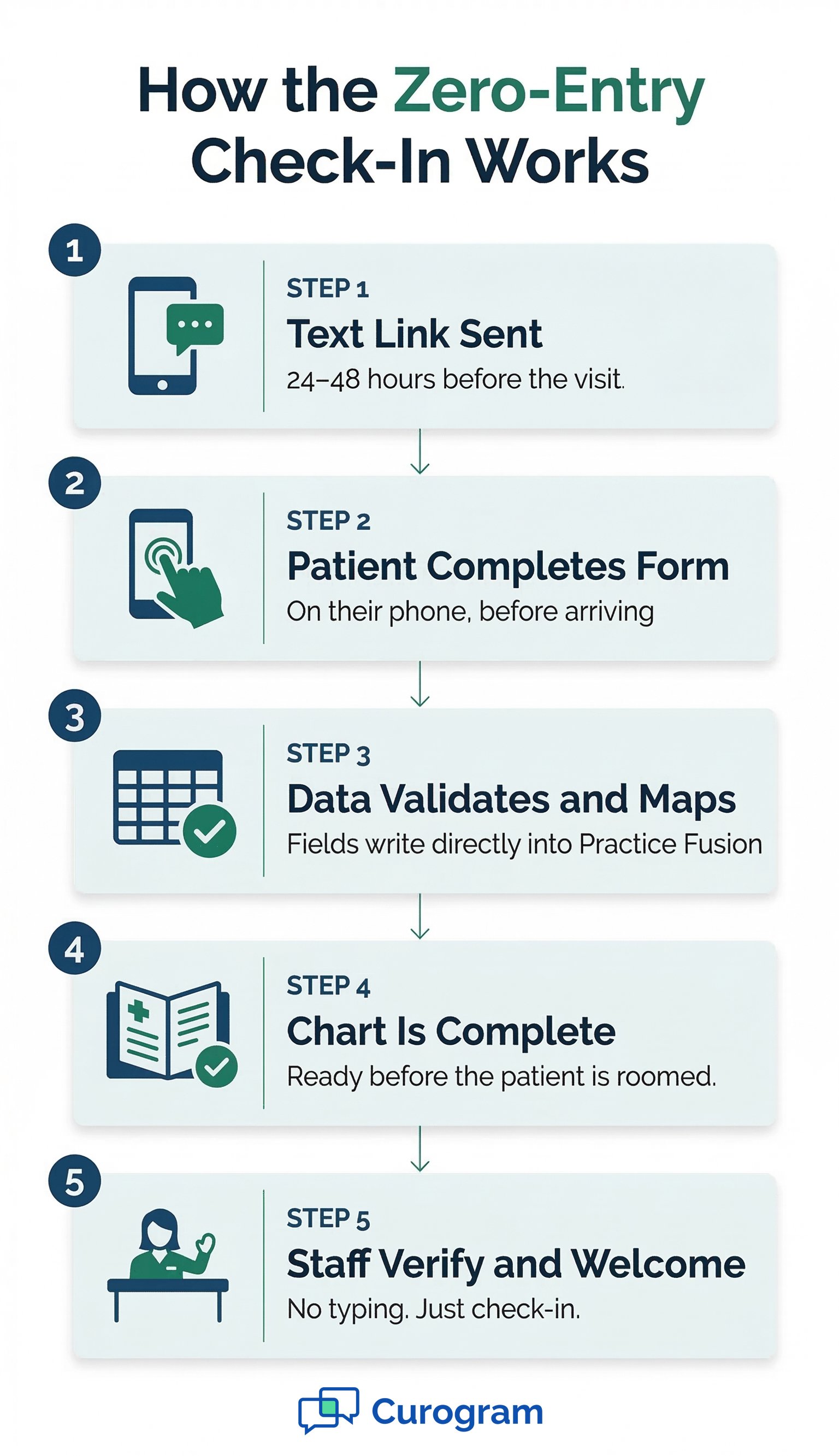
The process starts before the visit. Curogram sends a text message to the patient 24 to 48 hours before their appointment.

The message includes a secure link. The patient taps it, completes the form on their phone, and submits.

That data does not land in a PDF or an attachment. It writes directly to the correct fields in Practice Fusion. Demographics go where demographics belong.

Medications go to the medication list. Insurance details update the right section. When the patient walks in, the chart is already filled out and ready.

The front desk does not retype a single field. That is what zero entry means.

Built-In Validation That Keeps Data Clean

Paper forms accept anything. Incomplete fields. Wrong date formats. Medication names no one can read. That leads to claim issues and chart errors that take even more time to fix later.

Curogram's digital forms use field validation. Required fields cannot be skipped. Phone numbers must follow the right format. Dates auto-format. Medication names auto-suggest from a database. The data that enters Practice Fusion is clean, complete, and correctly structured from the start.

Smarter Updates for Returning Patients

Returning patients do not need to fill out a full intake packet every time. Curogram sends a shorter update form:

  • Has your insurance changed?
  • Do you have any new medications?
  • Any new allergies?

The patient only updates what has changed. Those updates write back to the right fields in Practice Fusion.

This makes check-in faster for both the patient and the front desk. No new stack of papers. No full re-entry. Just the delta, updated automatically.

Setup That Does Not Require IT

A lot of clinics have put off going digital because the setup feels complicated. Curogram was built to change that.

The form builder uses a drag-and-drop interface that any practice manager or front desk lead can figure out in an afternoon.

No coding. No vendor tickets. No training manual. If the clinic needs to add a consent form or a new screening question, they build it in the form builder, and it goes live right away. That kind of control matters for small practices that cannot afford to wait on IT support.

Infographic detailing the 5 steps of the Zero-Entry digital medical check-in process

The Narrative: How Carmen Stopped Being a Data Entry Clerk

Numbers and feature lists can only show so much. The clearest way to understand the Zero-Entry Check-In is to see it working in a real clinic.

This is the story of one front desk team member who went from spending hours on manual chart entry to running a smoother operation with a clear desk and complete charts.

Meet Carmen: One Person, One Clinic, Every Task

Carmen was the only front desk employee at a solo-provider internal medicine practice in suburban Orlando. The clinic ran on Practice Fusion.

Every day, Carmen handled check-in, scheduling, phone calls, insurance verification, and chart prep. All of it. By herself.

With 22 to 25 patients per day, Carmen estimated she was spending 3 to 4 hours just on data entry. She would collect intake packets, set them by her keyboard, and chip away at them between everything else. Type one form. Answer the phone. Type another. Check in a patient. Type another.

Some days, she fell behind. The doctor would open a chart that was not complete yet. The practice had never fully set up the Practice Fusion Online Check-In feature.

The few patients who had portal access rarely used it for forms. Carmen was essentially a data entry clerk who also happened to run the front desk.

Setting Up Curogram in One Afternoon

Carmen activated Curogram and built the clinic's intake forms using the drag-and-drop builder in a single afternoon. Forms were set to go out via text 24 hours before each appointment.

She did not need IT help. She did not need a training manual. She followed the guided setup and had forms live before the end of that same day.

That speed matters in a small practice where there is no dedicated tech team to handle implementation.

What Changed Within Three Weeks

Within three weeks, over 60% of patients were completing their intake before arriving at the clinic. Based on our internal data, this level of pre-visit completion is typical for practices during the first month of use.

Carmen's data entry workload dropped by more than half. The stack of paper forms by her keyboard was gone.

Charts were complete when the doctor opened them. No more "pending intake" notes.

Carmen redirected that reclaimed time to insurance verification, billing follow-ups, and actually welcoming patients when they walked in.

The operational shift was clear: she had stopped being a typist and started doing the work an office manager is actually hired to do.

Why This Matters for Practice Decision-Makers

Switching from paper intake to digital forms is not just about saving time. It is a business decision with measurable returns.

For practice managers and clinic owners, the case comes down to three things: labor cost, provider experience, and data quality.

The Real Cost of Manual Transcription

Staff time has a dollar value. When you calculate the hours spent on manual data entry at a typical front desk rate, the numbers add up fast.

Scenario

Daily Data Entry Hours

Monthly Labor Cost (at $20/hr)

Solo front desk, 20–25 patients/day

3–4 hours

$1,200–$1,600/month

Two staff, 30+ patients/day

5–7 hours

$2,000–$2,800/month

After Zero-Entry Check-In (60%+ digital)

Under 1.5 hours

Under $600/month


That is not spending money on something optional. That is paying staff to move information from paper to screen, a task that digital forms can eliminate. The return on investment is direct and measurable.

Provider Satisfaction and Clinic Flow

When providers open complete charts, the visit runs better. They do not have to ask, "Do you have any allergies?" while the intake form sits half-entered at the front desk.

They spend the appointment on the patient, not on gathering basic information that should already be there.

Smoother visits mean better patient experience. They also reduce the chance of clinical errors that come from working with incomplete data.

For small clinics, that kind of consistency builds the reputation that keeps patients coming back.

Why Write-Back to Chart Fields Is the Real Differentiator

Many Practice Fusion clinics have been told before that a tool "integrates" with their system. What they get is a PDF attached to the chart.

The provider still has to open it separately. Nothing writes to the actual fields.

Curogram's write-back sends data into the right structured fields in Practice Fusion. The provider sees it in the chart, not in a sidebar attachment. That is the difference between a tool that reduces work and one that just moves it somewhere else.


Operational Metrics: Measuring the Zero-Entry Effect

After activating the Zero-Entry Check-In, it is important to track progress.

These four metrics give a clear before-and-after picture of how digital forms are changing daily operations. Each one ties to a real outcome for staff, providers, and patients.

Key Metrics to Track After Going Digital

Start measuring as soon as forms go live. The goal is not just to confirm that something improved – it is to know exactly how much it improved and where to focus next.

Metric

Before Digital Forms

Target After Setup

What It Means

Daily data entry hours

3–5 hours/day

Under 1.5 hours/day

Time freed for higher-value work

Pre-visit completion rate

0%

60–75% within 30 days

Fewer forms to process on arrival

Check-in time per patient

15–20 min (new patients)

Under 5 minutes

Less waiting room congestion

Chart completeness at visit start

Often incomplete

Ready before rooming

Provider sees full data at visit


Daily Data Entry Hours

This is the most direct measure. Track how many hours your front desk spends on manual transcription before going digital. Then track it again 30 days after forms go live. A 50% or greater reduction is a realistic target.

For a practice spending 3 to 5 hours a day on data entry, that means getting 1.5 to 2.5 hours back every single day.

Over a month, that is a meaningful block of time redirected to work that actually moves the practice forward.

Pre-Visit Completion Rate

This metric tells you how many patients are completing intake before they arrive. Based on our internal data, practices typically reach 60 to 75% pre-visit completion within the first month of use.

Every pre-completed form is one less data entry task on arrival day. As your completion rate climbs, your check-in process becomes faster and less reactive. The front desk stops racing to catch up and starts managing the day with more control.

Check-In Time and Chart Completeness

Two more metrics round out the full picture. Check-in time per patient and chart completeness at visit start both affect how the entire clinic day flows.

For new patients, check-in time drops from 15 to 20 minutes to under 5 minutes when intake is pre-completed. That cuts waiting room congestion and reduces the perception that the clinic is running behind.

Chart completeness at visit start shows the provider impact. Before digital forms, charts often had "pending intake" notes when the provider opened them.

After digital forms, the charts are populated and ready, and the patient is roomed. That one shift alone changes how the provider experience feels throughout the day.


A patient completes a digital check-in form on their smartphone in a modern waiting roomFree Your Front Desk from Data Entry

Every clinic that still runs on paper intake is paying a hidden tax. That tax shows up as staff hours spent retyping forms, incomplete charts at visit start, and front desk teams that never fully catch up.

The fix is not complicated. Curogram's Zero-Entry Check-In connects to Practice Fusion and replaces the paper workflow with text-linked digital forms.

Patients complete intake before they arrive. Data goes straight into chart fields. The front desk stops being a data entry station.

Your staff was hired to run the practice, coordinate care, and support patients. Not to retype forms. When that time comes back, the whole clinic runs differently.

Schedule a demo to see how the Zero-Entry Check-In works in Practice Fusion

Frequently Asked Questions

How does Curogram send intake forms to patients before their visit?

Curogram sends a text message with a secure link to the patient 24 to 48 hours before their appointment. The patient taps the link and completes the form on their phone. No app download is needed. The timing fits into the existing appointment reminder sequence, so forms go out automatically without extra staff steps.

How does patient data get into Practice Fusion without staff typing it?

When a patient submits their form, Curogram maps each response to the matching field in Practice Fusion. Demographic details, medications, allergies, insurance, and history are all written to the correct structured fields. Staff do not have to copy anything. The chart updates before the patient arrives.

Why does it matter that data writes to chart fields instead of appearing as an attachment?

When data lands in a PDF attachment, the provider still has to open a separate document to find the information. It does not appear in the chart the way normal clinical data does.

When data is written directly to fields, the provider sees it in the right place without extra steps. That is what makes the chart actually useful at the start of a visit.

How long does it take to set up Curogram's intake forms for a small Practice Fusion clinic?

Most practice managers can build and launch intake forms in a single afternoon using the drag-and-drop form builder. No coding is required, and no IT support is needed. If the clinic wants to add a new question or consent form later, they can do it in minutes, and the change goes live immediately.

Why do small Practice Fusion clinics end up spending so much time on manual data entry?

Small clinics often have one or two people handling every front desk task at once. When intake is paper-based, every patient visit includes a transcription step that cannot be delegated or skipped.

That step takes 3 to 15 minutes per patient, depending on whether it is a new or returning visit. With 20 to 30 patients a day, those minutes add up to hours that never appear on a time audit but are always felt.


How the Text-to-Chart Pipeline Ends the Paper Clipboard

How the Text-to-Chart Pipeline Ends the Paper Clipboard

💡 Practice Fusion digital intake forms, powered by Curogram's Text-to-Chart Pipeline, replace paper clipboards with text-linked mobile forms...

Read More
Secure Online Forms for eClinicalWorks | Structured Data Intake

Secure Online Forms for eClinicalWorks | Structured Data Intake

💡 eClinicalWorks secure online forms with structured data intake for enterprise networks replace clipboard-based check-in with text-delivered...

Read More
eCW Front-Desk Intake Automation | Eliminate Transcription

eCW Front-Desk Intake Automation | Eliminate Transcription

💡 Most eClinicalWorks front-desk teams spend 8–12 minutes per patient typing clipboard data into eCW fields. That's not a staffing problem. It's a...

Read More