Skip to the main content.

13 min read

Curogram Communication Features: Complete Platform Overview (2026)

Curogram Communication Features: Complete Platform Overview (2026)
 💡 Curogram is a HIPAA-compliant patient texting platform built for medical practices. It offers two-way text messaging, automated appointment reminders, team collaboration tools, and EMR integration with 20+ systems. The platform helps practices reduce phone calls by up to 50% and lower no-show rates by up to 75%.

Key features include secure group messaging, message templates, custom workflows, patient recall campaigns, and analytics dashboards. Curogram also supports internal office messaging and office-to-office communication, making it a one-stop shop for medical practice communication software.

The platform works on mobile and desktop, with staff training that takes as little as 10 minutes. Pricing starts at $200 per month with no per-message fees. Curogram is designed to automate front desk tasks, boost revenue, and improve the patient experience.

Your front desk phone rings nonstop. Patients sit on hold. Staff scrambles to confirm tomorrow's appointments by hand. Sound familiar?

Most medical practices still rely on phone calls for nearly all patient contact. This old approach wastes time, burns out staff, and frustrates patients. The result? Missed appointments, lost revenue, and a team that can't keep up.

Based on our internal data, practices that don't use automated reminders see no-show rates as high as 14% or more. Each empty slot is money left on the table. And every minute your staff spends on the phone is a minute they can't spend on the patients in front of them.

That's why more practices are turning to Curogram communication platform features to fix the way they connect with patients and teams. Instead of juggling phone calls, paper forms, and clunky patient portals, you get one simple tool that handles it all through text.

This Curogram platform guide walks you through every feature the platform offers. You'll learn how the core messaging tools work, how appointment reminders cut no-shows, and how team collaboration keeps your office in sync. We'll also cover EMR integration, automation workflows, analytics, compliance, mobile apps, and pricing.

Whether you run a solo practice or a multi-location clinic, this guide will show you exactly what Curogram can do for your team. By the end, you'll have a clear picture of how each feature fits into your daily workflow and why this patient texting platform is built to solve the problems medical offices face every day.

Let's start with a quick look at what the platform is and how it works.

Curogram Platform Overview

Curogram is an all-in-one medical practice communication software designed to replace the chaos of phone tag with simple, secure text-based communication. It was built by engineers who spent time watching front office and call center teams work firsthand. That hands-on insight shaped a platform that's easy to learn and fast to set up.

At its core, Curogram is a HIPAA-compliant patient texting platform that connects your practice to patients through two-way SMS. But it goes far beyond basic texting.

The platform includes automated reminders, electronic forms, team messaging, patient surveys, text-to-pay, and more. Think of it as a one-stop shop for every way your office talks to patients, staff, and other offices.

One of the biggest strengths of Curogram capabilities is its EMR integration. The platform syncs with over 20 EMR and practice management systems, so your team doesn't need to enter data twice. It works as a seamless add-on to the tools you already use, not a replacement.

Staff training takes as little as 10 minutes. The interface feels like the texting apps your team already knows. That means less pushback from staff who don't like change, and faster adoption across your office.

Here's a quick look at what the platform covers:

Feature Category

What It Does

Two-Way Texting

Send and receive texts with patients in real time

Appointment Reminders

Automated, multi-touch reminders with confirmations

Team Messaging

Secure internal chats between staff and offices

EMR Integration

Real-time sync with 20+ EMR systems

Automation

Rule-based workflows and triggered messages

Analytics

Delivery rates, response rates, and no-show tracking

Compliance

HIPAA-compliant with encryption and audit logs

Mobile + Desktop

iOS, Android, and web-based dashboard


Every feature is built with HIPAA messaging features in mind, so patient data stays protected at every step.

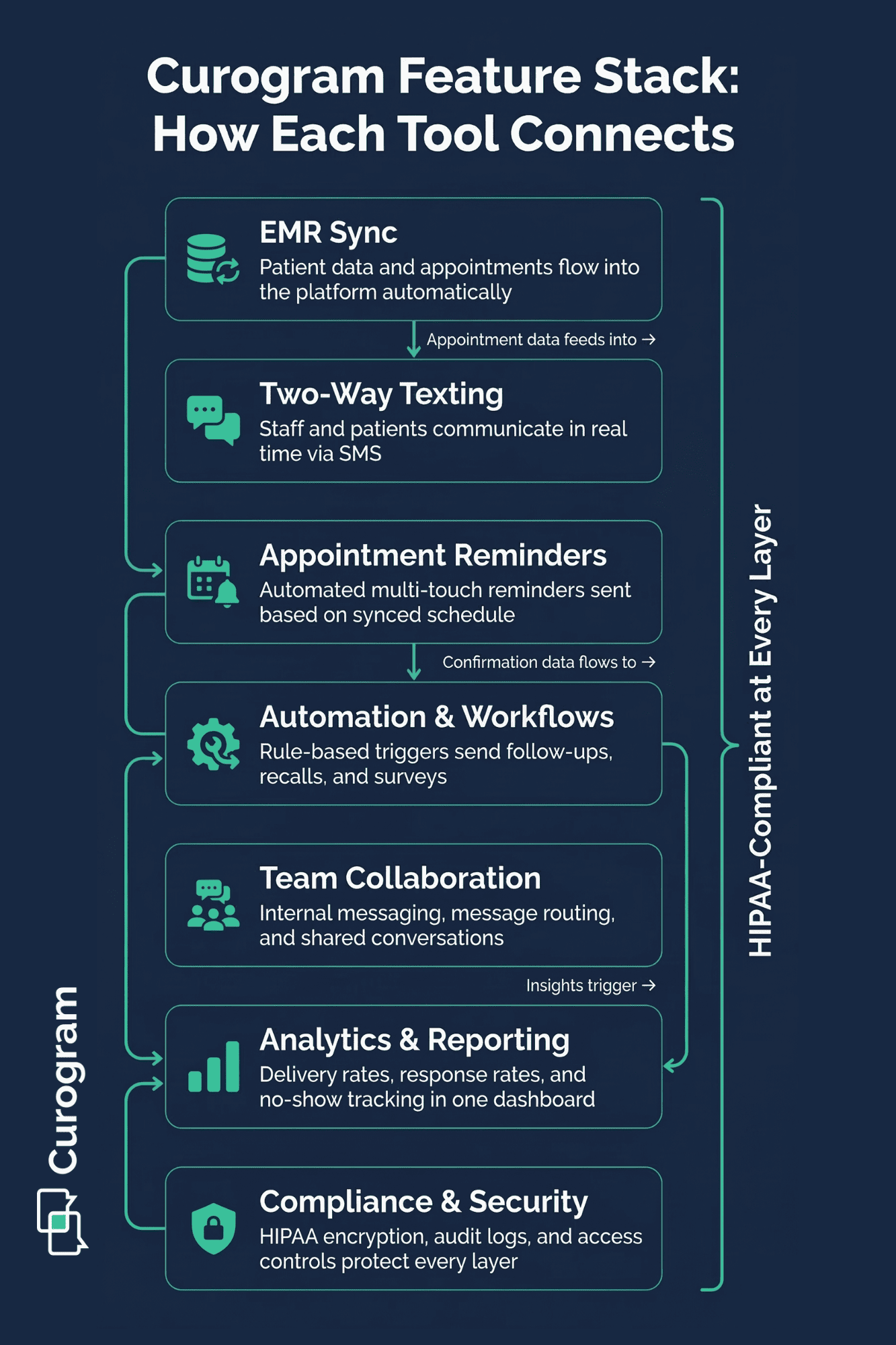
Visual guide to Curogram capabilities showing seven connected features that power medical practice communication from scheduling to compliance

Core Messaging Features

Messaging is the heart of what Curogram does. The platform turns your office phone number into a powerful two-way text channel that patients can use just like they text a friend. No app download required on the patient's side.

Two-Way Text Messaging

This lets your front desk send and receive messages with patients in real time. A patient can text in to ask about office hours, and your team can reply in seconds.

Compare that to a three-minute phone call that ties up a staff member and a phone line. Multiply that by dozens of calls per day, and you start to see why texting is so much more efficient.

Based on our internal research, practices using Curogram reduce phone call volume by up to 50%. That frees up staff to focus on patients who are right in front of them.

The platform also supports group messaging, which is useful when you need to send a message to a segment of patients at once. For example, you could text all patients scheduled for flu shots next week with prep instructions.

Message Templates

Templates save even more time. Your team can create pre-written replies for common questions like directions, insurance info, or pre-visit prep. A few clicks and the message is sent. No retyping the same answer over and over.

For more complex conversations, Curogram supports multimedia messages. Staff can send images, PDFs, and documents through the secure chat. Think: sending a patient their post-visit care sheet or a photo of a form they need to fill out.

Automated Responses

Curogram handles after-hours messages or common questions without any staff involvement. A patient texts at 9 PM asking about your hours? An auto-reply answers right away and lets them know when to expect a live response.

All conversations are encrypted and stored in compliance with HIPAA rules, so you never have to worry about patient data being exposed.

Appointment Reminder Automation

Missed appointments are one of the most costly problems for medical offices. Based on our internal data, one practice saw no-show rates as high as 14.20% before using Curogram.

After turning on automated reminders, that number dropped to 4.91% in just three months. That's three times better than the industry average.

Automated Reminder Scheduling

This is the backbone of this feature. Once your EMR syncs with Curogram, the system pulls upcoming appointments and sends reminders on your chosen schedule. You set the rules once, and the platform does the rest.

Multi-Touch Reminder Sequences

Curogram lets you send more than one reminder per appointment. For example, you might send a text three days before, then another one the morning of the visit. Practices that use two or more touchpoints see better confirmation rates than those that send just one.

Two-Way Confirmation

What makes Curogram stand out is two-way appointment confirmation. Patients don't just receive a reminder. They can reply "Yes" or "No" to confirm or cancel. Based on our internal data, one arthritis clinic confirmed over 1,100 appointments per month using this feature alone.

If a patient cancels, the system can trigger an automatic workflow to offer rescheduling options. That open slot can then be filled quickly, which means less lost revenue for your practice.

Multilingual

Curogram also supports multilingual reminders, which is critical if your practice serves a diverse patient base. You can send reminders in the language each patient prefers, which improves response rates and reduces confusion.

When combined with patient recall campaigns, the reminder system becomes even more powerful. Based on our internal research, 35% of patients who received an SMS recall message scheduled a follow-up appointment within one month, bringing in over 1,240 patient visits from recall texts alone.

Team Collaboration Features

Patient communication gets all the attention, but internal communication matters just as much. A front desk staffer who can't quickly reach a nurse or office manager creates bottlenecks that slow down the whole office. Curogram solves this with built-in team collaboration tools.

Internal Team Messaging

This gives your staff a secure, HIPAA-compliant chat channel inside the same platform they use for patient texting. No more using personal cell phones or sticky notes to relay messages. Everything stays in one place, encrypted, and easy to search later.

Shared Patient Conversations

The feature lets multiple team members view and contribute to a patient's text thread. For example, if a front desk staffer starts a conversation about scheduling and the clinical team needs to jump in with prep instructions, they can see the full history and respond without asking the patient to repeat themselves.

Message Assignment and Routing

It keeps things organized when your practice has a high volume of incoming texts. You can route messages to the right team member or department based on the type of question. A billing question goes to the billing team. A prescription refill request goes to clinical staff.

Team Member Permissions

Curogram ensures that staff only see what they need to see. A front desk employee might have access to scheduling conversations but not clinical notes. An office manager might have full access across the board. You control who sees what.

Office-to-Office Messaging

This is a feature that multi-location practices will love. If you run clinics in more than one location, your teams can communicate securely between offices without resorting to fax machines or unsecured emails. Referrals, patient transfers, and schedule coordination become much simpler.

All of these features work together to keep your team aligned, reduce mistakes, and speed up response times for patients.

EMR Integration Capabilities

One of the biggest Curogram capabilities that sets it apart from other tools is its deep EMR integration. The platform connects with over 20 EMR and practice management systems, making it one of the most flexible options on the market.

Real-Time Appointment Sync

This is the foundation of this integration. When a new appointment is booked in your EMR, Curogram picks it up automatically. That means reminders, confirmations, and follow-up messages happen without anyone on your team lifting a finger.

Patient Demographic Sync

Curogram pulls key patient data from your EMR into Curogram. Names, phone numbers, preferred languages, and appointment types are all available inside the platform. This eliminates the need for double data entry, which based on our internal research, is one of the top frustrations for front desk staff.

The integration supports data flow from the EMR to Curogram, ensuring that the texting platform always has the most current patient information. When a patient updates their phone number in the EMR, it reflects in Curogram without manual edits.

Here's how the integration works in practice:

Step

What Happens

1. New appointment booked in EMR

Curogram syncs the data automatically

2. Reminder rules trigger

Platform sends reminders per your schedule

3. Patient confirms or cancels via text

Status updates inside Curogram dashboard

4. Staff reviews responses

Team takes action on cancellations or reschedules


Because Curogram works as an add-on to your existing system, your team doesn't need to learn a brand new EMR. They keep using what they know, and Curogram layers on top to handle communication.

This approach also means switching EMRs down the road won't force you to abandon your texting platform. Curogram's flexible integration model adapts to your practice, not the other way around.

Advanced Automation and Workflows

Manual follow-ups eat hours of staff time every week. Curogram's automation engine lets you set up rules that handle routine messages without any human input. Once you build a workflow, it runs on its own.

Rule-Based Message Automation

This is the starting point. You define triggers and actions. For example:

"When a patient is booked for a new patient visit, send the intake form link 48 hours before the appointment."

The system handles the rest.

The custom workflow builder lets you create multi-step sequences tailored to your practice. Here's what a sample workflow might look like for a dermatology office:

  1. Day before visit: Send reminder with pre-visit instructions
  2. Day of visit: Send check-in link 30 minutes before appointment
  3. Day after visit: Send follow-up care instructions
  4. One week later: Send satisfaction survey and Google review request

Appointment Type-Specific Messaging

This means you can send different content based on the kind of visit. A wellness check gets different prep instructions than a procedure. A new patient gets a welcome message that an existing patient doesn't need.

Patient Segment Targeting

You can group patients by factors like appointment type, last visit date, or provider. Then you can send targeted messages to each group. This is especially useful for recall campaigns, where you want to reach patients who haven't been seen in six months or more.

Triggered Communications

Communication fires based on specific events. A missed appointment can trigger a rebooking message. A completed visit can trigger a review request. A new patient registration can trigger a welcome text with office info and directions.

These workflows replace tasks that would normally require a staff member to remember, track, and execute manually. They reduce errors, save time, and make sure no patient falls through the cracks.

Analytics and Reporting

You can't improve what you don't measure. Curogram gives your practice clear data on how your communication is performing, so you can spot problems and fix them fast.

  • Delivery and Read Rates show you whether your messages are reaching patients. If a batch of reminders has a low delivery rate, it might mean phone numbers are outdated. That's a signal to clean up your patient records.

  • Response Rates and Engagement tell you how many patients are replying to your texts. A healthy response rate means patients are engaged. A low rate might mean your message timing or content needs tweaking. For example, if your 7 AM reminders get fewer replies than your 10 AM ones, you know when to send them.

  • No-Show Rate Tracking ties directly to revenue. Based on our internal data, Curogram users see no-show rates that are 53% lower than the industry average across specialties like primary care, pediatrics, psychiatry, and radiology.

  • Staff Productivity Metrics help managers see how the team is performing. You can track things like average response time, messages sent per team member, and how quickly patient inquiries are resolved.

  • Custom Reports let you pull the data that matters most to your practice. Want to see how many appointments were confirmed by text last month? Done. Need to track recall campaign results over a quarter? You can build that report.

The dashboard overview puts all of this in one place. At a glance, you can see your practice's communication health: messages sent, patients reached, appointments confirmed, and no-shows avoided. It's a quick way to check the pulse of your front office operations without digging through spreadsheets.

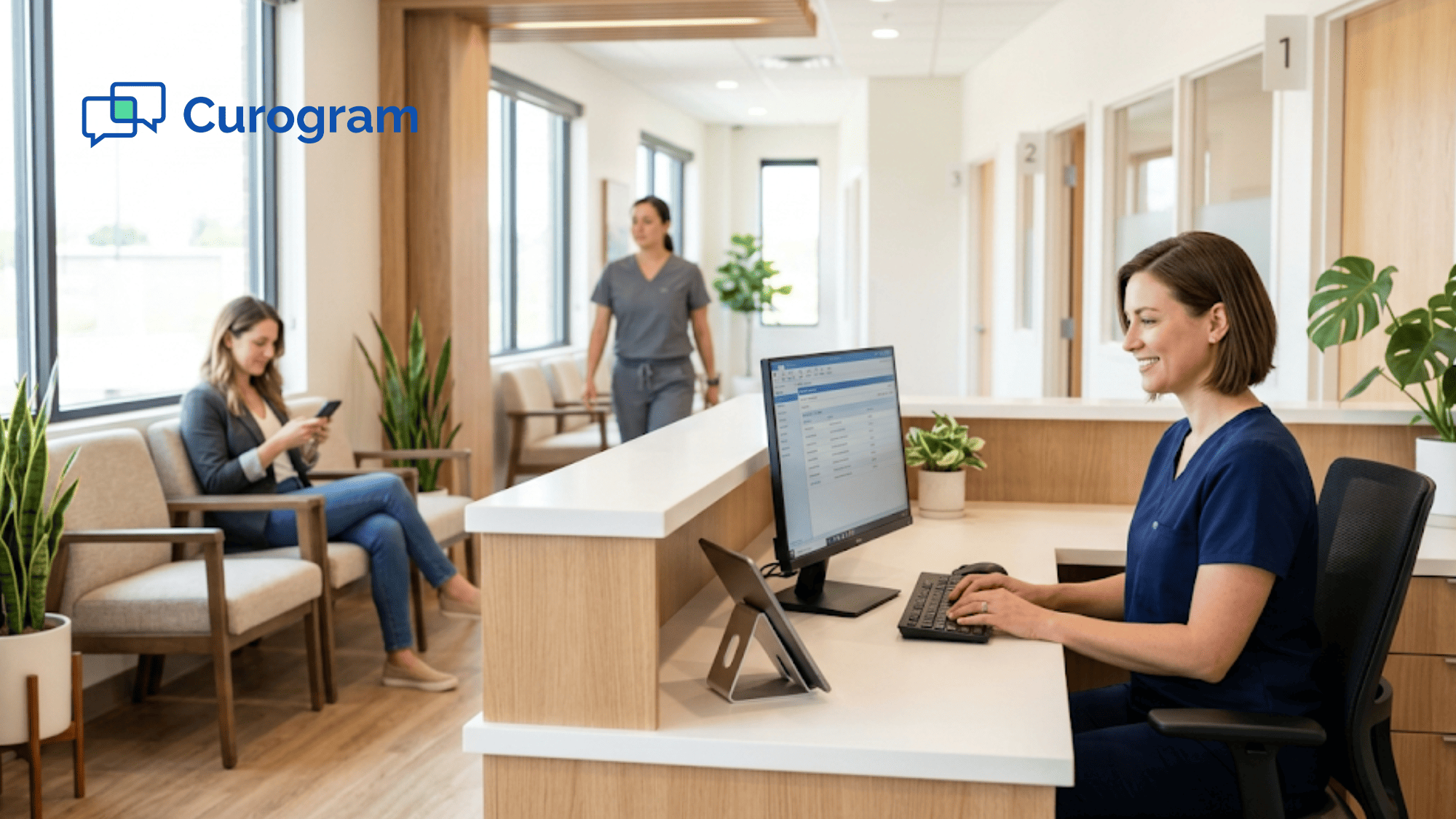
Medical office team including nurse, front desk staff, and office manager working together at a clinic workstation

Compliance and Security Features

Handling patient information through text might sound risky. But Curogram was built from the ground up with HIPAA messaging features that keep data safe and your practice compliant.

  • HIPAA Compliance is baked into every part of the platform. Curogram meets all the requirements set by HIPAA for electronic communication of protected health information. This isn't a bolt-on feature — it's core to how the software works.

  • Encryption and Data Security protect messages in transit and at rest. When a patient sends a text, it's encrypted before it leaves their phone and stays encrypted until it reaches your team. The same applies in reverse. No one in between can read the content.

  • Audit Logs and Documentation give your practice a full record of every message sent and received. If you ever need to prove that a patient was notified about an appointment or given specific instructions, the log is there.

  • Business Associate Agreement (BAA) is included as part of Curogram's service. This is a required legal document under HIPAA that defines each party's responsibilities for protecting patient data. Curogram signs it so your practice is covered.

  • Patient Consent Management helps you track which patients have opted in to receive text messages. The platform stores consent records so your team always knows who has agreed to be contacted by text.

  • Access Controls let you decide who on your team can see what. Admins can set permissions by role, so a front desk staffer sees different data than a billing manager or a clinical lead. This limits exposure of sensitive info to only those who need it.

Together, these features mean you can use text-based communication with confidence, knowing that patient privacy is protected at every level.

Mobile and Desktop Applications

Your team doesn't work from one place all day. A doctor might check messages between patients. A nurse might need to reply while walking between rooms. Curogram works wherever your team is, on any device.

  • The platform offers native apps for iOS and Android. Staff can send and receive messages right from their phones. The mobile app has the same features as the desktop version — texting, team chat, appointment views, and more. Nothing is missing.

  • The web-based dashboard opens in any browser with no software to install. This makes it easy to get started on day one and simple to add new users as your practice grows.

  • All messages and data are synced across devices in real time. If a staffer starts a conversation on the desktop dashboard and then picks up their phone, the full chat history is right there. No gaps, no missed messages.

  • The user experience is designed to feel like the messaging apps. Your team already uses similar mechanisms every day. That's a big reason why staff training takes as little as 10 minutes. There's no steep learning curve or confusing interface to figure out. You open it, and it just works.

This simplicity is a key part of what makes Curogram an effective medical practice communication software. Tools that are hard to use don't get used. Curogram removes that barrier so your team actually adopts the platform and sticks with it.

Whether your staff works from the front desk, a home office, or between exam rooms, Curogram keeps everyone connected and responsive.


Pricing and Plans

Cost is always a factor when picking new software for your practice. Curogram is built to be one of the most affordable options in its class, with pricing that scales as your practice grows.

Plans start at around $200 to $400 per month, depending on the size of your practice and the features you need. Compared to the cost of hiring extra staff to handle phone calls, that's a strong return on investment. If your practice saves just a few appointments per month from reduced no-shows, the platform more than pays for itself.

One of the best parts of Curogram's pricing model is that there are no per-message fees. Some platforms charge for every text you send, which makes costs unpredictable and hard to manage. With Curogram, you know what you're paying each month, no matter how many messages your team sends.

Feature tiers let you choose the right level for your needs. A solo practitioner might start with core texting and reminders, while a large multi-specialty group might need the full suite of automation, analytics, and team tools. The platform grows with you, so you're never locked into a plan that's too big or too small.

Implementation and support are included with every plan. Curogram's team helps you set up the EMR integration, configure your workflows, and train your staff. And because the platform is so simple to use, most offices are up and running within a day.

Think of it this way: if your average appointment generates $150 in revenue and you recover even five no-shows per month, that's $750 in saved revenue. Over a year, that adds up to $9,000, far more than the annual cost of the platform.

For practices looking for a full Curogram platform guide with pricing details tailored to their setup, requesting a demo is the best next step.

Conclusion

Running a medical practice today means doing more with less. Your front desk handles dozens of calls, your staff juggles scheduling and follow-ups, and patients expect fast, easy communication. The old way of doing things — phone calls, voicemails, and paper forms — just can't keep up anymore.

That's where Curogram steps in. This complete Curogram platform guide has walked you through every major feature: two-way texting, appointment reminders, team collaboration, EMR integration, automation workflows, analytics, compliance, mobile access, and pricing.

Each feature is designed to solve a real problem that medical practices deal with every single day.

The results speak for themselves. Based on our internal data, practices using Curogram see no-show rates drop by up to 75%, phone call volume cut by half, and staff productivity jump by more than 30%.

One practice went from a 14.20% no-show rate to just 4.91% in three months. Another brought back over 1,240 patients through text-based recall campaigns alone.

What ties all of these Curogram capabilities together is simplicity. The platform is built to feel like the texting apps your team already knows. Training takes minutes, not days. And with HIPAA compliance built into every layer, your patient data stays safe.

If your practice is still relying on phone calls and manual follow-ups, you're leaving money and time on the table. Curogram gives you a better way to connect with patients, keep your team in sync, and grow your revenue without adding headcount.

Automate the busywork so your team can focus on patients. Schedule a demo now to see how much time and revenue your office could recover with Curogram.


Frequently Asked Questions

How does Curogram reduce no-show rates for medical practices?
Curogram sends automated, multi-touch text reminders before each visit and lets patients confirm or cancel by replying. Based on our internal data, this approach has lowered no-show rates by up to 75%.
How long does it take to set up Curogram with an existing EMR system?
Most practices are up and running within one day. Curogram syncs with over 20 EMR systems and the support team handles setup, so your staff can focus on patients during the transition.
Why is two-way texting more effective than phone calls for patient outreach?

Patients can read and reply to texts on their own time. Based on our internal data, practices using Curogram cut phone call volume by up to 50%, which frees staff to handle in-office tasks.

How does Curogram keep patient text messages HIPAA compliant?

Every message is encrypted in transit and at rest. The platform includes audit logs, access controls, patient consent tracking, and a signed Business Associate Agreement to meet all HIPAA rules.

How can Curogram's recall feature help bring back inactive patients?

The platform sends targeted text messages to patients overdue for follow-ups. Based on our internal data, 35% of patients who received a recall message scheduled an appointment within one month.


Curogram vs Top Competitors: In-Depth Feature Comparison (2026)

Curogram vs Top Competitors: In-Depth Feature Comparison (2026)

💡 Curogram, Luma Health, Klara, and Artera are four leading patient communication platforms for medical practices. Curogram works for practices of...

Read More
Complete ROI Analysis: What Practices Save with Curogram (2026)

Complete ROI Analysis: What Practices Save with Curogram (2026)

💡 Healthcare practices using patient texting platforms like Curogram see clear financial gains within months. Based on our internal data, practices...

Read More
Enterprise Secure Medical Texting: Compliance and Integration

Enterprise Secure Medical Texting: Compliance and Integration

💡Secure, HIPAA-compliant texting is the future of healthcare communication. Transform your workflows with enterprise secure medical texting today.

Read More