

Professional Text Communication in Healthcare: A Complete Guide
💡 Professional text communication in healthcare refers to the use of secure, HIPAA-compliant patient texting to manage appointments, share...
14 min read
Jo Galvez
:
February 28, 2026
Your front desk phone rings nonstop. Patients sit on hold. All of the staff scramble to keep up. Sound like a normal Tuesday?
Most medical offices still lean on phone calls for almost every patient touch point. That approach drains time and creates bottlenecks that ripple through the whole day.
Meanwhile, 98% of text messages get opened, and most are read within three minutes. That gap between phone-first habits and what patients actually prefer is where the real cost hides.
The fix does not have to be hard. A solid set of patient text message templates lets your team reach people fast, stay consistent, and spend less time on routine back-and-forth. Instead of typing a fresh message every single time, you grab a tested template, drop in the right details, and hit send. It is really that simple.
This guide gives you more than 50 ready-to-use messages sorted by the most common patient interactions. You will find appointment text templates for scheduling and reminders.
There are billing messages that encourage on-time payment. You will also see patient text examples for test results, prescriptions, and urgent care. Every template in this collection has been reviewed with HIPAA in mind so you can use it with confidence.
Think of these as starting points, not rigid scripts. The goal is to sound like your practice, not a robot. We will also cover how to tailor each message to match your office voice and the specific needs of your patient base.
Whether you run a small family clinic or a large multi-site group, these healthcare communication templates will help you cut phone volume, reduce no-shows, and give patients the fast, clear updates they expect. Let us get right into it.
Before you copy and paste a single message, take a moment to set yourself up for success. These medical practice SMS templates work best when you treat them as a framework rather than a final draft.
Not every message fits every case. A billing reminder needs a different tone than a follow-up after a tough diagnosis. Scan the category that fits your need, then pick the template closest to your real-life scenario. Swap out the placeholder text with your practice name, phone number, and any patient-specific details.
Before you send, run through a fast check. Confirm the patient's name is correct. Make sure the date, time, and location are right. Double-check that the message contains no protected health information in plain text.
If you need to share private data, always use a secure link. Following these steps turns a generic template into a message that feels personal and stays compliant.
Standard SMS is not encrypted, which means you must be careful about what you include. Never put a diagnosis, test result value, or treatment plan in a regular text.
Instead, direct patients to a secure portal or encrypted messaging channel for sensitive details. These clinical messaging templates are written with that rule in mind, but always double-check before sending.
Templates save the most time when they fit into a clear routine. Assign certain messages to specific team members or automate them through your practice software. For instance, you might set your system to send a scheduling confirmation as soon as a patient books online. Then a reminder goes out 48 hours before the visit.
A well-planned flow like this means fewer missed steps and less manual work. If you want a deeper look at how to send a reminder text that actually gets results, check out our complete guide on how to send a reminder text to patients.
The key is to start small. Pick one or two categories, load those templates into your system, and train your team. Once everyone is comfortable, expand to more use cases.

Scheduling is the first real interaction most patients have with your office through text. These appointment text templates help you confirm new bookings, offer open slots, and make it easy for patients to say yes.
Send these right after a patient books. A quick confirmation cuts down on no-shows and sets the right tone for the visit.
"Hi [Patient Name], your appointment at [Practice Name] is set for [Date] at [Time]. Reply C to confirm or call us at [Phone] if you need to change it."
"Hello [Patient Name], you are booked with [Provider Name] on [Date] at [Time]. Please arrive 15 minutes early to fill out forms. Questions? Text us back."
"[Practice Name]: Your visit is confirmed for [Date] at [Time] with [Provider]. Please bring your insurance card and photo ID. See you soon!"
When patients schedule through a website or portal, send a fast follow-up. It confirms the booking worked and tells them what to expect next.
"Hi [Patient Name], we got your online booking for [Date] at [Time]. You will get a reminder before your visit. Text us if anything changes."
"Thanks for booking online, [Patient Name]! Your appointment is [Date] at [Time] with [Provider]. Complete your intake forms here: [Link]"
"[Practice Name] here. We see your new appointment for [Date]. Please check in through our patient portal before you arrive: [Link]"
These are great for filling last-minute gaps. Reach out to patients on your waitlist and turn empty slots into revenue.
"Hi [Patient Name], a spot just opened on [Date] at [Time]. Would you like to take it? Reply YES or call [Phone]."
"Good news, [Patient Name]! We have an earlier opening on [Date]. Want to move your visit up? Reply YES to grab it."
"[Practice Name]: We have a cancellation on [Date] at [Time]. Interested? Reply YES and we will save it for you."
"Hi [Patient Name], you are on our waitlist. An appointment is now open on [Date] at [Time] with [Provider]. Reply YES to book."
Keep scheduling messages short and action-focused. Always include the date, time, and a clear way to respond. These patient messaging templates make the process easy for both your staff and your patients.
Missed visits cost the average practice thousands of dollars each year. A timely text reminder is one of the simplest ways to bring that number down. These templates give you ready-made messages for different time frames before the visit.
Two days out is the sweet spot for most patients. It gives enough time to reschedule if needed, but is close enough that people do not forget again.
"Hi [Patient Name], just a reminder that your appointment at [Practice Name] is in 2 days on [Date] at [Time]. Reply C to confirm or R to reschedule."
"Friendly reminder: You have a visit with [Provider] on [Date] at [Time]. Need to change it? Reply R or call [Phone]."
"[Practice Name] reminder: Your appointment is on [Date] at [Time]. Please remember to bring your insurance card. Confirm by replying YES."
A same-day nudge helps cut last-minute no-shows. Keep it brief and helpful. Include directions or parking info if that is a common pain point.
"Hi [Patient Name], your appointment is today at [Time] with [Provider]. Our office is at [Address]. See you soon!"
"Reminder: Your visit at [Practice Name] is today at [Time]. Please arrive 10 minutes early. Free parking is in the rear lot."
Patients who are past due for a check-up or annual visit often just need a gentle push. These medical office text examples help you bring them back in without sounding pushy.
"Hi [Patient Name], it has been a while since your last visit. We would love to see you! Book your next appointment here: [Link]"
"[Practice Name]: Our records show you are due for your [annual exam/follow-up]. Schedule at your convenience: [Link] or reply to this message."
"Hi [Patient Name], Dr. [Name] recommends a follow-up visit. Let us find a time that works for you. Reply or call [Phone]."
Want more detail on timing, frequency, and best practices for these messages? Our article on how to send a reminder text to patients walks you through the full strategy.
Cancellations are going to happen. How you respond makes a big difference. The goal is to make it easy for the patient to rebook, so you do not lose them for good.
When a patient cancels, respond quickly with a warm message. Offer to reschedule right away so the next step is clear.
"Hi [Patient Name], we have cancelled your appointment on [Date]. We hope everything is okay. Ready to rebook? Reply or call [Phone]."
"Your appointment at [Practice Name] on [Date] has been cancelled. To reschedule, visit [Link] or text us a time that works for you."
"[Practice Name]: Your [Date] appointment is cancelled per your request. We would love to see you soon. Book again here: [Link]"
Sometimes your side needs to make a change. Be upfront, apologize briefly, and offer new options fast. Patients appreciate honesty and speed more than a long explanation.
"Hi [Patient Name], we need to reschedule your [Date] appointment due to an unforeseen change. We apologize for the trouble. Please pick a new time here: [Link]"
"[Practice Name]: Unfortunately, Dr. [Name] is unavailable on [Date]. We are sorry for the change. Reply to this message or call [Phone] to pick a new date."
"Hi [Patient Name], your appointment on [Date] needs to be moved. We have openings on [Date A] and [Date B]. Which works better for you?"
Speed matters here. The faster you reach out, the more likely the patient will rebook. Handling difficult conversations like cancellations with care builds long-term trust, and our guide on navigating difficult patient conversations has more tips on getting the tone right.
Money talk can be awkward. A clear, friendly text takes the friction out of it. These healthcare text templates for billing keep the tone professional while making it simple for patients to pay.
Send these after a visit when the patient has an outstanding balance. Be direct but kind. Always include a link or phone number for easy payment.
"Hi [Patient Name], you have a balance of $[Amount] from your recent visit at [Practice Name]. Pay securely here: [Link]"
"[Practice Name]: A balance of $[Amount] is due on your account. Please make a payment at your earliest convenience: [Link]"
"Hi [Patient Name], this is a friendly reminder that your balance of $[Amount] is outstanding. Questions? Call us at [Phone] or pay here: [Link]"
For patients with larger balances or those who have missed a payment, a gentle nudge works better than a stern demand. Offer options when you can.
"Hi [Patient Name], your payment of $[Amount] is past due. We offer flexible payment plans. Call [Phone] to discuss your options."
"[Practice Name]: Your account has an overdue balance of $[Amount]. Let us help. Reply to set up a payment plan or pay now: [Link]"
Always confirm when a payment goes through. It builds trust and reduces calls from patients asking if you got their money.
"Hi [Patient Name], we received your payment of $[Amount]. Thank you! Your balance is now $[Remaining Balance]. Questions? Text us."
"[Practice Name]: We need your updated insurance information before your visit on [Date]. Please submit it here: [Link] or call [Phone]."
"Hi [Patient Name], your insurance on file may be out of date. Please reply with your current provider and member ID, or call us at [Phone]."
Clear billing messages reduce confusion and speed up collections. When patients know exactly what they owe and how to pay, the whole process runs more smoothly for everyone.
Patients worry about test results. The sooner you reach out, the better they feel. But remember, you must never put actual results in a standard text. Always direct them to a secure channel.
Let patients know their results are in. Keep the message vague about the content but clear about the next step. This approach follows HIPAA rules and reduces patient anxiety at the same time.
"Hi [Patient Name], your results from [Practice Name] are ready. Please log in to your patient portal to view them: [Link]"
"[Practice Name]: New results are available in your account. View them securely here: [Link]. Questions? Call us at [Phone]."
"Hi [Patient Name], Dr. [Name] has reviewed your recent test. Your results are now in your portal: [Link]. Reach out if you have questions."
After results are shared, some patients need a follow-up visit. Make it easy for them to book one right from the text.
Using empathy in these messages matters, especially if the patient might be anxious. Our guide on showing empathy in patient communication offers helpful advice for these moments.
"Hi [Patient Name], based on your recent results, Dr. [Name] would like to schedule a follow-up. Book here: [Link] or reply to this text."
"[Practice Name]: A follow-up visit is recommended for you. Please call [Phone] or book online at [Link] at your earliest convenience."
"Hi [Patient Name], we want to make sure you are feeling well. Dr. [Name] suggests a check-in visit. Text us back or call [Phone] to set it up."
Speed and tone are everything here. Get the notice out quickly, and always leave room for the patient to ask questions through a secure channel.
Prescription messages save phone calls and help patients stay on track with their medication. These templates handle the most common refill scenarios your front desk deals with every day.
When a prescription is ready or has been sent to the pharmacy, a quick heads-up keeps the patient in the loop without revealing private drug details.
"Hi [Patient Name], your prescription has been sent to [Pharmacy Name]. Please allow 24 hours for it to be ready for pickup."
"[Practice Name]: A new prescription has been called in for you at [Pharmacy Name]. Contact them directly for pickup timing."
"Hi [Patient Name], your refill request has been approved and sent to your pharmacy on file. Questions? Call us at [Phone]."
Sometimes patients need to request a refill, or you need to let them know a request was denied. Keep these messages clear and action-oriented.
"Hi [Patient Name], we received your refill request. It is being reviewed, and you will hear back within [Time Frame]. Thank you for your patience."
"[Practice Name]: Your refill request requires a visit with your provider before we can approve it. Please schedule here: [Link] or call [Phone]."
"Hi [Patient Name], your refill for [general medication reference] was not approved at this time. Please call us at [Phone] to discuss next steps."
Notice that none of these messages name the specific drug or dosage in plain text. That is by design. Keeping prescription details out of standard SMS protects the patient and keeps your practice safe.

Not every text fits into a neat category. Some messages handle everyday logistics like office hours, directions, or satisfaction check-ins. These patient text examples cover the in-between moments that still matter.
A strong welcome text sets the tone for the whole patient relationship. Send one right after a new patient registers.
"Welcome to [Practice Name], [Patient Name]! We are glad you chose us. Complete your intake forms before your first visit: [Link]"
"Hi [Patient Name], thanks for joining [Practice Name]. Your first appointment is [Date] at [Time]. Here is what to bring: [Link]"
"[Practice Name]: Welcome aboard! If you ever need us, just text this number or call [Phone]. We are here to help."
Keep patients informed about hours, closures, and changes. A quick text beats a voicemail they will never check. Following best practices for professional patient communication helps these everyday messages feel polished.
"[Practice Name] will be closed on [Date] for [Holiday/Reason]. We reopen on [Date]. For urgent needs, call [Emergency Number]."
"Hi [Patient Name], our office has moved! Our new address is [Address]. Your next visit on [Date] will be at this location."
"[Practice Name] update: We now offer [new service/extended hours]. Book your next visit here: [Link]"
Feedback texts are gold for building your online reputation. Ask for a review shortly after the visit while the experience is still fresh.
"Hi [Patient Name], how was your visit today? We would love your feedback. Leave a quick review here: [Link]"
"[Practice Name]: Thanks for visiting us today! Your opinion matters. Share your experience: [Link]"
These everyday support messages round out your communication plan. When every touch point feels personal and timely, patients notice.
Emergency texts need to be clear, calm, and fast. There is no room for fluff. These templates help you guide patients to the right action during urgent moments.
When patients text after hours, they need to know what to do next. Direct them clearly. If it is a true emergency, always point them to 911 first.
"Hi [Patient Name], our office is currently closed. If this is an emergency, please call 911. For urgent but non-emergency needs, call our after-hours line: [Phone]."
"[Practice Name] after-hours: For emergencies, dial 911. For urgent questions, reach our on-call provider at [Phone]. We will respond to all other messages the next business day."
These are for cases where you need the patient to act soon. Maybe a lab result needs attention, or a provider wants to speak with them quickly.
"Hi [Patient Name], please call [Practice Name] at [Phone] as soon as possible. Our team needs to speak with you about a recent visit."
"[Practice Name]: It is important that you contact us today at [Phone]. Our office closes at [Time]. We look forward to hearing from you."
Keep urgent messages simple. State who you are, what you need, and how to act. Never include details about why the call is needed since that could reveal health information.
A template is only as good as the voice behind it. Patients can tell the difference between a message that sounds human and one that reads as if it came from a machine. Your practice voice should come through in every text.
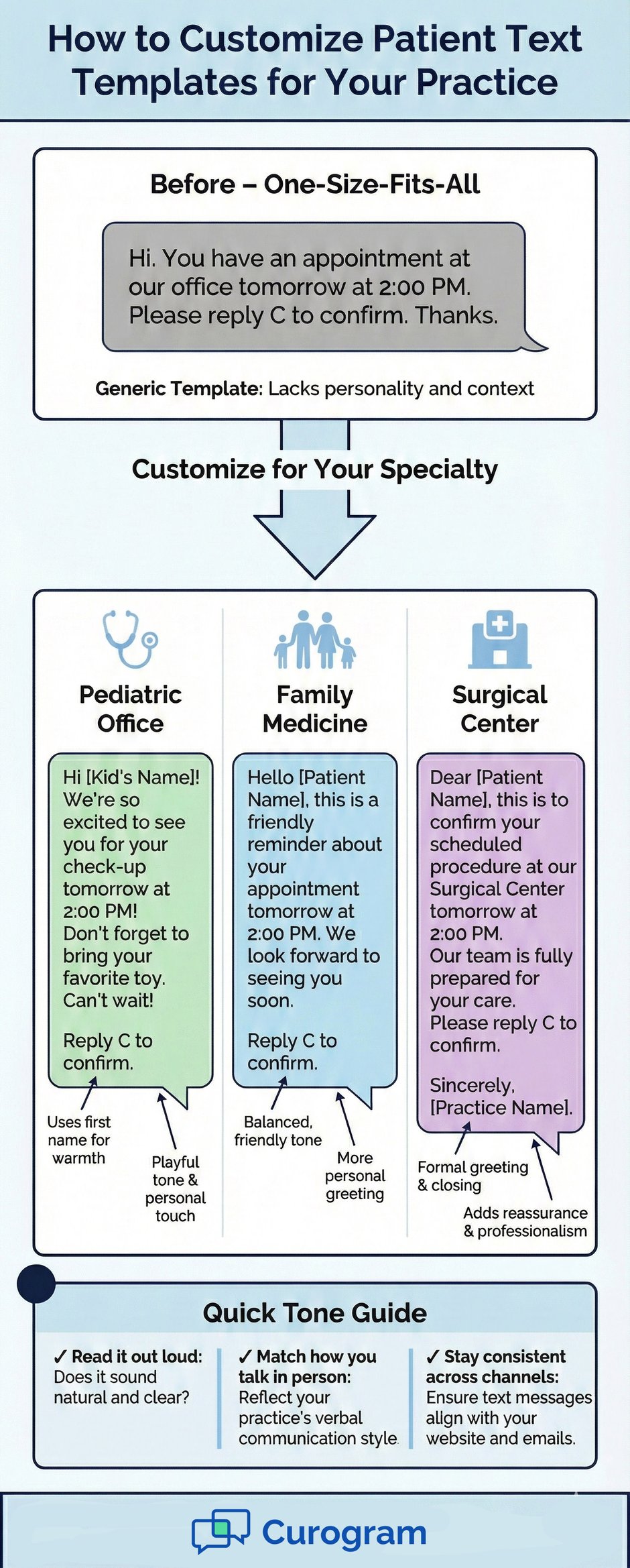
Start by asking how your office talks to patients in person. Are you casual and warm? More formal and clinical? Your texts should match that same energy. A pediatric office might use a lighter, friendlier tone. A surgical center may sound more professional. There is no single right answer. The right tone is the one that sounds like you.
Read each template out loud before you save it. If it sounds stiff, loosen it up. If it sounds too casual for your audience, add a touch of formality. Swap generic greetings for ones your team actually uses. Small changes like using first names or adding a simple smiley face can shift the whole feel of the message.
Your texts, emails, and portal messages should all feel like they come from the same place. Patients interact with your office across many touch points. If your text sounds friendly but your email reads cold, it creates confusion. Pick a voice and stick with it.
Healthcare communication templates should not sit on a shelf forever. Review them every few months. Ask your front desk team what works and what patients ask about most. Update your wording based on real feedback from your staff and patients alike.
Practices that invest in their messaging voice see stronger patient loyalty and fewer misunderstandings. It takes some effort up front, but pays off fast. And if you want a platform that makes managing and sending these templates easy, tools like Curogram let you store, customize, and automate your entire text library inside one HIPAA-compliant system.
You now have more than 50 patient text message templates ready to use across every common scenario your office faces. From scheduling to billing to urgent outreach, each one is designed to save time and keep communication clear.
The biggest win comes from action. Pick the five or six templates that match your busiest workflows. Load them into your system. Train your team, then track the results over the next month. Most practices see fewer phone calls and lower no-show rates within weeks.
Remember that great patient messaging templates are living documents. Update them as your practice grows and as your patients give you feedback. The more you refine your approach, the better your results will be.
Good communication is not a nice-to-have in healthcare. It is the backbone of a practice that runs well and keeps patients coming back. These medical practice SMS templates are your starting point. Now make them your own.
Schedule a demo to explore what is possible for your practice.
Frequently Asked Questions
Never include specific health details like diagnoses, test result values, or treatment plans in a standard text message. Use a secure messaging link any time you need to share private health data.
Keep standard SMS limited to logistics like dates, times, and general next steps. Review every template with your compliance team before launch.
Text messages have a 98% open rate compared to phone calls that often go to voicemail. Templates let your staff send consistent, accurate messages in seconds rather than spending minutes on each call.
This frees up phone lines for complex questions and cuts average patient wait times. Most patients actually prefer texting for routine updates.
Review your templates every three to six months. Ask your front desk staff which messages get the most questions or confusion from patients.
Update wording based on that feedback and any changes to your services or policies. Regular updates keep your messaging fresh and relevant.
Send at least two reminders before each visit, one 48 hours out and one on the day of the appointment. Include a simple way to confirm or reschedule right in the message.
Use a friendly, direct tone that makes it easy to respond. Practices that follow this approach often cut no-show rates by 30% to 50%.
Think about how your team talks to patients face-to-face and mirror that in your texts. Read every template out loud before saving it to catch awkward phrasing.
Match the tone to your specialty since a pediatric office sounds different from a surgical center. Stay consistent across all your communication channels so patients always know what to expect.
💡 Professional text communication in healthcare refers to the use of secure, HIPAA-compliant patient texting to manage appointments, share...
💡 Handling difficult patient conversations over text requires a clear process. Without tone of voice or body language, text messages can lead to...

💡 When comparing text vs phone calls in healthcare, data shows that text messaging wins on speed, cost, and patient preference, while phone calls...