Two-way reminders show the biggest gain: based on our internal data, Atlas Medical Center cut its no-show rate from 14.20% to 4.91% in three months.
To be safe and useful, the vendor must sign a Business Associate Agreement, encrypt your data, and sync with your EHR through API, HL7, or a direct database link.
Two clinics send the same reminder for a Thursday visit, and the same patient texts back "R" to reschedule. At the first clinic, the reply lands in a separate texting app. A staff member reads it, opens the EHR, finds the visit, moves it, and types a note so the provider knows why the slot changed.
At the second clinic, the reply updates the appointment and logs to the chart before anyone touches it.
Both clinics pay for HIPAA-compliant patient texting. Only one of them took work off the front desk.
Texting is only worth paying for when each reply reaches the EHR without a person carrying it there. Every workflow below depends on that link.
Small tasks add up fast at volume. Based on our internal data, Covina Arthritic Clinic confirms over 1,100 appointments a month by text.
If each reply needed even one minute of hand entry, that's more than 18 staff hours a month, as an illustrative estimate. Refill questions, intake answers, and unpaid balances stack on top of that.
Compliance rides on the same link. A message that never makes it into the chart is a message you can't pull up when a patient disputes what they were told, or when an auditor asks.
The eight workflows below each start from a real front desk task. Some, like digital intake, save typing. Others, like care handoffs, keep a nurse from guessing what a patient already heard. Each one shows the step a synced reply removes and what to check before you buy.
How HIPAA-Compliant Patient Texting Improves EHR-Integrated Workflows
Without a sync, every patient reply lives in two places. A confirmation comes in on the texting tool. Then someone types "pt confirmed via text" into the appointment notes in athenahealth or eClinicalWorks.
1. Eliminates Duplicate Data Entry Across Systems
Intake answers get retyped field by field, and each retype is a chance to swap two digits in a birth date or a member ID.
EHR integration closes that gap. The texting platform pulls the day's schedule from your EHR and pushes each reply back to the right record. Our integration pages show this flow for each system. Patients sync in from NextGen, DrChrono, or Practice Fusion, and message logs go back to the chart.
2. Reduces No-Show Rates Through Automated Reminders
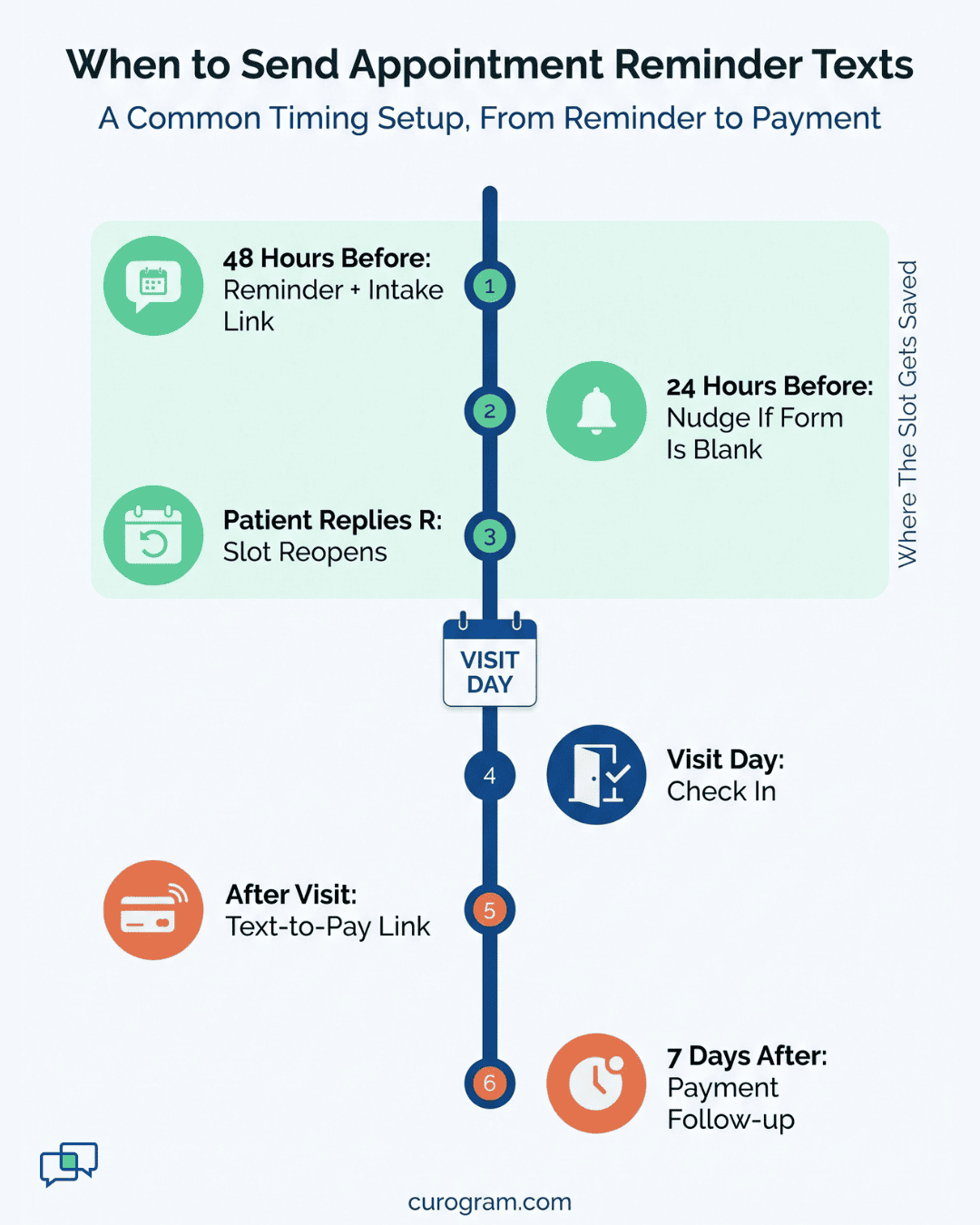
Missed appointments cost practices revenue and create scheduling gaps that are hard to fill. Text reminders sent 48 and 24 hours before visits give patients a direct way to confirm, reschedule, or cancel.
Two-way confirmations outperform one-way reminders by a factor of three. Patients can reply instantly, and their response updates your schedule in real time. Practices using integrated reminder systems report no-show reductions of 35% to 40% or higher.

3. Cuts Incoming Volume at the Front Desk
Every incoming inquiry that arrives as a text message is one fewer interruption for your front desk. Patients asking about appointment times, prescription refills, or basic questions can get answers without waiting on hold.
Curogram enables practices to handle a higher volume of patient messages without adding staff. Some multi-location groups report they would need three or four additional employees just to manage the communication volume handled by two-way texting.
Covina Arthritic Clinic shows the scale. Based on our internal data, the clinic now confirms over 1,100 appointments a month by text. Before automation, its staff handled confirmations through manual follow-up calls. At an illustrative two minutes per call, 1,100 calls would eat about 37 staff hours every month.
4. Centralizes Communication in One Clinical Inbox
When messages arrive through multiple channels, staff waste time switching between platforms. A unified clinical inbox collects texts, appointment confirmations, and patient responses in one location tied to your EHR.
This centralization means nothing slips through the cracks. Staff can see the full context of a patient's communication history before responding. That context speeds up resolution times and reduces the back-and-forth that frustrates both staff and patients.
5. Supports HIPAA Compliance With Built-In Documentation
Encryption rules are in flux. Under the current Security Rule, encryption is "addressable," which means you either use it or write down why another safeguard fits.
In January 2025, HHS proposed making it a must for health data, both stored and sent. That rule wasn't final as of mid-2026, and the target date has reportedly slipped to July 2027.
Every text sent and received through a compliant platform generates a permanent audit trail. This documentation supports compliance reviews, quality assurance, and any legal inquiries without requiring staff to manually log interactions.
Secure messaging protects patient data with encryption in transit and at rest. Combined with EHR integration, your practice maintains a single source of truth for all patient communication, which simplifies audits and reduces compliance risk.
6. Speeds Up Care Coordination Between Providers
Handoffs break when the next nurse doesn't know what the patient was told. Take a patient going home after a heart procedure. Your nurse texts the wound-care steps and a number to call for bleeding, and the text is logged to the chart.
Two days later, the patient texts that the site looks swollen. The nurse on call opens the record, sees the exact instructions and the time they went out, and can sort the concern without guessing. Nobody has to track down the first nurse to ask what she said.
Lab follow-ups work the same way. A text asking the patient to book a results visit sits in the same chart. The next provider can see the loop was opened and whether the patient answered.
7. Enables Faster Payment Collection via Text-to-Pay
Paper statements sit on kitchen counters for weeks. Your billing team then spends afternoons on calls that end in voicemail.
Text-to-pay sends a secure link with the balance. The patient taps it and pays on their phone, with no portal login. You can send the link right after the visit or once the claim posts, and follow up with a second text if it's still open after a week.
Before you go live, ask one question: do paid balances post back to your practice management system, or does billing still mark them by hand? If someone has to key each payment, you've moved the work rather than removed it. Get that answer in writing during setup.
8. Streamlines Digital Intake Before Appointments
Paper forms at check-in create bottlenecks and data entry backlogs. Digital intake forms sent via text let patients complete paperwork from their mobile device before they arrive.
This approach shortens wait times and improves data accuracy. Patient responses populate directly in your EHR, so staff spend less time typing and more time preparing for the visit. Mobile-friendly forms work on any device without requiring patients to create accounts or remember passwords.
Why EHR-Integrated Texting is Essential for Medical Practices
Medical practices that rely on disconnected communication tools face operational drag every day. Staff toggle between systems, messages go undocumented, and patients wait longer than necessary for responses. EHR-integrated texting solves these problems by making secure communication part of your clinical workflow.
Curogram offers practices a HIPAA-compliant platform with SOC 2 certification, telemedicine capabilities, and integration with over 20 major EHR systems. Most teams learn the platform in under 10 minutes, and implementation takes less than two weeks with dedicated support.
Recall is a good place to see the payoff. Based on our internal data, 35% of a multi-location practice's overdue patients booked within a month of a recall text. That added up to 1,240 patients seen from those messages alone.
Conclusion: Start With the Workflow That Costs You the Most
You don't have to switch on every feature in week one. Pick the workflow that eats the most staff time today, and fix that one first.
For most practices, that's appointment confirmations. Before go-live, pull your no-show rate for the last 90 days. Then count the confirmation calls your team makes in a normal week, including the ones that end in voicemail.
Those two numbers are your baseline. Check them again after one quarter, and you'll know whether the change paid off. Based on our internal data, Atlas Medical Center saw its drop inside that window.
Once reminders run on their own, add the next piece. Digital intake usually comes second, since the form link can ride along with the reminder you already send. Text-to-pay can follow once billing agrees on when links go out and who handles the replies.
Hold one rule as you go: if a feature makes someone copy data by hand, raise it with your vendor before you add anything else. A half-synced tool tends to stay half-synced once staff build habits around it.
Done in that order, HIPAA-compliant patient texting cuts the number of screens your front desk has to watch. Your team spends the saved time on the patient standing at the window.
Book a demo now and bring last quarter's no-show rate with you. We'll walk through how reminders, intake, and payments would sync with your EHR, and help you pick which one to turn on first.
Frequently Asked Questions
Start with a signed Business Associate Agreement from the vendor. Add access controls so only the right staff see each thread, and keep a log of every message. Data should be encrypted in storage and in transit.
Curogram links to your EHR through API, HL7, or a direct database connection. The day's schedule syncs into the texting tool, and patient replies and message logs go back to the correct chart without anyone retyping them.
Based on our internal data, Atlas Medical Center went from a 14.20% no-show rate to 4.91% in three months. Across our clients, no-show rates run 53% below the industry average, with confirmation rates above 75%.
Messages arrive in the texting app already on their phone. Patients reply the way they'd text anyone, and forms or payments open from a secure link. No download, login, or password stands between them and a quick answer.
Each form field is mapped to a matching field in your EHR. When a patient submits the form from their phone, the answers fill those fields, so your staff reviews the data instead of typing it from a clipboard.
Messages can route to the site that owns each patient, and each location can keep its own settings. Staff see the threads for their office, while managers can still view activity across the whole group from one place.

Mira Gwehn Revilla