

Professional Text Communication in Healthcare: A Complete Guide
💡 Professional text communication in healthcare refers to the use of secure, HIPAA-compliant patient texting to manage appointments, share...

17 min read
Jo Galvez
:
March 7, 2026
Your front desk phone rings nonstop. Patients sit on hold. Staff scrambles to keep up. Sound familiar?
Here is the truth: most patients do not want to call your office at all. Studies show that over 80% of people prefer texts over phone calls for quick updates.
Yet many medical practices still lean on outdated phone systems to handle bookings, reminders, and follow-ups.
That gap between what patients want and what clinics offer is costly. Missed calls lead to missed visits. Missed visits mean lost income and poor health outcomes. The fix is simple in concept but tricky in practice: you need the right patient texting software.
The market is packed with options in 2026. Dozens of vendors promise HIPAA safety, easy setup, and big returns. But not all platforms are built the same.
Some shine in EMR links. Others stand out with bulk messaging or patient forms. A few fall short on basics like two-way texting or secure data handling.
This guide cuts through the noise. We built it to help you run a fair patient texting software comparison without the sales spin. You will learn what features matter most, how to spot hidden costs, and which questions to ask before signing a contract.
Whether you run a solo family practice or a large multi-site group, the stakes are real. The right medical text messaging software can slash no-shows, free up staff, and boost patient trust. The wrong one drains time, money, and morale. Let us help you make a smart choice.
We built this guide to serve as your go-to resource. It covers features, pricing, compliance, and vendor questions.
By the end, you will have a clear framework for making your decision with confidence.
The way patients want to reach their doctor has changed fast. Texting is no longer a nice extra. It is the main way many people prefer to connect with their care team. If your practice still relies on phone calls alone, you risk falling behind.
Patients today expect the same ease they get from banks, airlines, and retail apps. They want quick replies, not long hold times. A recent report found that 73% of patients are more likely to pick a provider that offers text-based contact. That number jumps even higher among adults under 40.
For millennials and Gen Z, phone calls feel like a chore. They grew up with instant messaging and expect the same from their doctors. Practices that ignore this trend lose these patients to clinics that offer easier access. The best texting platform for a medical office meets patients where they already are: on their phones.
Texting is not just for younger crowds. Older adults find text reminders helpful for tracking visits and refills. Simple, clear messages cut down on confusion and missed steps. Healthcare patient communication software that works well for all ages gives your practice a true edge.
Many adults over 60 now use smartphones daily. They are more open to text updates than most practices assume. The key is to keep messages short, use plain language, and include only one action per text.
Beyond patient wishes, the numbers make a strong case. Practices that adopt medical practice texting solutions report fewer no-shows, faster payments, and lower phone volume. One industry survey showed a 40% drop in missed visits after adding text reminders.
On top of that, text-based payment links speed up collections. Patients who receive a text bill tend to pay faster than those who get paper statements. That kind of cash flow boost matters for every size of practice.
A single no-show can cost a practice $200 or more in lost revenue. Multiply that across a month, and the losses stack up fast. Text reminders sent 24 to 48 hours before a visit bring patients back on track. Automated follow-ups catch those who still slip through.
Some platforms also let patients confirm, cancel, or reschedule right from the text. That instant action means your team can fill open slots within minutes. In a busy practice, even two or three reclaimed slots a week can cover the cost of the software.
Front desk teams drown in phone calls each day. Many of those calls are simple tasks like confirming a visit or asking for directions. When texting handles those exchanges, staff can focus on harder jobs. That shift cuts burnout and keeps good employees around longer.

Not every platform does the same things. Before you start your search, know which features will make the biggest impact for your practice.
This section breaks down the must-haves and the nice-to-haves so you can focus your patient engagement software comparison on what truly matters.
At its heart, any good platform should let you send and receive texts with patients in real time. But the details matter. Look for tools that support two-way chats, bulk messages, and smart message templates.
Automation should handle the heavy lifting so staff do not have to send each text by hand. A strong platform also lets you customize message flows based on visit type, provider, or patient group.
Some tools only send outbound blasts. That misses the point. Patients want to reply, ask questions, and confirm visits through text. A secure messaging platform for healthcare must support true back-and-forth chats to be useful.
Flu season updates. Office closures. New service launches. Mass texting lets you reach hundreds of patients at once with a single click. Look for platforms that let you segment lists so the right message goes to the right group.
For example, you might text only patients over 65 about a new flu vaccine clinic. Or reach all patients who have not visited in six months with a recall message. This level of targeting makes your outreach far more useful than a generic blast.
Once you have the basics covered, advanced features set the top platforms apart. These extras can save hours of staff time each week and improve the patient journey from first contact to follow-up. They also help your practice stand out in a crowded market.
The best platforms let you set up rules that fire without manual steps. A patient books a visit, and the system sends a confirmation text, a reminder the day before, and a follow-up survey after the visit. This kind of workflow is what makes healthcare SMS software worth the spend.
Sending intake forms by text before a visit speeds up check-in and cuts down on paper. Patients fill out their info at home, on their own time. That data flows right into your system and saves front desk staff from re-typing everything.
Digital forms also reduce errors. When patients type their own info, there is less risk of mistakes from messy writing or misheard words on the phone. This feature alone can save 5 to 10 minutes per patient visit.
This is where many practices get tripped up. Texting patients is only safe if the platform meets strict federal rules.
Any lapse in HIPAA compliance can lead to fines ranging from $100 to $50,000 per incident. When checking HIPAA texting platforms for medical practices, compliance is not optional. It is the baseline.
HIPAA sets clear rules around how patient data can be sent, stored, and accessed. Any platform you choose must check certain boxes before it is safe to use in a clinical setting.
Messages must be encrypted both in transit and at rest. This means that even if someone intercepts the data, they cannot read it. Ask vendors if they use 256-bit AES encryption or better. If they cannot answer clearly, move on.
Every user who touches patient data should have a unique login. The platform must track who sent what message and when. These audit logs are vital during compliance reviews. They also protect your practice if a breach claim arises.
Role-based access is another must-have. Not every staff member needs to see all patient chats. A front desk clerk may need different access than a nurse or doctor. Good platforms let you set these limits with a few clicks.
A BAA is a legal contract between your practice and the software vendor. It spells out each party's duties for keeping patient data safe.
Without a signed BAA, you are exposed to full legal risk if data leaks. Every vendor of healthcare SMS software should be ready to sign one before you go live.
A solid BAA should name the types of data covered, the vendor's safety measures, and how breaches will be handled. It should also state how long data is kept and what happens when the contract ends. Never sign a BAA you have not read in full.
Watch out for vague phrases like "we take security seriously" without proof. Ask for SOC 2 reports, third-party audits, or named certifications. If a vendor says their tool is HIPAA compliant but will not sign a BAA, that is a deal-breaker.
A texting tool that does not talk to your EMR creates more work, not less. Staff end up copying data between systems, which wastes time and invites mistakes.
Strong EMR links are a top factor in any patient texting software comparison. The right fit should feel like a natural add-on to your current setup.
Not all integrations are equal. Some connect at a deep level and sync data both ways. Others offer only a basic one-way feed. Know the difference before you buy.
API links offer the deepest connection. They let the texting platform pull patient lists, visit schedules, and chart data straight from your EMR.
Changes in one system show up in the other. Curogram, for example, builds API links with nearly any EMR, which removes the need for double data entry.
API links also tend to be more reliable over time. Because they are built into the software at a deep level, they do not break as often as surface-level connections. That stability matters when your staff depends on the tool every day.
HL7 and FHIR are industry data standards that let different health tech systems share information. Platforms that support these standards tend to play well with a wider range of EMRs. Ask vendors which standards they support and how often those links are updated.
FHIR is the newer of the two and is gaining ground fast. If your EMR already supports FHIR, you will have an easier time linking new tools. This matters more as your tech stack grows and you add other systems down the road.
Even a strong integration can fail if the setup is complex or the vendor's support is thin. Dig into the details before committing.
Some platforms push data from the EMR into the texting tool but do not send updates back. That means a patient who confirms a visit by text may still show as unconfirmed in your EMR. Two-way sync saves staff from manual updates and keeps records clean.
Ask the vendor for a clear timeline. Simple integrations might take a week. Complex setups with custom fields can stretch to a month or more. Get this in writing so there are no surprises.
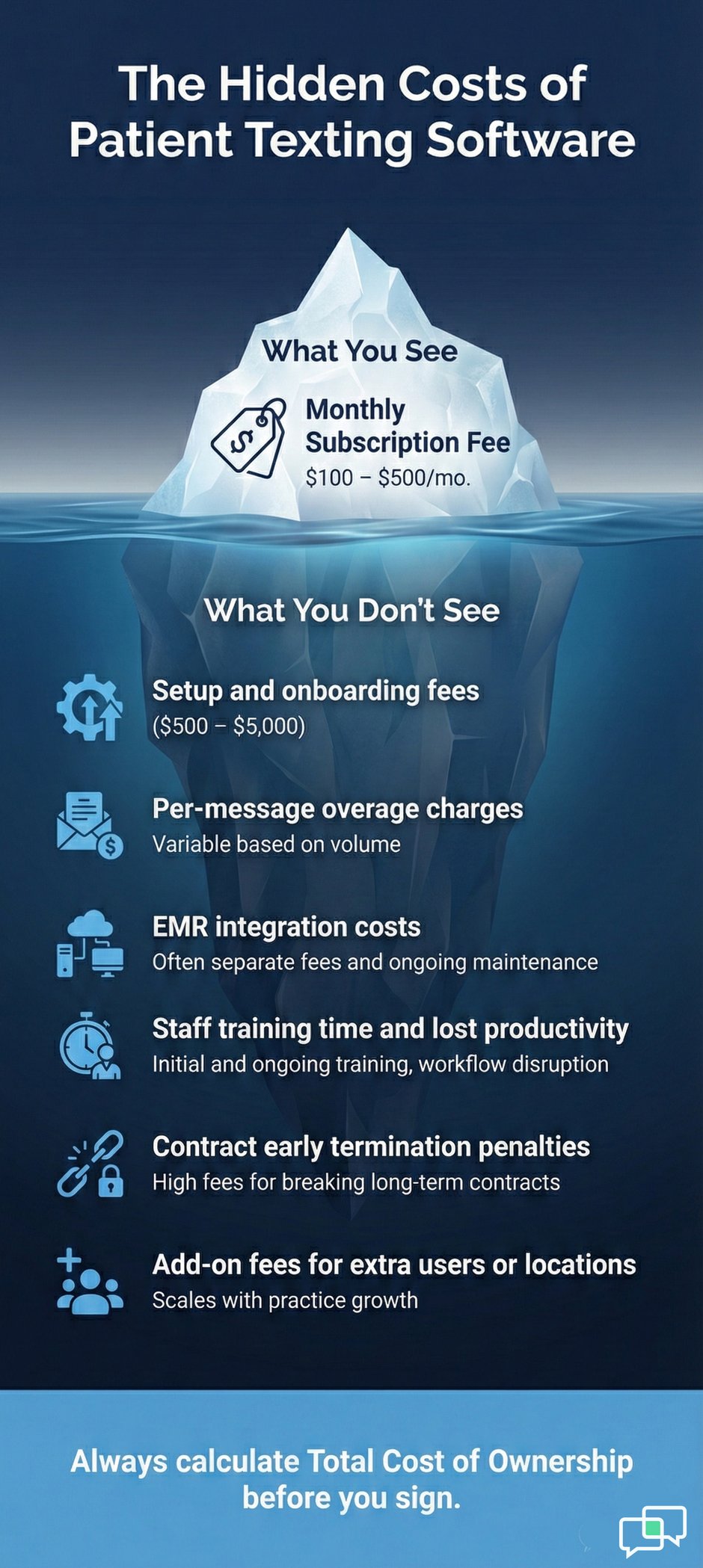
Price is a key factor, but the sticker price rarely tells the whole story. Hidden fees for setup, extra users, or message volume can double your real cost. A careful look at total cost helps you avoid budget shocks down the road.
Vendors use different models to charge for their medical text messaging software. Knowing how each model works helps you predict costs as your practice grows.
Some vendors charge by the number of providers on the platform. Others charge per office site. A small practice with two doctors may pay less on a per-provider plan.
A multi-site group might save with per-location pricing. Run the math both ways before you pick.
Also check whether mid-level staff, like nurse practitioners, count as providers in the pricing model. Some vendors count every clinician. Others only count physicians. That one detail can shift your monthly bill by hundreds of dollars.
Many platforms set a cap on monthly messages. Go over that cap, and you pay extra per text. Check what counts as a message. Some vendors count each segment of a long text as a separate message, which inflates costs fast.
A single text over 160 characters can be split into two or three segments. If your reminders include links, names, and dates, they will often exceed that limit. Ask the vendor how they count segments and what the overage rate is per text.
The base subscription is just the start. Several other costs can sneak up if you do not ask about them upfront. Doing a thorough cost review is just as important as the feature check in any patient engagement software comparison.
Some vendors charge a one-time fee for setup that can range from $500 to $5,000. Others bundle it into the monthly rate. Ask what the setup fee covers and if training is included. A platform that is hard to learn will cost you more in lost time than any setup fee.
Watch out for long contracts with auto-renewal clauses. A 12-month lock-in is common, but some vendors push for 24 or 36 months. Shorter terms give you more freedom to switch if the tool does not meet your needs.
Now for the part you came here for. Below is a side-by-side look at ten of the most popular healthcare SMS software tools on the market in 2026.
We scored each on features, EMR fit, HIPAA compliance, ease of use, and value. This is an unbiased overview to help you narrow your list.
Each platform below serves a slightly different type of practice. Some are built for small offices. Others target large health systems. Use this section as a starting point and dig deeper into the ones that match your size and goals.
Keep in mind that features and pricing change over time. We checked each vendor's public info and user reviews as of early 2026. Always confirm details directly with the vendor before you commit.
|
Platform |
2-Way Text |
Mass Text |
EMR Links |
HIPAA BAA |
E-Forms |
Best For |
|
Curogram |
Yes |
Yes |
Nearly any EMR |
Yes |
Yes |
All practice sizes |
|
Klara |
Yes |
Limited |
Select EMRs |
Yes |
Yes |
Small-mid clinics |
|
OhMD |
Yes |
Yes |
Major EMRs |
Yes |
No |
Solo/small practices |
|
Luma Health |
Yes |
Yes |
Wide range |
Yes |
Yes |
Mid-large groups |
|
Weave |
Yes |
Yes |
Select EMRs |
Yes |
Yes |
Dental/small clinics |
|
Solutionreach |
Yes |
Yes |
Major EMRs |
Yes |
Yes |
Multi-specialty |
|
Relatient |
Yes |
Yes |
Wide range |
Yes |
Yes |
Large health systems |
|
Phreesia |
Limited |
Yes |
Wide range |
Yes |
Yes |
Intake-focused |
|
Rhinogram |
Yes |
Yes |
Select EMRs |
Yes |
No |
Specialty practices |
|
Textline |
Yes |
Yes |
Via Zapier |
Yes |
No |
General messaging |
Curogram stands out for its near-universal EMR support, fast 10-minute staff training, and full feature set at a low price point. Klara is strong in patient routing and triage.
OhMD keeps things simple for solo providers who just need basic two-way texting. Luma Health brings robust waitlist tools and recall campaigns. Weave bundles texting with phone and payment features in one package.
Klara's mass texting is limited. OhMD lacks digital intake forms. Phreesia is strong on forms but weaker on real-time chat. Textline needs third-party tools like Zapier for EMR links, which adds cost and complexity. Rhinogram serves niche specialties well, but is not built for large multi-site groups.
No single platform is perfect for every practice. The goal of this patient texting software comparison is not to crown a winner. It is to help you match the right tool to your specific workflow and patient base.
Exact prices change often and depend on your deal. Use this as a rough guide for budget planning.
|
Platform |
Starting Price |
Model |
Free Trial |
|
Curogram |
~$100/mo |
Per location |
Demo available |
|
Klara |
~$250/mo |
Per provider |
Demo only |
|
OhMD |
Free basic tier |
Per provider |
Yes |
|
Luma Health |
~$300/mo |
Per location |
Demo only |
|
Weave |
~$400/mo |
Bundled |
Demo only |
|
Solutionreach |
~$300/mo |
Per provider |
Demo only |
|
Relatient |
Custom quote |
Enterprise |
Demo only |
|
Phreesia |
~$250/mo |
Per provider |
Demo only |
|
Rhinogram |
~$200/mo |
Per location |
Demo only |
|
Textline |
~$60/mo |
Per user |
Yes (14 days) |

With so many choices, it helps to follow a clear process. A structured approach keeps you from getting swayed by flashy demos or high-pressure sales calls. This step-by-step framework helps you pick the right tool based on your real needs.
Start by listing what your practice cannot live without. This is different for every office. A busy urgent care may need fast two-way messaging above all else. A specialty clinic might care most about form collection and recall campaigns.
Give each feature a weight based on how much it matters to your practice. HIPAA compliance should always rank highest. After that, rank items like EMR fit, two-way texting, mass messaging, and reporting. Score each vendor against your list and compare the totals.
A simple spreadsheet works fine for this. List vendors across the top and features down the side. Use a 1-to-5 scale for each cell. Multiply each score by the weight and add up the column. The vendor with the highest total is your best match on paper.
Your front desk team will use this tool every day. Ask them what tasks eat the most time. Their input helps you set the right priorities. A platform that staff love is one that actually gets used.
Hold a short meeting with your key team members before you start vendor calls. Write down the top five pain points they face. That list becomes your filter for every demo you attend.
Never buy based on a slide deck alone. Hands-on testing shows you what the daily experience will feel like. Most vendors offer demos, and some provide trial periods. This step alone can prevent months of regret.
Ask the vendor for a trial that mirrors your actual daily tasks. Send test reminders, try the two-way chat, and check how fast support responds. If the trial does not feel smooth, the full launch will not either.
A tool is only as good as its support team. Send a question during business hours and track how long the response takes. Then send one after hours. The gap between those two response times tells you a lot.
Asking the right questions upfront saves you from costly surprises later. Many practices skip this step and end up locked into tools that do not fit. Treat your vendor calls like job interviews. Come prepared with a list and take notes.
Start here because nothing else matters if the platform puts patient data at risk. These questions should be non-negotiable in any review of HIPAA texting platforms for medical practices.
Can you provide a signed BAA before we start?
What encryption do you use for messages in transit and at rest?
Have you had any data breaches in the past three years?
Can you share your most recent SOC 2 report or third-party audit results?
If a vendor dodges direct questions or gives vague replies, that is a warning sign. Strong vendors welcome compliance questions because they have nothing to hide. Look for clear, specific answers backed by proof.
After compliance, dig into how the platform will work with your existing tools and team. These questions help you predict how smooth the rollout will be.
Which EMRs do you integrate with natively?
Do you support HL7 or FHIR data standards?
Is the sync one-way or two-way?
What happens to our data if we cancel the service?
How long does typical onboarding take?
Is live training included or extra?
What are your support hours?
Do you offer a dedicated account manager for larger practices?
Also, ask how updates are handled. Some vendors push updates without notice, which can disrupt your workflow. Others give advance warning and let you test changes in a sandbox first. This matters more than most people realize.
Even the best platform can stumble if the rollout goes poorly. Many practices face the same set of hurdles when they launch new medical practice texting solutions. Knowing these pitfalls in advance helps you dodge them.
Change is hard. Staff who are used to phones and paper may push back against a new system. The key is to bring them on board early and make training painless. Even the best platform fails if the people using it do not trust it.
Pick one or two team members who are quick with tech and excited about change. Train them first and let them help others. Peer-led training often works better than top-down rollouts.
Long lectures do not work. The best onboarding is 10 to 15 minutes of live practice with the tool. Curogram, for instance, trains staff in under 10 minutes because the interface works just like everyday texting.
EMR links can break. Data fields might not map correctly. Phone numbers may need porting. These issues are normal but can slow you down if you are not ready. Planning for them makes the whole process smoother.
Add two to four extra weeks to whatever timeline the vendor gives you. This buffer accounts for unexpected delays like EMR updates or IT scheduling conflicts. A rushed launch leads to mistakes that are hard to undo.
Someone at your practice should own the rollout. This person handles vendor calls, tracks progress, and flags issues early. Without a clear owner, tasks fall through the cracks and timelines slip.
The point person does not need to be a tech expert. They just need to be organized and willing to stay on top of deadlines. Often, an office manager or lead front desk staff member is the best fit for this role.
Investing in a patient texting platform is a business move. Like any business move, you need to track whether it pays off. Most practices see early wins within the first 30 to 60 days, but the full return unfolds over three to six months.
Pick a few clear metrics and track them from day one. This gives you a baseline to measure against as the platform settles in.
Track your no-show rate for the month before launch and compare it with each month after. Practices that add automated text reminders typically see no-show rates drop by 25% to 40%. That alone can justify the cost of most platforms.
Count incoming calls before and after launch. Many clinics report a 30% to 50% drop in phone volume once patients can text instead. That frees staff to handle tasks that need a human touch, like billing questions or complex scheduling.
Try tracking time in 15-minute blocks. If your front desk spent four hours a day on the phone before launch and now spends two, you have clear proof of value. That kind of data makes it easy to justify the cost to practice owners or partners.
Not every metric moves at the same speed. Some gains show up in weeks. Others take a few months to fully appear.
Automated reminders usually cut no-shows within the first few weeks. Staff will notice fewer phone calls almost right away. Patient feedback on the new texting option tends to be positive from the start.
Use this early momentum to build support for the tool within your team. Share quick stats at staff meetings. When people see real results, they become advocates. Those advocates make the rest of the rollout much smoother.
Google review scores often climb as survey requests go out by text after visits. Revenue increases as fewer slots go empty. Over six months, the total return on a secure messaging platform for healthcare often exceeds 300% of the platform cost.
Patient retention also improves as your practice becomes easier to reach. When patients can text instead of call, they feel more connected. That loyalty leads to more referrals, which is the cheapest and most powerful growth channel any practice can tap.
Choosing the right patient texting software is one of the most impactful moves a medical practice can make in 2026. The tools exist. The patient demand is real. And the ROI speaks for itself.
Use this guide as your roadmap. Start with HIPAA compliance as your baseline. Then evaluate EMR fit, core features, and total cost.
Run a patient texting software comparison using the scorecard method we outlined. Test before you buy. Ask tough questions.
The best healthcare patient communication software does not just send texts. It reshapes how your office runs. It gives patients the quick, easy access they want. And it gives your team the breathing room they deserve.
Take your time with this decision. A few extra weeks of research now can save years of frustration later.
When you are ready to explore options, start with platforms like Curogram that offer broad EMR links, full HIPAA compliance, and a fast, simple setup. Your patients and your staff will thank you for making the switch.
Frequently Asked Questions
Look for encryption of data both in transit and at rest, unique user logins, and full audit trails. The vendor should offer a signed Business Associate Agreement before you start.
Ask for third-party audit reports like SOC 2 to confirm their claims. If they cannot provide these, keep looking.
Patient portals have low adoption rates, often below 30%. Texts reach patients directly on their phones without extra apps or logins.
Open rates for text messages sit above 95%, far higher than email or portal alerts. Texting fills the gap that portals leave wide open.
Simple setups can go live in one to two weeks. Complex rollouts with deep EMR links and custom workflows may take four to eight weeks.
Training time varies by platform, but the best options train staff in under 15 minutes. Build in buffer time for any unexpected tech delays.
Track no-show rates, phone call volume, and patient satisfaction scores before and after launch. Most practices see a 25% to 40% drop in missed visits within the first month.
Compare staff hours spent on phone calls versus text-based tasks. Revenue gains from filled appointment slots add up fast.
Without EMR links, staff must enter data by hand in two separate systems. That doubles the work and raises the risk of errors.
A good integration pulls patient lists and schedules into the texting tool on its own. It keeps records clean and saves your team hours each week.
💡 Professional text communication in healthcare refers to the use of secure, HIPAA-compliant patient texting to manage appointments, share...

💡 When comparing text vs phone calls in healthcare, data shows that text messaging wins on speed, cost, and patient preference, while phone calls...
💡 Medical practices improve daily workflows most effectively by using HIPAA-compliant 2-way texting to replace manual phone calls, rather than...