
Telemedicine Technology Stack: What You Need for Virtual Care
 Jo Galvez : 3/22/26, 11:00 AM
Master telemedicine with comprehensive best practices guide. Clinical, technical, legal, and operational guidelines for successful virtual care...

A few years ago, most patients had never had a virtual doctor's visit. Today, it is a normal part of how healthcare works. But being able to offer telehealth and doing it well are two very different things.
Many practices launched video visits quickly during the pandemic. Some still use those same rushed setups today. The result? Dropped calls, confused patients, billing mistakes, and legal gaps that no one planned for. These are not small issues. They can hurt patient care, drain staff energy, and cost your practice real money.
Most of these problems share a common cause: there is no clear plan. Telemedicine best practices give you that plan. They lay out exactly what to do, from how you pick your platform to how you follow up with a patient after their visit.
This guide was written for medical practices that want to run virtual care the right way. Whether you are new to telehealth or looking to improve what you already have, you will find real, practical steps here.
We will cover the current telehealth landscape and where things stand in 2026. We will walk you through virtual exams, tech requirements, and patient communication.
We will also look at telehealth guidelines around licensing, privacy, and informed consent. And we will break down billing codes, staff training, and how to track quality over time.
Think of it as a full playbook for virtual care. One that helps you stay compliant, keep patients happy, and run your team smoothly.
Virtual care is here to stay. In fact, it keeps growing. Patients expect it. More payers cover it. And as remote care guidelines continue to evolve, practices that get ahead now will be in a much stronger position.
So let's start from the beginning, and build a virtual care program worth being proud of.
Telemedicine has moved from a crisis response to a core part of how healthcare is delivered. Before diving into best practices, it helps to understand where virtual care stands today and where it is going.
When COVID-19 hit, telemedicine use spiked almost overnight. Waivers let providers see patients in new ways, across state lines and with more flexible tools. Usage that might have taken a decade to grow came in just a few months.
What is remarkable is how much of that growth was held. Patients who tried virtual visits largely liked them. Many kept using telehealth even after they could safely return to the clinic. Today, telehealth is not a backup plan. It is a standard option for millions of patients.
The regulatory environment has evolved alongside this growth. Some emergency-era waivers expired. Others became permanent. And payer coverage — once patchwork at best — has become more consistent and predictable for many visit types.
Patient expectations have shifted for good. Surveys show that patients value the ease of virtual visits. No commute, no waiting room, and faster access to care. This is especially true for routine check-ins, prescription refills, and mental health care.
Practices that do not offer virtual options risk losing patients to those that do. Convenience is no longer a nice-to-have. For many patients, it is a deciding factor in where they seek care.
Medicare and Medicaid have expanded reimbursement for many virtual visit types. More private payers have moved toward reimbursement parity. Paying the same for a virtual visit as an in-person one for comparable services.
That said, rules vary by state and payer. Staying current with these changes is a key part of meeting telehealth guidelines. Practices that fall behind on regulatory updates risk billing errors, claim denials, and, in some cases, compliance issues.
Patients have largely embraced virtual care. Satisfaction scores for telehealth are high when visits are well-run. Patients appreciate easy access and the ability to see their own provider from home.
Provider attitudes have also shifted. While some clinicians still prefer in-person care for complex cases, most now see virtual visits as a valuable part of their toolkit — not a replacement for in-person care, but a strong complement to it.
Patient acceptance rates for telehealth are highest in mental health, primary care, and chronic disease management. These are areas where the need for a physical exam is often lower and where ongoing access matters most.
Patients who are older or less comfortable with technology sometimes need more support. Offering clear setup instructions and a warm onboarding process goes a long way toward making virtual care feel accessible.
Providers who are well-trained and have the right tools tend to have better telehealth experiences. When virtual care is added on top of a full schedule without enough support, burnout becomes a real risk.
Practices that invest in good training, realistic visit loads, and reliable technology report higher provider satisfaction. That is good for your team and for your patients.
Good virtual care starts with strong clinical practice. The tools and format may be different, but the goal is the same: safe, high-quality care that meets your patients' needs.
A virtual physical exam is not the same as an in-person one, but it is more powerful than many providers expect. With the right structure and prep, you can gather a lot of useful clinical data online.
Start each visit by confirming the patient's location and making sure you can hear and see them clearly. Use a structured format for every visit, just as you would in the office. Ask open-ended questions and give patients time to describe their symptoms in their own words.
Many conditions are well-suited to virtual care. Skin concerns, respiratory symptoms, mental health issues, medication reviews, and many chronic disease check-ins can be managed effectively online.
However, some things truly require an in-person visit. Abdominal pain that needs hands-on exam, suspected fractures, or anything requiring direct physical assessment should be referred to the office. en — and when not to — is one of the most important telemedicine standards a provider can follow.
A good virtual exam has a clear start, middle, and end. Open with a brief tech check and a warm greeting. Move through the clinical assessment with focus. Close by summarizing the plan, answering questions, and confirming next steps.
Using structured templates in your EMR helps with consistency. It also makes documentation faster and more accurate, which supports both billing and compliance goals.
Clinical decisions made during virtual visits must be just as thorough as those made in the clinic. The format of the visit does not lower the standard of care. Providers should document their reasoning, what they assessed, and why they chose a particular plan.
Good documentation also protects you legally and supports proper reimbursement. Records should note the visit type (telehealth), the technology used, patient consent, and all clinical findings. Incomplete notes are one of the top reasons telehealth claims get denied.
A clear triage framework helps providers decide quickly. Consider the clinical complexity, what physical findings are needed, and whether the patient can accurately describe their symptoms. When in doubt, err on the side of in-person care.
Many practices use a tiered system: simple, low-acuity cases stay virtual; moderate-complexity cases are triaged by a nurse first; and high-acuity or emergency cases go directly to in-person care. This approach keeps telehealth efficient without compromising safety.
Documentation for telehealth must include specific elements. Record the date, time, and location of both provider and patient. Note that the visit was conducted via video or phone, if applicable. Document the patient's consent for telehealth.
Include the chief complaint, assessment, plan, and any follow-up instructions. Payers often audit telehealth records, so completeness matters. Create a standardized telehealth note template and use it consistently across your team.
Your technology choices directly affect the quality of every virtual visit. From the platform you use to the internet connection in your exam room, getting the tech right is non-negotiable.
The platform you use is the most critical technology decision your practice will make. Look for a solution that is HIPAA-compliant, easy for both staff and patients to use, and capable of integrating with your existing EMR.
The best platforms offer high-quality audio and video, simple meeting links that patients can join without downloads, and strong security features. Platforms like Curogram include multi-user telemedicine built into a broader patient communication suite. This way, your video visits, reminders, and messaging all live in one place.
Any platform used for virtual visits must comply with HIPAA. This means the vendor must sign a Business Associate Agreement (BAA) with your practice. The platform must also use encrypted connections for all audio and video data.
EMR integration is equally important. When your telehealth platform connects directly to your EMR, providers can document visits faster and more accurately. It also reduces the risk of information falling through the cracks between systems — a key part of any strong telehealth implementfation.
Every practice needs a backup plan. What happens if your platform goes down mid-visit? What if a patient's internet connection fails? A simple backup protocol, like switching to a phone visit, keeps the appointment on track.
Train your staff on backup procedures and post a quick-reference guide at each workstation. Having a tech support contact available during clinic hours also helps your team respond quickly without interrupting the provider.
A stable, fast internet connection is the foundation of a good virtual visit. For video calls, aim for at least 10 Mbps download and upload speeds. Slower connections lead to frozen screens, audio dropouts, and frustrated patients on both ends of the call.
Providers should use a device with a good camera and a clear microphone. Overhead lighting is often too harsh for video. A simple ring light or a lamp placed in front of the provider makes a noticeable difference in image quality.
A wired internet connection is more reliable than Wi-Fi, especially in a clinical setting with many devices connected. If Wi-Fi is the only option, a dedicated network for telehealth visits reduces interference.
For video quality, at least 720p resolution is the baseline. Many providers now use 1080p cameras for sharper image quality. This matters when examining skin conditions or reading subtle facial cues in a mental health visit.
Some tools extend what is possible in a virtual visit. Connected devices — like Bluetooth stethoscopes, blood pressure cuffs, or pulse oximeters that sync to a phone — let patients share real-time data with their provider from home.
Screen sharing also helps. Providers can walk patients through lab results, care plans, or instructional materials during the visit. These tools, used thoughtfully, make virtual visits richer and more useful for everyone involved.
The patient experience in a virtual visit is shaped by how you communicate. Strong communication reduces confusion, builds trust, and leads to better outcomes.
Good communication starts well before the patient logs in. Send clear prep instructions at least 24 hours in advance. Let patients know how to join the visit, what device to use, and what to have ready, like a list of their medications or a home blood pressure reading.
Automated text or email reminders are one of the most effective ways to prepare patients for virtual visits. Based on our internal research, practices that use automated reminders see significantly lower no-show rates for both in-person and virtual appointments.
A short pre-visit checklist helps patients feel confident on the day of their appointment. Include the link to join the visit, the estimated duration, and a note to find a quiet, private space. If patients need to complete forms ahead of time, link directly to those forms in the reminder message.
Digital patient forms sent in advance via text save time at the start of the visit and help both patient and provider arrive more prepared. This is a small step that has a big impact on how smoothly visits run.
Virtual visits can feel more formal and less personal than in-person appointments. Providers can counter this by making small, deliberate efforts to connect. Start with a warm greeting, maintain eye contact by looking at the camera (not the screen), and use the patient's name.
Active listening is harder to signal over video. Nod, give brief verbal affirmations, and paraphrase what the patient says to show you are engaged. These small cues make a big difference in how patients feel about their care experience.
The visit is not over when the call ends. A clear post-visit process helps patients understand next steps and feel supported. Send a brief follow-up message with care instructions, prescription details, and the date of any next appointment.
Collecting feedback after virtual visits is also valuable. Short satisfaction surveys sent via text are easy for patients to complete and give your practice real insight into what is working and what needs to change.
After a telehealth visit, patients often feel less sure of their care plan than they would after an in-person visit. A simple text or patient portal message with a written summary closes that gap. Include key takeaways, medications prescribed, and what to watch for that might require follow-up.
Clear after-visit instructions reduce unnecessary follow-up calls and improve medication adherence. They also show patients that your practice is organized and attentive, which builds trust over time.
Tech problems will happen. A patient's camera freezes. Audio cuts out. Someone cannot find the link. The key is having a calm, clear process so your team can handle these moments without derailing the appointment.
Train your front desk staff to troubleshoot common issues by phone. Keep visits on track by offering to switch to a phone call if video fails. And follow up with patients who could not connect to reschedule promptly.
Telehealth compliance is more complex than many practices realize. Understanding the rules that apply to virtual care protects your license, your patients, and your practice's finances.
The legal rules for telehealth vary by the patient's location. In most states, a provider must be licensed in the state where the patient is present at the time of the visit, not where the provider is located. This rule trips up many practices that see patients across state lines.
Some states have joined the Interstate Medical Licensure Compact (IMLC), which makes it easier to get licensed in multiple states. If your practice sees patients in more than one state, this compact may be worth exploring.
Before seeing a patient via telehealth, confirm that you hold the required license for the patient's state. If you see patients in multiple states, consult a healthcare attorney about your interstate obligations.
Some states also have telehealth-specific laws, including requirements for an initial in-person visit before ongoing virtual care can begin. Staying up to date on the rules for every state where you practice is a non-negotiable part of telehealth compliance.
Informed consent for telemedicine is a separate requirement from standard consent forms. Patients must understand that their visit is conducted via video, the risks and limits of telehealth, and their right to choose in-person care instead.
Consent should be documented in the patient record for every telehealth visit. Many practices collect this once per patient and then reference it in follow-up records. Electronic consent forms are an easy way to streamline this step without slowing down the workflow.
HIPAA applies fully to telehealth. Any platform, device, or communication tool used in virtual care must meet HIPAA requirements, including the video platform, messaging tools, and any patient data shared during the visit.
Prescribing via telemedicine is subject to DEA rules. In general, controlled substances may only be prescribed via telehealth if the provider has first conducted an in-person evaluation. Some exceptions apply, particularly for mental health medications. Regularly reviewing updated remote care guidelines keeps your prescribing practices in line.
Telehealth visit documentation must meet the same standards as in-person records. Include all required elements: date and time, visit modality, provider and patient location, patient consent, clinical findings, assessment, and plan.
Good records also protect you in audits. Payers increasingly review telehealth claims, so a clean, complete record is your best defense. Use a standardized telehealth note template to make sure nothing is missed from visit to visit.
The DEA's rules on prescribing controlled substances via telehealth were updated after the pandemic. As of 2026, most controlled substance prescriptions require a prior in-person visit unless the patient qualifies under a narrow exemption.
Non-controlled medications can generally be prescribed after a thorough telehealth evaluation. Always document your clinical reasoning and confirm that your state allows the prescription you are writing via a virtual visit. Consulting a healthcare attorney on prescribing policies can prevent costly compliance errors.
Patient data privacy is one of the highest priorities in virtual care. When a visit happens at home instead of in a clinic, new privacy risks emerge — for both the patient and the provider. Getting this right is not optional.
The first step in protecting patient privacy is choosing the right platform. Look for a video tool that uses end-to-end encryption. This means data is encoded from the moment it leaves one device until it reaches the other, so no one in between can read it.
Your platform should also require some form of authentication to join a visit. Waiting rooms, one-time meeting links, and login checks all help ensure that only the right people are in the session. Avoid using consumer video tools like FaceTime or Zoom's free tier for clinical visits.
A HIPAA-compliant video platform must use TLS (Transport Layer Security) for data in transit and strong encryption for data at rest. The vendor must sign a BAA with your practice before you use their tool for any patient care.
Look for platforms that log user access and allow you to monitor who is entering and leaving sessions. These audit trails are valuable if you ever face a compliance review or a data breach question.
Every vendor that handles patient data — including your telehealth platform, your messaging tool, and any digital forms software — must sign a BAA with your practice. This is a legal requirement under HIPAA, not just a best practice.
Keep a log of all your BAAs and review them annually. Vendors sometimes update their terms, and you need to confirm those updates still meet your compliance needs. Missing or outdated BAAs are a common finding in HIPAA audits.
Virtual visits introduce privacy risks that do not exist in a clinical exam room. Patients may be at home with family members nearby. Providers may be in shared office spaces. Both sides need to take steps to protect the conversation.
Advise patients to find a private space for their visit and to use headphones if others are around. Providers should conduct visits behind a closed door, away from foot traffic and background noise.
Some patients may not have a fully private space at home. Simple options include taking the call from a parked car, a quiet room, or after family members have left the house.
Address this proactively by including a privacy note in pre-visit instructions. Something as simple as "Please find a quiet, private space for your appointment" is easy to add to an automated reminder and makes a real difference in patient comfort.
Recording a telehealth visit has legal and ethical implications. In most states, both parties must consent before a recording is made. Many telehealth platforms have recording features built in, but having the feature does not mean you should use it without a clear policy.
If your practice records visits for quality assurance or training, patients must be informed and must consent before recording begins. Store recordings securely, apply the same data retention rules as medical records, and define who can access them and for how long.
Billing for telehealth is one of the most common areas where practices leave money on the table or create compliance problems. Getting the coding and documentation right is essential for sustainable virtual care.
Telehealth billing uses the same Evaluation and Management (E/M) CPT codes as in-person visits, but with specific modifiers that identify the service as virtual. The most common modifiers are 95 (for live video telehealth) and GT (used with Medicare when applicable).
The key is matching the CPT code level to the complexity of the visit. A 99214 requires more documentation and medical decision-making than a 99213, just like in-person billing. Using the wrong level creates compliance risk and affects your revenue.
|
CPT Code |
Visit Type |
Common Use |
Key Modifier |
|
99202–99205 |
New patient office visit |
Low to high complexity new patient |
95 or GT |
|
99211–99215 |
Established patient visit |
Low to high complexity follow-up |
95 or GT |
|
99421–99423 |
Online digital E/M |
Patient-initiated online visits |
None required |
|
90834 |
Psychotherapy (45 min) |
Mental health teletherapy |
95 or GT |
|
90837 |
Psychotherapy (60 min) |
Mental health teletherapy |
95 or GT |
Common CPT codes used in telehealth billing. Always verify current payer requirements.
The most used codes for telehealth E/M visits are 99202–99215 (office or outpatient visits) and 99421–99423 (online digital evaluation and management services). Behavioral health visits use codes like 90834 and 90837 for psychotherapy.
Originating site fees and facility codes may also apply depending on the patient's location and the payer's rules. Review current CMS guidance each year, as codes and policies are updated regularly.
Modifier 95 should be added to any synchronous telehealth service delivered via audio and video. Modifier GT is used for Medicare Part B telehealth claims when applicable. Place of service code 02 or 10 may also be required depending on where the patient is located during the visit.
Check each payer's telehealth billing policy separately, since requirements vary. Not all payers follow CMS rules exactly, and even those that do may have extra requirements on top.
Medicare and Medicaid have defined telehealth policies, but private payers often have their own rules. Some require prior authorization for telehealth visits. Others limit which visit types qualify for reimbursement. A few still don't cover audio-only visits at the same rate as video.
The most common telehealth billing errors include using the wrong modifier, failing to document consent, missing the place of service code, and billing telehealth codes for services that don't qualify. Any of these can lead to claim denials or trigger a payer audit.
Medicare expanded its telehealth coverage significantly during and after the pandemic. Many of those expansions were extended through 2026. Check the CMS website or consult your billing team for the most current list of covered services, eligible providers, and geographic requirements.
Private payers are less predictable. Review your contracts with each payer and call their provider services line when telehealth coverage is unclear. Keeping a payer-by-payer reference sheet for your billing staff saves time and reduces costly errors.
Some payers require prior authorization for telehealth visits, especially for mental health or specialty care. Submit prior authorization requests as early as possible, and document the authorization number in the patient record and on the claim form.
For all telehealth claims, documentation must support the service billed. The note must reflect the level of medical decision-making or time that matches the CPT code used. A brief or incomplete note is one of the top reasons telehealth claims are denied upon review.

Your staff is the engine behind every virtual visit. When your team is well-trained and working from clear processes, appointments run smoothly and patients notice the difference.
Training for telemedicine is not a one-time event. It is an ongoing process that evolves as your tools and workflows change. Start with a clear onboarding process for any new telehealth platform or feature. Walk staff through the full visit workflow, from scheduling to post-visit follow-up.
Role-specific training matters a lot. Front desk staff need to know how to schedule virtual visits, send pre-visit instructions, and help patients troubleshoot tech issues by phone. Clinical staff need to be comfortable with virtual exam protocols and documentation requirements for telehealth.
Providers need training on conducting effective virtual exams, using the platform's key features, and meeting documentation standards. Clinical staff should also know how to handle situations where a patient needs to be moved to in-person care.
Administrative staff have different training needs. Their focus is on scheduling, insurance verification, collecting consent, sending reminders, and managing the virtual waiting room. Clear scripts and step-by-step guides help staff feel confident in their daily roles.
Every practice needs a plan for tech problems that arise during virtual visits. Designate a point person to handle tech issues while the provider stays focused on clinical care.
Create a simple one-page guide with solutions to the most common problems: patient cannot find the link, audio is not working, camera is not showing. Post this at every workstation. Keep a direct line to your telehealth platform's support team easy to reach during clinic hours.
Virtual visit scheduling comes with its own challenges. Patients need time to test their tech before the visit. Providers need a brief buffer between appointments. And the front desk needs a clear process for confirming virtual appointments and handling last-minute changes.
Using automated appointment reminders improves show rates for telehealth. Based on our internal research, practices that use automated text reminders before virtual visits see a meaningful drop in no-shows — keeping the schedule full and reducing wasted provider time.
Many telehealth platforms include a virtual waiting room. This lets patients check in and wait for their provider without taking up physical space. Train your team to monitor the virtual waiting room and greet patients when the provider is ready.
Set clear expectations with patients about wait times. If a provider is running behind, a quick text heads-up goes a long way. Small gestures like these improve the patient experience and reduce frustration before the visit even begins.
A few problems come up again and again in telehealth. Patients who cannot get audio to work are often muted or have their volume turned down. Camera issues are usually fixed by refreshing the browser or relaunching the platform app.
Train your staff to ask patients about their device type and browser before trying to diagnose the issue. Keeping a list of device-specific tips makes troubleshooting faster and less stressful for both staff and patients.
Running a good telehealth program means looking at how it is performing and making it better over time. Quality improvement is not a one-time event. It is an ongoing habit that keeps your virtual care program sharp.
You cannot improve what you do not measure. Start by defining what quality means for your virtual visits. Consider clinical outcomes, patient satisfaction scores, first-contact resolution rates, and how often patients need to escalate to in-person care after a virtual visit.
Patient satisfaction surveys sent after telehealth visits are one of the most direct ways to measure how visits are going. Short, simple surveys get the highest completion rates. Ask about ease of joining the visit, communication quality, and whether the patient's needs were met.
Automate your post-visit surveys whenever possible. Sending a text with a survey link right after a visit gets the best response rate. Review results weekly and flag recurring themes, whether positive or negative.
Share feedback with your clinical and administrative teams on a regular basis. When staff see how their work affects patient experience, it motivates real improvement. Use feedback to update workflows, training materials, and patient communication templates.
Track your platform's performance as part of your quality review. Look at video drop rates, average visit durations, and the number of visits that had to switch to a phone call due to tech issues.
High rates of technical problems signal that something needs attention — whether it is the platform, the internet connection, or patient prep instructions. Work with your IT team or telehealth vendor to review performance data monthly and act on what you find.
Providers experience telehealth differently than patients do. Their perspective on workflow, clinical tools, and visit quality is just as valuable. Include virtual care topics in your regular staff check-ins and surveys. Ask what is working and what is slowing them down.
Benchmarking your performance against industry telemedicine standards gives you an honest reality check. Groups like the American Telemedicine Association publish benchmarks for patient satisfaction, show rates, and clinical outcomes. Comparing your data to these figures helps you spot gaps early.
Create a simple way for providers to flag issues in real time. A shared notes document, a short monthly survey, or five minutes at a team huddle can surface problems before they become patterns.
When providers feel heard, they are more likely to engage with improvement efforts. Involve them in decisions about platform changes, policy updates, and training content — and your virtual care program will be stronger for it.
Do not just compare against your own past performance. Use published telemedicine standards and peer benchmarks to set your goals. What is the industry average no-show rate for telehealth? What patient satisfaction scores do high-performing practices achieve?
Setting benchmarks gives your team something concrete to aim for. Revisit your benchmarks at least once a year and adjust them as your program grows and your data becomes richer.

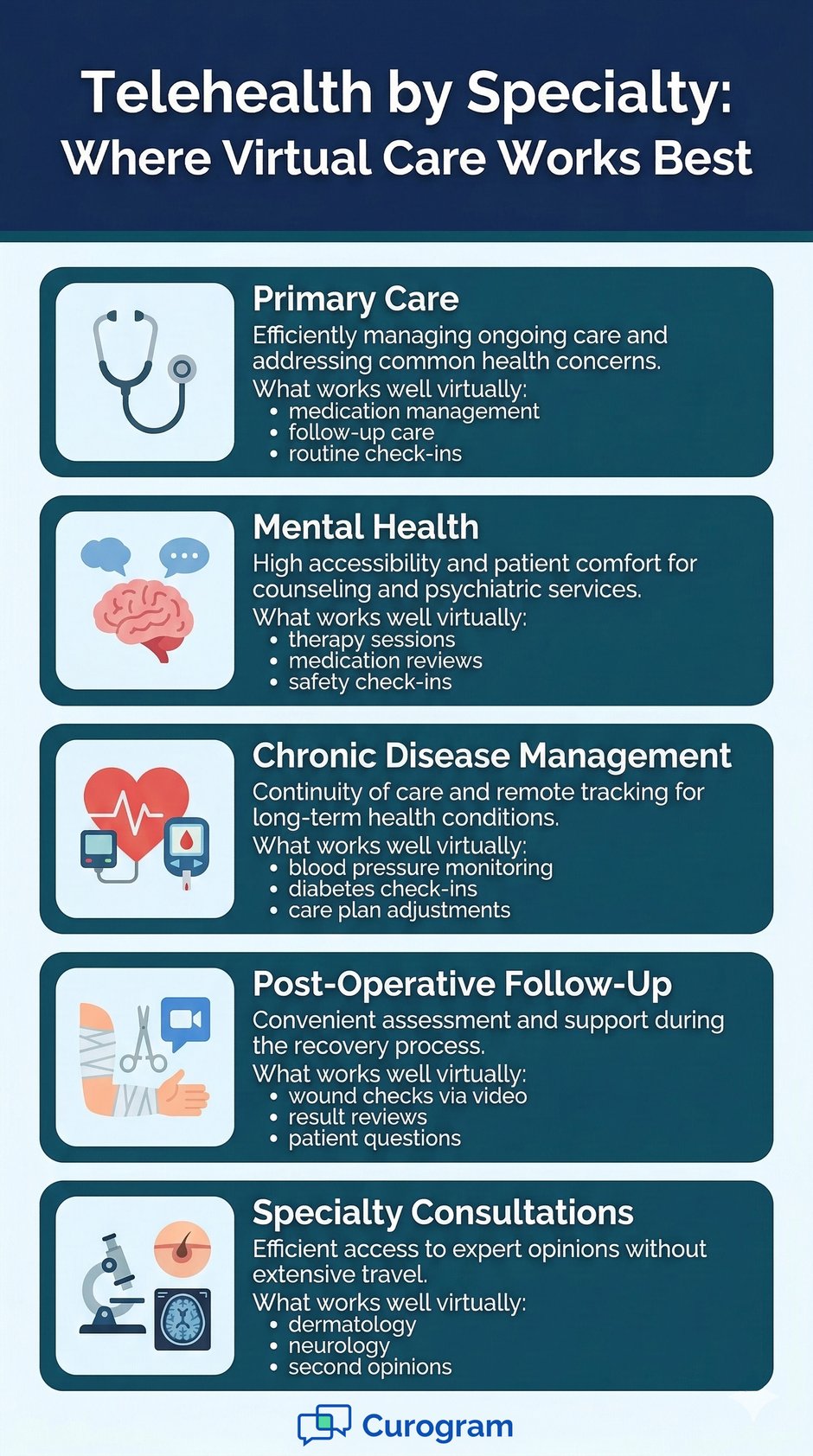
Not all telehealth visits are the same. The best approach for a primary care check-in is different from a mental health session or a post-surgery follow-up. Tailoring your approach by specialty makes a real difference in care quality.
Primary care and mental health are the two specialties where telemedicine has made the biggest impact. Both involve conditions that often do not require a hands-on physical exam, and both benefit from easy, frequent access to care.
In primary care, virtual visits work well for medication management, follow-up care, and common acute conditions. Providers can use telehealth to extend care between annual wellness visits. This keeps patients more connected to their health without adding extra office trips.
Primary care telehealth works best when there is already a provider-patient relationship in place. Established patients know their provider, can describe symptoms accurately, and feel comfortable asking questions on a video screen.
Set up primary care virtual visits with a clear intake process. Confirm medications, recent vitals (which patients can collect at home with basic tools), and any changes since the last visit. Use your EMR's structured templates to document findings efficiently and consistently.
Mental health telehealth — often called teletherapy — has grown faster than almost any other specialty. Patients value the privacy and ease of seeing a therapist from home. Many providers find that patients are more open in a familiar, comfortable environment.
That said, teletherapy has unique safety requirements. Providers must assess for safety risks and have a clear crisis plan for every patient. Knowing the patient's location at the start of each session is not just best practice. In many states, it is a legal requirement.
Telehealth is a strong fit for managing chronic conditions like diabetes, high blood pressure, and heart failure. Regular virtual check-ins let providers monitor progress, adjust medications, and address concerns before they become emergencies.
Connected devices can make these visits even more useful. A patient who tracks their blood pressure at home and shares readings via a connected device gives their provider real data to work with, without requiring a trip to the clinic.
For chronic disease management, consistency matters most. Set a regular schedule of virtual check-ins. Use automated reminders to keep patients on track. Make sure your telehealth documentation captures trends over time, not just a snapshot from one visit.
Patients with chronic conditions often have multiple providers. Strong care coordination — supported by EMR integration and shared visit notes — makes sure the whole care team stays informed. This is where solid telehealth implementation and data sharing pay off the most.
Post-op telehealth visits work well for many types of surgical follow-up. Providers can check wound healing via video, review test results, and address patient questions without requiring a clinic trip. This is especially helpful for patients who live far from their surgeon.
Specialty consultations via telehealth are most effective when paired with strong referral communication. A detailed referral note and a warm handoff between the primary provider and specialist reduce the chance of important information getting lost. Set clear expectations for who will follow up with the patient and when.
Running a successful telehealth program is about more than having the right technology in place. It takes thoughtful clinical protocols, clear patient communication, solid legal compliance, and a team that knows what they are doing. When all those pieces fit together, virtual care becomes a genuine asset, not just a convenience.
The telemedicine best practices covered in this guide are not just theory. They reflect what high-performing practices are doing to make virtual care work. From how you structure a virtual exam to how you code a claim, every detail adds up to a better experience for your patients and a healthier bottom line for your practice.
A few themes run through every section. Clarity wins. Clear patient instructions, clear documentation, and clear billing practices prevent most of the problems that derail telehealth programs. Compliance cannot be an afterthought, whether it is a Business Associate Agreement, an informed consent form, or a DEA prescribing rule, the legal side of telehealth requires active, ongoing attention.
And perhaps most importantly: the patient experience matters. A patient who feels confused or unsupported after a virtual visit is not likely to book another one. Strong communication before, during, and after each appointment is what separates good virtual care from great virtual care. It is also what drives the word-of-mouth that grows your practice.
Technology plays a supporting role, not a starring one. The right platform makes everything easier. But even the best platform will not save a visit that lacks a clinical structure or a post-visit follow-up plan.
The good news is that all of these best practices are achievable even for smaller practices with limited resources. Start with the basics: a HIPAA-compliant platform, clear patient instructions, complete documentation, and consistent billing. Then build from there, one layer at a time.
Tools like Curogram can help simplify several of these layers. From automated reminders and digital patient forms to two-way texting and multi-user telemedicine, a connected communication platform supports your virtual care workflow at every step without adding complexity.
Telehealth is not slowing down. Patient expectations are rising. Payer coverage keeps expanding. Practices that commit to doing virtual care well — following solid telehealth guidelines, training their teams, and constantly looking for ways to improve — will be in the strongest position to grow.
The goal is not perfection from day one. The goal is a real plan, honestly reviewed, and steadily improved. Start with one area from this guide that needs attention in your practice. Act on it.
Request a free demo because virtual care done right is healthcare done right, and your patients will feel the difference.
Frequently Asked Questions
 Jo Galvez : 3/22/26, 11:00 AM
Master telemedicine with comprehensive best practices guide. Clinical, technical, legal, and operational guidelines for successful virtual care...
 Aubreigh Lee Daculug : 2/14/26, 11:00 AM
Discover a seamless telehealth solution for medical practices. Learn how Curogram simplifies virtual care.
 Jo Galvez : 4/11/26, 1:00 PM
Boost telemedicine patient engagement with proven strategies. Pre-visit, during-visit, and post-visit tactics to improve satisfaction and outcomes.