Skip to the main content.

10 min read

What Is a Patient Communication Platform? A Guide for Practices

What Is a Patient Communication Platform? A Guide for Practices
 💡 A patient communication platform is a tool that helps medical practices manage all patient messages from one place. It handles two-way texting, visit reminders, intake forms, billing alerts, and team chat — all while staying HIPAA safe. Unlike an EMR, which stores health records, this type of platform is built to make real conversations happen faster.

Practices that use one often see fewer no-shows, shorter hold times, and less stress on front desk staff. Key features to look for include two-way SMS, EMR sync, custom reminders, and secure messaging. If your phones ring nonstop, patients wait too long for replies, or your no-show rate sits above 10%, it may be time to add a patient communication platform to your workflow.

Your front desk team picks up the phone, puts a caller on hold, and answers a second line — all while a third call rings through. Sound familiar?

This is the reality for most medical practices. Staff spend hours each day on calls that could be a simple text. Patients get stuck on hold. Messages fall through the cracks. And no one has time to follow up on missed visits.

A patient communication platform fixes this by bringing all your patient messages into one place. Instead of juggling phone calls, voicemails, and portal logins, your team can text patients, send reminders, share intake forms, and handle billing alerts from a single screen.

But not every tool on the market does the same thing. Some only send one-way blasts. Others lack the security your practice needs to stay safe. And many don't connect with your EMR at all, which means double the data entry.

This guide breaks down what a patient communication platform really is, how it differs from your EMR, and what to look for when picking one. Whether you run a solo clinic or manage a group practice, this article will help you figure out if your current setup is holding you back — and what a better option looks like.

By the end, you'll know the core features to expect, the real benefits across your team, and how to choose a platform that fits your workflow. Let's start with the basics.

What Is a Patient Communication Platform?

A patient communication platform is a single tool that lets your practice send, receive, and manage every message to and from your patients. Think of it as the hub that connects your front desk, your providers, and your patients — all through fast, simple channels like text messages.

At its core, this type of healthcare communication platform handles tasks like two-way texting, visit reminders, digital intake forms, billing alerts, and team chat. Instead of using three or four tools to do all of this, your staff works from one screen.

Here's what that looks like in practice. A patient texts your office to ask about a lab result. Your front desk sees the message right away and replies in seconds — no phone call, no hold time, no voicemail.

That same patient gets an automated reminder two days before their next visit. When they arrive, their intake forms are already filled out on their phone.

This isn't a nice-to-have anymore. It's the standard patients expect.

The reason this matters is simple: most people prefer texting. They text friends, family, and coworkers every day. When a doctor's office calls, they often let it go to voicemail. But a text? They read it within minutes.

A good healthcare communications platform brings all of these touch points together. It lets your team move faster, respond sooner, and stay organized. It also keeps a full record of each conversation, so nothing gets lost.

In short, a patient communication platform replaces the patchwork of phone calls, portal messages, and sticky notes with one clear, secure system. It saves time for staff and creates a better experience for the people you serve.

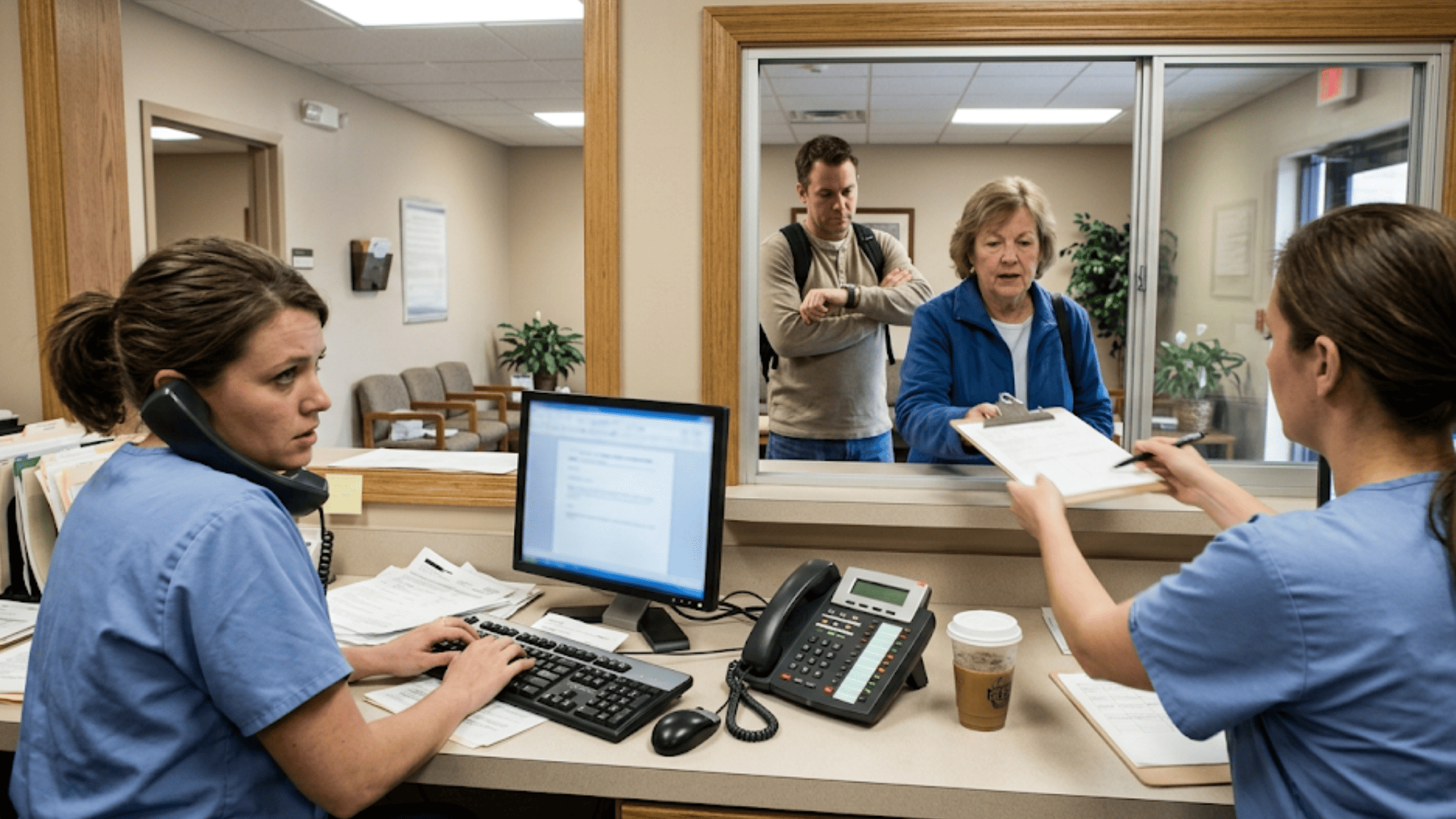
Busy medical front desk staff juggling phone calls and paper forms while patients wait in line at the check-in window

How a Patient Communication Platform Is Different from Your EMR

Many practice owners ask, "Why can't I just use my EMR for patient messages?" It's a fair question. Your EMR already holds patient records, visit notes, and billing data. But here's the key difference: an EMR is built to store data, not to have real-time conversations.

Most EMR messaging tools are clunky. They rely on patient portals that require a login, a password, and several clicks just to send a basic message. That's a big ask for patients who simply want to confirm a visit or ask a quick billing question.

Here's how the two compare side by side:

Feature

EMR Messaging

Patient Communication Platform

Two-way texting

Rarely supported

Built-in

Patient portal login needed

Yes

No

Automated reminders

Basic or manual

Custom and automated

Response time for patients

Hours to days

Minutes

Digital intake forms

Limited

Fully supported

Team/staff messaging

Not included

Built-in

Billing text alerts

Not standard

Supported


When you rely only on your EMR for outreach, you risk slow response times and missed messages. Patient communication software is built to close that gap. It gives your team the tools to have quick, direct exchanges without forcing patients to log in somewhere.

This doesn't mean you should ditch your EMR. The two work best together. A strong communication platform syncs with your EMR so your data stays in one place, but your conversations happen where patients actually respond — on their phones.

Think of your EMR as the filing cabinet. Your patient communication platform is the front desk phone and mailbox, made faster and smarter. One stores the data. The other makes the conversation happen.

Core Features Every Patient Communication Software Should Have

Not all platforms are created equal. Some look great on a demo but fall short once your staff starts using them. Before you commit, make sure the patient interaction software you're reviewing checks these boxes.

Here's a quick-reference table of must-have features:

Feature

Why It Matters

Two-way SMS

Lets patients reply to messages instead of calling back

Automated reminders

Cuts no-shows by sending timely visit alerts

Digital intake forms

Saves time in the waiting room and cuts paper costs

HIPAA-safe messaging

Protects patient data and keeps your practice in line

EMR sync

Avoids double data entry and keeps records current

Team/staff messaging

Lets your team chat without using personal phones

Billing text alerts

Gets patients to pay faster with simple text links

Patient surveys

Captures feedback and drives online reviews


Let's dig into a few of these:

  • Two-Way SMS is the backbone of any solid platform. Patients should be able to text your office just like they text a friend. If a tool only sends one-way blasts, it's not enough.

  • Automated Reminders are the next big win. Based on our internal data, practices using smart reminders see no-show rates drop by up to 75%. One clinic, Atlas Medical Center, went from a 14.20% no-show rate to just 4.91% in three months.

  • EMR Sync is what separates real patient communication software from basic texting apps. If your platform doesn't talk to your EMR, your staff will waste time entering data twice.

  • HIPAA-Safe Messaging is non-negotiable. Any platform you use must encrypt messages and follow strict rules to protect patient info. If it doesn't, you're putting your practice at risk.

  • Patient Surveys help you gather real feedback and boost your online reviews — which is how new patients find your practice in the first place.


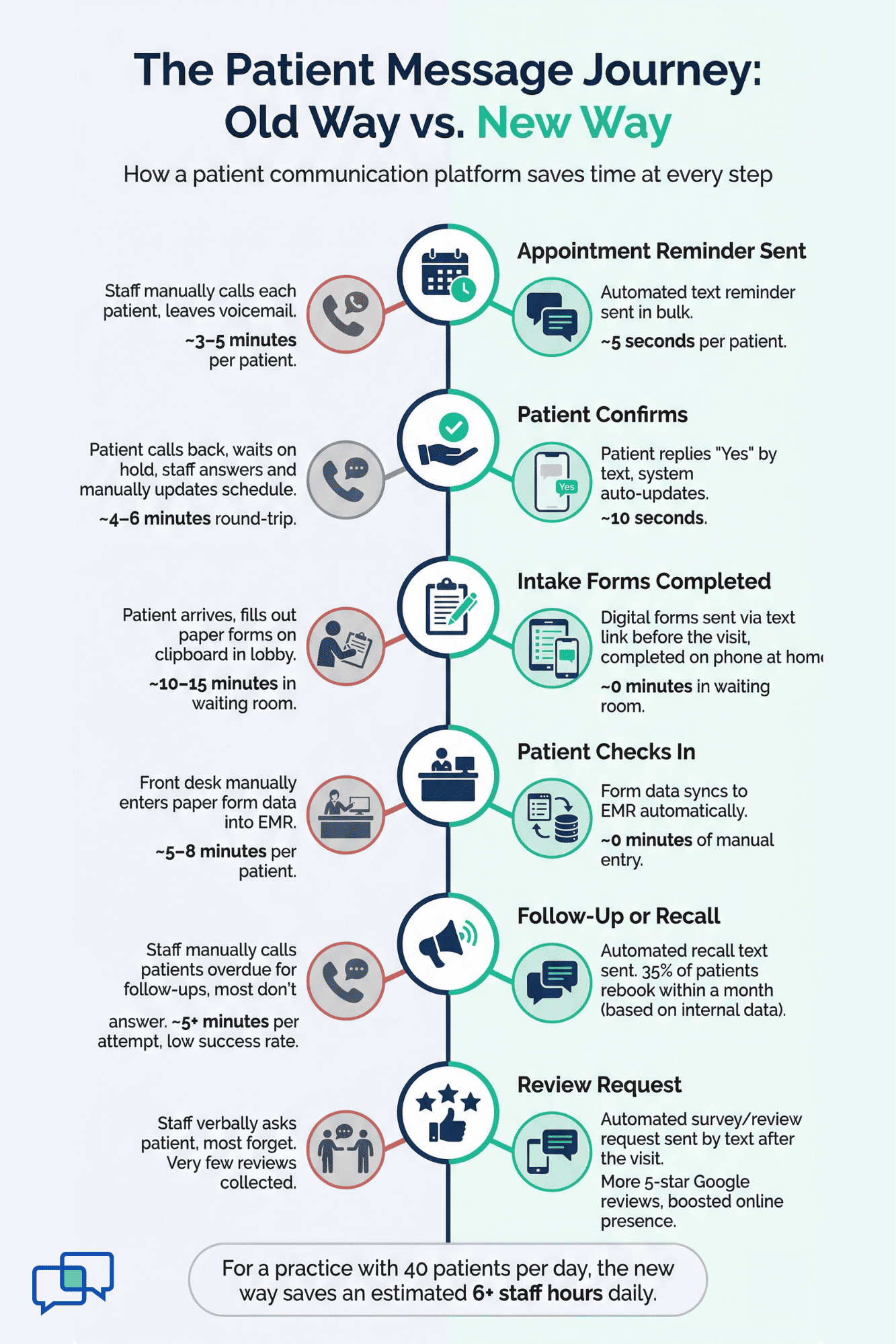
  • Infographic comparing time spent on phone calls versus a patient communication platform at each step of the patient journey

The Key Benefits of Using a Healthcare Communication Software

The right healthcare communication software doesn't just make texting easier. It changes how your entire team works day to day. The impact is felt at every level — from the front desk to the exam room.

Front Desk Staff

Fewer phone calls mean fewer hold queues and less time spent on tag. Based on our internal research, practices that adopt two-way texting can cut phone volume by as much as 50%. That means your team can focus on patients who are standing right in front of them.

Providers

Less time chasing down patients means more time for care. When reminders go out on their own, doctors aren't waiting on no-shows or scrambling to fill empty slots. That flow makes the workday far less stressful.

Patients

Faster replies mean a better experience. No one likes sitting on hold for ten minutes to confirm a visit. With text-based messaging, patients get answers in minutes, not hours. They also fill out forms ahead of time, which means shorter waits at the office.

Practice Managers

The numbers speak for themselves. Based on our internal data, practices using automated reminders see a 10–20% increase in revenue, thanks to fewer missed visits and more same-day bookings. That also frees up staff to handle higher-value tasks instead of chasing down confirmations.

Here's a quick snapshot of how it adds up:

Role

Key Benefit

Front desk

Up to 50% fewer phone calls

Providers

Fewer no-shows, less disruption

Patients

Faster replies, shorter wait times

Practice managers

10–20% revenue increase, better reviews


When everyone on the team benefits, it's not just a tool — it's a shift in how your practice operates.

How to Know If Your Practice Needs a Dedicated Communication Platform

Most practices don't realize they need a better system until the cracks start showing. The good news is, the signs are easy to spot once you know where to look. Use this as a quick self-check.

Your Phones are Always Ringing

If your front desk spends most of the day answering calls — many of them for simple tasks like confirming visits or asking about hours — that's a red flag. Those calls could be handled in seconds with a text.

Patients Complain About Response Times

When people can't reach your office quickly, they get frustrated. Some may leave a bad review. Others may just leave for a different practice. Either way, slow replies cost you.

Your No-Show Rate is Above 10–15%

The industry average for no-shows sits around 18–23% depending on the field. If your rate is above 10%, you're losing revenue every single week. Based on our internal data, practices that switch to automated reminders cut that number in half or more.

Your Team Plays Phone Tag Daily

Staff calls a patient, leaves a voicemail, waits for a call back, and repeats. This wastes hours of labor each week. A two-way text gets a reply in minutes, not days.

You Still Use Paper Forms in the Lobby

Paper intake slows down check-in, adds manual entry work, and increases the chance for errors. A digital option sent before the visit saves time on both sides.

Staff Feels Burned Out

When your team is stuck doing repeat tasks all day — dialing numbers, leaving messages, printing forms — morale drops. Giving them better tools helps them do more in less time.

If three or more of these sound like your practice, it's probably time to look at a dedicated platform. The problems only grow as your patient list gets bigger.

What to Look for When Choosing Patient Communications Software

Once you've decided your practice needs a better system, the next step is picking the right one. There are dozens of platforms out there, and not all of them will fit your workflow. Here's a simple framework to guide your choice.

Ease of Use

If the tool is hard to learn, your team won't use it. Look for patient communications software that your staff can pick up in minutes, not weeks. For example, Curogram trains new staff in as little as 10 minutes, which means less downtime and faster results.

EMR Fit

The platform must work with your current EMR — not replace it. Some tools only support a handful of systems. Others sync with nearly any EMR on the market. Ask about this before you sign anything.

HIPAA Safety

Any tool that handles patient data must meet strict safety rules. Make sure the platform encrypts messages, limits access, and has clear policies in place. This is a deal-breaker, not a bonus.

Pricing Model

Some platforms charge per message. Others charge per user or per location. Know what you're paying for and what's included. Hidden fees add up fast.

Two-Way Messaging

One-way blasts aren't enough. Your patients need to be able to reply. If the tool doesn't support two-way texting, cross it off the list.

Onboarding Support

A great product with bad onboarding leads to a failed launch. Ask about setup help, training calls, and ongoing support after go-live.

Here's a quick decision checklist to keep things simple:

  • Can my staff learn it in under 30 minutes?
  • Does it sync with my EMR?
  • Is it HIPAA safe?
  • Can patients text us back?
  • Is pricing clear and flat?
  • Do they help with setup and training?

If the answer to all six is yes, you're on the right track.


How Curogram Works as Your Patient Communication Platform

Curogram was built to solve one core problem: medical practices waste too much time on phone calls, no-shows, and scattered tools. It brings everything into one place — texting, reminders, intake, billing, and team chat — so your staff can do more with less.

  • It works with any EMR. Unlike many platforms that only support a short list of systems, Curogram syncs with nearly every EMR on the market. That means no double data entry and no need to switch your current setup.

  • Two-way texting, built in. Patients can text your office just like they'd text a friend. Your team sees every message in one inbox, responds fast, and keeps a full record. This alone can cut your phone volume by up to 50%, based on our internal research.

  • Smart reminders that work. Curogram sends custom visit reminders by text, which patients actually read and respond to. Based on our internal data, this drives an average confirmation rate above 75% — and no-show rates that are 53% lower than the industry average.

  • Digital forms sent before the visit. Patients fill out intake forms on their phones ahead of time. No clipboards. No scanning. No manual entry. This speeds up check-in and cuts paper waste.

  • Team chat, without personal phones. Staff can message each other securely inside the platform. No more using personal cell phones or group texts to talk about patient schedules.

  • Patient recalls that bring people back. Based on our internal data, 35% of patients who received a recall text scheduled a follow-up within a month. In one case, over 1,240 patients were seen from recall messages alone.

Curogram is the one-stop-shop healthcare communication platform built for the way modern practices actually work.

Conclusion

If you've read this far, you likely see the gap between how your practice talks to patients now and how it could work. Phone tag, missed calls, and long hold times don't just slow your team down — they push patients away.

A patient communication platform closes that gap. It replaces scattered tools with one simple system that handles texting, reminders, forms, billing, and team chat. And it does all of this while keeping data safe and synced with your EMR.

The results are real. Practices that make the switch see fewer no-shows, faster replies, happier staff, and stronger revenue. The front desk spends less time on the phone. Patients get the quick, easy access they expect. And providers can focus on care — not callbacks.

The key is picking a platform that fits your workflow, works with your EMR, and is easy enough for your team to adopt without a steep learning curve. Look for two-way texting, smart reminders, and strong onboarding support. If it checks those boxes, you're in good shape.

It also helps to use a tool built for healthcare from the ground up. Generic messaging apps might look cheaper, but they lack the safety, the EMR sync, and the features your practice really needs.

If your phones are ringing off the hook, your no-show rates are climbing, or your staff is burned out on admin work, now is the time to act. The longer you wait, the more time and money you lose.

Every day without a patient communication platform is another day of missed calls, no-shows, and burned-out staff. Schedule a demo now to take the first step toward a smoother, smarter practice.


Frequently Asked Questions

How does a patient communication platform reduce no-shows in a medical practice?
It sends automated text reminders before each visit. Patients confirm, cancel, or reschedule by replying to the text, which keeps your schedule full and your staff free from manual follow-up calls.
How is a patient communication platform different from a patient portal?
A portal requires a login and multiple steps to send a message. A communication platform uses direct two-way texting, so patients reply instantly from their phone without needing an app or password.
Why should a practice use a separate communication tool instead of relying on the EMR's built-in messaging?

EMR messaging is slow and limited. A dedicated platform offers two-way SMS, automated reminders, intake forms, and billing texts — features most EMRs don't support well or at all.

How does two-way texting help front desk staff manage high call volumes?

Staff can handle multiple text conversations at once instead of one phone call at a time. This cuts phone volume by up to 50% and frees the team to assist patients in the office.

How long does it take to set up and train staff on a patient communication platform like Curogram?

Most teams are trained in as little as 10 minutes. Curogram is designed to feel like regular texting, so the learning curve is minimal and adoption happens fast.