Patient Communication Evolution: Phone to Multi-Channel Guide (2026)
💡 Patient communication evolution refers to the shift from phone-only contact to multi-channel outreach in healthcare. For years, medical...

11 min read
Mira Gwehn Revilla
:
March 21, 2026
Your patients don't all want to hear from you the same way. Some prefer a quick text. Others check email. A few still want a phone call. If your practice relies on just one or two channels, you're likely missing people.
That's where a multi-channel patient communication strategy comes in. It's the idea of using several channels — text, email, phone, portals, and apps — in a way that's connected and easy to manage. Not as separate tools, but as one system that works together.
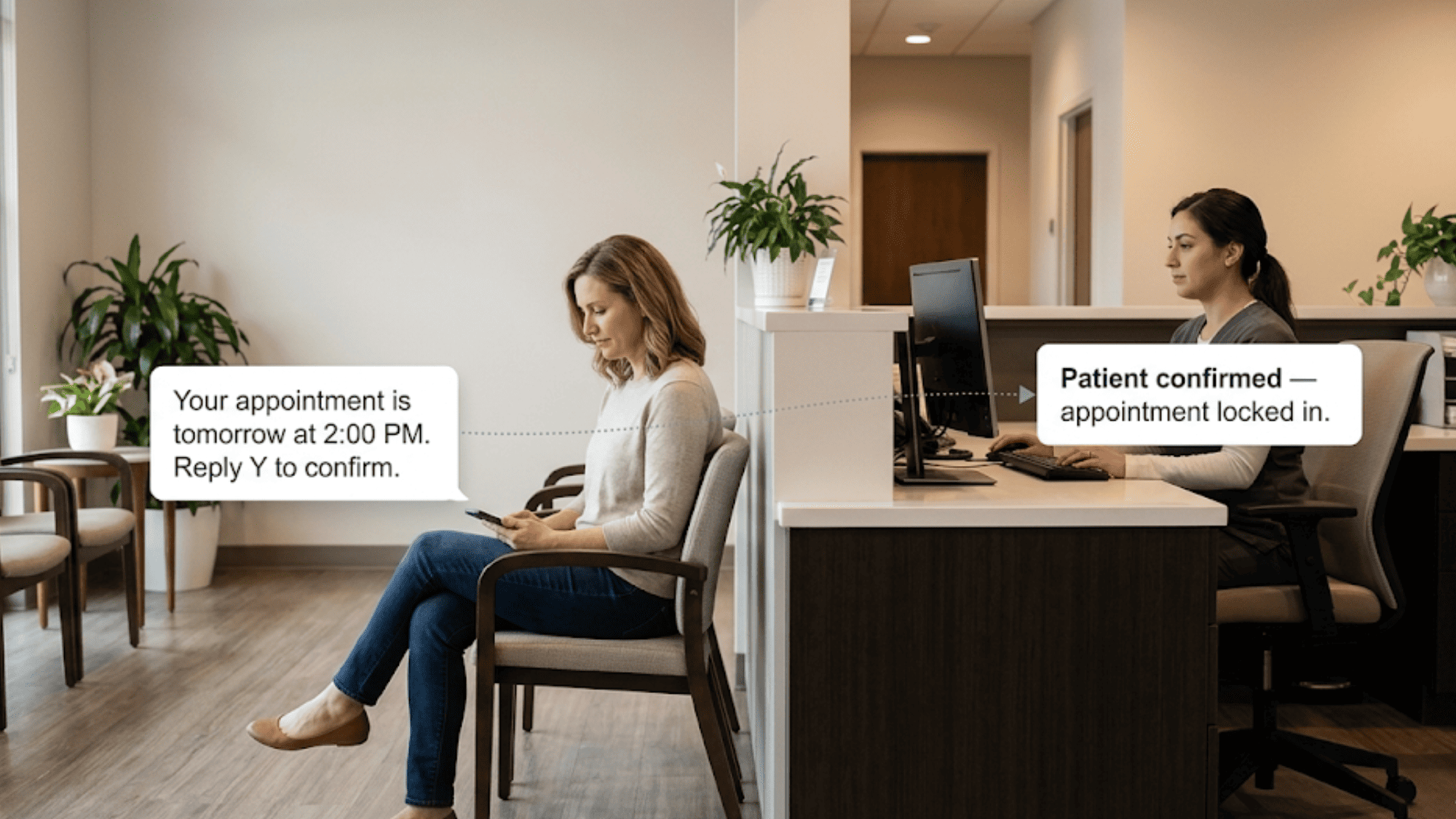
Think about it this way. A patient books online, gets a text reminder, checks in through a portal, and later receives a follow-up email. Every step feels smooth. Nothing gets lost. That's what integrated patient communication looks like in action.
But here's the catch — adding more channels without a plan creates chaos. Staff get confused. Messages overlap or go missing. Patients get annoyed instead of engaged. The goal isn't just "more channels." It's the right channels, used at the right time, for the right purpose.
This guide walks you through exactly how to build that kind of communication channel strategy. You'll learn how to assess what you have now, choose the right mix, design smart workflows, and measure what's working.
Whether you run a single-location clinic or a multi-site practice, the steps are the same. The tools may vary, but the thinking behind them doesn't. By the end, you'll have a clear path toward unified patient communication that actually works — for your team and your patients.
Let's get into it.
Patients today expect choices. They shop online, bank on their phones, and order food through apps. Healthcare shouldn't feel stuck in the past. When your practice offers only one way to get in touch, you risk losing people before they even walk through the door.
A solid approach to patient engagement channels makes a real difference. Patients who can reach you in the way they prefer are more likely to respond. They confirm visits. They show up. They come back for follow-ups.
Based on our internal data, practices using text-based outreach saw a 35% appointment reconversion rate among patients who had fallen off their care plans. That's 1,240 patients brought back from recall messages alone.
It's not just about patients, either. Staff benefit when channels are connected. Instead of chasing down patients with phone calls all day, your front desk can handle more tasks in less time. Our internal research shows that practices using automated reminders confirm over 1,100 appointments per month — without a single manual follow-up call.
There's also a competitive edge. Practices that offer omnichannel healthcare experiences stand out. Patients notice when booking, reminders, and follow-ups all feel easy. That positive experience leads to better reviews, stronger word of mouth, and higher retention
In fact, based on our internal data, 90% of patients at one multi-location practice left 5-star reviews after switching to an automated survey system tied to multiple channels.
In short, a multi-channel approach isn't a luxury. It's the baseline for modern patient care.
Before you add new tools, look at what you already use. Most practices have some mix of phone, email, a patient portal, and maybe text messaging. But few have taken the time to see how well each one actually works.
Start with a simple inventory. List every channel your office uses to talk to patients. Include the obvious ones like phone and email.
But also count things like your website contact form, patient portal messages, and any texting tools. Write down what each one is used for — reminders, billing, lab results, general questions.
Next, check the numbers. How many patients open your emails? How many respond to texts? How often does a phone call go to voicemail? These usage stats tell you where your efforts pay off and where they don't. If 80% of your calls go unanswered but 90% of texts get a reply, that's a clear signal.
Then do a gap check by patient group. Older patients may rely on phone calls. Younger ones may never check a portal. Patients with chronic conditions may need more frequent check-ins. Ask yourself: are you reaching each group in the way that works best for them?
Finally, look at your tech setup. Are your tools connected, or do they operate in silos? If your text platform doesn't talk to your EMR, your staff ends up doing double work. A good assessment gives you a clear starting point so you can plan smart upgrades instead of guessing.

Picking the right channels isn't about using every tool out there. It's about matching each channel to a clear purpose. A strong communication channel strategy starts with knowing your patients and how they want to hear from you.
Begin with your patient mix. A pediatric clinic will have different needs than an orthopedic practice. If most of your patients are under 40, text and app-based tools will likely get the best response. If you serve an older population, phone and email might still play a big role.
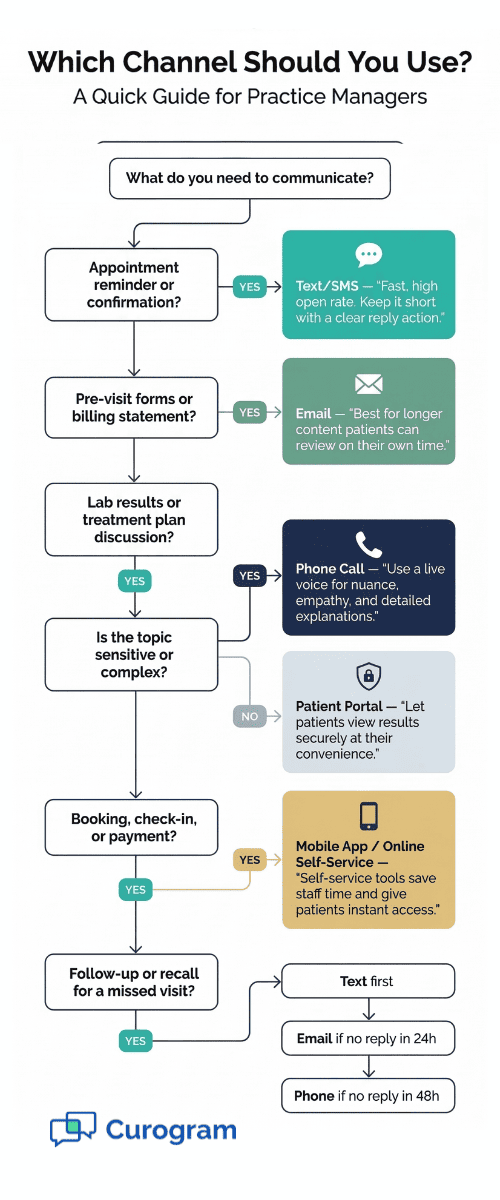
Next, map each channel to a use case. Here's a simple way to think about it:
|
Channel |
Best For |
Example |
|
Text/SMS |
Quick reminders, confirms |
"Your visit is tomorrow at 2 PM. Reply Y to confirm." |
|
|
Longer updates, forms, billing |
Pre-visit instructions, billing statements |
|
Phone |
Urgent matters, complex topics |
Lab result discussions, care plan changes |
|
Patient Portal |
Records, secure messaging |
Viewing test results, requesting refills |
|
Mobile App |
Self-service, real-time access |
Booking, check-in, payment |
This kind of mapping keeps things clear for both staff and patients. Everyone knows which channel to use and when.
After mapping, think about cost and effort. Some channels need more setup. Others need ongoing upkeep. Rank them by impact and ease of use. Then roll them out in phases — start with the ones that solve your biggest pain points first.
Having multiple channels is a good start. But the real value comes when those channels work as one system. That means building workflows where each step connects to the next — no gaps, no repeats, no confusion.
Start by mapping the patient journey from first contact to follow-up. Picture a typical visit: the patient books, gets a reminder, checks in, sees the provider, and gets a follow-up message.
At each step, a different channel may work best. Booking might happen online. The reminder goes by text. Follow-up instructions land in email. The key is to plan which channel handles which step.
Then set rules for when to switch channels.
|
For example: If a patient doesn't reply to a text reminder within 24 hours, send an email. If there's still no reply, trigger a phone call. This kind of escalation path makes sure no patient slips through the cracks. It also saves your staff from guessing what to do next. |
Look for spots where you can automate. Appointment reminders, post-visit surveys, and recall messages are all great candidates.
Based on our internal research, practices that automated their confirmation process hit an average confirmation rate above 75% — all without staff picking up the phone.
Finally, make sure your workflows feel smooth to the patient. A person who booked online shouldn't get a phone call asking them to confirm by phone.
The experience should feel connected. When your integrated patient communication workflows are well designed, patients notice the ease — and your staff notice the lighter workload.
The tools you use matter less than how well they connect. A practice with five great platforms that don't share data will still struggle. The goal is a setup where all your channels feed into one shared system.
That starts with your EMR. It's the center of your patient data. Any channel you use — text, email, portal, app — should be able to send and receive data from your EMR.
That way, when a patient confirms an appointment by text, the status updates in your schedule. When they fill out a form online, the info shows up in their chart. No one has to re-enter it by hand.
Look for tools that offer open connections or API access. This lets your systems talk to each other in real time. A unified patient communication platform that links all your channels to one dashboard is the simplest path to get there.
Curogram, for instance, serves as an integration hub that ties two-way texting, reminders, surveys, and forms directly into your existing EMR. There's no need to replace what you already have. It layers on top and connects everything. This kind of setup means less work for staff and fewer errors in patient records.
When choosing your tech stack, ask three questions:
Does it connect to our EMR?
Can we manage all channels from one place?
Does it scale as we grow?
If the answer to all three is yes, you're on the right track. If not, you may end up with more tools — and more headaches — than you started with.
Each channel has its own strengths. To make your multi-channel patient communication strategy work, treat each one with a clear plan — not a one-size-fits-all approach.
The common thread across all these channels? Consistency. Your tone, timing, and info should match no matter where the patient hears from you. An omnichannel healthcare experience means the patient feels like they're dealing with one practice — not five separate systems.
This your speed tool. Use it for reminders, quick updates, and two-way chats. Keep messages short and include a clear action, like "Reply Y to confirm."
Based on our internal data, one practice reduced no-show rates from 14.20% to 4.91% in just three months using automated text reminders — that's 3X better than the industry average.
Email is best for longer content. Use it to share pre-visit forms, billing details, or health tips. Don't overload inboxes, though. One to two emails per visit cycle is plenty. Make sure your subject lines are clear so patients open them.
Portals give patients self-serve access. They can check results, request refills, or send secure messages. The trick is making the portal easy to use. If it's clunky or hard to log into, people won't use it.
Phone calls still matter. Complex topics like treatment plans, sensitive results, or insurance issues often need a live voice. But don't default to calls for everything. Save them for what truly needs a human touch.
Apps offer real-time access for booking, check-in, and payments. They work best with younger, tech-savvy patients who want to handle things on their own.
Not every patient wants to hear from you the same way. Some love text. Others hate it. A good plan respects these choices and keeps track of them.
Start at intake. When a new patient fills out forms, include a simple question: "How would you like us to reach you?" Give them clear options — text, email, phone, portal. Make it easy to answer, and store that choice in their chart.
Opt-in and opt-out rules matter too. Patients should always have the right to say "stop." If someone opts out of text messages, that choice should take effect right away. Respect goes a long way in building trust, and it keeps you on the right side of the law.
Preferences change over time, so build in ways to update them. A short check-in once a year — "Is text still the best way to reach you?" — keeps your data fresh. You can also add preference updates to your patient portal so people can adjust on their own.
Make sure these choices actually connect to your tools. If a patient says "email only," your text system shouldn't still send them reminders. This is where EMR-linked preference data matters most. When your systems share this info, every channel respects the patient's choice.
Managing patient engagement channels well means listening to what people want — and then following through. It's one of the easiest ways to boost trust and reduce complaints. Patients who feel heard are more likely to stay, engage, and recommend your practice to others.

New tools only work if your team knows how to use them. Rolling out a multi-channel system without proper training leads to errors, frustration, and slow adoption.
Walk your staff through each step: how to send a text, how to check portal messages, how to escalate when a patient doesn't respond. Use real examples from your practice, not just slides. Role-playing a common scenario — like a patient missing a reminder — is more helpful than any manual.
Every staff member should use the same tone and language across channels. A text from one person shouldn't sound different from a text sent by another. Create a few message templates that reflect your practice's voice. This keeps things smooth and on-brand.
Platform training is the hands-on piece. Your team needs to feel comfortable using the dashboard or app. Give them time to practice before going live. If you're using a tool like Curogram, the learning curve is short — most staff get up to speed in under 10 minutes. But even simple tools need a walk-through.
Review how staff are using the channels. Spot issues early — maybe texts are going out too late, or phone scripts need updating. Use these check-ins as coaching moments, not critiques.
Over time, your goal is to build a communication culture. That means your team doesn't just follow steps — they understand why each channel matters. When staff feel confident and clear on the purpose, patients get a better experience across the board.
You can't improve what you don't track. Once your channels are up and running, build a simple system to measure what's working and what's not.
Start with engagement by channel. Look at open rates for email, reply rates for text, and usage stats for your portal. If one channel has low engagement, dig into why. Maybe the timing is off, or the message isn't clear. Small tweaks can make a big difference.
Patient satisfaction scores are another key metric. After a visit, a short survey — sent by text or email — gives you direct feedback. Are patients happy with how you reached them? Do they feel informed?
Based on our internal data, practices using automated post-visit surveys saw 90% of patients leave 5-star reviews. That tells you the experience is landing well.
Track health outcomes where you can. Are patients with chronic conditions keeping up with follow-ups? Are recall messages bringing people back for needed care?
If your text recall campaign brings back 35% of lapsed patients — as our internal research found — that's a clear sign the channel is doing its job.
Don't forget efficiency metrics. How much staff time does each channel save? How many fewer phone calls does your front desk handle? These numbers show the return on your investment in real terms.
A multi-channel patient communication strategy isn't just a nice-to-have. It's a must for any practice that wants to stay relevant, efficient, and patient-friendly. The good news is you don't need to build it all at once.
Start with an honest look at what you have today. Figure out which channels work, which don't, and where the gaps are. Then pick the tools that match your patients' needs — not the ones with the flashiest features. Simplicity wins.
From there, design workflows that connect each channel to the next. Make sure your texts, emails, phone calls, and portal messages all pull from the same patient data. This is the core of integrated patient communication — one system, many touchpoints, zero confusion.
Train your team so they're confident with the tools and clear on the "why" behind each channel. A well-trained staff can turn a good system into a great patient experience. Check in with them often and refine as you go.
Measure everything. Track reply rates, no-shows, satisfaction scores, and staff time saved. Use the data to make smart changes. The practices that grow aren't the ones with the most tools — they're the ones that use their tools well and adapt fast.
The path to unified patient communication is not about doing more. It's about doing what matters, in a way that feels easy for both your team and your patients. When every channel works together, patients feel cared for and staff feel supported.
That's the kind of practice people come back to — and tell their friends about. Start small, stay focused, and build from there. Your patients are already waiting to hear from you in the way that works best for them.
Stop juggling disconnected tools and manual phone calls that drain your front desk's time. Schedule a demo to see how one platform can handle everything automatically.
Start with one or two high-impact channels like texting and email. Tools like Curogram integrate with your existing EMR and scale with you, so costs stay manageable as you grow.
Set clear rules for frequency and timing. One reminder and one follow-up per visit is a good baseline. Always let patients choose their preferred channel and opt out anytime.
Track reply rates, appointment confirmation rates, no-show rates, and patient satisfaction scores monthly. Compare results by channel to see which ones drive the most engagement and adjust accordingly.
💡 Patient communication evolution refers to the shift from phone-only contact to multi-channel outreach in healthcare. For years, medical...
💡 Generational patient communication means matching your outreach style to each age group in your practice. Gen Z and Millennials want...
💡 Curogram is a HIPAA-compliant patient texting platform built for medical practices. It offers two-way text messaging, automated appointment...