
.jpg?width=30&height=30&name=square-formal-photo%20(1).jpg) Mira Gwehn Revilla
Mira Gwehn Revilla
Medical SMS Messages: How Practices Use Texting to Save Time
 Aubreigh Lee Daculug : 5/10/26, 1:00 PM
Medical SMS messages save time and keep patients informed. Learn how practices use texting and what makes a strong medical messaging system.

Your front desk staff just spent two hours calling patients. Half didn't pick up. A few voicemails bounced. And three patients still didn't show up today.
This is the daily grind for most medical practices. Staff spend hours each week on phone calls that often go nowhere. Meanwhile, empty slots eat into your revenue and throw off your whole schedule.
There's a better way to handle this. Automated appointment reminders in healthcare take the manual work off your team's plate. They send the right message at the right time, every single time, without anyone picking up a phone.
Think about what that means for a busy practice. No more sticky notes. No more missed calls. No more hoping a patient remembers their visit next Tuesday. The system handles it all in the background while your staff focuses on the patients who are already in your office.
The results speak for themselves. Practices that switch from manual calls to automated patient communication see big drops in no-shows. They also report less stress at the front desk and smoother daily workflows.
In this guide, you'll learn why scheduling automation in healthcare matters now more than ever. We'll walk through the types of reminders you can automate, how to build your own reminder workflow, and the best ways to manage multiple channels like text, email, and voice.
You'll also see how to use smart rules to tailor reminders for different patient types. Whether you run a solo practice or manage a group with dozens of providers, this guide will help you set up appointment reminders that work. Let's get started.
Manual reminders are a huge time drain. Consider a practice that sees 40 patients a day. If each call takes about three minutes, that's two full hours of staff time just on reminders. And that doesn't count the time spent on callbacks, voicemails, or chasing down no-replies.
The problem gets worse as your practice grows. When you add more providers and more patients, you need more staff hours to keep up. But hiring more people just to make phone calls isn't a smart use of your budget. This is where scheduling automation in healthcare becomes a real game-changer.
Human error is another big concern. A staff member might forget to call five patients before lunch. They might dial the wrong number or leave out key details. Manual systems just can't deliver the same level of care and detail every single time.
Automated systems work around the clock. They send reminders at 6 AM or 10 PM, whenever your rules say to. Patients get their reminders on time, even on weekends and holidays. Your staff doesn't need to be at a desk for this to happen.
The return on this kind of investment is hard to ignore. Think about it this way: if your average visit brings in $150 and you cut just four no-shows per week, that's $2,400 per month in saved revenue. Over a year, that adds up to nearly $29,000. The cost of most reminder tools is a fraction of that.
On top of the money, there's the morale factor. Front desk teams often feel burned out by phone-heavy tasks.
When you remove that burden, your team can focus on patient check-ins, follow-ups, and other face-to-face work. That leads to better job satisfaction and lower staff turnover, both of which matter in today's tight labor market.
One of the biggest gaps between manual and automated reminders is reach rate. Manual calling depends on someone being at the desk and having time.
In most practices, this means about 60% to 80% of patients get a reminder call. Automated systems reach 100% of your scheduled patients, every time.
Timing also matters more than most people realize. A manual call might go out at 2 PM one day and 10 AM the next. These gaps lead to uneven results. Automated systems follow your timing rules down to the minute, so every patient gets their message at the best possible time.
Automated patient reminders also let you send messages that feel personal, even at scale. You can insert the patient's name, the provider's name, the visit date, and even prep instructions. Doing this by hand for 40 or 50 patients a day would take forever. A system does it in seconds.
Now, let's talk cost. A manual call costs roughly $3 to $5 when you factor in staff wages, phone expenses, and time. An automated text or email costs just pennies. For a practice that sends 800 reminders a month, that's a savings of over $2,000 monthly.
The no-show impact is where things really stand out. Practices that rely only on manual calls often report no-show rates of 15% to 25%. Those that switch to automatic text reminders for patients commonly see rates fall to 5% to 10%. That shift can mean dozens of saved appointments each month.
There's also the issue of tracking. With manual calls, you often have no record of who was called, when, or what was said. Automated tools log every message, every reply, and every failed delivery. This data helps you spot patterns and make better choices over time.
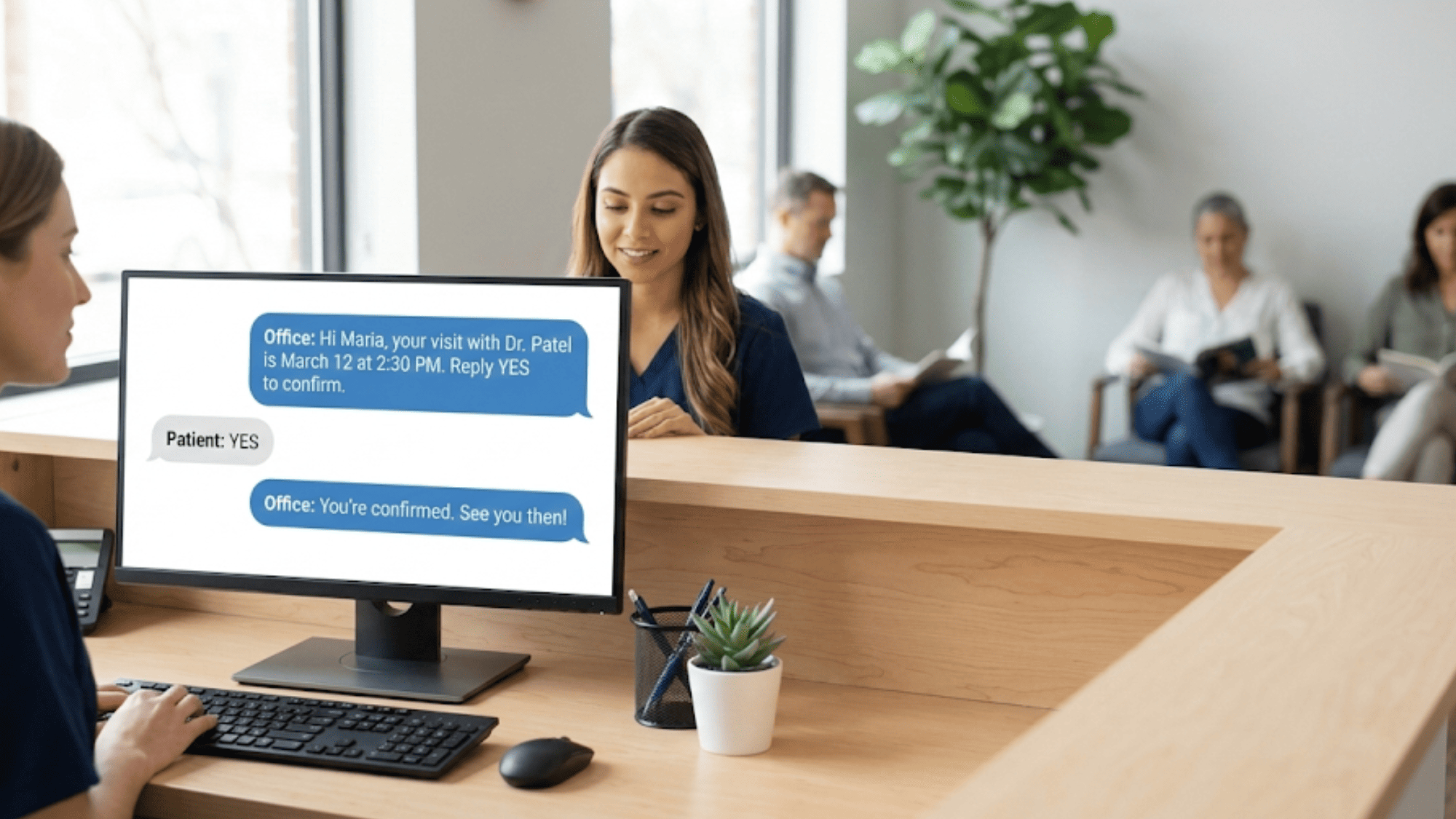
Not all reminders work the same way. The type of automation you use depends on when and why the message should go out. Most systems offer a few core trigger types that you can mix and match.
Time-Based Automation - This is the most common. This is when a reminder goes out a set number of hours or days before the visit. For example, you might send a text 72 hours before, another at 24 hours, and a final one the morning of. This approach gives patients more than one chance to confirm or cancel.
Event-Triggered Automation - It fires based on something that happens in your system. When a patient books an appointment, they get an instant text to confirm the details. When a cancellation opens up a slot, the system can alert the next person on your waitlist. These automatic appointment notifications keep things moving without any manual input.
Patient response triggers add another layer of smart behavior. If a patient doesn't reply to the first reminder, the system sends a follow-up. If a patient confirms, no more messages go out. If they say they need to cancel, the system can start a rescheduling flow right away.
Waitlist-Triggered Automation - This is great for high-demand practices. Say a patient cancels a Monday morning slot. Your system can scan the waitlist and text the first match within minutes. This keeps your schedule full and reduces lost revenue.
You can also build multi-step rules that combine these triggers. For instance, a new patient might get a booking confirmation, then a welcome message with intake forms, then a time-based reminder, and then a final same-day text.
Returning patients might just get a simple two-step sequence. This kind of appointment reminder automation helps you tailor the flow to each patient type.
Setting up a strong reminder workflow starts with mapping out your ideal sequence. Think about the journey from the moment a patient books to the moment they check in. Write down every touchpoint where a message should go out. Here are steps to follow:
Decide how many reminders each patient needs. A good starting point is three: one at the time of booking, one 48 hours before, and one the morning of the visit. For new patients, you might add a fourth message with intake forms or directions to your office.
Define your trigger conditions. Each message needs a clear "if this, then that" rule. For example, if a patient books a visit, send a booking confirmation text within five minutes. If no reply comes within 24 hours of the first reminder, send a follow-up by email.
Write your message templates. Keep them short and clear. A good reminder text might read: "Hi Sarah, this is a reminder of your visit with Dr. Lee on Tuesday, March 4 at 10:00 AM. Reply YES to confirm or CALL to reschedule." Include only what the patient needs to know.
Set up response handling rules. When a patient replies "YES," the system should mark them as confirmed. When they reply "CANCEL," it should open the slot and trigger a reschedule option. This is where reminder workflow automation really shines, as it keeps things moving without staff having to step in.
Reaching every patient with a single channel is tough. People have different habits, and what works for one person may not work for another. That's why the best reminder systems don't rely on just one method. A strong multi-channel approach gives you more ways to connect and fewer missed messages:
Text Messages - This is the top-performing channel for patient reminders. Open rates for SMS sit above 90%, and most people read a text within three minutes. For this reason, many practices use text as their main reminder channel.
Email - It works well as a backup channel. It's great for sending longer content like intake forms, parking directions, or pre-visit prep lists. Open rates are lower than text, usually around 20% to 30%, but email gives you room to share more detail.
Voice Calls - They still have a place, especially for older patients who may not use text as often. Automated voice reminders use recorded or text-to-speech messages to deliver the same info as a text. They work well as a last resort when texts and emails go unanswered.
A smart multi-channel plan layers these options. For example, send a text 48 hours out. If no reply comes in 12 hours, follow up with an email. If there's still no reply 6 hours before the visit, trigger a voice call. This approach makes sure no patient slips through the cracks.
Patient preference also matters. Some people hate phone calls. Others don't check email. When you let patients choose their preferred channel at intake, you boost the odds they'll engage. Most scheduling automation healthcare tools let you store this preference and apply it to every future visit.
Cost is worth thinking about as well. A text message may cost $0.01 to $0.05 each. An email is nearly free. A voice call can cost $0.10 to $0.25.
When you multiply that by hundreds of reminders each month, the channel mix you choose has a real impact on your budget. Stick with text as the default and save costlier channels for fallback use.
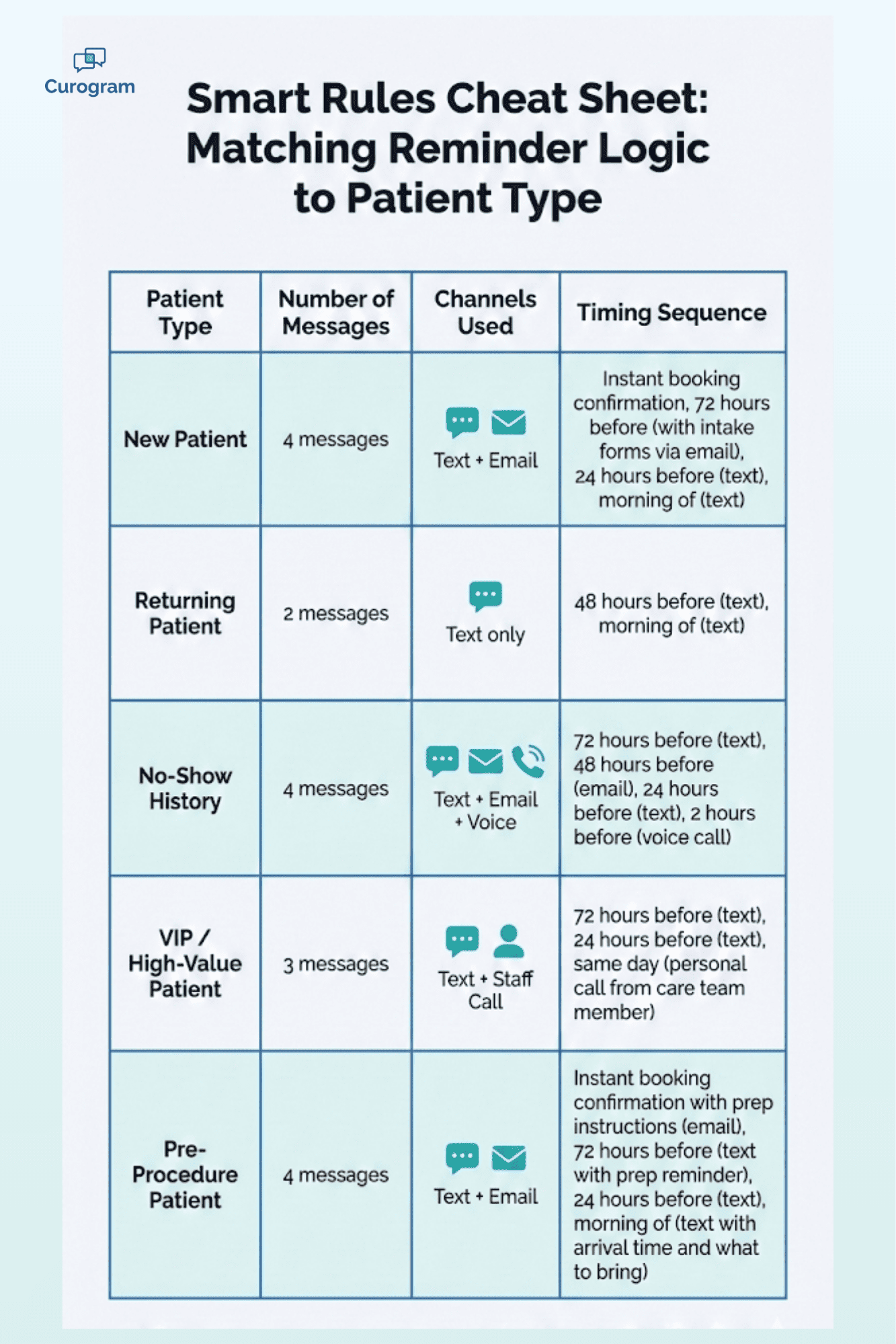
Not every patient needs the same reminder flow. Smart rules let you tailor your automated messages based on who the patient is and what kind of visit they have booked.
Start with new patients versus returning patients. A first-time visitor needs more hand-holding. They might need directions, a list of what to bring, and a heads-up about paperwork. A returning patient just needs a short "see you Tuesday" nudge. Your system should detect the patient type and adjust the message flow.
Visit type matters just as much. A routine check-up and a complex procedure call for very different reminders. A patient coming in for a minor follow-up might get a single text. A patient booked for a 90-minute consult might get a full sequence with pre-visit forms and prep instructions.
Patient history can also guide your rules. If a patient has missed their last two visits, you might send extra reminders or flag them for a staff follow-up call. If a patient always confirms on the first text, you can scale back to a simpler sequence. Using past data to adjust your approach is one of the best forms of automated patient communication.
Day and time logic helps you fine-tune when messages go out. Sending a reminder at 7 AM on a Monday may get a better reply than 9 PM on a Friday. Test different windows and let the data guide your choices. Most tools let you set "quiet hours" so patients aren't bothered late at night.
Some practices also set up VIP handling for high-value or high-risk patients. These patients might get a direct call from a care team member in addition to their automated reminders. The system can flag these patients and route them to a staff queue so nothing falls through the cracks.
Sending reminders is only half the job. The real power of automation comes from what happens when a patient replies.
When a patient texts "YES" or "CONFIRM," your system should auto-mark them as confirmed. This update should sync with your calendar in real time. Your staff can see at a glance who has confirmed and who hasn't, without checking a separate system.
Cancellation handling is just as important. When a patient replies "CANCEL," the system should open up the slot, send a rescheduling prompt, and notify the waitlist. All of this can happen within seconds. No one on your team needs to lift a finger.
Rescheduling requests need a smooth path too. If a patient texts "Can I move to next week?" the system can offer the next three open slots via text.
The patient picks one, and the booking updates instantly. This type of two-way flow saves a huge amount of back-and-forth phone time.
Not every reply fits a neat pattern. Sometimes a patient asks a question like "Do I need to fast before my visit?"
Your system should recognize when a reply doesn't match a standard command and route it to the right staff member. Good platforms use keyword detection or simple language processing to sort these messages.
This two-way approach turns reminders into real conversations. Patients feel heard. Staff stay in the loop. And your schedule stays full.
Practices that use two-way automated systems see higher confirm rates, faster cancellation recovery, and fewer phone calls overall. It's one of the biggest reasons to invest in appointment reminder automation for your practice.
Your reminder system is only as good as its connection to your scheduling data. If the two don't talk to each other, you'll end up with double-bookings, missed updates, and confused patients.
Real-time syncing is the gold standard. When a patient books, cancels, or reschedules, your reminder system should know right away.
A delay of even a few hours can cause problems. Imagine sending a reminder for a visit that was canceled two hours ago. That's a bad patient experience.
Data needs to flow in both directions. Your scheduling system should push new appointments to the reminder tool. And when a patient confirms via text, that status should update in your scheduling system. This kind of two-way sync removes the need for staff to update records by hand.
Most modern tools connect through an API, which is a direct digital link between two software systems. Some older practice management platforms may use file-based syncing, which is slower but still works. If your system uses HL7, a common healthcare data format, make sure your reminder tool supports it.
When you evaluate platforms, ask about their EMR and practice management integrations. The best tools work with systems like Athenahealth, eClinicalWorks, DrChrono, and others. A tool that doesn't connect to your existing stack will create more work, not less.
Troubleshooting is part of the process. Common issues include sync delays, duplicate records, and data mismatches. Run a test cycle with a small batch of patients before full rollout.
Check that names, dates, times, and provider details all come through correctly. A little setup care goes a long way in making your automatic appointment notifications reliable.

A reminder that says "You have an appointment coming up" doesn't inspire action. A message that says "Hi Maria, your visit with Dr. Patel is on March 12 at 2:30 PM" feels personal and clear.
Dynamic fields make this possible. Your system pulls the patient's first name, the provider's name, the date, the time, and the office location from your records. It fills them in for each message. This takes zero extra effort from your staff and happens in real time.
You can go further with conditional content. A patient booked for a fasting blood draw gets a reminder that says "Please don't eat or drink after midnight." A patient coming in for a wellness check gets a simpler message. Your system applies these rules based on the visit type in your calendar.
Visit-specific instructions make a big difference in the patient experience. Think about a pre-surgery visit. You can automate a message with a list of what to bring, what to wear, and when to arrive. This cuts down on confused calls to the front desk and helps patients feel prepared.
The key is to keep the tone warm and human even when the system is doing the work. Avoid cold, robotic language. Write your templates as if a real person typed each one. Use the patient's first name.
Keep it brief but friendly. For example: "Hi James, just a quick note — we'll see you Thursday at 9 AM with Dr. Nguyen. Let us know if you need to change anything."
This balance between scale and a personal touch is what separates good automated patient communication from forgettable messages. When patients feel like your office cares, they're more likely to show up, stay loyal, and refer others.
Setting up your reminders is not a one-and-done task. You need to track results and make changes over time. Start with three core metrics, such as delivery rate, response rate, and no-show rate:
Delivery rate tells you how many messages actually reached the patient. If texts are bouncing, you may have bad phone numbers in your records.
Response rate shows how many patients interacted with the message.
No-show rate is the bottom line, and the number you most want to see drop.
A/B testing helps you find what works best. Try sending one group a reminder at 8 AM and another at 12 PM. Test a short message versus a longer one. Compare one reminder versus two. Small changes can lead to big gains over time.
Watch for automation failures. A failed sync between your calendar and your reminder tool can mean missed messages.
A template error can send the wrong info. Set up alerts so you know right away when something breaks. Regular spot checks keep things running smooth.
Build a habit of monthly review. Pull your numbers, look for trends, and ask your front desk team what they're seeing. Are patients replying more to texts or emails? Is the no-show rate better on certain days? This feedback loop is what turns a basic setup into a high-performing system.
Many platforms offer built-in dashboards that track all of this for you. If yours doesn't, you can export the data and build your own simple tracker in a spreadsheet.
The goal is to keep improving. Even a 1% to 2% drop in no-shows can add up to thousands of dollars each year.
Automated appointment reminders in healthcare aren't just a nice upgrade. They're a must-have for any practice that wants to cut no-shows, save staff time, and keep patients engaged.
Throughout this guide, you've seen how manual systems fall short and why automation fills the gap. You've learned the different trigger types, from time-based reminders to event-driven alerts to patient response flows. You've explored how to build a workflow from scratch and layer in text, email, and voice for full coverage.
The smartest practices go beyond basic reminders. They use rules to adjust messages based on patient type, visit type, and history.
They let patients confirm, cancel, or reschedule by text. They connect their reminder tools to their practice management systems so data flows in real time. And they track results to keep getting better.
If you haven't started yet, begin with the basics. Set up appointment reminders with a simple three-step text sequence. Then add layers as you learn what works for your patients. You don't need to build the perfect system on day one. Start small, measure results, and grow from there.
The practices that thrive in 2026 and beyond will be the ones that use technology to work smarter, not harder. Automated reminders are one of the easiest wins in scheduling automation for healthcare. They save money, protect revenue, and give your patients a smoother experience from booking to check-in.
Your team deserves fewer phone calls. Your patients deserve timely updates. And your practice deserves a full schedule every single day. Now is the time to make it happen.
Ready to put your reminders on autopilot? Book a demo with us to see how our two-way texting platform helps practices like yours fill more slots and spend less time on the phone.
 Aubreigh Lee Daculug : 5/10/26, 1:00 PM
Medical SMS messages save time and keep patients informed. Learn how practices use texting and what makes a strong medical messaging system.

EMR system integration can cut your medical practice’s no-shows in half. Here’s the proof.
Get the best appointment reminder email template and see how the right wording, timing, and automation help your practice keep more appointments...