

Skip to the main content.

12 min read

Send Individual Texts to Multiple Contacts | No Group Chat Needed

Send Individual Texts to Multiple Contacts | No Group Chat Needed
 💡 How to send a message to multiple contacts separately means each recipient gets their own individual text — not a shared group chat where everyone sees each other's replies.

Standard group texts create privacy problems and reply chaos. Most phone apps don't offer a true individual-send option, and there's no native BCC equivalent in SMS the way there is in email.

The cleanest solution is a dedicated mass texting platform. These tools send the same message to every contact on your list as a separate, private conversation. For medical practices, purpose-built platforms like Curogram also handle HIPAA compliance, EMR integration, and two-way replies — making it far more than just a broadcast tool.

You write the message once. You need it to go to 50 people — or 500. It's the same information for everyone: an appointment reminder, a policy update, a practice closure notice. Simple enough, right?

So you fire off a group text. Done.

Then the replies start coming in. One person asks to reschedule. Another texts back "Who is this?" A third responds "Please remove me from this list" — and now everyone on the thread can see it. Your patients can see each other's names and phone numbers.

Someone is frustrated. Someone else is confused. And your front desk staff is fielding a mess that started with what felt like an efficient shortcut.

That's the group text trap. It looks like a time-saver. It rarely is.

What you actually wanted was to send the same text to multiple recipients separately — each person getting their own private message, with no shared thread, no visible contact list, and no reply-all chaos. That's a fundamentally different thing from a group chat.

And it's more achievable than you might think, once you understand your options.

Whether you're a business owner, office manager, or healthcare provider trying to reach patients at scale, this guide walks you through exactly how to do it. You'll learn what your phone can and can't do natively, why there's no BCC in texting (and what that means), and when it makes sense to use a dedicated platform instead.

If you're sending to a handful of contacts once in a while, your phone might be enough. If you're sending to dozens or hundreds regularly — especially in a healthcare setting — you need a better tool.

Let's break it all down.

Why a Group Text Isn't Always the Smart Move

Think about what actually happens when you add 30 patients to a single group text.

Every reply goes to everyone. Every "thanks" and "can I reschedule?" and "wrong number" lands in a shared thread that all 30 people can see. More critically, every recipient can see the phone numbers of everyone else in that group — which is a real privacy problem, and in healthcare, potentially a compliance one.

Group texts were designed for people who know each other: a family thread, a team chat, a group of friends. When you use them to reach unrelated contacts, the experience falls apart fast.

Most practices don't fall into this trap because they're careless — they do it because it's the fastest option available on a busy morning. Sending 50 appointment reminders sounds like a 30-second job when you're using a group text. The problem only becomes visible once the replies start flooding in and the thread becomes unmanageable.

The Reply-All Problem Nobody Talks About

Private communication sent to a group stops being private the moment it's a group.

There's a practical layer to this beyond privacy.

When one person replies, you may have no easy way to respond to just them — without that response also going to everyone. Conversations that should be one-on-one become a noisy shared thread that no one asked to be part of.

What makes it worse is that patients often don't realize they've been added to a group. They reply expecting a private conversation with your office — and then see that their response just went to 29 strangers. That kind of experience doesn't just cause confusion. It erodes trust in how your practice handles their information.

If your goal is to send a message to multiple contacts and have each person receive it as their own individual conversation, a group chat is the wrong tool entirely. The intent and the outcome simply don't match.

What you intended:

A private, direct message for each person.

What actually happened:

A shared thread where every recipient sees everyone else's number — and every reply goes to the whole group.

What Your Phone Can (and Can't) Actually Do

So how do you send the same text to multiple recipients separately using just your phone?

On iPhone

There's no native option to send a single SMS to multiple people as separate individual messages. You can create a group iMessage thread, but that's still a shared thread — not individual sends. Some workarounds exist, like manually copy-pasting and sending one at a time, but that's not practical at any scale.

It's also worth noting that iMessage threads are device-dependent. If any recipient isn't on an iPhone, the thread automatically falls back to SMS — which changes how messages are delivered, removes some features, and can behave differently depending on carrier. What looks clean on your end may look like a mess on someone else's screen.

On Android

Some apps offer a "send individually" or broadcast mode that fires off separate messages — but availability varies by device and carrier, formatting can break, and there's no guarantee of delivery consistency.

Even when Android broadcast mode works as intended, it offers no way to track who received the message, who opened it, or who replied. You're essentially firing into the void and hoping the right people got it. For a one-off personal message, that's fine. For patient outreach where follow-up and confirmation matter, it's a real gap.

Here's the honest reality: these are workarounds, not real solutions.

They work for 5 contacts. They don't work for 50. And they offer zero tracking, zero compliance features, and zero ability to manage replies at scale.

Method Individual Sends? Tracks Replies? Scales? HIPAA-Ready?
iPhone Group iMessage No No No No
Android Broadcast Mode Sometimes No Limited No
Manual copy-paste Yes (but tedious) No No No
Dedicated mass texting platform Yes Yes Yes Yes

The phone-native options are fine for occasional personal use.

For anything involving regular outreach to patients or clients, they fall short in nearly every meaningful way. And the gap doesn't just show up in features — it shows up in the time your staff spends managing the fallout from a method that was never designed for this kind of volume.

What Does BCC Mean in Texting?

This question comes up a lot, and it's a fair one.

If you've ever sent a mass email using BCC, you already understand the concept:

Everyone gets the same message, but no one can see who else received it. It's clean, private, and professional.

So what does BCC mean in text? In short — it doesn't exist in standard SMS.

BCC stands for Blind Carbon Copy, a term that originated in email. It allows you to send a message to multiple recipients without those recipients knowing who else is on the list. In email, it's a built-in feature that's been around for decades.

The reason so many people search for this is intuitive — if email has had BCC for 30 years, it seems reasonable to assume texting would have something similar. But SMS was built as a one-to-one communication protocol. It was never designed with broadcast or privacy-masking features in mind. The infrastructure simply isn't there.

Why SMS Was Never Built for This

Standard SMS has no equivalent. The protocol simply wasn't designed for it. When you text multiple people at once through your phone's native app, it creates a shared thread — the opposite of BCC behavior.

  Email with BCC Standard Group SMS
Recipients see each other? No Yes
Replies go to everyone? No Yes
Private, individual experience? Yes No
Native to the platform? Yes No equivalent

That gap is exactly why dedicated mass texting tools were built.

Platforms designed for bulk messaging replicate the "what does BCC mean in text" experience by sending individual messages behind the scenes.

Each recipient gets a standalone message. No one sees anyone else. No shared thread. Each reply opens a separate one-on-one conversation.

So if you've been searching for a BCC equivalent for texting, purpose-built platforms deliver the same result — even if the SMS protocol itself never will.

The behavior is identical to what you'd expect from email BCC;

It's just handled at the platform level rather than the protocol level.

how to send a message to multiple contacts separately - mid

How Mass Texting Platforms Let You Reach All Your Contacts at Once

A dedicated mass texting platform solves the core problem elegantly. You write one message, upload or select your contact list, and hit send. The platform delivers that message to every recipient as a separate, individual text — no group thread, no shared visibility, no reply-all chaos.

Behind the scenes, the platform is doing the heavy lifting. It loops through your contact list, fires off individual messages to each person, and manages delivery without any additional steps from your team. From a patient's perspective, the message looks exactly like a direct text from your office — because functionally, it is.

This is how to send a message to all contacts in a way that actually scales. Whether you're reaching 50 people or 5,000, the experience for each recipient is identical: a private, direct message that looks like you sent it just to them.

What Individual Sends Look Like in Practice

The range of use cases is broader than most people expect:

  • Appointment reminders: Send the same reminder to every patient scheduled for tomorrow without creating a group thread between them.
  • Practice announcements: Notify your entire patient list about a holiday closure or new provider in seconds.
  • Follow-up messages: Send post-visit care instructions individually to every patient seen that day.
  • Recall campaigns: Re-engage patients who are overdue for a visit with a personal-feeling outreach.

Most platforms also support two-way replies.

When a patient responds, that reply lands in its own private conversation thread — completely separate from everyone else's. Your staff can respond individually without any crossover.

The result is the mass reach of a broadcast with the privacy and feel of a one-on-one conversation — and that combination is what phone-native options simply can't replicate.

Part of what makes this so effective is the channel itself. Text messages get read in a way that other outreach methods simply don't.

98%

Of text messages are opened — compared to around 20% for email. That's not a small gap. It means 4 out of 5 patients who get an email reminder may never even see it.

That open-rate advantage matters most for time-sensitive communication — appointment confirmations, same-day reminders, urgent schedule changes. When you need a patient to act on a message within hours, texting is the only channel with the reach to make that happen reliably.

The Right Way to Handle Patient Messaging in a Medical Practice

For healthcare providers, the stakes around patient communication go beyond convenience. There are compliance requirements, privacy obligations, and patient trust on the line. Standard mass texting platforms built for general business use are a starting point, but they're not built for healthcare.

The difference isn't just about features. It's about accountability. 

A consumer texting tool has no obligation to protect patient data, maintain audit trails, or sign a Business Associate Agreement with your practice. A healthcare-specific platform does.

HIPAA Compliance

Any platform handling patient communication needs to meet HIPAA standards for data security and access controls. Standard consumer texting apps — including most general-purpose mass texting tools — don't qualify.

Based on our internal data, practices that use non-compliant tools are often unaware of their exposure until it becomes a problem.

The risk isn't just theoretical. Even a simple appointment reminder can become a HIPAA issue if it includes the wrong details — a patient's name alongside their condition, a provider's name tied to a specific treatment. A compliant platform gives you guardrails that make it harder to send the wrong thing accidentally.

Patient in exam room checking a text message from their doctor's office

EMR Integration

A platform that connects directly to your electronic medical records system means you're not manually uploading patient lists or cross-referencing spreadsheets. Patient contact data stays current automatically, and outreach can be tied to specific appointment types, providers, or conditions.

Without EMR integration, someone on your team has to manually export contact lists, format them, upload them, and verify they're current — every single time you want to send a message.

That's not a minor inconvenience. For a busy practice, it's a workflow bottleneck that either slows down communication or creates the temptation to skip outreach altogether.

Template Management

Medical practices send a lot of similar messages.

A good platform lets your team create, save, and reuse message templates — so every reminder or follow-up is consistent, on-brand, and fast to deploy.

It also reduces the chance of wording errors or off-message communication during a busy day when staff are moving quickly.

Two-Way Replies

Patients will respond. A platform built for healthcare keeps those replies organized by patient, flags urgent messages, and routes responses to the right team member. Without this, a flood of inbound replies lands in a single inbox with no context — and someone has to manually match each reply to the right patient record.

Curogram was built specifically for this workflow — HIPAA-compliant, integrated with almost any EMR, and capable of sending individual messages to your entire patient list at once. The difference shows up quickly in no-show rates.

Based on our internal research, practices using Curogram see no-show rates 53% lower than the industry average — freeing up appointment slots that would otherwise go to waste and contributing directly to practice revenue.

That's not from overhauling your entire operation. It's from reaching patients at the right time, in the right way — and making it easy for them to confirm, reschedule, or respond.

When It Makes Sense to Stop Relying on Your Phone

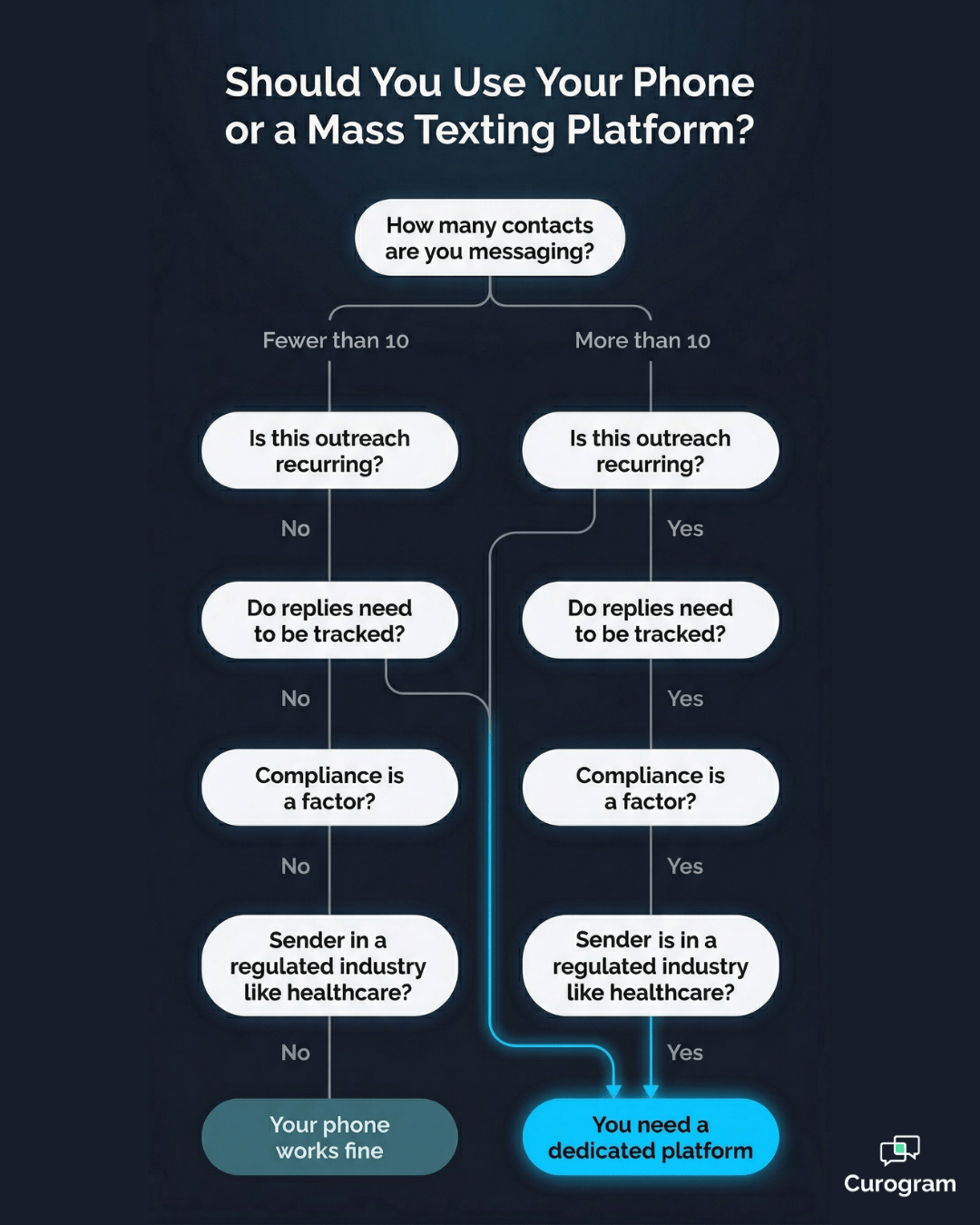
If you're still on the fence about whether you actually need a dedicated platform, here's a straightforward way to think about it.

Your Phone Is Probably Enough If…

  • You're texting fewer than 10 people at a time
  • It's occasional, not recurring
  • Replies don't need to be tracked or organized
  • Compliance isn't a factor

There's no shame in that. For someone texting a small group of personal contacts once in a while, a dedicated platform is overkill. The phone does the job.

It's Time for a Dedicated Platform If…

  • You're sending to more than a handful of contacts regularly
  • You need to know who replied, confirmed, or opted out
  • Replies need to be routed to the right person on your team
  • You're in healthcare or any regulated industry
  • You want to send the same message to multiple contacts at once and have it feel personal for each recipient

Most medical practices cross every one of those thresholds before noon on a Monday. The combination of volume, frequency, compliance requirements, and the need to manage replies makes the phone-based approach untenable — not just inconvenient.

The volume threshold isn't the only factor here. Frequency matters just as much. A practice sending appointment reminders five days a week is sending hundreds of messages a month — and doing that manually, one by one, is a real operational cost. The revenue side of that equation is just as concrete.

Recovering just 5 missed appointments per month at $150–$300 per slot adds up to $750–$1,500 per month — or as much as $18,000 per year — simply by reaching patients before they no-show.

When you frame it that way, a dedicated messaging platform isn't just a productivity tool. It's a revenue decision. The cost of the right platform is a fraction of what a single recovered no-show week generates — and the compounding effect of consistent outreach builds over time.

To see how this plays out in practice, it's worth reading how medical SMS messages save time and reduce workload for practices already doing this at scale — the numbers are more concrete than most people expect. And if you're still deciding between mass texts and group texts, the difference between mass text vs. group text is a useful place to start.

The tools exist. The question is just how much longer you want to work around them.

Conclusion

If there's one thing this guide makes clear, it's that the "good enough" approach to patient messaging usually isn't good enough at all.

Group texts create privacy headaches. Phone-native workarounds don't scale. And sending the same message to hundreds of patients one by one is a front desk time drain that no practice can afford indefinitely.

The real answer — for anyone sending to more than a handful of contacts, especially in healthcare — is a platform designed to handle exactly this. One that sends every message individually, keeps every reply organized in its own thread, connects to your existing EMR, and keeps everything HIPAA-compliant without extra steps from your team.

That's exactly what Curogram does.

Practices that make the switch don't just save time. They recover revenue. They reduce no-shows. They improve how patients experience every interaction with the practice — because a personal-feeling message at the right time makes a real difference in whether someone shows up, responds, or re-engages.

Think about your current outreach workflow. How long does it take to get a reminder out to tomorrow's patients? How many of those messages actually get read? With a 98% text open rate, the channel isn't the problem — the process is.

If you're managing patient communication tool with workarounds right now, it's costing you more than you think — in staff time, in missed appointments, and in the small but compounding friction that erodes patient relationships over time.

It doesn't have to work that way.

Send Individual Messages to All Your Patients at Once — See Curogram in Action. Book a Demo and see how easy it is to replace your current workflow with something that actually scales.


Frequently Asked Questions

Can I send the same text to multiple people without them seeing each other?

Yes — but not through a standard group text. Group texts create a shared thread where all recipients can see each other and each other's replies. To send a message to multiple contacts separately, you need a platform that delivers each message as an individual conversation. Dedicated mass texting tools do this automatically.

Is there a BCC option for text messages like there is in email?

No — standard SMS doesn't have a native BCC feature. The concept of BCC (Blind Carbon Copy) comes from email and doesn't exist in traditional texting protocols. Mass texting platforms replicate this behavior by sending each message individually behind the scenes, so recipients never see who else received the same message.

Can my iPhone send individual texts to a large list of contacts?

Not natively. iPhone group iMessage threads are shared conversations, not individual sends. While you can manually text each person one at a time, there's no built-in broadcast-to-individual feature for large lists. For any meaningful scale, a dedicated platform is the practical solution.

What's the difference between a mass text and a group text?

A group text puts everyone in a shared thread — every reply goes to the whole group. A mass text sends the same message to everyone on your list as separate, individual conversations. Each recipient gets a private message, and each reply stays in its own thread. This distinction matters a great deal for privacy, professionalism, and manageability.

Do medical practices need a special platform for patient texting?

Yes. General-purpose texting tools don't meet HIPAA requirements for handling patient information. Medical practices need a platform that includes built-in compliance safeguards, secure message handling, and ideally EMR integration. Using a non-compliant tool for patient outreach creates real regulatory risk, even for smaller independent practices.