


Skip to the main content.

11 min read

Mass Text vs Group Text: Key Differences and Best Use Cases

Mass Text vs Group Text: Key Differences and Best Use Cases
 💡 A group text creates a shared thread where every recipient sees all replies — think of it like a group chat on your personal phone. A mass text, by contrast, sends one message to many recipients individually, so no one can see who else received it or what they replied.

For medical practices, the difference between a mass text vs group text isn't just a matter of convenience — it's a matter of privacy. Group texts expose patient identities to each other and create serious HIPAA risks. Mass texting keeps every conversation private and one-on-one.

If you're trying to reach multiple patients at once, mass texting is the only appropriate choice. A HIPAA-compliant platform like Curogram makes it easy to send professional, private messages at scale — without putting your practice at risk.

A front desk coordinator needs to notify 80 patients about a scheduling change. Short on time, she grabs her phone and fires off a group text.

Within minutes, patients start replying — and every single one of those replies goes to the entire group. Phone numbers are exposed. Names are visible. A few patients fire back with questions about their own appointments, now visible to strangers.

It sounds like a simple mistake. It isn't.

That one group text could trigger a HIPAA complaint, erode patient trust, and put your practice on the wrong side of federal privacy law — all in the time it takes to brew a pot of coffee.

And yet, this kind of thing happens more often than you'd think, usually because no one stopped to ask a basic question: what's actually the difference between a mass text vs group text, and which one should a medical practice be using?

These two terms get mixed up constantly. They sound similar. They both involve texting multiple people.

But the way they work — and the risks they carry — are completely different.

This guide breaks it all down clearly. By the end, you'll know exactly which option fits your practice, when group texting is appropriate (hint: almost never for patient communication), and how to send messages to multiple contacts the right way.

How Group Texts Actually Work

A group text is exactly what it sounds like: one message sent to multiple people in a shared thread. Everyone in the group can see who else is in the conversation, read everyone's replies, and respond in a way that the whole group sees.

Think of it like a family group chat — everyone's in it, everyone can read it, and once someone replies, there's no taking it back.

It's easy to see why people default to this format. Group texts are built into every smartphone, require no setup, and feel instantly familiar. For personal use, they're perfectly fine. The problem is that familiarity can make them feel safe in situations where they absolutely aren't.

What Everyone in the Thread Can See

That shared structure means a lot is exposed the moment someone hits send.

In a typical group text, every participant can see:

  • Every other recipient's phone number
  • All incoming replies from the entire group
  • The full message history, including anything sent before they joined

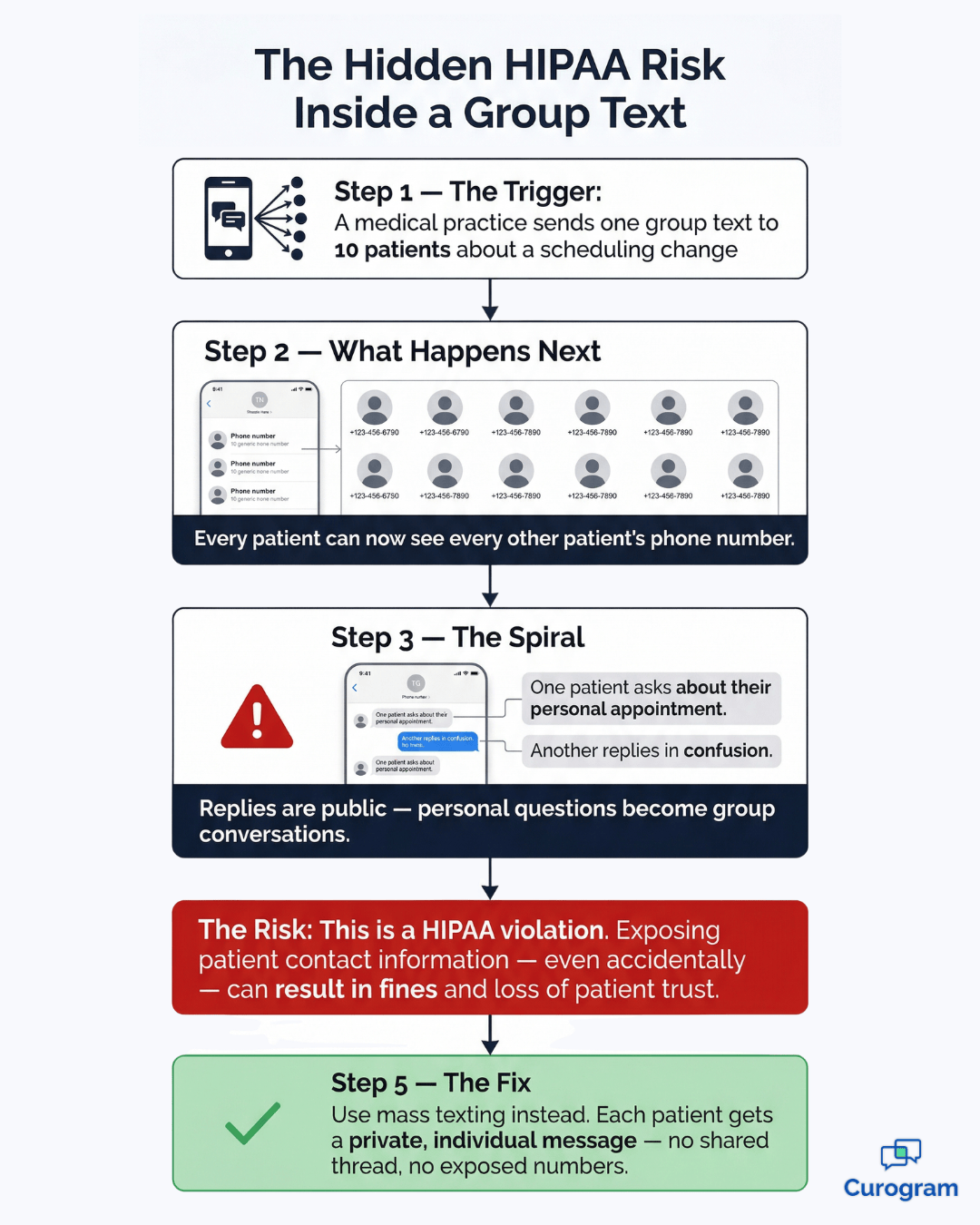
One group text to 10 patients instantly exposes each person's phone number to 9 strangers.

There's no unsend. There's no undo. The moment it goes out, the damage is done.

On most phones, this kind of messaging runs through MMS group messaging, which stands for Multimedia Messaging Service. Unlike basic SMS, MMS supports images, videos, and longer messages — but it doesn't change the core problem. The thread is still shared, and privacy between recipients simply doesn't exist.

When a thread gets active, things spiral quickly.

A patient replies with a personal question. Another misreads the message and fires back a confused response.

Now everyone in the thread is watching an awkward, semi-private exchange play out in real time — one your practice had no way to control once it started.

Group texts work fine for coordinating a team lunch or planning a weekend trip. For communicating with patients? They're the wrong tool entirely.

What Makes a Mass Text Different

A mass text sends one message to many people — but here's the key distinction — each recipient gets their own private, individual copy of that message.

No shared thread. No visible reply chain. No one can see who else received it.

Under the hood, a mass texting platform sends individual messages simultaneously rather than grouping recipients into a shared conversation. The technology is designed specifically to keep each delivery separate, which is exactly what healthcare communication requires.

One Message, Many Private Conversations

From the recipient's perspective, it looks exactly like a one-on-one text from your practice. From your side, you've reached hundreds of patients in seconds. The message is identical, but the experience is completely isolated — each patient is having their own private conversation with you, not participating in a shared thread.

That distinction matters more than it might seem at first.

When a patient feels like they're being addressed directly — not blasted out to a group — they're more likely to read the message, respond to it, and trust the practice that sent it. Privacy isn't just a compliance checkbox. It's part of the patient experience.

This is the method behind appointment reminders, health alerts, broadcast announcements, and bulk patient notifications that professional practices use every day — especially when using systems like Osmind that support scalable outreach.

When you need to send a message to multiple contacts at once while keeping each conversation private, mass texting is the tool built for that job.

It sounds simple. And honestly, it is — when you're using the right platform.

Mass Text vs Group Text: Comparing the Two Side by Side

Here's where the difference between group chat and mass text becomes impossible to ignore.

Let's put both options next to each other.

Feature Group Text Mass Text
Recipients see each other Yes No
Replies go to everyone Yes No (replies are private)
Max recipients Typically 10–32 contacts Hundreds or thousands
Primary use case Small team chats, family groups Bulk patient notifications, marketing
HIPAA risk High Low (when using a compliant platform)
Best for medical practices No Yes

What This Table Is Really Telling You

The group text vs mass text comparison really comes down to one question: do you want patient communication to stay private?

If the answer is yes — and it should always be yes — mass texting wins, hands down. The HIPAA risk row alone should settle this.

Any format that exposes one patient's information to another is a liability, regardless of how convenient it feels in the moment.

The recipient cap matters too. A group text typically maxes out at 10 to 32 contacts depending on the carrier and device. That's nowhere near enough for a practice that needs to notify hundreds of patients about an office closure or a policy change. Mass texting scales to match your patient list — not the arbitrary limits of a smartphone's default messaging app.

It's also worth noting that "low HIPAA risk" in the mass text column assumes you're using a purpose-built, compliant platform — not just a basic bulk SMS service.

The platform matters. A general-purpose texting tool without healthcare-grade safeguards carries its own risks, which is why choosing the right solution is just as important as choosing the right format — especially when comparing modern patient texting platforms.

Group text HIPAA risk flowchart showing how patient data gets exposed in a shared thread

When a Group Text Actually Makes Sense

There are legitimate uses for group texts. Just not many, and almost never with patients.

It's fair to acknowledge that group texts earned their reputation as a quick coordination tool.

For small, trusted circles where everyone already knows each other, the shared thread is actually useful — replies are visible to the whole group, which keeps everyone on the same page without extra back-and-forth.

The Internal Team Exception

Within a small, closed group of staff members, a group text can be a fast and practical way to stay coordinated.

Think situations like:

  • A provider running late notifying two or three front desk staff
  • A small clinic team confirming a last-minute schedule change
  • Office managers looping in a handful of colleagues about a supply delivery

The operative word here is small. Once the group grows past four or five people, threads get chaotic fast. Replies pile up. Notifications become overwhelming. People get pulled into conversations that have nothing to do with them.

And for anything patient-facing? Group texts are simply off the table.

Exposing one patient's phone number to another patient — even accidentally — is a privacy violation. It doesn't matter that you didn't mean to. The HIPAA risk is real, and the consequences can be significant.

HIPAA violations related to unauthorized disclosures of patient information can result in fines ranging from hundreds to tens of thousands of dollars per incident, depending on severity and intent. More immediately, a patient who discovers their information was shared without consent is unlikely to stay with your practice. The reputational cost often hits faster than any regulatory penalty.

Why Mass Texting Is the Professional Choice for Patient Outreach

Every time you need to reach patients — appointment reminders, flu shot alerts, office closure notices, lab result notifications, billing reminders — mass texting is how it gets done professionally. Each patient only sees their own message. No one else's name, number, or health information is visible.

The communication stays between your practice and that individual.

Think about how many scenarios in a typical week call for this kind of outreach. A weather event forces you to reschedule 40 appointments. Your practice is adding Saturday hours and wants to let patients know. A new provider is joining the team.

These aren't one-off situations — they're a normal part of running a practice. And each one deserves a communication method that protects the people on the receiving end.

The Numbers Back It Up

This isn't just good practice. It's the standard — and the data makes a compelling case.

98%

Of SMS messages are opened — most within 3 minutes of delivery. Email averages around 20%. Phone calls get answered roughly 30% of the time. Text simply reaches people in a way nothing else does.

Three minutes is worth thinking about. That's not hours — it's roughly the time between sending a reminder and a patient seeing it. For appointment confirmations or time-sensitive alerts, that kind of response window changes how your entire scheduling workflow operates.

Confirmations come back faster. Gaps get filled sooner. Staff spend less time waiting to hear back — reflecting how patients engage more quickly with text compared to traditional outreach methods.

A practice sending manual phone reminders to 50 patients a day could easily spend 2–3 hours on confirmation calls alone. Automated mass texting handles that in minutes — and gets a faster response. For your front desk team, that's hours back in the day to focus on patients who are actually in the building.

Understanding MMS Group Messaging — and Why It Doesn't Solve the Problem

If you've come across the term MMS group messaging, it's worth understanding what it actually means — and why it doesn't change the privacy equation.

Some practices assume MMS is a step up from a regular group text — that because it supports richer content, it must be more "professional" or carry fewer compliance risks. That's not how it works. The format of the content and the structure of the thread are two separate things, and MMS does nothing to address the latter.

SMS vs MMS: What Actually Changes?

MMS, or Multimedia Messaging Service, is the step up from standard SMS. Where SMS handles plain text only — with a 160-character limit — MMS supports photos, videos, audio files, and messages up to 1,600 characters. You've used MMS every time you texted a photo to a friend.

MMS group messaging takes that multimedia capability and applies it to a shared group thread.

So yes, you can attach an image to your message.

But the underlying structure hasn't changed at all — every recipient is still in the same thread, can still see who else received the message, and can still reply to the entire group.

Adding images or video to a group thread doesn't fix the privacy problem. It just makes it more colorful. For medical practices, neither SMS group texts nor MMS group messaging are appropriate for patient communication. The format doesn't matter. The shared thread does.

What does matter is finding a platform that separates message delivery from message visibility — where patients receive rich, well-crafted messages without ever being put in a room together. That's what a proper patient communication platform is designed to do.

Receptionist and patient at clinic front desk after receiving a mass text appointment reminder

Which Option Is Right for Your Medical Practice?

If you've read this far, you already know the answer. Group texts are for personal use and small internal teams. Mass texting is for patient communication. Full stop.

The distinction isn't about preference or style — it's about what each format fundamentally does. One broadcasts into a shared room. The other delivers a private letter to each person on your list. In a healthcare context, there's only one acceptable choice, and it's not the one that puts patients in a room together.

What to Look for in a Mass Texting Platform

The real question isn't which to choose — it's how to do mass texting the right way. Sending bulk messages from a personal phone or a basic texting app doesn't cut it.

A platform built for healthcare should be able to:

  • Send messages to hundreds or thousands of patients individually, with no shared thread
  • Route replies back to your practice as private, one-on-one conversations
  • Operate within HIPAA compliance standards — not just claim to
  • Integrate with your existing EMR without a complicated setup
Based on our internal data, practices using a dedicated mass texting platform reduce no-show rates by up to 75% — because patients actually receive, read, and act on text reminders in a way they simply don't with phone calls or emails.

That outcome isn't just operationally significant. Fewer no-shows means fewer empty slots, more consistent revenue, and less reactive scrambling to fill last-minute gaps.

For a busy practice, the scheduling improvements alone often justify switching platforms within the first month.

That's exactly what Curogram is designed to do.

Every message lands as a private conversation. Every reply comes back to your practice, not a shared thread.

And if you want to go deeper on how to send a message to multiple contacts separately while keeping each one private, that's covered in our full guide on the topic.


If you're also thinking about how mass texting fits into a broader communication strategy, our overview of patient text messaging best practices is a helpful next read. And if you're newer to the concept of what a dedicated system can do overall, our guide to what a patient communication platform is gives you a strong foundation.

Mass texting isn't a complicated upgrade — for most practices, it just takes the right tool and about 10 minutes of setup.

The Right Texting Tool Makes All the Difference

Choosing between a mass text vs group text isn't a minor technical question. It has real consequences — for patient privacy, for HIPAA compliance, and for how your practice communicates at scale.

Group texts are informal, messy, and completely inappropriate for anything involving patient contact. Mass texting, done through a compliant platform, is private, professional, and built for exactly this kind of outreach.

What "professional" looks like in practice is simple: every patient gets a message that feels like it was sent just for them, replies come back to your team without leaking to anyone else, and your staff never has to worry about what just went out. That's what a purpose-built mass texting tool gives you.

Your patients expect their health information to stay between them and your practice. Mass texting — not group texting — is how you keep that promise, every single time.

Conclusion

Most practices don't have a communication problem. They have a tools problem.

The right message sent the wrong way — like a group text — can undo trust that took years to build. The right message sent the right way, through a private, HIPAA-compliant mass text messaging, takes seconds and makes your practice look polished and professional.

Curogram is built specifically for medical practices that want to communicate better. Not just faster — smarter. You can reach hundreds of patients at once with appointment reminders, health notices, or office updates, and every single one of those patients gets a private, individual message.

No shared threads. No exposed phone numbers. No compliance headaches.

2–3 fewer no-shows per day, at $150 per visit, adds up to $6,000–$9,000 recovered every month — for a practice seeing just 30 patients a day. That's not a projection. That's what happens when patients actually receive and respond to their reminders.

Curogram also cuts phone call volume by up to 50%, based on our internal research. That's roughly 1.5 hours of front desk time freed up every single day — time better spent on patients in the room, not patients on hold.

And because Curogram integrates with almost any EMR, your team isn't learning a completely new system from scratch. The platform fits into existing workflows, which means adoption is fast and disruption is minimal. Most practices are up and running in a single session.

Curogram takes less than 10 minutes for staff to learn. There's no complicated onboarding, no steep learning curve — just a smarter way to stay connected with your patients.

Ready to see how it works for your practice?

Send Professional Mass Texts to Patients with Curogram — See How It Works. Book a demo now.


Frequently Asked Questions

What is the difference between a group text and a mass text?

A group text puts all recipients into one shared thread — everyone can see each other's replies and phone numbers. A mass text sends individual, private messages to each recipient. They receive the same content, but no one else can see their response or contact information.

Is a group text HIPAA compliant?

Generally, no. Group texts expose patient identities and phone numbers to others in the thread, which can violate HIPAA's privacy requirements. For patient-facing communication, a HIPAA-compliant mass texting platform is the appropriate choice.

What is MMS group messaging?

MMS group messaging is a group text that uses the Multimedia Messaging Service format, allowing you to include images, videos, or longer messages in the shared thread. However, the shared nature of the thread remains the same — all recipients can still see each other, so it carries the same privacy risks as a standard group text.

How do I send a message to multiple contacts without them seeing each other?

You need a mass texting platform, not a standard group text. These platforms send individual copies of the same message to each recipient, keeping every conversation private. Curogram is one example built specifically for medical practices.

Can I use a mass text for appointment reminders?

Yes — and it's one of the most effective uses. Appointment reminders sent via mass text reach patients quickly, encourage faster confirmations, and reduce no-shows significantly compared to phone calls or emails alone.