
1 min read
Best HIPAA-Compliant Patient Texting Platforms 2026
 Jo Galvez : 3/7/26, 11:00 AM
💡 Patient texting software helps medical practices send secure, HIPAA-safe messages to patients for reminders, follow-ups, and two-way chats. The...

Your front desk staff picks up the phone for the sixth time in ten minutes. A patient is on hold. Two more calls come in. Meanwhile, three people wait in the lobby just to confirm their visit time. Sound like your office?
This daily chaos is why more practices now want to implement patient texting in their practice. Text messages get read in under three minutes on average.
Phone calls? They sit in voicemail for hours, if they get returned at all. Patients today expect the same quick, easy access from their doctor that they get from their bank or their barber.
But knowing you need texting and actually setting it up are two very different things. A rushed launch leads to confused staff, mixed-up messages, and patients who ignore the new system. That is exactly the kind of waste your practice cannot afford.
This article gives you a clear, week-by-week plan to go from zero to a fully working patient messaging system in just eight weeks.
You will learn how to check if your practice is ready, pick the right platform, train your team, and onboard patients the right way.
We also cover the parts that most guides skip: how to handle staff who push back, how to avoid the most common mistakes, and which numbers to track so you know if the system is working. Think of this as your patient texting setup guide from start to finish.
Whether you run a small family clinic or a busy multi-provider office, the steps are the same. The key is to break the work into small, doable chunks so nothing falls through the cracks. That is what the 8-week timeline is for.
Ready to stop playing phone tag with your patients? Let us walk through each phase of this patient communication system rollout so you can launch with confidence.
Before you deploy healthcare texting at your clinic, you need to take an honest look at where things stand today. Skipping this step is like building a house with no blueprint.
A quick readiness check now saves you weeks of headaches later.
Start by mapping out how your team handles patient calls, reminders, and follow-ups right now. Write down every step, from the first ring to the final note, in the chart. This shows you where the biggest time drains are and where texting can help most.
Ask your front desk to log the number of calls they take each day for one full week. Note how long patients wait on hold. If your team handles more than 50 calls a day, texting can cut that load by 30% to 40% in many cases.
Look for tasks that happen over and over, such as visit reminders, balance due alerts, or pre-visit forms. These are the first things to move to text. Batch tasks like these are where you will see the fastest return on your time and money.
Your existing systems matter a lot when it comes to texting implementation in healthcare. The new platform must work with your current tools, or you will create more work instead of less.
Make sure the texting platform you are eyeing can sync with your EMR. Two-way data flow means your staff will not need to copy and paste between systems. If your EMR is not on the short list, ask the vendor about custom links before you commit.
Patient texting must follow HIPAA rules and your state consent laws. You will need to collect written or digital opt-in from every patient before you send a single text. Build this into your intake forms now so it is ready before launch day.
Now that you know your practice is ready, it is time to choose your platform and get the basics in place. These first two weeks set the stage for everything that follows. Move fast, but do not rush your decision on the tool you will use every single day.
There are dozens of texting platforms on the market, so you need clear criteria. Focus on fit, not just features. The best tool is the one your staff will actually use without fighting it.
For a deeper look at your options, check out our software comparison guide.
List your top three to five platforms. Score each one on cost, EMR fit, ease of use, HIPAA features, and support quality. Have at least two staff members test each demo so you get more than one point of view.
During demos, ask about onboarding time, data migration, and what happens if something breaks at 8 AM on a Monday.
You also want to know their uptime record and how fast their support team responds. These real-world details matter more than flashy slide decks.
Once you pick your platform, move quickly on the setup. The goal is to have the system ready for staff training by the end of week two. Do not leave this for later, because delays here push back your whole timeline.
Create accounts for each team member with the right access level. Front desk staff may need full send and receive rights.
Billing staff may only need to send payment links. Providers may want read-only access to message threads.
Run a test batch of data between the texting tool and your EMR. Confirm that patient names, phone numbers, and visit dates flow correctly. Catch errors now, not during your live launch. This is the backbone of your healthcare communication system implementation.
Your platform is set up and linked to your EMR. Now comes the part that makes or breaks the whole project: getting your team ready. Even the best tool fails if the people using it do not feel prepared and confident.
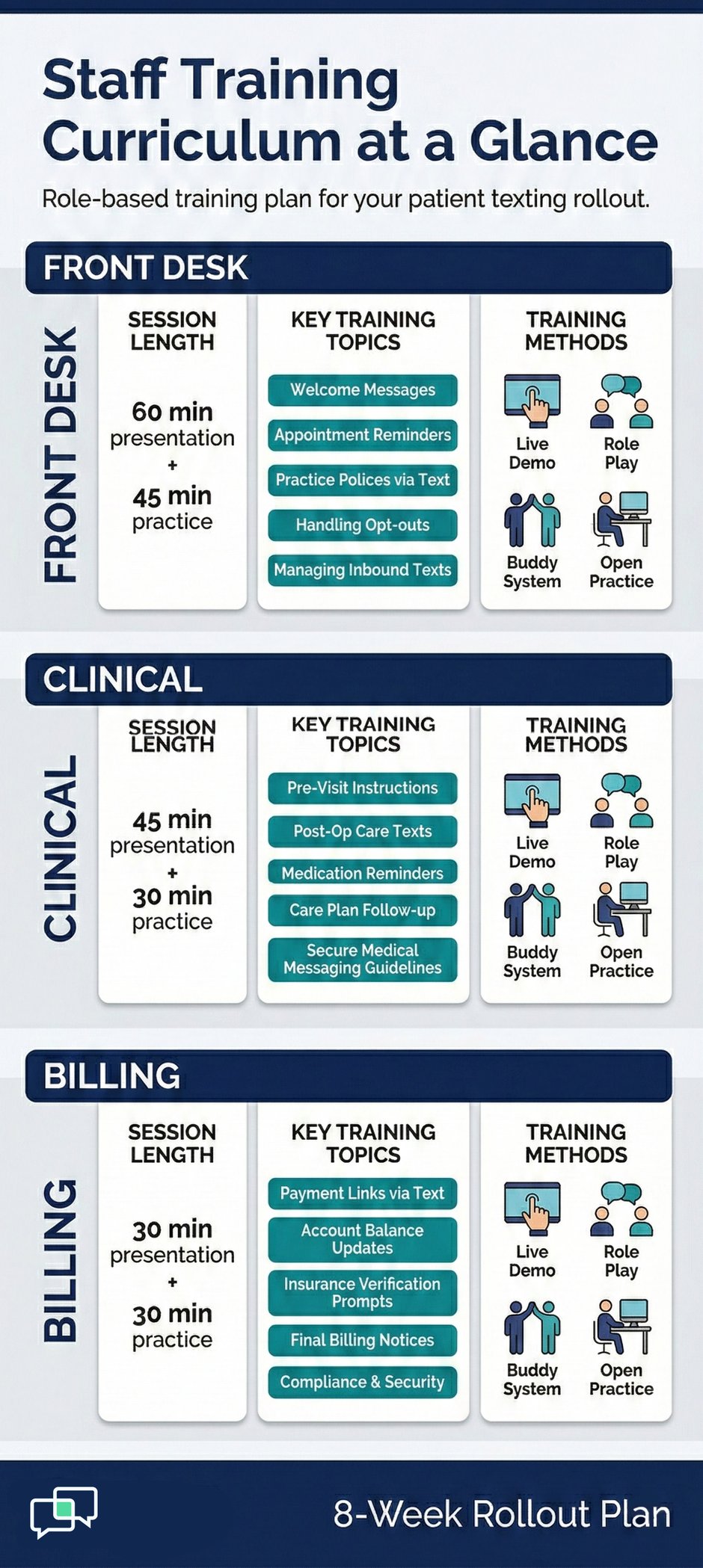
Classroom-style lectures do not work for learning new software. Your team needs to click buttons, send test messages, and practice with real scenarios.
For guidance on message tone and language, refer to our professional communication guide for patient texting.
Front desk, clinical, and billing staff each have different needs. Train each group in its own session so the content stays relevant. A 60-minute session for each role, plus 30 minutes of open practice, is a good starting target.
Pair a tech-savvy team member with someone less comfortable around new tools. This peer support builds confidence faster than any manual. It also creates internal champions who can answer quick questions after go-live.
Protocols keep your messages clear, consistent, and safe. Without them, one staff member might send a three-word reply while another writes a full paragraph.
Templates save time and protect your practice. Check out our message templates library for ready-made scripts you can adapt.
Decide which message types need a review before sending and which can go out right away. Routine reminders can be auto-sent.
Clinical replies should be reviewed by a nurse or provider first. Put this in writing so there is no gray area.
Start with the messages you will send most often: visit reminders, no-show follow-ups, balance due notices, lab result alerts, and pre-visit instructions. Having these ready before launch day means your team can start strong on day one.

A soft launch is your chance to test the system in the real world before you open it up to every patient. Think of it as a dress rehearsal. You want to catch problems early when the stakes are still low and fixes are still easy.
Choose a small, manageable group of patients to pilot the new system. This gives you honest feedback without overwhelming your staff during the learning curve.
Start with patients who already use your patient portal or online booking. They are more likely to engage with texts right away and give useful feedback. Aim for 50 to 100 patients in your first test batch to get a good sample.
Your test group should cover different use cases like new patient visits, follow-ups, and chronic care check-ins. This helps you see how well your templates and workflows hold up across real situations, not just one ideal scenario.
The whole point of a soft launch is to learn and adjust. Set up simple ways for both your patients and your staff to share what is working and what is not.
A two-question survey right after a text exchange can reveal a lot. Ask patients if the message was clear and if they found it helpful. Keep it short so they actually complete it.
During the soft launch, gather your team for a five-minute check-in each morning. Ask what went well, what felt clunky, and what needs a fix. Small tweaks during the pilot prevent big headaches at full scale.
You have tested the system, fixed the kinks, and your team feels ready. Now it is time to launch patient messaging to your full patient base. This is the moment your patient texting rollout strategy goes live for real.
A clear, simple launch message sets the tone. Patients need to know what to expect, how to opt in, and how to reach you if they have questions.
Use email, a sign in your waiting room, and your website to announce the new texting option. Give patients a clear reason to opt in, such as faster appointment reminders or easy rescheduling. The more places they see the message, the faster adoption grows.
Make it easy to say yes. A reply of YES to a first text, a checkbox on an intake form, or a QR code in the lobby all work well. The fewer steps, the higher your sign-up rate will be. Remove any friction you can.
Even in a full rollout, you do not need to flip the switch for every patient on day one. A phased approach keeps your staff from getting buried in messages during the first few days.
Begin by texting patients who have visits in the next two weeks. This gives you a built-in reason to reach out and a natural way to show the value of the new system right away.
Once reminders are running smoothly, layer on billing notices, referral follow-ups, and post-visit surveys. Adding one new message type per week gives your team time to adjust. You will also see how patients respond to each type before moving to the next.
Going live is not the finish line. It is the starting point for long-term improvement. The weeks after launch tell you what is really working and what needs a tune-up. This is how you turn a good start into lasting results.
Numbers do not lie. Set up a simple dashboard or spreadsheet to track the data that matters most. Review it every week for the first three months after you implement your SMS platform at your medical practice.
Check that your messages are actually reaching patients. A delivery rate below 95% may point to bad phone numbers in your system. Read rates above 90% are common for texts, so if yours is lower, look at your message timing and content.
Track how fast patients reply and how quickly your team responds back. A two-way text exchange should close within a few hours at most. If response times climb, you may need more staff trained on the platform or better alert settings.
Your first set of templates will not be perfect, and that is fine. Use real data and feedback to make them better over time.
Try two versions of your most-sent messages and see which gets a better response. Even small changes, like adding the patient's first name or shortening the text, can boost engagement by 10% to 15%.
As more patients opt in, your message volume will climb. Review your approval matrix, staffing, and auto-reply rules each month. What worked at 200 messages a week may not hold up at 2,000.
New tools only succeed when the people using them believe in the change. Staff pushback is normal and expected. How you handle it decides whether your rollout stalls or thrives. This is often the hardest part of any healthcare communication system implementation.
Do not wait for complaints to bubble up. Bring the conversation to your team before the first training session. Give them space to share what worries them.
Use this meeting to explain why the practice is adding texting and what it means for each role. Be honest about what will change and what will stay the same. When people feel included in the decision, they resist less.
Show your team the call volume logs, hold times, and no-show rates you gathered during the readiness check. Real numbers make the case better than any speech. People support change when they see the problem with their own eyes.
Positive support goes a long way further than pressure. Find ways to celebrate the team members who lean in early and help others get on board.
Pick one or two people from each department who catch on fast and ask them to serve as go-to helpers. Give them a title like Texting Lead. Public credit for this role builds pride and gives others someone to turn to besides the manager.
When the first batch of reminders cuts no-shows, share that win with the whole team. When a patient sends a thank-you text, read it aloud in the morning huddle.
Small wins build the momentum that keeps the whole project moving forward. For proof of what these wins can look like, read our guide on reducing no-shows with patient texting.

Your patients will not use a system they do not know about or do not trust. Onboarding is just as important on the patient side as it is for your staff. A few simple moves can turn slow adoption into fast uptake.
Patients need a reason to opt in. If all you say is 'we have texting now,' most will shrug and move on. Show them how it makes their life easier.
Whether it is a poster, an email, or a note on your website, keep the message short and plain. Something like 'Get your appointment reminders by text. Reply to reschedule in seconds.' works better than jargon-heavy pitches.
Many patients worry about sharing health information over text. Let them know your system is HIPAA-compliant and that their data stays safe. A short statement at the point of opt-in goes a long way toward building trust.
The best time to onboard patients is when they are already in front of you. Bake the opt-in step into your check-in process so it happens as a natural part of the visit, not a separate task.
A single checkbox on your new patient or annual update form is the simplest route. Train your front desk to mention it as they hand over the clipboard. A quick verbal prompt like 'Check the box if you want text reminders' boosts sign-ups by a wide margin.
Patients who skip the box at check-in may change their mind at checkout. A card with a QR code next to the payment window gives them one more chance. This small addition can increase your opt-in rate by 10% to 20% over the first month.
Even with a solid plan, there are traps that catch many practices off guard. Knowing what can go wrong lets you dodge these problems before they slow you down. Here are the most common ones we see when practices launch a patient messaging platform.
Speed feels good, but cutting corners creates bigger problems down the road. Resist the urge to skip steps or merge weeks together.
Going straight from setup to full rollout is tempting but risky. The soft launch phase catches bugs, bad templates, and workflow gaps that only show up with real patients. Two weeks of testing can save you months of damage control.
One 30-minute session is not enough for most staff. Plan for at least two hours of hands-on practice per role. Staff who feel rushed will avoid the new tool and fall back to old habits, which kills adoption fast.
Not every patient wants texts, and not every text should go to every patient. A one-size-fits-all approach frustrates people and drives opt-outs.
Some patients want reminders but not billing alerts. Others want lab results but not marketing messages. Giving patients control over what they receive keeps satisfaction high and complaints low.
Sending a text at 9 PM may be legal, but it is not smart. Set your system to send messages during business hours only, unless the patient asks for a different window. One badly timed text can undo weeks of goodwill.
You cannot improve what you do not measure. The first 90 days after launch are your proof-of-concept period. The data you collect now tells you whether your investment is paying off and where to focus next.
These numbers show whether your daily workflows are actually getting better since you started to deploy healthcare texting at your clinic.
Compare your no-show rate from the three months before launch to the three months after. Most practices that use text reminders see a drop of 25% to 40%. If your numbers are flat, review your reminder timing and opt-in rates first.
Track inbound calls per day before and after launch. A drop of 20% to 30% is a strong sign that texting is taking pressure off your phones. If calls are not falling, check whether patients know about the texting option yet.
Patient experience data tells you if the people you serve are actually happier since you made the switch. These are the numbers that prove long-term value.
Use post-visit surveys to track how patients feel about the new texting service. Look for shifts in overall satisfaction, ease of scheduling, and likelihood to recommend your practice. Even a five-point jump in net promoter score signals strong patient approval.
A healthy system sees opt-in rates climb each month and opt-out rates stay below 5%. If opt-outs spike after a certain message type, that is your signal to revise or remove it. These rates are the pulse of your patient texting rollout strategy's long-term health.
Adding texting to your practice does not have to be a guessing game. With a clear 8-week plan, you can move from idea to live system without chaos.
The key is to break the work into small, focused steps that build on each other.
The first two weeks are about prep and platform choice. You check your readiness, review your tech, and select a tool that fits your team.
Weeks three and four shift to training and protocols. Your staff learns the system, and you build the message library that keeps every text clear and on-brand.
Weeks five and six give you a soft launch with a small test group. This is your safety net. You catch errors, gather feedback, and fine-tune workflows before anyone else notices a glitch. Then, in weeks seven and eight, you open the doors wide and launch patient messaging to your full base.
But launch day is not the end. The real gains come in the months after, when you track your KPIs, refine your templates, and keep improving. Practices that stay on top of their data see no-show rates drop, phone volume fall, and patient satisfaction climb.
Just as important is the human side. Your staff needs to feel heard, trained, and supported. Change management is not a buzzword; it is the difference between a tool that gathers dust and one that transforms your day. Take the time to bring your team along at every step.
On the patient side, clear education and easy opt-in processes drive adoption. The more places you share the news, the faster your list grows. When patients can text instead of call, they feel more connected to your practice, not less.
If you are looking for a platform that makes this whole process simpler, Curogram offers a HIPAA-compliant texting solution built for medical practices.
It integrates with most major EMR systems and comes with built-in templates, training resources, and a dedicated support team to help you through every phase. You can explore Curogram implementation resources to see how it works.
Start your 8-week countdown. Map your workflows, score your shortlist, and set a launch date. Your patients are already on their phones. It is time to meet them there. Request a demo today.
Frequently Asked Questions
1 min read
Jo Galvez : 3/7/26, 11:00 AM
💡 Patient texting software helps medical practices send secure, HIPAA-safe messages to patients for reminders, follow-ups, and two-way chats. The...
1 min read
Jo Galvez : 2/28/26, 11:00 AM
💡 Patient text message templates are pre-written messages that medical offices use to reach patients by SMS. They cover key touch points like...

1 min read
Jo Galvez : 2/22/26, 11:00 AM
💡 When comparing text vs phone calls in healthcare, data shows that text messaging wins on speed, cost, and patient preference, while phone calls...