
1 min read
EMR Integration Success Story: A Small Clinic’s Actual Experience
💡 An EMR integration success story shows what happens when patient communication connects directly to your EMR. In this case study, a small primary...
5 min read

Every practice has four workflows worth automating. Scheduling, intake, communication, and billing.
Advice about which to do first usually arrives as a ranked list with big numbers attached. Cut no-shows by this much, calls by that much. Those numbers are almost never sourced, including on the earlier version of this page. We have taken ours out.
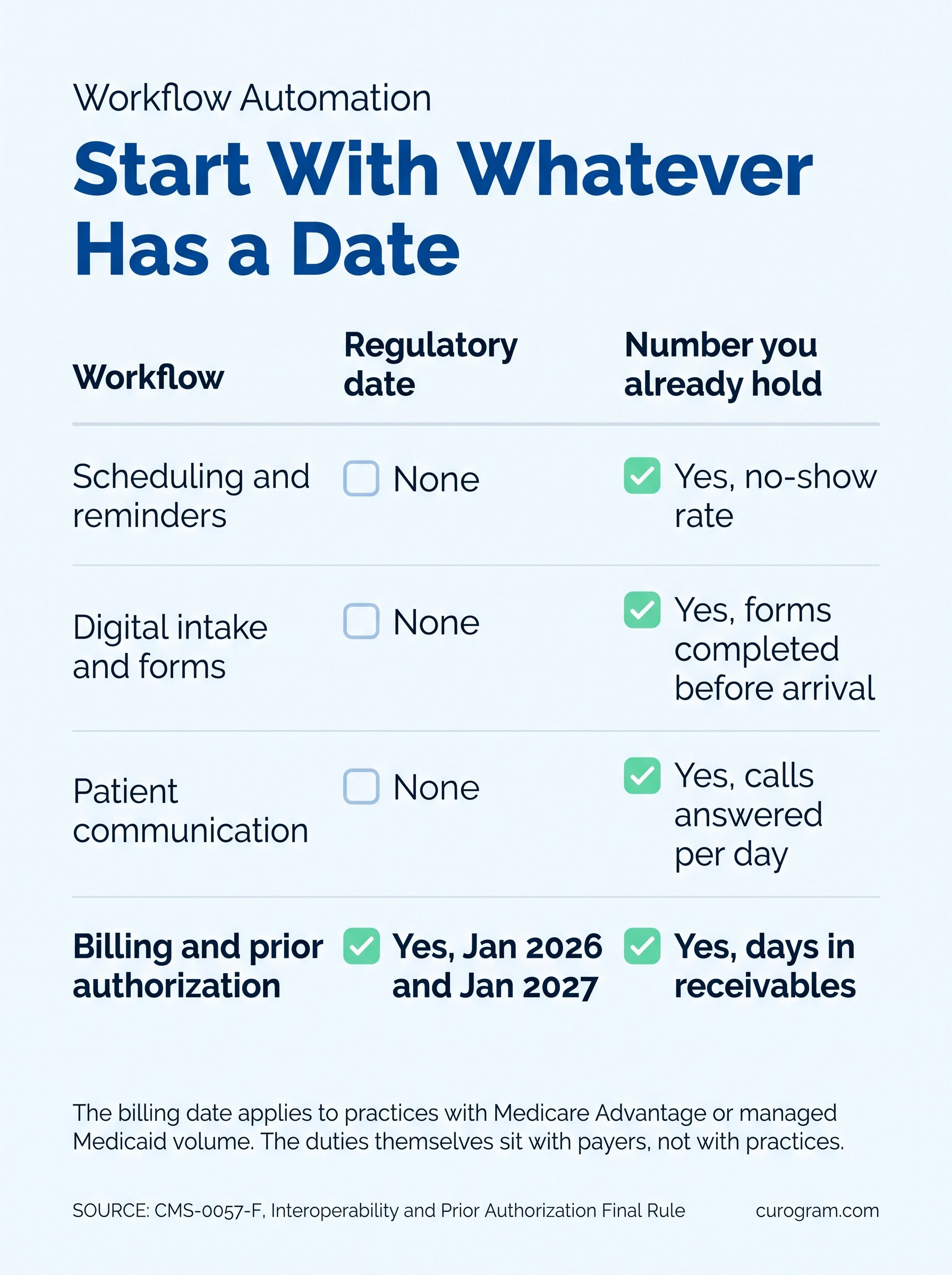
A better sorting rule exists. Start with whatever has a date attached to it, then with whatever you can already measure. One of the four now has a date. Prior authorization rules landed on payers in January 2026, with more due at the start of 2027.
Below: what each workflow costs when it stays manual. Which one carries a deadline, and how to pick without guessing.
Two reminder systems that do not read the same schedule will disagree within a week. One sends for an appointment that moved, the other stays silent.
Confirmation status is the part that breaks hardest. Staff end up calling patients who already confirmed somewhere nobody can see.
The earlier version of this page put industry no-show rates at 15% to 30% and cited a journal article. That article does not report a no-show rate. The claim is gone.
Paper gets transcribed, and transcription is where errors enter. An insurance ID mistyped at the desk becomes a denied claim six weeks later.
Allergy histories carry the same risk with worse consequences. A clipboard read at speed is a clinical record nobody checked.
Voicemail, sticky notes and an inbox nobody owns. Messages do not get lost so much as they stop being anybody's job.
Volume is where this turns structural. Our writeup of mass texting in Cloud 9 software covers what changes when one message reaches a whole list.
Intake data that never reaches billing produces claim errors, and claim errors produce denials. Balances drift past 30, 60 and 90 days.
Chasing them by phone costs more than the balances do. That is the calculation most practices have never run.
Prior authorization is the measured version of this. The 2025 AMA prior authorization survey, released in May 2026, asked 1,000 physicians.
Physician and staff time came to about 13 hours a week, across roughly 40 requests per physician. That is a full working day and a half, every week, per doctor.
95% said the process delays care. 79% said patients abandon treatment because of it, and 26% reported it leading to a serious adverse event.
Personal phones and unsecured email are the usual workarounds. Staff reach for both when the official tool is slow.
Automated messaging carries its own rules. The federal delivery rules include a health care exemption that lets a practice message patients without separate consent.
That exemption caps messages at one a day and three a week per patient, counting calls and texts together. A practice relying instead on consent it collected is not bound by that cap.
 How to Decide Which Workflow to Integrate First
Start here when confirmation status lives in somebody's head. The signal is staff calling patients who already replied.
Reminders built from the schedule know the visit type and the time. That is the whole requirement, and most tools fail it. Measure your own no-show rate for a month first. Any vendor figure, ours included, tells you nothing about your panel.
Start here when denials trace back to demographics or insurance rather than to coding. That is an intake problem wearing a billing costume. Patient intake works when forms arrive before the visit and land in the record without a second keystroke.
The test is whether anything reaches a staff inbox. A form that emails the front desk has moved the typing rather than removed it.
Start here when the phones decide the day. Call volume is the symptom, and a shared inbox is the usual fix.
At scale the problem changes shape, and mass messaging becomes its own workflow. Our piece on enterprise broadcast workflows for Oracle Health teams covers coordinating one message across many sites.
This is the workflow with a date on it, though the obligation sits with payers rather than with practices.
Under the CMS interoperability and prior authorization rule, impacted payers face fixed deadlines. Expedited requests get 72 hours. Standard ones get seven calendar days.
Those timelines started in January 2026, along with a requirement to give a specific reason for every denial. Payers also began posting prior authorization metrics publicly, the first set due by March 31, 2026.
Four APIs follow on January 1, 2027. The Provider Access and Prior Authorization ones are the two a practice will actually consume.
Recall sits in this workflow too. Our writeup of patient recall and revenue recovery in Practice Fusion covers the dormant list most practices never work.
Three questions, in order. Does anything here have a deadline? Can you already measure the cost? And who owns the problem today?
Prior authorization answers the first for any practice with Medicare Advantage or managed Medicaid volume. The rules are live and the APIs are weeks away.
If none of your workflows carry a date, pick the one with a number you already hold. No-show rate and days in receivables are both sitting in systems you run.
Then pick the one a named person is already losing hours to. That is the integration that gets adopted rather than installed.
Two-way reminders built from the schedule. Digital intake that writes back to the record. A shared inbox for patient messages. Text-to-pay for balances. Each works on its own, which is the point. A practice can start with one workflow and leave the other three alone.
EMR integration here means the record stays where it is. Nothing gets replaced, and the messages attach to what you already run.
Curogram HighlightCurogram's Mass Text Messaging sends to a list filtered from the schedule rather than an uploaded spreadsheet. Replies land in the same threads staff already use. Opt-outs apply across every message type rather than campaign by campaign. Which is the part that matters for the cap. A patient who stops one campaign and keeps receiving another has not really opted out. |

Rank the four by date first. Prior authorization has one, and for practices with Medicare Advantage or managed Medicaid volume it outranks everything else this quarter.
Rank what is left by the numbers you already hold. No-show rate, days in receivables, calls answered per day. Then check who is losing hours. Automation that nobody asked for gets switched off within a month.
Do one workflow properly before starting another. A half-connected second system creates the exact problem you were fixing. And measure your own baseline before you change anything. One month before, one month after, on a number you already collect.
That last step is the one everybody skips. It is also the only way to know whether any of this worked.
Book a demo and bring the workflow that hurts most. Ask to see it running against your own schedule rather than a sample one.

1 min read
💡 An EMR integration success story shows what happens when patient communication connects directly to your EMR. In this case study, a small primary...

1 min read
💡 Clinical workflow optimization for private practices means turning daily tasks into systems your team can repeat without thinking. The three...

1 min read
💡 EMR integration changes a clinic’s daily workflow by taking routine handoffs out of your staff’s hands. Appointment reminders go out from the...