
EMR Integration Success Story: A Small Clinic’s Actual Experience
Learn about the actual EMR integration success story of a small practice. This is how one clinic fixed its workflow and boosted patient satisfaction.
10 min read
Most of the work that wears down a front desk is copying. Your staff copy confirmations from voicemail into the schedule, copy clipboard answers into the chart, and copy balances onto statements that go out by mail. The data already sits in your EMR. Nothing moves it for them.
Connect reminders, intake, messaging, and billing to that EMR, and most of those manual handoffs drop off your team’s list. That’s what clinic workflow integration does in practice.
We’ve seen the effect across our clients. Based on our internal data, automated texting cuts inbound calls by 24%, and front desk productivity rises by more than 30%. Those gains in healthcare staff productivity come from fewer steps per patient.
Below, we follow one clinic day twice to show the EMR integration daily workflow changes at each step.
The first run is the disconnected version: confirmation calls, paper intake, a claim denied over one wrong digit, and a balance chased by phone. The second run is the same day with EMR workflow automation handling reminders, forms, and payments.
Patients feel the difference as well. For them, patient communication improvement looks like answers by text, forms finished at home, and one reminder that carries every instruction they need.
After both runs, we map each Curogram feature to the change it makes and name the one to connect first. For most practices, our answer is reminders.
Picture your clinic on a day when nothing talks to anything else. Your reminders, intake forms, and billing each sit in their own place, and your EMR doesn’t hear from any of them.
So your staff fill every gap by hand. They make the confirmation calls, re-type the clipboard forms, and chase balances by phone. Patients wait longer. Providers lose slots they thought were booked.
The sections below follow one of those days, from the 8:00 a.m. phone rush to the voicemails still unchecked at closing. Each stop shows where the work piles up before clinic workflow integration.
By 8:00 a.m., your front desk phones are already lit. Patients call to confirm, ask about prep instructions, or reschedule around a conflict. Your staff return calls and leave voicemails, but none of it updates the EMR on its own.
That gap creates double work. One person dials a patient to confirm her 10:30. At the next desk, a coworker takes a message from that same patient canceling the slot, and neither knows until someone checks the schedule by hand.
Meanwhile, the waiting room fills. New patients line up holding paper forms. Returning patients roll their eyes when asked for the same details they gave last visit.
Your team then types each form, insurance card, and ID into more than one system. Each retype is a chance for a wrong digit, and fixing it adds minutes to the wait. By midmorning, the phones still haven’t stopped and the line at the desk hasn’t shrunk.
By midmorning, the trouble reaches your providers. The schedule looked full at 8:00 a.m., yet several appointment slots are empty. Each gap has a plain cause.
Some patients never confirmed because their reminder came late or not at all. Others forgot, or misread their instructions. One patient drives to the wrong location, and another cancels at the last minute because no one sent her fasting instructions.
Lost visits like these can cost a clinic hundreds of dollars a day, and your providers can’t refill those slots on short notice. The rate adds up fast. Based on our internal data, Atlas Medical Center ran a 14.20% no-show rate before it started using Curogram.
Your office manager sees the pattern every week. Without EMR workflow automation, the same gaps show up again the next morning.
The calls keep coming all day, and most of them ask the same few things:
Because your clinic’s communication tools are not integrated, your staff can’t pull up the answer next to the patient’s appointment. They dig through sticky notes, old voicemails, and printed prep sheets instead.
When the answer isn’t there, they promise to call back after checking with the provider. That provider is with patients until lunch, so the question waits. Some patients call a second time. Others hear one answer on Monday and a different one on Wednesday.
Each of those loops pulls someone away from the patients standing at the desk.
Clipboards and pens fill your waiting room. New patients work through intake forms by hand, sometimes several pages long, while holding a toddler or rushing in from work.
Later, your staff type every page into the EMR. That second pass adds time to each check-in. When the desk is busy, each rushed entry can slip in a few familiar ways:
| Where it slips | What it causes later |
|---|---|
| Handwriting gets misread | Wrong patient details land in the EMR |
| An insurance ID is copied with a wrong digit | The claim comes back denied |
| A clinical detail is skipped in the rush | The chart is missing it at the visit |
Your billing team finds the damage weeks later, when denials arrive for claims that accurate intake would have prevented. Each denial means reworking the claim and waiting longer to get paid, while the patient who sat with that clipboard waited longer too.
By afternoon, the money side starts to slip. Without text-to-pay or any digital way to pay, many patients leave without settling their balance at check-in. Others get a paper statement in the mail and set it aside.
So your billing staff pick up the phone. They dial a patient about a small balance, reach voicemail, leave a message, and move to the next name. Most of those calls end the same way, and the statement goes back out next month.
Your accounts receivable keeps growing. Your office manager watches balances age past 30 days, then 60, while payroll and supply bills still come due on time.
At 4:45 p.m., your front desk is still catching up. Three jobs are still waiting:
The phone keeps ringing, too. Patients call back confused because they got mixed messages about their appointments. Your team stays late to sort it out, and for many of them, burnout feels inevitable. At 4:45 p.m., your front desk is still catching up. Three jobs are still waiting:
The phone keeps ringing, too. Patients call back confused because they got mixed messages about their appointments. Your team stays late to sort it out, and for many of them,
Your patients see the mess from the other end of the phone. They sit on hold, reach voicemail instead of an answer, and fill out the same forms they completed last visit. When instructions are missing or don’t match, confusion follows, and sometimes so do canceled procedures.
Those same patients book rides, order food, and track packages from their phones. A clinic they can only reach by calling during office hours feels slow next to that. Most will forgive one or two rough visits. After that, many start looking for a practice that answers clearly and respects their time.
Inside your clinic, the cost is predictability. No one can plan around the parts of the day that should be steady:
| Who | What they can’t count on |
|---|---|
| Your office manager | A schedule that matches who actually shows up |
| Your providers | Patients who arrive prepared |
| Your front desk | A workload they can finish by closing |

Picture the same day again, this time with EMR workflow automation in place. Reminders go out from your EMR schedule, intake forms arrive before patients do, and payment links reach patients by text.
Your team still opens at 8:00 a.m. and closes at 5:00 p.m. The sections below show which hand-done tasks drop off between those two times.
At 8:00 a.m., your front desk opens to a phone that rings now and then. Most patients have already confirmed or rescheduled by replying to automated reminders. Each reply updates the EMR on its own, so the schedule on screen already shows who’s coming.
Those replies add up. Based on our internal data, Covina Arthritic Clinic confirms more than 1,100 appointments a month this way. Across our clients, automated texting has cut inbound calls by 24%.
That frees your staff to greet each patient at the desk and work through the day’s schedule before the waiting room fills.
Each patient now gets three texts: one 72 hours before the visit, one 24 hours before, and one 2 hours before. A patient can confirm with a single tap. That reply syncs to your EMR, so no one on your team has to enter it.
Fewer patients forget. Based on our internal data, Atlas Medical Center cut its no-show rate from 14.20% to 4.91% in three months. Across our platform, more than 75% of appointments get confirmed.
Your providers see it in fewer open slots between visits. Your office manager sees the staff and exam rooms planned for each day actually get used.
A patient with a question now replies to the reminder text she already has. “Where do I park?” lands in a shared inbox your whole front desk can see. Her appointment details sit right next to the message, so whoever picks it up knows which visit she means.
Your staff keep directions, prep instructions, and office policies saved and ready to send. The patient gets the same answer on Monday that she’d get on Wednesday, in writing she can check again before she leaves home.
Intake now starts before the patient leaves home, in four steps:
No one retypes a clipboard, so there’s no handwriting to misread and no insurance ID copied by hand. Check-in moves faster, and fewer claims reach your billing team with intake errors in them.
By noon, most of the messages in your shared inbox are questions your team has answered many times before. Parking, fasting rules, what to bring. Your staff pick a saved template, adjust a line if needed, and send it.
Those saved replies add up to real gains in healthcare staff productivity. Based on our internal data, our clients see phone volume drop by up to 50% and front desk productivity rise by more than 30%.
With fewer calls to return, your front desk clears the midday rush and still has time for the notes and follow-ups that used to keep them past closing.
Payment requests now go out by text, the same way reminders do. Patients can pay their co-pay before the visit. Afterward, they get a text-to-pay link tied to their account for any balance left.
| Task | Before integration | After integration |
|---|---|---|
| Co-pay | Often missed at check-in | Paid before the visit |
| Remaining balance | Paper statement in the mail | Payment link by text |
| Follow-up | Call, voicemail, mail it again next month | Payments show up as they come in |
At 5:00 p.m., the phones are quiet and the shared inbox is empty. Your staff leave on time. Your providers finish the day with full schedules and fewer interruptions.
Before closing, your office manager checks three numbers:
Attendance shows whether the reminders are doing their job. Confirmations, along with fewer callback requests, are patient communication improvement you can count. Payment totals show how much came in by text that would once have waited on a mailed statement.
Clinic workflow integration ties reminders, messaging, intake, and billing to your EMR. With EMR workflow automation running off that schedule, most hand-done steps from the “before” day never come up. Your gains in healthcare staff productivity come from that: fewer calls, fewer retyped forms, and fewer balances to chase.
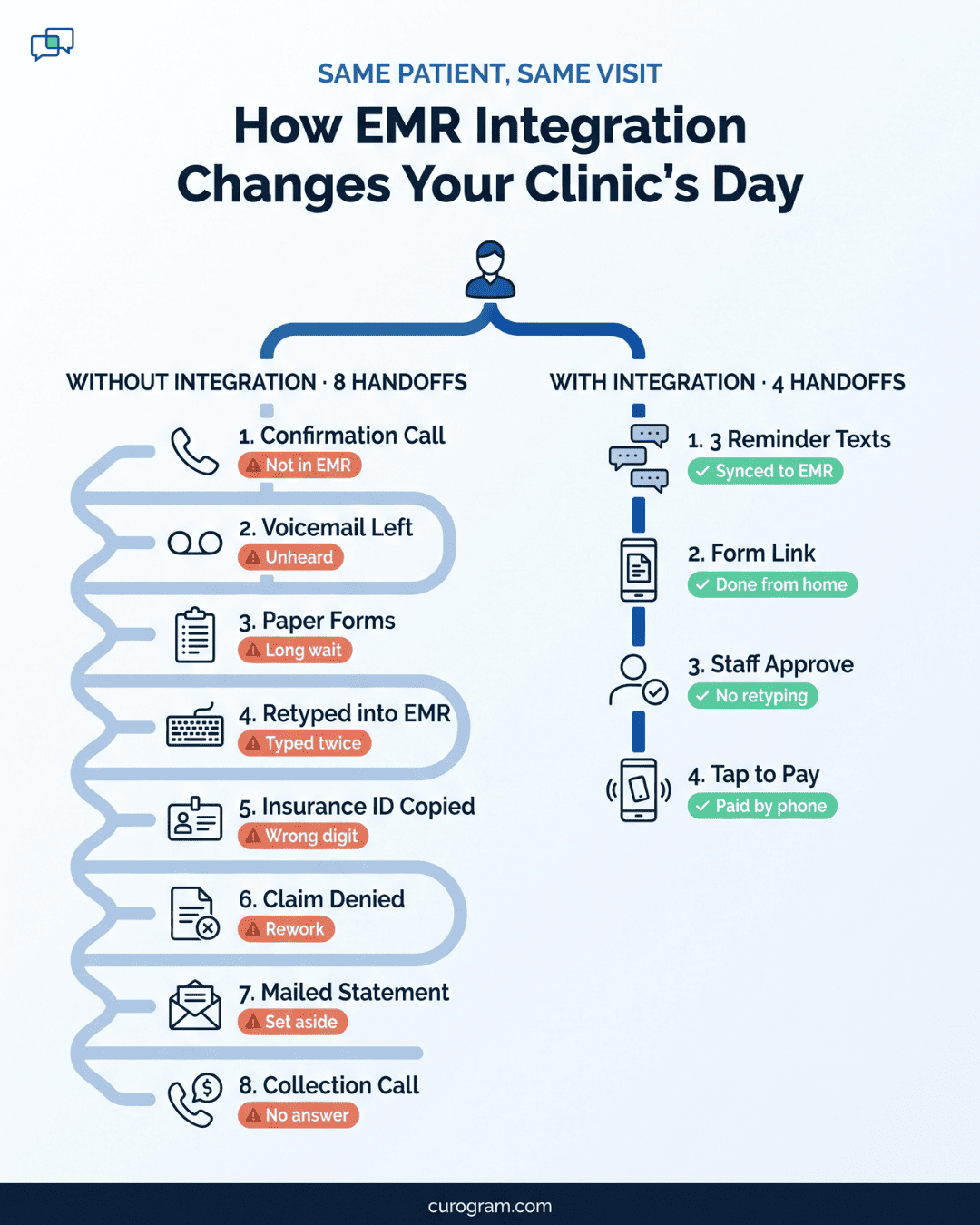
Curogram works on top of the EMR you already use. It syncs with your schedule and runs reminders, two-way texting, intake forms, payment links, and post-visit surveys from it. Your team keeps working in the same EMR, and each patient reply, form, or payment lands back there.
Curogram builds each reminder from your EMR schedule. If your staff move a visit from Tuesday to Thursday, the next reminder says Thursday. Each text also carries the details for that visit type, including prep instructions.
Patients reply to confirm, cancel, or reschedule, and the change shows up in the EMR. Based on our internal data, our clients’ no-show rate runs 53% below the industry average.
Patients text their questions in, and your staff answer from one shared inbox. That inbox is HIPAA-compliant, so no one on your team has to send patient details from a personal phone.
Saved templates let anyone at the desk give the same answer to the same question. Based on our internal data, texting cuts phone volume by up to 50%, which gives your staff more time for the patients standing in front of them.
Curogram sends each patient a secure form link before the visit. From home, the patient fills in contact details, signs consent forms, and adds insurance information. Your staff check the entries and send them to the EMR with no retyping.
Signed consents arrive with the rest of the file, so no one at the desk has to chase a missing signature at check-in. Fewer claims get held up by a wrong detail, too.
Curogram puts the payment link inside texts patients already open: the reminder before the visit and the follow-up after it. The patient taps the link and pays the balance on their account from their phone.
Clinics collect more balances this way than through mailed statements. Your billing staff also spend less of the week calling about unpaid accounts.
After each visit, Curogram texts the patient a short survey. Every patient gets the same invitation to leave a public review, whatever score they gave. When someone reports a problem, your staff see it right away and can call the patient while the visit is still fresh.
Based on our internal data, one client gathered 1,064 new five-star reviews in three months, with about 90% of its reviews at five stars. New patients see those reviews early: 90% of new patient leads check a practice’s Google Business Profile before its website.
In the “before” day, most of your front desk’s hours go to work the EMR could have handled. Confirmation calls, retyped forms, and balance reminders by phone all come from systems that don’t share data.
If you can fix only one thing first, start with reminders. They touch every visit, and each reply syncs back to your schedule. They’re also where the numbers move fastest: Atlas Medical Center cut its no-show rate from 14.20% to 4.91% in three months.
Intake, two-way texting, and text-to-pay can follow. Each one takes a different set of calls and retyping off your team’s list.
Curogram connects with the EMR you already use, so your team keeps working in the same system. Book a demo and we’ll map your current day against the “after” version.
Learn about the actual EMR integration success story of a small practice. This is how one clinic fixed its workflow and boosted patient satisfaction.

EMR system integration can cut your medical practice’s no-shows in half. Here’s the proof.
.png)
EMR + patient communication: how to connect for better care.