
Why After-Hours Patient Communication Matters (and How AI Can Help)
Learn why after-hours patient communication matters in healthcare. Discover the risks of missed calls and how AI voice can improve patient...
9 min read

Your call center is the front door to your practice. For many patients, it's also the place where they decide whether to stay loyal.
New patients call with questions about services and insurance coverage. Existing patients call to book appointments, ask about a bill, or check the status of a form. In a large practice, all of those conversations land in the same place, often at the same time.
When call volume spikes, the cracks appear quickly. Hold times stretch, and calls are transferred from one person to the next. A patient who only wanted to confirm an appointment ends up repeating their story three times and begins to wonder whether your practice is worth the hassle.
Your staff feels it too.
Agents who handle back-to-back calls all day without the right tools become exhausted quickly. Morale declines, and small errors begin to accumulate. Over time, that pressure turns into burnout and turnover, and every departure increases your hiring and training costs.
The usual solution is to hire additional staff. It sounds simple. It isn't.
Additional agents can shorten the line temporarily, but they don't change the reasons patients are calling. Most of those calls are routine: confirmations, directions, paperwork, and billing questions. If each one still requires a live phone conversation, you're paying to solve the same problem repeatedly.
A better healthcare call center works smarter, not just harder. It moves simple requests to text, sends complex ones directly to the right person, and lets automation handle the reminders no one should be making manually.
This guide walks you through practical ways to do exactly that, from 2-way texting and smart routing to automated reminders, follow-ups, and staff training. You'll also learn which metrics to track, how to use patient feedback, and how to plan staffing around real demand.
More people would rather text than call, and patients are no exception. For practices that operate call centers, that preference creates a genuine advantage.
A text message typically takes less than a minute to read and answer, while a phone call usually lasts 3 to 5 minutes. That means your staff spends 3 to 5 times longer on the same question when it arrives by phone.
Here's how those minutes accumulate. The table below is an illustrative example. It assumes a call center that gets 400 calls a day, an average call of 4 minutes, and an average text of 1 minute.
| Daily workload | All requests by phone | 50% shifted to text |
|---|---|---|
| Phone calls | 400 | 200 |
| Text conversations | 0 | 200 |
| Staff time on calls | 1,600 min (26.7 hrs) | 800 min (13.3 hrs) |
| Staff time on texts | 0 | 200 min (3.3 hrs) |
| Total staff time | 26.7 hours | 16.7 hours |
In practice, that's roughly 10 staff hours saved every day, or more than 200 hours a month across 21 workdays. For your team, that's valuable time returned for the complex calls that truly require a conversation.
Texting also fits naturally into patients' daily routines. They can respond between meetings or after work, whenever it's convenient, without sitting through hold music or playing phone tag.
|
Before you invest in new tools, pull one week of call logs and categorize each call by its reason. You'll probably discover that a handful of topics, such as appointment confirmations, directions, paperwork, and billing, account for a large share of your volume. Those topics are your best candidates to move to text messaging or automation first. Start with your top three, measure the reduction in calls, and expand from there. |
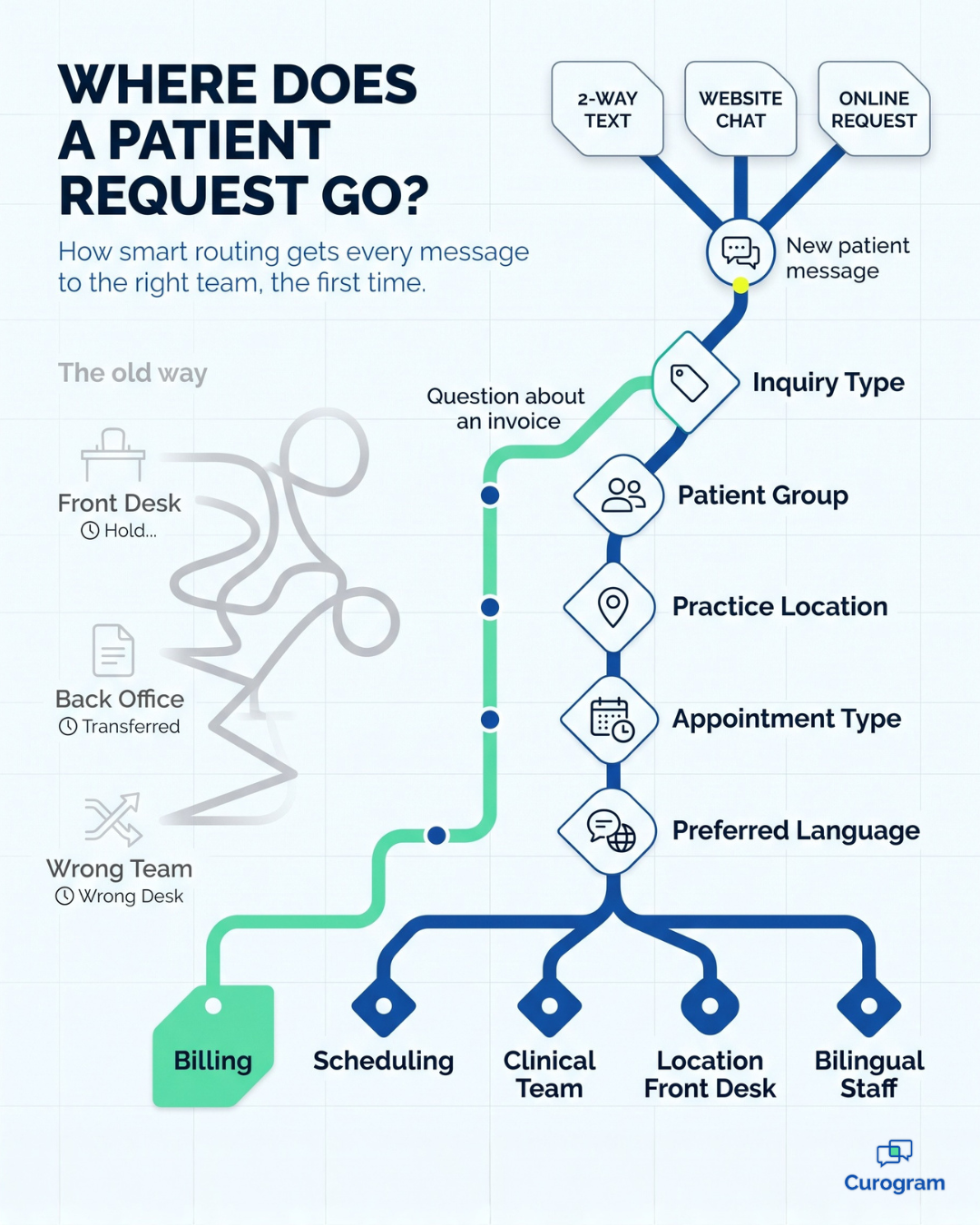
Advanced call routing systems are important for organizing and simplifying the activities of a call center. They help manage high call volumes by intelligently routing queries to the staff or team that can best handle the question. In this way, every patient's concern is addressed efficiently by the staff member assigned to that task.
In Curogram’s call routing system, queries are sorted via filters based on:
A patient’s inquiry about an invoice, for example, would be directly routed to staff members that handle billing.
This precise routing system significantly streamlines the process by eliminating the need for multiple staff members to respond to a query, preventing confusion and overload. This is particularly important in large practices, where the variety and volume of inquiries can be overwhelming.
Additionally, the system’s ability to create filter sets tailored to specific requirements simplifies staff assignments. Administrators can effortlessly place team members into predefined groups, easing the integration and training of new staff and ensuring a seamless workflow in the call center.
One important advantage of this smart routing system is its compatibility with Curogram’s Online Request, an SMS chat feature. This feature allows new and current patients to initiate digital conversations directly from your website, and effortlessly transition to 2-way SMS for continued communication.
Online Request, described in more detail in 7 Ways SMS Chat Benefits Your Healthcare Practice, allows patients to choose the topic of their inquiry. The system’s routing system then uses this information to direct every query sent via Online Requests to the staff member or group member best able to handle the question.
Automated appointment reminders eliminate a center’s need to phone, or manually text, every patient to confirm their upcoming appointments, creating major time and cost efficiencies.
The system determines those patients with upcoming appointments and sends automated messages inviting them to confirm their appointment. Once a patient confirms, the schedule within Curogram automatically reflects this information. Up to two additional scheduled reminder messages are sent to the patient, reducing appointment no-shows —with no staff involvement needed.
These reminders can be customized to maximize patient engagement. Include your patient’s first name and your practice name to personalize your message.
Add clickable driving instructions to the appointment location to reduce inbound phone calls (and patients arriving at the wrong practice site!), or include other important details to smooth the patient’s experience.
Some appointments require preparation, such as fasting or arriving early. You can add instructions to automated messages based on appointment type. Patients know exactly what to expect, which means less last-minute confusion and fewer calls for your team.
You can save even more time by texting patients a link to online patient forms. These messages go out based on appointment type, so each patient gets the right forms.
Patients fill out the forms on their phones and add photos of their driver's license and insurance card. Our guide, How To Save Time with Automated Online Patient Forms, walks through the process in detail.
Digital forms also end the struggle with messy handwriting. They reduce manual data entry and the errors that come with it, so your front desk and call center both run more smoothly.
Your communication shouldn't stop when the visit ends. Automated follow-ups keep patients engaged and bring them back on time.
Here's how the process works:
Recalls can make a measurable difference. In one Curogram case study, 35% of a multi-location practice's patients who got an SMS recall booked an appointment within a month. That added up to 1,240 patients seen from recall messages alone.
Good training is the backbone of a strong call center, and it goes well beyond picking up the phone. Your team needs to give accurate information, understand what patients need, and handle tough moments with patience and care.
Without good training, service slips. Patients get frustrated, and some may take their care elsewhere.

A solid training program should cover:
HIPAA training deserves special focus. Anyone on your team who can see protected health information (PHI) needs regular, detailed training. That means knowing how to keep PHI safe, what happens when the rules are broken, and what steps your practice takes when a security issue occurs.
You can't improve what you don't measure. Tracking key performance indicators (KPIs) shows how well your call center is working and where it needs help.
| Metric | What it measures | Why it matters |
|---|---|---|
| Call volume | How many calls come in over a set period | Shows patient demand and peak times, so you can staff the right way |
| Average handle time | How long each call lasts | Helps you spot slow workflows and coaching needs |
| First-call resolution | How often an issue is solved in one contact | Fewer callbacks mean happier patients and less repeat work |
| Patient satisfaction | How patients rate their experience | Tells you whether faster service also feels better |
Review these numbers on a regular basis. Over time, you'll spot trends, see which areas need work, and know where your staff needs more training. That consistent evaluation helps your call center continue improving, and your patients will notice the difference.
Patient feedback offers direct insight into the patient experience, revealing how satisfied people are and how effectively your customer service is working.
Keep the process simple. Send a two- or three-question survey by text within a day of the visit, while the experience is still fresh, and include at least one question about how easy it was to reach your practice.
Then put those answers to work. Share recurring themes with your team each month and choose one issue to address. When patients see that you're listening and responding, their trust in your practice grows.
Over time, feedback becomes one of your best tools for building a patient-centered practice. It keeps both your care and your service moving in the right direction.
Workforce management is about having the right people in the right place at the right time. In a healthcare call center, that takes smart scheduling, good training, and the right technology.
Here's a simple way to approach it:
When staffing matches demand, your team can manage busy periods without burning out. Service quality improves, and so does employee satisfaction.
A busy call center doesn't have to mean long holds and exhausted staff. The difference comes down to how you manage the work, not just how much of it there is.
Start by looking closely at why patients call. Many of those conversations can become quick text exchanges that take seconds instead of minutes. Others can be routed directly to the right person, so no one gets bounced from desk to desk.
Next, let automation carry the routine workload. Reminders, prep instructions, intake forms, recalls, and surveys can all run in the background. Your team stops chasing confirmations and starts focusing on the patients who genuinely need a human voice.
Technology is only half the picture, though.
Well-trained staff, clear metrics, honest patient feedback, and thoughtful scheduling keep the entire system running smoothly. Together, they help you identify problems early and resolve them before patients ever feel the impact.
The real goal goes beyond speed. A well-run healthcare call center builds trust, because patients feel heard, questions get answered the first time, and appointments happen as planned. That reliability keeps people loyal to your practice and makes them more likely to recommend you.
Not sure where to begin? Choose one change from this guide and test it for a month, tracking your call volume before and after. Even small adjustments, like moving appointment confirmations to text, can free up hours your team didn't realize they had.
Curogram brings 2-way texting, smart routing, automated reminders, and patient recalls together in one HIPAA-compliant platform. It's designed to take repetitive tasks off your team's plate so they can spend more time helping patients.
Ready to give your call center some breathing room? Book a personalized demo to see how Curogram streamlines patient communication, and discover how much time your team could get back.

Learn why after-hours patient communication matters in healthcare. Discover the risks of missed calls and how AI voice can improve patient...

Learn how two-way SMS can streamline telehealth, boost patient communication, and ensure HIPAA compliance for your care practice with an actual case...
 Joshua Inciso : 4/26/22, 7:00 AM
Automated tools in healthcare make processes more effective and efficient. Learn how to automate communication and enhance patient engagement.