Skip to the main content.

8 min read

Healthcare Staffing Optimization: Peak Hours Analytics Guide

Healthcare Staffing Optimization: Peak Hours Analytics Guide
 💡 Healthcare staffing optimization peak hours analytics reveals what raw headcount counts can't. Most staffing problems are not about hiring more people. They are about placing the right people in the right hours. Patient messages do not flow evenly across the day. They cluster in sharp peaks — like Monday mornings or Friday afternoons.

When staff schedules track appointment volume instead of message volume, reply times suffer. The fix often costs nothing. By reading message data and shifting staff to peak windows, practices cut reply times by 30-50% with no new hires.

This guide shows how to spot misaligned staffing, read the right signals, and build a protocol that holds. Better alignment means faster replies, fewer no-shows, and calmer front desks.

Most practice leaders ask the wrong staffing question. They ask "Do we have enough staff?" when they should ask "Do we have staff in the right hours?" These two questions look the same. They are not.

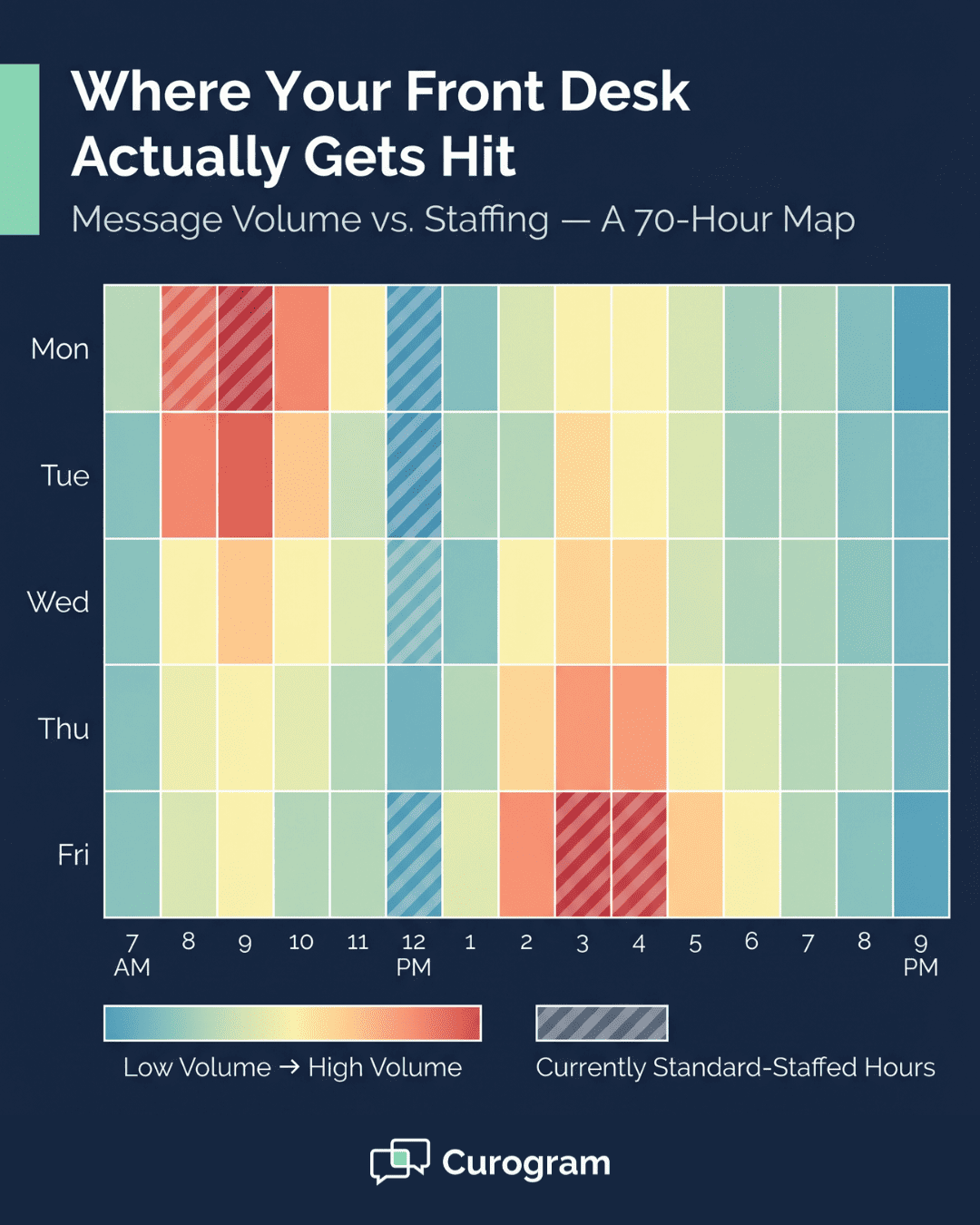
Patient messages do not spread evenly through the day. They cluster into sharp peaks. Monday at 9 AM looks nothing like Wednesday at 2 PM. Friday at 4 PM looks nothing like Tuesday at 11 AM. Yet many practices use one flat schedule for the whole week.

The result is easy to see. Some hours your team is buried in messages. Other hours they are bored. Reply times slip, patients wait too long, and no-shows climb. Staff burn out from peak windows they did not see coming.

This is where healthcare staffing optimization peak hours analytics changes the game. Instead of guessing, you measure. Instead of staffing to appointment volume, you staff to actual message demand. The shift is small but the impact is large.

Based on our internal data, practices that align staff to message volume cut reply times sharply. They do this without hiring a single new person. Atlas Medical Center, for example, dropped no-show rates from 14.20% to 4.91% in three months. That kind of gain starts with better timing, not bigger payroll.

This guide walks through the full process. You will learn why appointment volume is the wrong proxy for staffing. You will see the four signs that point to a misaligned schedule. You will read a real fix that took 47-minute reply times down to 16 minutes. And you will get a simple protocol for locking in those gains.

By the end, you should be able to tell a headcount problem from an alignment problem. Most of the time, the fix is free.

The Staffing Question Every Administrator Gets Wrong

Most practice leaders ask "Do we have enough staff?" That feels like the right question. It is not. The question hides a flawed idea — that patient demand is even across the day.

It is not even. Not even close. In most practices, demand piles up in a few key windows. The first 90 minutes after open. The post-lunch rebound around 1 PM. Friday afternoons before the weekend cutoff.

Look at total daily message volume and your staffing might look fine. But that number averages high-demand hours with low-demand hours. So during a Monday morning peak, four staff drown in messages. By Thursday at 2 PM, those same four sit idle.

The real question is not about total bodies. It is this: are the right people working the right hours? That shift in framing changes everything you do next.

Here is why the difference matters so much. Headcount problems and alignment problems look the same on the surface. Both show stress, slow replies, and frustrated patients. But they need very different fixes.

If total volume truly exceeds capacity, you must hire. That often costs $40,000 to $60,000 per new front desk hire each year. If volume is fine but timing is off, you reallocate. That costs almost nothing.

Based on our internal data, most staffing pain comes from misalignment, not understaffing. Practices think they have a headcount issue. They actually have a schedule issue. The two feel the same to the front desk.

Once you see the difference, the path forward is clear. Stop asking how many staff you need. Start asking when you need them. That is the heart of peak patient communication hours staffing — matching people to predictable demand windows.

Communication Volume vs. Appointment Volume

Most schedules start with appointment volume. The admin looks at the booking calendar, sees a busy morning and a slower afternoon, and staffs to match. That feels logical. Appointment volume is easy to count and easy to see.

But appointment volume is not the same as message volume. Patients message before visits to confirm, ask questions, or report symptoms. They message after visits about results, refills, and follow-up steps. They message on weekends when no appointments are even on the calendar.

This is why appointment volume is a poor proxy for actual demand on your front desk. The real load lives in messages, not just office visits. Medical practice staffing data analytics shows the gap between the two clearly.

Here is the pattern:

A reminder sent at 8 AM creates a reply wave around 9 AM. A message from a patient Friday night sits until Monday at 8 AM. A new-patient form filed on Sunday hits the queue first thing Monday. Scheduled events drive messages, but with delays and pile-ups.


That delay and pile-up is the whole point. Your appointment book might show steady demand. Your message queue might show a sharp Monday spike. Staffing to the book misses the spike.

Message volume staffing alignment fixes this. You read the actual flow of patient messages by hour and by day. You then map staff to that flow. The schedule starts to look bumpy, not flat — because the real demand is bumpy.

Practices that make this switch see faster reply times right away. Based on our internal data, the gain shows up in the first two weeks. No new hires. No new tools beyond what you already use. Just a schedule that matches what is really happening at the front desk.

Weekly heatmap showing medical practice message volume by day and hour with overlay revealing front desk staffing misalignment

Four Signs Your Staffing Is Aligned to the Wrong Variable

If you staff to appointment volume instead of message volume, four clear signs will show up. These signs are easy to spot once you know what to look for. You do not need fancy tools to notice them. You just need to listen to your team.

  • Monday mornings hurt more than they should. Reply times spike, phones never stop, and your staff feel buried. This is weekend pile-up hitting your queue at once. Messages sent Friday night and over the weekend all land Monday at 8 AM. A flat schedule cannot absorb that wave.

  • The afternoon dip and rebound. Things ease up around 1 PM. Your team finally breathes. Then by 4 PM they are drowning again, as patients send end-of-day questions before the office closes. The 1 PM dip hides the second peak.

  • Reply times swing wildly by day of the week. A truly balanced schedule shows small day-to-day swings. If Monday reply times are double those of Wednesday, your staff size may be fine. The schedule is the issue.

  • Appointment counts feel fine but message counts feel rough. You measure by visits and the numbers look healthy. You measure by messages and the numbers look bad. That gap is your alignment problem.


The Alignment Adjustment

An urgent care group ran into this exact problem. Their reply times on Monday mornings were three times slower than Wednesday afternoons. The first instinct of the office manager was simple — hire another front desk person.

Instead, the team paused and pulled the data first. They looked at message volume by day and by hour. The peak was clear: Monday from 9 to 11 AM was the hottest window of the week. Thursday afternoons, by contrast, were almost dead.

The fix was a shift, not a hire. One staff member moved from Thursday 2-5 PM to Monday 8-10 AM. No new salary. No new training. Just one schedule line changed.

The result was sharp. Reply times during the Monday peak dropped from 47 minutes to 16 minutes. That is a 66% drop. Confirmation rates also climbed within two weeks, since patients heard back fast enough to confirm before slots aged out.

That is how to align staff with patient volume healthcare leaders too often overlook. The fix lived in the data, not the budget. The cost was the time it took to redesign one schedule.

Most alignment fixes look just like this. They do not need new hires. They need attention to where messages truly cluster. Move staff into those windows. Pull staff back from quiet windows. That is the whole move.

The downstream effects compound over weeks. Faster replies improve confirmation rates.

Higher confirmation rates lower no-shows. Lower no-shows protect revenue. Based on our internal data, Atlas Medical Center cut no-shows from 14.20% to 4.91% in three months using related communication fixes.

This is the front desk optimization medical practice administrators rely on today — built on data, not gut feel.

Medical practice administrator reviewing peak hour message volume heatmap while adjusting weekly staff schedule on her desk


From Peak-Hour Data to a Staffing Protocol

Once you spot your peak windows, do not rely on memory. Write them into a real staffing protocol. A protocol turns insight into routine.

It locks in the gains, removes the guesswork, and keeps the schedule steady when leaders are out or new staff join. The next step is to translate raw data into a clear set of rules that anyone can follow.

Turning Peak-Hour Data Into a Staffing Protocol

A staffing protocol works only if the data behind it is clean and current. That is where Curogram Insight Suite earns its place. The tool pulls message volume, reply times, and staffing levels into one view, side by side. You see the peaks. You see the gaps. You see what to fix.

A simple protocol built from Insight Suite data might read like this:

Day & Time

Minimum Staff on Messages

Mon–Fri, 8–10 AM

3

Friday, 3–5 PM

3

Tue–Thu, 12–1 PM

2

Off-peak hours

Standard rotation


That kind of rule replaces hunches with numbers. It tells your team exactly when to be at the desk and when they can step away. New hires onboard faster because the schedule is written down, not passed by word of mouth.

Update the protocol once a quarter. Most practices find the core peak windows stay stable for 12 months or longer. Reviews shift from active fixing to light monitoring after the first two months.

Based on our internal data, the downstream gains stack up fast. Atlas Medical Center hit a 3X improvement over the industry no-show average using related communication fixes. Other Curogram clients have seen no-show rates fall 53% below the industry mean, with 10-20% revenue gains from recovered slots.

The real value goes beyond numbers. Staff stop dreading Mondays. Office managers stop firefighting peak hours. The front desk feels calm because it is no longer caught off guard by demand it could have seen coming.

Conclusion

Most staffing problems are not headcount problems. They are alignment problems. The fix rarely sits in the budget. It sits in the schedule.

Patient messages cluster in sharp peaks. Monday at 9 AM. Friday at 4 PM. The hour after lunch. If your staff plan ignores those peaks, your reply times will suffer no matter how many people you hire.

The four warning signs are easy to spot. Painful Mondays. A clear afternoon dip and 4 PM rebound. Wild day-to-day swings in reply time. A gap between how visits feel and how messages feel.

When you see those signs, do not hire first. Pull the data first. Look at message volume by hour and by day. Find your real peaks. Then move existing staff into those windows.

The fix often costs nothing. One urgent care group cut Monday peak reply times from 47 to 16 minutes by shifting one staff member. No hire. No new tool. Just a schedule that matched the truth on the ground.

Lock in the fix with a written protocol. Tie staff levels to specific hours. Review the protocol each quarter. Most practices keep the same core peaks for a full year before any major shift is needed.

The downstream wins are real. Faster replies lead to higher confirmation rates. Higher confirmation rates lead to lower no-shows.

Lower no-shows protect revenue. Based on our internal data, Curogram clients have cut no-show rates 53% below the industry average using these kinds of communication-led fixes.

The takeaway is simple. Stop asking how many staff you need. Start asking when you need them. That single shift will do more for your front desk than another hire ever could. The answer is already in your message data — you just have to look.

Cut peak-hour reply times by 30-50% without adding a single hire to payroll. Schedule a demo now and see see exactly which hours need staff and which do not.


Frequently Asked Questions

How do I know whether I have a headcount problem or an alignment problem?

Plot response time by hour of day as a grouped bar chart. If every hour is elevated equally, you have insufficient staff for total volume—add headcount. If only certain hours spike while others are normal, you have an alignment problem—reallocate existing staff to peak windows.

Can aligning staffing to communication volume actually reduce no-shows?

Yes, both directly and indirectly. Directly: faster response to pre-appointment questions improves confirmation rates, and higher confirmation rates correlate with lower no-shows. Indirectly: when patients feel heard and get quick responses, they're more engaged, and engagement reduces disengagement-driven no-shows.

How often should I review and update staffing alignment?

During active optimization, review monthly. Once alignment is stable (usually 2-3 months), move to quarterly reviews. Review out-of-cycle when practice changes occur—provider additions, volume spikes, new service lines, location openings.

What downstream effects does better staffing alignment create?

Faster reply times raise confirmation rates within two weeks. Higher confirmation rates lower no-shows within four to six weeks. Lower no-shows protect revenue and free up time slots. Staff also report less burnout from chaotic peak windows.

Why do most practices misread their staffing needs at first?

Most leaders rely on gut feel and total daily message counts. Both hide the peaks. Averages smooth out the spikes, and gut feel often points to hiring when the real fix is moving the staff you already have.