10 min read

How to Eliminate Confirmation Calls at Your Tebra Front Desk

How to Eliminate Confirmation Calls at Your Tebra Front Desk
💡 Tebra's built-in reminders send one-way alerts, but they don't close the loop. Front desk staff still spend 2–3 hours each morning calling patients to confirm.
  • Tebra reminders are one-way — patients can't reply to confirm, cancel, or reschedule
  • Staff dial 30–50 patients daily, reaching voicemail about 60% of the time
  • Curogram adds 2-way text-based confirmations on top of Tebra's scheduling
  • Patients reply with one word — "Confirm," "Cancel," or "Reschedule" — by text
  • Based on our internal data, practices see over 75% confirmation rates with zero phone calls
Curogram's automated patient confirmation workflow works alongside Tebra's front desk tools. It replaces the daily phone ritual with a simple dashboard review that takes minutes, not hours.

It's 7:45 a.m. Your front desk staff just pulled up today's schedule. There are 40 patients on the books. And now, one by one, they start calling each one.

"Hi, this is Dr. Smith's office. We're just calling to confirm your 10:15 appointment today..."

Voicemail. Leave a message. Move to the next name. Repeat.

This is the morning scramble. It happens every single day at Tebra practices across the country. And it eats up 2–3 hours before the first patient even walks through the door.

Here's the thing: Tebra does send reminders. But those reminders only go one way. They tell the patient about the visit. They don't let the patient reply. So your staff has no way to know who's coming and who's not — unless they pick up the phone.

That gap between "reminder sent" and "patient confirmed" is where your front desk loses its morning. The Tebra staff morning scramble around appointment verification is a real burden, and it grows worse as you add more patients and providers.

Curogram was built to close that gap. It layers automated 2-way text confirmations on top of Tebra's scheduling. Patients get a text. They reply "Confirm." The schedule updates in real time. No calls needed.

In this article, we break down how the morning scramble drains your staff and your day. We'll show you exactly how an automated patient confirmation workflow helps your Tebra front desk reclaim hours, reduce burnout, and start each day with a clear picture.

If your front desk still dials through the schedule every morning, this one's for you.

The Villain: "The Morning Scramble"

Every morning at Tebra practices, the same scene plays out. Staff pull up the day's schedule. They start at the top and call each patient. They reach voicemail about 60% of the time. They leave a message, hang up, and move on.

Tebra's reminders went out the night before. But those are just alerts — not confirmations. Without a 2-way reply, your front desk has no proof that a patient is coming. The "reminders on" setting in Tebra gives you a false sense of safety. It feels like the job is done. But every morning, the phones come out again.

That's the core problem. The Tebra front desk still makes appointment confirmation phone calls to verify patient confirmations, even when reminders are already set to automate. The tool sends a notice. It doesn't get one back.

The Workflow Drain

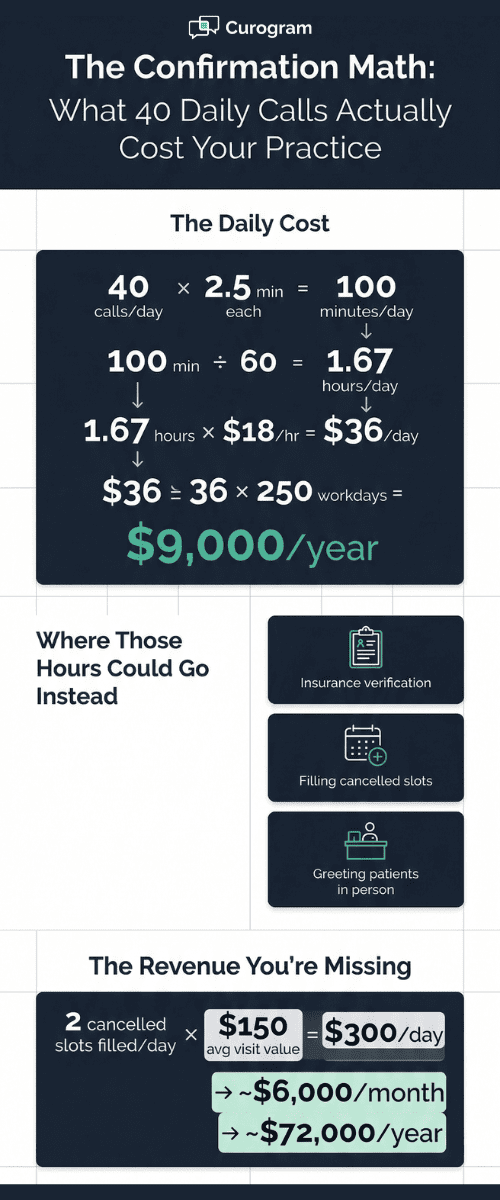
Each call takes 2–3 minutes on average. Your front desk agent dials the number, waits for an answer, states the patient's name, confirms the time and provider, notes the reply, and updates the chart.

For a practice with 30–50 visits per day, the math gets ugly fast. Here's a quick look:

Daily Appointments

Avg. Minutes Per Call

Total Time on Calls

30

2.5

75 minutes

40

2.5

100 minutes

50

2.5

125 minutes


That's up to two full hours spent on calls — before the front desk does anything else. Your staff isn't managing the day. They're running a manual call center.

This is the daily burden of the Tebra staff morning scramble around appointment verification, and it takes a toll far beyond just phone time.

The Compounding Cost

While your front desk makes calls, the rest of the morning falls behind. Patients walk in and wait at the desk with no one to greet them. Insurance checks pile up. Pre-visit prep gets skipped. Forms go unfiled.

The scramble doesn't just cost you time on the phone. It creates a chain reaction of delays. Check-ins slow down. Billing issues pop up later in the day. Provider schedules start to slip.

For growing Tebra practices that are adding providers or opening new locations, this problem gets worse — not better. The scramble doesn't scale. It breaks.

The Burnout Reality

Front desk staff at small Tebra practices already wear many hats. They check patients in. They answer phones. They handle insurance. They manage intake forms. Now add 2–3 hours of daily calls on top of all that.

It's not a surprise that burnout is high. Staff turnover at the front desk is one of the most common — and most costly — problems in small clinics. Hiring and training a new team member costs far more than the tool that could have prevented the burnout in the first place.

The all-in-one platform was supposed to prevent this kind of workload. But when your Tebra office manager still makes manual confirmation calls every morning and can't eliminate them, the promise of the platform falls short. The front desk needs help — not another task.

Infographic showing cost of manual confirmation calls at medical practices totaling $9,000 per year

The Guide: Automated 2-Way Confirmations

Curogram handles the full confirmation workflow — from reminder to reply. Here's how it works:

Text reminders go out at custom intervals. You pick the timing: 48 hours before, 24 hours before, 2 hours before — or any mix that fits your schedule. Patients get a simple text like:

"You have an appointment tomorrow at 2:00 PM. Reply CONFIRM, CANCEL, or RESCHEDULE."

No app to download. No portal to log into. The patient replies from their lock screen. That's it.

Once the reply comes in, the status updates in real time. Staff see a live dashboard with clear color codes: green for confirmed, red for cancelled, yellow for no reply yet. The only calls they need to make are to the yellows — and there are very few of those.

This text-based appointment confirmation delivers major Tebra staff time savings. Instead of 40 calls, your front desk might make 3 or 4.

Set-and-Forget Confirmations

Once you turn Curogram on, the system runs itself. Every booked visit gets a reminder — no daily setup, no manual steps, no one has to press "send."

Your front desk role shifts from making calls to reading a dashboard. That 5-minute check-in replaces the 2-hour scramble. Staff can focus on filling slots from cancels, prepping charts, and greeting patients in person.

Think about it this way. Say you have one front desk agent who earns $18 per hour. If they spend 2 hours each day on calls, that's $36 per day — or about $9,000 per year — spent just on the phone doing work a text could handle in seconds.

How It Works With Tebra

Curogram doesn't replace Tebra's scheduling. It works right next to it. When you book a visit in Tebra, Curogram picks it up and sends the confirmation workflow. Staff don't re-enter data. They don't flip between two systems.

You use Tebra to book. You use Curogram to confirm. It's two clicks instead of thirty calls. This is how Tebra front desk phone calls for patient confirmations get fully automated — without changing the way you schedule.

There's no heavy setup either. Curogram's founders actually sent their developers to sit beside front desk teams at real clinics. They watched the daily grind firsthand. That's why the platform takes about five minutes to learn. It was built around how the front desk already works.

The "Lean Practice" Fit

Most Tebra practices run lean. You've got 1–3 front desk agents juggling check-ins, phones, forms, and insurance — all at the same time. Adding one more task isn't an option. But Curogram doesn't add a task. It removes the biggest one.

For a practice that can't afford to hire another person, this matters. Automated confirmations do the work of a part-time employee at a fraction of the cost. Based on our internal data, Curogram's system is 100% automated — built to reduce admin tasks and handle more patients with the same team.

That's the key difference between Tebra front desk appointment confirmation through manual calls and what Curogram's automated reminders offer. One asks your staff to do more. The other does it for them.


The Success: The Morning Scramble, Eliminated

Numbers tell the real story. Covina Arthritic Clinic is a good example. After turning on Curogram, they went from managing confirmations by hand to processing over 1,100 confirmed visits per month on autopilot. The entire workflow — from reminder to reply — runs without a single phone call from the front desk.

Based on our internal research, practices using Curogram see over 75% of patients confirm by text alone. That means three out of four patients on the schedule reply before your staff even opens the office.

From Calling to Confirming

Here's what a typical morning looks like before Curogram:

  • 7:30 AM — Front desk pulls the schedule. Forty patients on the list.

  • 7:35 AM — Staff starts calling. First patient goes to voicemail. Second patient doesn't pick up. Third one confirms but asks to move the time.

  • 8:15 AM — Fifteen calls done, twenty-five to go. First patients start walking in. No one's at the desk to greet them.

  • 9:00 AM — Calls are still going. Insurance verifications are backed up. The provider asks why the first patient's chart isn't ready. The office manager is putting out fires instead of running the day.

Now here's the same morning with Curogram:

  • 7:30 AM — Front desk opens the dashboard. Thirty-two patients are green (confirmed). Three are red (cancelled). Five are yellow (no reply yet).

  • 7:35 AM — Staff fills two open slots from a waitlist. Makes three quick calls to the yellows. Done.

  • 7:45 AM — The team starts pre-visit prep, runs insurance checks, and gets ready for the day — with a clear picture of who's actually coming.

That's the shift. The phone still rings during the day, but for patient questions — not confirmation calls. The reactive morning turns into a planned one.

This is how an automated patient confirmation workflow transforms a Tebra front desk from a daily scramble into a daily system.

The Revenue Side

Most people think of confirmations as a time-saving tool. And they are. But they also have a direct impact on revenue.

When patients confirm by text, they show up. When they cancel early, you can fill the slot. When they reschedule, they stay in the system instead of falling off. Based on our internal data, Curogram practices see a 10–20% increase in revenue, with each recovered visit adding to the bottom line.

Let's say you have 5 no-shows per week. At $150 per visit, that's $750 in lost revenue — or about $39,000 per year walking out the door.

Now imagine cutting that number in half with confirmations. You'd recover close to $19,500 a year — just by knowing who's coming and who's not.

The real number could be even higher depending on your daily volume and average visit value. Curogram has helped practices reduce their no-show rate by as much as 75%, which means the revenue you're losing today doesn't have to stay lost.

That's the math behind text-based appointment confirmation and the Tebra staff time savings that come with it. You save hours and you save revenue.


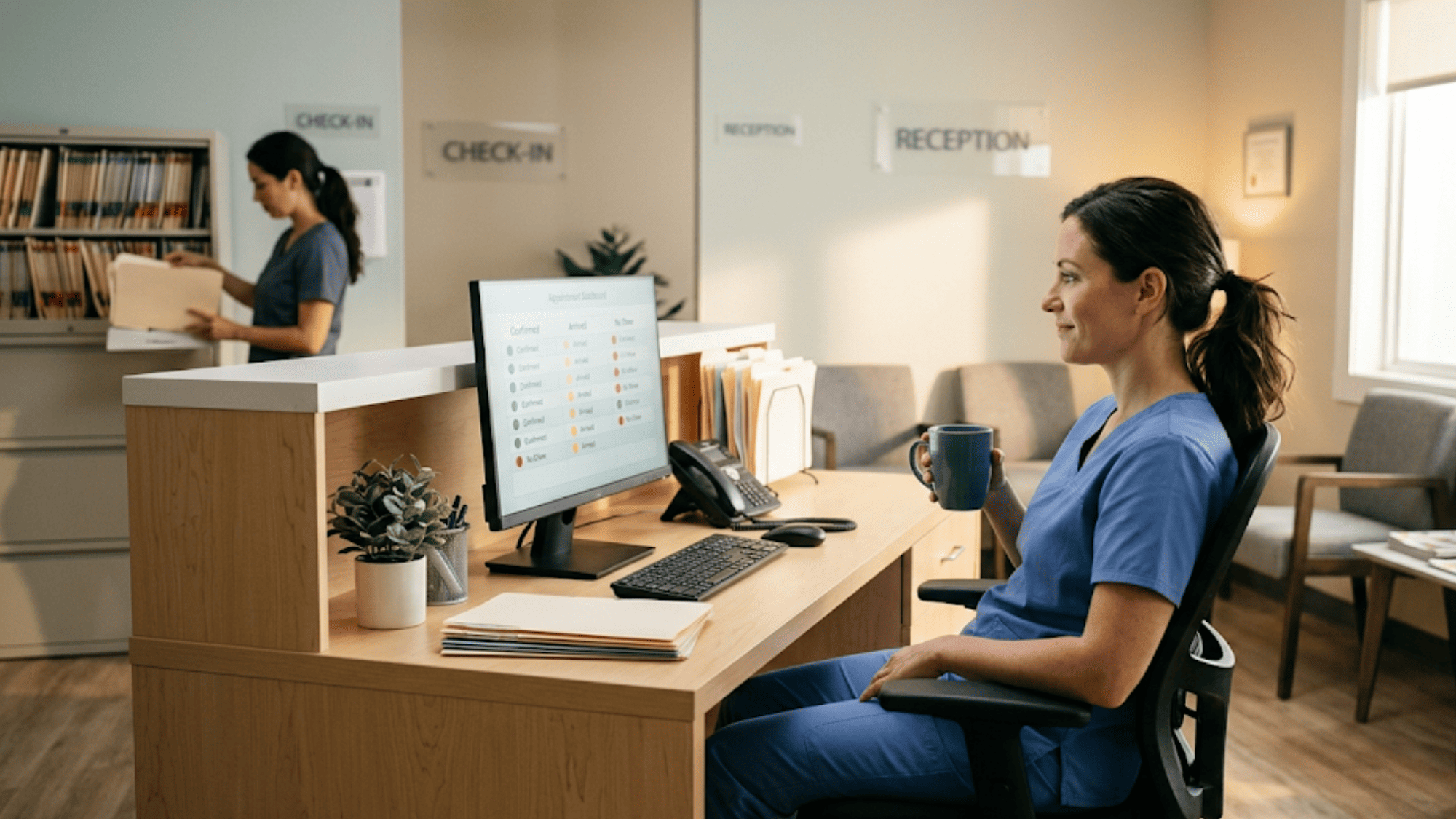
Relaxed medical office employee checking confirmed appointments on monitor during a quiet morning

Why 2-Way Confirmation Works Better Than One-Way Reminders

One-way reminders tell the patient about the visit. That's it. There's no way for the patient to reply, confirm, or cancel. The message lands in their phone, and nothing happens next.

Two-way confirmation changes the entire dynamic. The patient replies. The schedule updates. Your front desk sees the status in real time. There's no guessing, no chasing, no hoping they show up.

Here's why this matters. A one-way reminder puts the burden back on your staff. If the patient doesn't call the office to confirm, someone at the front desk has to call them. That's the gap that creates the morning scramble in the first place.

With Curogram, the patient does the work. One text reply takes two seconds. And because 98% of text messages are opened (compared to about 20% of emails), the response rate is far higher than any other method.

This is the difference that helps Tebra front desk teams automate patient confirmations through phone calls they no longer have to make. The reply is built into the message.

Curogram is also HIPAA compliant. All messages are logged and follow HIPAA formatting rules. No protected health details are included in the text. Curogram executes a Business Associate Agreement with every practice and uses encrypted channels for any data that requires it.

Setup takes about five minutes. Staff don't need training manuals or IT support. Curogram was designed by engineers who sat beside real front desk teams to watch how they work. The result is a system that fits into your existing flow — not one that forces you to change it.

Based on our internal data, the average Curogram client sees over 75% of their patients confirm by text. That's three out of four patients handled before the workday even starts.

The bottom line: one-way reminders are a heads-up. Two-way confirmations are a system. And a system is what your front desk actually needs.

Conclusion: Stop Calling, Start Confirming

Tebra's built-in reminders send a notice. Curogram's 2-way confirmations get a reply. That's the gap — and it costs your front desk 2–3 hours every single day.

When you close that gap with Curogram, the math changes fast. Morning calls drop from 35+ to fewer than 5. Staff use the extra time for insurance checks, pre-visit prep, and filling open slots. Patients confirm in seconds. The schedule goes from "maybe" to "confirmed" before 8 a.m.

Tebra handles your schedule. Curogram confirms it. Together, they give your front desk the kind of workflow that "all-in-one" was always meant to deliver.

For the office manager who still starts every day by printing the schedule and picking up the phone, this changes everything. For the front desk agent who juggles calls, check-ins, and insurance at the same time, this removes the biggest time drain from their morning.

When you eliminate the need for manual confirmation calls in your Tebra staff workflow with automated reminders, you don't just save time. You change how the day starts. And that changes how the whole day runs.

Your front desk is spending 2–3 hours a day on calls that a text could handle in seconds. See the difference in your first 30 days.

Your Tebra schedule is full, but your front desk still can't confirm who's coming. Schedule a demo to see how 2-way text confirmations close the gap before 8 a.m.


Frequently Asked Questions

How does Curogram's 2-way confirmation work with my Tebra schedule?
Curogram syncs with your Tebra scheduling system. When you book a visit, Curogram sends text reminders at the intervals you choose. Patients reply by text, and the confirmation status updates in real time on your dashboard.
How quickly can front desk staff learn to use Curogram?
Most staff learn the platform in about five minutes. Curogram was designed by engineers who observed real front desk workflows, so the dashboard mirrors how your team already works — no lengthy training needed.
Why do patients respond to text confirmations more than phone calls?

Texts are quick and easy to reply to. Patients don't have to answer a call, wait on hold, or call back later. A one-word reply like "Confirm" takes two seconds — so response rates are far higher than with phone-based outreach.

How does Curogram keep appointment reminder texts HIPAA compliant?

Curogram follows HIPAA formatting rules in every message. No protected health details are included in the text. Curogram also signs a Business Associate Agreement with each practice and uses encrypted channels for any data that requires added security.

How much front desk time can a Tebra practice actually save with Curogram?

Most practices reclaim 2–3 hours per day. Based on our internal data, over 75% of patients confirm by text — so staff only need to follow up with a handful of non-responders each morning instead of calling the full schedule.