9 min read

2-Way Smart Reminders for Tebra: Reduce No-Shows for Good

2-Way Smart Reminders for Tebra: Reduce No-Shows for Good
💡 Tebra appointment reminders with 2-way patient confirmation powered by Curogram's Confirmation Loop close the gap between sending a notice and getting a real response. Here's what you need to know:
  • Tebra's built-in reminders are one-way — they notify, but don't confirm
  • Curogram adds 2-way text replies: patients confirm, cancel, or reschedule in seconds
  • No app downloads, portal logins, or phone calls needed
  • Based on our internal data, no-show rates drop by up to 53% compared to the industry average
  • Atlas Medical Center cut no-shows from 14.20% to 4.91% in three months
Curogram works alongside Tebra — no migration or workflow changes needed. Practices using the Confirmation Loop achieve over 75% appointment confirmation rates across all specialties.

Your Tebra dashboard says reminders are active. The texts go out. The emails send. And yet, on Monday morning, three patients don't show up. Two never called. One says they "didn't see the message." The front desk scrambles to fill gaps, and by noon, your schedule looks like Swiss cheese.

This is the reality for thousands of Tebra practices. The reminders are on — but no one is checking whether they actually work.

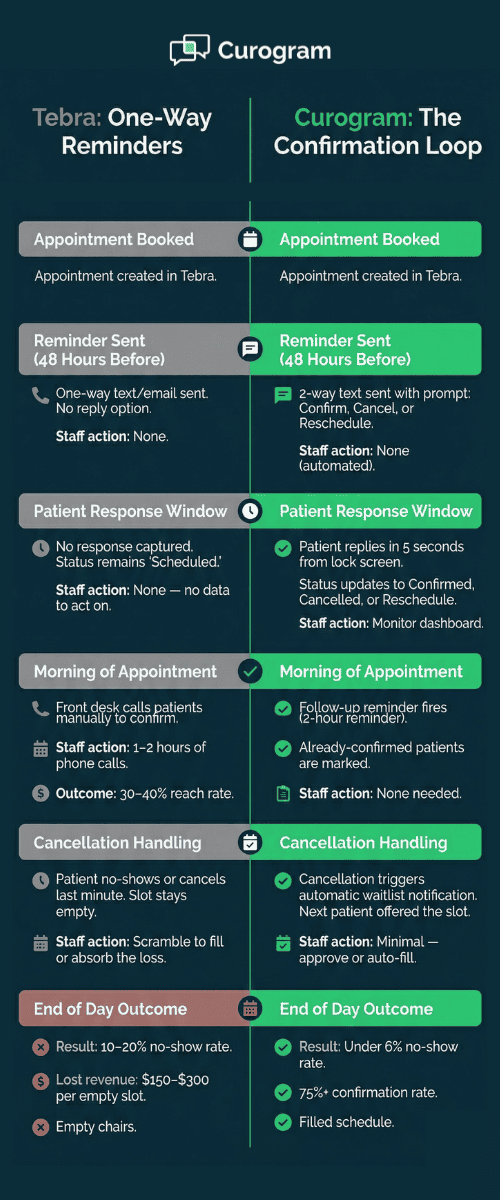
Here's the core issue: Tebra appointment reminders send a notice. They don't ask for a reply. A patient gets a text that says, "You have an appointment tomorrow at 2:00 PM." That's it. No prompt to confirm. No easy way to cancel. No option to reschedule with a quick text back. The reminder goes out, but nothing comes back.

We call this "The Silent Reminder." It looks like the system is working. Your settings show green lights. But the gap between sending a message and getting a real answer is where no-shows hide. And each empty slot costs your practice $150 to $300 in lost revenue.

When Tebra appointment reminders are not working the way you expect, patient no-shows climb fast. Practices accept this as normal because the tool exists. But existing isn't the same as working.

The fix isn't replacing Tebra. It's adding the one thing Tebra's reminders are missing — a way for patients to reply. A 2-way confirmation text can reduce no-shows at any Tebra practice by closing the loop between "scheduled" and "confirmed." That's what Curogram's Confirmation Loop does.

In this guide, we'll break down why Tebra's reminder system has a one-way patient confirmation gap, what it costs your practice, and how smart appointment reminders that let patients confirm, cancel, or reschedule through Tebra change the game.

The Villain: The Silent Reminder

Most practice owners believe their reminder system is doing its job. After all, Tebra markets automated reminders as a core part of its Patient Experience package. The platform sends text, email, and phone reminders before each visit. On the surface, this looks like the no-show problem is solved.

But there's a big gap between sending a reminder and confirming an appointment.

Tebra's reminders are notices — not questions.

They tell the patient, "You have an appointment at 3 PM on Thursday."

They don't ask, "Will you be there?"

There's no built-in way for a patient to reply "Yes," "No," or "Can I move this to Friday?"

The message flows in one direction. It's a broadcast, not a conversation.

This is what we mean by the Tebra reminder system's one-way patient confirmation gap. And it creates a blind spot that hits your schedule, your staff, and your revenue every single day.

The Delivery Problem

Even the one-way part doesn't always work right. Reviews on Capterra, G2, and GetApp point to a pattern of issues. Reminders don't send for certain appointment types. Time zone mix-ups cause texts to arrive at 3 AM. Options to adjust the timing or the message content are limited.

The merger between Kareo and PatientPop — which became Tebra — added more wrinkles. Some users report that the reminder settings don't line up with the scheduling module the way they should. When the system fails, it fails quietly. You don't know a reminder didn't send until the patient doesn't show up.

Think about it this way: if a reminder goes out at midnight due to a time zone error, the patient ignores it. From Tebra's side, the reminder was "sent." From the patient's side, it was junk. From your side, it's an empty chair at 9 AM.

The Revenue Consequence

Let's put real numbers to this problem.

No-show rates for Tebra practices range from 10% to as high as 50%, depending on the specialty and patient base. The average sits around 20%. Each missed appointment costs $150 to $300 in lost revenue.

Here's what that looks like for a 5-provider practice seeing 20 patients per provider per day:

Metric

Value

Total daily appointments

100

No-show rate (15%)

15 missed visits/day

Revenue lost per visit

$200 (avg.)

Daily lost revenue

$3,000

Monthly lost revenue (20 days)

$60,000

Annual lost revenue

$720,000


Even cutting that no-show rate in half would save over $350,000 a year. These are not edge cases. This is daily math that every Tebra practice can run with their own numbers.

The "Good Enough" Trap

The most costly part of this problem is that it hides in plain sight. Practice owners see "reminders: active" on their dashboard and assume the job is done. They don't compare their actual confirmation rate against the 75%+ rate that's possible with 2-way smart reminders.

They don't calculate the per-chair cost of empty slots. They accept patient no-shows as a fact of life — because their all-in-one platform told them the feature was included.

But having a feature and having a feature that works are two very different things. The Tebra no-show rate stays high because the text-based confirmation loop that could fix it simply doesn't exist inside the platform.

Side by side timeline of one-way appointment reminders versus 2-way smart reminders with patient text confirmation

The Guide: The Confirmation Loop

So if one-way reminders are the problem, what does the fix look like? It's simple in concept but powerful in practice: close the loop.

Curogram's Confirmation Loop adds the missing piece to Tebra's reminder workflow. Instead of sending a message that ends in silence, the system sends a text that invites a reply.

The patient texts back "Confirm," "Cancel," or "Reschedule." The status updates right away. The front desk sees the result in real time. No guessing. No hoping.

This is what smart appointment reminders look like — patients confirm, cancel, or reschedule through Tebra-integrated texts, and the schedule updates itself.

How It Works: Step by Step

Here's what the Confirmation Loop looks like in practice for a typical Tebra office:

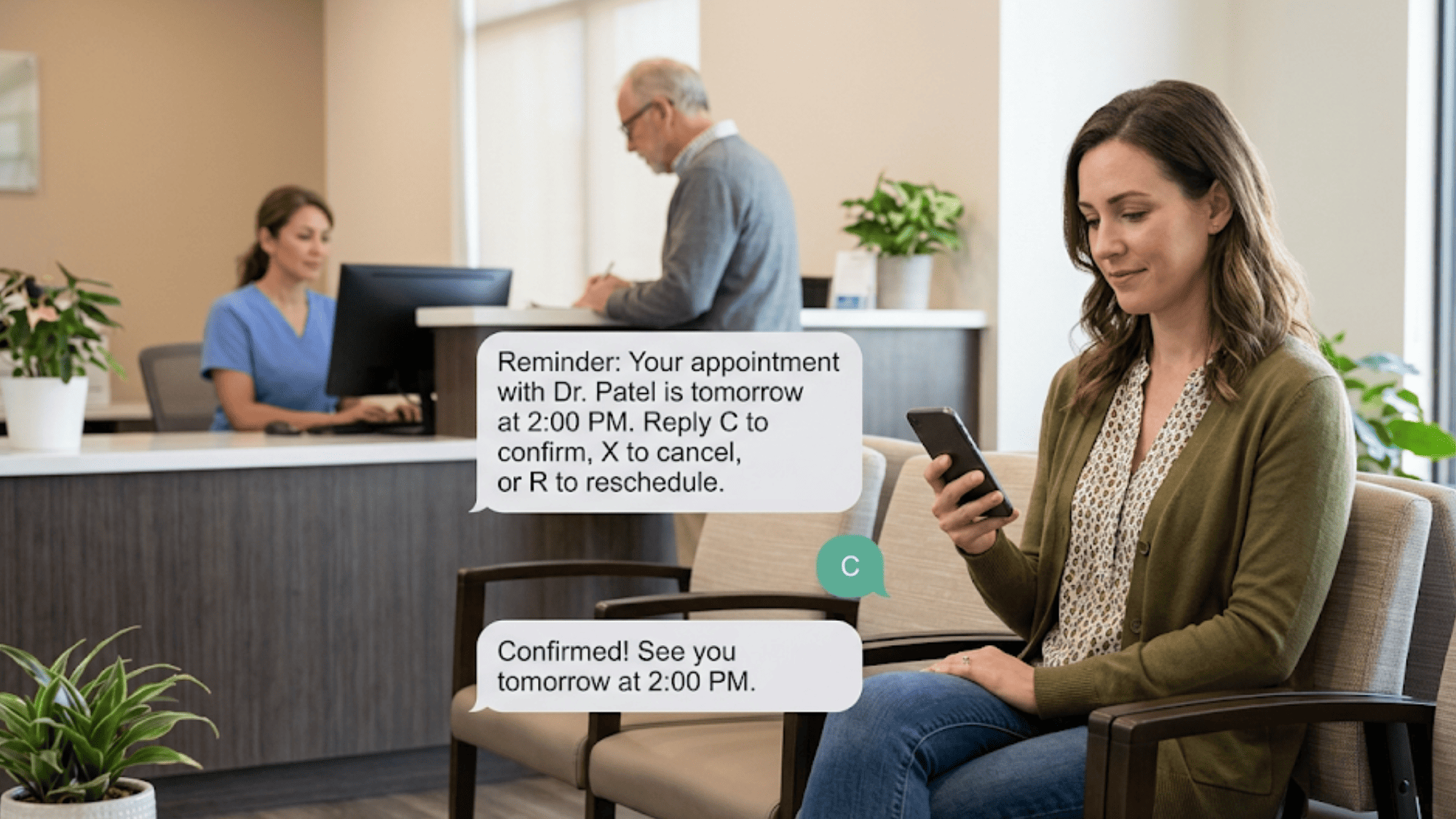
  • Step 1: The Smart Reminder Goes Out. Curogram sends a text to the patient — for example, 48 hours before the visit. The message includes the date, time, provider name, and a clear prompt: reply C to confirm, X to cancel, or R to reschedule.

  • Step 2: The Patient Replies. The patient sees the text on their lock screen. They tap a quick reply. No app to download. No portal to log into. No phone call to make. It takes about five seconds.

  • Step 3: The Status Updates. If the patient confirms, the status changes to "Confirmed" in real time. If they cancel, the slot opens up. If they want to reschedule, the system starts that process. Staff see all of this as it happens.

  • Step 4: The Waitlist Kicks In. When a patient cancels, Curogram can notify the next person on the waitlist. That empty slot gets filled — often within hours — instead of staying open and costing the practice money.

  • Step 5: Follow-Up Reminders Fire. Curogram doesn't stop at one message. You can set up a series — a 48-hour reminder, a 24-hour reminder, and a 2-hour reminder. Each one gives the patient another chance to respond. More touches mean higher confirmation rates.

Built to Work With Tebra — Not Replace It

A common concern from practice owners: "Do I have to switch systems?"

No. Curogram works alongside Tebra's scheduling module. Staff keep using Tebra for booking and charting. Curogram handles the confirmation layer — the piece between "scheduled" and "confirmed" that Tebra's one-way reminders can't close.

There's no data migration. No workflow overhaul. No retraining on a new platform. Based on our internal data, staff onboarding takes as little as 10 minutes.

Think of it this way: Tebra is the calendar. Curogram is the question mark at the end of every appointment — "Are you coming?"

Patient in clinic waiting room confirming appointment by replying to a 2-way text reminder on her phone

Why This Works Better Than Phone Calls

Many front desk teams spend the first hour of every morning on the phone, calling patients to confirm. This is slow, costly, and often useless. Patients don't pick up. Voicemails go unheard. Staff time that should go toward patient care gets burned on dial tones.

A 2-way confirmation text is faster, cheaper, and more effective. Here's a quick look at the contrast:

Method

Avg. Time Per Patient

Response Rate

Staff Effort

Phone calls

3–5 minutes

30–40%

High (manual)

One-way text (Tebra)

Automated

Near 0% confirmed

None, but no result

2-Way text (Curogram)

Automated

75%+ confirmed

Minimal (monitor)


The numbers speak for themselves. When you give patients a fast, simple way to respond, they do.

Fits Practices in Growth Mode

For Tebra practices that are adding providers, opening new locations, or growing their patient base, no-shows become a scaling problem. A 15% no-show rate with 20 daily visits is annoying. At 60 visits per day across two or three locations, it's a crisis.

Curogram's Confirmation Loop scales with you. Whether you have 1 provider or 20, the system keeps confirmation rates above 75%. The loop works the same at high volume as it does at low volume — and staff effort stays flat because the whole process is automated.

This is the all-in-one upgrade that Tebra practices need. Not a replacement — an addition that turns a one-way reminder into a closed-loop system.

The Success: Every Slot Confirmed or Filled

Results matter more than promises. Here's what real practices have seen after turning on Curogram's Confirmation Loop with Tebra.

Atlas Medical Center

Atlas Medical Center was dealing with a no-show rate of 14.20% — high enough to cause daily schedule gaps and real revenue loss.

After activating Curogram's automated reminders with 2-way text confirmation, their no-show rate dropped to 4.91% in just three months. Based on our internal data, that's a 65% reduction and 3X better than the industry average.

Covina Arthritic Clinic

The Covina Arthritic Clinic's front desk team was buried in manual follow-ups to confirm appointments. After switching to Curogram, they went from 369 confirmed appointments per month to over 1,100 per month — all automated.

Staff no longer spent their mornings on the phone. Based on our internal research, the clinic now averages over 1,100 confirmed appointments each month with zero manual effort.

The Shift: From Hoping to Knowing

The biggest change isn't just the numbers. It's the mindset. Before the Confirmation Loop, practices start each day hoping patients show up. After it, they know the status of every single slot.

Confirmed visits stay on the books. Cancellations come in early enough to fill from the waitlist. Patients who need to reschedule get a new time without the front desk playing phone tag. The schedule turns from a daily gamble into a steady source of revenue.

What This Looks Like in Practice

Picture a 10-provider Tebra practice with an 18% no-show rate. That's roughly 18 empty slots out of 100 daily appointments. At $200 per visit, that's $3,600 lost every day — about $72,000 a month.

After 60 days with Curogram, the no-show rate drops to under 6%. The practice recovers 12 of those 18 daily slots. That's $2,400 per day back on the books — around $48,000 per month in revenue that used to walk out the door.

Same Tebra platform. Same schedule. The only difference? Every reminder now gets a response.


How Curogram's Confirmation Loop Pays for Itself in the First Month


Practice owners already paying $99 to $399 per provider for Tebra ask a fair question: "Why add another cost?" The answer is in the math.

Start with what no-shows cost you today. A 5-provider practice seeing 100 patients a day with a 15% no-show rate loses 15 visits per day. At $200 per visit, that's $3,000 in daily lost revenue — about $60,000 per month.

Based on our internal data, Curogram clients see no-show rates drop by an average of 53% compared to the industry average. That means roughly 8 of those 15 daily no-shows turn into kept appointments. That's $1,600 per day recovered — or $32,000 per month back in your pocket.

Curogram's cost is a fraction of that recovered revenue. Most practices see a full return on their investment within the first 30 days.

But the ROI goes beyond just filling empty slots. When your front desk stops spending an hour each morning on confirmation calls, that time goes back to patient check-ins, insurance follow-ups, and the work that keeps the practice running.

Based on our internal research, Curogram's system is 100% automated, which reduces staff burden and lets the same team handle more patients.

The real question isn't "Can I afford to add this?" It's "Can I afford to keep losing $3,000 a day because my reminders don't ask for a reply?"

Atlas Medical Center answered that question by cutting their no-show rate from 14.20% to 4.91%. The cost of doing nothing was always higher than the cost of closing the loop.

Conclusion: Your Reminders Are On — But Are They Working?

Tebra's built-in reminders send messages. Curogram's Confirmation Loop gets answers. That single difference is the gap between a 30% and a 75%+ confirmation rate — and the tens of thousands of dollars per year it represents.

Let's be clear about what's happening. Your practice already has the appointments on the books. The patients are scheduled. The slots are filled — on paper. The problem isn't booking. The problem is showing up.

One-way reminders don't solve that problem. They never did. They tell patients an appointment exists. They don't ask patients to commit. And in a world where people reply to texts in under 90 seconds but ignore phone calls and portals, a 2-way confirmation text is no longer a nice-to-have. It's the baseline.

Tebra manages your schedule. Curogram confirms it. Together, they deliver the closed-loop system that removes the guesswork and the empty chairs.

If your Tebra no-show rate is higher than you'd like, the issue isn't your staff or your patients. It's the gap in your reminder system — the missing reply. Curogram fills that gap with a text-based confirmation loop that turns every reminder into a two-way conversation.

Stop guessing who's showing up tomorrow. Book a quick demo and see your Tebra reminders actually get replies.


Frequently Asked Questions

How does Curogram add 2-way confirmation to Tebra without replacing it?
Curogram layers on top of Tebra's scheduling. Staff keep booking in Tebra while Curogram handles the reply-based confirmation step — no migration, no retraining, and setup takes about 10 minutes.
How do patients respond to a Curogram reminder text?
Patients reply directly to the text with a single word — confirm, cancel, or reschedule. No app download, no portal login, and no phone call. It takes about five seconds from their lock screen.
How quickly does the Confirmation Loop reduce no-show rates?

Based on our internal data, Atlas Medical Center saw their no-show rate drop from 14.20% to 4.91% within three months. Many practices see clear results within the first 30 to 60 days after activation.

Why do one-way Tebra reminders still result in high no-show rates?

One-way reminders only notify — they don't capture a response. The practice has no way to know if the patient plans to show up, cancel, or reschedule until the appointment time arrives and the chair is empty.

How does Curogram handle a cancelled appointment once a patient replies?

When a patient texts "cancel," the slot opens up right away. Curogram can then notify the next person on the waitlist so the opening gets filled — often within hours instead of sitting empty.


Practice Fusion Patient Appointment Reminder Reply

Practice Fusion Patient Appointment Reminder Reply

💡 Practice Fusion patient appointment reminder reply functionality, powered by Curogram, lets patients confirm, reschedule, or cancel by text. No...

Read More
NextGen Smart Reminders | 2-Way Confirmation, Fewer No-Shows

NextGen Smart Reminders | 2-Way Confirmation, Fewer No-Shows

💡 NextGen Enterprise appointment reminders powered by Curogram send 2-way texts patients can reply to — confirming, cancelling, or rescheduling. ...

Read More
Prevent AdvancedMD No-Shows: From 27% to Under 5% with Smart Reminders

Prevent AdvancedMD No-Shows: From 27% to Under 5% with Smart Reminders

💡 AdvancedMD no-show prevention gets a real boost when smart reminders include follow-up texts and waitlist tools. AdvancedMD sends appointment...

Read More