9 min read

Tebra Appointment Reminders Patients Can Actually Reply To

Tebra Appointment Reminders Patients Can Actually Reply To
💡 A Tebra patient appointment reminder with text reply lets patients confirm, cancel, or reschedule in seconds — no app, no portal, no phone call needed.
  • Patients reply to a text with one word to confirm or cancel
  • No download or login is needed to respond
  • Practices using Curogram see 75%+ confirmation rates
  • No-show rates drop by 53% compared to the industry average
  • Cancelled patients get reschedule options in the same text thread
Curogram adds two-way text confirmation to your Tebra workflow. Patients act on reminders the moment they see them, and your front desk gets a clear view of tomorrow's schedule without making a single follow-up call.

Your patient gets a reminder about tomorrow's visit. They see it. They mean to confirm. But the only way to respond is to log into a portal or call your office.

So they do nothing.

This is the reality for most Tebra practices relying on built-in reminders. The alert reaches the patient, but it doesn't give them a fast way to reply. There's no one-tap appointment confirmation text message for the Tebra patient to use. The result? Your staff has no idea who's coming and who's not.

Now picture a different version. The patient gets a text that says: "Reply C to confirm, X to cancel, or R to reschedule." They tap one letter and go back to their day. Done in five seconds.

That's what Curogram brings to your Tebra setup. It turns a one-way alert into a two-way text that patients can act on right from their lock screen. No app to download. No password to remember. No hold music to sit through.

The impact is real. Based on our internal data, practices using Curogram see over 75% of patients confirm by text. No-show rates drop by 53% compared to the industry average. And the best part? It's fully automated — your team doesn't lift a finger.

In this article, we'll break down why Tebra's built-in reminders leave a gap in the patient experience, how text-based confirmation closes that gap, and what kind of results you can expect when patients can actually reply to their appointment reminders.

Whether you run a solo practice or a growing multi-site Tebra group, this is the feature that turns hopeful guesses into confirmed slots.

The Villain: The Reminder They Can't Answer

Think about what happens when your Tebra patient gets an appointment reminder today. They see a text or email about their visit. They want to confirm. But what are their options?

Option one: log into the patient portal. That means finding their login, entering a password, navigating the site, and clicking confirm. Option two: call the office. That means dialing, waiting on hold, stating their name, and confirming by voice.

Both paths take more effort than the task deserves. A simple "yes, I'll be there" should not take three to five minutes. Most patients skip both steps entirely.

They plan to show up. They just don't confirm. And your practice is left guessing.

The Inaction Cascade

When patients can't easily confirm, two things happen — and both hurt your practice.

First, patients who are coming don't confirm. Your staff then wastes time calling them to check. These follow-up calls eat into the day for patients who were going to show up anyway.

Second, patients who aren't coming stay silent. They don't cancel. They don't reschedule. They just don't appear. That slot sits empty, and you lose the revenue tied to it.

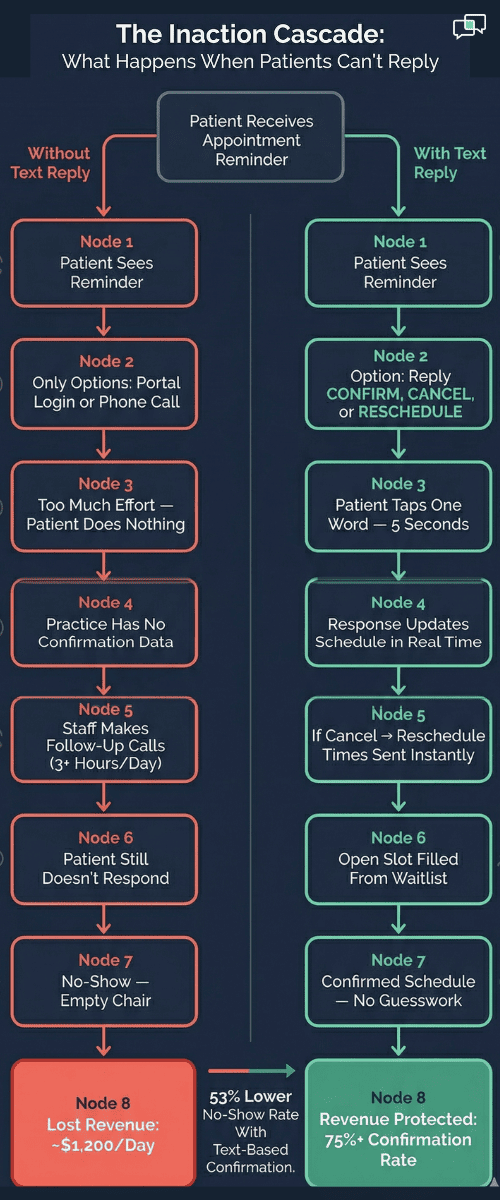
Here's a quick look at how the lack of a reply path creates a chain of problems:

What Happens

Without Text Reply

With Text Reply

Patient gets reminder

Sees it, does nothing

Replies in 5 seconds

Committed patient

Shows up unconfirmed

Confirms instantly

Uncommitted patient

No-shows silently

Cancels early, slot gets filled

Staff workload

Hours of follow-up calls

Automated, no calls needed

Schedule clarity

Unknown until day-of

Clear the night before


The no-show wasn't caused by the patient forgetting. It was caused by the lack of a fast way to cancel or reschedule when plans changed.

The No-Show Psychology

Patients don't skip visits on purpose. They skip because cancelling takes too much effort.

Think about it this way. If cancelling took 10 seconds — just a quick text reply — most people would do it early enough for you to fill the slot. But when cancelling means a phone call or a portal login, they put it off. Then they forget. Then they default to silence.

The friction in the cancellation path is what produces empty chairs. It's not bad intent. It's bad design.

A patient who can reschedule or cancel their appointment by text through Tebra's system — without a phone call — is far more likely to act. And a cancellation you receive 24 hours early is worth far more than a no-show you discover at check-in.

The Experience Gap

Your patients already confirm restaurant tables by text. They reschedule haircuts with a quick reply. They text "C" to their dentist and it's done.

Then they get a Tebra appointment reminder that sends them to a portal login page. The gap between what patients expect and what they receive is not a tech problem. It's an experience problem. And patients notice it — even if they never say it out loud.

This is where the patient experience around appointment confirmation becomes a real issue for Tebra practices. Every extra step between "I saw the reminder" and "I confirmed" is a step where the patient drops off. The easier you make it for patients to respond, the more of them will.

Vertical flowchart showing how no-reply reminders lead to no-shows while text reply confirmations protect revenue for Tebra practices

The Guide: The 5-Second Confirmation

Curogram adds text-based two-way confirmation to your Tebra appointment workflow. Here's what it looks like in practice.

Your patient gets a text: "You have an appointment tomorrow at 2:00 PM with Dr. Smith. Reply CONFIRM, CANCEL, or RESCHEDULE."

The patient taps one word from their lock screen. Done. Five seconds. No login. No app. No hold music.

The response flows straight back into your schedule. Your staff sees who's confirmed, who's cancelled, and who needs a follow-up — all without picking up the phone.

This is how a Tebra patient appointment reminder with a text reply should work. The patient sees the message, acts on it, and moves on with their day. The practice gets a confirmed slot. Everyone wins.

The Feature: "Reply and You're Done"

Curogram's reminder texts are built for instant action. One message. Three clear options. One-word reply.

Patients don't need to learn a new tool or navigate a screen. They respond to a text the same way they respond to every other message in their life. It feels normal because it is normal.

Here's what makes the flow so effective:

When a patient replies "Cancel," two things happen at once. First, the slot opens up in your schedule right away. Second, Curogram sends that patient a list of open times to rebook — in the same text thread. This keeps them in your schedule instead of losing them to silence.

When a patient replies "Reschedule," they get available times by text. They pick one and reply. No call to the front desk. No back-and-forth emails. The entire exchange takes under a minute.


This kind of easy text confirmation is what shapes the patient experience in a Tebra practice. Patients judge your office by how simple it is to interact with you — not by your EHR features.

The Accessibility Factor

Text-based confirmation works for every patient group. That's what makes it so powerful.

Elderly patients who struggle with portal navigation can reply to a text. Busy parents managing appointments for three kids can confirm in seconds between tasks. Patients in rural areas on limited data plans don't need to load a web portal. If a patient can receive and reply to a text, they can confirm their visit.

This removes the digital divide that portal-based systems create. It also removes the staffing burden. Your team isn't spending their morning calling patients who just needed a simpler way to say "yes."

Man on a park bench casually confirming a medical appointment on his phone during a lunch break

The Patient Retention Fit

Patients don't sit down and rate your practice's tech stack. But they do notice how easy — or hard — it is to interact with your office.

When confirming takes five seconds, your practice feels modern and patient-friendly. When confirming takes a portal login and a three-minute workflow, your practice feels outdated.

For growing Tebra practices that compete for patients, the reminder experience is a factor that shapes retention.

Patients may not say, "I stayed because your texts were easy to reply to."

But they will say, "I left because your office was hard to deal with."

Tebra patient no-show prevention starts with a text-based reminder reply that meets patients where they are — on their phones, ready to respond if the path is clear. Curogram clears that path.

The Success: Patients Respond When Responding Is Easy

The numbers tell a clear story. Based on our internal data, Curogram clients see over 75% of their patients confirm appointments through two-way text. Compare that to near-zero actionable confirmations from one-way reminder systems that don't allow replies.

The response time is just as telling. The average patient replies to an SMS reminder in under three minutes. Portal-based messages? Those can sit unread for hours — or days.

And the bottom-line result: no-show rates drop by 53% across Curogram-powered practices compared to the industry average.

What This Means in Dollar Terms

Let's put the no-show reduction into context with a simple example.

Say your practice sees 40 patients a day and your average visit brings in $150 in revenue. At a 20% no-show rate, you lose 8 patients a day. That's $1,200 in lost revenue — every single day.

Over a month (20 working days), that adds up to $24,000 in empty slots.

Now drop the no-show rate to 8% with text-based confirmation. You lose about 3 patients a day instead of 8. That's $450 lost instead of $1,200 — a daily savings of $750.

Monthly, you recover roughly $15,000 in revenue that was walking out the door.

Based on our internal research, practices see a 10–20% increase in revenue once recovered slots are filled with waitlist patients or same-day bookings. The math is simple: fewer empty chairs means more patients seen and more revenue earned.

The Shift: From Silence to Certainty

The dynamic between your practice and your patients changes when text replies are an option.

Before Curogram, the pattern looks like this: patient gets a reminder, patient does nothing (because replying is too hard), and the practice hopes they show up. Staff call patients one by one to try to confirm. Most calls go to voicemail. The schedule stays uncertain until the morning of.

After Curogram, the pattern flips. Patient gets a text. Patient replies in seconds. The confirmation, cancellation, or reschedule request flows into the schedule in real time.

Cancellations arrive early — often 24 hours or more before the visit. That gives your team time to fill the slot from the waitlist. A reschedule request comes through the same text thread, not through a phone call the patient never makes.

Your practice gains certainty about tomorrow's schedule. And your patient gains a practice that communicates on their terms.

This is what Tebra patient no-show prevention looks like when it's built around a text-based reminder reply. It's not about sending more alerts. It's about making it dead simple to respond.

Why This Matters for Growing Tebra Groups

If you run a single location, a 53% drop in no-shows is a big deal. If you run five or ten locations, multiply every number above by your site count.

A five-location group losing $24,000 per month per site to no-shows is bleeding $120,000 monthly. Cut that by more than half, and you've added over $60,000 a month back to the bottom line — without seeing a single extra patient.

Curogram scales across locations because it's fully automated. There's no extra staff needed, no manual setup per site. The system sends the texts, collects the replies, and updates your Tebra schedule in real time.

For multi-site Tebra practices, text-based confirmation isn't just a nice-to-have. It's a revenue protection tool.


Why Text-Based Confirmation Changes Everything for Tebra Practices


The gap between Tebra's built-in reminders and what patients expect is not a mystery. Patients want to reply to a text. Tebra sends a reminder they can't reply to. Curogram bridges that gap in a way that's simple for patients and powerful for practices.

Patients reply with one word. The response updates your schedule in real time. No manual entry. No phone tag.

When a patient cancels, Curogram sends them open time slots in the same text thread. You don't lose the patient — you just move them to a new slot.

When a slot opens, your team can reach out to waitlisted patients by text and fill the gap before it costs you revenue.

Curogram's reminder texts follow HIPAA guidelines. No clinical details are shared in the message. The platform is SOC 2 Type II certified and signs a BAA with every practice.

If the patient can text, they can confirm. This is especially important for elderly patients, rural patients, and families managing multiple appointments.

Based on our internal data, the results speak for themselves. Over 75% average confirmation rate. A 53% drop in no-shows compared to industry norms. And practices like Atlas Medical Center cut their no-show rate from 14.20% to 4.91% in just three months — 3X better than the industry average.

The patient experience around easy text appointment confirmation in a Tebra practice goes from frustrating to effortless. And that shift drives retention, revenue, and schedule clarity all at once.

Conclusion: Make Confirming as Easy as Texting

Tebra's reminders notify patients. Curogram's text confirmations let patients respond. That one difference — the ability to reply — is what separates a schedule full of confirmed visits from a schedule full of hopeful guesses.

The five-second reply is not a small upgrade. It's the feature that turns passive alerts into active confirmation. It's the reason practices see no-show rates drop by more than half.

Tebra tracks your patients' appointments. Curogram earns their confirmation. The portal is for medical records. The text reply is for everyday convenience. Together, they deliver the appointment experience patients expect — the same ease they get when they confirm a dinner reservation or a haircut.

Your patients already confirm reservations, deliveries, and salon visits by text. They shouldn't have to jump through hoops to confirm a doctor's appointment. Give them the same simple experience for their healthcare visits — and watch no-shows fade.

Stop calling patients who just need an easy way to reply. Schedule a demo to see what a 75% confirmation rate looks like on your Tebra schedule.


Frequently Asked Questions

How does Curogram's text reminder work with Tebra's system?
Curogram connects directly to your Tebra schedule. It sends text reminders at the times you choose, and patient replies update the appointment status in real time — no manual syncing required.
How does text-based confirmation stay HIPAA compliant?
Curogram's reminder texts only include the appointment time, provider name, and reply options. No clinical details are shared. The platform is SOC 2 Type II certified and signs a BAA with every practice.
How quickly do patients typically respond to text reminders?

Based on our internal data, the average patient replies in under three minutes. Compare that to portal messages, which can go unread for hours or even days.

Why does text confirmation reduce no-shows more than portal reminders?

Because replying to a text takes five seconds, while logging into a portal takes several minutes. Patients are far more likely to cancel or confirm when the response path is simple and instant.

How does the reschedule flow work when a patient cancels by text?

When a patient replies "Cancel," Curogram logs the cancellation and immediately sends available time slots in the same text thread. The patient can pick a new time without calling the office.


2-Way Smart Reminders for Tebra: Reduce No-Shows for Good

2-Way Smart Reminders for Tebra: Reduce No-Shows for Good

💡 Tebra appointment reminders with 2-way patient confirmation powered by Curogram's Confirmation Loop close the gap between sending a notice and...


Read More
Practice Fusion Patient Appointment Reminder Reply

Practice Fusion Patient Appointment Reminder Reply

💡 Practice Fusion patient appointment reminder reply functionality, powered by Curogram, lets patients confirm, reschedule, or cancel by text. No...

Read More
Athenahealth Appointment Reminders: The Schedule Filler Guide

Athenahealth Appointment Reminders: The Schedule Filler Guide

💡 Athenahealth appointment reminders powered by Curogram's Schedule Filler use 2-way SMS to keep your schedule full and cut no-shows. Sends text...

Read More