10 min read

Send Lytec Text Reminders Patients Can Reply To and Reschedule

Send Lytec Text Reminders Patients Can Reply To and Reschedule
💡 Lytec text reminders patients can reply to reschedule turn a one-way alert into a two-way chat. Patients confirm or move a visit in one tap, with no call, no app, and no portal.
  • Patients reply YES, NO, or RESCHEDULE from their own phone.
  • The reply updates the Lytec schedule and lands in one shared inbox.
  • There is nothing to download and no login to learn.
  • Texting reaches younger and older patients alike.
  • Curogram clients average above 75% confirmation, based on our internal data.
A reminder patients can answer is a reminder that works. Give every Lytec patient a reply button.

A patient reads your reminder text and thinks, "I can't make that time." Then they look for a way to reply. There is no reply button. So the message just sits there, unanswered.

That tiny dead end is where many no-shows begin. The patient meant to reschedule. They simply had no easy way to say so. A one-way reminder leaves them with one option: a phone call.

Most people will not make that call. They feel too busy, or they dread waiting on hold. So the appointment slips, and the chair sits empty. The practice never learns why it happened.

Lytec text reminders patients can reply to reschedule close this gap. They turn a one-way alert into a two-way chat patients finish in one tap. Curogram lets your Lytec patients reply YES, NO, or RESCHEDULE. There is no phone call, no app, and no portal login.

This matters for every patient, not just the young ones. If a person can text, they can reply YES. The 80-year-old and the 25-year-old both get a simple, respectful way to respond. No tech skills are needed.

When replying is this easy, patients actually do it. They confirm or move the visit instead of vanishing. Staff see the answer right away and adjust the schedule. Nobody has to chase the patient down.

The payoff is fewer empty chairs and fewer reminder calls. Comparable practices cut no-shows from over 14% to under 5% once patients could respond, based on our internal data. That is a measured shift.

This guide shows how that reply button works. You will see how one text closes the loop between patient and schedule. You will also see the gains a reply-ready reminder can bring. Most of all, you will see why a reminder patients can answer beats one they cannot.

The Villain: A Reminder With No Reply Button

Lytec runs your schedule well. It holds each slot, each provider, and each visit. But the reminder a patient gets is often a one-way street. It tells them when to show up, and that is all.

The patient can read it. They cannot answer it. There is no reply button to tap. So a simple "I can't make it" has nowhere to go.

Picture a real moment. A patient sees a 2pm reminder for Thursday. They have a work meeting at the same time. They want to move the visit, not skip it. But the text is a dead end.

Now they face a chore. They have to find your office number. They have to call during business hours. They have to wait on hold while staff juggle other lines. Many patients just give up here.

That give-up point is costly. The patient did not plan to ghost you. They wanted to reschedule. The one-way reminder turned a willing patient into a no-show. The empty chair was never really their choice.

How the Leak Adds Up

One missed reply seems small. Across a month, the leaks add up fast. Each no-show is a slot that earned nothing. It is also a slot another patient could have used.

Think of a clinic with 40 visits a day. Even a few daily no-shows drain real revenue. Worse, the schedule looks full while chairs sit empty. Staff cannot fill gaps they learn about too late.

The one-way reminder hides the warning signs. A patient who would have replied "RESCHEDULE" stays silent. You only find out when they fail to arrive. By then, the slot is gone.

How it Feels on Both Sides

The patient feels unheard. They tried to be responsible, but the system blocked them. A reminder that talks at them feels cold. It does not feel like care.

Your front desk feels the strain too. They field calls, take voicemails, and play phone tag. They want patient-friendly reminders for Lytec practices, not more hold music. Yet a one-way tool keeps pushing work back onto the phone.

This is the core problem. A reminder with no reply button is half a conversation. It sends information out but lets nothing come back. The patient and the schedule never connect.

Here is a quick look at where the one-way street breaks down.

Step

What the patient wants

What a one-way reminder allows

Reads reminder

Confirm or move the visit

Read only

Has a conflict

Reply RESCHEDULE

No reply option

Tries to act

Quick, no-call fix

Call and wait on hold

Gives up

Keep the visit somehow

Becomes a no-show


Look at the last column. Every row ends in friction. The patient meets a wall at each step. The reminder cannot do the one thing they need most.

This is why no-call rescheduling for Lytec patients matters so much. The fix is not a louder reminder. It is a reminder that listens. When the patient can reply, the dead end disappears.

The next section shows that fix. It turns the one-way street into a loop. The patient sends a reply, and the schedule sends back an update. Both sides finally meet in the middle.

That small change rewires the whole flow. The same reminder now carries a reply button. And a reply button is the difference between a guess and a confirmed visit.

The Guide: A Reply Button on Every Reminder

The fix is simple to picture. Give every reminder a reply button. Let the patient confirm or move the visit right in the text thread. That single change closes the loop.

Curogram adds 2-way text reminders for Lytec patients. The reminder still goes out on time. But now the patient can text back. They reply YES, NO, or RESCHEDULE in plain words.

There is no setup for the patient. They do not download an app. They do not create a login. They do not learn a portal. They just reply, the way they text a friend.

What Each Reply Does

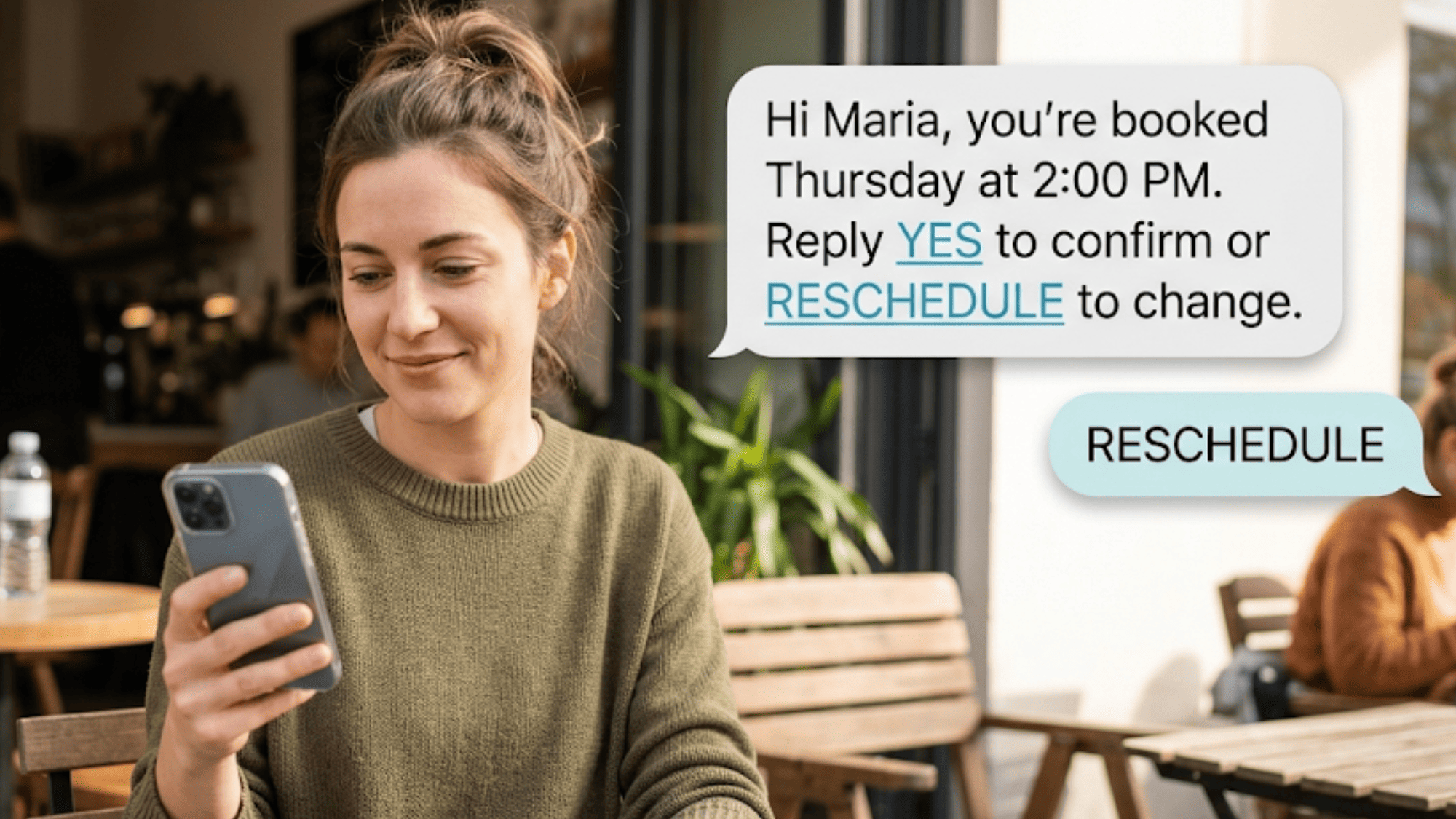
Each reply has a clear job. YES confirms the visit. NO cancels it. RESCHEDULE opens a quick path to a new time. The patient picks one and taps send.

When a patient replies YES to confirm in Lytec, the loop closes in seconds. The slot is now locked in. Your staff can trust the schedule they see. The guesswork is gone.

When a patient needs a new time, they reschedule by text in Lytec. No call. No hold. No trip to the front desk. They handle it from the same thread that started the reminder.

Where the Reply Goes

A reply is only useful if staff see it. So every reply lands in one shared inbox. Your team reads it the moment it arrives. The patient's choice updates the Lytec schedule, so the calendar stays the source of truth.

This keeps both sides in sync. Lytec stays the schedule of record. Curogram carries the back-and-forth. Neither tool steps on the other. Each does the job it does best.

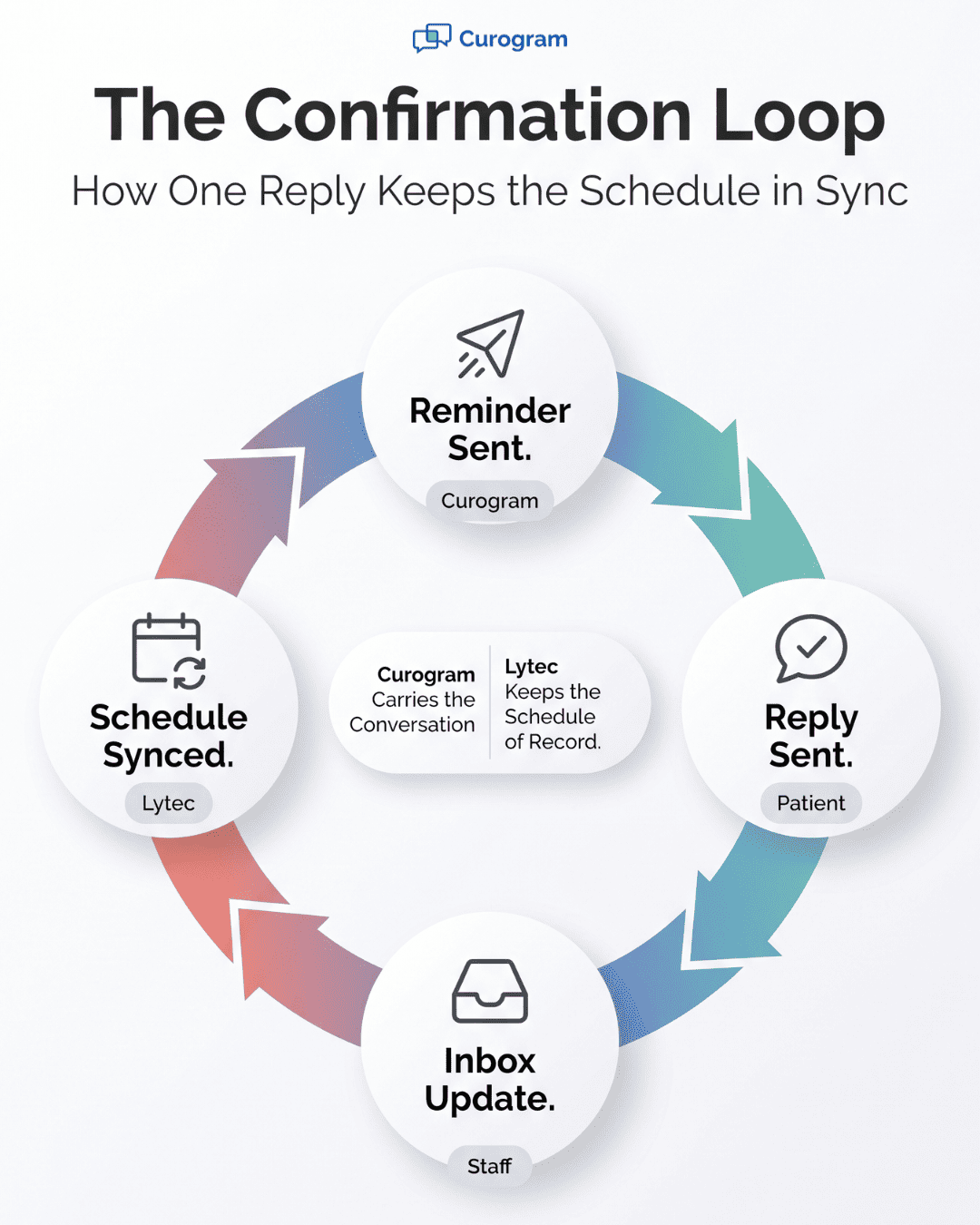
Here is the loop in four short steps.

Step

Who acts

What happens

1. Reminder sent

Curogram

Text goes out with a reply button

2. Reply sent

Patient

YES, NO, or RESCHEDULE in one tap

3. Inbox update

Staff

Reply lands in one shared inbox

4. Schedule synced

Lytec

The slot confirms, cancels, or moves


Read it top to bottom. The message leaves, the reply returns, and the schedule updates. That round-trip is the whole point. It is what a one-way reminder could never do.

Circular infographic showing the Lytec text reminder confirmation loop from reminder to reply to schedule sync

Why This Fits Every Patient

Texting is the great equalizer here. Almost everyone can send a text. Your older patients text their grandkids. Your younger patients text all day. The reply button works for both.

That is what makes these patient-friendly reminders for Lytec practices. The patient does not adapt to your tech. The tech meets them where they already are. A reply feels natural, not robotic.

It also feels respectful. The patient gets to act on their own time. They reply at 9pm if that suits them. They do not wait for your phones to open.

Less Work For Your Front Desk

The loop helps staff just as much. Fewer patients call to reschedule. Fewer calls mean fewer voicemails to return. The reply does the work the phone used to do.

Your team still stays in control. They see every reply in one place. They can jump in and chat if a patient has a question. The tool handles the routine, and staff handle the rest.

This is the confirmation loop in action. A reminder goes out with a way to answer. The patient answers in one tap. The schedule updates, and everyone stays in sync.

The next section shows what this loop produces over time. The reminder stops leaking no-shows. Instead, it starts confirming visits on its own. That is a self-confirming schedule.

The Success: Replies That Run the Schedule

When patients can reply, the schedule starts to manage itself. Reminders go out. Replies come back. The calendar updates with little staff effort. That is a self-confirming schedule.

The change is not just about comfort. It shows up in hard numbers. Let us look at what happens when patients get a reply button.

The Metric: No-Shows Drop, Confirmations Rise

Start with the no-show rate. One comparable practice tracked this closely. Atlas Medical Center cut no-shows from 14.20% to 4.91% in three months, based on our internal data. That is a drop of about 65%.

Sit with that figure for a moment. Roughly two of every three former no-shows now show up or reschedule. The chairs that used to sit empty now hold patients. The same schedule earns far more.

Confirmations climb too. Across Curogram clients, the average appointment confirmation rate runs above 75%, based on our internal data. So most reminders now get a clear answer. Staff no longer guess who will arrive.

There is a wider pattern as well. Curogram practices run no-show rates 53% lower than the industry average, based on our internal data. The reply button is a big reason why. When patients can act, they do.

The Shift: A Dead End Becomes a Round-Trip

The deeper change is in the flow itself. A one-way reminder is a dead end. It sends data out and waits. Nothing comes back to confirm the visit.

The confirmation loop makes it a round-trip. The reminder goes out. The patient replies. The reply updates Lytec. The schedule reflects reality, not hope.

Here is the contrast in one view.


One-way reminder

Self-confirming schedule

Direction

Out only

Out and back

Patient action

None possible

Reply in one tap

Reschedule path

Phone call

Reply RESCHEDULE

Staff effort

Chase by phone

Read one inbox

Schedule accuracy

A guess

Confirmed by replies


The right column is the goal. Every row turns friction into flow. The patient acts, and the schedule responds.

An Example: How the Math Could Play Out

Let us walk through a simple, illustrative example. The numbers below are example math, not a case study. They show how the gains might add up for one clinic.

Say a clinic books 1,000 visits a month. At a 14% no-show rate, that is 140 missed visits. Now drop the rate to 5%. That leaves about 50 missed visits.

So the clinic recovers roughly 90 visits a month. Suppose each visit is worth $150. That is about $13,500 in recovered revenue each month. Over a year, that could near $162,000.

Again, those are illustrative figures. Your real numbers depend on your volume and your fees. But the shape of the gain is clear. Fewer no-shows means more recovered revenue.

The recovered slots do more than earn money. They open care for patients who need it. A freed slot can go to someone on a waitlist. The schedule works harder without working longer.


Floating text thread showing a Lytec patient replying RESCHEDULE to a two-way appointment reminder

How Curogram Turns Lytec Reminders Into Two-Way Conversations

Curogram works alongside Lytec, not on top of it. Lytec stays your schedule of record. Curogram adds the one thing a reminder needs: a reply button. Together, they close the loop.

The feature that powers this is Smart Reminders. It sends each reminder on time, then accepts plain replies. Patients text YES, NO, or RESCHEDULE in everyday words. There is zero setup on the patient's side.

No app stands in the way. No portal login blocks them. No new password to forget. If a patient can send a text, they can answer. That keeps the door open for every age group.

Each reply does real work behind the scenes. A YES confirms the slot. A RESCHEDULE starts a no-call path to a new time. The reply updates the Lytec schedule, so your calendar stays accurate.

Just as important, every reply lands in one shared inbox. Your front desk sees each answer the moment it arrives. No one digs through voicemails. No one plays phone tag. The conversation lives in one clear place.

This is what makes the reminders feel patient-friendly. The patient is not talked at. They are invited to reply. They reschedule by text in Lytec on their own time, even after hours.

The results follow the design. Curogram clients average above 75% confirmation, based on our internal data. They also run no-show rates 53% below the industry average. A reply button is a big part of that gap.

The setup stays simple for you. You keep your Lytec workflow. You add a return path to your reminders. From there, patients confirm or move visits with one tap, and your schedule keeps itself current.

Conclusion: Give Patients a Reply Button

A reminder patients can answer is a reminder that works. That is the idea behind the reply button. When a text has nowhere to go, it turns into a phone call or a no-show. When it has a reply button, it turns into a confirmed visit.

Lytec holds the appointment and runs your schedule. Curogram lets the patient keep that visit, or move it, by text. The two work side by side, each doing its own job. Lytec stays the schedule of record, and Curogram carries the conversation.

Think about what changes for the patient. They no longer have to call, wait on hold, or give up. They just reply YES, NO, or RESCHEDULE in a few seconds. That small act of respect keeps more chairs full.

Think about what changes for your staff. They stop chasing patients by phone all day. The reply lands in one shared inbox, and the schedule updates on its own. Your team spends time on care, not on hold music.

The numbers back this up. Comparable practices cut no-shows from over 14% to under 5%, and Curogram clients average above 75% confirmation, based on our internal data. Those gains start with one simple change.

So stop turning reminders into phone calls. Give every patient a reply button instead. Let them confirm or reschedule by text in Lytec, with no app or login needed. The easier you make it, the more patients respond.

Find out how much of your schedule could confirm itself. Book a demo and we'll map the two-way reminder flow to your exact Lytec setup.


Frequently Asked Questions

How do patients opt out, and how is the texting kept compliant?

Patients reply STOP to opt out at any time, which keeps you aligned with TCPA rules. The whole flow is HIPAA compliant, so patients can confirm or reschedule by text without installing anything or sharing extra data.

How do older or less tech-savvy patients handle replying by text?

If a patient can text, they can reply YES. There is no app to download and no login to learn. That simple path is why text reminders reach nearly every patient, young or old, on the phone they already use.

What does a patient need to reschedule a visit by text?

Just their phone and the reminder thread. They reply RESCHEDULE, then pick a new time, with no call and no portal. The portal stays optional, so no-call rescheduling for Lytec patients works without any extra login or app.

How does a patient's reply reach my staff and update Lytec?

Each reply lands in one shared inbox, so staff see it right away. The patient's choice updates the Lytec schedule, which stays your source of truth. Nobody digs through voicemails or plays phone tag to confirm a slot.

Why do reply-ready reminders cut no-shows so much?

A one-way reminder forces a phone call, and many patients give up. A reply button removes that friction. Patients confirm or move visits in one tap, so fewer slots leak. Comparable practices saw no-shows fall from over 14% to under 5%.