11 min read

Add 2-Way Patient Confirmation to Your Lytec Appointment Reminders

Add 2-Way Patient Confirmation to Your Lytec Appointment Reminders
💡 Lytec appointment reminders with 2-way patient confirmation let patients reply right inside a text. They tap YES, NO, or RESCHEDULE, and your Lytec schedule updates on its own.

Here is what changes:

  • Patients confirm, cancel, or reschedule by text, with no phone call needed.
  • Replies write back to the Lytec schedule in real time.
  • Curogram acts as a true Lytec AutoRemind alternative, not a one-way add-on.
  • Comparable practices cut no-shows from 14.20% to 4.91% in three months.
  • One clinic confirmed more than 1,100 appointments a month with no extra staff.
One-way reminders only notify. A two-way loop confirms, so your front desk stops guessing who will show up.

A text reminder went out last night. The patient read it. This morning, the chair still sits empty. That gap between a sent reminder and a kept visit costs practices real money.

Most Lytec reminders travel only one way. They tell patients about a visit, but they offer no way to reply. So patients who need to move an appointment call your front desk instead. Some simply do not show up at all.

This is the core of Lytec no-show reduction text reminders done right. A reminder a patient can answer becomes a confirmed slot. It can also become a freed cancellation or a filled gap. A reminder that only notifies leaves you guessing.

Curogram closes this gap with two-way texting. Patients reply YES, NO, or RESCHEDULE to a simple message. Those replies write back to your Lytec schedule on their own. No staff member re-keys a thing.

The results are real. Based on our internal data, comparable practices cut no-shows from 14.20% to 4.91% in three months. That is a drop of about 65%. One clinic confirmed more than 1,100 appointments a month with no added staff.

This guide breaks down the full shift. You will see why one-way reminders still leak no-shows. You will learn how a two-way loop updates Lytec in real time. And you will see what changes in the first 90 days.

By the end, you will know how to turn each reminder into an answer. Your schedule starts to confirm itself. Your front desk stops chasing patients by phone. And your daily revenue stops feeling like a guess.

So let us start with the real problem behind that empty chair. It is simpler than most teams expect. The real fix lives inside the patient reply. A small change right there shifts your whole day.

The Villain: The One-Way Street

Lytec does its job well. It keeps an accurate schedule and tracks every booked visit. The problem is not the calendar. The problem is the reminder that rides on top of it.

Many practices add a reseller reminder tool to Lytec. These add-ons push a message out the door, then stop. The patient gets the note, but the road ends there. There is no reply path back to your office.

Think of it as a one-way street. Traffic flows out, never back in. A patient reads "You have an appointment tomorrow at 2." They want to move it. But the text gives them nothing to tap.

So what do they do next? They call your front desk. That call joins a queue that can top 80 calls a day. Or they give up and simply skip the visit.

How the Dead-End Reminder Hurts

A reminder that cannot be answered does not reduce no-shows for a Lytec practice. It only tells patients something they already half-knew. The action still depends on a phone call that may never happen.

No-show rates swing widely from one clinic to the next. Some small practices lose only a handful of slots. Others watch a large share of the day walk away. Either way, every empty chair is paid time with no return.

The cost adds up fast. Industry estimates often place one missed visit near $150 to $300. For a three-to-five provider group, lost slots can reach tens of thousands a month. Treat those as ballpark ranges, not internal figures. The point stands: empty chairs are expensive.

Here is the quiet part of the problem. Staff often learn about a no-show when the chair sits empty. By then it is too late to fill the slot. The morning huddle plans for a full day that never arrives.

The Hidden Tax on Your Front Desk

One-way reminders also push work back onto your team. Patients who cannot reply by text call instead. Each call pulls a staff member off another task. The phone becomes the only way to confirm, cancel, or reschedule.

That creates a daily scramble. Your team chases confirmations one call at a time. They leave voicemails that no one returns. They re-key changes into Lytec by hand, which invites typos and missed updates.

Picture a Monday with 60 booked visits. A one-way tool reminds all 60 patients. But your front desk still has no idea who plans to show. The schedule looks full, yet the day is a guess.

This guesswork ripples through the whole practice. Providers sit idle when patients no-show without warning. Other patients wait weeks for a slot that quietly opened today. Revenue forecasts become hopeful, not real.

The deeper issue is simple. A one-way reminder treats the patient as a target, not a partner. It talks at them instead of with them. And a reminder that ignores the reply leaves your biggest fix on the table.

So the goal is clear. You do not need to replace Lytec. You need to turn that dead-end reminder into a two-way conversation. You need a reply that means something and updates the schedule on its own.

That is the shift we cover next. The fix closes the one-way street and opens a loop. Patients answer, the calendar updates, and your team stops chasing. Let us look at how that loop actually works inside Lytec.

The Guide: The Confirmation Loop

The fix is not a louder reminder. It is a reminder that listens. Curogram turns each text into a short, two-way conversation. That conversation always ends in a clear status, not silence.

This is the heart of Lytec appointment reminders with 2-way patient confirmation. The patient gets a friendly message about their visit. They reply with one tap. The schedule reacts to that reply right away.

How the Loop Sends and Listens

Curogram sends an automated text sequence before each appointment. A common setup uses three touches: 72 hours out, 24 hours out, and 2 hours out. Each touch gives the patient a simple way to act.

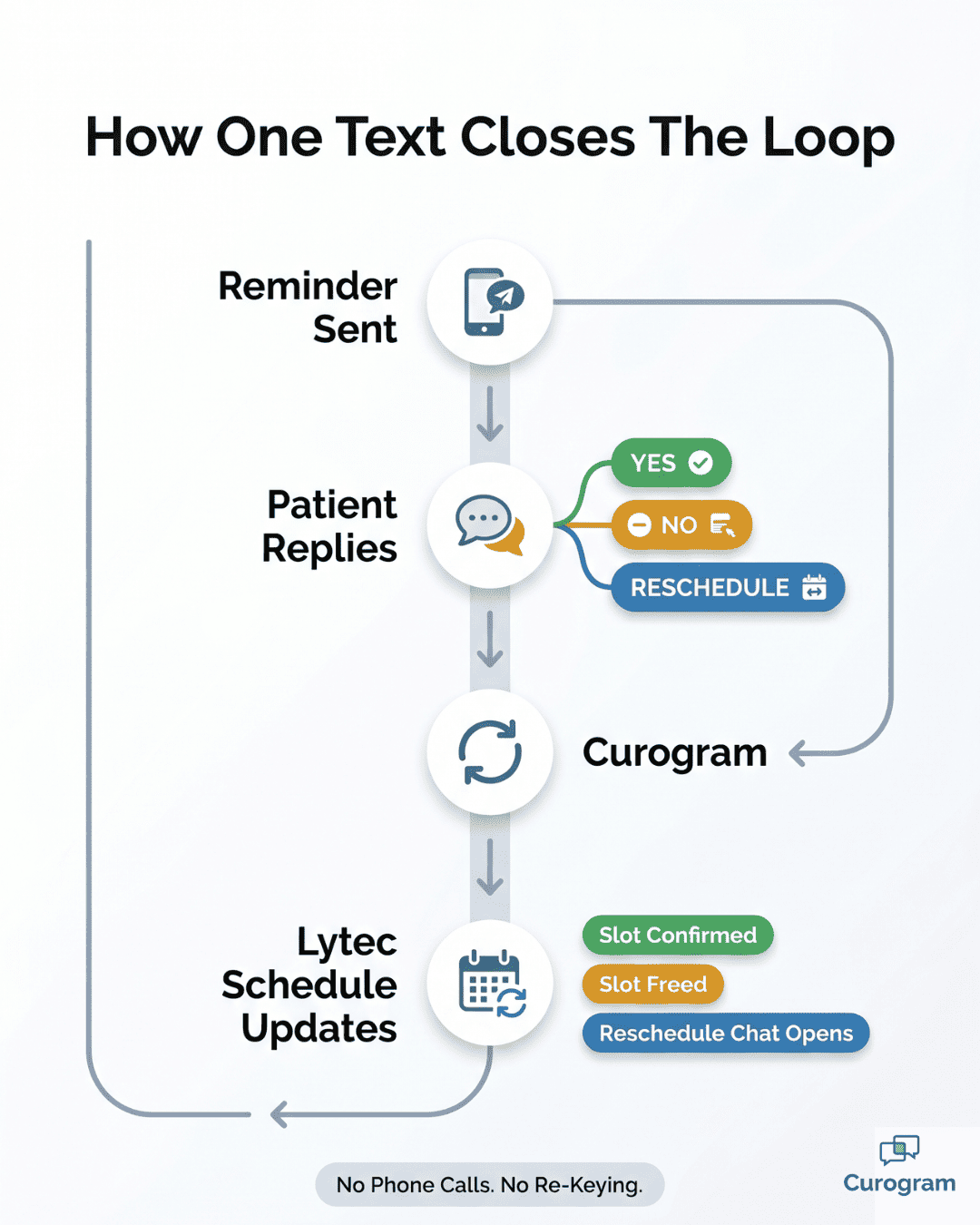
The patient replies YES, NO, or RESCHEDULE. YES confirms the slot. NO frees it for someone else. RESCHEDULE starts an easy back-and-forth to find a new time.

These automated appointment confirmations for Lytec run on their own. No one on your team has to send them. No one has to watch for replies. The system handles the whole back-and-forth.

You can tune the timing and wording to fit your practice. A dental office may want a longer lead time. A busy primary care clinic may add a same-day nudge. The smart reminders adjust to your flow, not the other way around.

How Replies Write Back to Lytec

A reply only helps if it reaches your schedule. This is where the loop closes. When a patient answers, Curogram writes that status back to the Lytec schedule in real time.

So a patient can confirm, cancel, or reschedule by text, and Lytec reflects it. The calendar updates without a staff member re-keying a thing. The system of record stays accurate on its own.

Here is the split that matters:


One-way reminder add-on

Curogram two-way loop

Patient can reply

No

Yes

Confirm, cancel, reschedule

By phone only

By text

Writes back to Lytec

No

Yes, in real time

Front desk re-keys changes

Yes

No

Reminder + confirmation

Two tools

One loop


This is why Curogram works as a Lytec AutoRemind alternative, not just another notice. AutoRemind and similar add-ons mostly push one way. Curogram replaces that push with a true loop. Most practices drop the standalone add-on instead of stacking another bill.

Infographic showing Lytec appointment reminders with 2-way patient confirmation flowing from text to schedule update

Why a Two-Way Loop Feels More Personal

There is a softer benefit here, too. A reminder that invites a reply feels human. The patient is not ignored. They are given an easy door, so they walk through it.

For specialty and primary care practices, continuity matters. A patient who cannot make Tuesday can move to Thursday in seconds. They reschedule instead of ghosting. That keeps care on track and the chair filled.

These Lytec smart reminders SMS messages also cut friction for nervous patients. Some people avoid phone calls. A text is low-pressure and fast. So patients who would have stayed silent now respond.

The loop respects the patient's time and yours. It removes the phone tag. It removes the guesswork. And it turns a one-way street into a real exchange.

Best of all, the loop never sleeps. It runs nights, weekends, and lunch breaks. While your front desk handles the lobby, the loop quietly confirms tomorrow. Every reply lands in Lytec, ready for the morning huddle.

That is the engine. Next, let us look at what it produces over a full quarter. The numbers show how a noisy schedule becomes a calm, self-confirming one.

The Success: The Self-Confirming Schedule

A loop is only worth it if it changes the day. So let us look at the results. Based on our internal data, the shift is large and it shows up fast.

The Metrics that Move

Two figures tell the story best. The first is the no-show drop. The second is the confirmation volume.

Metric

Before

After

Time frame

No-show rate

14.20%

4.91%

3 months

Drop in no-shows

About 65%

3 months

Appointments confirmed

1,100+ per month

Ongoing

Added staff needed

None


A comparable two-location specialty practice cut no-shows from 14.20% to 4.91% in 90 days. That is roughly a 65% drop. Their schedule went from leaky to dependable in one quarter.

A comparable single-specialty clinic reached more than 1,100 confirmed appointments a month. They added no new staff to do it. The loop did the chasing that people used to do by hand.

Across our client base, the pattern holds. Curogram practices run no-show rates about 53% below the industry average. Confirmation rates sit above 75%. Those are not one-off wins. They are steady results from a steady loop.

What "Self-Confirming" Really Means

The phrase sounds simple, and it is. A self-confirming schedule updates itself as patients reply. You do not push the calendar toward reality. The calendar moves there on its own.

Walk through a single day. The loop sends reminders the night before. Patients tap YES, NO, or RESCHEDULE while making dinner. By morning, your Lytec schedule already shows who is coming.

The empty slots are not a surprise at 9 a.m. They are visible the night before. That head start is the whole game. It is the difference between filling a slot and eating the loss.

Cancellations You Can Actually Fill

A late cancellation hurts. A cancellation you see early is a gift. The loop turns one into the other.

When a patient taps NO, the slot frees right away in Lytec. Your front desk sees the gap with hours or days to spare. They can pull a patient from a waitlist or a recall list. The chair fills instead of sitting empty.

Here is a simple example. Say a 24-hour reminder gets a NO at 6 p.m. Tonight. Your team has all evening and morning to fill it. That same NO, learned at 9 a.m. on the day, is a dead loss.

Now multiply that across a week. A practice with even a few daily cancellations recovers many slots a month. Each recovered slot is real revenue, not a maybe. Based on our internal data, recovered appointments tend to add 10% to 20% in revenue lift.

A Simple Way to Picture the Payoff

Let us do quick, clear math. Treat these numbers as an illustration, not a promise. Your real figures will differ.

Say your clinic books 1,000 visits a month. At a 14% no-show rate, you lose 140 visits. At a 5% rate, you lose only 50. That is 90 visits saved each month.

Now value each visit at $150 to $200. Ninety saved visits is $13,500 to $18,000 a month. Over a year, that climbs past $160,000. Even half that result would pay for the tool many times over.

This is why the loop is not just tidy. It is an income engine. Every confirmed reply protects a slot that used to leak.

The Front Desk Gets its Time Back

Numbers aside, your team feels this change first. The phone stops ringing with confirm-and-cancel calls. The voicemail backlog shrinks. The manual re-keying ends.

Staff move from chasing to filling. Instead of dialing 60 patients to confirm, they handle the few replies that need a human. They spend their energy on care, not call tag.

That shift also lowers errors. Hand-keyed changes invite typos and missed updates. When replies write back to Lytec on their own, the calendar stays clean. Fewer mistakes means fewer surprises.

How it Compares to a One-Way Add-On

It helps to see the full contrast side by side. A one-way add-on reminds. Curogram confirms.

Outcome

One-way add-on

Curogram loop

Patients can act in the text

No

Yes

Cancellations surface early

Rarely

Yes

Slots get refilled in time

Hard

Easy

Lytec stays accurate on its own

No

Yes

Daily revenue is predictable

No

Yes


This is the practical case for a Lytec AutoRemind alternative. You do not just swap one reminder for another. You swap a dead-end for a loop that pays you back.


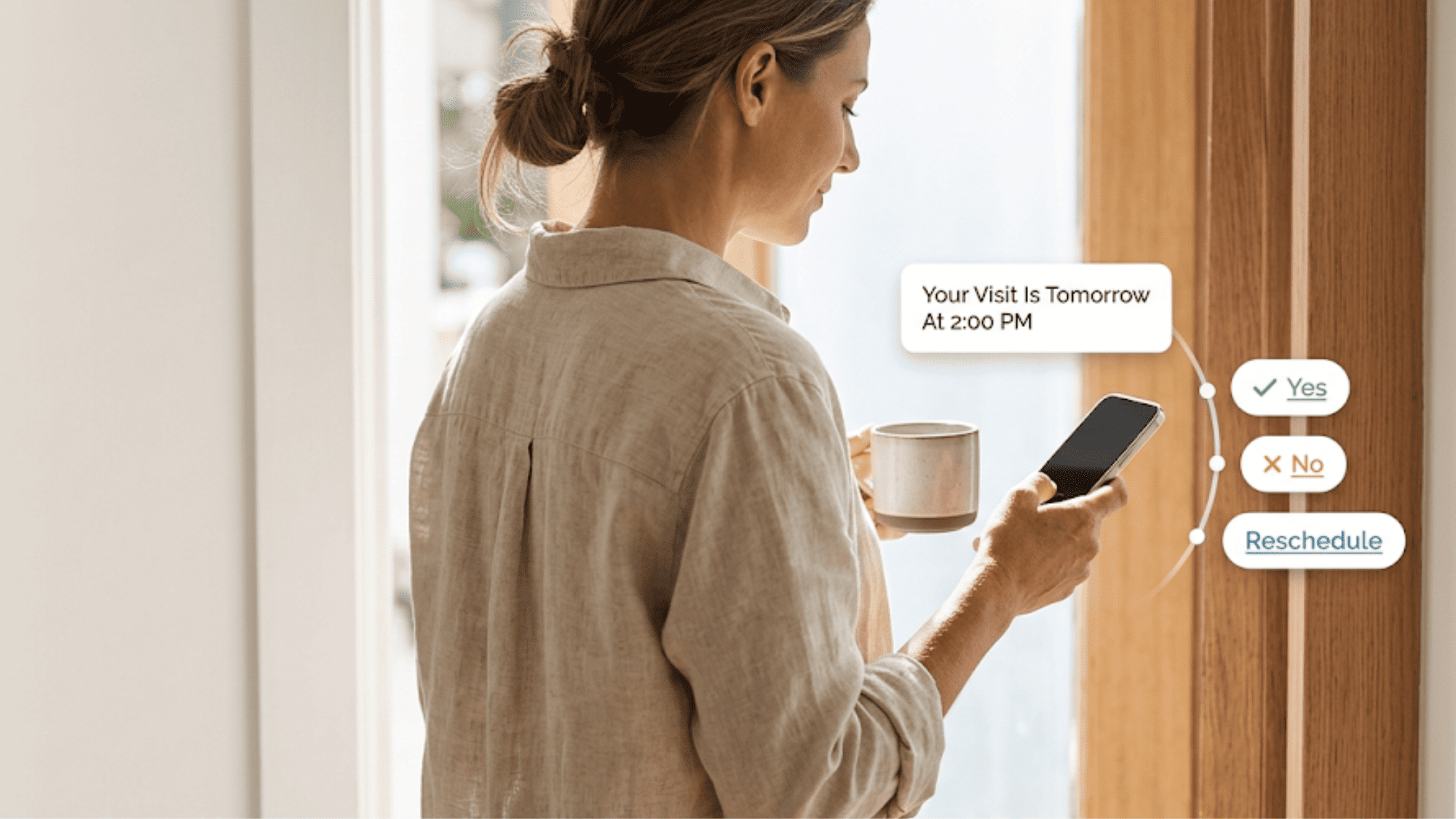
Patient at home glancing at a phone with floating Yes, No, and Reschedule reply options to a Lytec appointment reminder

How Curogram's Smart Reminders Close the Loop Inside Lytec

Most reminder tools stop at "sent." Curogram does not. Its Smart Reminders feature turns every reminder into a reply you can use.

Here is how it works in plain steps. Curogram sends an automated text sequence before each visit. A common pattern uses a 72-hour, 24-hour, and 2-hour touch. Each message gives the patient one easy action.

The patient replies YES, NO, or RESCHEDULE. They never download an app. They never log in to a portal. They just answer a text, the way they text a friend.

Then comes the part that matters most. Each reply writes back to your Lytec schedule in real time. A YES confirms the slot. A NO frees it. A RESCHEDULE opens a quick chat to find a new time.

No one on your team re-keys these changes. The calendar updates on its own. Your system of record stays accurate without extra hands.

You stay in control of the details. You set the timing, the wording, and the cadence. You decide how many touches each visit gets. The loop bends to your workflow, not the reverse.

Because the reminder and the confirmation live in one place, you simplify your stack. There is no separate one-way add-on to fund. Curogram serves as a single Lytec AutoRemind alternative that does more for less.

The result is a schedule that confirms itself. Patients answer on their own time. Lytec reflects reality by morning. Your front desk handles only the replies that need a person.

That is the whole point of the loop. It removes phone tag, manual entry, and guesswork. It gives you back time, accuracy, and a calmer day. And it does it quietly, one patient reply at a time.

Conclusion: Let Your Lytec Schedule Confirm Itself

One-way reminders notify. Two-way reminders confirm. That single difference decides whether a chair sits empty or fills on time.

Here is the simple split. Lytec holds your schedule. Curogram keeps that schedule accurate. The system of record stays put, and a confirmation loop runs on top of it.

Patients reply YES, NO, or RESCHEDULE to a text. Those replies write back to Lytec right away. No one re-keys a thing. Your calendar starts to match real life.

The payoff shows up fast. Based on our internal data, comparable practices cut no-shows from 14.20% to 4.91% in three months. One clinic confirmed more than 1,100 appointments a month with no added staff. Each recovered slot adds real revenue.

The shift is bigger than fewer no-shows. Cancellations surface early enough to fill. Your front desk stops chasing confirmations by phone. Daily revenue stops feeling like a guess.

You also stop paying for tools that only push one way. A true Lytec AutoRemind alternative folds the reminder job into one loop. Most practices replace the old add-on instead of stacking another bill.

So close the loop and stop guessing who is coming in. Let your Lytec schedule confirm itself, one reply at a time. The change is small for patients but large for your day. It pays you back every single week.

Replace your one-way reminder add-on with a true loop. Schedule a demo and see how Curogram fits your Lytec workflow in minutes.


Frequently Asked Questions

How do patient text replies update our Lytec schedule without double entry?

When a patient taps YES, NO, or RESCHEDULE, Curogram writes that status straight back to your Lytec schedule in real time. Your team never re-keys the change, so the calendar stays accurate on its own.

Why do one-way reminders still leave us with no-shows?

One-way reminders only notify. They give patients no way to act, so anyone who needs to cancel or move a visit must call instead. Many never do, and the slot quietly leaks into a no-show.

What makes Curogram a true Lytec AutoRemind alternative rather than another add-on?

Most add-ons push reminders one way and stop. Curogram runs a two-way loop that confirms, cancels, or reschedules and updates Lytec. It also folds reminders into one tool, so you drop the extra bill.

How does Curogram keep two-way reminders compliant with TCPA and HIPAA rules?

Reminders use proper consent handling and include a STOP opt-out to meet TCPA expectations. Curogram is a HIPAA-compliant platform and signs a Business Associate Agreement, so your patient messaging stays protected.

What does the first 90 days of two-way reminders usually look like?

Confirmations climb quickly as patients start replying by text. Based on our internal data, comparable practices reached single-digit no-show rates within three months. The front desk shifts from phone chasing to simply filling freed slots.