10 min read
Build a Lytec Appointment Confirmation Workflow Without Manual Calls
Mira Gwehn Revilla
:
June 23, 2026
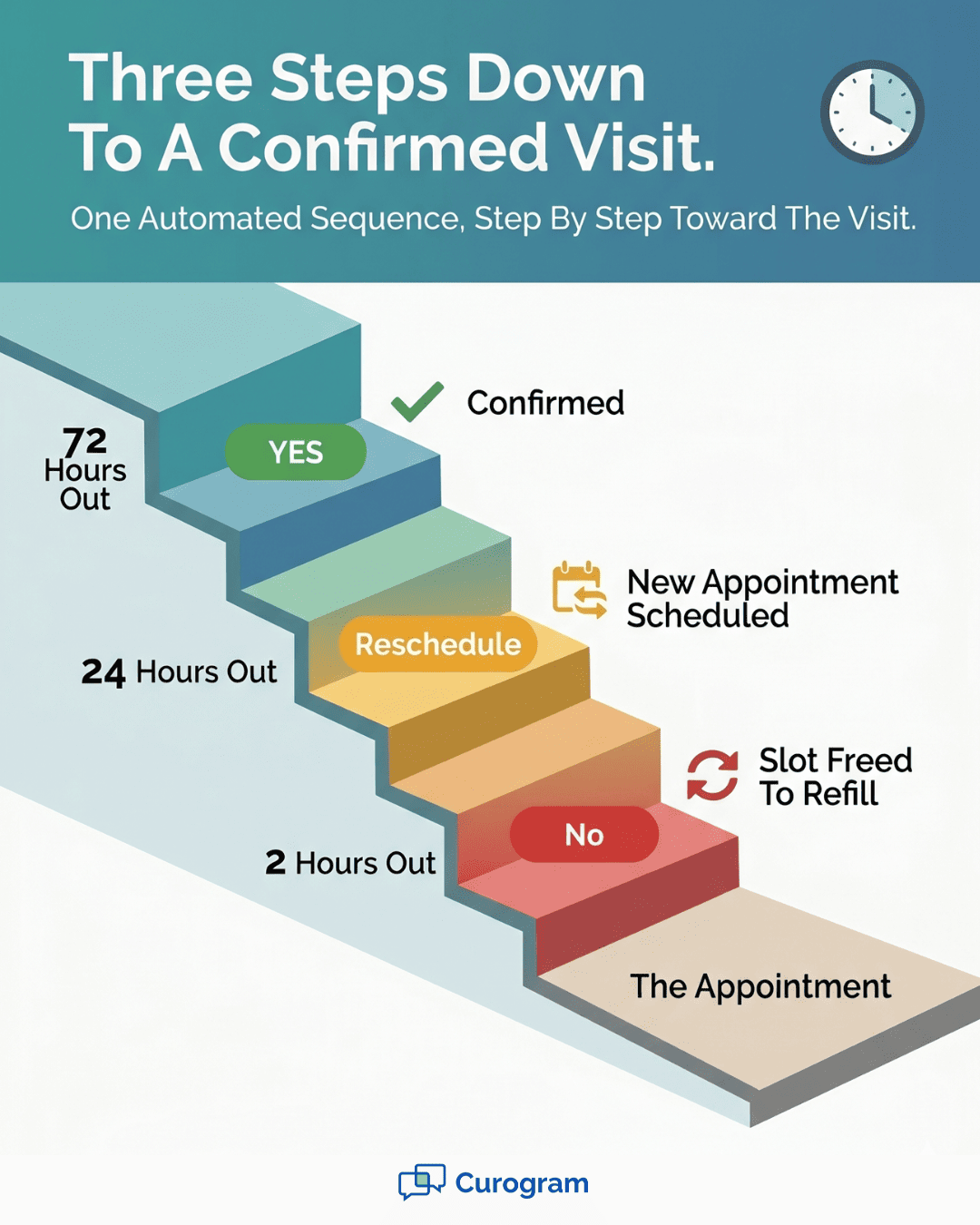
Here is how the loop works:
- Reminders go out 72, 24, and 2 hours before each visit.
- Patients reply YES, NO, or RESCHEDULE by text.
- Replies write back to the Lytec calendar in real time.
- Staff handle only the exceptions, not every call.
- Most teams finish setup in under 10 minutes.
Listen to a busy front desk in the morning. The sound is almost always the same. A phone, a dial tone, a voicemail beep, then repeat. Your team is calling tomorrow's patients one by one.
Each call confirms a single slot, and then it starts over. This is the confirmation call marathon. It eats hours your staff could spend on the patient at the window. Worse, all that effort still misses people.
Voicemails go unheard, and unconfirmed slots turn into last-minute gaps. CGM Lytec schedules your day well. But confirming that schedule is still manual work. Someone dials, marks a paper list, then re-keys the results into Lytec.
The desk becomes a call center, and care waits in line. There is a far better way to run this. A Lytec appointment confirmation workflow without manual calls hands the dialing to software. Curogram sends the reminders, collects the replies, and updates Lytec for you.
Your staff stop placing calls and start coordinating care. This shift is not just a nice idea on paper. A comparable single-specialty clinic confirmed more than 1,100 appointments a month, based on our internal data. Even better, they did it with the same team, not new hires.
That outcome is repeatable. The same loop works for any Lytec practice.
In this guide, we break down the marathon and how to end it. You will see why one-way reminder tools still create callbacks. You will learn how a two-way loop closes the gap for good. And you will see what a self-confirming schedule looks like in a real clinic.
The goal here is simple and worth repeating out loud. Give the morning back to your front desk. Let the schedule confirm itself while your team does the human work. Let's start with the villain behind the whole marathon.
The Villain: The Dial-and-Pray Cycle
Lytec is good at building a schedule. The trouble starts when you try to confirm it. Most practices still confirm by phone. Others bolt on a one-way reminder tool and hope for the best.
Either way, the work lands back on your front desk. A one-way tool sends a text or robocall, then stops. The patient cannot reply in a way the system reads. So they call the office back instead.
Now your staff answer the phone, not just dial it. The "automation" made more inbound work, not less. This is the one-way street, and it runs in only one direction.
The Morning Grind
Walk through a normal morning at the desk. Your team pulls tomorrow's list from Lytec. Then the dialing begins, call after call. They leave a voicemail and try again an hour later.
Some patients pick up, but many do not. Each result gets marked on a paper list. Later, someone re-keys all of it back into Lytec. That is the same fact entered twice, by hand.
A single confirmation can take three or four touches. Now multiply that by 50 or 60 visits a day. The math gets ugly fast. This is exactly why teams want to stop manual confirmation calls in Lytec.
Capacity Capped by Headcount
Here is the real bottleneck. Your confirmation capacity is tied to how many people can dial. Two staff can only make so many calls before lunch. On a busy day, the calls do not all get made.
Slots stay unconfirmed, and gaps appear with no time to fill them. The more your practice grows, the worse the squeeze gets. Volume rises, but the phone does not move any faster. Every call your team places is one they cannot hand to software.
That cap creates a quiet tax on the whole clinic. Look at where a single morning really goes:
|
Front desk task |
Time it quietly eats |
|
Pulling the daily call list from Lytec |
10–15 minutes |
|
Dialing, voicemails, and re-dials |
2–3 hours |
|
Marking the paper list |
20–30 minutes |
|
Re-keying replies back into Lytec |
30–45 minutes |
These ranges are illustrative examples, not measured Curogram data. Still, most front desks will recognize the shape of them.
How it Actually Feels
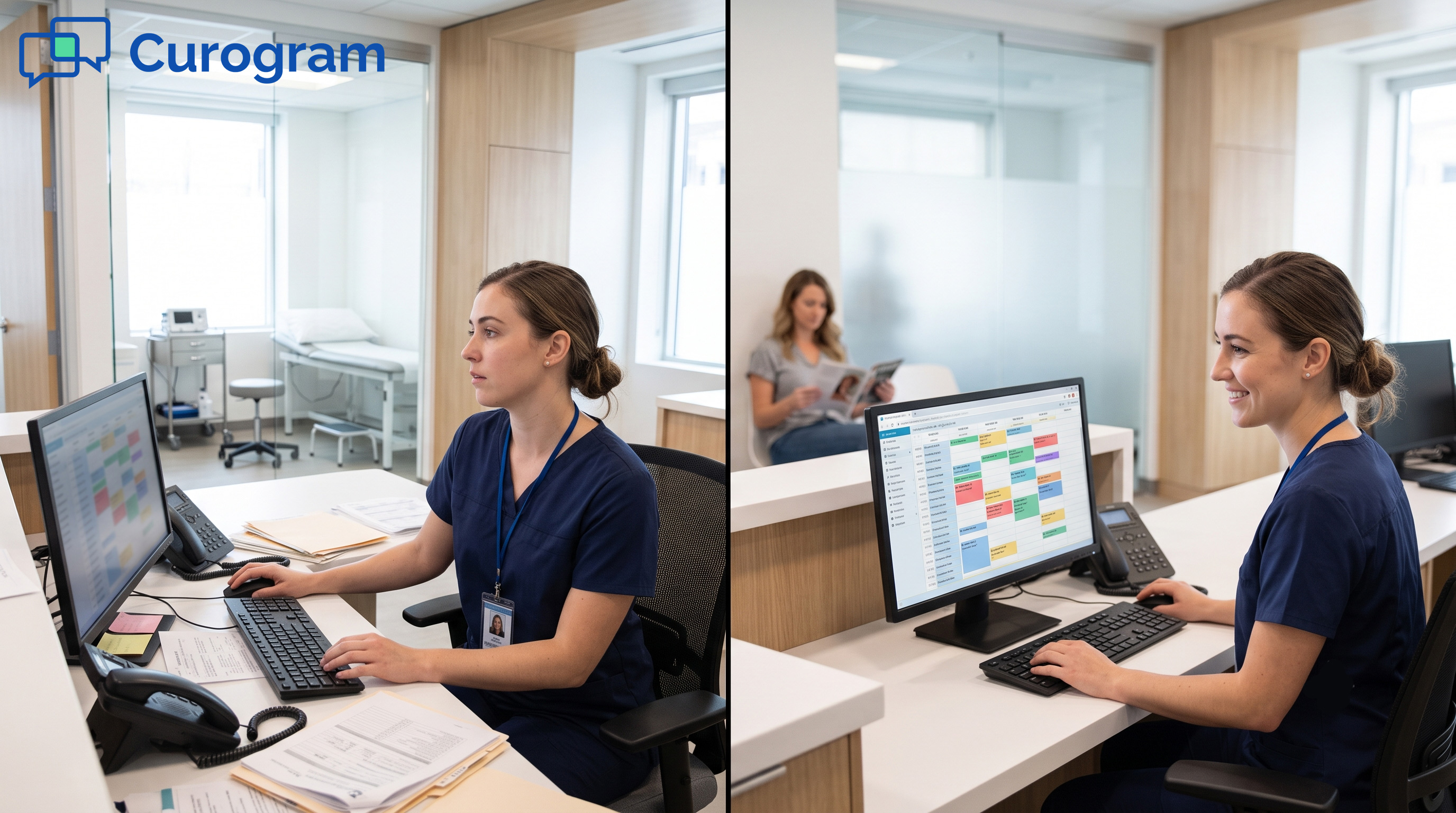
For staff, the desk turns into a call center. They spend the morning with a headset on. Meanwhile, a patient stands at the window and waits. It feels backward, because it is backward.
For patients, a missed voicemail is easy to ignore. A one-way text with no reply option is just as easy to forget. So they show up late, skip the visit, or call with a question. The loop never closes, and the gaps keep coming.
A Quick Example from a Specialty Desk
Take a small orthopedics office with two front desk staff. They see about 55 patients a day. Tomorrow's list needs confirming today, on top of live phones and walk-ins.
By the example math above, dialing alone can swallow most of a morning. That is two skilled people on a headset instead of the lobby. The cost is not just time. It is the patient who waited, unhelped, while staff chased an empty voicemail box.
There is a second cost too. Reminders that get skipped on busy days lead to no-shows. An empty slot earns nothing and is hard to refill last minute. The one-way street quietly drains both hours and revenue.
The Guide: The Hands-Off Confirmer
The fix is not more dialing. It is a loop that runs itself. A confirmation loop sends the reminder, takes the reply, and updates the schedule. Your staff supervise the few exceptions instead of placing every call.
Think of it as a round trip, not a one-way street. The message goes out, and the answer comes back. The schedule then changes on its own. No one has to chase the patient or re-key a thing.
Reminders that Send Themselves
Curogram's Smart Reminders run a set sequence with no help from staff. A first text goes out 72 hours before the visit. A second nudge follows at 24 hours. A final reminder lands 2 hours before the appointment.
Each patient gets a clear prompt to reply. The timing is steady and predictable. Lytec reminder automation for staff means fewer dials and more face time. The system does the routine work, so your people do not have to.
Two-Way Replies, No Callback
Here is the part a one-way tool cannot match. Patients reply YES, NO, or RESCHEDULE in plain text. Curogram reads the answer and acts on it. A confirmation logs itself, and a reschedule opens a new slot.
Because patients can reply, they stop calling the office back. That alone removes a wave of inbound calls. When you automate appointment confirmations, your Lytec front desk shifts from dialing to coordinating. The phone stops ruling the morning.
Writes Back to Lytec in Real Time
Replies do not sit in a separate app. Confirmations and reschedules write back to the Lytec schedule as they happen. There is no paper list and no double entry. The calendar you trust stays current on its own.
This is how you reduce front desk calls, since Lytec scheduling updates without a single keystroke. One source of truth, always fresh. Staff glance at the calendar and know it is right.

What One Patient Reply Looks Like
Picture a single confirmation, start to finish. Curogram texts a patient 24 hours out. The patient taps back "YES" from the couch. The slot turns confirmed in Lytec, and no one lifts a phone.
Now say a different patient replies "RESCHEDULE." The system offers open times and books the new one. That freed slot can go to someone on a waitlist. The whole exchange takes seconds and needs zero staff dialing.
This is the loop doing the heavy lifting. Staff only see the handful of replies that need a human. Everything else settles itself in the background.
Built for the Front Desk
This is not a tool only IT can run. Training takes under 10 minutes for most teams. Staff move from outbound callers to in-clinic coordinators. They watch a short list of exceptions and step in only when needed.
It also replaces a standalone add-on. As a Lytec AutoRemind alternative staff workflow, Curogram folds reminders into one platform and one bill. There is no second login and no extra invoice. The whole loop lives in a single inbox your team already knows.
One Bill, One Inbox, Less Stack
Many practices pay for a reminder add-on on top of Lytec. Curogram rolls that job into one platform. You retire the standalone tool and the extra invoice with it. That trims both cost and clutter from your stack.
It also means fewer places to check. Replies, confirmations, and reschedules live in one shared inbox. Your team stops bouncing between screens to piece the day together. The morning gets simpler, not just faster.
The Success: The Hands-Free Calendar
Here is the payoff of the loop. Your schedule starts to confirm itself. Reminders go out, replies come back, and Lytec updates. Confirmation stops being a chore and becomes a quiet background process.
That is not a slogan. It is what the work looks like once the loop is on. Let's walk through the numbers, the role shift, and the day-to-day result.
The Metric that Matters
Start with a real, verified outcome. Covina Arthritic Clinic confirmed more than 1,100 appointments a month with Curogram, based on our internal data. That volume ran on automation, not on extra hires. The clinic kept the same team and still cleared the load.
Two more numbers add context, both from our internal data. Curogram clients see appointment confirmation rates above 75%. They also run no-show rates 53% below the industry average. Fewer empty chairs means more care delivered and more revenue kept.
One case shows the no-show side clearly. Atlas Medical Center cut no-shows from 14.20% to 4.91% in three months, based on our internal data. That is roughly three times better than the typical clinic. Timely reminders and easy replies did the heavy lifting.
A Simple Before-and-After
Numbers land better side by side. The table below is an illustrative example, not measured Curogram data. It shows the shape of the shift for a busy specialty desk.
|
What changes |
Before the loop |
After the loop |
|
Who confirms each slot |
Two staff on the phone |
The system, by text |
|
Time spent dialing daily |
2–3 hours |
Near zero |
|
Double data entry |
Yes, paper then Lytec |
None, replies write back |
|
Unconfirmed slots by noon |
Common on busy days |
Rare |
|
Last-minute gaps |
Hard to fill in time |
Surfaced early to rebook |
The point is not the exact figures. It is the direction of travel. Work moves off your staff and onto the loop. Your people stop dialing and start doing higher-value work.
Example Math You Can Sanity-Check
Let's make the time savings concrete with a simple model. These are illustrative numbers, not Curogram data. Say your desk handles 50 confirmations a day. Suppose each one takes 4 minutes across calls, voicemails, and re-keying.
That is 200 minutes a day, or more than three hours. Over a five-day week, it nears 17 hours. That is most of a full work shift, gone to dialing. Shift that load to the loop, and the hours come back.
Now picture those hours pointed at patients instead. Staff greet people warmly and answer questions in person. They handle billing questions and fill cancellations from a waitlist. The same headcount suddenly has room to breathe.
The Role Shift at the Desk
This is where the marathon disappears. Your front desk stops being a call center. Staff change from outbound callers into in-clinic coordinators. They supervise a short queue of exceptions, nothing more.
What counts as an exception? A patient who replies with a question. A reschedule that needs a specific provider. A slot that no one has claimed yet. Everything else settles on its own.
When you free up the front desk, Lytec confirmations no longer eat the morning. That space changes the whole mood of the office. Staff feel less rushed and less buried. Patients feel more seen, because someone is actually present for them.
The Outcome You Feel All Day
A self-confirming schedule does more than save time. It changes when you learn about a problem. With manual calls, a cancellation surfaces late, often too late to fill. With the loop, a "NO" arrives early enough to act.
That early signal is the quiet win. An open slot spotted at 9 a.m. can be filled by noon. A patient from the waitlist takes the spot. The chair that would have sat empty now earns its keep.
Multiply that across a month, and the picture adds up. More confirmed visits, fewer surprise gaps, steadier revenue. The team is calmer, and the lobby moves better. The schedule does its own upkeep while your staff focus on care.
There is a compounding effect too. Confirmed patients show up more often. Higher attendance means fuller days and fewer wasted slots. That is how a clinic clears 1,100-plus confirmations a month without burning out its desk.
Those gains are easier to picture when you put real numbers to them. Plug in your daily visits and average revenue, and you can calculate the ROI you miss with your current no-shows. Seeing that figure makes the case for a self-confirming schedule hard to ignore.
.png?width=2000&height=1125&name=Build%20a%20Lytec%20Appointment%20Confirmation%20Workflow%20Without%20Manual%20Calls-inline2%20(1).png)

What Makes Curogram's Smart Reminders Different
Most reminder tools send a message and then go quiet. Smart Reminders from Curogram do the opposite. They open a conversation and keep it going until the slot is settled. That small difference changes the whole front desk.
Here is what that looks like in your Lytec practice. A reminder goes out 72 hours before the visit. If the patient does not reply, a 24-hour nudge follows. A final 2-hour text lands on the day itself.
The patient replies in plain words, and the system reads the answer. A YES marks the slot confirmed. A RESCHEDULE opens a new time. A NO frees the slot early enough to fill.
Each reply writes back to Lytec on its own. No one marks a paper list, and no one re-keys a thing. Your team is not buried in dialing or callbacks. They watch a clean queue of exceptions and step in only when needed.
That is a real Lytec AutoRemind alternative staff workflow, run from one inbox. You also see every message in one shared thread. Nothing hides on a personal cell phone or a sticky note.
Security sits underneath all of it. Curogram is HIPAA compliant and SOC 2 Type II certified. Every account includes a signed BAA. Reminders also carry a STOP opt-out, which keeps you aligned with TCPA rules.
Setup is fast, not a long project. Most teams are live in under 10 minutes. Training is short because the screen is simple. Staff see who confirmed, who declined, and who still needs a touch.
The result is a quieter desk and a fuller schedule. Your front desk stops acting like a call center. The loop runs in the background while your team cares for the people in front of them.
Conclusion: Automate the Calls, Keep the Care
The confirmation call marathon is a choice, not a rule. You can keep dialing tomorrow's list by hand. Or you can let a loop confirm it for you. The second path gives the morning back to your team.
Think about what your front desk really does best. They greet patients, answer real questions, and solve problems in person. None of that happens while they sit with a headset, leaving voicemails. The dialing adds little, and it costs hours every single day.
Lytec holds the schedule, and it does that job well. Curogram keeps that schedule confirmed for you. Reminders go out on a set sequence. Replies come back as YES, NO, or RESCHEDULE, and the Lytec calendar updates itself in real time.
That is the whole loop, running quietly in the background. No paper list, no double entry, no call center at the front desk.
When you free up the front desk, Lytec confirmations stop owning the morning. Staff move from dialing to caring, and patients feel the difference.
The numbers back this up clearly. A comparable specialty clinic confirmed more than 1,100 appointments a month, based on our internal data. Curogram clients also see confirmation rates above 75%, again from our internal data.
Trade voicemails for a quiet, self-confirming schedule. Book your Curogram demo today and see confirmations roll in without a single added hire.
Frequently Asked Questions
It sends timed text reminders, reads patient replies, and writes confirmations back to Lytec on its own. Staff supervise only exceptions, so the daily round of manual calls disappears for good.
One-way tools send a message but cannot read a reply. Patients with questions or changes call the office instead. A two-way loop lets them respond by text, so inbound calls drop sharply.
The reply writes back in real time. A YES marks the slot confirmed, a RESCHEDULE opens a new time, and a NO frees the slot early. No paper list and no re-keying.
Most teams go live in under 10 minutes. Because replies write back to Lytec automatically, there is no second system to maintain and no double entry for your front desk.
Curogram is HIPAA compliant and SOC 2 Type II certified, with a signed BAA on every account. Reminders carry a STOP opt-out, which keeps your texts aligned with TCPA rules.