Build a Lytec Appointment Confirmation Workflow Without Manual Calls
💡 A Lytec appointment confirmation workflow without manual calls lets your front desk stop phoning patients one at a time. Curogram automates the...

11 min read
Mira Gwehn Revilla
:
July 4, 2026
Most front desks measure the day by one number: calls dialed. Before the first patient arrives, staff work down a long list. They ring each person to confirm tomorrow's visits. That list is a quiet tax on your whole schedule and your morning.
Here is the odd part. Your CureMD reminders already went out the night before. Yet the front desk still picks up the phone to confirm. One-way reminders tell patients about the visit, but send nothing back.
So staff fill the gap by hand. They leave voicemails. They chase people who never answer. By 8 a.m., the schedule is still a guess, not a plan.
This is the confirmation gap, and it caps your practice by headcount. You can only dial so many patients in a day. When someone cancels, you often learn too late to fill the slot. CureMD appointment confirmation without manual staff calls fixes this at the root.
The goal is simple. You want to stop manually confirming appointments in CureMD. Curogram adds two-way smart reminders that work beside your EHR. Patients text a quick reply, and the schedule updates on its own.
This guide is written for the front desk, not the IT team. We will show you how to retire the call list for good. You will see how one specialty clinic confirmed more than 1,100 visits a month with no new hires. And you will learn how to hand those lost hours back to your staff.
The fix is not another reminder blast. It is a reply your system can read and act on by itself. That one change turns a whole morning of calls into a schedule that is ready before you are. Below, we will unpack how the loop closes and what it frees up for your busy front-desk team.
One-way reminders create a hidden trap. CureMD tells the patient about the visit, but the patient cannot tell CureMD back. So the reminder goes out, and your team still has no idea who plans to show up.
That missing reply turns confirmation into a manual phone job. The front desk builds a list each afternoon. They dial down the list one name at a time. Every CureMD front desk reminder call takes the same few minutes, whether or not anyone picks up.
Most calls do not end cleanly. Some go to voicemail. Some reach a wrong number. Some patients pick up, then ask three questions that stretch a quick check into a long chat.
|
Picture a single afternoon at the desk: A staff member dials 40 names before close. Fifteen go to voicemail, eight never answer, and six turn into long conversations. Only eleven visits are truly confirmed when the shift ends. |
Outdated contact info makes it worse. Numbers change, and no one updates the chart. So your staff burn minutes on lines that no longer reach anyone. The list looks full, but half of it is dead ends.
By the next morning, the list is only half done. A third of patients never replied at all. Your 8 a.m. schedule is still a guess, and the guess is often wrong.
Now do the math on staff time. Say a busy clinic has 60 visits booked for tomorrow. At three minutes per attempt, that is three hours of dialing. And that is before a single walk-in or billing question hits the desk.
This is the real cost of a one-way reminder workflow. It ties your confirmed volume to how fast people can dial. You cannot confirm more visits without adding more hands to the phones.
Tomorrow brings a fresh batch of names and the same slow grind. There is no end state, only another afternoon of calls.
The uncertainty ripples past the front desk, too. Providers do not know if their next patient is coming. Rooms sit ready for people who will never arrive. The whole clinic plans around a schedule it cannot trust.
The bottleneck gets worse when cancellations hide inside the list. A patient who plans to cancel rarely calls to say so. You find out only when your staff reach them, or when the slot sits empty at 10 a.m.
By then it is too late to fill. The open hour is lost, and so is the revenue tied to it. Same-day gaps surface after the day has already started, when your options are gone.
Staff spend the morning heads-down on the phone, not with the patients in front of them. They measure the day by calls dialed, not by people helped.
Over weeks, this drains morale. Skilled team members feel like dialers, not coordinators. The work is repetitive, and much of it leads nowhere. Good people burn out on a task that a system should own.
Here is the core problem in one line. A reminder that cannot receive a reply will always push the real work back onto your staff. The call list is not a habit you chose. It is a workaround for a tool that only talks one way.
That is the gap Curogram was built to close. And closing it starts with a reminder that can listen and then act.
Curogram works like a confirmation engine that runs beside CureMD. It does the confirming for you, so your staff do not have to dial at all. The reminder now asks a question and waits for the answer.
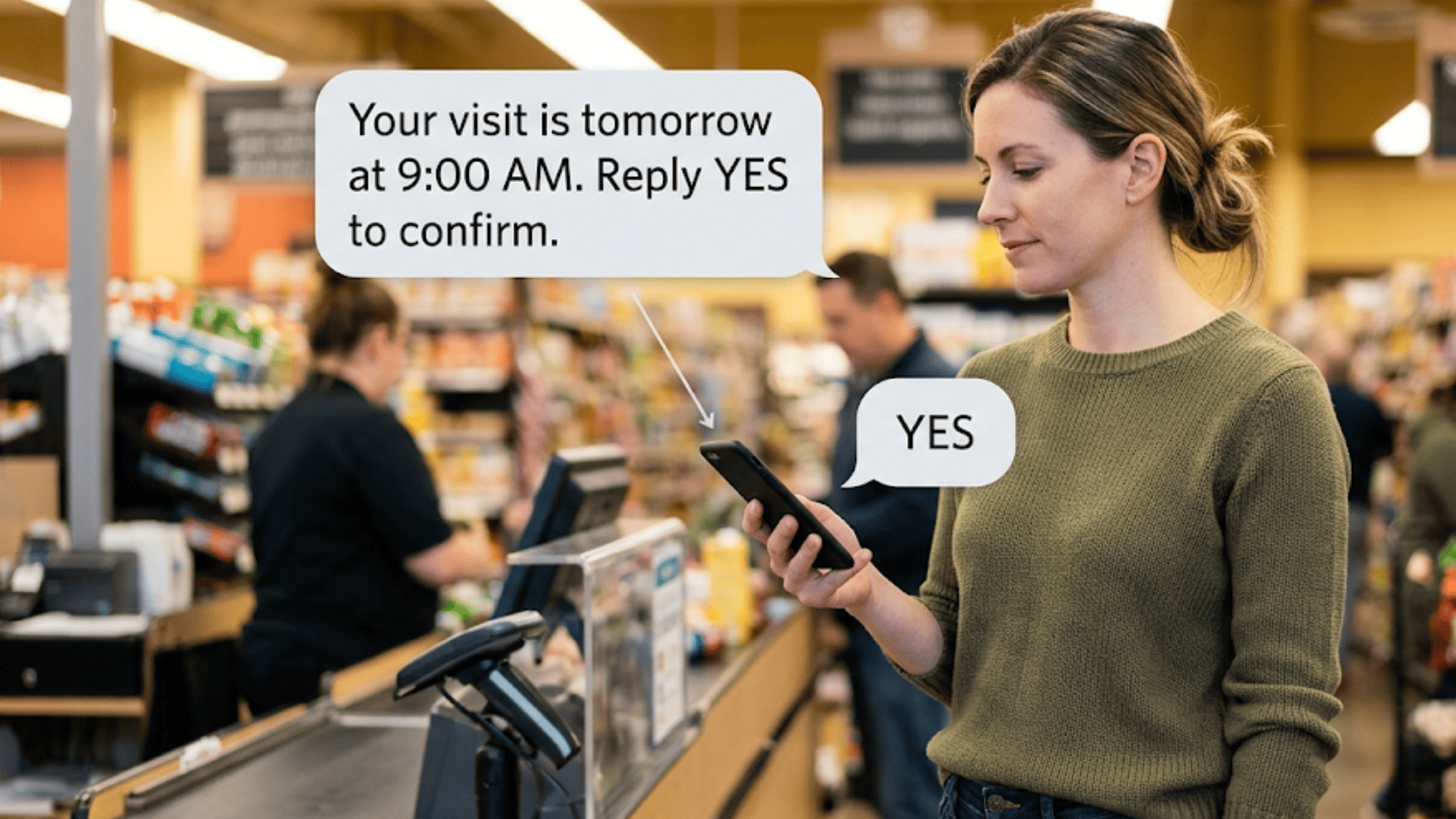
A patient gets a text and replies YES, NO, or RESCHEDULE. That reply flows straight into the system, and the confirmation status auto-updates in CureMD.
Walk through a real reply for a moment. A patient named Maria gets a text about her Tuesday visit. She taps YES from the grocery line. Her visit is marked confirmed before your staff even sees it.
Think about what that removes. No call list. No sticky notes. No staff member typing each reply into the schedule by hand.
This is how you automate appointment confirmations in CureMD without new software to learn. Curogram sends the reminders, reads the replies, and marks each visit. Your team only steps in for the exceptions.
An exception is simple to handle. If a patient replies RESCHEDULE, a staff member reaches out to find a new slot. Everything else is already done before anyone looks at the calendar.
Exceptions even line up in one clean queue. Staff work that short list instead of the whole schedule. Nothing routine ever lands on their desk. They spend their focus only where a person is truly needed.
You keep CureMD as your system of record. The schedule still lives there, while confirmations flow in from Curogram.
There is nothing to migrate and no data to move. Curogram sits on top of the workflow you already use. Your staff log in to the same tools, with far fewer calls to make.
Setup is light, not a months-long project. You choose when reminders go out and how often they repeat. Once that is set, the cadence runs on its own, night after night.
You also get a clear view of every reply. Confirmed, declined, and pending visits are easy to see at a glance. Nothing slips through, and nothing needs a manual double-check.
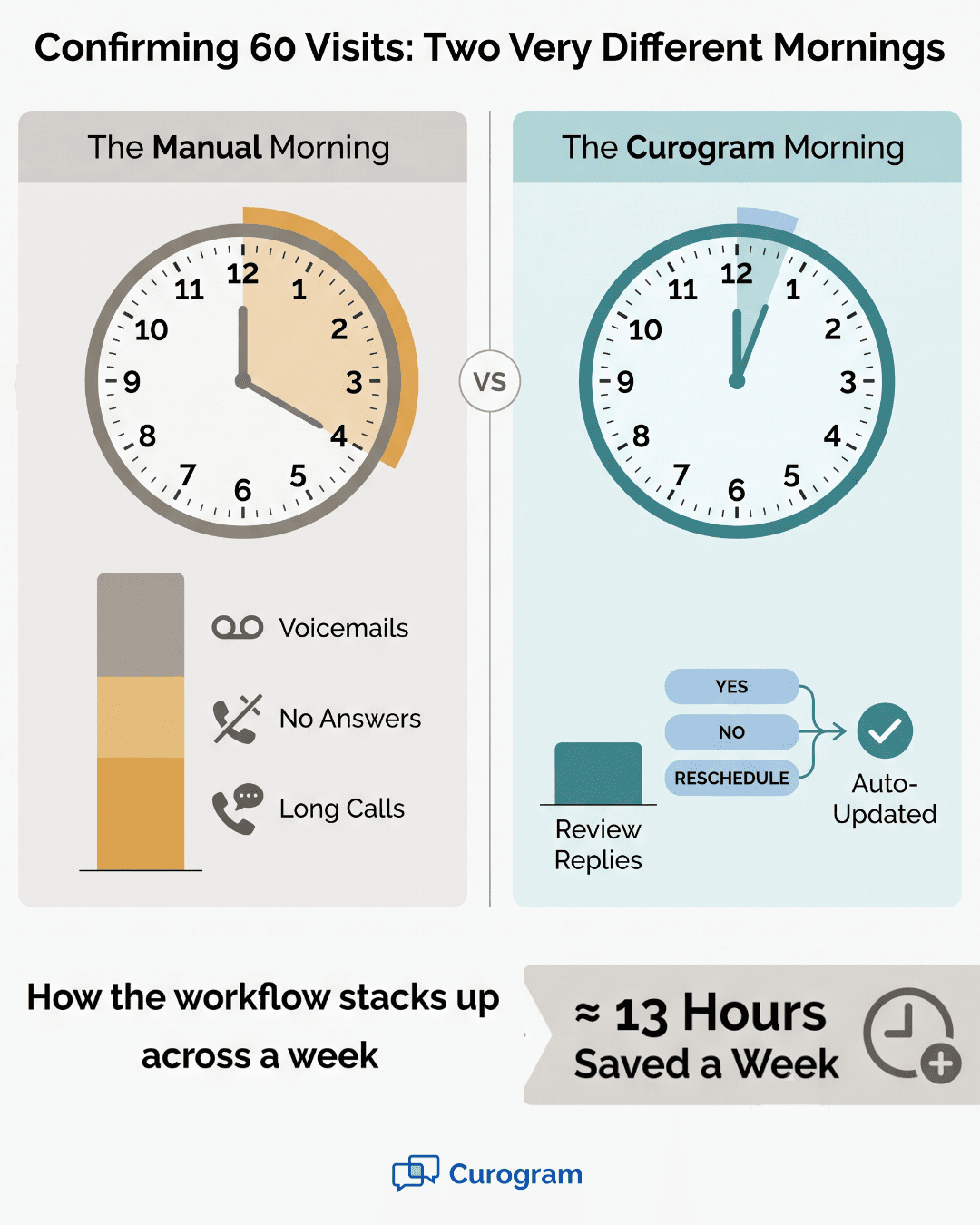
This reshapes the whole reminder workflow and gives real staff time back. Instead of dialing 60 patients, your team reviews a short list of replies. The routine confirmations are settled without a single call.
|
Compare the two mornings side by side: In the old one, staff open a call list and start dialing. In the new one, they open a clean schedule and scan a handful of exceptions. |
The fit is even stronger for specialty clinics. In a rheumatology or dermatology practice, each slot is longer and worth more. A single open hour is costly, so early warning matters.
Say a dermatology clinic loses a 90-minute slot to a no-show. That gap is hard to fill on the day itself. Early replies give you the lead time to avoid that loss.
Because replies come in the day before, cancellations show up early. That gives you real time to fill same-day cancellations from a waitlist. You act on the gap while there is still time to close it.

Here is the shift in plain terms. Your staff stop chasing confirmations and start managing exceptions. The engine handles the volume, and people handle the judgment calls.
That is what a confirmation engine does. It turns a manual, one-by-one task into a quiet background process. And it lets your front desk act like coordinators again, not dialers stuck at a phone.
Fewer chased confirmations also means fewer empty chairs. Every reply that lands early is a slot you can save before the day starts. It helps to see the ROI in reducing no-shows in plain dollars for your own schedule.
When confirmations run themselves, the whole model changes. You move from a daily call-around to a closed loop. A reminder goes out, a reply comes back, and the schedule updates, all without a staff phone call.
That loop is the point. Each step feeds the next with no gap for a human to fill. The system asks, the patient answers, and the calendar reflects the truth.
The results back this up. Based on our internal data, one specialty arthritis clinic now confirms more than 1,100 visits per month. It reached that volume with no new hires.
Sit with that number for a second. More than 1,100 monthly confirmations, handled without adding a single seat to the front desk. The old model would have needed far more phone hours to match it.
Across Curogram clients, the average confirmation rate runs above 75%, based on our internal data. That means most patients now confirm themselves by text. Your staff no longer carry that load by hand.
Curogram clients see no-show rates about 53% lower than the industry average, based on our internal data. Fewer no-shows means fewer empty chairs and less lost revenue.
One clinic shows the scale of that drop. Atlas Medical Center cut its no-show rate from 14.20% to 4.91% in three months, based on our internal data. That is roughly three times better than the typical rate.
Your staff redeploy from the phones to the floor. They greet patients, sort out intake, and handle the questions that truly need a person.
That redeployment shows up in small, daily ways. The waiting room moves faster because someone is actually working it. Patients feel seen the moment they walk in.
Take a second example from a normal week. A front desk lead used to spend afternoons on confirmation calls. Now she runs recall outreach and trains new hires instead. Same person, far higher-value work.
This is the shift from call list to closed loop. The automation becomes your most steady worker. It never skips a reminder, never forgets to log a reply, and never calls in sick.
Let us walk a simple, illustrative example. The math below is a sample, not a client stat. It shows how the hours can add up for a mid-size clinic.
|
Task |
Old manual way |
With Curogram |
|
Confirm 60 visits/day |
3 hours of calls |
About 20 minutes of review |
|
Weekly time on confirmations |
About 15 hours |
About 1.5 hours |
|
Same-day gaps caught early |
Rarely |
Most of them |
|
Staff role |
Dialer |
Coordinator |
In this sample, the front desk saves around 13 hours a week. That is nearly two full shifts returned to patient-facing work. Your real numbers will vary, but the pattern holds.
Think about what two shifts could cover. That is time for recall outreach, cleaner intake, or a shorter phone queue. The saved hours do not vanish; they move to higher-value work.
In the old model, a cancellation showed up after the day began. You found the empty slot too late to do anything with it.
Now the reply comes the day before. A patient texts NO, and you see the open slot tonight. You can fill same-day cancellations from your waitlist before the sun comes up.
Here is how that fill works in practice. The system flags the open slot as soon as the NO arrives. Staff text a waitlisted patient to offer the time. Often the gap is closed hours before the clinic opens.
That early warning is worth real money in a specialty practice. A single filled slot can cover the cost of the tool for the week. Every recovered visit drops straight to the bottom line.
Think of the closed loop as three simple parts:
The reminder asks
The patient replies
The schedule updates and flags any gap for your team
Each part used to need a person. Now only the last mile, the true exceptions, needs a human touch. That is the whole idea behind the shift.
The call list was never the goal. It was a patch for a reminder that could not listen. Close the loop, and the patch is no longer needed.
Your front desk stops counting calls dialed. It starts counting patients helped. And the schedule is ready before the first one walks through the door.

Most reminders stop at the send. Two-Way Smart Reminders keep going. They turn a one-way notice into a short, useful conversation that your schedule can actually read.
Here is how it works in practice. A patient gets a text about tomorrow's visit. They reply YES, NO, or RESCHEDULE right from their phone. No app, no login, no portal to dig through.
That reply does the real work. A YES marks the visit confirmed. A NO frees the slot while there is still time to fill it. A RESCHEDULE flags the patient for a quick staff follow-up.
The value is in what happens next. The confirmation status updates on its own, so no one types it in by hand. Your team sees an accurate schedule without ever lifting the phone. The result is a calendar you can finally trust.
Because the whole exchange is text, it fits how patients already live. Most people answer a text far faster than they return a call. That speed is why confirmation rates climb once the loop is in place. It even reaches patients who would never pick up a call.
It is also built for healthcare from the ground up. The texting is HIPAA-compliant, backed by a BAA, encryption, and per-user access controls. Your staff get simplicity, and your practice keeps its safeguards.
Best of all, it runs beside CureMD, not on top of it. You keep your system of record and simply add the replies it was missing. There is nothing to migrate and nothing new to relearn.
Think of Two-Way Smart Reminders as the listening half of your reminders. CureMD handles the schedule. Curogram handles the replies that keep it true. Together, they close the loop. Your front desk has filled it by hand, one call at a time, for far too long.
The confirmation call list was never really your choice. It grew up as a workaround for a one-way reminder. When a reminder cannot listen, someone has to pick up the phone and fill the gap.
That someone has been your front desk. Morning after morning, skilled staff spend hours dialing instead of helping the patients in front of them. The list caps your day by how fast people can call.
There is a cleaner way to think about the tools. CureMD is built for your schedule and your records. Curogram is built for the replies that keep that schedule accurate.
Put the two together and the loop finally closes. Reminders go out, patients text back, and confirmations post on their own. Your team stops chasing and starts coordinating instead.
The payoff shows up fast. One specialty clinic now confirms more than 1,100 visits a month with no new hires, based on our internal data. Across clients, confirmation rates run above 75% and no-shows fall well below average.
Those are not just numbers. They are quiet mornings, filled slots, and staff who feel like coordinators again. They are hours handed back to the work that only a person can do. They mark the shift from a frantic morning to a smooth one.
So take the confirmation calls off your front desk's plate. Let automation do the confirming, and let your team do the caring. The gap that capped your schedule does not have to stay open.
Find out how much phone time your team could reclaim. Grab a short demo slot and see the manual call list disappear for good.
Curogram provides HIPAA-compliant texting backed by a BAA, encryption, and per-user access controls. Appointment reminders are allowed under HIPAA with the right safeguards, so your team can confirm visits by text with confidence.
CureMD sends the reminder, but Curogram reads the reply. That two-way loop is what removes the call list. Recovered no-shows and reclaimed staff hours tend to cover the cost quickly.
Very little. YES and NO replies update the schedule on their own, with no typing needed. Staff step in only for exceptions, such as helping a patient who texts RESCHEDULE find a new slot.
Because replies arrive the day before, a cancellation shows up while there is still time. You see the open slot the night before and can fill it from your waitlist before the day starts.
A one-way reminder tells the patient about the visit but sends nothing back. Without a reply your system can read, staff must call each person to confirm. That is what rebuilds the daily list.
💡 A Lytec appointment confirmation workflow without manual calls lets your front desk stop phoning patients one at a time. Curogram automates the...
💡 CureMD appointment reminders with two-way text confirmation turn a one-way message into a reply your schedule can trust. CureMD sends the...
💡 Automated appointment reminders for Elation Health EHR cut no-shows by up to 65% through two-way SMS that lets patients confirm with one text...