

11 min read
How Your Front Desk Staff Can Stop Making Manual Confirmation Calls
Jo Galvez
:
March 18, 2026
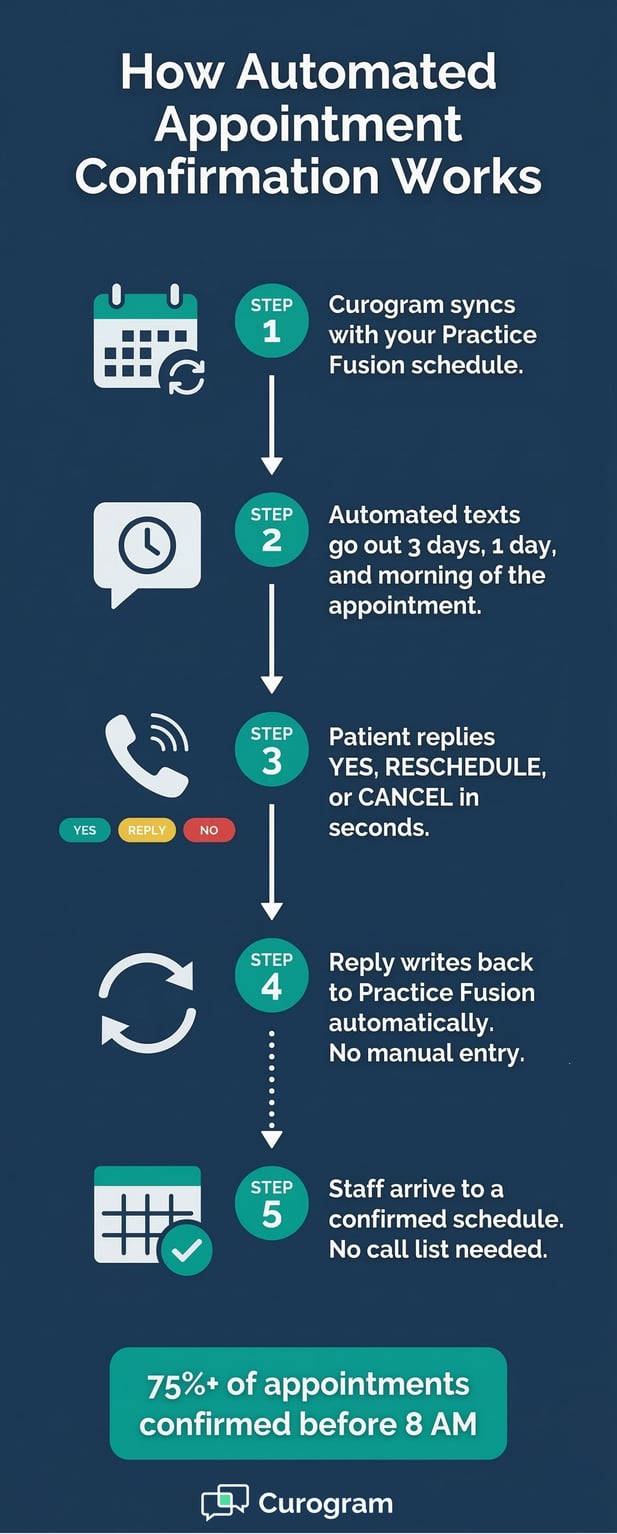
Curogram solves this with automated text confirmations that let patients reply YES, RESCHEDULE, or CANCEL in seconds. Every reply updates the Practice Fusion schedule in real time. By the time staff arrive, most appointments are already confirmed.
Based on our internal data, practices using Curogram achieve an average confirmation rate above 75% and cut no-show rates to levels well below the industry average. The result: front desk teams start the day with a confirmed schedule, not a call list.
You need to reschedule your appointment. Simple, right? But then you remember: the portal. Download the app. Create an account. Verify your email. Link your records.
By the time you get through all of that, you've given up and just called the office instead.
This is the reality for most patients at small primary care and family medicine practices using Practice Fusion. The built-in patient portal, powered by FollowMyHealth, works well for patients who are already set up on it.
But research shows portal adoption at small practices rarely tops 25 to 30%. That means roughly 70 to 75% of patients have no digital path to reach the office.
Those patients fall back on phone calls, hold times, and voicemails. Routine tasks like confirming an appointment, asking a billing question, or requesting a prescription refill can take 10 to 15 minutes of back-and-forth. For a task that should take 30 seconds, that's a real problem.
Curogram's No-Portal Text Line was built to fix this gap. It lets patients text the practice's existing number from the messaging app they already use, with no setup at all.
This article walks through how it works, why the portal gap exists, and what it means for patient experience and retention at small practices.
The Villain: The Morning Scramble
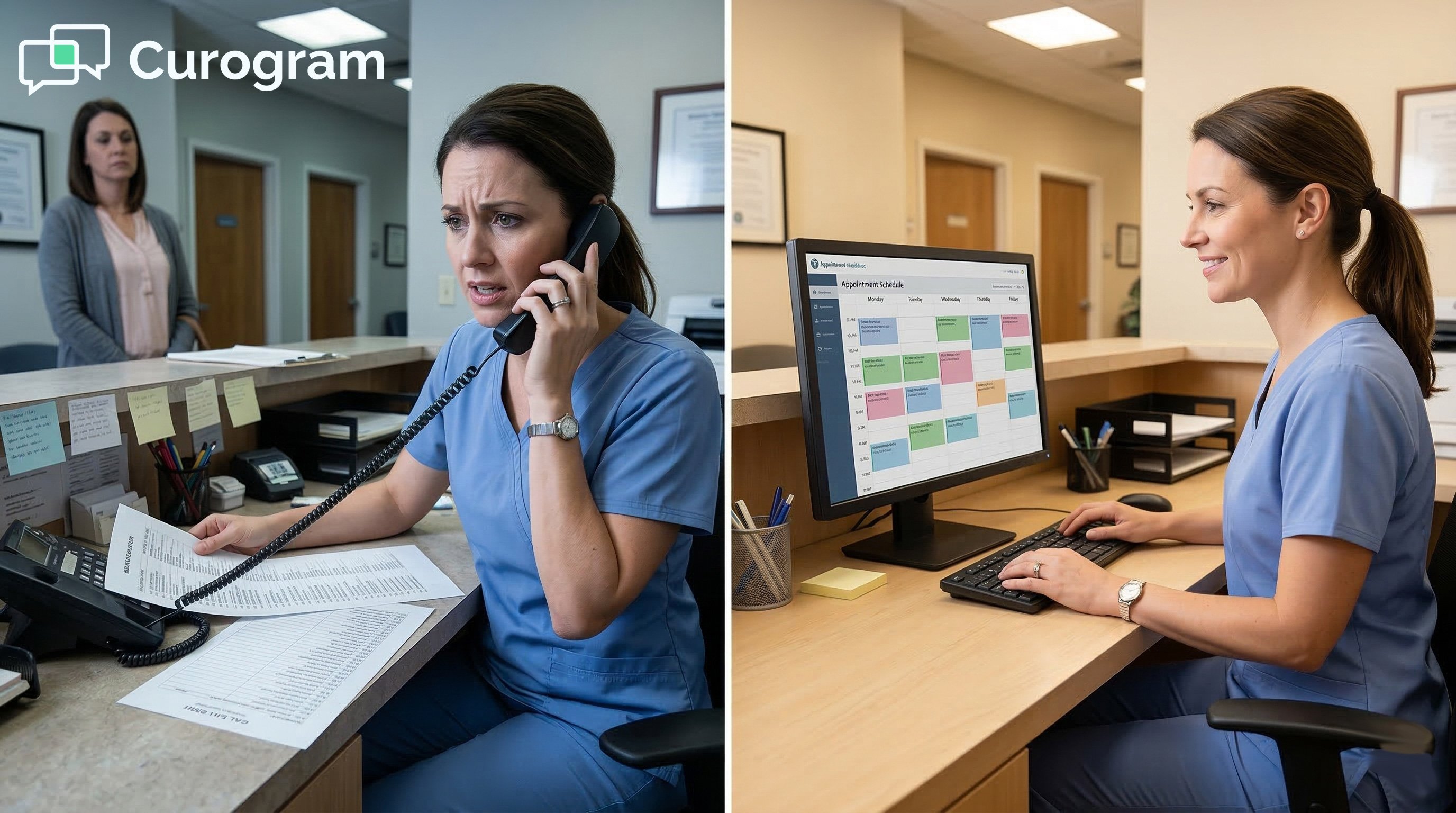
Most front desk staff know the morning scramble well. It's the cycle of calls, voicemails, and unanswered rings that fills the first two hours of every workday.
Understanding why this happens, and what it actually costs, is the first step to fixing it.
Why Practice Fusion's Built-In Reminders Leave Gaps
Practice Fusion does send reminders. Texts, emails, and voice messages go out to patients ahead of their appointments.
The problem is that these reminders only go one way. They notify the patient, but there's no way for the patient to reply. No confirmation button. No text-back option.
A patient might text back "confirmed", but that message goes nowhere. It doesn't update the schedule. It doesn't reach the front desk. The slot still shows as unconfirmed the next morning.
This creates a false sense of progress. Reminders went out, but zero actionable data came back. The front desk still has to call every patient on the list to find out who's actually showing up.
The Problem With One-Way Reminders
One-way reminders inform patients, but they don't complete the confirmation loop. A confirmation only counts when the practice has a clear YES or NO from the patient, and that data is reflected in the schedule. Without a reply mechanism, reminders are just notifications, not confirmations.
What "Unconfirmed" Costs in Real Time
Every unconfirmed slot is a question mark. It might fill. It might not. That uncertainty ripples through the whole schedule, affecting how providers manage their time, how staff prep patient files, and how the practice responds to last-minute cancellations. Unconfirmed appointments are a hidden source of daily inefficiency.
The Hidden Cost of the Call List
The morning scramble doesn't just waste time. It also delays everything else the front desk needs to do. Each outbound call takes 3 to 5 minutes when someone answers, longer if the patient has questions.
Voicemails take 30 to 60 seconds each, and most don't get a callback before the appointment.
By 10:00 AM, the front desk has reached maybe half the list. The other half are still unconfirmed. Meanwhile, the phone is ringing with other calls.
Patients are walking in for check-in. Insurance verifications are waiting. The scramble creates a cascade that lasts the whole day.
For a practice with 25 to 35 daily appointments, the confirmation call list can consume 25 to 35% of the front desk's total daily capacity , all on a task that adds no clinical value.
That's not a small inefficiency. It's a structural problem that repeats every single morning. And for solo-staff front desks, it's even more acute.
One person trying to call an entire schedule while also checking in patients and answering the phone isn't multitasking; it's triage.
The Feature: The Morning Scramble Cure
Curogram's automated confirmation system replaces the manual call list with a process that runs in the background, before staff even arrive.
Here's how each part of the system works, and why it matters for small Practice Fusion clinics.
Automated Text Confirmations Sent Before the Workday
Curogram sends confirmation requests by text at intervals you set. Common sequences are 3 days before, 1 day before, and the morning of the appointment. Each text comes from the practice's familiar phone number, so patients recognize it.
The message is simple and clear: confirm, reschedule, or cancel with a single reply. Patients respond in seconds. No phone call needed. No voicemail to record. No callback to wait for.
By the time your front desk arrives, most patients have already replied. The schedule reflects their answers in real time.
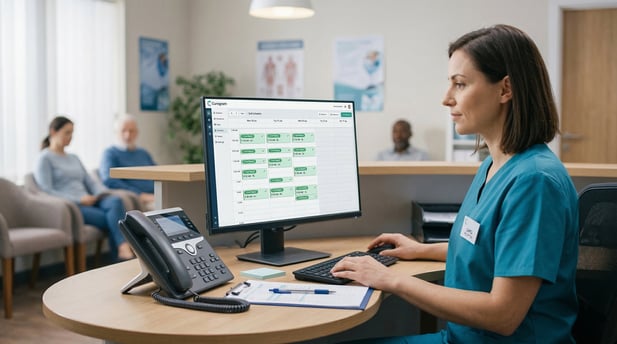
Staff open Practice Fusion and see confirmed slots, rescheduled times, and open spots from cancellations, not a list of question marks.
How Reply Options Simplify the Patient Experience
Giving patients three clear options (YES, RESCHEDULE, CANCEL) removes friction. Patients don't need to call the office or find time to leave a voicemail. A quick text reply from their phone takes seconds.
The easier the action, the more likely patients are to complete it. This is why text confirmation rates run well above those of phone-based outreach.
Real-Time Schedule Updates in Practice Fusion
Every patient reply writes back to Practice Fusion automatically. There's no manual data entry, no toggling between systems, and no risk of missing an update.
When a patient cancels, the slot opens. When they confirm, the schedule locks. Staff always see an accurate, current view of the day.
Built-In Tools to Handle Non-Responders and Cancellations
Not every patient replies to the first text. Curogram handles this with follow-up reminders and automated escalation to voice calls for non-responders.
The system works through the list on its own, so staff only need to manually contact the small number of patients who didn't respond to any automated outreach.
Based on our internal data, that's typically 10 to 15% of the schedule , instead of 100%.
Curogram also includes a cancellation-to-waitlist workflow. When a patient cancels by text, waitlisted patients are notified automatically that a slot has opened.
The practice fills the slot without staff involvement. Revenue that would have been lost recovers on its own.
Setup takes about 10 minutes. There's no IT team required, no complex configuration, and no training manual. Staff learn the dashboard quickly, and the system works the same way whether the practice has 20 appointments or 50 on the schedule.

The Narrative: Rosa’s First Morning Without the Call List
Real-world results matter more than features on a list. Here's how one office manager's experience changed after switching to automated confirmations, and what it meant for the whole practice.
The Practice Profile
Rosa manages a 2-provider pediatric practice in suburban Denver, running on Practice Fusion. Until mid-morning, she handled front desk duties on her own. Two providers. Thirty-plus appointments a day. One person managing it all.
Her mornings followed the same pattern: arrive early, pull up the schedule, start calling. With 30 to 35 appointments per day across two providers, confirmation calls ran from 7:30 to 9:30 AM every day.
The Problem Rosa Faced
Practice Fusion's reminders went out, but parents had no way to reply.
"I'd get moms texting back 'confirmed' to the reminder, and it went nowhere," Rosa said. "Then they'd call the office upset because they thought they'd confirmed but nobody acknowledged it."
No-shows were running at 12%. Based on average appointment values, that translated to roughly $2,000 per month in lost revenue. But the bigger cost was time.
While Rosa was on the phone with confirmation calls, the office line rang with sick kids needing same-day slots. Parents had questions about forms. The first patients of the day checked in with no one to greet them.
The morning scramble wasn't just inefficient; it created a poor experience for the patients who did show up. Staff attention went to the phone, not the waiting room.
What Changed After Activation
Rosa set up Curogram's automated confirmations in a single session. Reminders went out 2 days before and again the morning of each appointment.
Each message came from the practice's number with clear reply options.
Her first morning without the call list felt, in her words, "surreal." She arrived at 7:30, opened the schedule, and saw 28 of 33 appointments already confirmed by text.
Three patients had rescheduled. Two had cancelled, and one open slot had already been filled by a waitlist notification.
Rosa's confirmation workload for the morning came down to calling 2 non-responders. That's it.
The Outcome by the Numbers
|
Metric |
Before Curogram |
After Curogram |
|
No-show rate |
12% |
Under 4% |
|
Morning confirmation calls |
30–35 per day |
2–3 per day |
|
Schedule confirmed by 7:30 AM |
0% |
~85% |
|
Staff time on confirmations |
~2 hours/day |
Under 15 minutes/day |
|
Estimated monthly revenue lost to no-shows |
~$2,000 |
Reduced significantly |
No-shows dropped from 12% to under 4% within a month. That's a 65% reduction. Rosa redirected her reclaimed morning hours to insurance verification and same-day scheduling.
"I actually have time to help patients when they walk in now," she said. "Before, they'd be standing at the counter while I was on the phone saying 'we're calling to confirm your appointment.' It was embarrassing."
The change wasn't just operational. It shifted the tone of the whole morning. Staff were present, calm, and focused on patients, not scrambling through a call list while the waiting room filled up.
Why It Matters for Practice Decision-Makers
Rosa's results point to three bigger patterns that affect any small Practice Fusion clinic. Office managers and practice owners should consider all three when evaluating their current confirmation process.
Staff Productivity and Where the Time Actually Goes
The morning scramble isn't just a front desk problem; it's a staffing model problem. When one or two people handle the entire confirmation process manually, they're spending 25 to 35% of their daily capacity on a task that automation handles faster and more reliably.
That time doesn't disappear when it's recovered. It goes toward work that actually moves the practice forward: insurance verification, billing follow-ups, patient scheduling, and quality care at the front desk. Staff hired to manage a practice shouldn't spend their mornings as outbound call agents.
For a practice with 25 to 35 daily appointments, eliminating confirmation calls recovers an estimated 10 to 15 staff hours per week. That's close to a quarter of a full-time position.
The Real Cost of Staying Manual
Manual confirmation calls cost more than staff time. They delay every other task that depends on front desk attention. They leave patients without a greeter when they arrive.
They create gaps in insurance verification that can slow billing. The downstream cost of the scramble is far larger than the 2 hours it takes each morning.
The Updox Comparison
Practices currently using Updox for appointment reminders are paying for a separate platform that still requires staff to toggle between systems.
Updox provides reminders, but like Practice Fusion's built-in tools, these reminders don't complete the confirmation loop in a seamless way.
Curogram replaces Updox's reminder setup with a fully integrated solution that writes patient replies back to Practice Fusion automatically.
There's no second platform to log into, no manual transfer of confirmation data, and no patchwork of tools to maintain.
When you factor in the cost of Updox plus the staff time still required to manage non-responders manually, the total cost of the patchwork approach often exceeds what a unified solution like Curogram costs. This is worth calculating before the next renewal.
Scalability as the Practice Grows
Manual confirmation calls don't scale. As appointment volume grows, the call list grows too. A solo front desk staff member who can handle 25 appointments now will hit a wall at 35 or 40.
Automated confirmations scale without adding staff hours. Whether the schedule has 20 appointments or 50, the system handles it.
Reducing No-Shows Without More Work
No-show rates at small practices typically run between 10 and 50%, depending on specialty and patient population.
Based on our internal research, Curogram clients see no-show rates that are 53% lower than the industry average. Atlas Medical Center reduced their rate from 14.20% to 4.91% in three months, a 65% drop.
Each recovered appointment goes directly to the practice's bottom line. A 10 to 20% increase in revenue is achievable when no-shows are consistently reduced and open slots are filled through waitlist automation. These gains don't require hiring. They require a better system.
Operational Metrics: Measuring the Morning Scramble Cure
Numbers tell you whether the system is working. These are the metrics every office manager should track before and after switching to automated confirmations. Each one ties directly to a real operational outcome.
Tracking What Changes Day to Day
The first metric to watch is simple: how many outbound confirmation calls does your front desk make each morning? Before Curogram, the answer is typically 25 to 35.
After Curogram, it should approach zero. Every eliminated call is 3 to 5 minutes of staff time returned to higher-value work.
Next, track your schedule confirmation rate by 8:00 AM. Before automation, that number is 0% , every slot is unconfirmed until staff start calling.
With Curogram, 75 to 85% of the day's appointments are confirmed by text before the workday begins. Based on our internal data, the average confirmation rate across current Curogram clients is above 75%.
No-Show Rate Benchmarks by Specialty
|
Specialty |
Industry Avg No-Show Rate |
Curogram Avg No-Show Rate |
|
Primary Care |
19% |
14.11% |
|
Pediatrics |
30% |
14.00% |
|
Psychiatry |
23% |
11.03% |
|
Radiology |
18% |
8.00% |
|
Dermatology |
25% |
9.00% |
|
Pain Medicine |
14% |
10.00% |
|
Specialty Clinics |
23% |
10.00% |
Source: Based on our internal research across active Curogram clients.
Staff Time Reallocation
For a practice with 25 to 35 daily appointments, eliminating the morning call list recovers an estimated 10 to 15 hours of staff time per week.
That's time that can go toward insurance verification, billing follow-ups, and patient experience at the front desk. Tracking how those recovered hours are used helps make the case for continued investment in automation.
Tracking No-Show Trends Over Time
No-show rate is the clearest financial metric tied to appointment confirmations. Track it weekly and monthly. Industry averages run between 10 and 50%. Curogram's target is under 5%.
Atlas Medical Center achieved a no-show rate of 4.91%, down from 14.20% before using Curogram , a 65% reduction in just three months.
Based on our internal research, that result is consistent with what small practices see when they move from manual confirmation calls to automated text confirmations.
To calculate the financial impact, multiply your average appointment value by the number of monthly no-shows you're currently experiencing.
That's the revenue available to recover. For many small practices, the number is larger than expected, and it grows with every appointment slot that automation fills from a waitlist.
Arrive to a Confirmed Schedule
The morning scramble is a fixable problem. It's not a staffing issue, a patient behavior issue, or a Practice Fusion limitation. It's a workflow issue, and workflow issues have workflow solutions.
Your front desk was hired to run the practice. Not to spend two hours a day on the phone confirming appointments.
The time they spend making confirmation calls every morning is time taken away from patients walking in, phones ringing with real inquiries, and tasks that actually require human judgment.
Curogram's automated confirmations replace that manual process with a system that runs overnight. Patients reply to texts at their convenience.
The schedule updates on its own. When staff arrive, the day is already organized.
The results are measurable. No-show rates drop. Schedule confirmation rates climb above 75% before 8:00 AM.
Staff hours previously spent on outbound calls shift to insurance verification, billing, and patient care.
Cancellations fill from waitlists automatically, so revenue doesn't walk out the door when a patient cancels at the last minute.
The setup takes about 10 minutes. There's no IT team required and no disruption to your current Practice Fusion workflow. The system just works , quietly, in the background, every night before your team arrives.
For practices currently using Updox or relying on Practice Fusion's built-in one-way reminders, Curogram offers a fully integrated upgrade.
One platform. One place to manage patient communication. No patchwork of tools, no double data entry, and no gaps in your confirmation process.
Schedule a demo to see how it works in real time. Your morning doesn't have to start with a call list.
Frequently Asked Questions
Curogram syncs with your Practice Fusion schedule and sends automated text reminders at intervals you choose. When patients reply, their response writes back to Practice Fusion automatically. Staff see an updated schedule without making a single call.
Each answered call takes 3 to 5 minutes. Voicemails add 30 to 60 seconds each, and most don't get a callback before the appointment. For a schedule of 25 to 35 patients, working through the list manually takes 2 to 3 hours before any other task is done.
Curogram sends follow-up reminders and can escalate to an automated voice call for patients who don't respond. The system works through non-responders on its own, so staff only need to manually follow up with the small group – typically 10 to 15% of the schedule – who didn't respond to any automated outreach.
Updox provides reminders, but it operates as a separate platform that requires staff to manage two systems. Curogram integrates directly with Practice Fusion, so patient replies update the schedule automatically with no manual transfer.
For practices paying for Updox on top of Practice Fusion, Curogram often delivers more functionality at a lower combined cost.
Every no-show is a slot that generated no revenue. Based on our internal research, practices using Curogram see no-show rates 53% lower than the industry average. When open slots are also filled via waitlist automation, each recovered appointment contributes directly to the practice's bottom line, adding up to a 10 to 20% increase in revenue over time.