Send Lytec Text Reminders Patients Can Reply To and Reschedule
💡 Lytec text reminders patients can reply to reschedule turn a one-way alert into a two-way chat. Patients confirm or move a visit in one tap, with...
9 min read
Mira Gwehn Revilla
:
June 24, 2026
Most patients never open the portal you built for them. They get the invite, see a login screen, and close the tab. Your message sits there, unread for days.
That is the quiet cost of asking patients to come to you. Every extra step is a chance for them to give up. A forgotten password is often where the conversation ends.
Lytec patient texting without an app or portal login flips that pattern. Instead of a download wall, the patient gets a plain text. They read it, and they reply. No new account, no reset link, no call to your front desk.
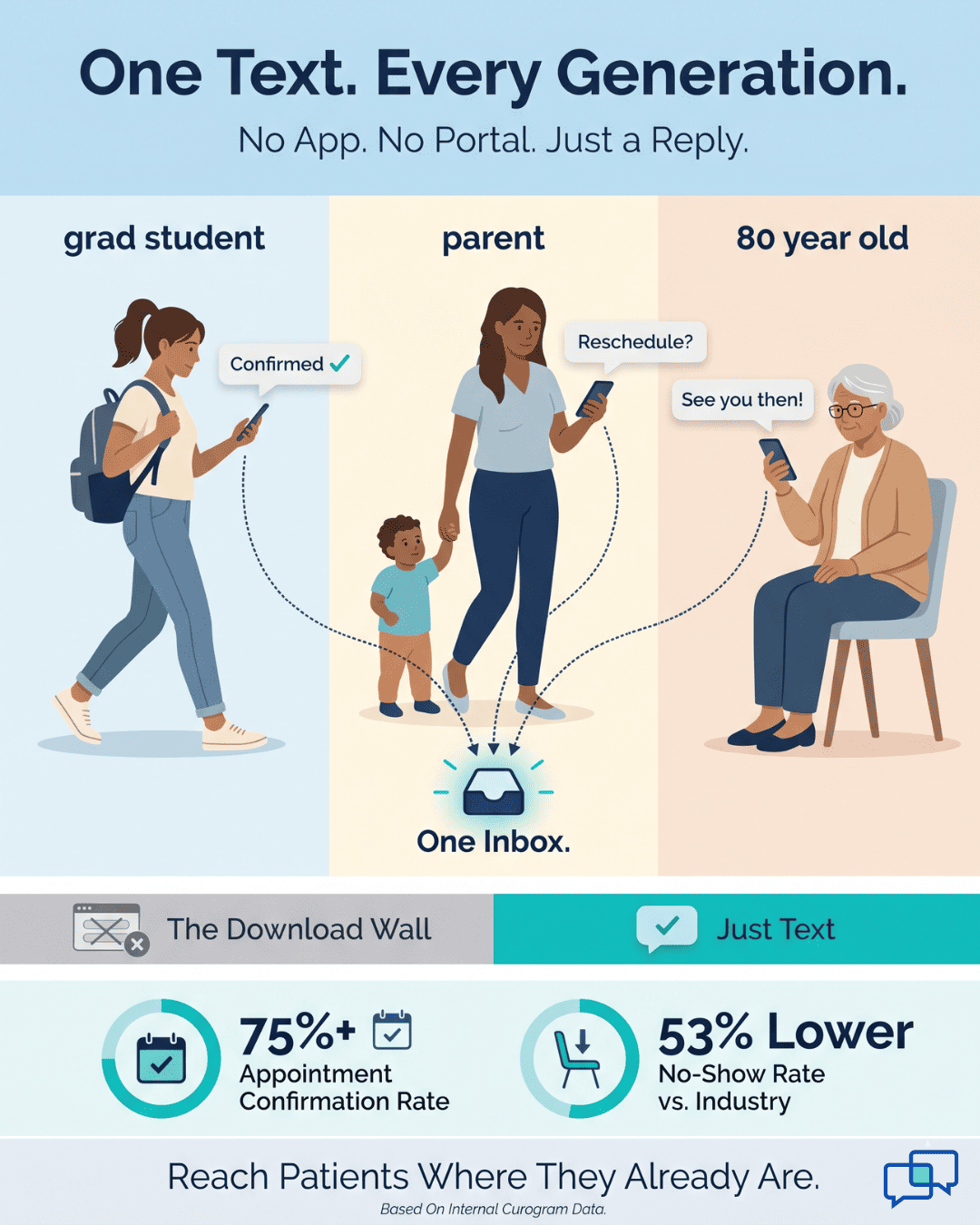
This works because texting is something nearly everyone already does. The 80-year-old grandmother texts her family. The 25-year-old grad student texts all day. You do not have to teach either of them a new tool.
Lytec is strong where it counts, holding the chart and running the back office. But it was never built to be the place patients live. Patients live in their text threads. So that is where your practice should meet them.
When you reach patients by text in Lytec, replies come back fast. Confirmations climb, voicemails shrink, and phone tag fades. Among current Curogram clients, the average appointment confirmation rate runs above 75%, based on our internal data.
This article shows how text-first patient communication for Lytec practices removes the friction. You will see the "download wall" that buries your message today. You will see how a single text thread replaces it. And you will see what changes when patients can simply reply.
No app. No portal. No password. Just a text they actually read.
You know the "Toggle Tax" from the staff side. It is the time lost flipping between Lytec, a phone, a fax, and a messaging tool. But patients pay a version of it too. For them, it shows up as a wall of apps, portals, and passwords.
Lytec is solid clinically and operationally. The problem is not the chart. The problem starts when patient messaging lives inside a portal or a separate app. That setup forces patients to reach you on the tool's terms, not their own.
Think about the steps a portal really asks for. A patient gets an invite by email. They click it and land on a sign-up page. They create an account and pick a password. Then they verify the email and wait. Many quit before they ever read your message.
Here is that journey laid out plainly:
|
Step |
What the patient must do |
Where they drop off |
|
1 |
Find the portal invite email |
Buried under spam |
|
2 |
Click through and create an account |
"I'll do it later" |
|
3 |
Set and confirm a password |
Too many to track |
|
4 |
Verify their email address |
Link expires |
|
5 |
Log back in to read one message |
Forgotten password |
Each row is a place to lose someone. By the last step, the message you needed them to see is gone. This is the "download wall," and it is tall.
Portals see chronically low adoption across primary care and specialty practices. One-way reminders vanish into a black hole, since patients cannot reply to them. So patients do the one thing that always works for them. They call.
Those calls pile up fast. A busy front desk can field 80 or more calls a day. Each one ties up a staff member who could be helping the patient in the room. And many of those calls are simple questions a text could have answered.
There is a softer cost too, and it stings more. When your only digital door is a clunky portal, patients sense a practice stuck in the past. They compare you to the urgent care down the street that just texts back. Slowly, quietly, some of them drift there instead.
This is the real shape of no-portal patient messaging for Lytec done wrong. The intent is good. The tools just ask too much of the patient. Every login, every download, every reset is a tax on the relationship.
The fix is not to push harder on the portal. You cannot scold a patient into loving a login screen. The fix is to drop the wall entirely and meet patients on the channel they never have to learn.
That channel is the text thread already open on their phone. No download. No account. Just a reply. The next section shows how that one shift changes everything.
The way out of the "download wall" is simple. Stop asking patients to come to a new place. Go to the place they already are. For almost everyone, that place is the text thread on their phone.
This is the heart of patient-friendly texting for Lytec. The patient does nothing new. They get a message, and they reply, the same way they text a friend. There is no learning curve because there is nothing to learn.
Curogram makes this possible with its 2-Way Texting feature. It needs zero setup on the patient's side. Nothing to install, no account to build, no password to keep. The patient simply texts back.
|
Picture the difference with a quick example: Your office needs to confirm a Tuesday appointment for a patient named Maria. With a portal, Maria must log in to see the request. With Lytec patient texting and no app, she gets a text and replies "Yes" in five seconds. |
That five-second reply is the whole point. It is Lytec SMS with no download, and it works on the first try. Maria never thinks about the tech. She just answers a question, like she would for anyone else.
Now think about where her reply goes. This is where many texting tools fall apart. A reply that lands on a staff member's personal phone is lost to the rest of the team. Curogram solves that with one shared inbox.
Every reply routes back to a single inbox tied to your Lytec workflow. Staff see the message without opening a second system. The front desk, the nurse, and the biller all work from the same thread. Nothing falls through the cracks.
Here is what that flow looks like end to end:
|
Stage |
Patient's experience |
Staff's experience |
|
Outbound |
Gets a plain text |
Sends from the shared inbox |
|
Reply |
Texts back in seconds |
Sees the reply in the same thread |
|
Follow-up |
No app, no login |
Full history, tied to Lytec |
The result feels personal, not robotic. A patient can ask a question, get a real answer, and move on. They never sense the system behind it. They just feel heard.
The "every-patient" fit is what makes this so powerful. Texting does not skew young or tech-savvy. The 80-year-old grandmother and the 25-year-old grad student both text every day. Text-first reach is close to universal, which a portal can never claim.
That reach is why open and reply rates climb. People read texts within minutes of getting them. They rarely ignore a thread, the way they ignore a portal invite. So your message lands, and the response comes back fast.
This is text-first patient communication for Lytec at its best. You are not adding a tool patients must adopt. You are using the tool they adopted years ago on their own. Curogram simply becomes the "Unified Inbox" behind it.
One channel. Every conversation. No wall to climb. The next section shows what that does to your numbers.

When the "download wall" comes down, the change is fast and easy to measure. Reaching a patient stops being a project. It becomes one message. That single shift ripples across your whole front office.
Start with engagement, since that is where it begins. Portals were always a hard sell, with low adoption no matter how often you nudged. Texting needs no selling at all. Because patients already text, they respond at rates a portal never matched.
You can feel this in the daily call volume. When patients can self-serve by text, they stop calling for small things. They confirm, reschedule, and ask quick questions in the thread.
A practice that texts first often sees a real drop in inbound calls, with some platforms reporting reductions up to half. Treat that range as an illustrative ceiling, not a promise, since results vary by practice.
Among current Curogram clients, the average appointment confirmation rate runs above 75%. That is the kind of reliable response a portal invite cannot produce.
Confirmations matter because they protect your schedule. A confirmed slot is far less likely to become a no-show. And no-shows are where small practices quietly bleed revenue every week.
Here the numbers get concrete. Based on our internal research, Curogram practices run no-show rates 53% lower than the industry average. That is a benchmark across many practices, not a single clinic's result.
One clinic shows what that can look like up close. Atlas Medical Center cut its no-show rate from 14.20% to 4.91% in just three months, according to our internal data. That is roughly three times better than the typical industry rate.
Volume tells the same story from a different angle. Covina Arthritic Clinic confirms more than 1,100 appointments every month through automated texting, based on our internal data. Each of those confirmations is a slot that stayed full and a call the front desk never had to make.
Let's put the old way and the new way side by side:
|
What changes |
Portal / phone-only |
Text-first with Curogram |
|
Patient setup |
Account, login, password |
None — just reply |
|
Message read rate |
Low, often ignored |
High, read in minutes |
|
How patients confirm |
Call the office |
Text back "Yes" |
|
Confirmation rate |
Inconsistent |
Above 75% (internal data) |
|
Front-desk calls |
80+ per day |
Fewer, as patients self-serve |
|
No-show risk |
Higher |
53% below industry (internal data) |
Read that table top to bottom and the pattern is clear. Every row moves in your favor when the patient can simply text. The friction that drove people to the phone is gone.
Now picture a single morning at the front desk. Before, the first hour is voicemails and callbacks about tomorrow's schedule. After, those same confirmations have already arrived overnight by text. Staff start the day caught up, not behind.
That is the "one screen, every conversation" payoff. The front desk works one inbox instead of juggling tools. They see every reply, tied back to the Lytec record, in one place. Nothing hides on a personal phone or a sticky note.
That same caught-up morning adds up to real hours saved across a week. When patients confirm and reschedule by text, your team stops chasing routine calls and gets time back for the work that matters.
To see what those reclaimed hours are worth, you can calculate ROI for improving staff efficiency using your own appointment volume and labor costs.

How Curogram Turns Intake into a Text-First Workflow
Curogram works as the intake layer that feeds your EHR. The goal is simple: get complete, client-entered data before the visit. Here is how the flow runs from start to finish.
First, staff build the packet in the drag-and-drop tool. They pick the screens, consent forms, and fields they need. No code and no vendor ticket are involved.
The templates already hold the screens behavioral health teams rely on. You can start from PHQ-9, GAD-7, AUDIT-C, or CAGE-AID. You can add 42 CFR Part 2 consent, insurance fields, and emergency contacts in the same packet.
Next, Curogram sends the packet by text on a schedule you set. You might send it three days out, with a nudge the day before. Clients tap the link and fill the forms in a phone browser.
You stay in control the whole time. Change the wording, reorder a question, or swap a screen as the protocol shifts. The update is live within the hour, not next quarter.
Then the data flows into one dashboard for review. Staff and clinicians see finished packets in a clear, sortable view. They can flag a high PHQ-9 score or a missing consent before the client walks in.
All of this meets strict privacy rules. Data is encrypted in transit and at rest. The system runs on SOC 2 Type II infrastructure and supports both HIPAA and 42 CFR Part 2. Completed consents are stored with full audit trails.
The result is a tight, repeatable loop. Forms go out, clients respond, and charts fill on their own. Your team trades hours of data entry for a few clicks. And your clinicians start each visit with a full picture, not a blank page.
The core issue is control. Sigmund AURA's embedded forms need a vendor ticket for each change. That puts your intake at the mercy of a support queue.
Curogram flips that script. The self-service builder hands form control back to your staff. The people who run intake every day can shape it as they go.
And the forms reach clients before they ever arrive. A text link does the work that a paper packet used to do. Clients answer at home, in their own time, where they feel safe.
Think of the two tools as a team. Sigmund AURA holds your clinical records and treatment notes. Curogram fills those records with clean, client-entered data.
One stores the chart. The other fills it before the session starts. Together they close the gap between booking and care.
Your intake team gains the most from this shift. They lose the dull task of re-typing forms by hand. That time goes back to clients and to the cases that truly need a person.
The payoff is real and easy to picture. Staff stop printing 19-page packets. They stop waiting on tickets they cannot speed up. Clinicians open each visit with completed screens in hand.
Clients feel the difference, too. No clipboard. No early-arrival rule. No wall of paper at the worst possible moment.
So here is the next move. Stop the printing and the waiting. See how text-delivered forms clear the clipboard for good.
Stop waiting on vendor tickets to update a single form. Book a quick demo and see your own intake packet go digital in minutes.
Staff use Curogram's drag-and-drop builder to add the screen themselves. They pick a template, drop it into the packet, and publish. The change goes live the same day, with no support request and no wait.
Many SUD clients in early recovery struggle with portal logins they cannot recall. A simple text link skips that hurdle. They tap once and answer at home, which lowers friction and cuts intake no-shows.
All submissions are encrypted in transit and at rest on SOC 2 Type II infrastructure. Consent forms can carry your exact 42 CFR Part 2 language. Completed consents are then stored with full audit trails.
Curogram sends a secure link by text, so no account is required. Clients tap the link and fill out forms in their phone browser. No app, no password, and no portal login stand in the way.
Filling out a packet is an early act of commitment that primes clients to attend. Atlas Medical Center paired this with automated reminders. Its no-show rate fell from 14.2% to 4.91%.
💡 Lytec text reminders patients can reply to reschedule turn a one-way alert into a two-way chat. Patients confirm or move a visit in one tap, with...
💡 The patient texting experience Elation Health SMS engagement gap is wide and growing. SMS hits a 98% open rate, while portal messages often stall...
💡 Lytec is a strong billing and scheduling system, but it has no built-in patient texting. Curogram adds HIPAA-compliant 2-way patient texting for...