9 min read
One Inbox: HIPAA-Compliant 2-Way Patient Texting for Lytec Teams
Mira Gwehn Revilla
:
June 20, 2026
What this means for your office:
- Text patients and read their replies without ever leaving Lytec.
- Drop the daily swivel between Lytec, Updox, and the phone.
- Keep every message logged, secure, and tied to the patient record.
- Reach all ages, since nearly everyone already texts.
- Free up staff hours by turning routine calls into quick texts.
Count the tabs open on your front desk screen right now. You likely see Lytec, a separate messaging tool, a browser, and a few sticky notes. Every patient question sends staff swiveling from one to the next. That swivel quietly drains your day, minute by minute.
Lytec runs your scheduling and billing well. But it was never built to text patients. So most offices bolt on a tool like Updox or just grab the phone. The result is a workday spent jumping between screens, copying details by hand.
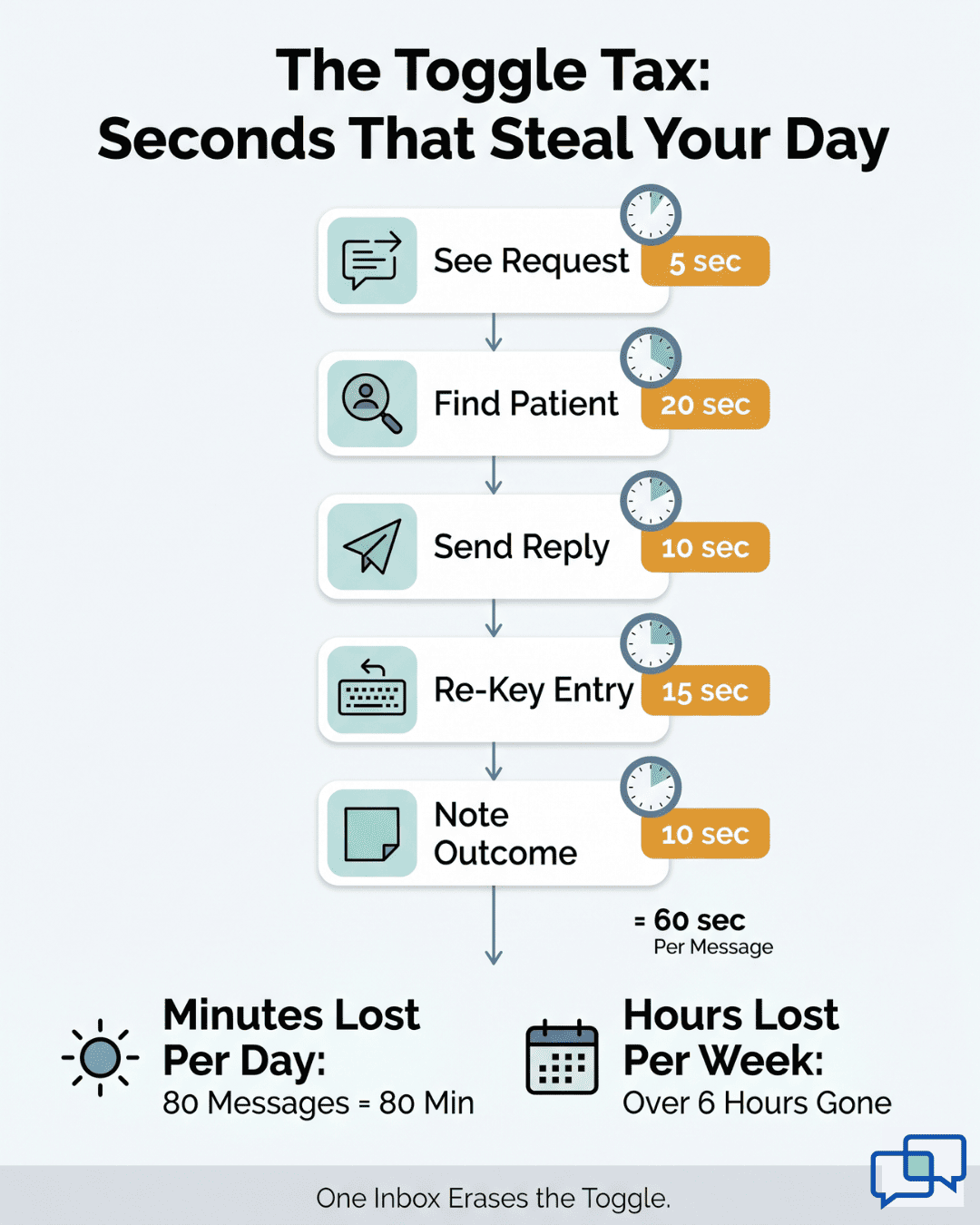
We call this the Toggle Tax. Staff leave the Lytec schedule, open another app, find the patient, and send a note. Then they re-key the outcome back into Lytec. They repeat this for every message, all day long. Context slips through the cracks each time.
There is a simpler way. HIPAA-compliant 2-way patient texting for Lytec practices lets your front desk text patients and read replies in one place. No second login. No lost threads. Just one inbox tied to the patient record.
This matters because texting reaches people that portals never did. The 80-year-old and the 25-year-old both already text. They answer a text faster than a voicemail or a portal alert. Your team will feel that difference within a single week of use.
This guide is for small primary care and multi-specialty offices. Think 1 to 5 providers, a lean staff, and no IT department. You want fewer calls, faster replies, and one calm screen that holds every patient conversation.
Below, we break down the hidden cost of toggling. Then we show how a single inbox fixes it. We close with a clear next step you can take today. By the end, you will see exactly how a texting layer fits your Lytec workflow.
The Villain: The Toggle Tax
Lytec earns its keep every day. It handles scheduling, billing, and claims with ease. But Lytec has no built-in patient texting. So messaging becomes a separate task on a separate screen.
Most offices fix this in one of two ways. They add a tool like Updox, or they pick up the phone. Either choice pushes texting outside of Lytec. That gap is where the trouble begins.
It starts with one reschedule. A patient needs to move an appointment. Your front desk leaves the Lytec schedule and opens Updox. They search for the patient, type the message, and hit send. Then they switch back to Lytec and re-key the change.
Now multiply that by every message in a day. Each one means leaving Lytec, finding the patient again, and typing the same details twice. The swivel looks small. Over hundreds of messages, it eats real hours.
Here is what that flow looks like, step by step:
|
Step |
Where staff work |
What it costs |
|
See the request |
Phone or Updox |
Attention split |
|
Find the patient |
Updox search |
15 to 30 seconds |
|
Send the reply |
Updox |
A context switch |
|
Re-key the change |
Back in Lytec |
Double entry |
|
Note the outcome |
Sticky note |
Easy to lose |
A proper 2-way SMS for Lytec front desk teams removes most of these steps. The reply and the record sit together. Staff stop hunting across tabs.
The math adds up fast. Many small practices field 80 or more calls a day. Say each toggle wastes just 20 seconds. Across 80 calls, that is over 25 minutes lost to swiveling alone. Add the double typing, and one staffer can lose an hour a day.
Context through the Cracks
When messages live in one app and records live in another, details get dropped. A patient mentions a new allergy by text. If that note never reaches Lytec, it can vanish. The next visit then starts from scratch.
One-way tools make it worse. Many reminder add-ons only blast messages out. Patients cannot reply, or their replies land in a "black hole" no one checks.
So patients call instead, and your phones ring more, not less. A true Lytec Updox alternative for texting must let patients answer and route those answers to a real person.
The front desk pays the price for all of this. Your staff want to help the person at the window. Instead, they feel like a switchboard. They juggle tabs, repeat themselves, and lose their place. Work that should feel like care starts to feel like data entry.
There is a human cost too. Patients sense the delay. They leave a voicemail and wait. They call again to check. Each missed reply chips away at their trust in your office.
This is the Toggle Tax. It is not one big failure. It is a thousand tiny ones, paid in seconds and dropped details. Each toggle seems harmless. Together they drain your day and slow your patients down.
The good news is simple. None of this is a Lytec problem. Lytec does its job well. The missing piece is a way to text patients from Lytec without ever leaving the screen. That is the fix we turn to next.

The Guide: The Unified Inbox
So how do you remove the Toggle Tax without ripping out Lytec? You add one screen that holds every patient conversation. We call it the Unified Inbox. It sits beside Lytec, not on top of it.
A good Lytec patient texting platform should do one thing first. It should put outbound texts and patient replies in the same place. No second app. No separate login. Your whole front desk sees the same thread.
This is where Curogram's 2-Way Texting comes in. It turns a one-way blast into a real talk. You text a patient, and they reply in plain words.
The thread stays attached to that patient, so anyone on the team can pick it up. Nothing gets lost in a personal cell phone or a shared voicemail.
One-way reminders feel like a robot. Two-way texting feels like a person. A patient can write "Can I come Friday instead?" and get a quick yes. That small reply saves a phone call and a round of phone tag.
The Next Worry: Setup
Most small offices have no IT staff and no spare time. Curogram handles the technical side for you. It manages the FHIR connector and the CGM developer approval, so patient context flows into the inbox. Your team never wrestles with flat PDFs or guesswork.
Because the link is built for Lytec, staff do not enter things twice. The conversation and the patient details sit side by side. This is what HIPAA texting integrated with Lytec should feel like: secure, connected, and quiet in the background.
Security is not an extra here. Every message is protected in transit and at rest. Curogram is SOC 2 Type II certified and HIPAA compliant, with a signed BAA. So your team can text real details without worry.
Here is the part that surprises people: Automation can make care feel more personal, not less. When staff are not trapped behind a second login, they reply faster and warmer. A Lytec patient communication add-on should give time back, not take it.
Think about a 1 to 5 provider office with a lean team. One person may run the phones, the window, and the texts at once. A unified inbox lets that one person keep up. They answer from a single screen instead of three.
That is the shift the Unified Inbox creates. It does not replace Lytec. It wraps a conversation layer around it. Lytec keeps the schedule and the billing. Curogram keeps the talk.
The result is a front desk that feels calm. Staff stop swiveling and start helping. Patients get fast, human answers. And every word stays logged and compliant, ready for the next visit.
The Success: One Screen, Every Conversation
What changes when every conversation lives on one screen? The short answer: your phones get quieter and your day gets longer. Staff reclaim the minutes that toggling used to steal. Patients get answers without waiting on hold.
Texting pulls work off the phone. A reminder that lets patients reply by text can stop a dozen callbacks before they start. Many text-first practices watch their call volume drop sharply once patients can answer in a tap.
Our own client results back the pattern. Based on our internal data, Curogram practices keep no-show rates 53% below the industry average. Confirmation rates run above 75% across current clients. Those confirmations happen by text, with no staffer dialing a single number.
One clinic shows the scale. Based on our internal data, Covina Arthritic Clinic confirms more than 1,100 appointments every month through automated texts. That is over 1,100 calls their staff never had to make. The phone simply rings less.
Here is the day-to-day difference:
|
Front desk task |
Before (toggling) |
After (one inbox) |
|
Confirm a visit |
Call, leave a voicemail |
Send a text, get a reply |
|
Reschedule |
Phone tag, then re-key |
Patient texts, staff confirm in Lytec |
|
Answer a quick question |
Promise a callback |
Reply in the same thread |
|
Log the outcome |
Sticky note |
Saved with the patient |
Before a unified inbox, staff do the Two-Screen Shuffle. They bounce between Lytec and a messaging app, copying details by hand. Each hop risks a typo or a dropped note. The shuffle feels normal until you see it gone.
With one screen, that shuffle collapses into a single thread. Messaging stops being a separate place you go. It becomes part of the Lytec workflow your team already knows. There is no new system to learn and no extra password to reset.
This is why adoption is fast. Staff do not need a training week. They open one inbox and start typing. The tool fits the way they already work.
The Real Win: Small Moments
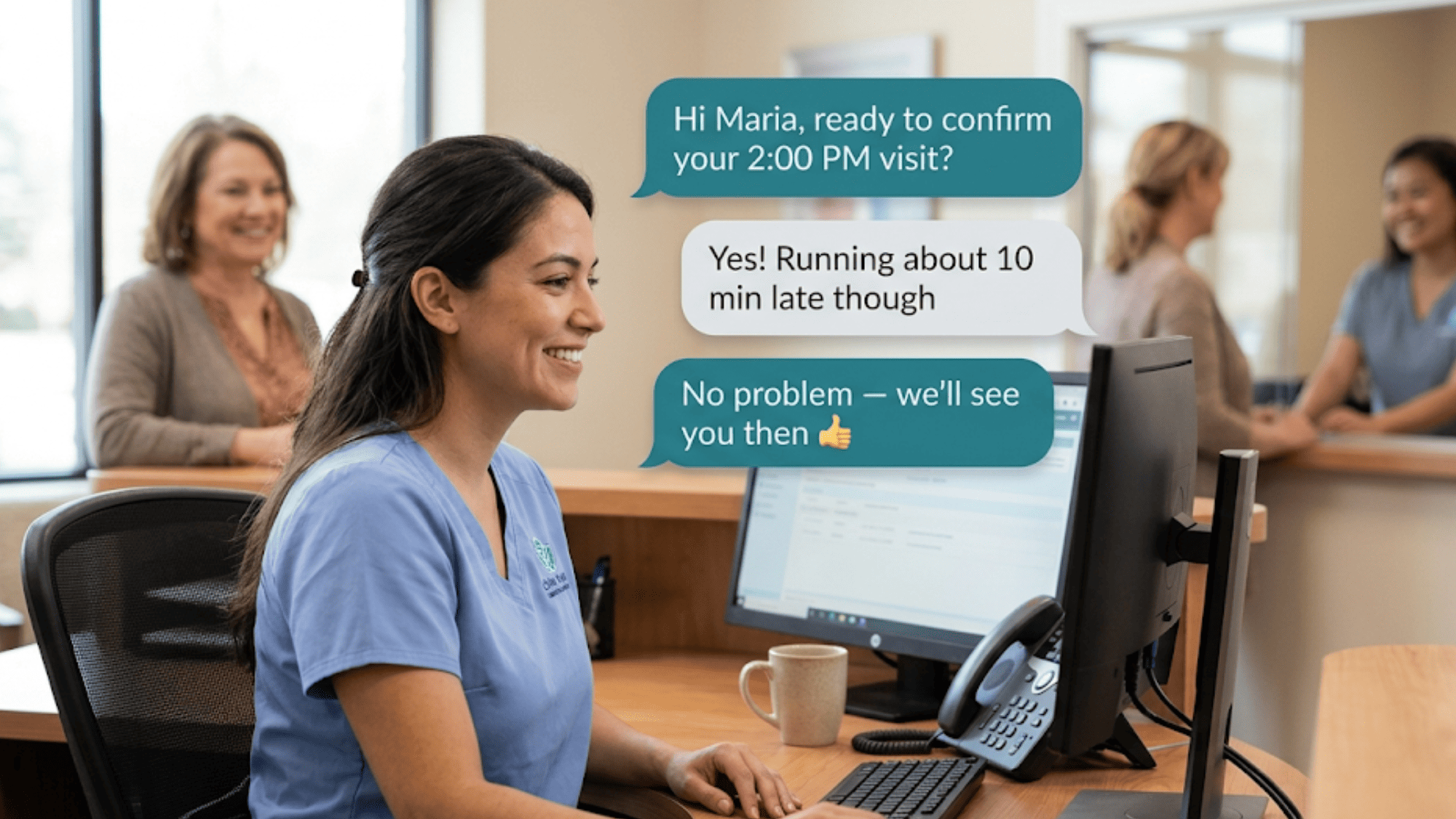
A patient texts "running 10 late." Someone actually sees it, because the thread sits right there. Staff shift the schedule and move on. No missed message, no awkward arrival.
Or a patient writes to move an appointment. Staff read it, open the slot in Lytec, and confirm in seconds. A reschedule that used to take three calls now takes one reply. The patient never sits on hold.
Even billing questions get easier. A patient asks about a balance by text. Staff answer from the same screen, with the record in view. When you can text patients from Lytec without leaving the chart, every answer comes faster.
Texting also reaches people the portal missed. Older patients who never logged into a portal will still read a text. Younger patients reply almost instantly. You meet both groups where they already are, on the phone in their pocket.
That broad reach lifts your numbers in a quiet way. More confirmations mean fewer empty slots. Fewer empty slots mean steadier revenue. Based on our internal data, recovered slots can drive a 10 to 20% revenue lift over time.

How Curogram Turns Lytec Into a One-Screen Texting Hub
Most texting tools sit outside your practice management system. They make staff log in somewhere else, then copy details back by hand. Curogram takes a different path. It puts secure patient texting right inside your Lytec day, with no extra app to open.
The connection is built for you. Curogram manages the FHIR connector and the CGM developer approval, so you skip the technical setup.
Patient context flows straight into the inbox, and your team never has to double-key the same note twice. There is no flat-PDF guesswork, no developer paperwork, and no IT project for you to manage.
Once connected, your whole front desk shares one screen. Outbound texts and patient replies sit in the same thread, tied to the right patient. Anyone on the team can pick up a conversation where another left off. Nothing hides in a personal cell phone, a sticky note, or a shared voicemail box.
Curogram's 2-Way Texting is the heart of it. A reminder becomes a real talk. A patient can reply "Can I switch to Friday?" and get a quick yes. That single text replaces a voicemail, a callback, and a long round of phone tag.
Security stays built in, not bolted on. Curogram is SOC 2 Type II certified and HIPAA compliant, with a signed BAA in place. Every message is protected in transit and at rest. So your team can text real details with confidence.
The payoff is time and calm. Based on our internal data, Curogram clients keep no-show rates 53% below the industry average, with confirmation rates above 75%.
Those wins come from texts patients actually read and answer. Lytec keeps running the schedule and the billing. Curogram keeps every patient conversation on one secure screen.
Conclusion: See Your Lytec Inbox on One Screen
Lytec runs your practice. Curogram runs the conversation. With a unified inbox, both live on the very same screen, at the very same time, all day.
The split is simple to picture. Lytec is for your schedule and your charges. Curogram is for their questions and their replies. One holds the chart and the billing. The other holds the chat and the questions.
When those two sit side by side, the Toggle Tax disappears. Staff stop swiveling between apps. They answer from one thread, with the patient record in view. The work that felt like endless data entry starts to feel like real care again.
Your patients feel it too. They text in plain words and get a fast, human reply. No portal login. No app to download. No long hold on the phone. Just a quick, friendly answer from someone who can see their full story.
And you do not trade away anything you trust. Lytec keeps doing its job. Curogram simply wraps a secure, HIPAA-compliant texting layer around it. Nobody on your team has to learn a brand-new system or reset a single password.
So here is the choice in front of you. You can keep paying the Toggle Tax in lost minutes and dropped notes. Or you can bring every patient conversation into one inbox and win those hours back.
Turn routine calls into quick texts your patients actually answer. Schedule a demo now and see HIPAA-compliant 2-way texting work with Lytec.
Frequently Asked Questions
Curogram adds a HIPAA-compliant texting inbox that connects to Lytec through a managed FHIR connector. Lytec keeps running your schedule and billing, while Curogram carries the patient conversation on the same screen, with no double entry.
Patients read texts in seconds, but rarely log into portals or check voicemail. A text reaches the 80-year-old and the 25-year-old alike, on the device already in their pocket, so replies come back faster and more often.
A unified inbox lets patients confirm, reschedule, and ask questions by text instead of calling. Many routine calls turn into quick replies, so your phones ring less and your front desk reclaims time for in-office patients.
Curogram connects directly to Lytec, so conversations and patient context sync to the record automatically. Your team works from one inbox instead of copying details between two systems. The demo shows you exactly which fields flow where.
Curogram is SOC 2 Type II certified and fully HIPAA compliant, with a signed BAA in place. Every message and patient detail is protected in transit and at rest, so your team can text sensitive information with full confidence.