10 min read

Get CureMD Two-Way Patient Texting Without Portal Login Running

Get CureMD Two-Way Patient Texting Without Portal Login Running
💡 CureMD two-way patient texting without portal login lets patients reply by text. CureMD runs your charts, billing, and phones well, yet one gap remains.
  • CureMD's portal keeps messaging behind a login most patients skip.
  • The AI Contact Center answers calls but can't hold a text chat.
  • Curogram adds HIPAA-compliant two-way texting alongside CureMD.
  • Patients text from their phone, and replies land in one dashboard.
  • No portal account or app download is needed.
Comparable practices that added two-way texting cut phone calls by 24%, based on our internal data. Curogram opens the channel CureMD leaves closed.

Your patients would rather text than call. They text their kids, their bank, and their pharmacy all day. So when your practice sends a reminder, their thumb drifts toward reply.

Then nothing happens. The text lands nowhere, or a portal login blocks the way. So they sigh and dial the front desk instead. Now your staff is back on the phones, fielding a question a text could have closed.

This is the quiet cost of running CureMD with no text-back lane. CureMD is strong software. It charts well, bills well, and its AI Contact Center answers calls around the clock. But none of those tools let a patient simply text you and get a logged reply.

We call that gap "The One-Way Wall." Messages flow out to patients, but the lane back in stays shut. CureMD patient portal texting limitations are a big reason why. Portal messaging works, yet it hides behind an account most patients never set up.

The fix is not ripping anything out. It is adding the missing CureMD patient communication channel right alongside your current setup. That is the promise of CureMD two-way patient texting without portal login. Patients text from the phone in their hand, and your team answers from one screen.

This guide breaks down the whole problem and the cleaner path forward. You will see why the portal and the phone leave a gap. You will see how two-way texting closes it without double work. And you will see real numbers from practices that made the switch.

By the end, you will know how to turn outbound alerts into real conversations. Patients get the channel they prefer. Your front desk finally gets its day back. And through all of it, you still keep every piece of CureMD running exactly as it does today.

The Villain: The One-Way Wall

CureMD gives your practice capable patient tools. The Patient Portal handles scheduling, results, and refills. The AI Contact Center answers the phone 24/7 and even books appointments. Both are useful. Both share one blind spot.

Neither lets a patient fire off a quick text and get a reply your team can see. That is The One-Way Wall. Your practice can push messages out, but the lane back in stays closed.

A Reminder Goes Out, A Question Comes Back

Here is the loop your patients hit every week. They get a portal alert or an automated reminder. They have one small question, like "Can I come 15 minutes late?" So they text back from their phone.

That reply vanishes. The reminder may come from a number no one reads. Or the only "real" channel is portal messaging inside OnPatient or the Leap Health app. That needs a login they skipped, so their text drops into a black hole.

And portals are easy to skip. Patients forget the password. They never finish the sign-up email. They delete the app to free up space. CureMD patient portal texting limitations are not about bad software. They are about a login step real people avoid.

So the patient does the only thing left. They call. And when 40 other patients do the same, the line is busy and the voicemail fills up.

The Phone Becomes the Catch-All for Everything

The AI Contact Center helps here, and it is a real step up from hold music. It answers calls, books visits, and takes payments without staff lifting a finger. But a phone call is still a phone call.

Some patients dislike talking on the phone. Others are at work, on a bus, or in a quiet office. They cannot say their date of birth out loud to confirm a visit. A text would take them ten seconds. A call takes ten minutes.

This is the heart of the CureMD AI Contact Center vs text messaging question. It is not which one wins. It is that the phone alone cannot serve patients who simply prefer to type.

And the cost is not just time. Every missed call is a patient left frustrated. Some give up and never rebook. The wall quietly chips at loyalty, one busy signal at a time.

The Hidden Tax on Your Front Desk

Now look at the cost to your staff. A busy front desk can field 80 or more routine calls a day. Most are quick: confirm a time, check a balance, ask for directions.

Each call still pulls a person off the task in front of them. They put down the chart, pick up the phone, and lose their place. Say each call eats four minutes with the back-and-forth. Eighty calls is more than five hours of staff time, gone to the switchboard.

The table below shows how the same simple request plays out two ways.

Patient need

Through the phone

Through a text channel

Confirm an appointment

Call, wait on hold, speak to staff

Tap "Yes" in seconds

Ask a balance

Call during office hours only

Text anytime, reply logged

Send an insurance card

Read numbers aloud or mail it

Snap a photo, send it

Reschedule

Phone tag across two days

One quick thread


For the office manager, it feels like running uphill. You answer the same calls all day. And the whole time, you know patients would rather just text, if only the practice could text back. That is the wall this guide tears down.

The Guide: The Open Line

If The One-Way Wall is the problem, the fix is an open line. Curogram is that line. It is the text-first layer that gives CureMD practices the two-way channel the portal and the phone leave closed.

The idea is simple. Keep CureMD for what it does well. Add a real text channel for what it does not.

One Secure Thread for Every Patient Message

With Curogram, each patient conversation lives in one place. Questions, confirmations, and photos of insurance cards all land in a single secure dashboard. Your front desk watches one screen, not five.

Patients need no portal account and no app. They text from the same messaging app they already use. That is the core of CureMD two-way patient texting without portal login. The barrier that sends people to the phone is simply gone.

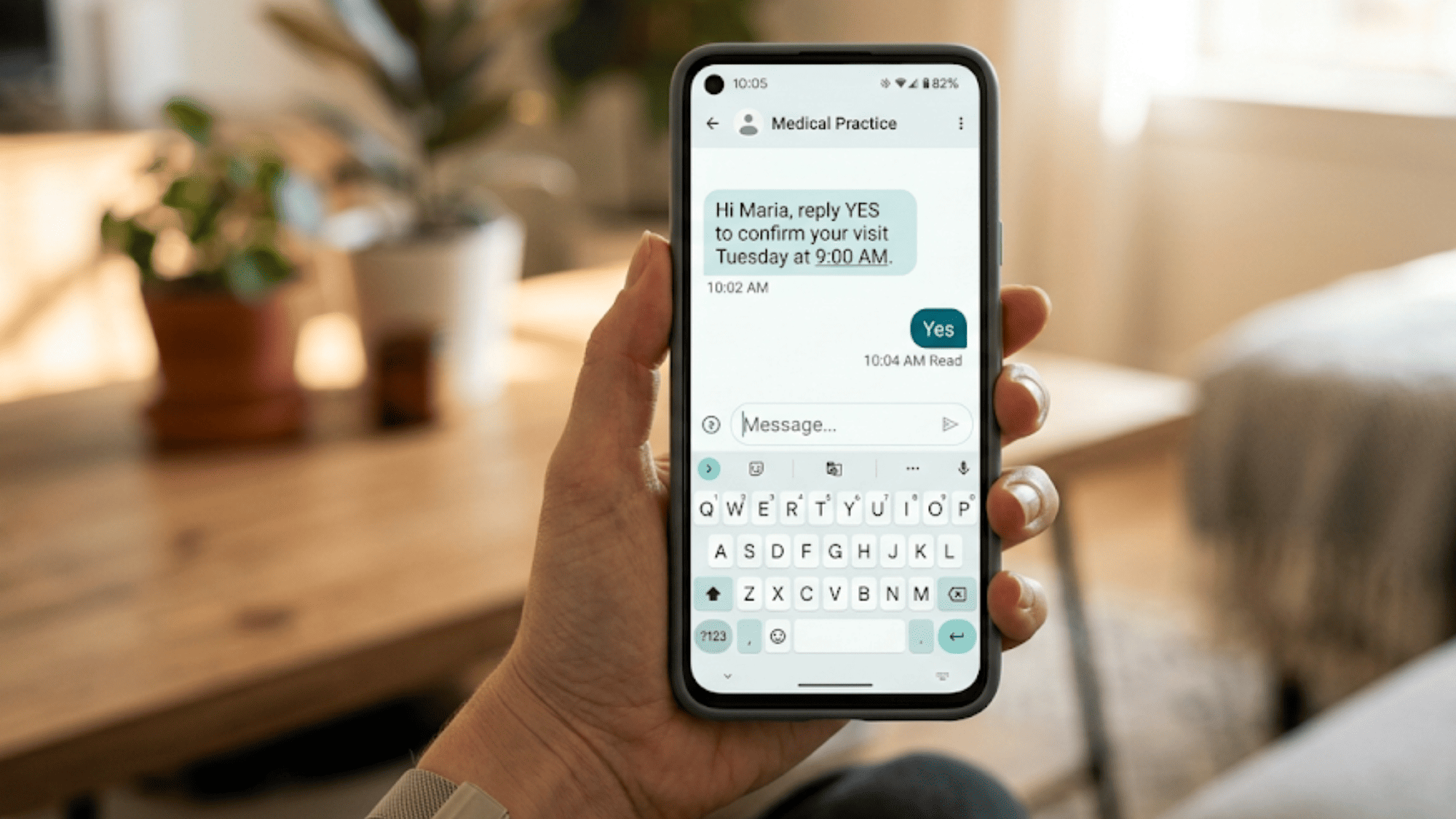
Picture a real exchange. The clinic texts, "Hi Maria, reply YES to confirm Tuesday at 9." Maria replies, "Yes, but can I come at 9:15?" Staff answer in the same thread, and the slot is locked. No call, no hold, no lost message.

And it stays safe. HIPAA-compliant texting for CureMD practices means a signed BAA, encryption, and access controls. Patient chats stay private without anyone logging into a portal.

It Works Next to CureMD, Not on Top of It

Here is the part that wins over office managers. Curogram runs as a standalone layer beside CureMD. You do not wait on gated FHIR or API work to see results.

That means you can add two-way SMS alongside CureMD EHR in days, not quarters. Your team keeps charting, billing, and scheduling in CureMD exactly as before. Curogram simply opens the lane CureMD keeps shut.

Most practices flip it on without IT drama. There is no new server and no long build to sit through. The text layer simply turns on beside CureMD.

There is a bonus, too. Because the texting layer is its own platform, it travels with you. If you ever switch EHRs, your patient text history and saved workflows come along. You are never starting from zero again.

Call-routing diagram splitting CureMD patient calls into a text channel and phone channel to cut routine calls

Is it the AI Contact Center or Texting?

Many CureMD practices ask this exact thing. The honest answer to CureMD AI Contact Center vs text messaging is "both." They are not rivals. They cover different lanes.

The AI Contact Center owns the phone. It handles callers 24/7 and never sleeps. Curogram owns the text channel that many patients prefer for routine notes. One answers calls; the other answers texts.

Here is the clean split. A patient who wants to talk calls and reaches the AI Contact Center. A patient who wants to type texts and reaches your team in Curogram. Together they cover every patient, not just the ones who like to talk.

Why Texting Feels More Personal

Some worry that texting is cold. In practice, the opposite is true. For relationship-driven clinics, a text feels warm and close.

Think of pediatrics, geriatrics, and behavioral health. A parent juggling a sick toddler cannot sit on hold. An older patient may find a portal confusing. A behavioral health client may not want to speak out loud at all.

Take a simple case. A worried dad texts, "Is a 101 fever too high for my 4-year-old?" Your nurse replies in minutes, right from the dashboard. He feels heard, and you skip a frantic phone call. For all these patients, a text reaches a real person on the device in their hand. That is what text-first patient engagement for CureMD practices looks like in real life.

The Success: The Conversation Loop

This is where the payoff shows up. When you open the text lane, the front desk shifts from phone tag to a steady rhythm. We call it The Conversation Loop. Every message gets answered in a logged thread, and nothing falls into the black hole.

Let's put real numbers and real workflows to it.

The Metric: Fewer Calls, More Breathing Room

Start with what we have measured. Based on our internal data, comparable practices that turned on two-way texting cut phone-call volume by 24%. That is one in four calls gone, simply because patients could text instead.

Picture what that frees up. If your front desk takes 80 routine calls a day, a 24% drop removes about 19 of them. That is roughly two hours of staff time back, every single day. Over a five-day week, that is ten hours, or more than a full shift returned.

The gains can climb higher as more routine needs move to text. Say half of those 80 daily calls are the kind a text resolves: confirmations, balance checks, refill status, directions. Move those to text, and that is 40 fewer calls a day, or 200 a week.

That is the difference between a switchboard and a smooth front desk. Your numbers will vary. But the direction is clear, and the verified 24% is your floor, not your ceiling.

Which Calls Actually Convert to Text

Not every call should become a text. The trick is moving the routine ones. These are the easy wins:

  • Appointment confirmations: a one-tap "Yes" instead of a callback.
  • Reschedule requests: one short thread instead of two days of phone tag.
  • Refill status: "Is my prescription ready?" answered in seconds.
  • Balance questions: a quick reply with a secure payment link.
  • Insurance updates: the patient snaps a photo of the new card.
  • Intake and forms: a texted link the patient opens before the visit.
  • Directions and parking: the same answer, sent once, reused often.

Each of these used to ring the phone. Now each lives in a thread your team can see and search later.

A Quick Before-and-After

Compare a Monday under each model.

Front desk task

Phone-only Monday

Conversation Loop Monday

Confirmations

30 outbound calls

30 texts, mostly one-tap

Quick questions

Constant interruptions

Answered between tasks

Reschedules

Phone tag, voicemails

One thread each

Record of the chat

Notes or memory

Logged, searchable thread


Under the old model, the phone sets the pace. Under the loop, your team sets it. They answer texts in calm batches and keep their place on bigger tasks.

Why One Logged Thread Matters

There is a quieter benefit too. Every text sits in a searchable thread. So when a patient calls back next month, the history is right there. Staff do not start from scratch or guess what was said.

They scroll up, get the context, and answer with confidence. That continuity builds trust. It also cuts the repeat questions that clog a phone line. One thread does the work of a dozen scattered notes.

How Texting Closes the Confirmation Loop

Two-way texting does more than cut calls. It also fills your schedule. When patients can confirm by text, they actually do.

Our internal data shows the impact across clinics. Curogram clients see appointment confirmation rates above 75%. No-show rates run 53% lower than the industry average. Those are not small swings.

The case studies make it concrete. Atlas Medical Center cut its no-show rate from 14.20% to 4.91% in just three months. Covina Arthritic Clinic now confirms more than 1,100 appointments a month, all automated. Each confirmed slot is revenue that would have slipped away.


Patient confirming a Tuesday 9 AM visit by two-way text message instead of calling the front desk

How Curogram's 2-Way HIPAA Texting Opens the Channel

Curogram's 2-Way HIPAA-Compliant Texting is the feature that tears down The One-Way Wall. It gives every CureMD practice a real, secure lane for patients to text in and get answers back.

Here is how it works in plain terms. A patient texts your practice from their normal phone. The message lands in one shared dashboard your front desk already watches. Staff reply right there, and the whole chat stays in one logged thread.

No patient login. No app to download. No portal account to reset. The barrier that pushed people to the phone is simply removed, so more patients reach you the easy way.

Every thread can carry more than words. Patients send photos of insurance cards. Your team sends secure payment links and intake form links. One conversation handles confirming, asking, paying, and prepping for the visit.

Safety is built in, not bolted on. HIPAA-compliant texting for CureMD practices comes with a signed BAA, encryption, and access controls. Patient chats stay private, and your practice stays covered at every step.

Best of all, it sits beside CureMD instead of fighting it. Keep charting, billing, and scheduling in CureMD as you always have. Curogram adds two-way SMS alongside CureMD EHR as a standalone layer, with no gated API work first. You see results in days, not quarters.

The result is one tidy loop. Outbound CureMD alerts and AI phone calls now have a matching inbound text channel. Patients reach a real person on the device they already hold.

For relationship-driven clinics, that personal touch matters most. Pediatrics, geriatrics, and behavioral health teams all gain a warmer, faster way to connect. And because it travels with you, the channel stays yours even if your EHR changes. It is the open line your patients have wanted all along, now finally switched on.

Conclusion: Open the Channel Patients Already Prefer

Let's bring it together. CureMD runs your clinical and billing engine well. It charts, it bills, it schedules, and its AI Contact Center answers the phone. It just does not give patients a simple way to text you back.

That gap has a cost. Patient replies slip into the black hole. Routine questions pile up in the phone queue. And your front desk spends the day on calls a text could have closed.

Think of it this way. CureMD is built for your charts and your schedule. Curogram is built for their convenience. One runs the office; the other opens the conversation patients actually answer.

The fix does not mean a rip-and-replace. You keep CureMD exactly as it is. You simply add the missing CureMD patient communication channel right beside it. Two-way texting starts working in days, not quarters.

The payoff is real and measured. Based on our internal data, comparable practices cut phone calls by 24% after turning on two-way texting. Confirmation rates climb past 75%, and no-shows drop well below the industry norm. Fewer calls, fuller schedules, calmer staff.

So picture your next Monday. The phones are not ringing off the hook. Confirmations, quick questions, and reschedules all happen by text. Your team spends its time on the patients in the room, not the switchboard.

That is what an open line delivers. Patients get the channel they already prefer. Your staff gets its day back. And no one has to log into a portal to send a simple message.

Ready to see it work alongside your current setup. Book your CureMD integration demo today and watch two-way texting lift that load off your front desk for good..


Frequently Asked Questions

How does two-way texting with patients stay HIPAA-compliant?

Curogram is built for healthcare. It includes a signed BAA, encryption, and access controls, so chats stay secure. Patients text from their own phone, and no one needs a portal login to keep messages private.

How does Curogram work alongside CureMD without creating double work?

Curogram runs as a separate layer beside CureMD. Your team keeps charting, billing, and scheduling in CureMD as before. Texting simply opens a lane CureMD does not, and everything threads into one messaging dashboard.

How is Curogram different from CureMD's AI Contact Center?

The AI Contact Center owns the phone channel 24/7. Curogram owns the text channel patients prefer for routine notes. They are complementary: one answers calls, the other answers texts, so every patient gets a lane.

Why do patients prefer texting over the patient portal?

Portals need an account, a password, and a login most patients skip. Texting needs none of that. People already text all day, so a reply takes seconds and reaches your front desk without any extra hurdle.

Which front-desk calls should a practice move to text first?

Start with your highest-volume, lowest-complexity calls. Confirmations, reschedules, balance questions, and refill status are ideal. These quick exchanges clog the phone line, yet a short text thread resolves each one in seconds.


HIPAA Texting for Athenahealth: No Portal or App Download Needed

HIPAA Texting for Athenahealth: No Portal or App Download Needed

💡 Athenahealth patient texting through Curogram lets every patient reach their practice by SMS — no portal login, no app download, no hold time. ...

Read More
Boost Patient Texting Experience and Elation Health SMS Engagement

Boost Patient Texting Experience and Elation Health SMS Engagement

💡 The patient texting experience Elation Health SMS engagement gap is wide and growing. SMS hits a 98% open rate, while portal messages often stall...

Read More
Enable CureMD Patient Texting Without App Download or Portal Account

Enable CureMD Patient Texting Without App Download or Portal Account

💡 CureMD patient texting without app download or portal account lets patients reach your office with one simple text. There is no login, no...


Read More