10 min read

Enable CureMD Patient Texting Without App Download or Portal Account

Enable CureMD Patient Texting Without App Download or Portal Account
💡 CureMD patient texting without app download or portal account lets patients reach your office with one simple text. There is no login, no password, and nothing to install.

Here is what that looks like in practice:

  • Patients reply to a normal text and reach a real person.
  • No app download, no portal account, and no password resets.
  • Messages stay private with HIPAA-compliant encryption and a signed BAA.
  • New patients can text before they ever build an account.
  • Staff handle every chat in one dashboard beside CureMD.
The result is the channel patients use all day. Reply rates climb because a quick text beats a portal login every time.

Most patients will text a friend, a pharmacy, or a delivery driver without a second thought. Ask them to log into a portal, though, and many simply won't.

They forget the password, lose patience, and move on. That small gap costs your practice messages, and sometimes whole appointments.

CureMD gives your office strong tools. The Patient Portal stores charts and lab results, and the AI Contact Center handles calls with real skill. Both work well, yet both ask something of the patient first. The portal wants an account and a password, while the phone line wants time on hold.

For a quick "I'm running late," neither option feels easy. This is where texting changes the math for your front desk. People already live inside their messaging app, and they read texts fast and reply even faster. So when a busy practice can answer a text, patients actually respond.

That is the idea behind CureMD patient texting without app download or portal account. Curogram lets patients text your office directly and reach a real person. The chat stays secure, and your staff see it right next to CureMD. Patients get the channel they like, and your office finally gets the reply.

This guide looks at the whole problem from the patient's chair. We will show why a login can feel like a locked door to them. We will explain how a plain text quietly opens it. And we will cover the patients who gain the most from this shift.

By the end, you will see one clear and simple change. Your practice can become as easy to reach as a text message. That change is smaller than it sounds, yet the payoff shows up fast in your daily numbers and your schedule. Let's start with what your patients quietly see today.

The Villain: Why a Portal Feels Like a Locked Door

To a patient, your front office has only two doors. One is the CureMD Patient Portal. The other is the phone line. Both are useful, yet both ask the patient to do work before they can talk to you.

The portal is a locked door. To open it, a patient needs an account and a password. New patients often have neither one yet. So a quick message turns into a setup task they never planned on.

The phone is the other door, and it usually means waiting. A patient calls, sits on hold, and listens to a menu. For a small update, that wait feels like far too much. Many simply hang up and try later, or they never do.

Now picture one very common moment: a patient wants to send a photo of a new insurance card. They open the portal but cannot recall the password. They tap "forgot password," wait for an email, and lose patience. The card never gets sent, and your front desk never learns why.

The Heart of the Problem

Right now, patients cannot text the practice without a portal in CureMD, so a fast errand becomes a chore. They only wanted to text my doctor's office the way they text everyone else. Instead, they hit a login wall and quietly give up.

Here is how those two doors compare from the patient's chair:

What the patient wants

The portal door

The phone door

Send a quick update

Needs account and password

Needs a call and hold time

Share an insurance photo

Log in, then upload

Cannot do it by voice

Ask one small question

Reset password first

Wait through a phone menu

Reach you as a new patient

No account exists yet

Long wait, easy to abandon


New patients feel this wall the most of all. They have not built a portal account yet, so it is useless to them on day one. They are also the group most likely to walk away. A missed message here can mean a missed first appointment.

There is a quiet cost to all of this. Every abandoned login is a question that never reached your team. Every dropped call is a patient who felt ignored. None of it shows up as a clear line on any report.

Those small losses add up over a busy month. A handful each day quietly becomes dozens by Friday. The schedule looks fine, but reachable care slips away.

How It Feels to the Patient

Your staff are right there, ready and willing to help. But from the patient's chair, the whole office seems hard to reach. The only doors are a password screen and a phone queue.

That feeling then shapes their behavior. A patient who struggles once will hesitate the next time. They may skip the update, delay the question, or no-show with no warning. The practice looks distant, even when the team is close and caring.

None of this means the portal or phone line is bad. Both have a real place in good, modern care. The trouble is simply that they are the only two options. When the only doors require work, some patients stop knocking.

So the question becomes very simple to ask. How do you give patients a door that needs no key at all? The next section shows exactly what that open door looks like.

Busy parent on a phone while heading out a home entryway

The Guide: How a Plain Text Opens the Door

The fix for that wall is not complex. It is the channel patients already use every single day. Text needs no account, no download, and no set of instructions. People know how to text before they ever walk into your office.

The Open Line

A patient gets a message from your practice and simply replies. There is no portal screen and no password to recall. The door is open before the patient even thinks about it.

Curogram makes this work through two-way HIPAA-compliant texting. Your office sends a normal text, and the patient texts back. That reply reaches a real staff member, not a robot. The whole exchange stays private and compliant.

This is true no-app patient messaging in CureMD practices. Nothing gets installed on the patient's phone. They use the same messaging app they already trust. The barrier that stopped them before is simply gone.

Security does not get traded away for this ease. The chat runs on secure patient SMS with no login required. Encryption protects the message, and a signed BAA covers your practice. Patients get convenience, and you keep your compliance footing.

Now think about where these chats live for your team. Every conversation sits inside one clean Curogram dashboard. That view sits right alongside CureMD, so context is close at hand. Staff never have to dig through a portal to find a patient note.

Setup and Daily Flow

A front-desk member can read the thread and reply in seconds. They see past messages, so they never repeat a question. The patient feels known, and the visit starts on a warmer note.

It also keeps your records clean and simple. The clinical chart still lives in CureMD, right where it belongs. The conversation lives in Curogram, where it is easy to act on. Each tool does its own job without stepping on the other.

Patient-preferred texting helps some groups far more than others. Think about the patients who struggle most with apps and logins. For them, the open line is not a nice extra. It is the difference between reaching them and missing them.

Older adults are a clear example. Many will not set up a portal or reset a password. But almost all of them can read and send a text. A simple message meets them exactly where they already are.

Parents are another strong example. A mom with two kids in the car will not log in. She will, however, fire off a quick text at a red light. That text might confirm a visit or ask about a refill.

Behavioral-health patients gain something deeper here. A login wall can feel like one more hurdle on a hard day. Texting lowers that hurdle to almost nothing. They reach out because the channel feels calm and familiar.

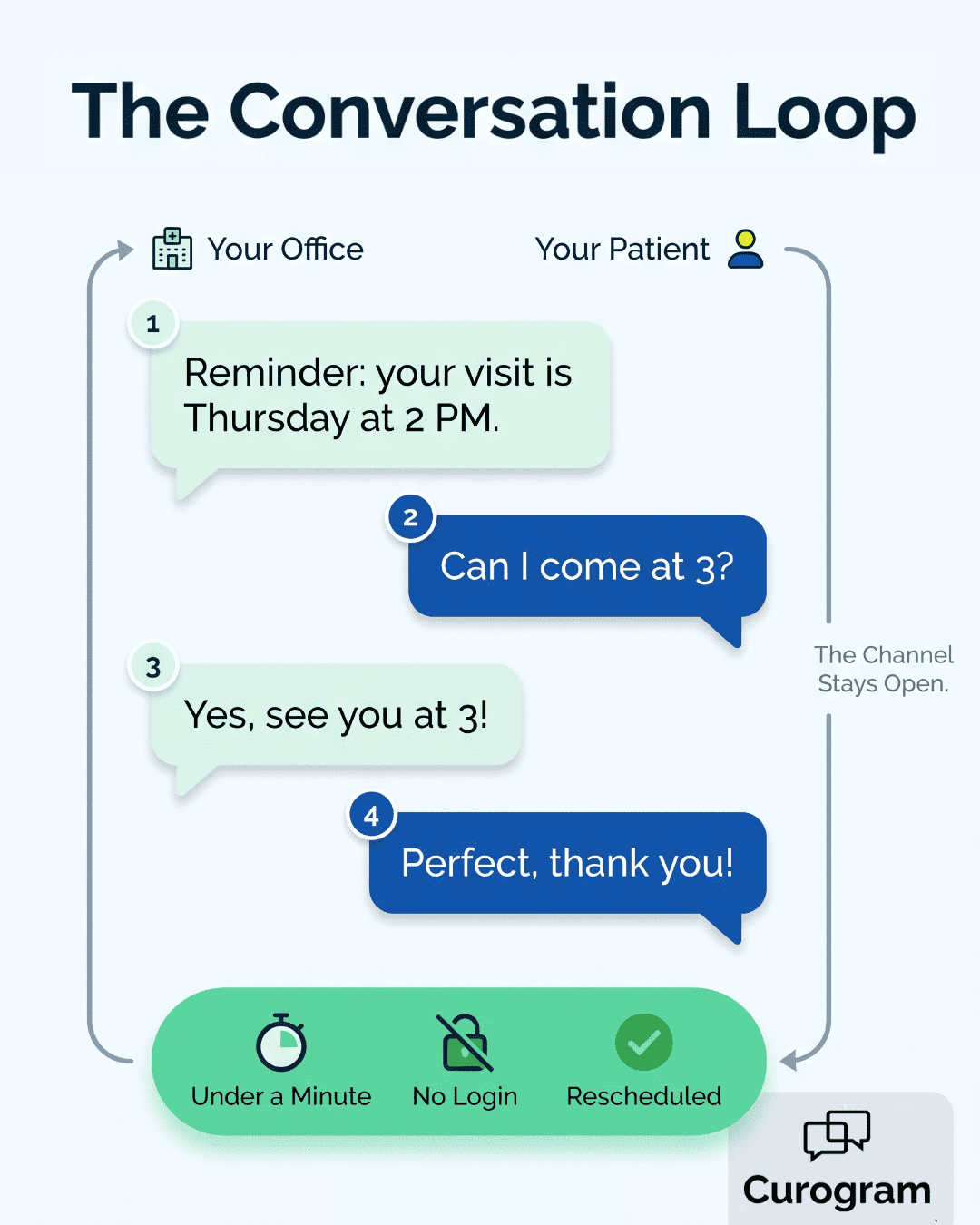
Conversation loop diagram of CureMD patient texting without app download or portal account

The same is true across many busy specialties. Pediatric offices reach parents who are always on the move. Geriatric practices reach patients who skip every app. Primary care reaches the widest mix of all.

What ties these groups together is friction, or the lack of it. Each one bumps into a portal and stops. Each one flows right through a text. The open line removes the very thing that held them back.

So the picture starts to come together clearly. The portal still serves the patients who like it. The phone still answers those who prefer to call. Texting simply adds a third door that almost anyone can open.

That third door changes the whole feel of your front office. It turns a closed wall into a real invitation. The next section shows what patients do once it opens.

The Success: Fewer Calls, Faster Replies, Fuller Schedules

Open a door, and the question is whether people walk through it. With texting, they do. Patients reach for their phone all day long. When your office lives there too, replies come back fast.

Think about your own habits for a second. You read a text within minutes, but emails can sit for hours. A portal login might wait for days, or forever. Patients are no different from you here.

That habit shows up in real practice numbers. Based on our internal data, a comparable practice cut phone volume by 24% after patients could text instead of call. That is nearly a quarter of calls gone. Those are minutes your front desk gets back every single day.

The Shift: What the Numbers Say

The pattern holds for confirmations too. Based on our internal data, Curogram clients see appointment confirmation rates above 75%. Patients confirm because a text takes one tap. They do not need to log in or sit on hold first.

It even shows up in no-shows. Based on our internal data, Curogram practices run no-show rates 53% below the industry average. A patient who can reply easily is a patient who shows up. Reachable patients are reliable patients.

Here is the shift in plain words. The old rule was "log in to reach us." The new rule is "just text us." That small flip changes how patients treat your office.

We can call this new pattern the conversation loop. Your office sends a text, and the patient answers. You reply, and they answer again. The thread stays open, simple, and human.

Here is a simple before-and-after view from the patient's side:

Patient task

Before texting

After texting

Confirm a visit

Call or portal login

One quick text reply

Reschedule

Hold time on the phone

A short back-and-forth

Ask a question

Reset a password first

Text and wait for a person

Send a document

Log in and upload

Snap a photo and send


Notice how every "after" box is just a text. That is the point of the open line. A CureMD patient can reply to a text in seconds. No step in the way means no reason to quit.

Fixing the Problem of Missed Messages

In the old model, a question died at the login screen. In the new model, it lands in your dashboard. Your team sees it, answers it, and closes the loop.

Faster replies build something valuable over time. Each quick answer tells the patient you are easy to reach. That feeling is rare in healthcare, and patients remember it. They come back, and they tell friends and family.

It changes how new patients judge you too. A first-timer texts a question before they ever visit. They get a warm, fast reply from a real person. That moment shapes their whole view of your practice.

Think about what the patient is really doing here. They wanted to text my doctor's office like any other contact. Now they can, and the office answers like a friend would. The relationship starts on solid, easy ground.

The throughline is reachability, plain and simple. Patients answer because answering is easy. Your office hums because the work flows in smoothly. Everyone wins when the channel matches real life.


Why Curogram Lets CureMD Patients Text Without a Single Login

Curogram adds a simple text channel to the practice that already runs on CureMD. Your patients keep their own phone number and their normal messaging app. They never download anything or build a portal account just to send you a quick note.

At the center is 2-Way HIPAA-Compliant Texting. A patient gets a text from your office and simply replies. The message reaches a real staff member, not a dead-end auto-reply. Encryption and a signed BAA keep every chat private and compliant.

Staff see each conversation in one clean dashboard. That view sits right beside CureMD, so context is easy to find. Front-desk teams answer questions, send forms, and confirm visits from one screen. No one has to bounce between tabs or chase a lost message.

The setup helps the patients who struggle most with apps. Older adults skip the password screen and simply text back. Parents juggling kids fire off a quick reply between errands. Behavioral-health patients reach out quietly without a stressful login wall in the way.

It also helps your team in clear, daily ways. Fewer calls pile up front, and fewer messages slip through the cracks. Patients tend to reply faster because texting already feels natural to them. Your office spends less time coaching people through a portal.

You can start small and then grow from there at your own pace. Turn on reminders, recall texts, and two-way chat when ready. Patients who prefer the CureMD portal can simply keep using it. Everyone else gets the open line they quietly wanted all along.

The goal here is plain, simple, and worth repeating once more. Make your practice as easy to reach as a text. Curogram brings that experience straight to CureMD offices every day. No app and no portal account stands between a patient and care.

Conclusion: Make Your Practice as Easy to Reach as a Text

Patients are not avoiding your portal because they are difficult people. They are avoiding a login when a simple text would do the job. A password screen feels like work, so they call instead or go quiet. That quiet costs you messages, follow-ups, and sometimes the whole visit.

The fix is not another app or another set of instructions. It is meeting patients on the one channel they already trust. Text is fast, familiar, and open to nearly everyone with a phone. No account stands between them and a quick question.

Think of the split this way for a moment. CureMD holds the patient's chart, history, and clinical record with care. Curogram holds the patient's conversation, on the channel they actually answer. The two work side by side, each doing what it does best.

For your team, the daily change is real and easy to feel. Fewer calls stack up at the front desk during your busy hours. Fewer messages slip away because a patient simply forgot a password. More replies land, and more open slots get filled again.

For patients, the practice finally feels reachable and human. They text a question, and a real person answers them. That small bit of ease quietly builds trust over time. It also keeps them coming back for the care they truly need.

So stop losing messages and new patients to a password screen. The portal can stay in place for those who like it. Texting simply opens a second, friendlier door right next to it for everyone.

Ready to see it work across your own office? Schedule your Curogram demo to watch the full patient texting experience.


Frequently Asked Questions

How can patients text our office without a CureMD portal account?

Curogram adds a separate text channel to your CureMD practice. Patients reply from their normal messaging app, with no account, password, or download needed. Their clinical chart still lives safely inside CureMD, right where it belongs.

Why do patients reply to texts more than portal messages?

Texting needs zero setup, so nothing blocks the patient. They read texts within minutes and answer with one tap. A portal asks for a login first, which many patients skip, forget, or quietly abandon halfway through.

How does patient texting stay HIPAA-compliant without a login?

Curogram protects each message with encryption and a signed BAA. Security lives inside the platform, not behind a patient password. Patients get an easy text, while your practice keeps its full compliance footing in place.

Why does no-app messaging help older and busy patients most?

Texting needs no app, no password, and no strong signal. Many clients face unstable housing or spotty internet, which makes a portal login hard to use. A text reaches the device they already check every day.

How do staff manage patient texts alongside CureMD?

Every conversation sits in one Curogram dashboard, right beside CureMD. Staff read the thread, answer questions, and confirm visits from a single screen. The clinical chart stays in CureMD, so records never get messy.


Stop Revenue Leaks: Reducing Patient No-Shows for CureMD Practices

Stop Revenue Leaks: Reducing Patient No-Shows for CureMD Practices

💡 Reducing patient no-shows for CureMD practices starts with one simple change: 2-way SMS reminders. Practices that add text-based reminders see up...

Read More
Patient Texting for eCW Networks | No App, No Portal, No Wait

Patient Texting for eCW Networks | No App, No Portal, No Wait

💡 Patients at eClinicalWorks (eCW) networks often face a wall before they can ask a simple question. They need to download the healow app, create...

Read More
Patient Communication Without Portal Login | Meditab IMS Texting

Patient Communication Without Portal Login | Meditab IMS Texting

💡 Meditab IMS patient communication without portal login via secure texting lets practices reach patients through SMS — no app download, no...

Read More