
 Mira Gwehn Revilla
- Patients open the link in the phone’s browser, with no password, app, or account.
- One packet can hold new-patient forms, consents with e-signatures, and health histories that branch based on each answer.
- Patients can send an insurance card photo by text message into the same secure thread.
- Finished forms come back as digital documents that staff review and attach to the CureMD chart.
- Per Pew Research Center’s 2026 survey, 98% of U.S. adults own a cellphone, so the link reaches nearly every patient.
Only 65% of U.S. adults were offered and used a patient portal in 2024, per a national survey from ONC, the federal health IT office. That number counts people who already had a login. A new patient booked for next Tuesday has none.
That’s where intake breaks for a lot of CureMD practices. CureMD’s Patient Portal handles forms, consents, and health histories for patients who sign up and log in. New patients haven’t done either yet, so their packet waits behind an account they may never create.
We think intake should travel as a secure text link the patient opens with one tap. CureMD’s portal can stay focused on records and messages for established patients who want that access.
Most front desks already know the fallback. An invite goes out, nothing comes back, and the patient gets a clipboard at check-in. Someone types those pages into CureMD after clinic, and a misread member ID turns into a denied claim three weeks later.
New patients matter most here. They have the longest forms, the most consents, and no history in your system yet. They’re also the group least likely to have a portal account on the day they book.
A text-link packet runs next to CureMD with no API project. It goes out the moment the visit is booked. Forms, signed consents, and a photo of the insurance card come back while the patient is still at home.
For practices weighing CureMD intake forms by text link, no portal account required, the trade is clear. You keep CureMD as the record and move only the front door: the first form a new patient sees.
The Account-First Intake
CureMD promotes itself as a #1 KLAS-ranked EHR, and plenty of ambulatory practices run their whole day on it. Its Patient Portal offers intake forms, consent documents, and health history questions. Its AI Contact Center answers calls 24/7 in 14 languages, based on CureMD’s own product page.
For an established patient who set up a login two years ago, portal intake works fine.
Most CureMD patient portal intake limitations trace back to one design choice: the account comes first. A patient has to exist as a portal user before a single form field opens. New patients, by definition, don’t exist as portal users yet. So the wall sits right at the front door, in front of the exact people intake was built for.
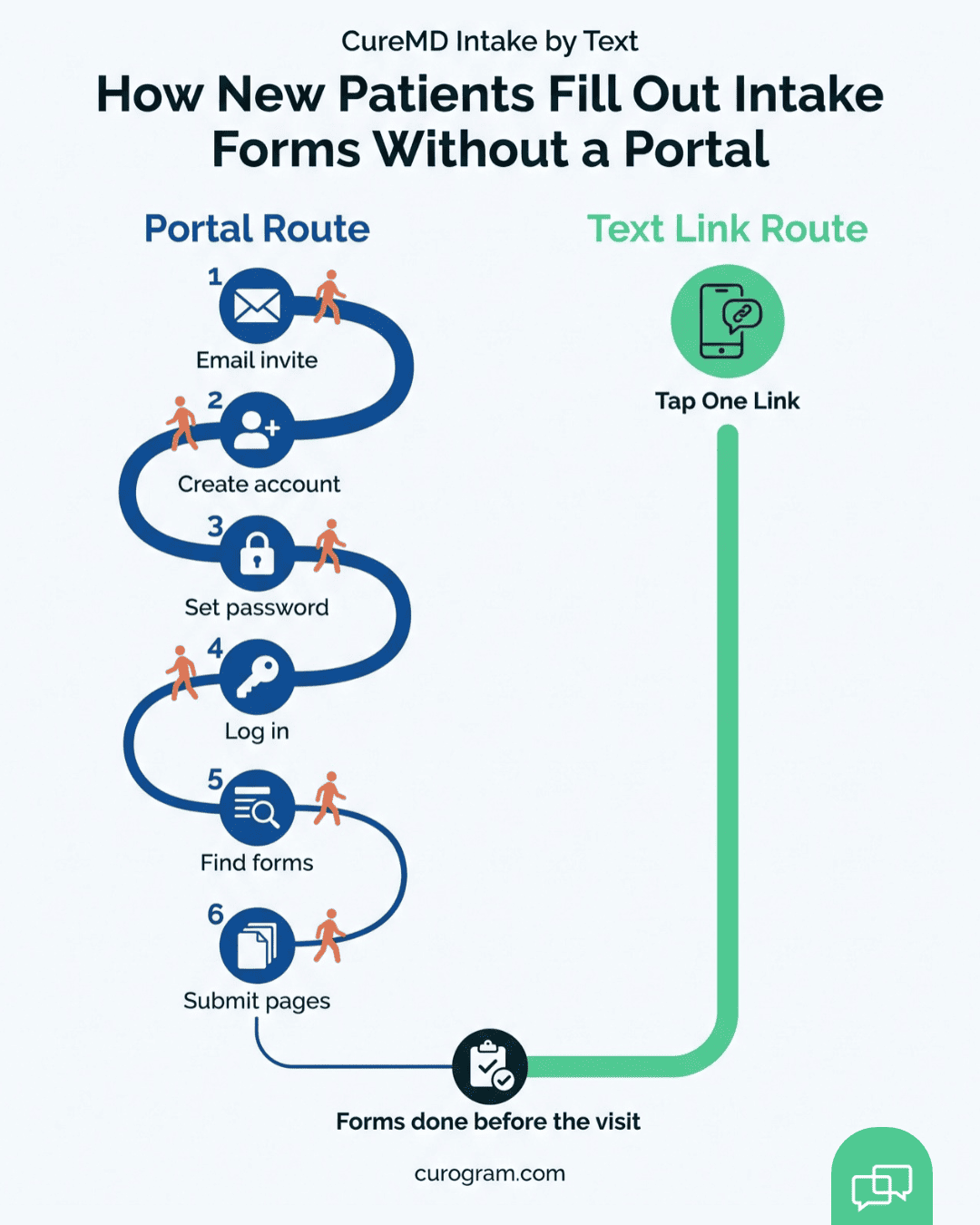
Six Steps Before the First Field
Walk through what a brand-new patient faces after booking:
- An email invite arrives, often from an address they don’t recognize.
- Clicking through opens an account setup page.
- A password has to meet the portal’s rules, and the email address needs confirming.
- Next comes the login, sometimes on a laptop because the phone screen feels cramped.
- Inside a menu built for records and messages, the patient hunts for the forms section.
- A multi-page submission follows, and nobody’s sure it saves if they stop halfway.
Every step loses a few people. One invite lands in spam. Someone’s password gets rejected twice. A third patient means to finish it “tonight” and doesn’t.
Taken together, the setup asks a stranger to do six things for a practice they haven’t visited yet. Many are also arranging time off work for the visit that same week.
Why the Email Invite Stalls
Portal invites travel by email, and email is a weak first contact for a new patient. The message often comes from a no-reply address the patient has never seen. Some land in a promotions tab. Others go to a shared family inbox that the patient’s spouse checks.
Encouragement helps, but only for people who get it. ONC’s 2024 data shows that patients whose provider encouraged portal use accessed it 87% of the time, compared with 57% for those who weren’t encouraged. That nudge usually happens in the exam room, during a visit. A new patient hasn’t had that visit yet.
So the patients with the longest packets get the weakest push to finish them. Older patients, patients without a personal email, and patients booking for a parent or child all hit the same wall. For them, the portal invite is one more unread message in a crowded inbox.
Where the Clipboard Comes Back
When the portal packet doesn’t come back, intake falls back to paper. At check-in, the patient gets a clipboard and starts on page one of a six-page packet while the provider’s schedule keeps moving.
That packet then has a second life. Someone at the front desk keys it into CureMD later, reading handwriting that slants off the line. A transposed digit in a member ID doesn’t show up until the claim comes back denied.
These figures are illustrative. Plug in your own numbers to see the weekly load.
|
Clipboard step (illustrative) |
Time per new patient |
Weekly total at 25 new patients |
|
Patient fills out packet in the lobby |
15 min |
6.25 hours of lobby time |
|
Staff key the packet into CureMD |
10 min |
4.2 hours of staff time |
|
Staff call back to fix unreadable fields |
3 min |
1.25 hours of staff time |
That’s roughly 5.5 staff hours a week spent copying what the patient already wrote. At an illustrative $20 hourly wage, that’s about $110 a week, before counting a single denied claim.
The Morning It Shows Up
An office manager knows this pattern by feel. Both the 9:00 and the 9:20 slots are new patients. Both are in the lobby on page three, and the first provider is already standing at the door of an empty exam room.
Now the 9:40 patient waits too, and the delay rolls through the whole morning. Someone will stay late typing both packets into CureMD. And the portal intake the practice pays for never had a real shot at these two patients. Neither had an account when they booked.
The Text-Link Packet
A text-link packet starts from the device already in the patient’s hand. When the visit is booked, Curogram sends a short text with a secure link. One tap opens the forms in the phone’s browser.
There’s no sign-up screen and no password rule. Each link is tied to one patient and one visit, so the patient lands on their own packet and starts on question one.
Pew Research Center’s 2026 data shows 91% of U.S. adults own a smartphone and 98% own a cellphone. That reach is why text-based patient intake for medical practices tends to beat the email invite. People open texts from their doctor’s office because the message is short and comes from a number they’ve seen before.
Timing helps too. Your team can set the packet to go out automatically the moment the appointment is booked, so nobody has to remember to send it.
What Goes into the Packet
Your team builds each form with drag-and-drop fields, so a new specialty consult form doesn’t need a vendor ticket. Three pieces do most of the work.
Consents carry an e-signature right on the phone. A signed copy comes back with a date and time stamp, ready to file.
Health histories use conditional logic. If a patient answers “yes” to prior surgery, the form asks which one and when. If they answer “no,” those questions never show up, so a 40-question history can feel like 15.
Photo capture handles the cards. Patients snap the front and back of the insurance card and a photo ID, and the images land in the same secure thread. Your staff read the member ID off a clear image instead of a photocopy.
Keeping It HIPAA Compliant by Text
HIPAA compliant intake forms by text depend on what’s in the message and where the answers go. Each text carries only a short note and a link. No diagnosis, medication, or history ever sits in the SMS body.
Tapping the link opens a protected session where the patient enters their answers. Each submission is logged, and Curogram signs a Business Associate Agreement with the practice before any patient data moves. Patients can reply STOP to opt out of texts at any time.
How It Sits Next to CureMD
CureMD does publish FHIR R4 APIs. Getting access is a process, though. Per CureMD’s developer guide, an app team emails CureMD support with its redirect URLs, privacy policy, scopes, and security attestations, then waits for approval and credentials.
Those APIs use SMART App Launch 2.0 and US Core 3.1.1, and the published scopes are read and search only.
So the forms workflow doesn’t wait on that. Completed forms arrive as clean digital documents. Staff read them, confirm the details, and attach them to the patient’s CureMD chart. Decoding handwriting turns into a quick read-and-file step.
CureMD remains the system of record for charting, billing, and scheduling the whole time. Curogram handles getting the packet to the patient and back.
How It Fits Different Specialties
CureMD serves more than 30 specialties, and intake looks different in each. A primary care office sends a full new-patient packet, then a short update form before each annual visit. A cardiology or orthopedic office adds a consult history that asks who referred the patient and whether they’ve had imaging.
Multi-location groups get a different win. One standard packet goes out from every site, so the Tuesday clinic and the Thursday clinic stop using three versions of the same form.
Older patients often benefit the most. “Tap the blue link in the text” works for a 78-year-old who would never finish an account setup. They can fill in their medication list on the couch with their daughter’s help, at their own pace. That’s what digital intake forms without portal login look like in practice.
The Pre-Arrival Intake
Patients act on pre-visit texts. Based on our internal data, Atlas Medical Center cut its no-show rate from 14.20% to 4.91% in three months after moving reminders to Curogram. That’s 3X better than the industry average.
Across Curogram clients, average appointment confirmation runs above 75%, and no-show rates sit 53% below the industry average. Covina Arthritic Clinic confirms more than 1,100 appointments a month through the same channel.
An intake packet rides that same thread. If a patient replies to confirm on Tuesday, the form link is sitting just above it.
A New-Patient Packet, Step by Step
Below is one new-patient visit after intake moves to text. Treat the days and times as an example.
- Monday. A front desk staffer books a new patient for Friday at 9:00 in CureMD. That booking triggers the intake text, with a link to the practice’s new-patient packet.
- Monday evening. The patient opens the link, gets through demographics, and stops halfway through the health history.
- Wednesday. An automated nudge goes out because the packet isn’t done. This time the patient finishes the history, signs the HIPAA notice and financial policy, and photographs both sides of the insurance card.
- Thursday morning. The completed packet sits in the staff queue. A front desk lead reads it, checks the member ID against the card photo, and runs eligibility.
- Thursday afternoon. Staff attach the forms to the CureMD chart. Now the provider can scan the history the day before the visit.
- Friday, 9:00. The patient checks in, confirms their address hasn’t changed, and is roomed at 9:02.
Nothing in that sequence needed a portal login, a password reset, or a callback about a blurry card.
Curogram Highlight: Secure Online Forms
Secure Online Forms is the Curogram feature that sends your intake packet as a text link. It runs next to CureMD and reaches patients who don’t have a portal account.
Your team builds forms with a drag-and-drop editor. Add text fields, checkboxes, date pickers, and signature boxes, then save the form as a template for each visit type. A primary care packet, a cardiology consult form, and a two-page annual update can all live side by side.
Conditional logic keeps forms short. A “yes” to a prior surgery opens follow-up questions about the procedure and date. A “no” skips them.
E-signatures cover consents, financial policies, and HIPAA notices. The patient signs with a finger on the phone screen, and the signed copy comes back with a time stamp.
Photo capture lets patients add their insurance card and ID by camera. The images arrive in the same secure, HIPAA-compliant thread as the forms, so staff never chase a missing card by phone.
Packets can send automatically when an appointment is booked. If a patient stops halfway, an automatic reminder brings them back to the same spot. Staff see which packets are done and which are still open before the day starts.
Finished forms come back as structured digital documents. Your staff review them and attach them to the CureMD chart, and CureMD stays the record for charting, billing, and scheduling.
Patients who need help mid-form can reply to the text. Your team answers in the same two-way thread, with no extra phone call.
Conclusion: Open the Front Door of the Walled Garden
CureMD runs your charting, billing, and scheduling, and it does that well. Intake is the one job where its design works against you. Its portal asks for an account before it asks for a single answer, and new patients don’t have one.
A text link removes that step. Your packet reaches anyone with a phone number, which per Pew is 98% of U.S. adults. Forms, signed consents, and card photos come back before the visit, and your staff read them instead of retyping them.
The CureMD portal is for records and for established patients who want that access. CureMD’s AI Contact Center handles calls. Curogram handles the texts patients answer, including the intake link that new patients actually finish.
Each week the clipboard stays, you pay for it twice. You pay in the lobby when the 9:00 new patient is still on page three. You pay again after close, when someone types that packet into CureMD.
Book a demo and see your own new-patient packet rebuilt as a Curogram text link in about 15 minutes.