
 Mira Gwehn Revilla
- The link goes out on its own when the visit is scheduled, and it needs no CureMD portal account or password.
- Patients fill in demographics, health history, and consents, then sign on their phone.
- A photo of the insurance card and photo ID arrives in the same HIPAA-compliant thread.
- Staff open a typed, legible packet and attach it to the CureMD chart.
- Anyone who shows up unfinished completes the same link in the lobby, on their own phone.
Most CureMD front offices already own a digital intake tool. CureMD’s patient portal can collect forms, consents, and health history online. It works well for patients who have made an account and logged in.
New patients haven’t done either. They booked by phone last week, and the portal invite is sitting unread in their inbox. So on visit day, your team prints a packet, clips it to a board, and hands over a pen. We call this the Account-First Intake, and your staff pay for it hours later.
That cost is the clipboard hour. It’s the 15 to 20 minutes a new patient spends writing in your lobby, plus the 10 or so minutes someone spends hand-keying the packet into CureMD after close.
Treat those times as illustrative and clock your own desk. Either way, a misread birth date or one swapped digit in a member ID turns into a claim your billing team works twice.
New patient intake belongs before the visit, on the patient’s phone, delivered by text. Curogram sends the packet link the moment the visit is booked. The patient fills it out at home with no login. By morning, your staff have a typed, signed packet and a photo of the actual insurance card waiting for review.
Your lobby stops backing up behind slow writers, and the after-hours typing pile shrinks to almost nothing. The insurance data on file came from the card itself, so claims start clean.
For a desk that sees 25 new patients a week, cutting 10 minutes of re-typing each gives back over 4 hours every week.
The Clipboard Hour
CureMD has earned top KLAS marks for small-practice ambulatory EMR, and most front desks on it would tell you why. Scheduling is quick. Charting and billing live in one place. Its AI Contact Center answers calls 24/7, books visits, and checks eligibility in 14 languages.
None of that gets a new patient’s packet finished before the visit. The AI Contact Center works by voice, and a multi-page packet with signed consents and a card photo is a lot to finish on a call. Portal intake does handle the full packet, but only behind account creation and login.
So the front desk falls back to paper for the exact group with the most paperwork. A returning patient might update one page. A new patient needs demographics, a full history, a medication list, allergies, consents, and insurance details.
What the Portal Invite Asks of a New Patient
To finish intake through the portal, a brand-new patient has to find the invite email, maybe in a spam folder. Then they pick a username, set a password that meets the rules, confirm their email, log in, and locate the forms. That’s six steps before they answer a single question.
Most won’t do it for a practice they haven’t visited yet. They’ll fill out paper at the desk instead, because paper asks nothing of them until they arrive. The portal ends up full of established patients, while new patients, who have the longest packets, never touch it.
A New Patient Morning, Step by Step
Walk through one 9:00 new patient at a busy primary care desk:
- Before the doors open, someone prints the packet and clips it to a board.
- The patient arrives at 8:50 and gets a pen.
- At 9:15, they’re still on page four, the medication list.
- The 9:00 slot slips, and the 9:20 follow-up waits too.
- Staff walk the insurance card to the copier and back.
- After close, someone sits with the stack and keys each field into CureMD.
Step six is where handwriting turns into guesswork. Is that a 1 or a 7 in the member ID? Did the patient write “penicillin” or “pending”? Staff either guess, call the patient back, or leave the field blank.
The Math Behind the Clipboard Hour
Every new patient carries two hidden costs. One is lobby time that pushes your schedule. Another is staff time spent re-typing what the patient already wrote. The figures below are illustrative, so swap in your own counts and times.
|
Per new patient |
Illustrative time |
|
Writing in the lobby |
15 to 20 minutes |
|
Hand-keying into CureMD |
About 10 minutes |
|
Weekly re-typing at 25 new patients |
About 4 hours |
|
Yearly re-typing at that pace |
About 27 eight-hour workdays |
That’s more than a month of one person’s year spent on medical intake transcription burden alone. It also lands on the same people who answer the phone, check patients out, and chase referrals.
The Phone Rings Through All of It
Packet handoffs don’t happen in a quiet room. The same person passing out clipboards is also answering the line, booking follow-ups, and checking out the patient who just finished. Each new patient adds three more desk tasks: hand over the board, copy the card, collect the board.
So the packet often comes back with gaps nobody catches in the moment. A missing emergency contact or an unsigned consent page turns into a callback later in the week.
Where Hand-Keyed Data Becomes a Denial
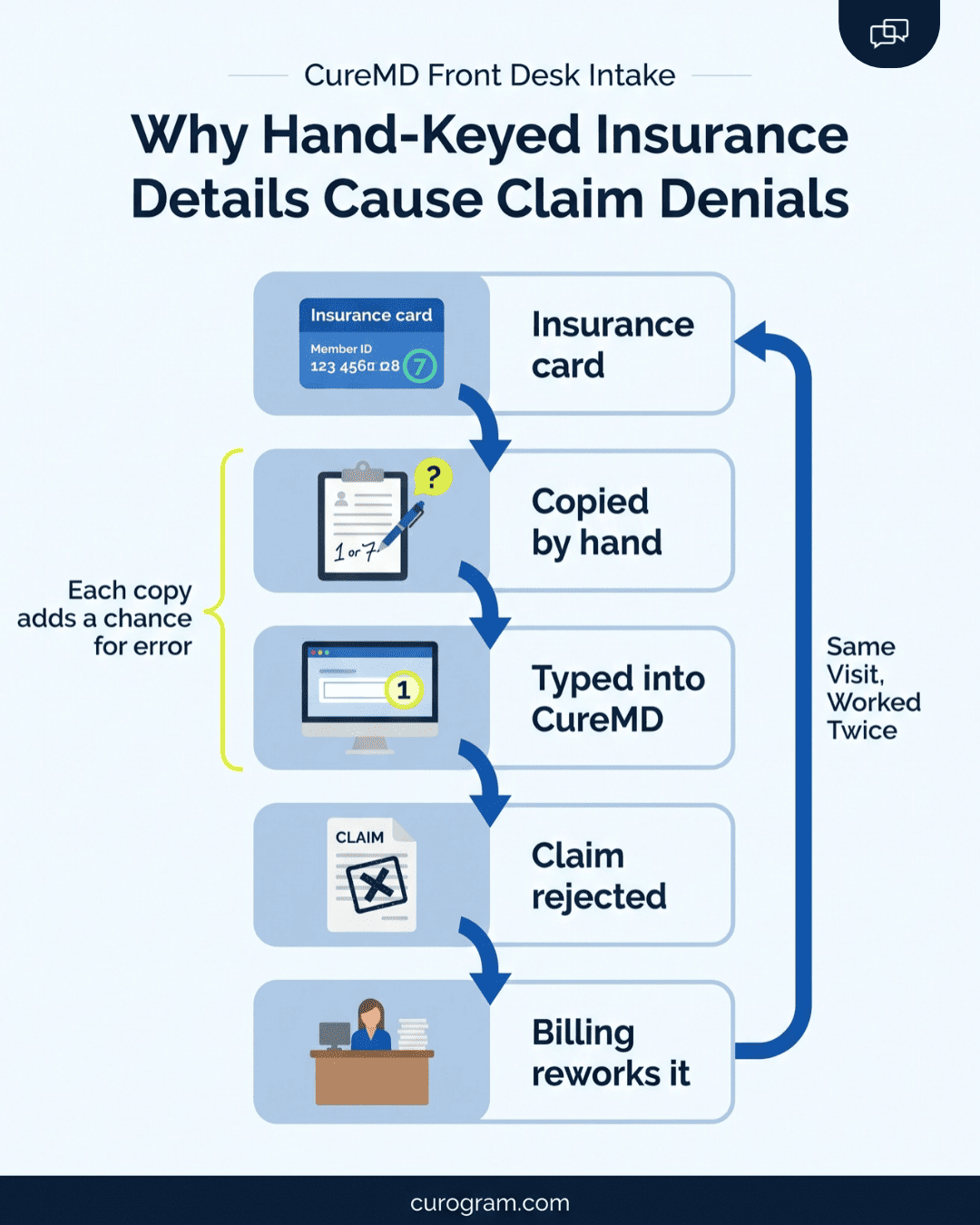
Typing from paper is a two-step copy. The patient copies the card onto the form, and staff copy the form into CureMD. Each copy is a chance for a wrong digit or a misspelled name.
Payers match on exact data. A member ID off by one character or a date of birth with the month and day swapped can bounce a claim at the front end. Your billing team then has to find the error, fix the field, and resubmit.
The Lunch That Doesn’t Happen
On a heavy new-patient day, the front desk lead often eats at the desk. Morning packets still sit in a tray, and the afternoon ones are already coming in. If she steps away, the stack grows.
Her office manager knows CureMD’s portal intake exists. She has sent the invites. But she can’t name the last new patient who finished the packet online before a first visit, because the invite asks for an account first.
One Text, Packet Done
Curogram moves the packet out of your lobby and onto the patient’s phone, days before the visit. Booking triggers the text, and the patient finishes the packet at home.
Your staff start the day reviewing completed forms, with no blank ones to hand out. For most offices, it’s the most direct way to reduce waiting room paperwork at check-in.
What Fires When a Visit is Booked
Once a new patient is scheduled, Curogram sends a text with one secure link. No one at the desk has to remember to send it. The patient taps the link, and the packet opens in their phone’s browser.
There’s no app to install and no CureMD portal account to create. That single change is what makes new patient packet completion before arrival realistic. The patient can finish forms on the couch the night they book, or at lunch the next day.
If they stall halfway, a reminder can go out on the same thread. Your team sees who has finished and who hasn’t, so follow-up goes only to the patients who need it.
What the Patient Actually Receives
Keep the text short and plain. A typical one reads:
“Hi Maria, this is Riverside Family Medicine. Please complete your new patient forms before your visit on Monday at 9:00 AM. Tap here: [secure link]. Reply STOP to opt out.”
On your side, each packet shows a status of sent, in progress, or complete. Your desk lead can scan Monday’s new patients on Friday morning and see at a glance who still owes forms. Those are the only patients who get a nudge.
Build the Packet Once
Your packet gets built one time with a drag-and-drop form builder. Most offices start by copying their paper packet section by section:
- Demographics and contact details
- Health history, current medications, and allergies
- Consent forms and your HIPAA notice, each with an e-signature field
- Insurance details and a request for card photos
Required fields stop the patient from skipping a page. A typed allergy list means nobody has to decode handwriting later. Once the packet is set to auto-send on scheduling, front desk intake workflow automation runs on its own.
Insurance Card Verification by Text
The copier queue at check-in exists because staff need a clean image of the card. Curogram asks the patient to snap the front and back of the insurance card, plus a photo ID, inside the same thread.
Insurance card verification by text means staff check eligibility against an image of the real card before the visit day. If the photo is blurry or the plan looks inactive, they text the patient back that afternoon. That beats finding out at the window with three people in line behind them.
How Packets Reach the CureMD Chart
CureMD offers FHIR R4 APIs, but access runs through app registration with CureMD, SMART on FHIR 1.0.0 authorization, OAuth 2.0 tokens, and custom field mapping. That’s a lot of setup before a single form moves.
So Curogram’s intake workflow is built to pay for itself without waiting on that work. Completed packets arrive as clean, legible, structured documents.
Staff review each one and attach it to the patient’s CureMD chart in a fraction of the time hand-keying took. CureMD stays your system of record for the chart, schedule, and claims.
In practice, staff open the patient in CureMD, upload the finished packet, and copy over only the few fields your workflow needs. Copying typed text into a field takes seconds. Reading a scrawled medication list, then calling the patient to confirm a drug name, can take ten minutes on its own.
How Front Desks Use It Across Specialties
|
Setting |
How the desk runs it |
|
Primary care |
New-patient packet auto-sends at booking |
|
Multi-specialty group |
One consult-history form shared across departments and locations |
|
Specialty referral desk |
Packet goes out the day the referral is scheduled |
|
Any front desk |
Reminder and forms ride the same text thread |
That last row matters for your schedule. Based on our internal data, Curogram clients average confirmation rates above 75%. When the reminder and the packet share one thread, the patient who confirms is already looking at the forms.
The Front Desk That Reviews Instead of Types
Proof that patients act on pre-visit texts already exists. Based on our internal data, Atlas Medical Center cut its no-show rate from 14.20% to 4.91% in three months with Curogram’s pre-visit texting. Forms ride that same channel, so the habit carries over.
We call the result the Pre-Arrival Intake. Staff spend the morning reviewing finished packets, greeting patients by name, and moving them into rooms on time.
One New Patient, Booking to Exam Room
Follow one new patient through a review-first desk. The times are an illustrative walk-through.
|
When |
What happens |
Who does the work |
|
Thursday, 2:10 p.m. |
Patient books a Monday 9:00 visit by phone |
Scheduler |
|
Thursday, 2:11 p.m. |
Packet link texts out on its own |
Curogram |
|
Thursday, 8:30 p.m. |
Patient finishes forms, signs, and snaps card photos |
Patient |
|
Friday, 9:30 a.m. |
Staff review the packet and check eligibility |
Front desk |
|
Friday, 9:40 a.m. |
Packet attached to the CureMD chart |
Front desk |
|
Monday, 8:55 a.m. |
Patient confirms name and birth date at the window |
Front desk |
|
Monday, 8:57 a.m. |
Patient is seated and the visit starts on time |
Clinical team |
Curogram Highlight: Secure Online Forms
Secure Online Forms is the Curogram feature behind the text-link packet. It lets your front desk build a new-patient packet once and send it by text, automatically, the moment a visit is scheduled.
Patients open the link on any phone with no app and no CureMD portal account. They complete demographics, health history, medications, and allergies. They sign consents with an e-signature and upload photos of their insurance card and ID in the same HIPAA-compliant thread.
On the staff side, the work shrinks to review. Completed packets come back as structured, legible documents. Your team checks them, follows up by text on anything missing, and attaches them to the CureMD chart.
Curogram is SOC 2 Type II certified and signs a BAA with every practice. Each submission is time-stamped and logged, which gives you a cleaner audit trail than a paper packet in a filing cabinet.
Secure Online Forms pairs with Curogram’s appointment reminders on the same thread. The patient who confirms Monday’s visit is one tap away from the packet. Based on our internal data, automated texting also cut inbound calls by 24%, which frees up time for the review work that replaces typing.
Conclusion: Retire the Clipboard
For a CureMD front office, the fastest intake win is moving new-patient forms from the lobby clipboard to a text link sent at booking. Build your CureMD new patient intake workflow for front office staff around that text, and the patient spends a few minutes at home. Your staff save the re-typing and your billing team the rework.
Each tool in your office has its own lane. CureMD holds your chart, your schedule, and your claims. The AI Contact Center handles patient phone calls.
Curogram handles patient paperwork, finished on their couch and on their time. Only one of the three gets a new patient’s full packet back before the visit.
Start with a count. Pull this week’s hand-keyed intake packets, multiply by the minutes each took, and put a payroll number on the clipboard hour.
Then bring your current new-patient packet to a Curogram demo. We’ll rebuild it live as an auto-sending text link, so you can see the exact packet your next new patient would get.