11 min read

Single-Dashboard Virtual Visits: A Guide for Elation Health Staff

Single-Dashboard Virtual Visits: A Guide for Elation Health Staff
💡 Elation Health practice staff can run telemedicine visits without adding new platforms. Curogram brings the full workflow into one screen. From a single dashboard, staff can:
  • Send pre-visit texts and intake forms
  • Launch HIPAA-safe video visits with one click
  • Collect copays through text-to-pay
  • Track patient replies in real time
  • Send Google review requests after each visit
This means fewer tools, faster training, and less daily toggling. New hires can learn the full virtual visit workflow in one short session.

A front desk staff member at a busy Elation Health practice just finished her fifth login of the morning. One tool handles scheduling. One sends reminders. One launches video visits. One collects the copay. One requests reviews. Her first virtual visit has not even started.

This is the hidden cost most practices never measure. Each tool feels small on its own. Stacked together, they steal time and focus. They also drain staff morale.

The promise of telemedicine was simpler care. The reality for many practices is the opposite. Virtual visits added more vendors, more logins, and more steps. Staff now toggle between platforms instead of helping patients.

There is a smarter way to run things. Managing telemedicine workflows for Elation Health staff through single-dashboard virtual visits is now possible. The right setup pulls reminders, forms, video, payments, and reviews into one place. Staff virtual visit management can live on one screen instead of five.

This article walks you through the broken multi-tool workflow that many practices still use. Then we show what a single-dashboard telemedicine setup looks like in real life. You will see how Curogram supports Elation Health telehealth operations through vendor consolidation virtual care.

You will also see a typical staff day before and after the switch. We will share training timelines, support details, and answers to common questions from practice managers. Examples and step-by-step flows will show what changes for your team.

By the end, you will know how to free your front desk from the toggle tax. You will also see why one dashboard often beats five. The shift is smaller than most teams expect — and the payoff hits in the first week.

The Current Virtual Visit Workflow (And Why It Breaks)

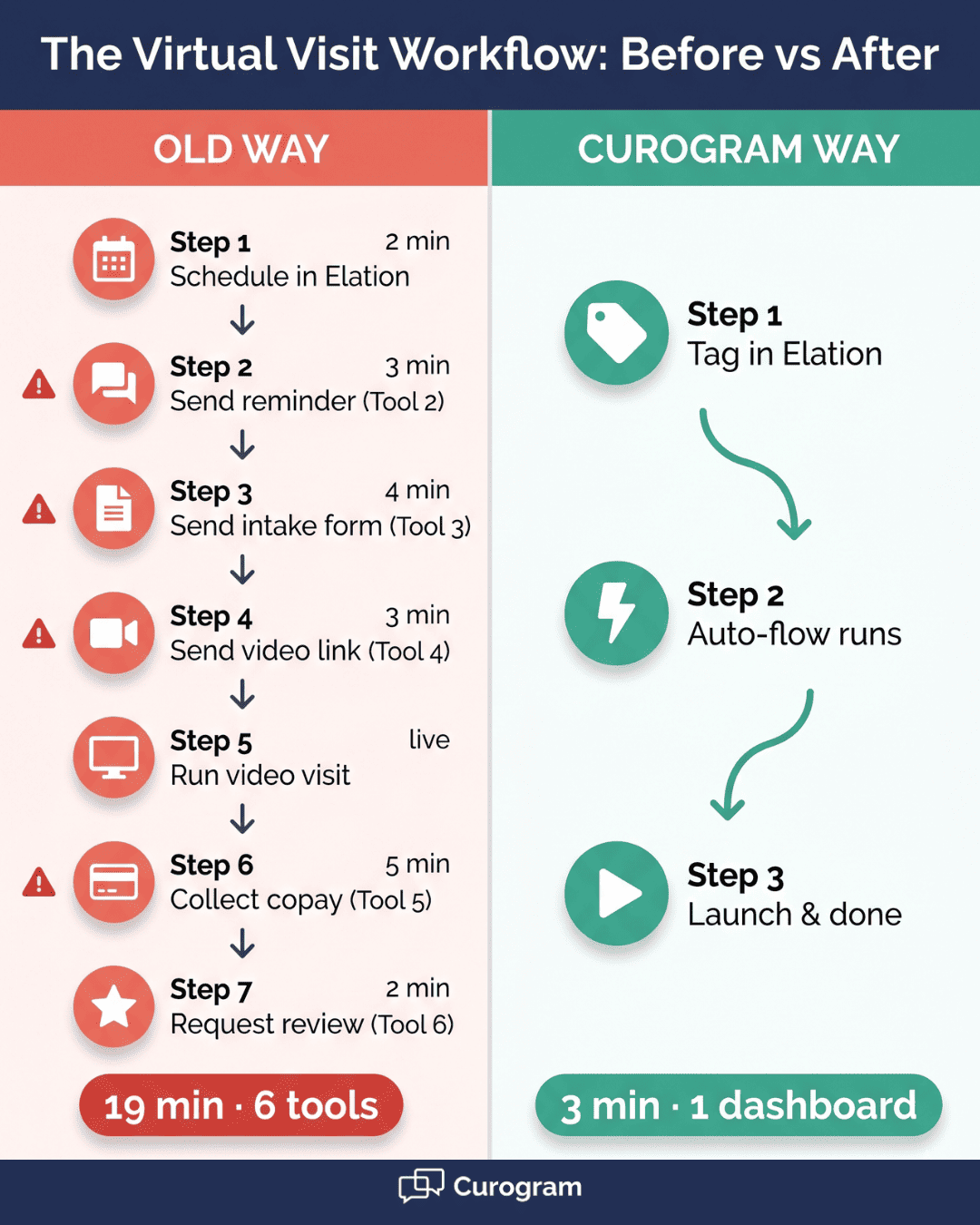
Most Elation Health practices stitch together four or five tools to run one virtual visit. The flow usually looks like this:

  1. Staff book the visit in Elation.

  2. They send a reminder using Spruce or another texting tool.

  3. Then they send an intake form through a third tool or email.

  4. Right before the visit, they push the video link from a separate telehealth platform.

  5. After the visit, they collect payment through a portal or mailed statement.

  6. Finally, they request a review using yet another tool.

Six steps. Four to five logins. One patient.

Each handoff is a chance for things to break. Patients miss the video link because it came from a number they do not know.

Forms go unfilled because the link arrived in a different channel from the reminder. Copay collection drags on because it lives outside the visit flow. Each gap turns into a phone call or a chase text.

Front desk staff feel the weight of all these tools. Based on our internal research, staff spend 10 to 15 minutes per virtual visit on platform coordination alone. In a unified system, the same tasks take 2 to 3 minutes. Multiply that gap across 20 virtual visits a day, and you lose 3 to 4 hours of staff time. That is half a workday — gone to tab-switching.

The Training Multiplier

The toggle tax is not just a daily cost. It is a hiring cost too. Each platform needs 2 to 4 hours of staff training. With 3 to 5 platforms in the workflow, new hires need 6 to 20 hours of training before they can manage a virtual visit end-to-end.

That number gets worse with turnover. Front office roles see high churn. So this training cycle never really stops.

Every update, every new feature, every UI change across five vendors becomes another session. Practice Managers spend their afternoons in onboarding instead of process improvement.

Then there are the support headaches. When something breaks during a visit, who do you call? The texting vendor blames the video vendor. The video vendor blames the EMR. Staff get stuck in the middle while patients wait. A single fix can take days when three vendors are involved.

The hidden costs add up fast. Here is a side-by-side look at the real numbers:

Workflow Element

Multi-Tool Setup

Single-Dashboard Setup

Logins needed

4–5

1

Staff time per visit

10–15 min

2–3 min

Onboarding time

6–20 hours

60–90 minutes

Support contacts

3–5 vendors

1 vendor

Patient touchpoints

Fragmented

Unified


The table shows the gap clearly. Multi-tool setups slow down both staff and patients. They also raise costs that never show up on a single invoice. Practices end up paying for time, training, and lost revenue all at once.

This is the real cost of vendor sprawl in Elation Health telehealth operations. It is not the price of any single tool. It is the price of the gaps between them.

The Curogram Single-Dashboard Workflow

The shift starts at the scheduling step. Staff book the visit in Elation just like they always have. The only change is the appointment type. Elation tags the visit as a virtual one, and Curogram picks it up from there.

From that single tag, the full pre-visit sequence kicks in on its own. A reminder text goes out 24 to 48 hours before the visit. An intake form link follows by SMS if the visit type calls for one. The video visit link arrives 15 minutes before start time. Each step uses the same channel — text — so patients see one familiar number, not three.

Staff configure these triggers once. After that, every virtual visit follows the same path with no manual work.

The front desk can watch all pending virtual visits in the Curogram dashboard, side by side with in-person appointment messages. There is no tool-switching to check who has confirmed, who has not opened a form, or who is running late.

Here is how the time savings stack up:

  • Old way: Send 3 to 4 messages per patient across 2 to 3 tools by hand
  • New way: One automated flow per patient, tracked from one screen

Launch and Manage Virtual Visits

When visit time comes, the staff member or provider clicks the video launch button right inside the Curogram dashboard. The patient taps the link from the text they already received. Connection takes seconds. No app download. No new account. No password reset.

If the patient has not joined yet, staff can send a quick check-in text from the same screen. No new tab. No second login. The reminder goes through the same number the patient has been getting messages from all morning.

During the visit, the provider sees the full picture in one place. Communication history is there. Completed forms are there. Visit notes synced from Elation are there. Payment status is there. The provider does not have to ask, "Did you send your intake form?" — because the dashboard shows it was filled out at 8:42 AM.

This is what single-dashboard telemedicine looks like in practice. The patient feels the visit is smooth. The provider feels prepared. The staff feels in control. Each side of the visit benefits from the same shared view.

Side-by-side workflow diagram showing time saved managing telemedicine workflows with single-dashboard virtual visits versus multiple platforms

Post-Visit Automation

The work does not stop when the video call ends. In a multi-tool world, post-visit tasks pile up fast. Someone has to send a payment link. Someone has to follow up on instructions. Someone has to ask for a review. In a single-dashboard setup, these tasks fire on their own.

The text-to-pay link goes out right after the visit. The patient taps once and pays without a portal login. Based on our internal data, automated post-appointment surveys tied to Google Reviews helped one multi-location practice earn 1,064 new 5-star reviews in just three months.

In that same group, 90% of patients left 5-star ratings. The same engine drives the post-visit review request for virtual visits.

A Google review request goes out 1 to 2 hours after the visit. Follow-up instructions from the provider flow through the same two-way text channel. The patient can reply right back. No call. No portal. No new login.

Staff intervention for routine visits drops close to zero. That time goes back to the front desk for in-person patients, phone calls, and scheduling. Practice Managers see the full task list from one dashboard — payments collected, reviews submitted, follow-ups read.

Here is a side-by-side of the post-visit flow:

Post-Visit Task

Multi-Tool Setup

Curogram Setup

Copay collection

Mailed statement or portal login

Automated text-to-pay

Review request

Manual send or extra tool

Auto-sent 1–2 hours later

Follow-up message

Phone call or separate text tool

Two-way text in dashboard

Status tracking

Multiple logins

Single dashboard view


The same setup also reduces no-shows. Based on our internal data, Curogram clients see no-show rates 53% lower than the industry average. Automated reminders and two-way texting let patients confirm or reschedule with a tap. Practices have used those freed slots to grow revenue by 10% to 20%. Each recovered slot turns a no-show into a paid visit.

Picture a clinic running 15 virtual visits a day. With multi-tool setups, that is roughly 3 hours of staff coordination time daily.

With Curogram, it drops to about 45 minutes. Across a five-day week, the practice saves over 11 hours of front desk time. That is more than a full workday given back each week, with no extra hires.

This is the heart of vendor consolidation virtual care. One tool. One vendor. One support contact. No more chasing five vendors when something goes wrong. No more piecing together status across tabs.

The result for staff is just as clear. Tasks that used to take 15 minutes now take 3. Visits that used to involve five tools now flow from one screen. New hires reach the same skill level in a fraction of the time. Practice Managers stop spending afternoons in training and start spending them on growth.

For Elation Health practices already stretched thin, the math is simple. Fewer tools means fewer fires. Fewer fires means more time for patients. And more time for patients is the whole point of telemedicine in the first place.

Implementation and Training Made Simple

Bringing virtual visits under one dashboard sounds like a big project. It is not. Most Elation Health practices go live in three to four weeks. The path is broken into small, easy steps.

Week 1: Setup and Integration

The first week is about getting the technical pieces in place. The Curogram team sets up your account and connects it to Elation Health. They map your appointment types so virtual visits trigger the right flows. They also set up the video platform inside the dashboard.

No coding is needed. The integration uses standard tools that Elation Health already supports. Your IT lead can sit in or stay hands-off — most practices choose the second option.

Week 1–2: Staff Training Session

This is where most practices feel the biggest shift. The full training takes 60 to 90 minutes. One session covers the entire workflow — scheduling triggers, pre-visit automation, video launch, in-visit tools, and post-visit automation.

Staff who already use Curogram for texting or reminders need even less time. The virtual visit feature lives on the same dashboard, so the learning curve is short. A new front desk hire who joins in Week 5 can be visit-ready by lunch on Day 1.

Compare that to the old way:

Training Item

Multi-Tool Setup

Curogram Setup

Initial onboarding

6–20 hours

60–90 minutes

Per-vendor refreshers

2–4 hours each, several times a year

One vendor, one session

New hire readiness

1–2 weeks

Same day


Week 2–3: Supervised Rollout

The team does not flip a switch and walk away. A small group of providers starts using Curogram for virtual visits first. Staff shadow each other. The Curogram onboarding team stays on call in real time. Any quirks get fixed before they spread to the full team.

This phase usually surfaces small workflow tweaks. Maybe the reminder timing needs to shift. Maybe a form needs an extra field. These changes happen on the fly. By the end of Week 3, the workflow feels like second nature.

Week 4 and Beyond: Full Rollout

By Week 4, all providers can offer virtual visits through Curogram. The full system runs every day. Staff manage virtual and in-person appointments side by side. Practice Managers track usage and time-saving wins through built-in reports.

The Curogram support team stays in touch from here on out. Every question about texting, video, payments, forms, or reviews goes to the same place. There is no more guessing which vendor owns the issue.

Ongoing: One Support Contact

This is the part many practices say they enjoy most. Before, a missed video link could mean three calls — one to the EMR, one to the texting vendor, one to the video vendor. Now there is one number to call. One ticket. One owner.

Practice Managers say this alone gives them hours back each week. The mental load of running staff virtual visit management drops sharply. Staff who used to ask the manager about every small issue now find answers themselves in one help center.

The upshot: rolling out single-dashboard virtual visits is not a six-month project. It is a four-week shift that pays off from the first patient.


Physician conducting a virtual visit on a laptop inside a small exam room

How Curogram Simplifies Elation Health Telehealth Operations

Curogram was built from watching front desk teams work. Engineers spent time inside real practices before writing a single line of code. They saw the toggling. They saw the wait times. They saw the training pain. The result is a platform that staff can learn in less than 10 minutes for core tasks.

For Elation Health practices, the connection is tight. Curogram pulls appointment data from Elation in real time. When you mark a visit as virtual in Elation, Curogram knows. It sends the right messages, triggers the right forms, and prepares the right video link.

Each feature lives on the same screen. Two-way texting. Automated reminders. Online forms. HIPAA-safe video visits. Text-to-pay. Review requests. The dashboard pulls them all together so no staff member has to juggle tabs.

The numbers tell the rest of the story. Based on our internal data, Curogram clients see no-show rates 53% lower than the industry average. Confirmation rates run above 75% across specialties. Recovered appointment slots have helped practices grow revenue by 10% to 20%. SMS recall messages alone brought back 1,240 patients across one multi-location group, with 35% of those patients booking within a month.

For staff, the win shows up in fewer tools and shorter training. For patients, it shows up in clearer messages and easier visits. For Practice Managers, it shows up in fewer fires to put out.

Curogram does not just bolt on virtual visits. It folds them into the same workflow staff already use for every other patient task. That is what makes vendor consolidation virtual care work in real practices — not a promise of fewer tools, but a real, single screen that does the job.

Conclusion

The toggle tax is real, and it adds up fast. Every extra tool means another login, another lesson, and another point of failure. For Elation Health practices running virtual visits, the cost shows up in staff hours, training time, and patient drop-offs. None of it shows up on a single invoice — which is why so many practices miss it.

The fix is not more software. It is fewer tools, doing more. A single dashboard for texting, reminders, forms, video, payments, and reviews lets your team focus on people, not screens. Staff manage virtual and in-person visits without thinking about which platform handles what.

The shift is smaller than most teams expect. Setup takes about a week. Training takes about an hour. New hires reach full speed on Day 1. Support comes from one place, with one team that knows your whole workflow.

The payoff hits early. Staff get 10 to 12 minutes back on every virtual visit. Practice Managers free up hours they used to spend on training and vendor calls. Patients feel the difference too — fewer missed video links, fewer unfilled forms, faster payments.

Curogram brings all of this together inside one platform built for Elation Health practices. It is not just another tool to add. It is the tool that lets you cut tools. That is the heart of vendor consolidation virtual care, and it is why practices that switch rarely look back.

Cut new hire onboarding from 20 hours to 90 minutes. Book a demo today and and see how your team can run telemedicine from one dashboard.


Frequently Asked Questions

How long does it take to train staff on Curogram telemedicine?

Provide a specific answer: most front desk and clinical support staff are fully trained on Curogram’s virtual visit workflow in a single 60–90 minute session. Because the telemedicine feature uses the same Curogram dashboard as texting, reminders, forms, and payments, staff who already use Curogram for other features need minimal additional training for virtual visits.

Can staff manage virtual and in-person visits from the same dashboard?

Confirm that Curogram’s dashboard provides a unified view of all patient communications, including virtual visit scheduling, pre-visit preparation, and post-visit follow-up alongside in-person appointment workflows. Staff do not need separate tools or views for virtual versus in-person patients.

What happens if a patient has trouble joining a virtual visit?

Explain the troubleshooting workflow: staff can see in the Curogram dashboard whether the patient has received and opened the video link. If the patient has not joined, staff can send an immediate reminder text or call the patient through the two-way texting channel. Most connection issues resolve with a simple re-send of the link.

Why do multi-tool setups slow down front desk staff?

Each tool needs its own login, training, and support contact. Staff lose 10 to 15 minutes per virtual visit just toggling between platforms. New hires also need 6 to 20 hours of onboarding across vendors.

How does Curogram lower the training burden for new hires?

One vendor means one training session, one help center, and one support contact. New staff learn the full virtual visit workflow in 60 to 90 minutes — about 80% less time than a multi-tool setup needs.