

9 min read
Cloud 9 Ortho Telehealth | Zero Tech Support, Full Utilization
Aubreigh Lee Daculug
:
April 13, 2026
Parents receive a secure video link via text, tap it, and connect instantly — no app download, no login, no troubleshooting required.
For front desk staff and operations teams, this means the entire telehealth workflow is a single text. The coordinator sends the link. The parent taps. The video call opens in the phone's browser. That's it.
For Cloud 9 DSOs and OSOs, text-link video visits deploy instantly across every location with no IT setup, no staff re-training, and no location-dependent inconsistencies.
Every virtual visit slot is available for clinical care from the first second.
You scheduled a 15-minute virtual visit. Five minutes in, the parent still can't get the app to work.
"I downloaded it, but it's asking me to update." "My camera isn't showing up." "It says my browser isn't supported."
Your front desk coordinator — hired to manage the schedule, answer phones, and keep patient flow moving — is now walking a frustrated parent through mobile app troubleshooting. Again.
This is what happens when an orthodontic practice launches telehealth without thinking through the patient access layer. The technology works. The experience around it is broken.
And it's costing you more than you realize.
Think about this for a second. Your orthodontist schedules a 15-minute virtual check. Five minutes go to tech support. Seven minutes remain for the actual clinical visit.
And 3 out of every 10 parents never connect at all — they give up, call back, and book an in-office appointment instead. The platform that was supposed to free up capacity is creating new bottlenecks.
For Cloud 9 orthodontic practices, this problem is both common and fixable. The fix isn't a better app. It's eliminating the app entirely.
Curogram's Telehealth Schedule Integration brings the Cloud 9 orthodontic telehealth workflow zero tech support closer to reality by replacing app-based video visits with a single text link.
The coordinator sends it. The parent taps it. The call opens in their phone's browser. Face-to-face in 10 seconds.
No downloads. No logins. No support queue.
This article breaks down exactly how that works, why app-based telehealth keeps failing front desk teams, and what changes when you remove the technology barrier completely.
When Your Front Desk Becomes the IT Help Desk
Every app-based telehealth platform has the same hidden problem: it turns the patient connection step into a support event. And the person absorbing that support burden is your front desk coordinator.
The Five-Minute Troubleshoot Before Every Visit
Here's what one typical virtual visit interaction looks like with an app-based system. The parent calls in because something isn't working.
The coordinator sets aside everything else and walks them through it — step by step:
- Finding and downloading the app from the correct app store
- Logging in or resetting a forgotten password
- Granting camera and microphone permissions in their phone's settings
- Locating and tapping the "Join Visit" button once everything loads
That sequence — replicated across every virtual visit — is not a rare edge case. It's the standard experience. And for a practice scheduling 5 to 8 virtual visits per day, that's 25 to 40 minutes of staff time lost to tech support daily.
Over a five-day week, that's up to 3.3 hours — and that's just for the parents who actually get through.
The "No-Show" That Was Never a No-Show
Here's the part practices often miss. Virtual visit no-shows aren't always no-shows.
The parent is home at the scheduled time. Phone in hand. Trying to connect. The app isn't working, and they don't want to call and admit they're struggling with the technology.
They wait 10 minutes, give up, and call back the next day to reschedule as an in-office visit. Your system logs it as a no-show. But it wasn't — it was a failed connection.
These false no-shows inflate your telehealth no-show rate and create a misleading picture of patient behavior.
The data suggests parents don't want virtual visits. The reality is they can't access them. That's a problem with your access layer, not your patients.
The Training Burden Nobody Budgets For
App-based telehealth also carries a hidden training cost that rarely shows up in platform evaluations.
Staff need to learn two systems:
The Cloud 9 schedule for booking and the telehealth platform for managing visits.
New coordinators need telehealth onboarding on top of their standard training.
When the telehealth platform updates its interface — which happens regularly — your team needs re-training again.
For DSOs and OSOs managing multiple Cloud 9 locations, this training inconsistency compounds quickly.
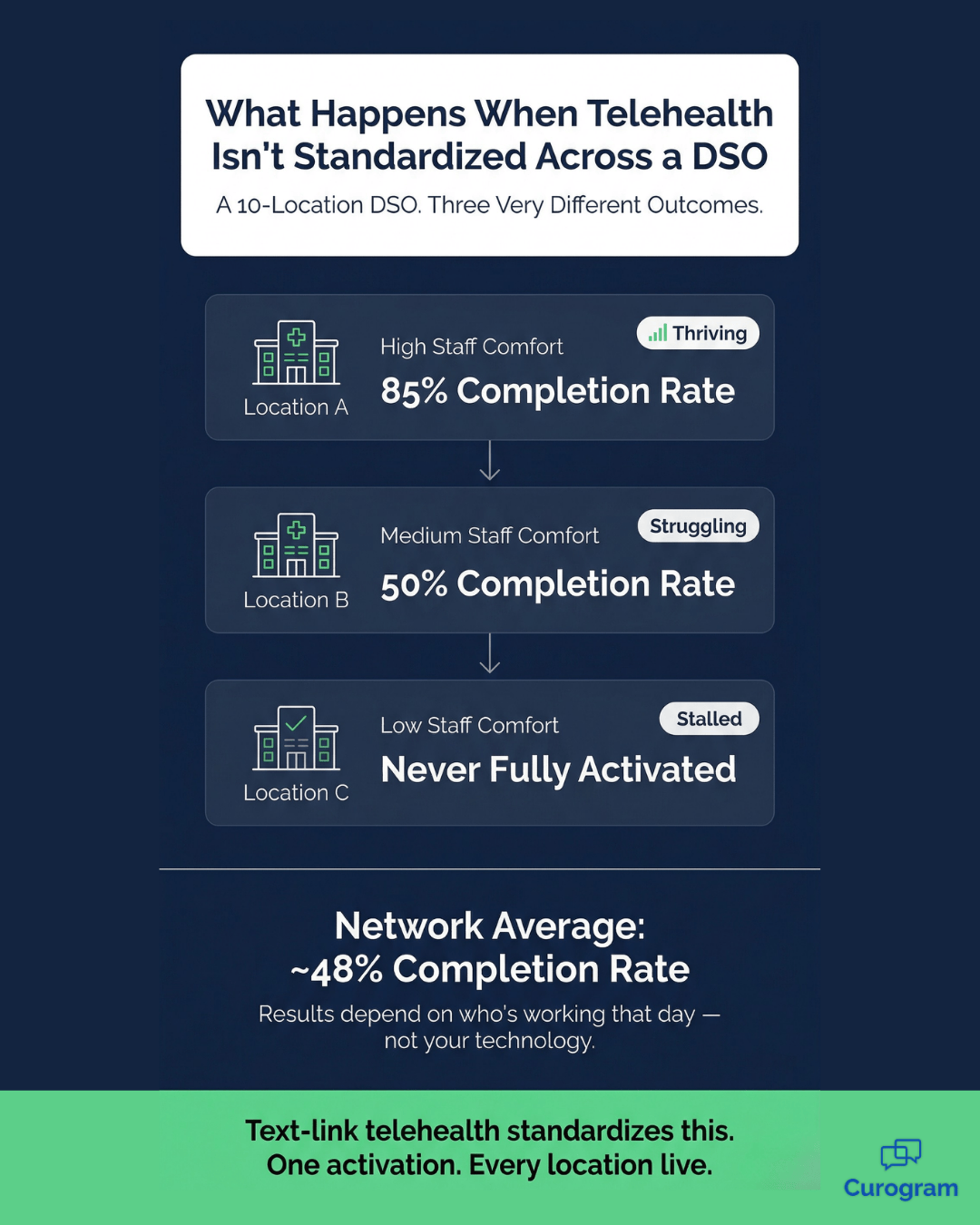
The result plays out differently at every location.
A tech-savvy coordinator at Location A handles app issues smoothly and hits an 85% virtual visit completion rate.
Location B's coordinator struggles with the platform herself — completion drops to around 50%.
Location C never fully activated telehealth because the practice manager didn't have bandwidth for the rollout.
Network average: somewhere around 48%.
That's not a patient problem. That's a deployment problem.
And it means your VP of Operations can't standardize telehealth utilization across the network because the results depend entirely on which coordinator happens to be working that day.
The Zero-Support Virtual Visit: How Text-Link Telehealth Actually Works
The core of Curogram's approach is simple:
Remove the thing that's causing the problem.
There's no app for the parent to download. No account to create. No login to remember. No interface to navigate before the visit even starts.
The coordinator sends a text link. The parent taps it. Their phone's browser opens the call. Done.
The Cloud 9 staff orthodontic telehealth workflow zero tech support model works because the only action required of the parent is tapping a link they received via text. That's it. If they can tap a link in a text message, they can join the video visit.
There's no compatibility check, no device restriction, and no permissions to configure beyond the standard browser camera prompt their phone already knows how to handle.

One-Click Link Delivery from the Same Dashboard Your Team Already Uses
When it's time for a virtual visit, the coordinator opens the Curogram dashboard — the same platform they're already using for two-way texting, appointment reminders, and patient forms — and sends the video link with a single click.
There's no separate telehealth interface to toggle into. No new login. No second tab.
The system generates a unique, secure video link and delivers it via text to the parent. The coordinator can see when the message was delivered and when the parent tapped the link.
If a parent hasn't joined two minutes after their scheduled time, the coordinator sends a follow-up text — also in one click — that reads something like:
"Dr. Martinez is ready for Tyler's check. Tap here to join: [Link]."
That's the full extent of your team's involvement in the visit connection process.
For staff, the telehealth workflow feels like a natural extension of the text communication they're already doing, not a separate technology to manage.
Real-Time Visit Status Tracking, No Guesswork Required
One of the quieter operational benefits is what Curogram shows the coordinator while visits are happening.
The dashboard displays real-time visit status for every scheduled virtual appointment:
Link sent, link tapped, call in progress, call completed, or call not started.
For a practice running multiple virtual visits across providers on the same afternoon, this status view means no patient falls through the cracks and no orthodontist is sitting in a video room waiting on a parent who needed a quick reminder text.
For a telehealth workflow Cloud 9 orthodontic practices run across high-volume schedules, that visibility is meaningful. It shifts the coordinator role from reactive troubleshooter to proactive traffic manager — a much better use of their time.
Instant Deployment Across Every Cloud 9 Location
For DSOs and OSOs, this is where the model changes substantially.
With app-based telehealth, activating virtual visits across 20, 50, or 100 locations is a project, not a feature toggle.
Before a single parent can join a virtual visit, your operations team has to:
- Configure IT infrastructure at each site
- Train staff at every location on the telehealth platform
- Distribute patient-facing instructions and app download guides
- Troubleshoot adoption issues location by location
With Curogram's text-link video visits, the orthodontic telehealth workflow Cloud 9 zero tech support deployment happens at the platform level. The VP of Operations activates the feature in Curogram, and every location is live.
No site-by-site configuration. No specialized training rollout. No patient app to distribute.
Every location gets the same zero-friction patient experience from day one. That's not just operationally cleaner — it's the only way to standardize telehealth utilization across a multi-location network.

What Changes When Tech Support Disappears
Connection Rates That Actually Hold
The outcomes of switching to text-link telehealth aren't theoretical. They follow directly from removing the friction layer.
Text-link video visits achieve near-100% connection rates for scheduled virtual appointments.
Compare that to app-based platforms, which typically see 70 to 85% connection rates due to download failures, login errors, and browser compatibility issues. That 15 to 30% gap represents real appointment slots — some recovered as delayed in-office visits, others simply lost.
For a practice running 6 virtual visits per day at $80 per slot, that gap costs roughly $120 per day in lost clinical time.
Over a year, that's about $26,000 left on the table — from connection failures alone.
The Shift from IT Help Desk to Patient Care
The staff impact may be the most immediate change you'll feel.
When the front desk coordinator's role in a virtual visit drops from 5 minutes of active tech support to 10 seconds of sending a text, their entire afternoon changes.
The time they were spending troubleshooting app issues goes back to patient check-in, phone calls, scheduling, and the core responsibilities they were actually hired to do.
30–40 minutes of daily staff time is consumed by telehealth tech support in a practice running 5–8 virtual visits per day.
With text-link visits, that drops to under 1 minute.
The Cloud 9 ortho telehealth workflow zero tech support model doesn't just reduce frustration — it restructures how your team allocates time during virtual visit hours.
For coordinators who've been managing the IT help desk role on top of their real job, that shift is significant.
A Telehealth Offering Parents Actually Use
The final outcome is the one that matters most for long-term telehealth adoption: parents actually use it.
When the access barrier is zero, utilization rises. Emergency triage, wire check-ins, retainer evaluations, and virtual consultations become easy options for parents to choose.
The practice's telehealth offering becomes a genuine convenience rather than a reluctant alternative that requires 10 minutes of troubleshooting to access.
1.5 recovered slots per day — At a 75% app-based connection rate, a 6-visit schedule loses roughly 1.5 visits daily.
Text-link telehealth puts every one of those slots back into productive clinical use.
That's the orthodontic telehealth workflow Cloud 9 zero tech support practices should be building toward. Not a flashy app that creates support work. A text link that starts a call.
Your Front Desk Sends a Text. Your Orthodontist Sees a Patient. Done.
Telehealth should be simple. For too long, it hasn't been.
App-based platforms put the burden of a patient-facing technology product squarely on the shoulders of your front desk coordinators — people who were hired to manage appointments, not troubleshoot mobile software.
The result is a telehealth workflow that consumes staff time, inflates no-show rates, creates inconsistency across locations, and underdelivers on the promise of virtual care.
Curogram's text-link telehealth changes the equation entirely.
There's no app to download, no account to create, and no compatibility to check.
The coordinator sends a link via the same Curogram platform already used for every other form of patient communication.
The parent taps it. The call opens. That's the entire workflow.
For Cloud 9 practices running high-volume schedules, this matters in three concrete ways: your virtual visit slots fill and complete instead of failing, your staff spend their time on patient care instead of IT troubleshooting, and your telehealth capability is consistent across every location from the moment you activate it.
For DSOs and OSOs, the multi-location deployment advantage alone removes what has historically been one of the biggest barriers to network-wide telehealth adoption.
No IT project. No location-by-location training rollout. One activation, every site live.
Your telehealth shouldn't add to your support queue. It should add to your schedule.
If you're ready to see exactly how text-link video visits integrate into your Cloud 9 orthodontic practice's workflow — including scheduling, status tracking, and multi-location deployment, schedule a demo with the Curogram team.
Frequently Asked Questions
Yes. Virtual visits can be scheduled as appointment types in your Cloud 9 calendar. When it's time for the visit, the coordinator sends the video link via Curogram. The scheduling stays in your existing workflow — the video link delivery is the only new step. There's no separate telehealth scheduling system to manage or maintain alongside your current setup.
Curogram's video visits support standard two-way video communication from both the provider and parent devices. The orthodontist can hold educational materials up to the camera, or follow up the call with a text message containing links to resources. For most orthodontic virtual visits — where the primary need is the parent showing the child's mouth to the camera — the standard video format handles everything the clinical interaction requires.
Curogram supports multiple simultaneous virtual visits across providers and locations. Each video call is a separate, independent session. If three orthodontists in your practice are each conducting a virtual visit at the same time, all three calls run independently without any interference. For DSOs and OSOs managing multiple Cloud 9 locations, there's no practical limit to the number of concurrent virtual visits running across the network at once.
Yes. Every video link Curogram generates is unique to that specific appointment and expires after the visit ends. The connection is encrypted, and no visit data is stored on the parent's device. Curogram's telehealth platform is built to meet HIPAA requirements, so your practice can offer virtual visits without creating a compliance gap in your patient communication workflow.
The parent can simply tap the original text link again to rejoin the call. Because the link stays active for the duration of the scheduled appointment window, there's no need to contact the front desk, generate a new link, or start the connection process over. The coordinator can also see in the Curogram dashboard that the call was interrupted and send a quick follow-up text with the link if needed.