10 min read
Virtual Visit Dashboard for Dolphin: Recover Chair Hours Fast
Mira Gwehn Revilla
:
April 27, 2026
- Virtual visits by type: retainer check, progress evaluation, and triage
- Chair time recovery per day, week, and month
- Patient acceptance rates by age, provider, and office
- Visit duration, link opens, and connection success
- Revenue impact from freed chair hours
Your practice manager converted 8 retainer checks to virtual visits this week. That feels like a win. But how many chair hours did it free? How many patients preferred the virtual option?
Most Dolphin practices can't answer those questions. They offer virtual visits when it feels right. The orthodontist hops on a quick video call. A retainer check gets done in 12 minutes instead of a full chair slot. Everyone moves on.
The problem shows up later. The practice owner asks, "Is our virtual program actually working?" No one has the numbers. Dolphin Management runs the clinical side well, but it has no native patient-facing telehealth tool. So the outcome data either lives in scattered notes or never gets collected at all.
Without tracking, virtual care stays informal. You think it helps the schedule. You believe patients like it. But you can't prove it. And you can't scale what you can't measure.
This is where Dolphin orthodontic virtual visit tracking through Curogram's Virtual Visit Dashboard shifts the model. The platform adds the telehealth link your Dolphin setup lacks. More importantly, it turns every virtual retainer check, every progress evaluation, and every emergency triage call into clean appointment analytics you can act on.
You see chair time recovery in real numbers. You see patient acceptance by age group and visit type. You see which appointments convert well to virtual and which should stay in the chair.
In this guide, we'll walk through the hidden cost of unmeasured virtual visits. Then we'll show how smart data turns ad hoc telemedicine into a core part of your schedule strategy.
The Villain: The Virtual Visits You Can’t Measure
Most ortho practices already run some form of telemedicine. A retainer check here. A quick progress evaluation there. A triage call when a bracket pops off on a Saturday. The visits happen — but the data never does.
This gap creates four real problems that quietly hold your schedule back.
The Unmeasured Experiment
When virtual visits happen on the fly, there's no system tracking them. The orthodontist calls a patient when it fits the day. The front desk marks it in a note. But no one counts how many virtual visits happened this month or what came out of them.
Without a record, telemedicine stays an experiment. You can't say if it worked. You can't say which visit types fit virtual best. The program lives in staff memory, not in your data. And that means it can't grow in any planned way.
The Chair Hour Blindness
The biggest gain from virtual visits is chair time recovery. A virtual retainer check frees a 20-minute chair slot. A virtual progress evaluation frees 15 minutes. Across a week, those slots add up fast.
But most Dolphin practices can't measure what they saved. They suspect virtual visits help. They don't know how many chair hours got freed. They don't know if those freed slots filled with billable treatment. The value stays in theory, not on the books.
Without numbers, the owner can't make a case to expand telemedicine. Staff can't defend the time they spend setting up virtual calls. And you miss the chance to turn freed chair hours into real revenue.
The Patient Preference Gap
Some patients love virtual visits. Parents juggling work and school runs prefer a 10-minute video call. Teens with busy class schedules like skipping the drive. Other patients want the in-office touch every time.
Without tracking, your team offers virtual to everyone the same way. Some say yes. Many say no. You end up guessing who wants what — and that guessing costs acceptance rates.
Smart practices learn their patient base. They see which age groups like virtual. They see which visit types convert best. They match the offer to the patient. But that takes data. And without a dashboard, the data doesn't exist.
The Feeling Most Practice Owners Know
Here's how it sounds in real practice:
"We've been doing some virtual retainer checks. The patients who try it love it. But I don't know how many we've done, how much chair time we've saved, or if it's actually helping our schedule. I think it's working. I just can't put numbers on it."
If that sounds like your office, you're not alone. The core issue isn't the virtual visits themselves. It's the missing data layer around them.
Weave doesn't stress telemedicine in its bundle. Dolphin has no built-in patient-facing virtual care. So Dolphin orthodontic practices end up running telehealth without a scoreboard. The next section shows what it looks like when that scoreboard finally gets turned on.

The Guide: The Telehealth Intelligence Dashboard
Curogram's Virtual Visit Dashboard gives you the data layer that informal telemedicine programs lack. It doesn't just host virtual visits — it tracks every step of them. From the moment the link goes out to the moment the visit ends, every action turns into a metric you can use.
Here's how the pieces fit together.
The Full Visit Journey, Tracked End-to-End
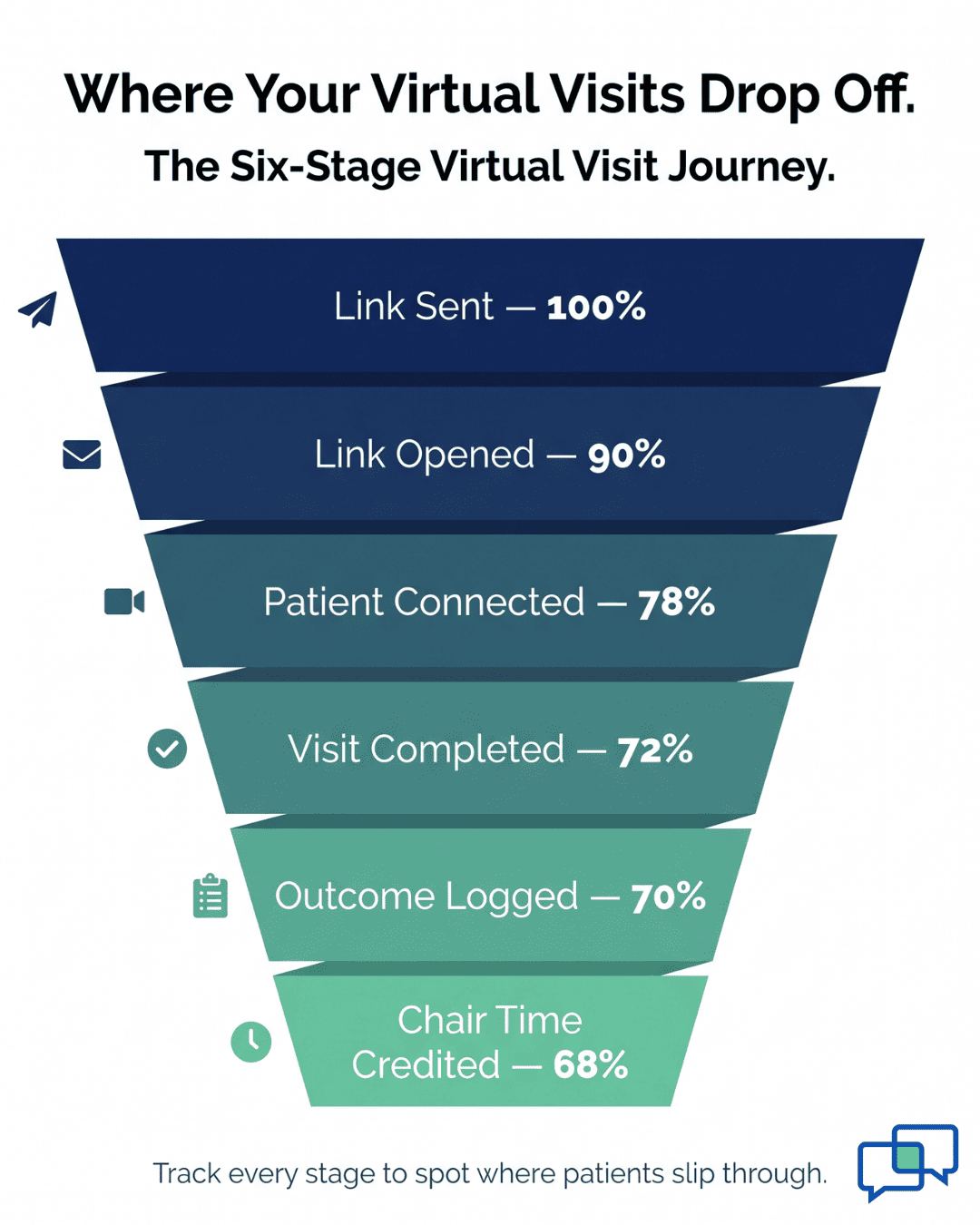
The dashboard follows each virtual visit across six points: link sent, link opened, patient connected, visit duration, visit outcome, and chair time recovered. Every step feeds your appointment analytics.
You see, for example, that 90% of sent links got opened — but only 78% led to a connected visit. That 12-point gap tells you something.
Maybe the link worked, but the video didn't. Maybe the patient needs a tech check before the call. The dashboard turns that kind of drop-off into a fix you can act on.
Each metric breaks down by appointment type, provider, patient age, and location. So you don't just see one number. You see the full picture of how telemedicine tracking plays out across your practice.
The Schedule Impact View
This is the feature most practice owners lean on first. The Schedule Impact view shows chair hours recovered per day, week, and month from virtual visit conversions.
A sample week might look like this:
|
Metric |
This Week |
|
Virtual retainer checks |
8 |
|
Virtual progress evaluations |
4 |
|
Virtual triage consults |
3 |
|
Chair hours freed |
6 |
|
Freed hours filled with treatment |
5.5 |
|
Added production |
$2,475 |
Now virtual visits have a number. Not "it feels good." Not "patients like it." A real dollar figure tied to real chair time recovery. That shifts the whole conversation with your team and your owners.
Appointment Type Analysis
Not every visit fits virtual equally well. The dashboard breaks down acceptance by type so you can target offers with care. A typical Dolphin ortho practice might see patterns like these:
- Retainer check: 65% patient acceptance
- Emergency triage: 80% acceptance
- Progress evaluation: 45% acceptance
- Initial consultation: 35% acceptance
Those numbers drive a smarter outreach plan. You push virtual aggressively for retainer checks and triage. You offer it selectively for progress evaluations. And you treat initial consults as in-office by default, with virtual as a backup for patients who travel far.
This is where appointment analytics turn into real schedule policy. Your front desk stops guessing. They work from patterns that hold up across months.
Multi-Location Comparison
For practice groups running several Dolphin offices, the dashboard goes one level deeper. You see virtual visit adoption side by side across locations.
You see which office recovers the most chair time. You see where the orthodontist's drive time between offices could be replaced with a video visit.
One location might run virtual at 40% of eligible visits. Another might sit at 12%. That gap is a coaching moment, not a random quirk.
The high-adoption office is likely doing something right — a scripted offer, a follow-up text, a staff champion. The dashboard helps you spot that playbook and share it.
Dolphin gives you the clinical workflow. The Virtual Visit Dashboard gives you the view across that workflow.
Together, they turn orthodontic virtual visit dashboard Dolphin telemedicine tracking retainer check progress chair time recovery into a system — not a set of scattered calls.
The Success: From Informal Experiment to Measured Strategy
Data doesn't just report results. It changes behavior. Once a team can see what virtual visits produce, they offer virtual visits more often — and more skillfully. That shift is the real payoff of Dolphin virtual visit dashboard orthodontic telemedicine retainer check progress evaluation chair time analytics.
Here's how that change plays out across three levels.
The Metric: A 30–50% Lift in Virtual Visit Use
Practices that adopt the Virtual Visit Dashboard tend to grow their virtual visit volume by 30% to 50% within the first few months. The reason is simple — visible numbers breed confidence.
When the dashboard shows that last week's virtual retainer checks freed 6 chair hours and added $2,400 in production, the team stops seeing virtual visits as a favor. They start seeing them as a tool.
The front desk offers virtual more often. The orthodontist signs off on more virtual triage. And the practice manager pitches the program with real data, not hope.
This lift doesn't come from pressure. It comes from clarity. The numbers do the coaching.
The Shift: From "When It's Convenient" to "As Part of the Plan"
The mental shift is bigger than the metric.
Most practices start with, "We do virtual visits when it's convenient."
After a few months on the dashboard, that becomes, "We have a virtual visit plan with targets and measured outcomes."
Virtual care moves from side option to core schedule tool. It gets built into new patient onboarding. It shows up in your recall flows. It becomes a planned part of how you handle retainer season, summer travel, and post-op triage.
Our internal data backs up why this shift matters. Curogram's two-way texting and automated reminders already drive no-show rates 53% below the industry average, based on our internal research.
When you stack telemedicine tracking on top of that, you don't just reduce no-shows — you capture value from the slots that open up. Each recovered slot has been shown to contribute 10% to 20% in revenue lift, based on our internal data.
The Outcome: A Real Month in the Life of a Tracked Practice
Picture your practice manager opening the Virtual Visit Dashboard at month-end. Here's what a typical month might look like for a mid-size Dolphin ortho office.
|
Monthly Metric |
Result |
|
Virtual retainer checks |
34 |
|
Virtual progress evaluations |
12 |
|
Virtual emergency triage consults |
8 |
|
Total chair hours recovered |
27 hours |
|
Freed hours filled with treatment |
24 hours |
|
Added production from freed time |
~$12,300 |
|
Patient satisfaction (very/extremely satisfied) |
92% |
That's a clean story. Virtual care freed almost a full workday each week. Those hours filled with billable treatment. And patients were happy with the experience.
The dashboard also breaks acceptance down by age. Parents aged 25 to 45 accept virtual visits at about 72%. Teen patients aged 13 to 17 prefer in-office at 60%.
That's a simple insight with a real use — target virtual visit offers to parents, keep in-office as the default for teens. The acceptance rate climbs. The friction drops. The schedule plan works with your patients instead of against them.
Why Ad Hoc Telemedicine Stops Working at Scale
A practice running 4 or 5 virtual visits a week can get by on memory. A practice running 40 a week can't. Once volume grows, ad hoc tracking breaks down. Notes get lost. Outcomes don't get logged. The data you need to defend the program simply isn't there.
This is where ortho groups hit a wall. They want to expand virtual visits, but they can't justify it because they can't measure it. That's the exact gap the Virtual Visit Dashboard closes. It gives you tracking that scales with your volume.
The Full Measured Loop
Here's the loop in plain terms:
- Track every virtual visit sent and completed
- Measure chair time recovered and production added
- See which visits and which patients fit virtual best
- Build a targeted plan for next month
- Track again, refine again, grow again
That's the move from informal to measured. Dolphin ortho virtual visit dashboard telemedicine tracking retainer check chair time recovery analytics — all of it — turns a side program into a growth engine.
Based on our internal data, one multi-location practice saw more than 1,240 follow-up visits come from automated outreach alone, with a 35% appointment reconversion rate.
Add structured virtual visit tracking on top of those flows, and the compounding effect is even stronger. You're not just bringing patients back. You're serving them in the format that fits their life — and capturing the chair hours you used to leave on the table.

How Curogram's Virtual Visit Dashboard Turns Every Telehealth Call Into a Growth Signal
Most telehealth tools stop at the video call. They connect the patient and the provider, then log the visit as "done." Curogram goes further — every virtual visit becomes a data point in your growth plan.
The dashboard shows link sends, opens, connections, visit duration, outcome, and chair time recovered — all in one screen. No switching tabs. No pulling reports from three places. The data is ready the moment the visit ends.
Curogram layers over your Dolphin Management setup without disrupting it. The link goes out by text from Curogram. The visit happens on a HIPAA-compliant call. The outcome flows back into your records. Your clinical workflow stays where it is — the tracking runs quietly alongside.
Most platforms count visits. Curogram counts results. You see chair hours recovered. You see revenue added from those recovered hours. You see patient satisfaction by visit type. The focus is on what the virtual program produces — not just how busy it is.
Over time, the dashboard builds a profile of your patient base. Which age groups prefer virtual. Which visit types convert best. Which locations lead on adoption. Your team stops offering virtual the same way to everyone. They match the offer to the patient.
You don't have to rebuild your whole communication stack to get this. Curogram runs as a focused add-on to Dolphin. You get the telehealth layer plus the tracking, without the bloat or the switching cost of a full platform swap. The value shows up fast — often in the first month of use.
Conclusion: See What Your Virtual Visits Actually Produce
Running virtual visits without tracking outcomes is guessing. You feel like it helps. You hope patients like it. But hope doesn't build a schedule — data does.
Curogram's Virtual Visit Dashboard shows every metric that matters. Visits done by type. Chair hours recovered. Revenue added from freed slots. Patient acceptance by age and location. Appointment conversion rates by visit type. All of it in one view, updated in real time.
Dolphin manages your clinical workflow with care. Curogram shows you what happens when that workflow stretches past the office walls. How many patients you reached. How much chair time you saved. How much production those freed hours brought in.
The shift is simple but powerful. You stop running virtual visits as a favor. You start running them as a plan. And the plan keeps sharpening each month as the data builds.
You don't need a full Weave bundle swap to get there. You don't need to rebuild your tech stack. You need a focused tool that sits next to your Dolphin setup and turns every virtual call into a measured win.
Give your team the data they need to run virtual visits with confidence. Request a demo and see every metric — chair time recovered, patient acceptance, and revenue impact — in one clear view.
Frequently Asked Questions
Use the multi-location view inside the Virtual Visit Dashboard. It stacks each office side by side on key metrics — visits done, hours freed, acceptance rates. The top-performing office often has a playbook the others can copy to lift results group-wide.
Look at the appointment type analysis tab. Retainer checks and emergency triage usually show the highest acceptance rates. Start with those. Save progress evaluations and new consults for selective virtual offers based on patient distance and preference.
Visible numbers change team behavior. When staff see that last week's virtual visits freed real chair hours and added real revenue, they offer virtual more often. The dashboard does the coaching. The lift follows soon after.