

Front Desk Optimization: Reduce Chaos, Improve Experience
💡 Front desk optimization in a medical practice means making your front office run smoother, faster, and with less stress for everyone involved....
19 min read
Aubreigh Lee Daculug
:
March 15, 2026
Your phone is ringing off the hook. Staff are juggling six tasks at once. Patients are on hold longer than they should be, and a few have already hung up.
Sound familiar?
For many medical practices, the phone system is a constant source of frustration — for staff and patients alike. As your patient volume grows, managing calls without a clear system only gets harder. The good news is that medical call center management does not have to be complicated.
With the right staffing model, technology, and protocols in place, you can run a smooth, patient-friendly phone operation — even in a busy practice.
The phone is often the first point of contact a patient has with your practice. How that call is handled — how quickly it is answered, how well the agent communicates, and whether the issue gets resolved — shapes how patients feel about your care before they ever walk through the door.
A poor phone experience does not just frustrate patients. It drives them to leave reviews, switch providers, or simply not come back.
What makes this harder is that most practices did not set out to build a call center. The phone system grew alongside the practice, one line and one staff member at a time, until it quietly became one of the most complex parts of daily operations. Getting it under control means being intentional — about how you staff it, how you measure it, and how you use technology to take some of the load off your team.
This guide covers everything you need to know: how to staff and schedule your team, which tools to use, how to handle different call types, and how to measure what's working. You will also learn how to cut unnecessary call volume so your team can focus on the calls that matter most.
Not every practice needs a full call center setup. But if your front desk is drowning in phone traffic, it may be time to think differently about how you manage patient calls. The signs are usually hard to ignore — and acting on them early is far easier than scrambling to catch up later.
Most practices start feeling the strain long before they formally acknowledge the problem. Staff start informally triaging calls — letting some go to voicemail, rushing through others, or putting patients on hold while helping someone at the front window.
These workarounds feel manageable at first, but they quietly erode patient experience and staff morale over time.
200+ |
|
Daily calls The threshold where structured call center management becomes essential for most medical practices |
It is also worth paying attention to softer signals — things like a spike in patient complaints about hold times, staff reporting phone fatigue, or a rise in calls going unanswered during busy windows. These are early warning signs that your current setup has hit its ceiling.
If more than two of these apply to your practice, it is worth investing in a more intentional approach. The sections below will show you exactly how to do that.
Getting staffing right is one of the hardest parts of running a healthcare contact center. Too few staff, and patients wait too long. Too many, and you are wasting resources you could use elsewhere.
The goal is to find the right balance — and then build a schedule that actually holds up in the real world.
A useful starting point is the Erlang C formula, a staffing model that accounts for call volume, average handle time, and your target service level.
It is not a perfect tool, but it gives you a data-driven baseline to work from rather than guessing.
To use the formula effectively, you need to know your average calls per hour, how long each call typically takes, and what service level you are aiming for — most practices target answering 80% of calls within 30 seconds.
If you do not have this data yet, even a rough estimate from reviewing call logs over a few weeks will get you much closer than guessing.
Erlang C: the three inputs you need before you can calculate staffing
| Input | What It Means | How to Find It | Typical Starting Point |
|---|---|---|---|
| Average calls per hour | How many calls arrive in a given 60-minute window | Pull from your phone system's call logs — break it down by hour of day | Varies; start with your busiest hour |
| Average handle time (AHT) | How long each call takes from answer to wrap-up | Most VoIP systems log this automatically; otherwise time a sample of calls | 3–5 minutes for most medical practices |
| Target service level | The % of calls you want answered within a set time | Set by your practice based on patient experience goals | 80% of calls answered within 30 seconds |
Peak time analysis is equally important. Most practices see their heaviest call volume Monday mornings, right after the office opens, and again around noon. Pull your call data and look for patterns.
Once you know when the rush is coming, you can schedule more staff for those windows and reduce coverage during slower periods.
Schedule optimization also means accounting for time off, training days, and the reality that not every agent will be available every shift. Build a buffer — typically 10 to 15% above your calculated minimum — so that one absence does not push your whole team into the red.
Skill-based routing is a smart way to improve efficiency. Rather than sending every call to the first available agent, routing systems can direct billing questions to billing staff, refill requests to clinical staff, and new patient inquiries to intake specialists.
Patients reach someone who can actually help them — faster.
This kind of routing also has a secondary benefit: agents become more skilled in their designated call types over time. Someone who handles scheduling calls all day will get faster and more accurate than someone who switches between scheduling, billing, and triage within the same hour. Specialization builds confidence and reduces errors.
Training and onboarding programs should not be overlooked.
A well-trained agent handles calls faster, makes fewer mistakes, and leaves patients with a better impression. Build a structured onboarding process that covers your scripts, your technology, your escalation protocols, and your practice's communication style.
Plan for at least two weeks of shadowing before a new agent handles calls independently.
Quality assurance roles are also worth investing in. Even one part-time QA reviewer listening to recorded calls and providing coaching can significantly improve your team's performance over time. Regular feedback loops prevent small habits from becoming big problems — and they give agents a clear picture of what good performance actually looks like.
The right tools make a real difference in how efficiently your team handles calls. Medical practice phone systems have come a long way, and most modern options are cloud-based — meaning they're easier to set up, maintain, and scale than the traditional on-site hardware of the past.
Choosing the right technology starts with understanding your practice's actual needs.
A solo-provider office with 50 calls a day has very different requirements than a multi-location group practice handling 500.
Before you commit to any system, map out your call volume, your team's workflow, and the integrations you need — then evaluate options against that list rather than chasing the most feature-rich product on the market.
|
Common IVR design mistake to avoid Most practices build their IVR menu around how the practice is organized internally — clinical, billing, scheduling — rather than how patients think about their needs. A patient looking for test results does not think "clinical department." They think: "I need to talk to someone about my lab work." Design your IVR around patient language, not your org chart. Test it with real patients, gather feedback, and revise. A poorly designed IVR is one of the fastest ways to drive up abandonment rates. |
CRM integration is another layer worth investing in as your call center matures. When an agent can see a patient's appointment history, recent messages, and open issues the moment a call comes in, conversations start faster and end sooner.
It also reduces the number of times patients have to repeat themselves — one of the top complaints about healthcare phone experiences.
Beyond the basics, workforce management software helps you forecast call volume, schedule staff efficiently, and track real-time performance.
Analytics and reporting tools give you visibility into metrics like average handle time, abandonment rate, and first call resolution — so you can identify problems before they escalate. As your operation grows, these tools shift from nice-to-have to essential.
Not all patient calls are the same, and your team should not handle them all the same way. Having clear protocols for each call type is one of the highest-impact things you can do for patient call management.
Below are the most common call categories and what each one requires.
These are your most frequent calls, and they set the tone for the entire patient relationship. Agents should have access to your scheduling system in real time and be trained to offer alternatives if a patient's first choice is unavailable.
A short script covering availability, insurance verification, and any prep instructions keeps these calls focused and efficient.
One thing practices often overlook in scheduling calls is the handoff.
If a patient needs to be transferred to a nurse, a billing specialist, or another department, train agents to give a warm transfer — a brief verbal introduction that tells the next person what the patient needs.
Cold transfers, where the patient just gets dropped into a new queue, are a fast way to damage trust.
Refill requests need a clear handoff to clinical staff. Front-line agents should collect the patient's name, date of birth, medication, and pharmacy — then route the request without making clinical decisions themselves.
The key rule here is simple:
Agents confirm and collect, clinicians decide and act.
|
The one rule that prevents most refill call errors Agents confirm and collect. Clinicians decide and act. Front-line staff should never advise on dosage, approve refills, or interpret whether a medication is appropriate. Their job is to gather the right information and get it to the right person — quickly and accurately. Post this rule at every workstation. It protects your patients, your staff, and your practice. |
Test result inquiries require a more careful approach.
Your protocol should specify which results can be shared over the phone, by whom, and under what conditions.
Normal results from routine labs might be relayed by a nurse, while abnormal or complex results should always come from the ordering provider. For potentially distressing results, a call-back is far more appropriate than a front-desk relay.
Document every refill request and every result inquiry in your EHR, even when no action is taken. This creates a clear record of patient contact and protects your practice if questions arise later about what was communicated and when.
Billing and insurance questions tend to run long, and they often involve sensitive information.
If you have dedicated billing staff, route these calls directly to them.
If not, train agents to handle the most common questions — copay amounts, claim status, payment plans — and escalate anything beyond that scope.
Giving agents a clear escalation threshold reduces the number of calls that end without a resolution.
Clinical triage and nurse lines carry the highest risk of any call type. These calls require specially trained staff and written decision trees that leave no room for ambiguity. Emergency protocols should be posted clearly at every workstation, and all staff should know exactly when to escalate to a provider or call 911. Review these protocols at least once a year and update them whenever your clinical team changes.
Scripts and decision trees are not a sign of inexperience — they're a sign of a well-run operation.
When agents know exactly what to say and what to do next, calls are faster, more accurate, and less stressful for everyone involved.

One of the most effective strategies in call center efficiency for healthcare is reducing the number of calls that don't need to be calls in the first place. Many routine patient requests — appointment confirmations, balance inquiries, and general questions — can be handled through other channels without any loss in service quality.
Text messaging is one of the fastest ways to shift volume away from the phone.
Based on our internal data, automated appointment reminders reduce incoming confirmation calls by up to 60%. Patients appreciate the convenience, and your staff spend less time on outbound confirmation calls.
Two-way texting takes this even further. When patients can reply to a reminder, confirm their appointment, or ask a quick non-clinical question via text, many of them never pick up the phone at all.
This is especially true for younger patients, who increasingly expect to interact with their healthcare providers the same way they interact with everyone else — through their phones, not on them.
Patient portals are another powerful tool. When patients can view their test results, request prescription refills, and message their care team through a secure online portal, they often choose that route over calling — especially for non-urgent needs.
The key to portal adoption is awareness. Practices that actively promote the portal — at check-in, in follow-up communications, and on their website — see much higher usage rates than those that simply make it available.
Email works well for non-urgent communication like follow-up instructions, policy updates, and health education. Pairing outbound emails with auto-replies that direct patients to the right resource for common questions helps manage expectations and reduces repeat calls from patients who are not sure where to turn.
The goal is not to push patients away from the phone — it's to guide them toward the channel that works best for their request.
When a patient calls about something that could be handled via text or portal, train your agents to briefly explain the alternative and encourage them to use it next time.
This simple habit, applied consistently, shifts patient behavior over time and meaningfully reduces inbound call pressure.
A practical way to track progress is to categorize your incoming calls by type and review the breakdown monthly. If appointment confirmation calls make up 30% of your volume, and you launch automated reminders, you should see that category shrink noticeably within the first few weeks. Tracking this shift in real time gives you concrete data to share with your team and helps you spot which call types still need a digital alternative.
Curogram's two-way texting and automated messaging features make this kind of migration practical and easy to set up, even for smaller practices. You don't need to overhaul your whole system to start seeing results.

You cannot improve what you don't measure.
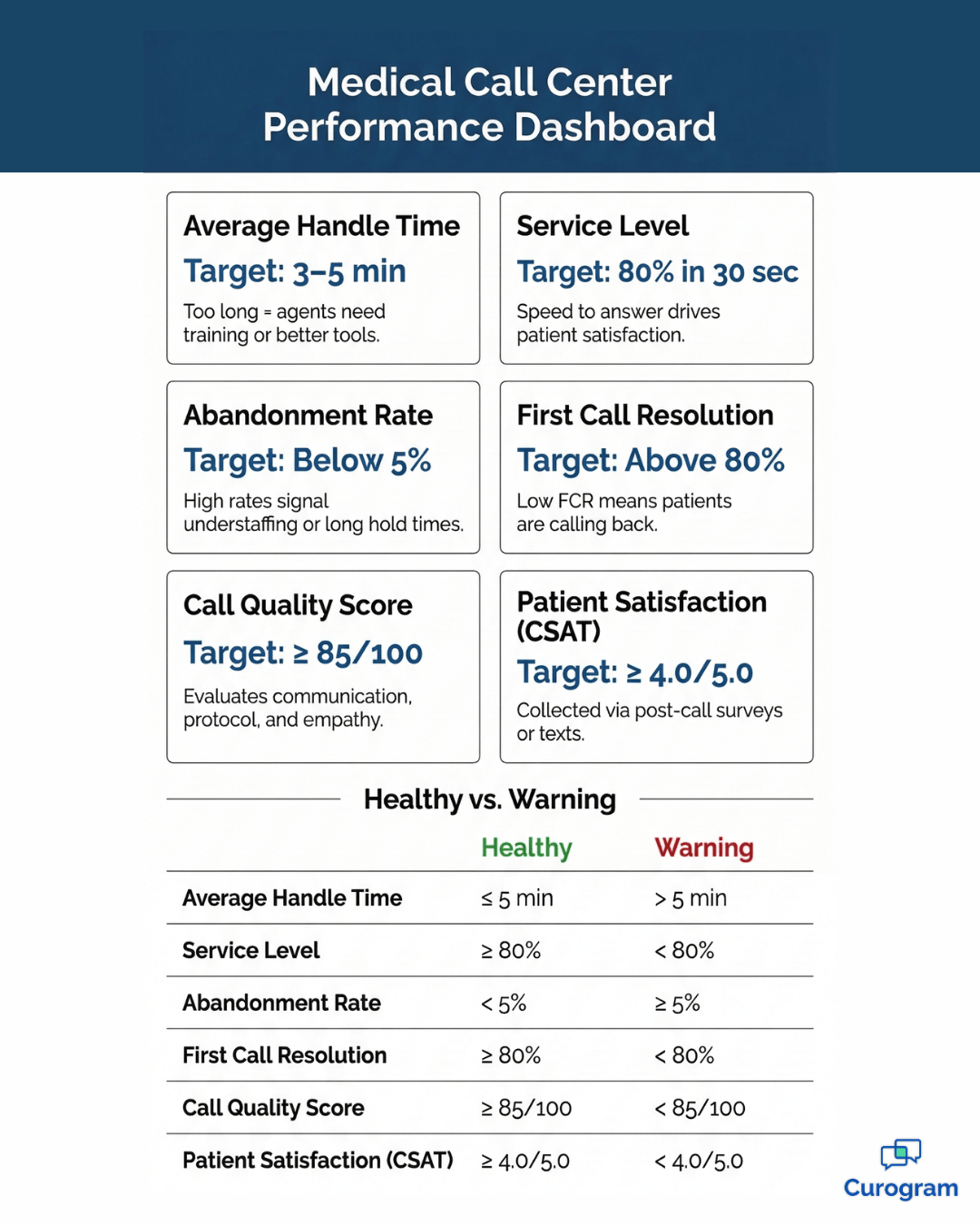
Tracking the right key performance indicators (KPIs) gives you a clear picture of your call center's performance — and tells you where to focus your improvement efforts.
Without this data, you are essentially managing by gut feeling, and gut feelings are not reliable enough when patient experience is on the line.
It helps to think about your metrics in two groups:
Operational metrics that measure speed and efficiency, and experience metrics that measure how patients actually feel about the interaction.
Both matter. A call center that answers quickly but leaves patients confused or frustrated is not doing its job.
| Metric | Target | Why It Matters |
|---|---|---|
| Average Handle Time (AHT) | 3–5 minutes | Measures how long each call takes from start to finish. Too long suggests agents need more training or better tools. |
| Service Level | 80% of calls answered in 30 seconds | Shows how quickly patients reach someone. Missing this target leads to frustration and abandoned calls. |
| Abandonment Rate | Below 5% | The % of callers who hang up before reaching anyone. High rates signal understaffing or long hold times. |
| First Call Resolution (FCR) | Above 80% | Tracks how often a patient's issue is resolved in one call. Low FCR means patients are calling back — wasting their time and yours. |
| Call Quality Score | Varies by practice | A scored evaluation of how well agents communicate, follow protocols, and represent your practice. |
| Patient Satisfaction (CSAT) | Varies by practice | Measures how patients feel about their call experience. Collected through post-call surveys or follow-up texts. |
First call resolution deserves special attention because it directly affects both your workload and patient satisfaction. Every patient who has to call back a second time to resolve an issue that should have been handled on the first call represents a failure — not necessarily of your staff, but of your process.
Low FCR is often a symptom of agents lacking the tools or authority they need to fully resolve issues during the call.
Review these metrics at least monthly and share them with your team — not just with management.
When staff understand the numbers and what drives them, they are far more likely to take ownership of improving them.
When a number drops, dig into the data before assuming it's a staffing problem.
Sometimes the real cause is a process gap, a technology issue, or a knowledge gap that a short training session can fix.
Quick-read: healthy vs. warning signs in your call center metrics
| Metric | Healthy Range | Warning Sign | What to Do |
|---|---|---|---|
| Avg Handle Time | 3–5 min | > 7 min | Review scripts; check if agents lack patient info access during calls |
| Service Level | ≥ 80% in 30 sec | < 70% in 30 sec | Add peak-window coverage; activate virtual queuing |
| Abandonment Rate | < 5% | > 8% | Shorten hold times; turn on callback option immediately |
| First Call Resolution | ≥ 80% | < 65% | Audit escalation paths; give agents more authority to resolve on the spot |
| Call Quality Score | ≥ 85 / 100 | < 70 / 100 | Schedule coaching; refresh scripts and empathy training |
| Patient Satisfaction | ≥ 4.0 / 5.0 | < 3.5 / 5.0 | Run post-call surveys to identify which call types drive low score |
Even a well-staffed call center will hit moments where demand outpaces supply. The practices that handle these moments best are the ones that planned for them in advance — not the ones still scrambling to add staff when the phones are already ringing.
Forecasting is your first line of defense. Use historical call data to predict your busiest periods by hour, day, and month. If your practice sees higher volume during cold and flu season, build that into your staffing model. Many workforce management tools do this automatically once you have fed them enough data.
A common forecasting mistake is only looking at average call volume.
Averages can hide volatility.
A week that averages 200 calls per day might have individual days that spike to 280 — and those spikes are where things break down.
Look at the range, not just the mean, and staff for the high end of your typical volume rather than the middle.
53% |
|
Lower no-show rate Curogram clients experience 53% fewer no-shows than the industry average — fewer last-minute gaps means more predictable call volume (internal data) |
When your lines are truly overwhelmed, overflow strategies kick in.
Your options include:
Virtual queueing is a patient-friendly alternative to holding. Instead of listening to hold music, patients receive a callback when it's their turn. Most strongly prefer this option — and it reduces abandonment rates noticeably.
It also reduces staff stress, because agents are not dealing with a wall of impatient callers who have been waiting for 10 minutes.
Seasonal staffing adjustments, like bringing on part-time agents during your busiest months, can make a real difference. Cross-training administrative staff to handle calls during peak periods gives you extra coverage without a full hire. Even one or two cross-trained staff members available to jump on phones during a surge can prevent your regular team from becoming overwhelmed.
Do not overlook staff wellbeing. High-volume periods are stressful, and burnout is a genuine risk in call center environments. Research consistently shows that stressed agents make more errors, handle calls less effectively, and leave their jobs at higher rates — none of which helps your patients or your practice.
Build in short breaks between high-volume stretches where possible, rotate agents between high-demand and lighter tasks, and check in regularly with your team rather than waiting for problems to surface.
A short daily huddle at the start of each shift — even five minutes — gives you a real-time read on how your team is doing and surfaces issues before they become serious.
One of the bigger decisions in medical call center management is whether to handle calls with your own staff or to outsource some or all of that work to a third-party service. Both models have real advantages — and real trade-offs.
The wrong choice for your practice's stage and size can cost you in quality, compliance, or both.
| Factor | In-House | Outsourced |
|---|---|---|
| Cost | Higher upfront investment in staff, tech, and training | Lower per-call cost, but less control over quality |
| Quality Control | Full control over training, tone, and protocols | Depends on vendor's standards and oversight agreements |
| HIPAA Compliance | Easier to manage internally | Requires a signed BAA and careful vendor vetting |
| Flexibility | More rigid — scaling takes time | Easier to scale up or down quickly |
| Patient Relationship | Staff know your practice and patients | Agents may lack context or practice-specific knowledge |
| Best For | Established practices with consistent volume | Fast-growing or multi-location practices with variable demand |
In-house teams offer something outsourced vendors rarely can:
Familiarity. Your staff know your providers, your scheduling quirks, your most frequent callers, and your practice's tone.
That institutional knowledge adds up to better, warmer interactions — and fewer escalations. The trade-off is that building and maintaining an in-house team requires ongoing investment in recruiting, training, and supervision.
Outsourced call centers work best for high-volume, lower-complexity call types — think appointment reminders, general information requests, and after-hours coverage. They struggle with nuanced calls that require practice-specific knowledge, strong empathy, or clinical judgment.
If you go the outsourced route, the quality of your vendor relationship will determine your results more than almost anything else.
A hybrid approach is often the most practical solution for mid-size practices. You keep high-touch, clinically sensitive calls in-house — triage calls, test result inquiries, new patient consultations — while outsourcing routine calls like appointment reminders and general information requests.
This gives you the best of both models without fully committing to either.
If you choose to outsource, HIPAA compliance is non-negotiable. Your vendor must sign a Business Associate Agreement (BAA) and demonstrate clear data handling protocols.
Ask how their staff are trained on HIPAA, what their breach notification process looks like, and how they handle calls that involve protected health information. Audit them regularly and make sure your contract gives you the right to review call recordings.
The right model ultimately depends on your practice's size, budget, call mix, and growth plans. If you are unsure, start by mapping your current call types and volumes. That data will tell you a lot about where human staff add the most value — and where automation or outsourcing could serve your patients just as well.
A well-run call center is not built on scripts alone. It is built on people who feel confident, supported, and skilled enough to handle whatever comes their way. That takes consistent training and a feedback culture that coaches rather than criticizes.
Culture shapes performance more than any single policy or tool. When agents feel that mistakes are learning opportunities rather than punishable offenses, they are more likely to ask questions, flag uncertainty, and stick to protocols — even on difficult calls. Building that culture starts with how leadership responds when things go wrong.
Call monitoring should be a regular practice, not something you only do when there's a complaint. Set a goal for how many calls each supervisor will review per week and use a scoring rubric that evaluates communication skills, protocol adherence, accuracy, and empathy.
Consistency in evaluation matters — agents should know exactly what "good" looks like before they can reliably hit that standard.
Empathy matters more in healthcare than in almost any other industry. Patients who call your practice are often worried, in pain, or confused.
Training agents to acknowledge how a patient feels before jumping into problem-solving mode makes a measurable difference in satisfaction. A simple technique that works well is the "acknowledge, then act" framework.
Before an agent starts solving the problem, they name what the patient is experiencing:
"I understand this has been a frustrating wait — let me help you get this sorted out." It takes five seconds and changes the entire tone of the call.
Coaching sessions work best as two-way conversations. Share what you observed, ask the agent how they felt the call went, and work together on what to do differently next time. This approach builds trust and makes agents far more receptive to feedback than a one-sided review ever could.
A shared knowledge base — a centralized document or system where agents can quickly look up answers — reduces handle time and improves accuracy. This could be as simple as a well-organized Google Doc or as robust as a dedicated internal wiki. What matters most is that it is easy to search, up to date, and actually used.
Update your knowledge base regularly as policies, procedures, and insurance rules change. An outdated knowledge base creates a specific problem: agents confidently giving patients incorrect information. Schedule a review at least quarterly, and assign someone ownership of each section so updates do not fall through the cracks.
Ongoing training programs do not need to be lengthy or formal. Short, weekly micro-training sessions on one skill or scenario at a time are often more effective than a quarterly training day.
They keep skills fresh, give your team regular opportunities to ask questions, and let you address emerging call trends — like a new insurance policy question or a change in your scheduling process — while they are still fresh.
Managing a medical call center does not have to feel like a constant fire drill. When you have the right structure in place — clear staffing plans, well-trained agents, smart technology, and defined protocols — your phone operation becomes a true asset to your practice instead of a daily headache.
The biggest gains often come from the simplest changes: adding more coverage during peak hours, giving agents better scripts, or shifting routine patient requests to text and online channels. These steps do not require a massive budget or a complete overhaul of your operations.
It is also worth remembering that your patients notice the difference. When calls are answered quickly, issues get resolved on the first try, and staff sound confident and caring, patients feel that. That kind of experience builds trust — and trust keeps patients coming back and referring others to your practice.
Getting here does not happen overnight, but it does not have to be overwhelming either. Start with the area causing the most friction right now — whether that is staffing gaps, a clunky IVR, or a lack of performance data — and build from there. Small, consistent improvements compound quickly in a high-volume environment.
Curogram helps medical practices reduce call volume, improve patient communication, and run a leaner front-office operation.
From automated appointment reminders to two-way texting and real-time patient messaging, Curogram is built for the realities of running a busy practice.
Our internal data shows that practices using Curogram's automated reminders see up to 60% fewer inbound confirmation calls — giving staff more time for the complex, high-value interactions that actually need a human on the line.
Book a demo with today and see how Curogram can help you build a better, more efficient healthcare contact center — without adding headcount or overhauling your current systems. Your team — and your patients — will thank you.
Medical call center management refers to the systems, staffing, and processes a medical practice uses to handle patient calls effectively. It includes everything from scheduling and routing calls to training agents, tracking performance metrics, and reducing unnecessary call volume.
Staffing needs depend on your daily call volume, average handle time, and service level goals. A common benchmark is to use the Erlang C formula as a starting point. Most practices with 200+ daily calls benefit from having at least one dedicated call center agent or team, separate from the general front desk.
The six most important metrics are average handle time (target: 3–5 minutes), service level (80% of calls answered within 30 seconds), abandonment rate (below 5%), first call resolution (above 80%), call quality scores, and patient satisfaction ratings. Review these monthly and share results with your team.
The most effective ways to reduce call volume include sending automated appointment reminders by text, enabling patient self-service through a patient portal, using email for non-urgent communication, and training patients to use alternative channels for routine requests. Based on our internal research, automated reminders alone can cut confirmation call volume by up to 60%.
It depends on your practice's size, call mix, and budget. In-house call centers offer more control over quality and patient relationships. Outsourced centers are more cost-effective and easier to scale. Many mid-size practices use a hybrid model — handling clinical and complex calls in-house while outsourcing routine inquiries.
💡 Front desk optimization in a medical practice means making your front office run smoother, faster, and with less stress for everyone involved....
💡 Automated medical reminders deliver a measurable revenue impact by cutting no-show rates by up to 75% and reducing manual reminder call costs by...
💡The key to improve clinic efficiency lies in strategies that reduce admin burden. Doing so improves patient flow without hiring and increases...