
.jpg?width=30&height=30&name=square-formal-photo%20(1).jpg) Mira Gwehn Revilla
Mira Gwehn Revilla
How HIPAA-Compliant Texting Speeds Patient Responses
.jpg?width=30&name=square-formal-photo%20(1).jpg) Mira Gwehn Revilla : 7/22/26, 5:00 PM
Mira Gwehn Revilla : 7/22/26, 5:00 PM
Learn how HIPAA texting shortens patient response time, cuts front-desk phone tag, and helps your practice confirm more appointments in far less time.
Front desk phones ring for the same handful of reasons all day. A patient wants to move an appointment. Another calls to confirm one. A third asks whether their form went through, and a fourth wants to pay a balance. None of these calls needs a nurse or a biller. They need an answer, and the phone is the only door the patient knows.
That door is costly. Every routine call ties up a staff member who could be checking in the person at the counter. When the line stays busy, patients give up. Some of them were trying to confirm, and those dropped calls turn into next week's no-shows.
Texting changes which calls reach the phone at all. Patient communication platforms answer the repeat questions automatically and handle the rest by message. Routine questions get sorted by text, which keeps the line open for the calls that need a voice.
This guide covers four tactics to reduce patient call volume with texting: automated reminders and confirmations, self-service rescheduling, digital intake with text-to-pay, and multi-location routing.
Each one targets a call type you can measure before and after. We'll also show how to baseline your current volume, so you can prove the drop instead of guessing at it.
Curogram clients see a confirmation rate above 75% and no-show rates 53% below the industry average, based on our internal data. Both numbers start with one move: taking routine calls off the phone and putting them in a text your patients will actually read.
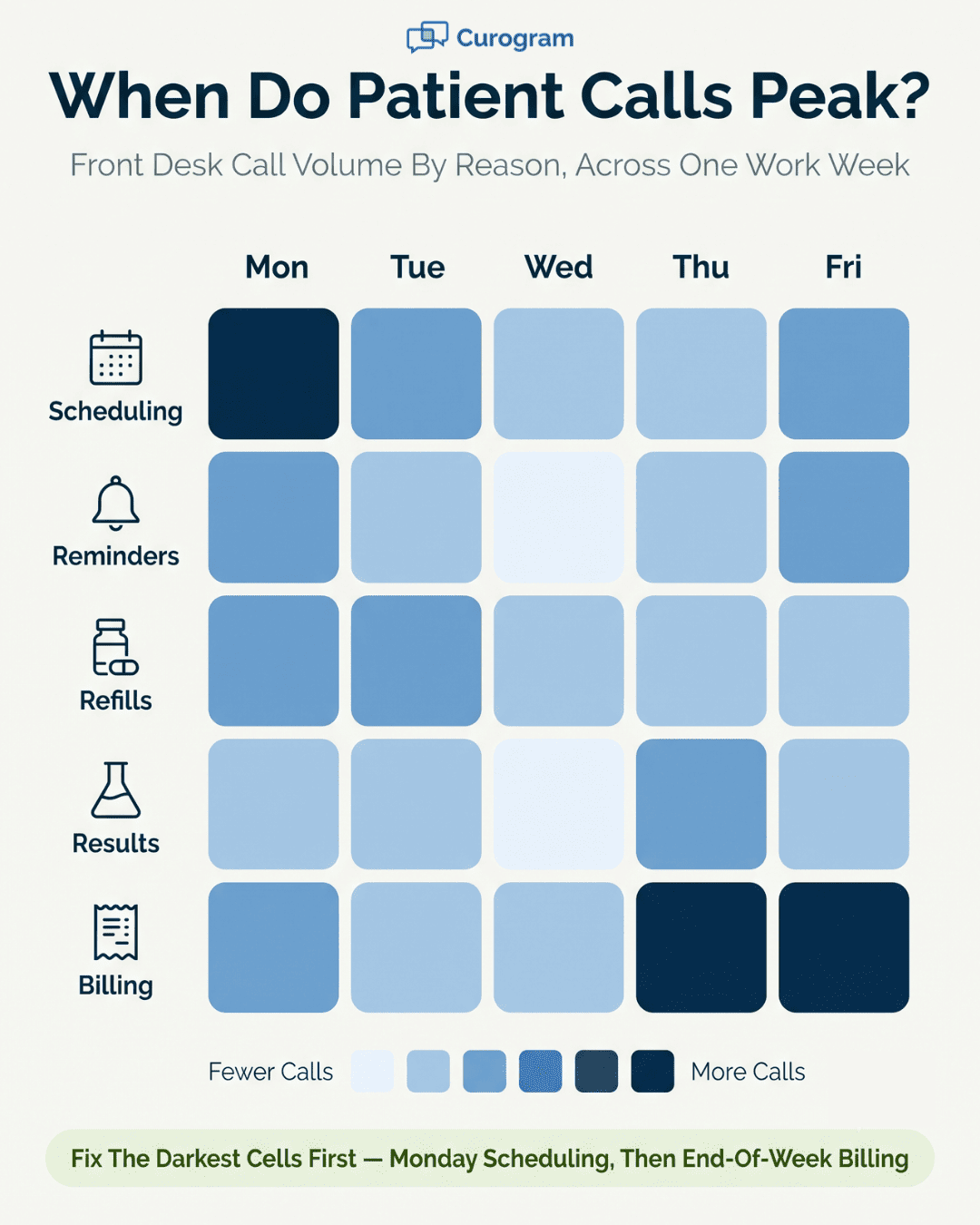
Before you fix the phone, count what it's carrying. Most practices assume calls are random. Pull a week of front desk activity and the same five reasons show up again and again.
Scheduling leads the list. Patients call to book, move, or cancel, and each one takes a few minutes of back-and-forth. Confirmations come next, split between reminder callbacks and staff chasing down unconfirmed slots.
Refill requests, test results, and billing questions round out the top five. These calls share a trait: the answer rarely needs judgment.
A reschedule needs an open slot. A confirmation needs a yes or no. For a balance question, the biller already has the number on screen. Each one is a lookup dressed up as a conversation, and a lookup is what texting handles well.
A three-minute call sounds cheap until you stack it. Twenty scheduling calls a day is an hour of staff time, every day, on one call type.
Add confirmations and billing, and the front desk spends much of the morning on the handset instead of the counter. What drains the day is the volume of near-identical calls that never lets up.
The hidden cost is the missed call. When staff are stuck on one line, the next patient hears a busy signal or a voicemail. Confirmation calls that don't land become no-shows. A no-show is a lost slot plus the callback to rebook it, so one missed call quietly creates two more.
|
Put a rough number on it: Say a front desk fields 60 routine calls a day at three minutes each. That's three hours of staff time daily, or most of one person's shift, spent on calls a text could close. The figure is illustrative, but the shape holds at almost any practice: routine calls eat a full seat. |
Guessing wastes effort. Spend three days tallying calls by reason on a simple sheet: scheduling, confirmations, refills, results, billing, other. You don't need software for this, just a pen and honest counts. Three days is usually enough to see the shape of a normal week.
Your EHR won't do this part for you. CureMD, Elation Health, and TherapyNotes log appointments and visits, not the reason someone dialed the front desk. That's why the manual tally beats waiting on a report: the data you need was never captured in the first place.
|
Call type |
Share of calls |
Texting fix |
|
Scheduling / rescheduling |
Often the top driver |
Two-way self-service rescheduling |
|
Reminders / confirmations |
High, mostly routine |
Automated reminders |
|
Refills and results |
Steady, repetitive |
Two-way message threads |
|
Billing questions |
Spiky near statements |
Text-to-pay with balance links |
The total call count tells you how loud the phone is. The reason breakdown tells you where to aim. Two practices with the same volume can have very different drivers: one drowning in reschedules, another buried in billing questions the week statements go out.
Watch the timing, too. Billing calls spike right after statements. Scheduling calls climb on Mondays. Knowing when a driver peaks tells you which automation earns its keep first, and when to expect the relief once it's live.
Be honest about the ceiling. Some patients still prefer a call, and some calls should stay on the phone. A worried patient asking about a diagnosis, an elderly patient without a texting habit, or a knotty prior-auth question all belong with a person.
The goal is a smaller, cleaner phone queue. Clear the routine 60% or 70%, and the calls that remain get answered faster because staff aren't buried in reschedules. Measuring by reason keeps you honest about which calls actually left the line.
Once you know your top two drivers, you know where to start. A scheduling-heavy practice gets the biggest drop from self-service rescheduling. A practice buried in confirmation callbacks starts with automated reminders.
Provider-patient texting handles the refill and results threads that clog the line in between. Fix the loudest driver first, measure it, then move to the next.
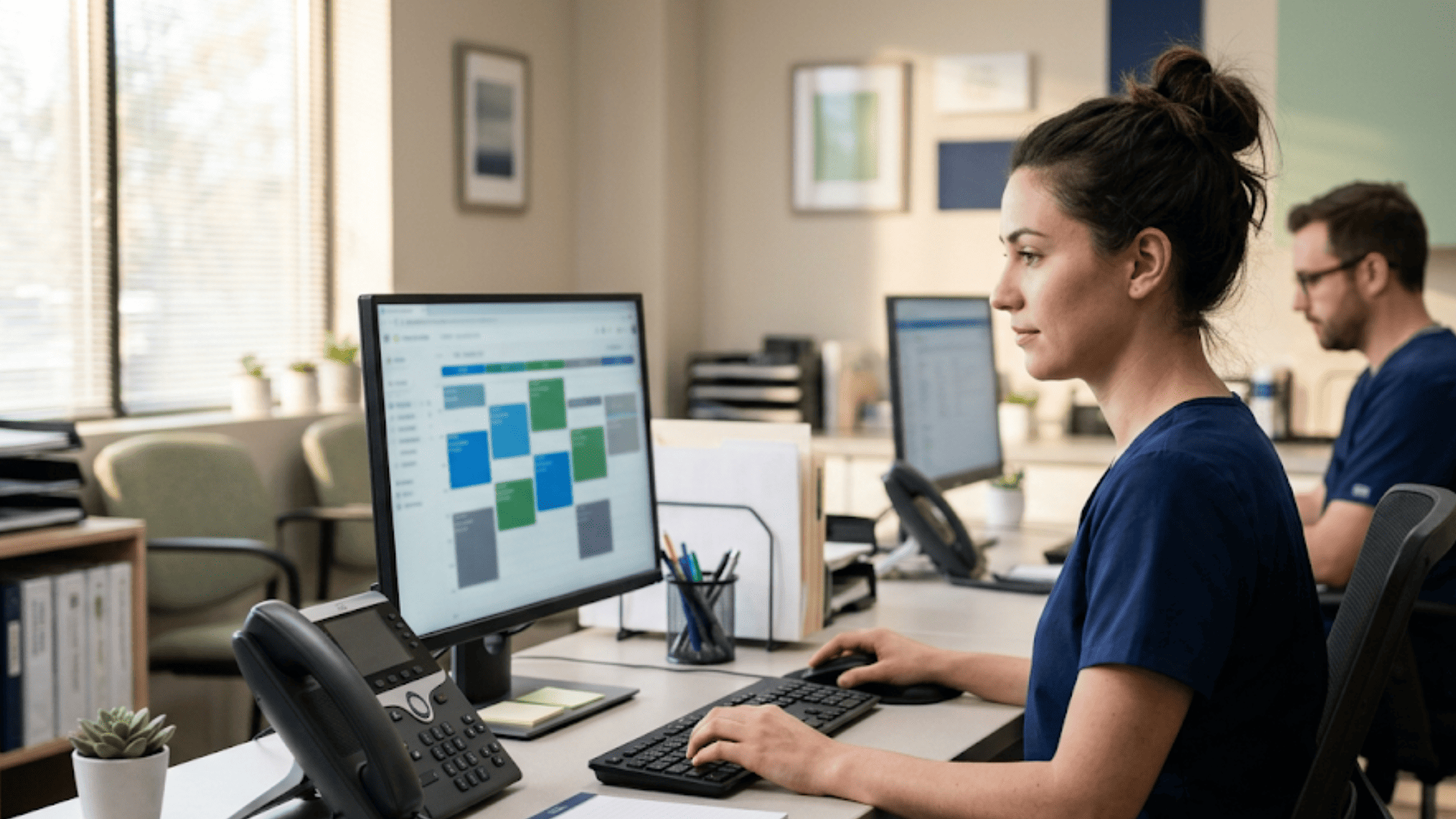
Reminders are the easiest call type to automate, and often the largest. Every reminder that lands by text is a call the front desk never has to place or receive.
A manual confirmation process runs on staff labor. Someone opens tomorrow's schedule, dials each patient, leaves voicemails, and marks who answered. It's slow, and it's the first task that slides when the lobby gets busy.
An automated sequence sends the reminder, reads the reply, and updates the schedule without a person touching it.
Covina Arthritic Clinic confirms more than 1,100 appointments a month this way, based on our internal data. That's over 1,100 calls the front desk didn't have to make. The staff hours that used to go into dialing now go to patients in the building.
Cadence matters more than volume. A common pattern sends one reminder a few days out and a second the day before, each with a one-tap confirm.
The early reminder catches conflicts while there's still time to rebook the slot. The day-before reminder catches the patients who simply forgot.
Keep the message plain and short. State the date, time, provider, and a clear reply option to confirm or ask for a change.
A reminder that reads like a form letter gets ignored, and ignored reminders become the confirmation calls you were trying to avoid. Name the practice so the text doesn't read like spam, and patients reply at a much higher rate.
One rule sits under all of this: patients have to opt in. The TCPA governs automated texts, so you need clear consent to send them, and every message should offer a plain way to stop.
A simple STOP-to-opt-out line covers the exit, and capturing the phone number and consent at intake covers the entry.
Build consent into your intake form and the reminder program stays clean from day one. It's a five-minute setup step that keeps a high-volume channel on the right side of the rules.
Not every reply is a clean confirm. Some patients answer with a question, a conflict, or a request to call.
A good setup reads the intent and routes those to staff, while the plain confirmations clear themselves. Staff only see the messages that need a human, so a hundred reminders might surface five real conversations.
That filtering is the whole point. Without it, every reply lands in the same pile and someone has to sort them by hand, which recreates the phone queue in text form. Intent routing keeps the automated calls automated and pushes only the exceptions to a person.
Automated reminders do more than trim calls. They protect the slots those calls were meant to secure. Atlas Medical Center cut its no-show rate from 14.20% to 4.91% in three months after turning on automated reminders and two-way texting, based on our internal data.
Across current clients, no-show rates run 53% below the industry average. Fewer no-shows means fewer rebooking calls, which pulls a second wave of volume off the phone.
Each recovered slot also carries revenue: our internal data ties the reminder-and-recall effect to a 10% to 20% revenue lift, since a kept appointment beats an empty chair every time.
Rescheduling is where the phone queue really backs up. One reschedule can mean three calls: the patient reaches out, staff check the calendar, and someone calls back with options. Text handles the whole loop in one thread.
A cancel-and-rebook is rarely one call. The patient calls during a gap in their day, staff are mid-check-in, so it goes to voicemail. Staff call back, the patient misses it, and the tag continues. Meanwhile the original slot sits open with no time to fill it.
Multiply that by a busy week and reschedules alone can own the phone. Each one is low-stakes for the patient and high-friction for the front desk, which is exactly the kind of call worth automating first.
There's a quieter cost, too. A patient who can't reach anyone to reschedule often just cancels, or worse, no-shows. The reschedule that never connects becomes a lost slot, so an easy text path protects revenue as much as it saves staff time.
Run the same task over two-way texting instead:
Four steps, no callback, no voicemail. The patient handled it during a two-minute break, and staff never picked up the phone. The reopened slot is now visible for the next patient who needs an earlier date.
When no offered slot works, the thread hands off to staff instead of dead-ending. The patient stays in one conversation, and the front desk steps in only for the harder cases.
So a stack of reschedules that once meant twenty calls becomes a short list of exceptions that actually need a human.
An open slot is only a win if it fills. When a reschedule frees a Thursday morning, that slot can feed a waitlist text to patients who asked for something sooner.
The same two-way thread that emptied the slot can fill it, so the reschedule nets close to zero lost revenue instead of a gap.
Match the offer to the visit type so a 15-minute follow-up doesn't get booked into a new-patient hour. Tie the waitlist to the schedule and the fill happens without a single outbound call. A slot that reopens at 9 a.m. can be booked again by lunch, with no one dialing a soul.
Telehealth messaging keeps some of these appointments from canceling at all. A patient who can't come in can switch to a virtual visit by text, which holds the slot on the books. The reschedule call turns into a two-line exchange, and the visit still happens.
This matters most for follow-ups and check-ins that don't need hands-on care. A patient stuck at work or home with a sick kid keeps the appointment as a video visit instead of scrapping it. The practice keeps the revenue, the patient keeps the care, and neither side spends time on the phone.
Two call types hide in plain sight: "did my form go through?" and "how do I pay this?" Both move off the phone with a link.
New-patient paperwork drives a surprising number of calls. Patients call to ask what to bring, whether the form arrived, or how to fill in a field. A digital intake form sent by text answers all three before the visit.
The patient taps the link, completes the form on their phone, and the answers land in the chart. No front desk call, no clipboard at check-in, no re-keying. The staff member who used to walk paperwork to the counter is free for the patient in front of them.
Billing calls spike right after statements go out. Patients call to ask their balance, confirm a payment posted, or read a card number over the phone. Text-to-pay sends the balance and a secure pay link straight to the patient's phone.
They pay in a tap, the payment posts, and the "did it go through" call never happens. For the front desk, that removes one of the least clinical, most repetitive calls on the board.
Not every call should leave the line. A patient in real distress, a complex insurance dispute, or an urgent clinical question still needs a person. Clearing the routine forms-and-payments calls is what gives staff the room to take those well.
One line per site sounds simple until a patient calls the wrong one. Then the call bounces, gets transferred, or lands in a voicemail no one owns.
Patients don't track which location holds their chart. They call the number they remember, reach a site that can't see their appointment, and get told to call the other office. Each transfer is a fresh call and a fresh chance for the patient to give up.
For groups running several offices, this is a daily tax. Front desk staff at one site field calls meant for another, then play middleman between the patient and a colleague across town.
Multi-location practice tools solve this with one shared inbox. Every text comes into a single queue, tagged by location, and routes to the right site's staff. A patient texts one number and reaches whoever can help, no transfer required.
A group that centralized its messaging this way rebuilt its reputation fast, earning 1,064 new 5-star reviews across the practice in three months, based on our internal data. The same shared workflow that routed calls also drove the review requests that lifted the profile.
A single practice number for texting removes the "which office do I call" problem entirely. Patients stop guessing. Staff stop transferring. And the group gets one view of every conversation instead of separate silos per location.

Reducing patient call volume only counts if you can show the drop on paper. Set a baseline before you turn anything on, then track the same numbers after. A tactic you can't measure is one you can't defend at budget time.
Use the same three-day call log from earlier as your starting line. Record total calls, the count for each reason, and rough staff hours on the phone. That snapshot is what you'll compare against once texting is live.
Watch call volume by reason, no-show rate, and staff hours on the phone.
|
Metric |
Baseline |
After rollout |
|
Scheduling / confirmation calls per day |
Your count |
Expect a clear drop |
|
No-show rate |
Your rate |
Curogram clients run 53% below industry, per our internal data |
|
Front desk phone hours |
Your hours |
Reallocated to in-person care |
Compare the same categories, not just the grand total. A drop in confirmation calls with a steady no-show rate tells a different story than a drop in both. The reason-level view is what shows which tactic earned its place.
Freed phone time only pays off if it goes somewhere useful. When reminders and rescheduling pull an hour a day off the front desk, point that hour at the work that gets skipped: checking in patients faster, working the recall list, or calling the few who still need a real conversation.
Name where the hour goes, and the savings show up as better service instead of just a quieter phone.
Set a review date, too. Pull the numbers 30 and 90 days after each tactic goes live, so you can tie a specific drop to a specific change and know what to roll out next.
The practices that quiet their phones don't do it by working the front desk harder. They pick the one call type that repeats most and move it to text, prove the drop, then take on the next.
A scheduling-heavy office starts with self-service rescheduling. A practice buried in confirmation callbacks starts with automated reminders. The order depends on your own call log, which is why the three-day tally matters more than any vendor's feature list.
What makes texting work isn't the messages themselves. It's that each routine call becomes a lookup the patient can finish on their own: a tap to confirm, a tap to reschedule, a link to pay.
Staff stop being a switchboard and go back to the person at the counter. The busy line that once turned confirmations into no-shows stays open for the calls that actually need a voice.
The numbers follow from that shift. Atlas Medical Center cut no-shows from 14.20% to 4.91% in three months, and Curogram clients run confirmation rates above 75%, based on our internal data. Fewer missed calls, fewer no-shows, fewer rebooking calls after that.
Your call mix is specific to your practice, so the right first move is too. See how much volume yours can move off the phone. Book a demo and we'll map your top call drivers to a texting workflow built for your setup.
 Mira Gwehn Revilla : 7/22/26, 5:00 PM
Learn how HIPAA texting shortens patient response time, cuts front-desk phone tag, and helps your practice confirm more appointments in far less time.

 Aubreigh Lee Daculug : 9/27/26, 6:00 PM
Two-way and one-way appointment reminders compared on call volume, confirmation rates and the software gaps that stop call reduction.
 Mira Gwehn Revilla : 4/19/26, 1:00 PM
Transform your patient outreach with text-based messaging. Confirm appointments faster, bring back overdue patients, and grow your practice revenue...