
How to Reduce Front Desk Calls With Patient Texting (2026)
 Jo Galvez : 9/5/26, 8:00 AM
Texting only cuts work if messages sort themselves. How to reduce front desk calls with patient texting using routing rules, auto-replies and a...

Your front desk in Austin handles messages one way. Your Dallas office does it differently. Your San Antonio clinic? Nobody's quite sure, because it runs on whatever the office manager set up three years ago.
This is the quiet chaos living inside most multi-location physician groups. Each site operates like its own island — separate phone trees, separate habits, separate levels of chaos. Patients notice. So does your staff, every time they're pulled into a call that texting could have handled in seconds.
The math gets worse as you grow. Add a location, add a call volume problem. Add five, and you've got five versions of the same communication headache, none of them talking to each other.
Corporate leadership sees inconsistent patient experience scores. Site managers see burned-out front desk teams. IT sees a compliance risk waiting to happen, because nobody can say for certain how PHI moves through five different sets of tools.
The frustrating part? None of this is a staffing problem. It's a systems problem. When every clinic manages patient communication on its own, you don't get five efficient teams — you get five fragmented ones, each reinventing a wheel that should already be shared.
That's where patient texting for multi-location groups changes the equation. Instead of stitching together separate phone systems and inconsistent habits, one platform connects every site under a single, HIPAA-compliant communication layer. Messages route to the right team automatically. Reminders go out the same way, every time, everywhere.
Below, we'll break down exactly why the multi-location model breaks traditional communication tools, what a unified system actually looks like in practice, and how much call volume you can realistically expect to shed once every location speaks the same language.
Running one clinic well is hard enough. Running ten clinics with ten different communication setups is a different problem entirely.
Most multi-location physician groups grew site by site, and their phone systems grew the same way — bolted on, not built out. Each office ends up with its own line, its own voicemail habits, and its own idea of how fast a patient message should get answered.
That patchwork creates three compounding problems.
There's also a compliance layer that's easy to overlook.
When each site manages messaging on its own, enforcing consistent HIPAA practices gets exponentially harder.
One location might have a solid encrypted messaging protocol. Another might have staff texting from personal phones, and that inconsistency is exactly the kind of risk that turns into a real problem during an audit.
None of this is a people problem. It's a design problem, and it's one that multiplies with every site you add.
The fix isn't more phone lines or another site-specific workaround. It's collapsing every location's communication into one system that all of them share.
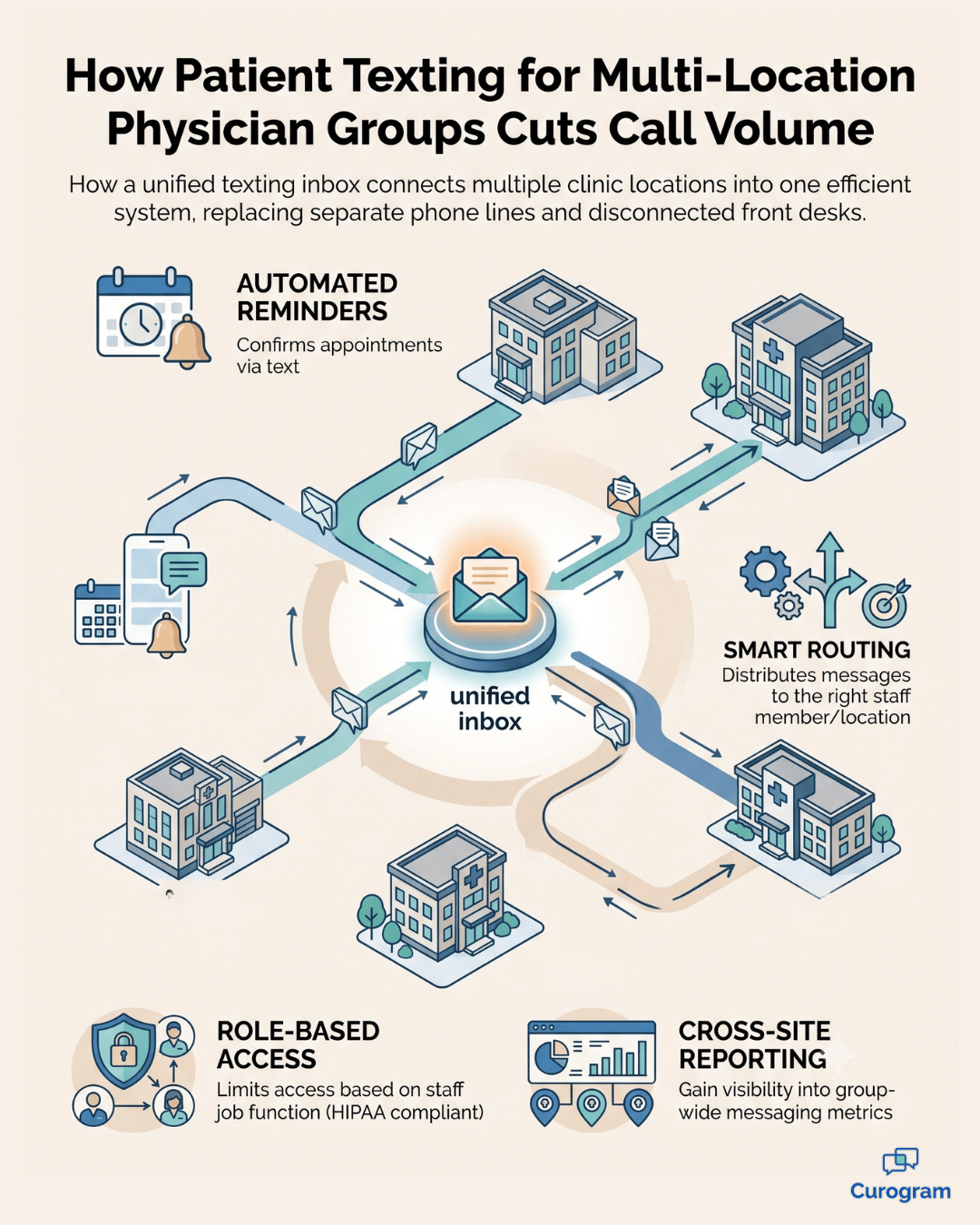
A unified texting platform gives your group one inbox that spans every site, with enough context built in that staff always know which location, team, or provider a message belongs to.
Nobody's digging through five separate systems to figure out who owns a conversation. Smart routing handles the sorting automatically, sending a message from a patient at your northside clinic straight to that clinic's team instead of into a general queue someone has to manually redirect.
This is the core of what makes patient texting for multi-location groups actually workable at scale, rather than just a nicer version of the same fragmented setup.
Role-based access keeps things organized without creating bottlenecks. Site managers see what's happening at their location, while central administrators get the full picture across every site, so leadership finally has real visibility instead of guesswork.
It also stays simple for the people who matter most: your patients.
There's no app to download and no login to remember, since it works over standard SMS, so the experience feels the same whether someone's messaging your flagship location or your newest satellite office. Underneath all of it, native EHR integration keeps patient records connected across every site, so texting doesn't become yet another disconnected system your staff has to manage separately.
Here's the question every practice administrator eventually asks:
How much can this actually reduce the number of calls hitting the front desk?
The honest answer depends on what's driving your call volume today, but the biggest drivers are almost always the same across every location.
Automating those categories through two-way texting is what moves the needle, and it's the core promise behind reducing patient call volume at scale. Consider a group running five locations, each fielding roughly 150 calls a day. That's 750 daily calls across the organization, a huge share of them routine and entirely automatable.
Shifting reminders, confirmations, and simple scheduling questions to text can realistically cut inbound call volume by roughly half, based on typical results practices see when they move these interactions to two-way texting.
That's not a small efficiency gain — it's the difference between front desk staff spending their day fielding repetitive calls and spending it on the patients who actually need a human conversation.
Mass texting adds another layer of value here. Need to notify one site about a schedule change, or your entire group about a weather closure? You send it once, to the right audience, instead of making dozens of individual calls or relying on each site to handle its own notifications differently.
The result isn't just fewer calls — it's a call-reduction pattern that holds steady as you add new locations instead of resetting the problem every time you grow.
Not every texting tool is built for a multi-location group, and the gaps show up fast once you're managing more than one site.
Here's what actually matters.
| Feature | Why it matters for multi-site groups |
|---|---|
| Centralized inbox with routing | Keeps every location's messages sorted without manual redirecting |
| Automated reminders and recalls | Standardizes no-show reduction across every site, not just your flagship location |
| Cross-site reporting | Gives leadership one dashboard instead of five disconnected views |
| Online scheduling and e-forms | Reduces administrative back-and-forth before the patient even arrives |
| Telehealth and text-to-pay | Extends the same unified experience into virtual visits and billing |
| Consent and opt-out management | Keeps TCPA compliance consistent across every location automatically |
These features work together, not in isolation. A centralized inbox without cross-site reporting still leaves leadership blind, and automated reminders without consent management still leaves you exposed to compliance risk. The value of multi-location practice tools comes from how well the pieces integrate, not from any single feature on its own.
This is also where provider-patient texting earns its place as a standard workflow rather than a side feature.
When providers can message patients directly through the same compliant system front desk staff use, follow-up care and quick clinical questions stop requiring a phone call altogether.
Compliance is where fragmented systems create the most risk, and where a unified platform earns its keep.
A platform built for multi-location groups should carry HIPAA compliance, a signed BAA, SOC 2 Type 2 certification, and encryption as standard, not as an add-on you have to configure separately at each site.
Audit logs need to span your entire organization, so if a question ever comes up about how a message was handled, you're pulling one clean record instead of chasing down five different systems.

This matters more than it might seem at first glance. Telehealth messaging and secure texting only stay compliant if every location follows the same protocol, every time, and one site cutting corners on encrypted messaging puts your entire organization at risk, not just that clinic.
Centralizing your communication doesn't just reduce call volume. It closes the compliance gaps that naturally open up when every location manages its own version of "secure enough."
If you're comparing options, it helps to know where the differences actually show up in daily use.
The difference comes down to how routing and the patient experience are handled across multiple sites. Curogram's unified multi-location routing and app-free patient experience are built specifically for groups managing several locations at once, rather than adapted from a single-site model. See the full breakdown in Curogram vs Klara.
The gap shows up in depth and breadth. Curogram is built to handle the complexity of multi-location operations while still covering the full range of communication needs — scheduling, forms, payments, and telehealth — in one platform. Compare the details in Curogram vs OhMD.
The distinction is routing and call deflection. Curogram is built around getting messages to the right person the first time and automating the call drivers that eat up front desk hours, which matters more as you add locations. See the comparison in Curogram vs Solutionreach.
For a broader look at how the category compares overall, this breakdown of how the top multi-location texting platforms stack up is a useful next stop.
Every location you add shouldn't mean another disconnected phone system to manage. It should mean one more site plugged into a communication process that already works.
That's the real shift here. Patient texting for multi-location groups isn't about replacing your front desk phones with a fancier version of the same fragmented setup. It's about giving every site — from your original location to the one you opened last quarter — the same reliable, compliant, automated way of reaching patients.
The practices that get this right stop treating each clinic as its own island. They centralize the inbox, automate the repetitive calls eating up staff time, and give leadership one clear view across the whole organization instead of five disconnected ones.
You've already seen what the alternative costs: inconsistent patient experiences, invisible bottlenecks, and a compliance risk that grows quietly with every new site you open.
Curogram was built to close that gap. One platform, every location, one compliant system your whole team can actually rely on.
If you're managing communication across multiple sites and feeling the strain of doing it the fragmented way, it's worth seeing what a unified system looks like in practice.
See it against your own exam types and prep rules, not a generic demo script. Book a demo with Curogram today and find out how much time — and how many calls — your front desk teams could get back.
 Jo Galvez : 9/5/26, 8:00 AM
Texting only cuts work if messages sort themselves. How to reduce front desk calls with patient texting using routing rules, auto-replies and a...

 Aubreigh Lee Daculug : 10/1/26, 6:00 PM
Four failures behind broken clinic texting: personal phones, no BAA, no audit trail and no opt-out record. What each exposes and how to close it.
 Aubreigh Lee Daculug : 8/5/26, 10:00 AM
Learn why patient portals see low engagement while texts reach 98% open rates, and when each channel works best.