
Patient Texting for Multi-Location Physician Groups
 Aubreigh Lee Daculug : 7/28/26, 10:00 AM
Curogram unifies patient texting across every location. Route messages, automate reminders, and reduce call volume. Book a demo.

Most practices set up texting, watch a few hundred messages arrive, and find they moved the queue rather than shrank it. The phone is quieter. One person now reads everything.
That is a routing problem. A message landing in a shared pile with no rules attached costs almost what a call costs: someone reads it, works out whose job it is, and passes it along. You swapped hold music for a forwarding step.
The practices that actually get their afternoons back do two things first. They decide what sorts on arrival, and they decide what never reaches a person at all.
Sorting on arrival means a reschedule request goes to scheduling and a question about results goes to clinical staff, without a human in the middle making that call. Never reaching a person means the four or five questions that have one fixed answer get answered by the system.
Office hours. Where to park. Which insurance you take. What to bring to a first visit.
What is left after those two filters is the real work, and it is a far smaller pile than your phones carry today. Curogram clients have cut phone volumes by as much as 50%, per Curogram client data from clinical settings.
One caution before any of it. We keep the focus on front desk communication rather than direct access to physicians, because most practices want the desk more reachable and the doctor's day protected. Routing rules are where that line gets drawn, so draw it deliberately at setup.
This covers how sorting works, which replies to automate, the two call sources practices usually miss, and how to prove the drop with numbers.
Sorting is the difference between a texting tool and a lighter workload. Set these rules before you go live.
Incoming messages are read for topic and intent, then sent to the team that owns it. Reschedule or cancel goes to scheduling. Results or symptoms goes to clinical staff.
Your front desk should never scroll past clinical threads to find the four scheduling requests they handle. That scrolling is the hidden cost of a single shared pile, and it grows with volume.
Match the rules to how your practice already divides work, including by provider panel or department. Rules that fight your staffing model get overridden within a month.
Multi-site groups have a specific version. A patient texts the number they remember, reaches a site that cannot see their appointment, and gets told to try the other office.
Location tagging fixes it underneath. Every message lands in one queue tagged to the patient's home site, and staff see only their own. Each location keeps its number and caller ID, so nothing changes on the patient's phone.
Role-based routing narrows who sees protected health information. On the phone, whoever picks up hears whatever the patient says. Every thread carries a record of who opened it and when.
That record is what a compliance review asks for, and the fastest way to answer a patient who says nobody got back to them.
Automation earns its place on repetition. If your team types an answer forty times a week, it should not be typed at all.
Start with the four or five that never vary: hours, directions and parking, accepted insurance, and what to bring to a first visit. Each auto-reply that resolves a question removes a message from the queue and an interruption from someone's afternoon.
Write them in your own voice, one action each. A reply that answers and then asks something back has created another message.
Reminders that accept a reply are the highest-volume win available. The patient answers yes, the reply is captured against the appointment, and nobody calls to chase it.
More than 75% of appointments get confirmed this way, per Curogram client data from clinical settings. One clinic runs over 1,100 confirmations a month on automated reminders, work its front desk used to do by phone.
A reschedule is not a one-tap task at most practices, because availability depends on visit type, provider, and room. What text removes is the waiting: no hold, no voicemail, no calling back at four.
The patient says they need to move, staff answers in-thread with two or three real options, and the patient picks one when they get a minute. Ninety seconds of attention each, spread across an hour.
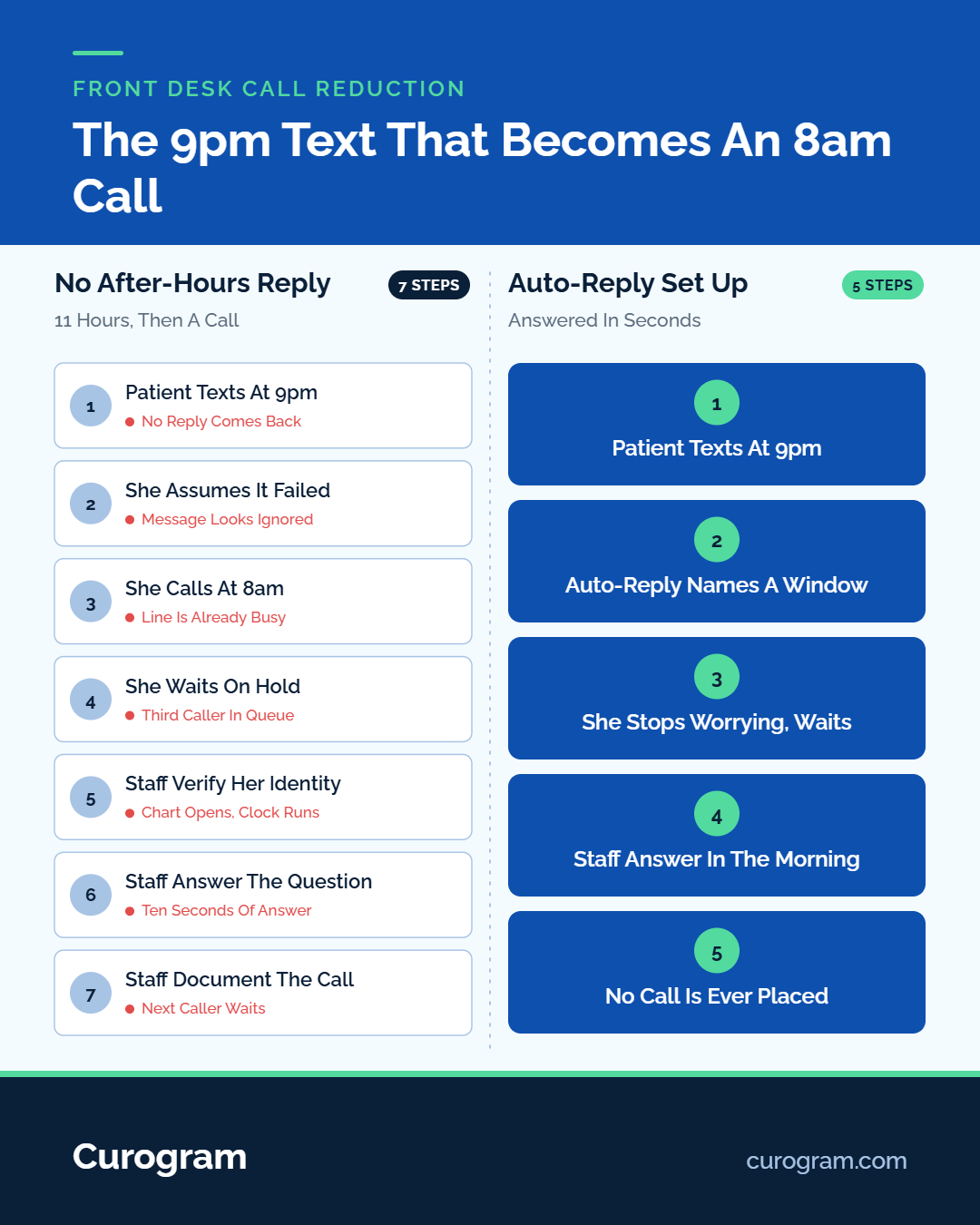
A patient who texts at 9 pm and hears nothing assumes the message failed, so they call at opening. That call is a real share of the morning queue, and one automated reply removes it.
Two things belong in that reply. When someone will respond, stated as a window rather than soon. And what to do if the situation cannot wait, which means naming 911 and your after-hours line explicitly.
Never let an auto-reply imply a message has been read. Acknowledging receipt is fine. Suggesting a person has seen it is not, and that wording matters if a patient later says they reported something urgent.
Write the handoff rule down instead of leaving it to judgment. Ours is short. Three exchanges without resolution, any message with a symptom in it, or any patient who sounds upset becomes a phone call.
A hundred reminders might surface five real conversations. Those five are the ones your team should be spending its judgment on.
Two call sources sit outside the scheduling conversation entirely, and practices routinely forget to count them. Electronic Patient Forms and Text-to-Pay are the features that take them off the phone.
New-patient paperwork generates its own call pile. Did my form go through. What do I bring. Which section applies to me.
A texted form link answers all three before the visit. The patient completes it on their phone, and check-in stops being where paperwork gets discovered.
Billing volume is predictable in a way scheduling volume is not. It spikes in the days after statements go out, every cycle, while staffing rarely moves to match.
A payment request sent by text carries the balance and a secure link. Patients stop calling to ask what they owe, and staff stop reading card numbers over the phone.
Curogram connects with nearly any EMR and complements the system you already run, so patient lists and schedules do not need re-keying. Confirm sync direction for your own system at setup, because what posts back to the chart and what a staffer updates differs by platform. We cover this per platform under EMR integration.

Reducing call volume only counts if you can show it. That takes a baseline, and the baseline has to exist before you change anything.
Spend three days tallying calls by reason: confirmations, scheduling, billing, refills, everything else. Your phone system reports volume, but not reason, and reason is the number that matters.
Log two more things while you are at it. Staff minutes on the phone, and voicemails left per day.
|
Metric |
Where it comes from |
When to check |
|
Calls by reason |
Same three-day tally, repeated |
Day 30 and day 90 |
|
Confirmation rate |
Reminder reports |
Weekly |
|
No-show rate |
Your schedule |
Monthly |
|
Staff phone minutes |
Phone system report |
Day 30 and day 90 |
Run the tally the same way both times. A loose baseline and a careful follow-up will show a drop that is not there.
An hour a day off the phones disappears if nobody assigns it. Name the destination before launch: faster check-in, the recall list, or the prior auth backlog.
Recall is usually the highest-value place to put it. One multi-location client sent SMS recalls to overdue patients, 35% booked within a month, and 1,240 patients were seen from those messages alone.
Set the routing rules before the first message arrives. Topic, then location, then provider or department.
Automate the questions with one fixed answer, and write down what comes back to a person. Count calls by reason for three days first, so the number you quote in ninety days means something.
Book a demo and we will map your routing rules against your current call mix before you commit to anything.
 Aubreigh Lee Daculug : 7/28/26, 10:00 AM
Curogram unifies patient texting across every location. Route messages, automate reminders, and reduce call volume. Book a demo.

.jpg?width=30&name=square-formal-photo%20(1).jpg) Mira Gwehn Revilla : 3/21/26, 1:00 PM
Mira Gwehn Revilla : 3/21/26, 1:00 PM
Explore all Curogram communication platform features. See how HIPAA texting, appointment reminders, team tools, and EMR integration work for you.

 Jo Galvez : 9/24/26, 8:00 AM
Learn why clinics face patient texting platform gaps with workflow, compliance, and adoption issues—plus practical fixes to improve communication.