Skip to the main content.

13 min read

Why Two-Way Appointment Confirmations Are 3x Better Than One-Way

Why Two-Way Appointment Confirmations Are 3x Better Than One-Way
 💡 A two-way appointment confirmation lets patients reply to a text to confirm, cancel, or reschedule their visit. Unlike one-way reminders that only send info, two-way systems ask patients to take action. When a patient texts back "YES" to confirm, they make a mental promise to show up. This simple act of replying can cut no-show rates from 15–20% down to 5–8%.

Two-way systems also save staff time by cutting down on phone calls. The best platforms auto-sort replies like YES, NO, or RESCHEDULE and update your calendar in real time. Practices that switch from one-way to two-way often see results in the first month. To get started, pick a platform with two-way texting, set up clear message templates, and train your front desk team on the new workflow.

Your front desk sends out dozens of reminders each day. But how many patients actually read them? And more to the point, how many still show up?

One-way reminders have been the norm for years. They push out a message and hope for the best. But hope is not a strategy when each missed visit costs your practice $200 or more.

That's where a two-way appointment confirmation changes the game. Instead of just telling patients about their visit, it asks them to reply. A simple "YES" or "NO" turns a passive message into an active exchange. It's the gap between talking at someone and having a real chat with them.

This approach works because it puts the patient in the driver's seat. They choose to confirm. They choose to cancel. They choose to reschedule. Each choice keeps your schedule tight and your revenue safe.

In this guide, you'll learn why two-way patient communication beats one-way reminders by every measure. We'll walk through the data, the message design, the staff workflows, and the tech you need. You'll also get real templates you can use right away.

Whether you run a solo practice or manage a group with dozens of providers, this article will show you how to cut no-shows, save staff hours, and keep your schedule full. By the end, you'll have a clear action plan to move from one-way blasts to a true appointment confirmation system that works.

Let's dig into the numbers and see why two-way is the smarter move.

One-Way vs Two-Way Reminders: What's the Difference?

A one-way reminder is a message that goes out and asks nothing in return. Think of it as a digital sticky note.

Your system sends a text or email that says, "You have a visit on Tuesday at 2 PM." The patient reads it — maybe — and that's it. There's no way to know if they saw it or plan to show up.

A two-way appointment confirmation adds a reply step. The patient gets the same info, but the message also says, "Reply YES to confirm or NO to cancel."

When they respond, the system logs their answer and updates the schedule. This turns a one-sided alert into a real exchange.

Here's a quick example of each:

  • A one-way message might read: "Reminder: Your visit with Dr. Smith is March 5 at 10 AM."

  • A confirm appointment text might read: "Hi Alex, you have a visit with Dr. Smith on March 5 at 10 AM. Reply YES to confirm, NO to cancel, or RESCHEDULE to pick a new time."

The tech behind each type is also different. One-way reminders only need a basic mass-texting tool. Two-way systems need a platform that can send, receive, and sort replies. The platform must also connect to your EMR so confirmations flow into your calendar in real time.

Cost is another factor. One-way tools are often cheaper up front because they do less. Two-way platforms charge more, but the return on that spend is clear. When you cut no-shows by even a few per week, the extra cost pays for itself fast.

A practice with 20 missed visits a month at $200 each loses $4,000. Cutting that in half saves $2,000 monthly — far more than the cost of a better platform. In short, one-way talks. Two-way listens.

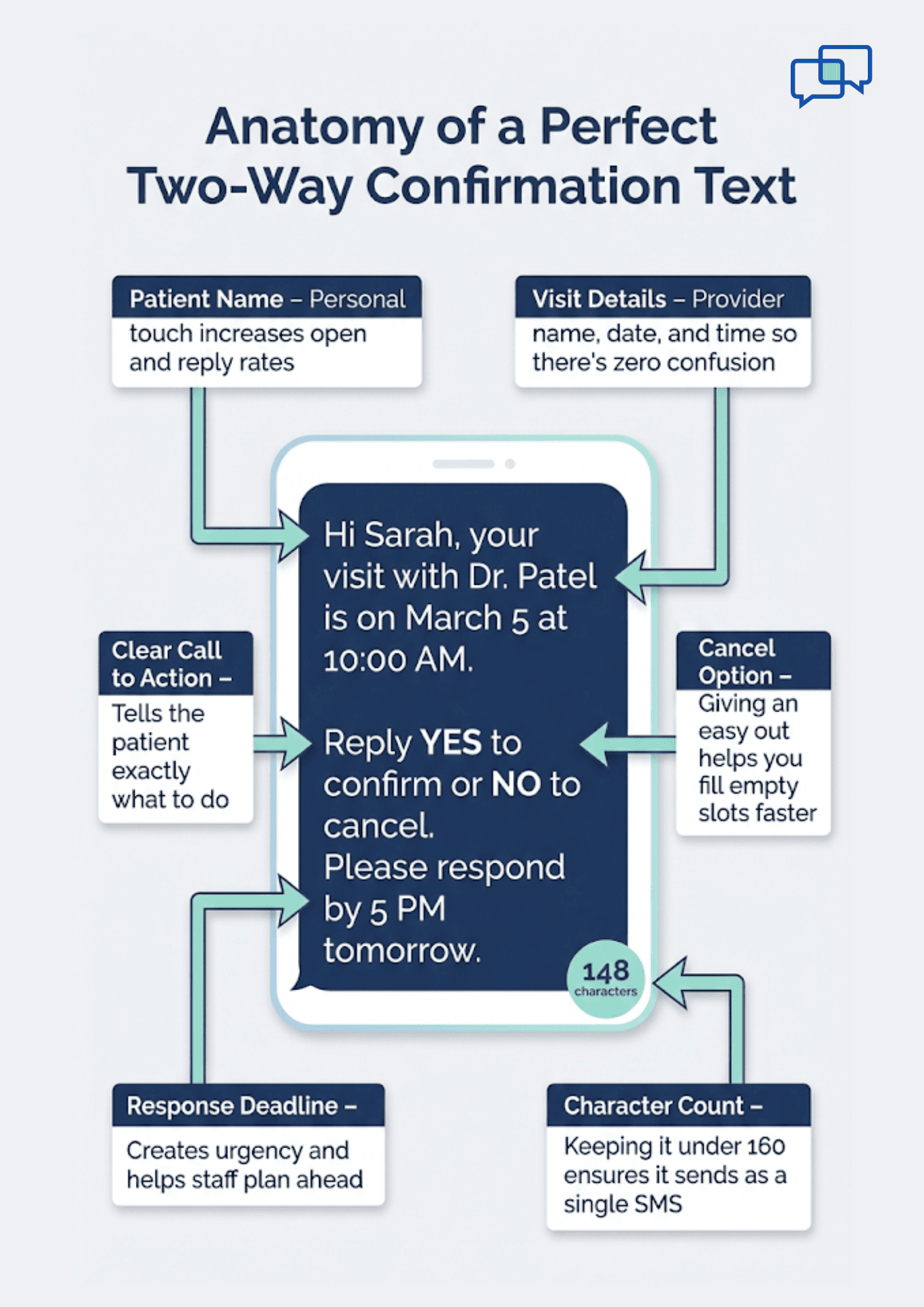
Infographic showing the anatomy of a two-way appointment confirmation text

The Data: Engagement and No-Show Rate Comparison

Numbers tell the real story. Practices that use one-way reminders still see no-show rates between 15% and 20%. That's roughly one in every five or six patients who just don't show up. For a busy practice with 40 visits a day, that could mean six to eight empty slots.

Now, compare that with two-way systems. Practices using interactive appointment reminders bring no-show rates down to 5–8%. That's a drop of more than half. The reason is simple: when patients reply, they commit. When they commit, they follow through.

Response rates support this. Most two-way systems see 60–80% of patients texting back to confirm. That means your front desk knows the status of most visits a full day or two before the slot. Compare that to one-way, where the status is always "we hope they come."

What does this look like in dollars?

Take a 10-provider group that sees 200 patients a day. At a 20% no-show rate, that's 40 missed visits daily. If each visit is worth $150, the daily loss is $6,000. Moving to a two-way system that cuts no-shows to 7% means only 14 missed visits. The daily savings: roughly $3,900.

Over a month, that adds up to more than $80,000 in saved revenue. Even a solo provider seeing 25 patients a day could save $10,000 or more per month by making the switch.


These aren't just guesses. Industry data from health IT reports shows that practices using two-way texting see the largest drops in no-shows within the first 60 days of going live. The key is getting patients used to the new flow and making it easy for them to reply.

Psychology: Why Two-Way Creates Stronger Commitment

There's a reason asking for a reply works so well. It taps into a basic part of how people make choices. When someone says "YES" to a visit, they feel a pull to keep that promise. This is called the commitment effect. Once we say we'll do something, we're far more likely to do it.

  • One-way reminders skip this step. They inform, but they don't engage. A patient reads the text, thinks "I'll remember," and then moves on with their day. By the time the visit rolls around, life has gotten in the way. There was no active choice, so there's no inner push to follow through.

  • Two-way patient communication flips this. The reply creates a small but real agreement. The patient has now gone on record. Even though it's just a text, it mimics making a promise. People don't like to break their word, even with a text message.

There's also the factor of active vs passive engagement. Reading a message is passive. Typing a reply is active. Active tasks create stronger memory. The patient is more likely to put the visit on their mental to-do list because they had to do something about it.

Think of it this way: If a friend tells you about a party, you might forget. But if they ask "Can you come?" and you say "Yes, I'll be there," you're far less likely to skip it. The same logic applies to your patients.

This is also why interactive reminders healthcare teams use tend to outperform even phone call reminders. A phone call is active, but it takes more time and staff effort. A two-way text gets the same result with a fraction of the cost and time.

Designing Effective Two-Way Confirmation Messages

The message itself matters more than most people think. A poorly worded text gets ignored. A clear one gets replies. The goal is to make it as easy as possible for the patient to respond.

Start with a strong call to action. Tell the patient exactly what to do. "Reply YES to confirm" is clear and simple. Avoid vague phrases like "Let us know if you're coming." The easier the action, the higher your response rate.

Always include a cancel option. This might seem odd, but giving patients an easy out helps your schedule. If someone can't make it, you want to know fast so you can fill the slot. "Reply NO to cancel" works well here.

Add a reply deadline when possible. For example, "Please reply by 5 PM tomorrow." This creates a sense of urgency and helps your team plan ahead.

Keep messages short. Aim for 160 characters or less. Long texts get skimmed or ignored. Here are some sample templates you can adapt:

  • "Hi [Name], your visit with Dr. [Last Name] is on [Date] at [Time]. Reply YES to confirm or NO to cancel."

  • "Reminder: You have an appointment on [Date] at [Time]. Reply 1 to confirm, 2 to cancel, 3 to reschedule."

  • "Hi [Name], this is [Practice Name]. Your visit is [Date] at [Time]. Can you make it? Reply YES or NO."

  • "[Practice Name]: Visit reminder for [Date] at [Time] with Dr. [Last Name]. Reply C to confirm or X to cancel."

  • "Hi [Name], just checking in. Your visit is [Date] at [Time]. Reply YES to lock it in or call us to change."

Test different versions and track which ones get the most replies. Small changes in wording can lift response rates by 10–15%.

Automating Response Handling

Getting replies is only half the job. What happens after the patient texts back is just as important. A good appointment confirmation system handles most replies without any staff input.

When a patient replies YES, the system should mark the visit as confirmed in your calendar. This update should happen right away. Your front desk can then see a live dashboard of confirmed, canceled, and pending visits.

When someone replies NO, the system should trigger a cancel workflow. This means the slot opens up on the schedule.

It can also send an auto-reply like, "Your visit has been canceled. Would you like to reschedule? Reply RESCHEDULE or call us at [number]." This keeps the door open without adding work for your team.

For RESCHEDULE replies, the flow gets a bit more complex. Some platforms offer a self-service link that lets the patient pick a new time.

Others route the request to a staff member who calls or texts back with open slots. Either way, the goal is to keep the patient engaged so they don't fall off your schedule.

Ambiguous replies are the tricky part. Patients might text "Maybe," "I think so," or "What time again?" Your system should flag these for staff review. A smart platform uses keyword matching to sort clear replies and escalate unclear ones.

Here's a real-world example:

A patient texts "Yes but can I come later?" The system can't auto-confirm this. It flags the message. A staff member sees it, checks the schedule, and texts back with the next open slot. This blend of automation and human touch keeps things smooth.


The key rule: automate the simple stuff. Escalate the rest. This saves your team hours each week while making sure no patient falls through the cracks.

Dealing with Non-Responders

Not every patient will reply. Some will ignore the text. Others might not see it in time. You need a plan for these non-responders.

  1. The first step is a follow-up message. If a patient doesn't reply within 24 hours, send a second text. Keep it brief: "Hi [Name], we haven't heard back about your visit on [Date]. Reply YES to confirm or call us at [number]." This nudge alone can boost response rates by 15–20%.

  2. If the second text gets no reply, a phone call is the next move. Have a staff member call during business hours. Keep the call short and friendly. "We just want to make sure we're holding your spot." This backup strategy catches most of the remaining non-responders.

Now, here's a big question: do you assume the patient is coming or not? Some practices assume confirmation — they keep the slot filled and hope for the best. Others assume cancellation and open the slot for someone else. Neither approach is perfect.

The best practice is to track patterns. If a patient has shown up for their last three visits without replying, they're likely to come again. If someone has a history of no-shows and doesn't reply, it's safer to open that slot. Use your data to guide the call.

Over time, you can also improve response rates by changing your message timing, wording, or the channel you use. Some patients respond better to texts sent in the morning. Others prefer an evening reminder.

Testing these changes helps you find what works best for your patient base. The bottom line: non-response is not a dead end. It's a signal to try a different path.

Staff Workflow for Two-Way Confirmations

One of the biggest wins with two-way texting is how much time it saves your front desk. In a typical practice, staff spend hours each day calling patients to confirm visits. With a two-way system, that call volume drops sharply.

Think about it this way:

If your team calls 80 patients a day and each call takes two minutes, that's over two and a half hours on the phone. A two-way text flow handles 60–80% of those confirmations on its own. Your staff might only need to call 15–20 patients instead of 80.


That frees up your team for higher-value tasks. They can greet patients, handle check-ins, process paperwork, or manage complex scheduling requests that need a human touch. The result is a calmer front desk and better patient experience.

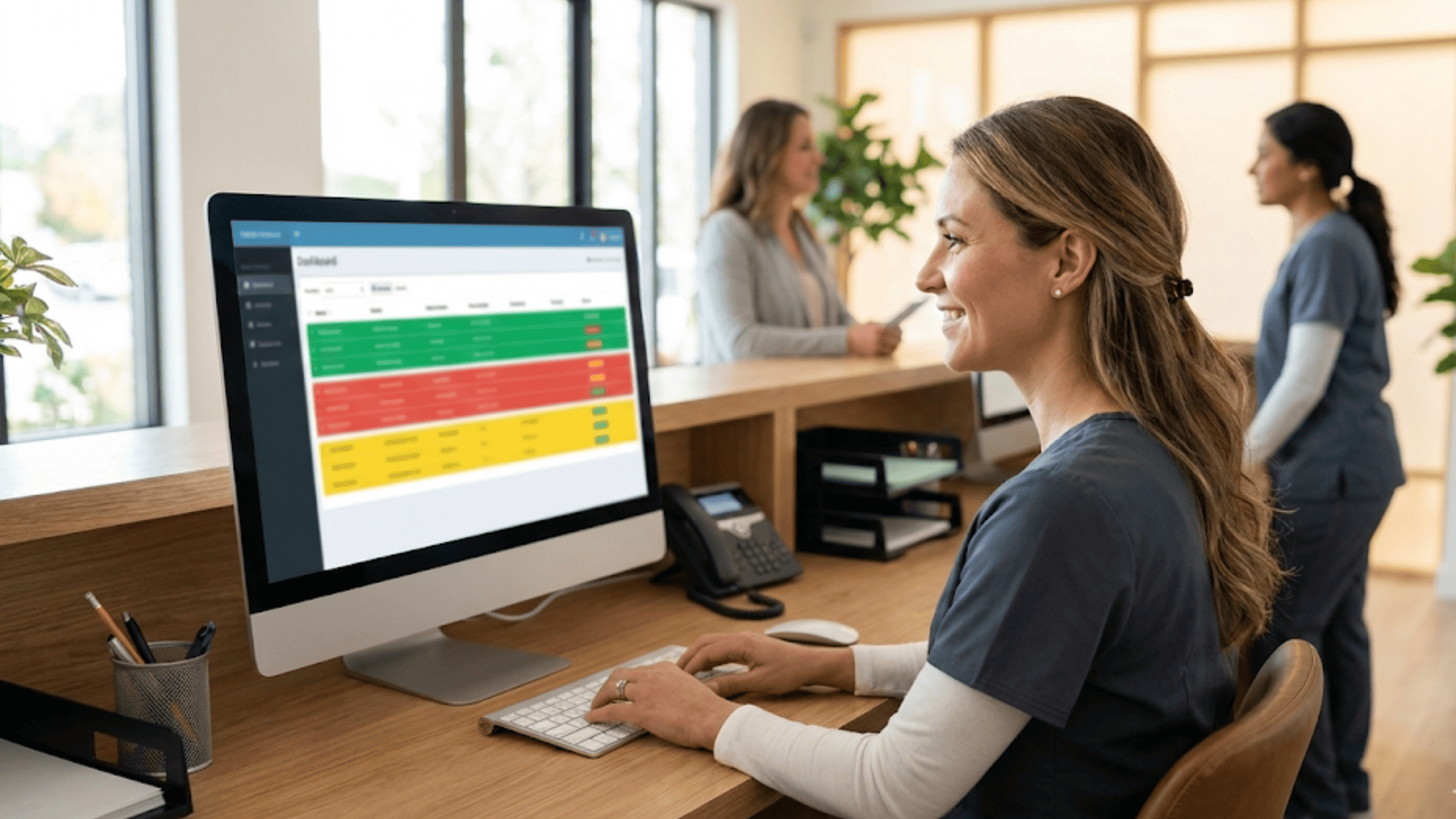
Most platforms offer a dashboard where staff can see all replies in one place. Confirmed visits show in green. Cancellations show in red. Pending replies show in yellow. This visual layout makes it easy to spot gaps and act fast.

For complex cases — like a patient who wants to add a family member to the visit or needs a longer slot — staff step in to handle the request by text or phone. The system handles the routine. Humans handle the tricky stuff.

Training is also simple. Most teams are up and running in a day or two. The workflow comes down to three steps: check the dashboard, handle flagged messages, and follow up on non-responders. Staff who are used to texting in their daily lives pick this up fast.

To put a number on it, practices report saving 10–15 hours of staff time per week after switching to two-way confirmations. At an average front desk wage, that's real money back in your pocket.

Medical office front desk staff member viewing a color-coded two-way appointment confirmation dashboard on her monitor

Technology Requirements and Platform Features

Not all texting platforms are built the same. If you want true two-way messaging, your tech needs to check a few key boxes:

  • The platform must support two-way texting. This sounds obvious, but many basic reminder tools only send messages. They can't receive or sort replies. Make sure the system can handle incoming texts and match them to the right patient and visit.

  • Look for auto-response parsing. The platform should read a patient's reply and take action based on keywords. If the patient texts "YES," it confirms. If they text "NO," it cancels. If they text something unclear, it flags the message for staff. This feature is what makes interactive reminders healthcare practices rely on truly hands-off.

  • EMR connection is a must. When a patient confirms via text, that status should flow right into your medical record system. No one should need to type it in by hand. This keeps your schedule in sync and cuts down on errors.

  • Check the reporting tools. You want to see data like reply rates, no-show rates, and the time it takes patients to respond. These numbers help you fine-tune your messages and workflows over time.

  • Think about scale. If you're a solo practice, a simple tool might work fine. If you run a group with many locations, you need a platform that can handle volume and still keep things organized.

Other features worth looking for include message templates, custom sending times, staff chat, and HIPAA-safe texting. A full-featured platform will let you manage all patient messaging in one place, from reminders to follow-ups to intake forms.

When you compare tools, focus on the features that matter most to your daily workflow. A flashy dashboard means nothing if the core texting doesn't work well.

Implementation Guide: Transitioning from One-Way

Switching from one-way to two-way doesn't have to be hard. A phased rollout over six to eight weeks works best for most practices.

Weeks 1–2: Setup and Template Creation

Start by picking your platform and setting it up. Build your message templates during this phase. Draft two or three versions of your confirm appointment text so you can test which one gets the best response.

Set up your auto-replies for YES, NO, and RESCHEDULE responses. Connect the system to your EMR and run a few test messages to make sure everything flows.

Weeks 3–4: Staff Training and Soft Launch

Train your front desk team on the new workflow. Show them how to check the dashboard, handle flagged replies, and follow up with non-responders.

Start with a soft launch — send two-way messages to a small group of patients first. This lets you catch any issues before going live with everyone.

Weeks 5–6: Full Rollout and Monitoring

Roll out two-way messaging to all patients. Watch your response rates and no-show numbers closely. Have a team member own this process and check the data daily. Look for patterns, like certain days or times that get lower reply rates.

Weeks 7–8: Optimization Based on Data

By now, you'll have enough data to make smart changes. Adjust your message wording, send times, and follow-up cadence based on what you see. If morning texts get more replies, shift your send time. If one template outperforms another, use it as your default.

Common challenges include patients who aren't used to the new format and staff who resist the change. Solve the first with a brief heads-up message: "We're upgrading how we confirm visits. You'll now be able to confirm by text." Solve the second with clear training and early wins.


ROI Analysis: Is Two-Way Worth the Investment?

Let's talk money. A two-way platform might cost $200–$400 per month, depending on your practice size. Is it worth it?

Start with no-show savings. Say your practice sees 30 patients a day and has a 20% no-show rate. That's 6 missed visits daily. At $150 per visit, that's $900 lost every day, or about $19,800 a month.

If two-way texting cuts your no-show rate to 7%, you're down to roughly 2 missed visits a day — a loss of $300. That's a monthly savings of over $13,000.

Now add staff time. If your team saves 10 hours a week on confirmation calls, and the average front desk wage is $18 an hour, that's $720 per month in saved labor. Over a year, that's $8,640.

So in the first year, a mid-size practice could see combined savings north of $150,000 from reduced no-shows and fewer staff hours. Even a small practice with 15 patients a day stands to save $3,000–$5,000 a month.

The break-even point is fast. Most practices recoup the cost of a new platform in the first month. Some see a return within the first two weeks if their no-show rate was high to begin with.

There are soft benefits too. Patients prefer texting over phone calls. Your staff is less stressed. Your schedule runs tighter. These gains don't show up on a spreadsheet, but they make a real difference in how your practice feels day to day.

When you crunch the numbers, two-way appointment confirmation isn't just worth the cost — it's one of the best returns you can get on any practice tool.


Conclusion

The gap between one-way reminders and two-way confirmations is clear. One sends a message and hopes. The other starts a conversation and gets results.

Every data point leads to the same place. Two-way texting cuts no-shows, saves staff time, and brings in more revenue. Practices that make the switch see fast, measurable results. The return on a modest monthly spend is often ten times the cost or more.

The psychology backs it up too. When patients reply to confirm, they make a small promise. That promise makes them far more likely to show up. It's a simple change in how you send reminders, but the effect on your schedule is anything but small.

Getting started doesn't require a full overhaul. You can phase in the new system over a few weeks. Pick a platform, build your templates, train your team, and launch. Watch the data, and fine-tune as you go.

The most important step is the first one. Choose a platform that supports two-way messaging and EMR sync. Set up your confirm appointment text with a clear call to action. Then let the system do the heavy lifting while your staff focuses on patients, not phones.

If your practice still relies on one-way blasts, you're leaving money and time on the table. Two-way appointment confirmation is not a "nice to have." It's the new baseline for any practice that wants to run a tighter schedule and deliver a better patient experience.

Ready to stop chasing patients by phone? Every missed visit is lost revenue and a patient who didn't get care. Schedule a demo with us to see two-way confirmations in action.


Frequently Asked Questions

How does a two-way appointment confirmation reduce no-shows better than a one-way reminder?
It asks patients to reply, which creates a small commitment. That act of confirming makes them far more likely to follow through and show up for their visit.
How should a practice handle patients who reply with unclear or off-topic responses?
Set your system to flag any reply that isn't a clear YES, NO, or RESCHEDULE. A staff member then reviews the flagged message and responds by text or phone within the hour.
Why is EMR integration important for a two-way appointment confirmation system?

It lets confirmed, canceled, and rescheduled statuses flow into your calendar automatically. Without it, staff must update records by hand, which adds work and room for error.

How long does it typically take to see results after switching from one-way to two-way?

Most practices notice a drop in no-shows within the first two to four weeks. Full results, including staff time savings, usually become clear by the end of the second month.

How can practices improve reply rates for patients who tend to ignore text messages?

Test different send times, shorten your message, and add a follow-up nudge 24 hours later. For patients who never reply to texts, a phone call backup is the most reliable next step.


Set Up Automated Appointment Reminders in Curogram: Complete Guide

Set Up Automated Appointment Reminders in Curogram: Complete Guide

💡 Setting up Curogram appointment reminders takes about eight steps from start to finish. First, make sure you have an active account and your...

Read More
The Psychology of Appointment Reminders: What Gets Patients to Show Up

The Psychology of Appointment Reminders: What Gets Patients to Show Up

💡 Most patients don't skip appointments on purpose. They forget, feel overwhelmed, or find it too hard to confirm. Appointment reminder best...

Read More
How to Reduce Patient No-Shows With Smart Reminder Workflows

How to Reduce Patient No-Shows With Smart Reminder Workflows

💡 Medical practices can cut patient no-shows by as much as 75% using smart reminder workflows. These automated systems send appointment...

Read More