
Curogram vs Solutionreach: Depth Over Feature Count
 Jo Galvez : Sep 20, 2026, 8:00:00 AM
Curogram vs Solutionreach on texting depth, EMR write-back, reviews and support. Plus a 40-minute demo script that separates the two faster than any...

A lab result lands in the chart on a Tuesday morning. The physician reads it and wants the patient back in four weeks instead of eight. Someone has to make that happen.
That someone is usually your front desk. In many practices, the reminder platform contributes nothing to solving it. The platform was built to run a recall clock, and a clock cannot read charts.
This is the quiet cost of running medical scheduling on software that grew up in dental. The tool sends reminders right on time. It just sends them on the wrong timeline.
Solutionreach knows its market well. The company started in 2000 as Smile Reminder and built its name in dental and optometry, where recall really does run on a six or twelve month cycle. Those defaults still shape how the product behaves today, years after the rebrand.
Medical practices operate differently. A follow-up window shifts after a lab value, a medication adjustment, a post-op check, or a new referral. Your patient outreach has to move with it automatically, without a staff member catching the change first.
So when practices start comparing Solutionreach alternatives for medical practices, the feature grid is rarely what decides it. Almost every platform here sends reminders, collects reviews, and offers two-way texting. The sharper question is whether the system can react to what changed in the chart, or whether it waits for a timer to run out.
This guide answers that question.
You will get four platforms worth a shortlist, a plain look at heritage and pricing, and three workflows to run live in every demo. You will also get an honest read on when staying put is the smarter business call for your practice.
No hype here. Just the questions that separate a genuinely good fit from an expensive mistake.
Solutionreach launched in 2000 under the name Smile Reminder and rebranded in September 2011. You can read Solutionreach's own company history for the full arc. The early product solved a dental problem, and it solved it well.
Dental and optometry recall runs on a steady clock. A cleaning is six months out. An eye exam is twelve. The front desk can book a year ahead with confidence because the interval rarely changes.
Now take a patient with type 2 diabetes. One A1c result comes back higher than expected, and the follow-up moves from eight weeks to four. Nothing about that patient's recall interval was ever fixed.
A reminder engine built on a fixed clock cannot follow that adjustment on its own. It knows when the previous visit happened. It has no visibility into what the chart recorded this morning.
Here is the moment that actually costs you. A staff member pulls a patient list out of the EMR, opens it in a spreadsheet, deletes the patients whose intervals changed, adds the ones who need earlier outreach, then uploads the file back into the campaign builder.
That is not a workflow. That is a workaround for a campaign builder that assumes every patient in a list shares one interval.
Say that cleanup takes 45 minutes a week. Over a year, that is 39 hours.
At a loaded front desk rate of $25 an hour, you are spending about $975 a year to hand-correct a system that was supposed to automate the work.
That figure is illustrative, so plug in your own rate and see where you land.
The dollars are not the worst part. The list is stale the moment it uploads, because charts keep changing after the export. For anything beyond a fixed cycle, teams end up leaning on mass text messaging for patient outreach as a manual patch.
There is a clean way to name what is happening here. An interval-driven system asks one question: when did the clock last run for this patient? An event-driven system asks a different one: what changed in the chart?
Medical scheduling runs on the second question. Labs, medication changes, post-op checks, and referrals all reset the timeline without warning.
This is why automated appointment reminders built around chart events behave so differently from reminders built around a recall calendar. Identical feature name. Completely different result at 8 a.m. on a Monday morning.
Curogram is built for outpatient medical practices, from solo providers to multi-location groups. It integrates with most major EMR and practice management systems, and it runs two-way texting through a shared inbox your whole front desk can work at once.
Weave is the closest thing to a like-for-like swap. It bundles VoIP phones, texting, reminders, payments, and reviews, and it is strongest in small dental, optometry, and primary care offices that want one vendor instead of five.
Klara does patient messaging well, with call-to-text, webchat, and one clean thread per patient.
One caveat worth knowing up front:
ModMed acquired Klara in February 2022, so its deepest integration story sits inside the ModMed ecosystem.
Artera sits at the enterprise end. It is independent and venture-backed, and more than 1,000 healthcare organizations use it. It is built for health systems and large groups.
For a five-provider clinic, that scale tends to show up as cost and setup time rather than value.
Price transparency here is uneven, and it matters more than buyers expect. Solutionreach now posts some numbers.
Two Patient Communications packages run $199 and $249 a month, billed yearly.
Two optional Revenue Cycle packages run $199 and $349, and Enterprise is quote-only.
Read those numbers with care. A package price is not a full quote. Setup, extra SMS volume, and integration work all get billed on top.
Buyer reviews say the same thing. Reports on Solutionreach reviews on G2 and Solutionreach on Capterra come back to add-on costs and renewal increases again and again. You can check Solutionreach's pricing tiers yourself.
| Platform | Primary vertical heritage | Named EMR integrations | Conversational 2-way texting | Reputation automation | Public pricing? |
|---|---|---|---|---|---|
| Curogram | Outpatient medical | Integrates with most major EMR and PM systems | Yes, shared inbox with assignment | Yes, automated review requests | No, quote-based |
| Solutionreach | Dental and optometry | Dental PM systems plus common medical PM systems | Yes | Yes | Partial, two package prices listed |
| Weave | Dental, optometry, veterinary | Open Dental, Dentrix, Eaglesoft, athenahealth, eClinicalWorks | Yes | Yes | Partial, entry tier only |
| Klara | Specialty medical, owned by ModMed | ModMed plus a growing list of EHR interfaces | Yes | Not a headline feature | No, quote-based |
| Artera | Enterprise health systems | HL7 and FHIR interfaces with major EHRs | Yes | Not a headline feature | No, quote-based |
Reputation tools vary a lot in how automatic they really are, so ask each vendor to show the trigger, not the dashboard. Our own approach to healthcare reputation management starts at the post-visit message.
If budget is the gating factor, the Curogram and Solutionreach cost comparison breaks the math down further.
Two names are missing on purpose. Luma Health and Phreesia both do serious work. Both lean toward large systems and enterprise intake, which puts them well past what most independent practices need or want to pay for.
RevenueWell is the other obvious absence. It is a strong product with a dental center of gravity, which makes it a lateral move for a medical practice already frustrated by dental defaults.
If you run 20 or more providers, the shortlist shifts again. Our roundup of the best patient texting platforms for large practices covers that tier, and the Curogram vs Solutionreach head to head goes deeper on the direct matchup.
Vendor comparison charts reward breadth. Your front desk rewards depth. A platform with 40 features and no way to assign a conversation loses to a platform with 12 features that a staff member can finish in one pass.
Here is a test you can run in five minutes.
Ask whether two staff members can work the same message queue without colliding.
Can one person claim a thread, can the other see it is claimed, and does the patient get one reply instead of two?
That single question exposes more than any feature grid. Shared inboxes without assignment produce duplicate replies, dropped threads, and the awkward text that starts with "sorry, ignore my last message."
Count the clicks, too. If confirming a single reschedule requires six clicks instead of two, a practice handling 40 reschedules weekly absorbs roughly 160 unnecessary clicks.
That calculation is illustrative, but the underlying pattern is real. Minor friction, repeated hundreds of times, is what genuinely exhausts a front desk.
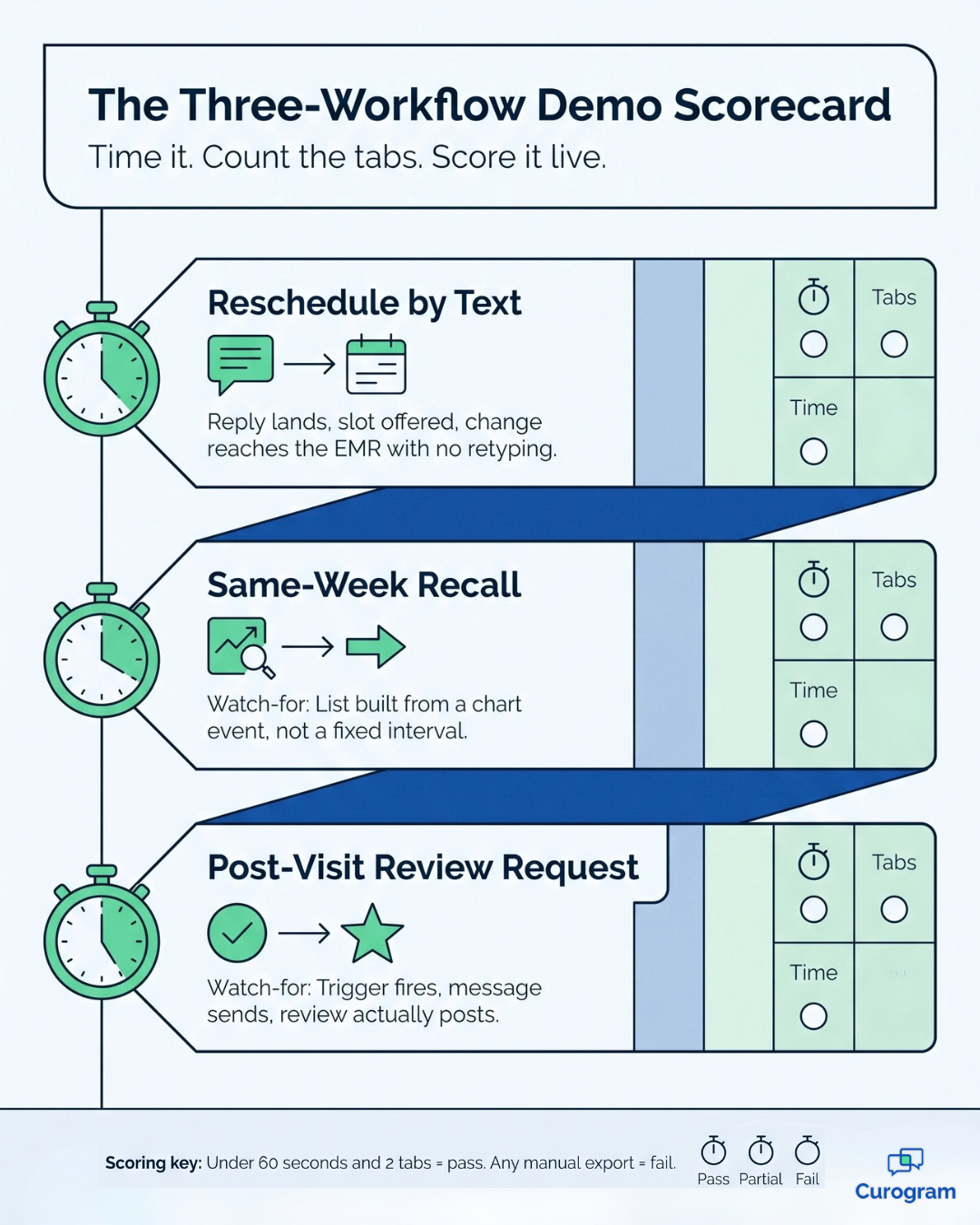
Stop asking vendors to describe workflows. Ask them to run three in front of you, live, on their own system.
Time each one with your phone. If a workflow needs three tabs and a manual export during a demo, it will need five in your office on a busy Monday. Vendors demo their best case, so treat the demo time as a floor.
The mechanics underneath matter here too. Whether a platform writes changes back into your EMR, or simply reads from it, changes what any demo can even show you. Our breakdown of how the two integration architectures differ covers that distinction.
We keep the full scripted version of these three demo requests, with the exact wording to send each vendor, on the head-to-head comparison page rather than here.
Use it as your scorecard across all four platforms. For a closer look at what happens after the message sends, see clinical workflow automation compared.
Not every practice should switch. Pretending otherwise would waste your time.
Solutionreach is strong on its home ground, and three situations make staying the better call:
Specialty groups are the common edge case. Follow-up intervals swing hardest there. A dermatology practice and an endocrinology practice can share one EMR and still need very different outreach timing. Our page on specialty clinics covers that pattern.

Whether you stay or go, renewal is the moment you have the most bargaining power. Ask for three things in writing before you sign anything.
First, a written renewal escalator with a hard cap. Next year's increase should be a number, not a surprise.
Second, a re-executed BAA that reflects your current locations and providers.
Third, a full export of your patient lists and campaign history, in a usable file format, on request.
That last one matters most. Practices usually discover the export gap at cancellation, which is the worst possible time to find out. Ask for it now, while your account is active and your rep still has a reason to help.
Numbers beat adjectives, so here are two from real medical practices, based on our internal data. Both come from clinics that moved to chart-triggered outreach rather than a fixed recall calendar.
Atlas Medical Center cut no-shows from 14.20% to 4.91% in three months. For a clinic seeing 1,000 appointments a month, that is roughly 93 recovered visits every month, or more than 1,100 a year that used to be empty chairs.
The second number is about patients who had already drifted. Across a multi-location practice, 35% of existing patients who got an SMS recall booked an appointment within a month, and 1,240 patients were seen from recall messages alone.
For your team, that means the gap on the schedule is often a messaging problem before it is a demand problem.
Do not start with a contract. Start with the three workflows and make every vendor run them on your terms, using your scenarios rather than their demo data.
Keep your scorecard simple. Note the time each workflow takes, the number of tabs involved, and whether anything required a manual export. Three vendors, three workflows, one page.
When you have a winner, the mechanics of moving are well documented. Our guide to switch from Solutionreach to Curogram walks through export, timing, and the cutover window so nothing goes dark mid-week.
You now have the one question that sorts this category. Does the platform wait for a clock, or does it move when the chart moves?
Everything else follows from that. Feature counts, tier names, and comparison grids are easy to produce and easy to game. A reschedule request that reaches your EMR without a manual export is not.
That is why the demo script matters more than another spreadsheet. Three workflows, run live, timed by you, ideally the same day.
Reschedule by text. A same-week recall built from a chart event. A post-visit review request, followed from trigger to posted review.
Run it against Curogram, Weave, Klara, and Solutionreach. Any platform that hesitates on those three has told you what you need to know, and any Solutionreach competitors worth your shortlist will welcome the test.
If you are evaluating a Solutionreach alternative in 2026, come to the demo with your own list. Bring the patient scenario that breaks your current setup, whether that is a post-op check, a medication follow-up, or a specialty interval that never sits still. We will run it on your EMR, not a sandbox.
Practices that make the move usually notice it in the schedule first. Based on our internal data, Atlas Medical Center dropped no-shows from 14.20% to 4.91% in three months, and 35% of recalled patients booked an appointment within a month.
Those figures do not represent a ceiling. They describe what happens when patient outreach follows the chart instead of a calendar.
Schedule a demo with Curogram and we will run the three-workflow script against your real setup. No trial signup, no sales gauntlet, just a working session where you watch the workflows land in your EMR. Bring your hardest scheduling scenario. That is the one worth testing.
 Jo Galvez : Sep 20, 2026, 8:00:00 AM
Curogram vs Solutionreach on texting depth, EMR write-back, reviews and support. Plus a 40-minute demo script that separates the two faster than any...
 Jo Galvez : Sep 12, 2026, 1:00:00 PM
Tebra sells its own patient texting. Klara belongs to ModMed. If you run Tebra and want one layer that does more than messages, compare the options.

 Aubreigh Lee Daculug : Oct 11, 2026, 6:00:00 PM
Curogram vs Artera on rollout effort, day-to-day ownership and support. Two capable platforms built for organisations with very different staffing.