

9 min read

Curogram vs. Solutionreach: Total Cost of Ownership and ROI Analysis

Curogram vs. Solutionreach: Total Cost of Ownership and ROI Analysis
💡 Evaluating the curogram solutionreach cost comparison roi means looking beyond the monthly subscription fee. Solutionreach runs on a batch-sync model — pulling data from your EHR at scheduled intervals.  

Curogram uses real-time, cloud-native API integration, so every workflow operates on current patient data. 

That architectural difference creates hidden costs that never appear on an invoice: staff time spent correcting misdirected communications, IT maintenance for locally installed sync software, and manual data entry from PDF intake forms.

Curogram clients see 53% lower no-show rates, 75%+ confirmation rates, and a 35% patient recall reconversion rate — all driven by automation working on live, accurate EHR data, not data from hours ago.

Your front desk gets a call. A patient is confused — they received a reminder for an appointment they canceled two days ago. Your scheduler pulls up the EHR, apologizes for the mix-up, and manually corrects the record.

That interaction takes about three minutes — and it wasn't the first one this week.

Now imagine it happening 15 times today.

That's 45 minutes of staff time spent correcting a problem your patient engagement platform created. Nobody budgeted for it. Nobody measured it. It just became part of the daily routine.

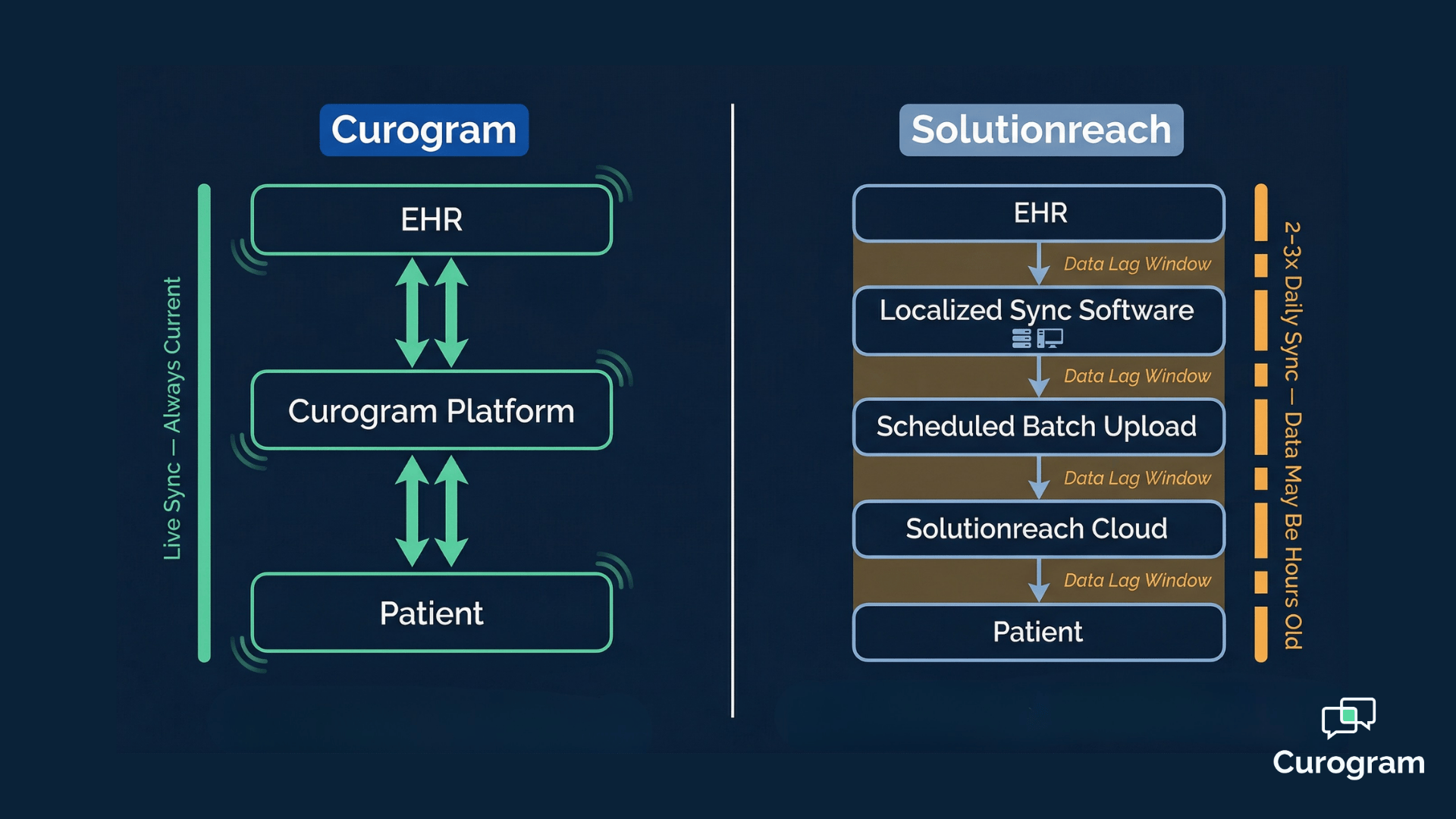
This is what happens when your platform runs on batch-sync technology. Platforms like Solutionreach pull data from your EHR in scheduled intervals — not in real time.

By the time a reminder goes out, your schedule may have already changed. A patient rescheduled. Another canceled. A new appointment was added at the last minute.

None of that is reflected in what your platform just sent.

The downstream costs are real and compounding. Misdirected messages generate inbound calls. Schedulers manually verify statuses that should have updated automatically. Staff spend time on exception-handling instead of patient care.

And through all of it, you're paying a monthly subscription for a platform running on outdated data.

When practices start evaluating the curogram solutionreach cost comparison roi, most look at the subscription fee first. That makes sense — it's the most visible line item on the invoice.

But practices with no-show rates between 10% and 50% can lose $20,000 to $30,000 every single month.

A platform that works on stale data cannot reliably close that revenue gap.

The real question isn't which platform costs less per month. It's which one recovers more revenue, eliminates more manual work, and delivers better results from day one.

That's what this article is about.

What Your Subscription Invoice Isn't Showing You

The price on a platform's pricing page is the beginning of the cost conversation, not the end.

For platforms built on legacy batch-sync infrastructure, the subscription fee is the most visible — and often the least significant — component of the total cost.

What doesn't show up in that monthly number is where the real financial drag lives:

Staff labor for manual data entry, communication errors from stale schedule data, IT overhead from locally installed sync software, and the revenue that quietly evaporates when workflows can't respond to real-time changes.

The Four Cost Dimensions That Determine Real ROI

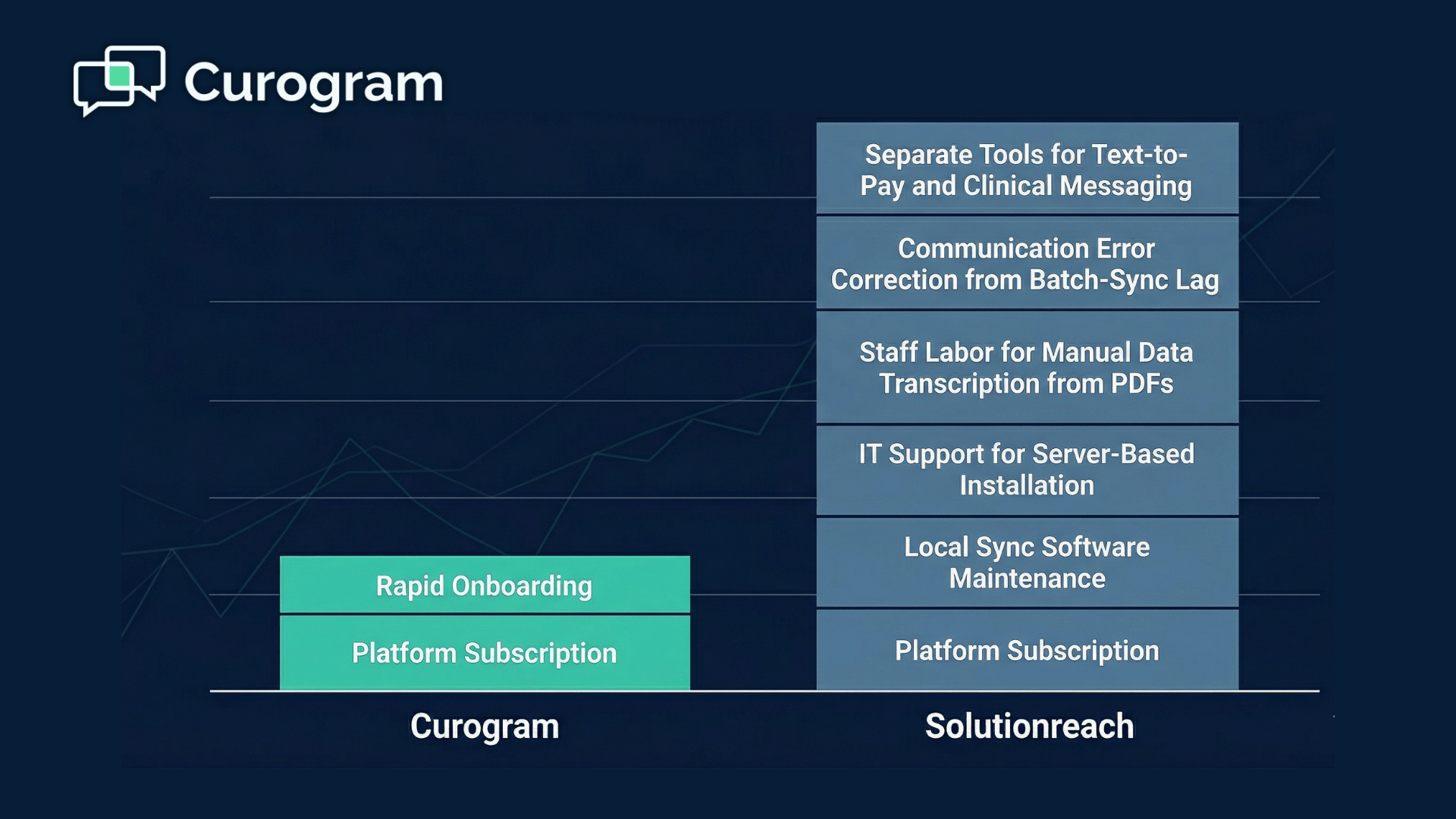
A complete evaluation of solutionreach total cost hidden expenses has to look past the invoice and measure the platform's impact across four dimensions:

  • Data accuracy costs — errors triggered by stale EHR data, including misdirected reminders and incorrect confirmation statuses
  • Staff productivity — hours spent on manual correction, data transcription, and exception-handling that automation should have prevented
  • Revenue recovery speed — how quickly and accurately the platform closes the gap on no-shows, missed collections, and lapsed patients
  • Workflow automation breadth — whether the platform requires additional tools (like separate text-to-pay or clinical messaging solutions) to complete the job

Each dimension affects your bottom line on its own. Together, they determine whether a platform delivers genuine ROI or just a polished-looking subscription line item.

When data is hours old, every one of those dimensions is compromised before a single message leaves the platform.

The Invisible Tax Hiding in Every Batch-Sync Delay

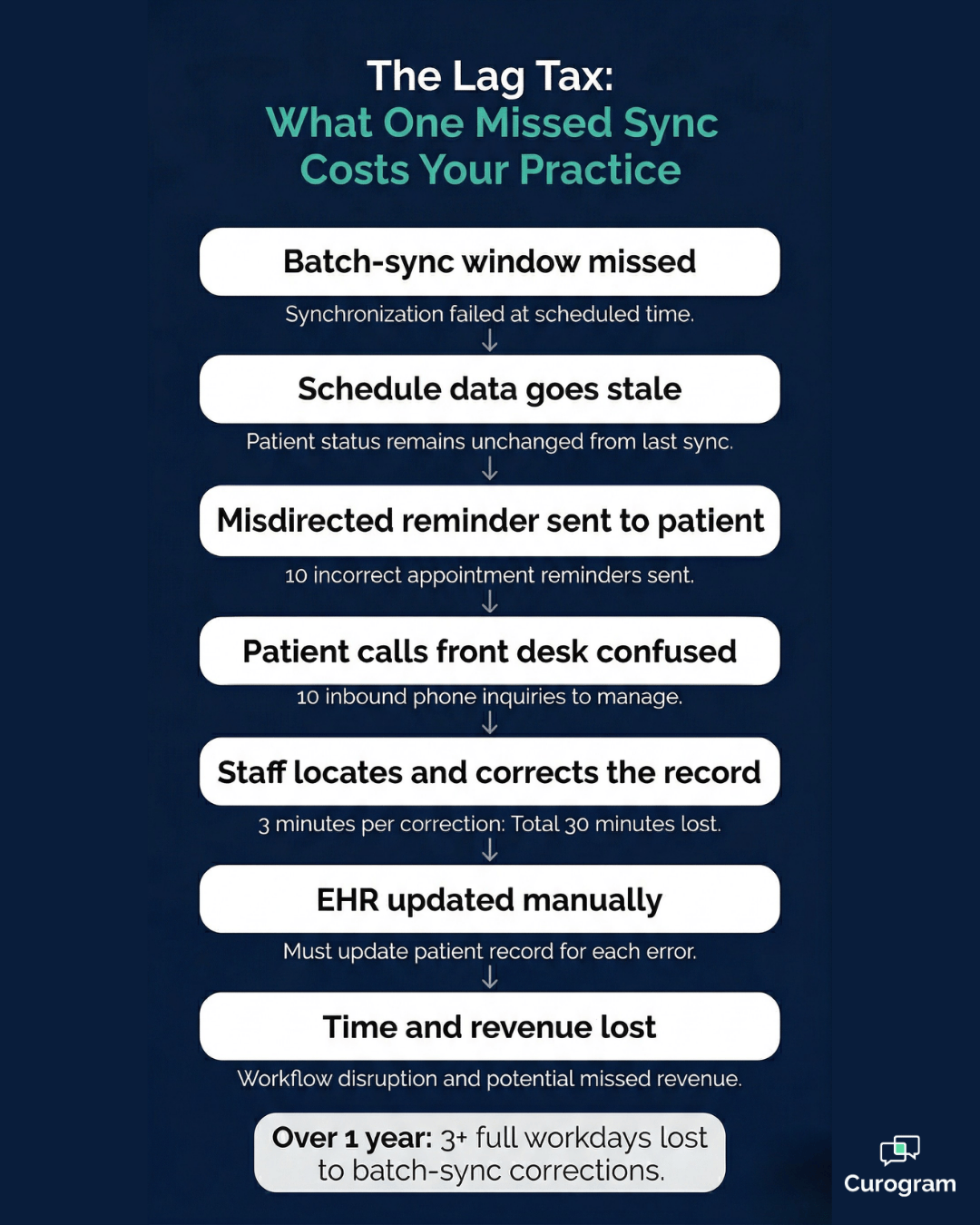
There's a name for what batch-sync architecture does to your practice: the lag tax.

The lag tax is the cumulative economic cost of running a patient engagement platform on data that's hours old. It sounds like a minor technical issue. It isn't.

What the Lag Tax Looks Like on a Typical Day

Solutionreach syncs patient data from your EHR in scheduled batch intervals. Between those intervals, your schedule keeps moving — but the platform doesn't know that yet. By the time it sends outbound communications, it may be acting on records that no longer reflect reality.

The most common misdirected messages look like this:

  • Reminders sent for appointments that were canceled or rescheduled hours earlier
  • Confirmation requests delivered to patients who have already responded through another channel
  • Pre-visit intake prompts pushed out for encounters that were moved to a future date

Each one creates the same downstream chain:

A confused patient calls the front desk, a staff member locates the correct record, resolves the discrepancy, and manually updates the status.

For a practice managing 30–50 daily appointments with continuous schedule changes, this is not an occasional inconvenience. It's a daily workflow tax.

Even if each correction takes just three minutes, 10 errors a day costs your team 30 minutes of administrative work that should never have been necessary — 2.5 hours a week, or the equivalent of more than three full workdays lost over a year.

The batch sync cost data lag in a medical practice extends beyond communication timing. It also involves the server-side infrastructure that makes batch syncing possible. That local sync software needs compatibility updates when your operating system changes.

It needs troubleshooting when a scheduled upload window is missed.

It needs someone's attention when the sync silently fails and nobody realizes it until a reminder reaches a patient whose appointment was canceled the day before.

None of those IT hours appear on a Solutionreach invoice. But they are real operational expenses.

Curogram's cloud-native, API-based integration eliminates this category of overhead entirely — no local software, no manual sync management, no missed-window troubleshooting.

Curogram vs Solutionreach revenue recovery comparison over 12 months

How Real-Time Sync Turns Missed Appointments Into Recovered Revenue

The revenue case for real-time automation is straightforward: accurate data produces accurate outcomes, and accurate outcomes recover more money.

Practices with no-show rates between 10% and 50% can lose $20,000 to $30,000 per month in missed revenue.

That's not a rounding error — it's a material financial problem that compounds every single month. Closing that gap depends on confirmation workflows that are both timely and accurate, which requires live access to current EHR data.

This is the core of the no-show revenue recovery cost comparison between Curogram and Solutionreach.

The Confirmation Accuracy Advantage

Curogram's confirmation workflows operate on real-time EHR data — sending the right message to the right patient at the right moment, and instantly updating the appointment record the moment a patient responds.

That's how Curogram clients consistently achieve 75%+ appointment confirmation rates across their practices.

The results at Atlas Medical Center illustrate what that looks like over time. Their no-show rate fell from 14.20% to 4.91% in just three months — a result that is three times better than the industry average. That kind of trajectory is only possible when every patient response instantly reflects in the EHR, without waiting for the next batch upload.

At Covina Arthritic Clinic, more than 1,100 appointments are now confirmed automatically each month — handling a volume that would have required hours of manual follow-up under a traditional phone-call model.

Revenue Streams That Extend Beyond No-Shows

Patient engagement platform ROI real-time sync doesn't stop at appointment confirmations.

Curogram's architecture supports multiple downstream revenue vectors, each operating on live data:

  • SMS recall campaigns recovered 1,240 patients at a 35% reconversion rate — reactivating revenue from patients who had disengaged from the practice entirely
  • Native text-to-pay addresses a significant collection gap; practices relying on paper billing typically recover around 20% of outstanding balances through that channel, while SMS-based payment reaches patients where they already are
  • Automated review generation produced over 1,000 new 5-star Google ratings for clients in three months, reducing patient acquisition costs by strengthening organic search visibility

Every one of these revenue outcomes operates in real time. And every one of them is less effective — or simply unavailable — on a batch-sync platform where the underlying data is always running behind.

Patient receiving appointment confirmation text at clinic front desk

Side by Side — Where the Real Costs Show Up

Understanding the solutionreach vs curogram pricing value gap requires looking at the full cost stack, not just the monthly subscription.

The Full Cost Stack, Line by Line

Cost Dimension Curogram Solutionreach
Data Accuracy Costs None; real-time sync eliminates stale-data errors Ongoing; batch-sync lag produces misdirected communications
Manual Data Entry Labor Eliminated; discrete write-back to EHR fields Ongoing; PDF intake requires manual transcription
Infrastructure Requirements Cloud-native; no local software installation Local sync software on clinic server; IT maintenance required
No-Show Revenue Recovery 53% lower rate; 75%+ confirmation; real-time EHR sync Reminder-based; accuracy limited by batch-sync timing
Payment Collection Native text-to-pay; digital revenue stream No native text-to-pay; PRM-focused platform
Patient Recall ROI 35% reconversion; 1,240 patients recovered Broadcast recall campaigns; standard PRM approach
Time-to-Revenue Weeks; immediate real-time workflow activation Delayed by batch-sync accuracy limitations

To make those differences concrete: imagine a 5-provider practice with 40 daily appointments and a 15% no-show rate.

At an average visit value of $150, that's $900 in missed revenue per day — about $18,000 per month. If real-time confirmation workflows cut that no-show rate by 50%, the practice recovers roughly $9,000 per month.

No-shows cost you money! Reduce missed appointments by up to 75% with Curogram's automated, customizable smart reminders.  

That's $108,000 in recovered revenue over 12 months, driven by data accuracy alone.

That projection is conservative. It doesn't include:

  • Revenue recovered through SMS recall reconversions
  • Additional collections from switching paper billing to text-to-pay
  • New patient volume driven by improved Google review ratings

Each of those categories adds real, compounding return — and none of them require new operational complexity on your end.

The Verdict on Batch-Sync Economics

The verdict on batch-sync economics is clear when you add it all up. The lag tax is not an abstract concept; it represents the accumulated cost of real, traceable inefficiencies running through your practice every day.

These include misdirected messages that generate inbound calls your staff shouldn’t have to handle, manual record corrections that consume time your front desk should be spending on patients, IT hours troubleshooting sync failures that a cloud-native platform would never produce, and scheduler verification steps triggered by confirmation statuses that should have updated automatically.

None of these costs appear on a subscription invoice, yet all of them quietly, consistently, and compounding over time reduce your platform’s net return.

Curogram’s real-time architecture eliminates the lag tax by removing its source. There’s no batch window to miss, no local sync software to maintain, and no stale data feeding your outbound communications.

Every reminder, confirmation, recall, and intake form runs on the same live record your clinical team is working from right now.

The practical implication is significant. When your platform always has current EHR data, every workflow it executes is accurate, every dollar it recovers is earned without the friction of stale-data exceptions, and every hour your staff gets back stays in patient care rather than administrative correction.

For practices genuinely evaluating the economics of these two platforms, the right framework isn’t “which platform is cheaper per month,” it’s “which platform produces the best return on the dollars you’re already spending on scheduling, communications, and patient engagement.”

On that measure, real-time clinical automation has a structural advantage that batch-sync infrastructure simply cannot overcome.

Conclusion

Your patient engagement platform should be an asset, not a daily source of administrative overhead.

If you're managing a busy schedule and your platform is sending reminders for canceled appointments, triggering inbound confusion calls, and pulling your staff into manual data correction — that platform isn't delivering on its ROI.

It's creating costs that never appear in the pricing conversation, and it's doing it every single day.

The comparison between Curogram and Solutionreach comes down to one architectural difference that changes everything downstream: real-time EHR sync versus batch-sync.

That difference determines whether your confirmations reach the right patients at the right time, whether your staff spends the day on patients or on exceptions, and whether your practice starts recovering revenue on week one or absorbs a lag tax while waiting for data to catch up.

The numbers are documented. Curogram clients have seen no-show rates drop from 14.20% to 4.91% in three months. More than 1,100 appointments confirmed automatically every month at scale. 1,240 patients brought back through SMS recall campaigns alone.

All of it powered by a platform that always knows what your schedule looks like right now — not what it looked like hours ago.

You don't have to keep tolerating the hidden costs of outdated infrastructure. You don't have to accept misdirected messages, manual correction workflows, or IT overhead as standard operating procedure. There's a better architecture available, and the performance data behind it is real.

If you want to see exactly how the numbers would look for your practice — factoring in your no-show rate, appointment volume, and current staff workload — Curogram's ROI Calculator can give you a specific projection in minutes.

Schedule a demo and see the impact for yourself. Real-time means more revenue — and it shows from the very first screen.

Frequently Asked Questions

How does Solutionreach's total cost of ownership compare to Curogram?

Solutionreach's total cost of ownership includes expenses beyond the subscription: IT maintenance for locally installed sync software, staff labor for manual data entry from PDF intake forms, communication error correction caused by batch-sync data lag, and workflow gaps that require additional tools (no native text-to-pay, limited real-time two-way messaging). Curogram's cloud-native, real-time architecture eliminates all of these hidden cost categories — meaning the gap between the two platforms is considerably wider than their subscription prices suggest.

What revenue recovery difference exists between real-time and batch-sync platforms?

Real-time platforms like Curogram recover revenue faster and more accurately because confirmations, reminders, and clinical workflows always operate on current EHR data. Batch-sync platforms like Solutionreach carry a lag tax — stale data produces misdirected communications, delays confirmation tracking, and reduces the net revenue impact of every automated workflow. Curogram documents 75%+ confirmation rates and 53% lower no-show rates: outcomes that depend directly on real-time data accuracy.

Does Solutionreach's local sync software create IT costs that Curogram avoids?

Yes. Solutionreach's sync software requires installation on a clinic workstation or server, ongoing compatibility updates, and IT troubleshooting when batch uploads fail or miss their scheduled window. Curogram is entirely cloud-native with API-based EHR integration that requires no local software installation — eliminating this category of IT overhead completely.

How quickly can a practice expect to see ROI after switching to Curogram?

Most practices begin seeing measurable results within the first few weeks of activation. Because Curogram's workflows operate on real-time EHR data from day one, there's no ramp-up period waiting for batch windows to stabilize or sync software to be configured. Atlas Medical Center documented a no-show reduction from 14.20% to 4.91% within three months — and that improvement began accumulating from the first confirmation cycle, not after a prolonged setup period.

Does Curogram replace Solutionreach entirely, or does it only handle certain functions?

Curogram is a full patient engagement platform — not a point solution. It handles appointment reminders and confirmations, two-way HIPAA-compliant texting, digital intake forms, SMS-based payment collection, patient recall campaigns, and automated Google review generation. Practices switching from Solutionreach to Curogram typically consolidate multiple tools into one platform, which reduces vendor complexity and eliminates the cost of separate solutions for functions Solutionreach doesn't natively support, like text-to-pay.


Curogram vs. Solutionreach: EHR Integration Architecture Compared

Curogram vs. Solutionreach: EHR Integration Architecture Compared

💡 Curogram and Solutionreach both integrate with your EHR — but they do it in fundamentally different ways. Curogram uses a real-time...

Read More
Curogram vs. Klara: EHR Integration Architecture Compared

Curogram vs. Klara: EHR Integration Architecture Compared

💡 When comparing Curogram and Klara on EHR integration, the core difference lies in how each platform connects to your system.Curogram uses a...

Read More
Curogram vs OhMD EHR Integration: Which Platform Writes to Your Chart?

Curogram vs OhMD EHR Integration: Which Platform Writes to Your Chart?

💡 When comparing Curogram and OhMD on EHR integration architecture, the central difference is what happens to patient data after it is collected....

Read More