

10 min read
How to Switch from Solutionreach to Curogram: Complete Migration Guide
Aubreigh Lee Daculug
:
April 15, 2026
The migration removes locally installed sync software from your server and connects your EHR directly to Curogram's cloud-based API — eliminating data lag, manual transcription, and the workarounds your staff relies on daily.
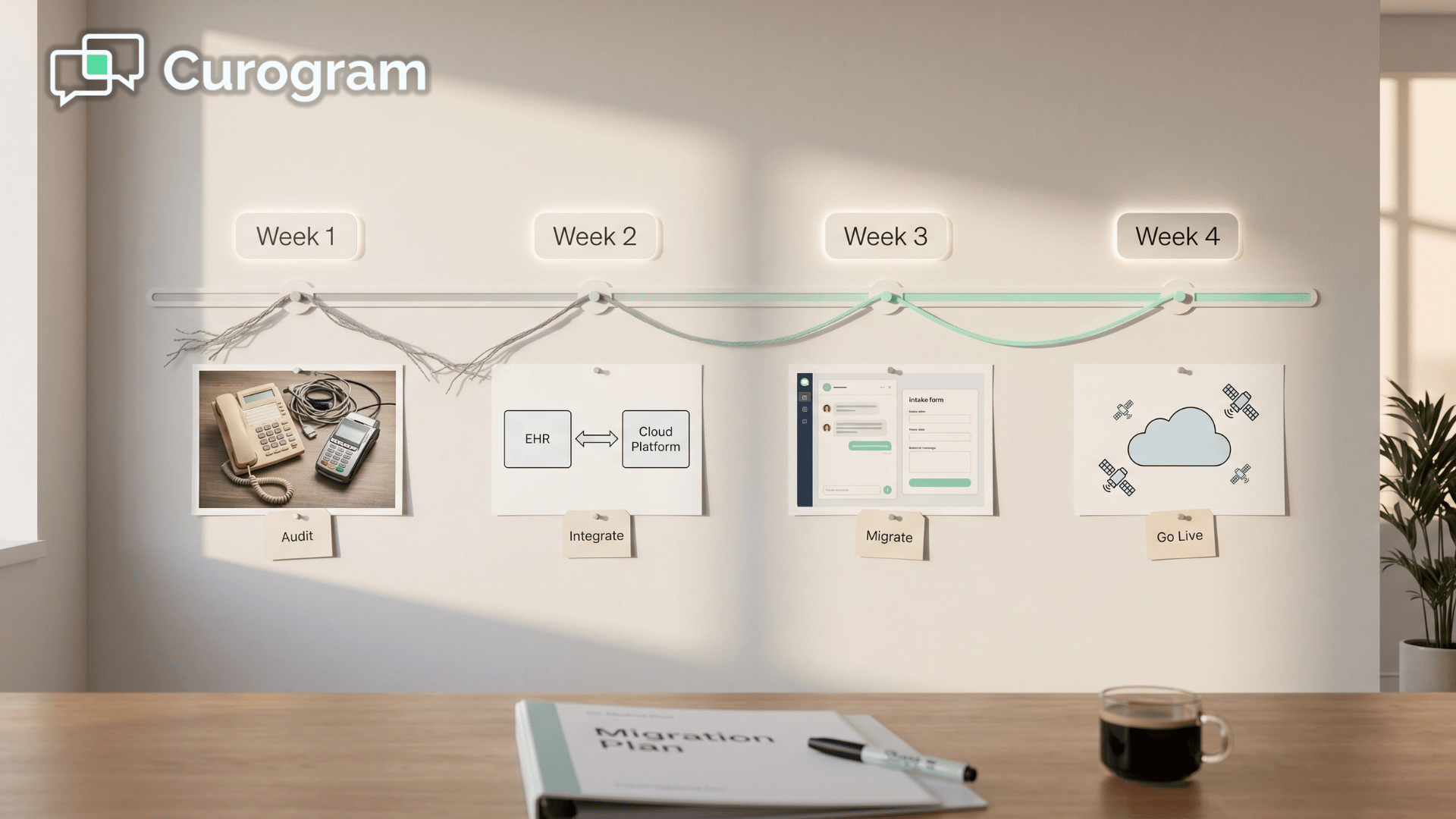
Follow a phased rollout: audit batch-sync (Week 1), set up real-time API (Week 2), migrate communications (Week 3), and fully replace Solutionreach (Week 4).
Practices that complete this migration typically see confirmation rates above 75%, no-show reductions of up to 66%, and significant staff time freed from manual follow-ups — all without disrupting daily operations during the transition window.
Your front desk team starts Monday morning the same way they ended Friday afternoon: catching up.
The schedule changed over the weekend. Patients confirmed, cancelled, or never responded — but the EHR still doesn't know it.
The Solutionreach sync won't run until tonight. So your team picks up the phone and starts working through the list manually: re-confirming appointments the system was supposed to handle, and updating records the platform was supposed to update automatically.
This is what batch sync looks like in practice. It sounds like a minor inconvenience. It isn't.
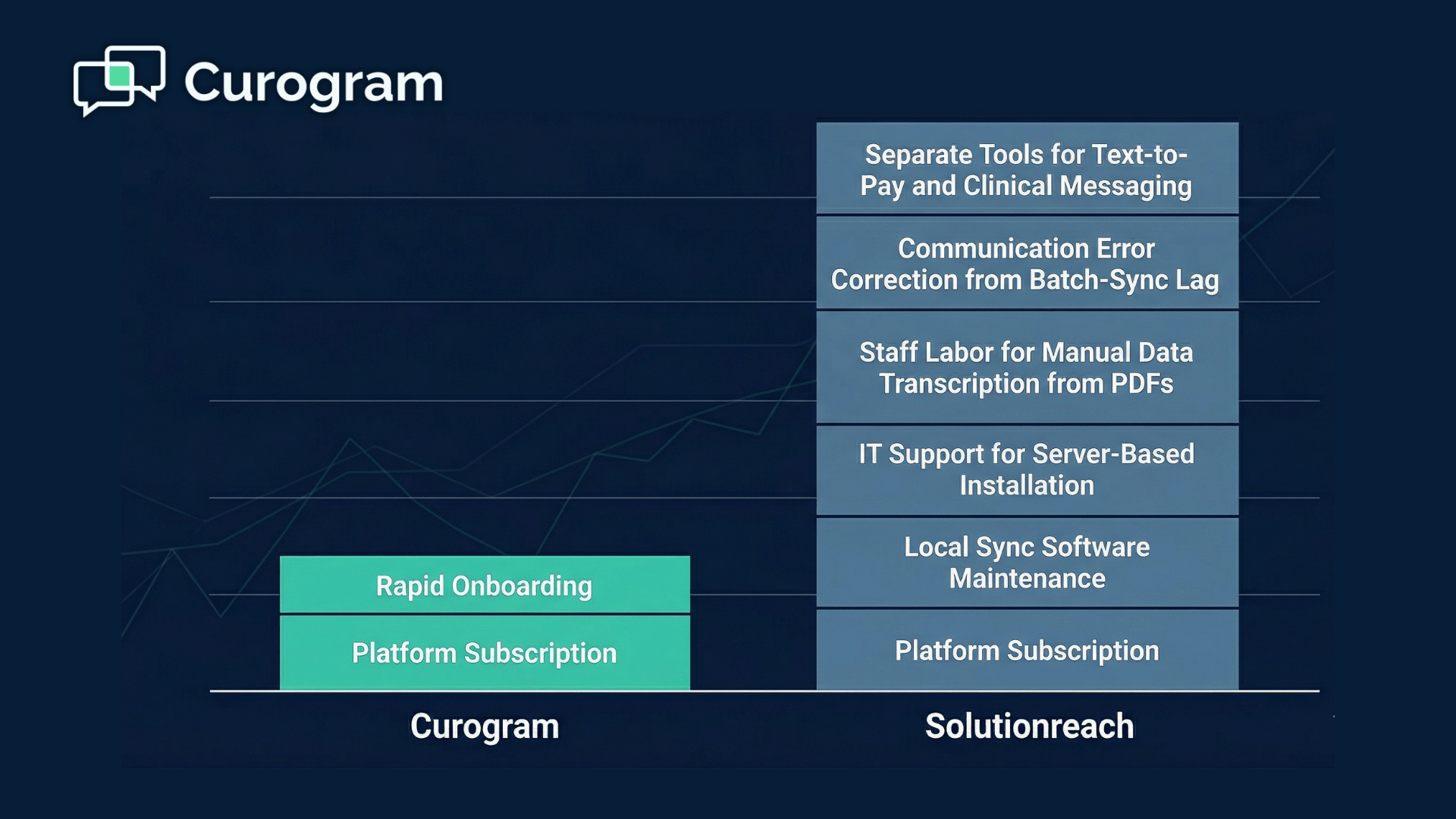
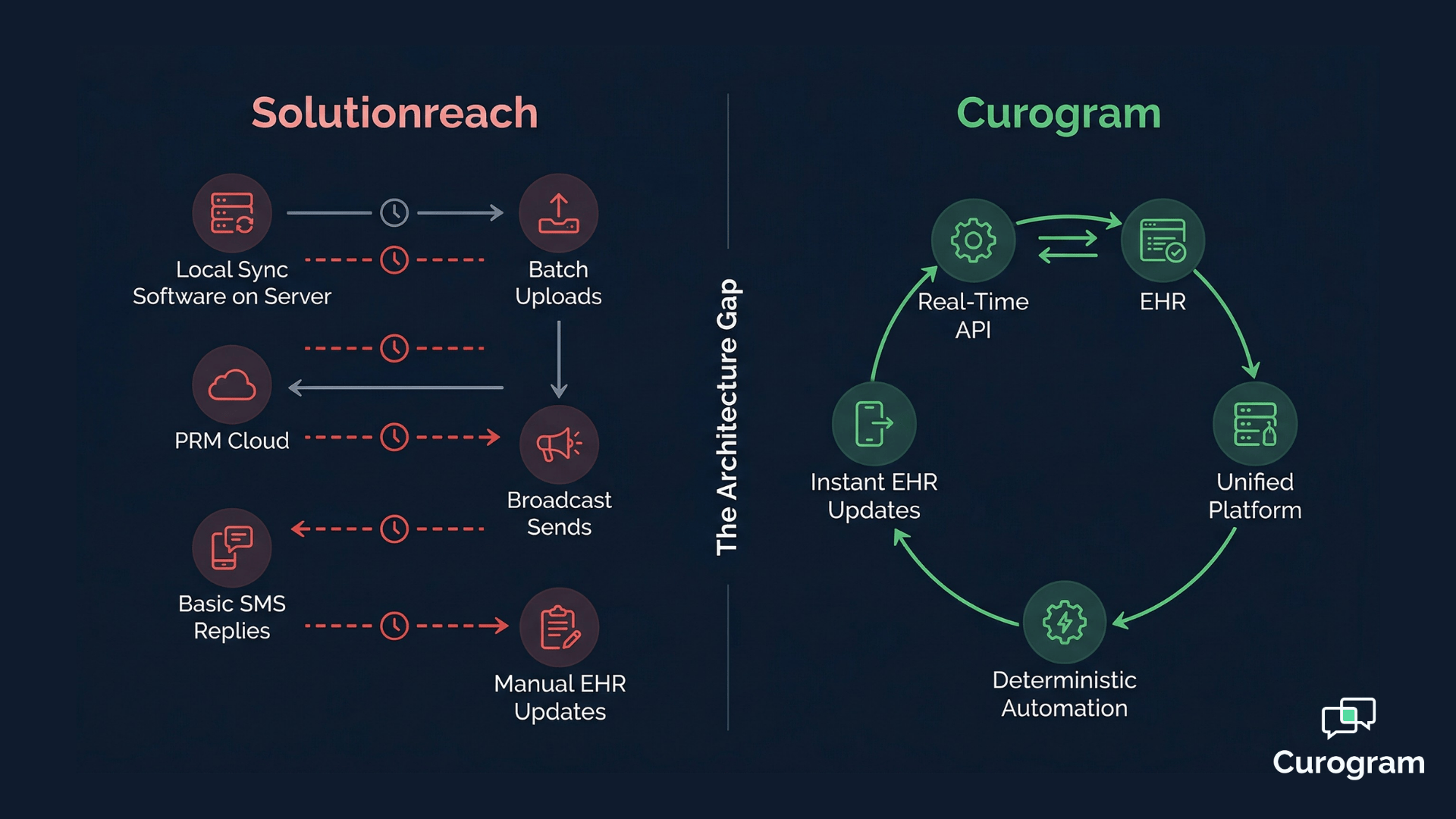
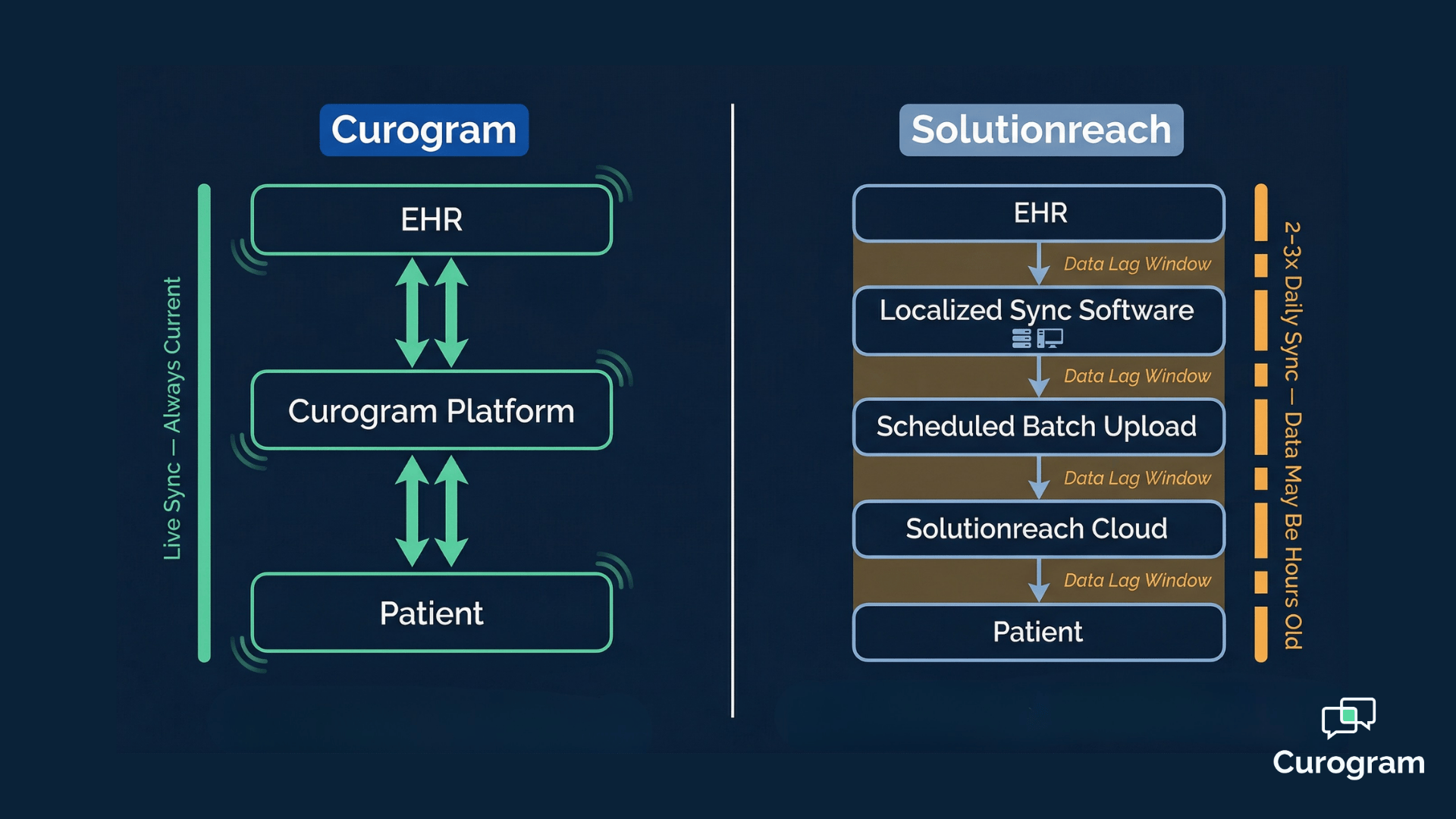
Solutionreach was built on an architecture that made sense a decade ago. A piece of locally installed software extracts data from your EHR in scheduled batches — maybe every few hours, maybe once a night.
The platform sends reminders based on that snapshot. When patients respond, those confirmations don't write back to your EHR automatically.
Your staff fills the gap, transcribing responses and updating records one by one, every single day.
As your practice grows, the gap between what the platform knows and what's actually happening in your schedule gets wider. A patient cancels at 9 a.m. That slot sits empty at noon. Nobody calls. Revenue walks out the door.
That is the core problem driving so many practices to search for a solutionreach alternative for their medical practice — not that Solutionreach is broken, but that it was never designed for the clinical communication demands of a modern, scaling practice. Broadcast messaging and batch uploads can only take you so far.
The decision to complete a switch from Solutionreach to Curogram migration is about more than features.
It's about moving from a platform built around one-way broadcast messaging to one built around real-time clinical automation — a platform that communicates with your EHR continuously, not on a timer.
This guide walks you through exactly how to make that move.
Step by step. Week by week.
Without disrupting your patients or your team.
When Your Practice Has Simply Outgrown a Batch-Sync Platform
There's a moment every growing practice reaches where the workarounds start to outnumber the workflows.
Your staff checks the schedule twice before huddle — once in the EHR, once in Solutionreach — because they know the two won't match.
They spend the first hour each morning catching up on confirmations the platform processed overnight but never pushed back to the chart.
They keep a separate log for patients who responded by text, because those responses don't automatically update anything.
None of this feels like a technology failure. It feels like just how things work.
But it isn't how things have to work.
The Hidden Cost of Data That's Always Behind
The batch-sync model creates a window of inaccuracy that's hard to see until you start measuring it.
When your EHR and your patient communication platform aren't talking in real time, decisions get made on stale data.
Reminders go out to patients who already cancelled. No-shows happen at slots that could have been filled. Staff time gets absorbed into reconciliation tasks that should never exist.
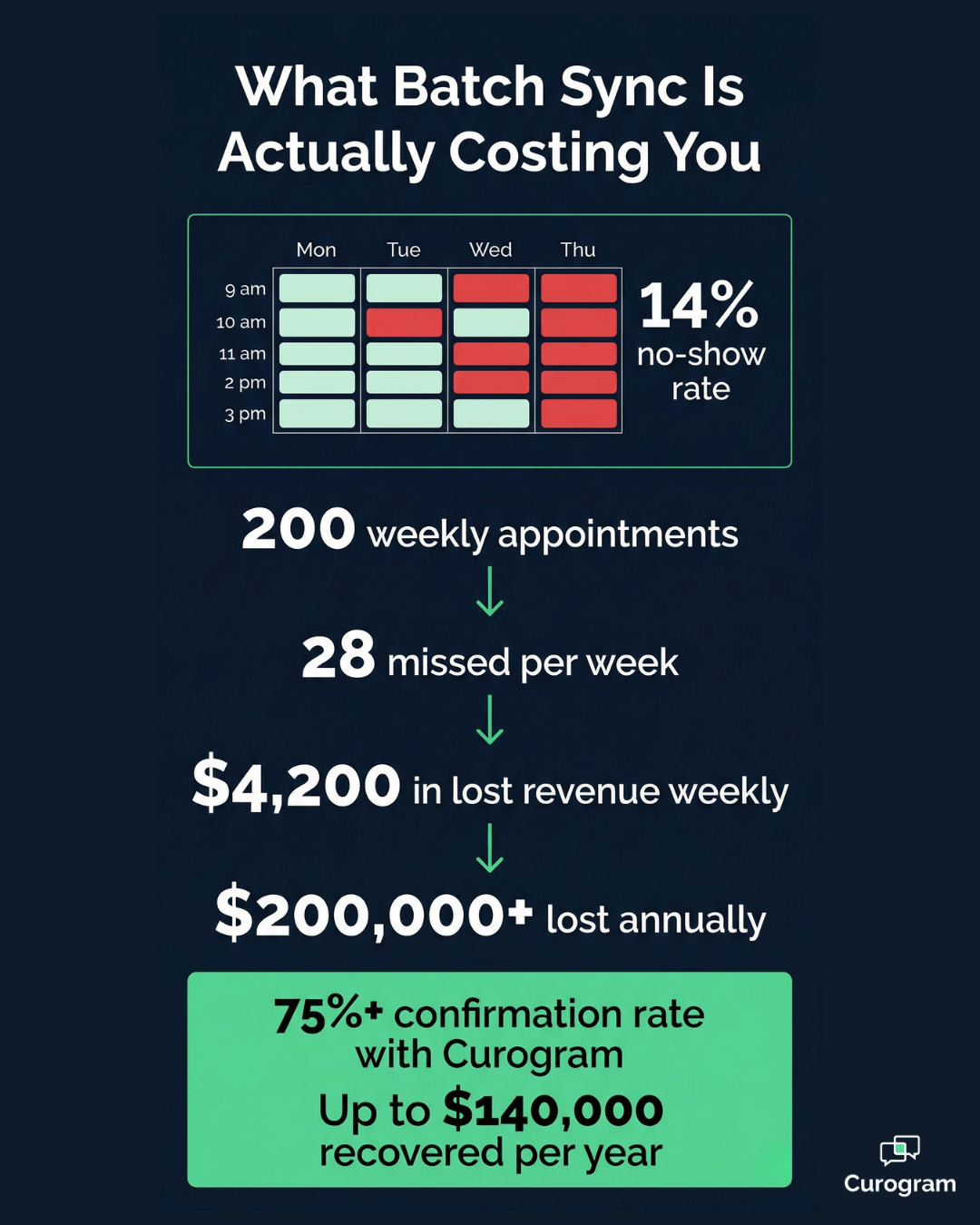
Think about what that adds up to in a week. If your practice sees 200 patients a week and your no-show rate sits around 14% — which is close to where many practices land before making a change — that's roughly 28 missed appointments.
At an average visit value of $150, that's $4,200 in lost revenue every week. More than $200,000 a year.
That's not a software inconvenience. That's a structural revenue problem.
Why PRM Broadcast Platforms Reach Their Ceiling
Solutionreach was designed as a patient relationship management platform — a tool for sending appointment reminders, recall messages, and practice newsletters. It does that reasonably well.
The problem is that as your clinical operations grow more complex, you need capabilities that fall entirely outside a broadcast platform's design:
- Missed calls that automatically convert to text conversations, so no inbound patient falls through the cracks
- Intake forms that write directly to discrete EHR fields instead of generating PDFs your staff has to retype
- Payment collection that happens by text, without chasing patients after the fact
- Two-way clinical conversations with no character limits and no lag between what a patient says and what your chart records
These are not features Solutionreach can add with a software update. They require a different architectural foundation entirely.
That's why the move to migrate from legacy PRM to clinical automation isn't just an upgrade — it's a category change.
Knowing What You're Up Against Before You Start
Before you can make the switch, you need to understand exactly what you're switching away from.
The first phase of this migration isn't technical. It's diagnostic. You're mapping out every place your practice currently depends on Solutionreach — and every place your staff has built a workaround to compensate for what it can't do.
Documenting Your Current Batch-Sync Footprint
Start here. Before any technical work begins, run a full audit of your current Solutionreach setup.
You're looking for five things specifically:
- All active communication workflows — reminders, recalls, review requests, broadcast campaigns — and when each one triggers
- Your current batch-sync schedule and how large the data lag window actually is
- Manual processes your staff has built around the platform's limitations (confirming appointments by phone, updating the EHR after patient responses, transcribing PDF intake data)
- The local sync software installation on your clinic server — its location, dependencies, and what will need to be decommissioned
- Clinical workflow gaps that Solutionreach was never designed to fill: missed-call capture, two-way messaging, text-to-pay, real-time intake write-back
This is also the moment to inventory your local sync software installation. Solutionreach's sync tool runs directly on your clinic server, consuming resources and requiring ongoing maintenance.
Part of what makes this a solutionreach to curogram transition guide rather than a simple platform swap is planning the physical decommission of that local software — something most practices don't think about until it's right in front of them.
Quantifying the Gap
Most practices find, when they sit down and actually count, that staff members are spending anywhere from one to two hours per day compensating for what the platform can't do automatically.
That's 5–10 hours per week, per staff member involved — time spent on manual confirmation checks, intake transcription, and EHR updates that a real-time system handles instantly.
For a practice with two front desk staff at $18/hour, that's roughly $17,000 to $35,000 in annual labor absorbed by workarounds. The audit doesn't just reveal a gap. It quantifies the economic case for migrating.

Making the Move Without Shutting Down the Day
Here's the thing about switching platforms:
Practices worry it will break everything. It won't — if you do it in parallel.
The right approach to curogram onboarding from solutionreach is not a hard cutover. You don't turn one platform off and another one on. You run both systems simultaneously during a defined transition window, validating
Curogram's performance before you retire Solutionreach entirely.
Connecting to the EHR in Real Time
The technical centerpiece of this migration is the shift from Solutionreach's locally installed sync software to Curogram's cloud-native, real-time API connection.
This is what it means to switch from batch sync to real-time API — not just a terminology difference, but a fundamental change in how data flows.
Once Curogram's API connection to your EHR is established, data moves continuously.
A schedule change at 10 a.m. is reflected in Curogram at 10 a.m.
A patient confirms by text at 2 p.m. and the EHR is updated at 2 p.m. There is no batch window.
There is no lag. There is no gap for staff to fill manually.
The first thing your team will notice is that the schedule they see in Curogram matches the schedule in the EHR — at the same time, every time.
Activating Clinical Automation Layer by Layer
As Curogram's real-time connection proves reliable, you activate its clinical automation capabilities one layer at a time. Appointment confirmation workflows come online first, running simultaneously with Solutionreach's batch reminders during the overlap period.
Your team can monitor both in real time, compare confirmation rates, and verify that write-back to the EHR is accurate before any commitment to move forward.
From there, the remaining capabilities activate in sequence: intake forms that write to discrete chart fields, missed-call-to-text that captures patients who would have slipped away on hold, text-to-pay for balance collection, and recall campaigns for patients who haven't scheduled a follow-up.
Each layer builds on the one before it — and none of it requires Solutionreach to be switched off first.
Once all communications are running through Curogram and data integrity is confirmed across the board, the Solutionreach sync software is uninstalled from your server. The local infrastructure dependency disappears entirely.
No more scheduled batch extractions. No more server overhead. No more split schedule views.

A Four-Week Roadmap from One Platform to the Other
The entire migration from start to full go-live takes four weeks.
Here's how each phase breaks down:
| Migration Phase | Timeline | Key Activities | Success Metric |
|---|---|---|---|
| Phase 1: Batch-Sync Audit & Workflow Inventory | Week 1 | Document all active Solutionreach workflows; map batch-sync schedule and data lag windows; inventory local sync software; identify clinical gaps | Complete current-state map with data lag cost baseline and gap inventory |
| Phase 2: Real-Time API Connection & Validation | Week 2 | Establish Curogram's EHR API connection; validate discrete write-back accuracy; activate confirmation workflows | Real-time sync verified; confirmations active with instant EHR updates |
| Phase 3: Patient Communication Transition & Sync Software Removal | Week 3 | Migrate all patient messaging to Curogram; activate intake forms, missed-call-to-text, and text-to-pay; begin deinstall of local sync software | All communications running through Curogram; local sync software removed from server |
| Phase 4: Full Go-Live & Legacy Infrastructure Decommission | Week 4 | Fully decommission Solutionreach; activate review generation and recall campaigns; complete staff training and adoption | Confirmation rate ≥75%; zero batch-sync lag; single unified real-time platform |
Three Things Worth Knowing Before You Start the Clock
A lot of practices assume a migration like this comes with some period of disruption — a day the phones don't work, a week where nothing is confirmed. That's not how this works.
A few reassurances worth keeping in mind:
- Your practice is fully operational throughout all four weeks. There is no blackout period, no forced downtime, and no patient-facing disruption at any point in the process.
- Real-time automation is live by Week 2. Your team doesn't wait until go-live to feel the difference. Confirmation responses start writing to the EHR automatically as soon as the API connection is validated.
- The local sync software is off your server by Week 3 — before the migration is even complete. Server resources previously consumed by batch extraction are freed up early, not at the end.
Four weeks is a realistic timeline. Most practices don't need more.
What the Numbers Look Like on the Other Side
Once the migration is complete, the performance gap becomes clear.
Moving from a legacy PRM to real-time clinical automation delivers measurable improvements across scheduling, revenue, and patient engagement.
- No-shows drop, revenue returns
- Confirmation volume scales
- Recall campaigns fill empty slots
- Reviews drive new patients
The most immediate impact is reduced no-shows.
With confirmation rates exceeding 75%, more patients show up. In one case, no-shows dropped from 14.2% to 4.91% (~65% reduction), recovering about $2.7K per week or ~$140K annually.
Automation also removes manual limits. Practices can handle over 1,100 confirmations per month without adding staff—something that would be difficult to sustain manually.
Beyond confirmations, recall campaigns bring patients back. Around 35% of recalled patients reschedule, generating roughly 1,240 visits and about $186K in recovered revenue from a single campaign.
Finally, automated review requests strengthen online presence. Generating 1,000+ new 5-star reviews in just a few months improves visibility and drives more new patients.
Together, these gains—lower no-shows, higher confirmations, recovered recall revenue, and stronger reputation—translate into real, measurable growth.
Conclusion
If the gap between what Solutionreach can do and what your practice actually needs is getting wider every quarter, it may be time to stop patching around it.
The switch from Solutionreach to Curogram migration is not a disruptive, high-risk project. It's a structured, four-week process with clearly defined milestones, parallel operation during the transition, and measurable performance outcomes from Week 2 onward.
Your team doesn't go dark. Your patients don't notice. Your EHR gets smarter.
What changes is the infrastructure underneath everything. Batch uploads give way to a real-time API. Local sync software comes off your server permanently.
Manual transcription and daily confirmation checklists become things your staff used to do. And your practice gains clinical automation capabilities — missed-call-to-text, text-to-pay, real-time intake write-back, automated recall — that no PRM broadcast platform was ever designed to deliver.
The practices that have completed this transition share a common observation: the upgrade felt overdue the moment it was done. Not because the migration was easy, but because the difference between batch-sync and real-time is impossible to un-see once you've experienced it firsthand.
You don't need to keep compensating for what your current platform can't do. You need a platform built for how your practice actually operates — not how practices operated a decade ago.
Curogram's migration team has guided practices through this exact transition, with onboarding support, EHR integration specialists, and a structured timeline designed to minimize disruption and maximize speed to value.
Schedule a demo with Curogram today and see what a real-time clinical automation platform looks like for your practice — before you spend another month working around a batch-sync system that was never built to scale with you.
Frequently Asked Questions
A structured migration follows a four-week phased timeline: batch-sync audit and gap analysis in Week 1, real-time API connection and validation in Week 2, patient communication transition and sync software removal in Week 3, and full go-live with Solutionreach decommission in Week 4. Core real-time automation is active by Week 2, and local sync software can be removed from your server by Week 3.
No. Solutionreach's sync software extracts data from the EHR — it does not contribute data back to it. Removing the sync software eliminates the scheduled batch extraction process without affecting EHR functionality in any way. Curogram's API connects directly to your EHR through a cloud-based integration, requiring no local software installation and freeing up the server resources previously consumed by batch extraction.
Curogram adds real-time bi-directional EHR sync instead of batch uploads, discrete data write-back to clinical chart fields instead of PDF generation, native missed-call-to-text automation, unified two-way clinical messaging without character limits, text-to-pay digital payment collection, deterministic appointment confirmation with instant EHR updates, and automated recall campaigns. These capabilities represent a shift from PRM broadcast marketing to full clinical workflow automation.
Yes — and that's exactly how the transition is designed. During Weeks 2 and 3, Curogram and Solutionreach operate in parallel. Your team can compare performance in real time, validate write-back accuracy, and confirm that all workflows are functioning correctly before the Solutionreach sync software is removed. This parallel deployment model is what makes the transition low-risk.
Your patient data lives in your EHR throughout the migration — not in Solutionreach and not in Curogram. Both platforms pull from and write back to the EHR. The migration does not involve transferring bulk patient records between platforms. Curogram's real-time API simply begins reading from and writing to the same EHR data source your practice has always used, eliminating the lag and data gaps that batch-sync creates.