

Skip to the main content.

18 min read

Curogram Integration Success: Real Practices, Real Results

Curogram Integration Success: Real Practices, Real Results
 💡 Curogram integration case studies show that medical practices of all sizes can see real improvements in efficiency, patient communication, and revenue. From small primary care offices to large orthopedic groups, these five stories highlight what happens when the right healthcare software integration clicks into place.

Key results include up to 45% higher patient response rates, 200+ staff hours saved monthly, and no-show reductions of 28% to 40%. Each practice followed a clear implementation plan, trained staff early, and worked closely with the Curogram team.

If your practice is looking for proven EMR integration success stories with measurable outcomes, these real-world examples offer a practical roadmap to follow.

Your front desk is drowning in phone calls. Patients are missing appointments. Staff members are entering the same data into two different systems. Sound familiar?

These problems are not unique to your practice. Thousands of medical offices across the country deal with the same daily headaches. The good news is that many of those practices have already found a solution, and the results speak for themselves.

In this article, you will find five detailed Curogram integration case studies that show how real practices solved real problems. These are not vague promises or sales pitches. Each story walks you through the specific challenges a practice faced, how they set up their integration, and what changed after going live.

You will see a small primary care clinic that saved 12 staff hours every week. A multi-location cardiology group that cut missed appointments by 40%.

An imaging center that slashed confirmation calls by 60%. A large orthopedic practice that boosted patient response rates by 45%. And a boutique specialty clinic that achieved 99% appointment attendance.

Beyond the numbers, these stories highlight how technology can transform patient communication. Automated reminders, seamless intake forms, and integrated messaging systems not only reduce administrative burdens but also improve patient experience.

When patients receive timely reminders and can complete forms online, they show up prepared—and on time.

Integration is not just about efficiency; it’s about accuracy and consistency. With Curogram, data flows directly between your scheduling system, electronic health records, and patient messaging platform. This eliminates errors caused by duplicate entries and ensures every staff member has access to the same up-to-date information.

Whether you run a two-provider office or manage a network of clinics, there is a story here that mirrors your situation. By the end, you will have a clear picture of what successful healthcare software integration examples look like in the real world, along with practical steps you can take to get similar results at your own practice.

And the benefits extend far beyond internal operations. Practices that implement smart integration often see measurable improvements in patient satisfaction, higher collection rates, and better overall engagement.

These case studies will give you actionable insights that you can start applying immediately—without the guesswork or trial and error.

The Case for EMR Integration: Why It Matters Now

Staff efficiency is one of the biggest reasons practices invest in EMR integration. When your scheduling, reminders, and messaging tools all connect with your electronic medical record, your team stops wasting time on manual data entry. That means fewer errors and more time spent on patient care.

Data accuracy also improves when your systems talk to each other. Manual entry between disconnected platforms almost guarantees mistakes. Wrong appointment times, missing patient details, and duplicate records add up fast. A connected system removes those risks.

Beyond the daily headaches, poor data accuracy can also cause compliance issues. When patient records do not match across platforms, your practice could face audit problems or billing rejections. Integration helps keep everything consistent and clean from the start.

The Patient Experience Factor

Patient experience gets a boost too. When your practice can send automated reminders, collect forms digitally, and reply to patients through text, everything feels smoother from the patient's side. Today's patients expect that kind of convenience, and practices that deliver it keep more of their patients loyal.

Think about the last time you had to call a business and wait on hold. Your patients feel the same frustration when they cannot get a quick answer from your office. Text-based communication removes that barrier and gives patients a way to interact on their own time.

The Cost of Standing Still

Patient communication integration is no longer a nice-to-have.

Practices that rely on disconnected tools pay a real price, including:

  • Higher staff overtime costs from manual workarounds and duplicate data entry
  • Lost revenue from preventable no-shows and scheduling gaps
  • Falling behind competitors who already offer text-based convenience
  • Lower patient retention as expectations for digital communication rise

What makes integration successful is not just the technology. It takes a clear plan, team buy-in, and a vendor that understands healthcare workflows.

The five case studies in this article show exactly what that looks like, and the benefits they describe reach across every department.

Practices that get integration right also see benefits they did not expect at first. Better data flow leads to faster billing cycles. Fewer missed appointments mean more predictable revenue. And staff who feel supported by good tools tend to stick around longer, which reduces the cost and disruption of turnover.

How a Small Primary Care Practice Transformed with Athenahealth

Practice Profile

  • 3 providers, urban location, approximately 8,000 active patients
  • EMR: athenahealth
  • Primary challenge: manual appointment entry across two disconnected systems
  • Implementation timeline: 3 weeks

Every time a patient booked an appointment, staff had to enter the details into both athenahealth and their separate reminder tool.

The double entry was eating up hours each week, and mistakes happened regularly. Missed reminders and confused patients were becoming the norm, and staff morale was dropping because the team felt like they were always playing catch-up.

After evaluating several options, the practice chose Curogram because of its direct integration with athenahealth. During the three-week setup, the Curogram team helped map existing workflows, connect the systems, and train every front desk member.

The training process was hands-on and practical. Staff walked through the new system using real patient scenarios so they could see exactly how the workflow would change. By the time the practice went live, every team member felt comfortable with the tool.

Results at a Glance

BEFORE CUROGRAM AFTER CUROGRAM
Manual data entry in two systems Single automated workflow
35% no-show rate 35% fewer no-shows
Staff overwhelmed by phone reminders 12 staff hours saved every week
Low team morale and constant catch-up ROI achieved within 2 months

The results were clear within the first month. No-show rates dropped by 35% thanks to automated text reminders that patients actually read and responded to. The practice also saved 12 staff hours per week. The return on investment paid for itself within two months.

Beyond the numbers, the front desk team reported feeling less stressed and more in control of their daily work. Patients responded well to text-based reminders too, with many telling the front desk they preferred a text over a phone call.

This medical practice efficiency case study shows that even small clinics can see major gains from the right integration.

The practice also noticed a drop in same-day cancellations after switching to automated reminders. Patients who received a text the day before were more likely to reschedule in advance if they could not make it, which gave the office time to fill the open slot. That small shift had a noticeable impact on daily revenue.

Staff turnover, which had been a growing concern before the integration, also slowed down. When employees feel like their tools work for them instead of against them, job satisfaction goes up. The practice administrator credited the new workflow with helping retain two key front desk team members who had been considering leaving.

Multi-Location Cardiology Group Unifies Communication with eClinicalWorks

Managing patient communication across six locations is hard enough on its own. For this cardiology group with 15 providers and 25,000 patients, the problem was even worse. Each location handled reminders, follow-ups, and patient messages differently. There was no single process, and patients noticed.

Complaints about missed reminders and inconsistent communication were rising. Some locations used phone calls, others used a basic email tool, and one was still relying on paper reminders. The group needed a unified system that could work across all sites without disrupting daily operations.

The lack of consistency also created problems for the central administrative team. When each office ran its own process, tracking performance or spotting trends across the organization was nearly impossible.

Leadership knew that a single platform would solve the communication problem and give them better visibility into how each location was performing.

The Rollout Strategy

The practice chose Curogram for its ability to sync with eClinicalWorks across multiple locations. Rather than launching everywhere at once, the team took a phased approach. Implementation began at the highest-volume site and expanded to the remaining five offices over the course of six weeks.

Starting with a single location let the team work out any kinks before expanding. Staff at later sites benefited from lessons learned early on, which gave them a smoother onboarding experience and built confidence in the new system.

The phased approach also allowed the group to customize message templates for each location before they went live.

Some offices served a higher volume of older patients who needed simpler language, while others had a younger patient base that responded better to a more casual tone. Tailoring those details upfront helped each site get better results from day one.

What the Numbers Showed

40% +22
Fewer Missed Appointments Net Promoter Score Increase
Across All 6 Locations Patient Satisfaction Jump

Once all locations were connected, missed appointments dropped by 40%. Patient satisfaction scores improved, with the group's Net Promoter Score jumping by 22 points. Staff across all locations finally had one shared communication workflow, which cut down on confusion and finger-pointing between offices.

Leadership also made a point of sharing early wins across the organization. When the first location reported its results within weeks, the other five offices were eager to get started. That internal momentum made the rest of the rollout faster and easier.

The unified system also made it easier for the group to run organization-wide campaigns like flu shot reminders and annual wellness check outreach. Before Curogram, coordinating a single campaign across six offices required dozens of phone calls and spreadsheets. Now the entire process runs from one dashboard.

An Imaging Center Streamlines Scheduling with NextGen

This standalone imaging center handled about 50,000 studies per year across multiple modalities like MRI, CT, and X-ray. Each modality had different prep instructions, different appointment lengths, and different reminder needs. 

Managing all of that through phone calls was a constant struggle, especially in an environment where imaging data, reporting workflows, and understanding how PACS works already added technical complexity to daily operations.

Before integration, staff spent most of their day making and fielding confirmation calls. Patients who did not pick up were often marked as uncertain, which made scheduling gaps unpredictable. The center was losing revenue every week from empty time slots that could have been filled.

Curogram's integration with NextGen allowed the center to automate reminders based on modality type. A patient scheduled for an MRI received prep-specific instructions along with their reminder, while a patient coming in for a routine X-ray got a simpler message. The setup took about four weeks.

The ability to send modality-specific messages was a game-changer for the center. Previously, staff had to remember which patients needed fasting instructions, which needed to avoid certain medications, and which had no special prep at all.

Automating those details eliminated human error and gave patients clearer guidance before they walked through the door.

Key Results After Integration

No-Show Reduction: 28% drop across all modalities

Confirmation Calls: 60% fewer — staff freed for patient care

Slot Utilization: Improved, leading to more studies completed daily

Time to ROI: Investment justified within the first quarter


This is one of the clearest healthcare software integration examples of how automation solves a specific operational problem. The center's administrator noted that the biggest win was getting staff off the phones so they could focus on the patients who did show up.

The prep-specific messaging also reduced patient errors on the day of the appointment. Fewer patients arrived unprepared for their MRI or CT scan, which meant fewer reschedules and less wasted time for both staff and patients. That ripple effect improved the entire patient flow.

The Revenue Impact

Revenue grew as a direct result of better slot utilization. Fewer no-shows meant more studies completed per day, and the automated waitlist feature helped fill last-minute cancellations. The financial impact alone justified the investment within the first quarter.

The center also found that referring physicians took notice. When patients reported a smoother scheduling experience, the doctors who sent them were more likely to keep referring. That positive feedback loop helped the center strengthen its referral network without spending any extra money on marketing.

Large Orthopedic Group Enhances Engagement Through Epic

With 50 or more providers spread across 10 locations and a patient base of over 100,000, this orthopedic group had the scale and the complexity. They were already using Epic with MyChart, but patient engagement through the portal was lower than expected.

Many patients did not use MyChart at all, and others found it confusing.

The group needed a way to reach patients where they already were, which is on their phones through simple text messages. The challenge was adding a new communication layer without conflicting with Epic's existing infrastructure.

The IT team initially had concerns about adding another system on top of Epic. They worried about data conflicts, security gaps, and additional maintenance. Curogram addressed those concerns during the planning phase by demonstrating how its platform works alongside Epic rather than replacing any part of it.

That clarity gave the IT team confidence to move forward.

Navigating the Complexity

Implementation took about 12 weeks.

Here is how the phased rollout looked:

PHASE 1 PHASE 2 PHASE 3 PHASE 4
Weeks 1–3 Weeks 4–6 Weeks 7–10 Weeks 11–12
Planning, Epic coordination, workflow mapping Pilot at 2 locations, staff training Expand to remaining 8 locations Optimization, fine-tuning, full go-live

This was the most complex setup among these EMR integration success stories, but the results justified every week of planning. Rather than replacing MyChart, Curogram added a text-based layer on top of it. Patients who preferred the portal could keep using it, while those who preferred texting had an easier option.

The dual-channel approach turned out to be a major advantage. Older patients who were comfortable with MyChart did not have to change anything.

Meanwhile, younger patients and those who had never logged into the portal finally had a simple way to engage. Giving people a choice made all the difference.

Measurable Outcomes

Once the integration was live, the numbers told a compelling story. Patient response rates increased by 45% once text-based communication went live alongside MyChart. Staff across the organization saved more than 200 hours per month that had previously gone to phone tag and follow-up calls.

The practice also saw improvements in pre-visit form completion and post-visit survey responses.

The biggest takeaway from this practice workflow transformation was the importance of executive sponsorship. Leadership committed resources and time from day one, which made it easier for staff at all 10 locations to get on board quickly. This flexibility in giving patients a choice between portal and text drove the 45% lift in engagement.

The group also saw an unexpected benefit in post-surgical follow-up compliance. Patients who received text-based check-in messages after procedures were more likely to report issues early, which helped the clinical team intervene before small problems became serious complications.

That improvement in care quality became one of the most talked-about results within the organization.

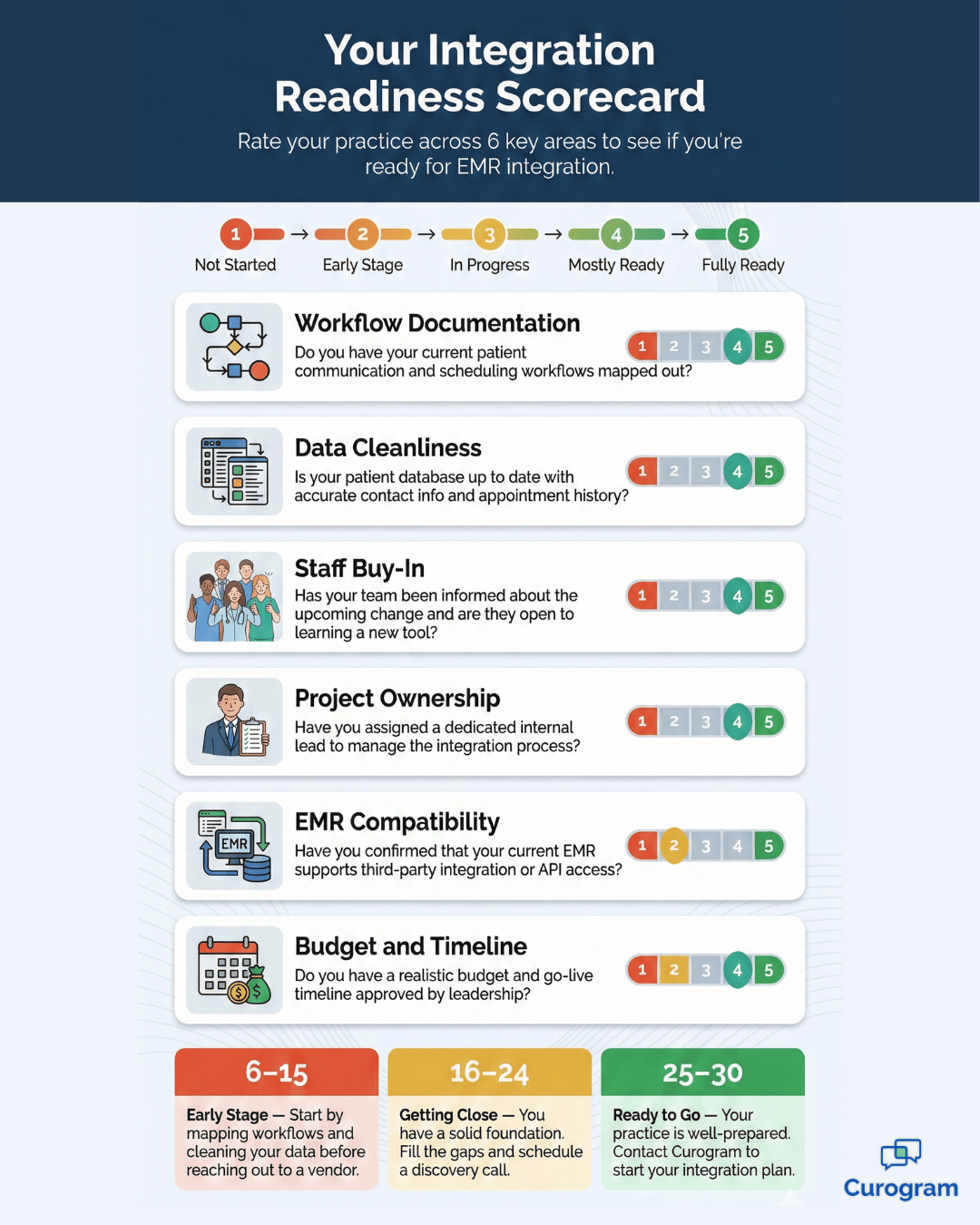
EMR integration readiness scorecard with six scored categories for medical practices

Boutique Specialty Clinic Delivers a Premium Experience with DrChrono

Not every practice needs to handle tens of thousands of patients. This boutique specialty clinic had just two providers and a small but loyal patient base. Their goal was simple: deliver a white-glove experience using technology that patients never had to think about.

Before Curogram, the clinic's communication was inconsistent. Sometimes patients got a reminder call, sometimes they did not. Follow-up messages went out by email one week and by phone the next. The clinic wanted a system that was seamless and invisible to the patient.

The inconsistency was starting to affect the clinic's reputation. A few patients mentioned in online reviews that communication was the one area where the practice fell short.

For a boutique clinic that built its brand on a premium experience, that kind of feedback was impossible to ignore.

A Seamless Patient Journey

Curogram integrated with DrChrono in just two weeks. The setup was straightforward because the clinic's workflow was simpler than a multi-location group. The team focused on creating a consistent message flow, from initial booking through post-visit follow-up, that matched the clinic's premium brand.

The clinic also customized its message templates to reflect the warm, personal tone patients had come to expect. Every text felt like it came from someone who knew them, not from a generic software system. That attention to detail reinforced the white-glove experience the practice was known for.

After launch, the clinic achieved a 99% appointment attendance rate. Patients consistently gave five-star feedback about how easy it was to book, confirm, and communicate with the office. The clinic also gained a competitive advantage in its local market, standing out from larger practices that still relied on clunky patient portals.

For small practices, this case study proves that patient communication integration does not have to be complicated or expensive.

With the right partner and a clear vision, even a two-provider office can deliver a tech-forward experience that patients love.

The clinic has since used its improved communication as a marketing advantage. New patient inquiries often mention the easy texting experience as a reason they chose the practice over larger competitors. In a crowded local market, that kind of word-of-mouth differentiation is priceless.

Five Practices, Five Results: A Side-by-Side Comparison

The table below puts all five case studies next to each other so you can quickly compare practice sizes, implementation timelines, and headline results.

Use it to find the example that best matches your own situation.

Practice EMR Size Timeline No-Show Drop Top Result
Primary Care athenahealth 3 providers 3 weeks 35% 12 staff hours saved weekly
Cardiology Group eClinicalWorks 15 providers, 6 locations 6 weeks 40% NPS improved by 22 points
Imaging Center NextGen 50K studies/yr 4 weeks 28% 60% fewer confirmation calls
Orthopedic Group Epic 50+ providers, 10 locations 12 weeks N/A 45% higher patient response rates; 200+ hrs/mo saved
Specialty Clinic DrChrono 2 providers 2 weeks N/A 99% appointment attendance

Each practice started with different challenges and different EMR systems, yet every one of them achieved measurable improvements after going live with Curogram. The timelines ranged from two weeks for a small specialty clinic to 12 weeks for a large multi-location orthopedic group, showing that the process scales to fit your complexity.

What stands out most is that no practice type was too small or too large to benefit. Whether you see yourself in the two-provider boutique clinic or the 50-provider orthopedic network, these results confirm that the right integration partner can make a real difference.

Notice that the implementation timelines are tied directly to practice complexity, not to difficulty. A longer timeline does not mean a harder project. It simply means the integration was scoped properly to handle more locations, more providers, and more moving parts.

Another pattern worth noting is that the practices with the fastest implementation times were also the ones with simpler workflows. If your practice has a straightforward setup, you could realistically be live within a few weeks. If your operations are more complex, a longer timeline is not a red flag. It is actually a sign that the project is being done right.

What These Success Stories Have in Common

Across all five practices, a few common themes stand out. The details differ from one office to the next,

but the factors that drove success were remarkably consistent.

  • Integration as the foundation: Without connecting Curogram to their EMR, none of these practices would have seen the efficiency gains, time savings, or patient experience improvements they achieved.
  • Early staff adoption: Practices that invested in training before go-live saw faster results and fewer bumps during the transition.
  • Thoughtful communication strategy: The best outcomes came from practices that carefully considered message timing, tone, and content rather than just turning on automated reminders.
  • Ongoing optimization: Going live was not the finish line. Teams continued to refine templates, adjust timing, and tweak workflows for weeks after launch.
  • Strong vendor support: Each practice credited hands-on help from the Curogram team as a key factor in their success.

A phased rollout approach also appeared in several of these stories. Whether it was rolling out by location or by feature, taking a step-by-step approach reduced risk and gave staff time to adjust. Practices that tried to launch everything at once had a harder time.


Another shared pattern was the decision to measure results from the very first week. Practices that tracked their no-show rates, response times, and staff hours before and after launch had clear proof that the integration was working. That data made it easier to justify the investment to leadership and kept the team motivated during the transition.

When your team understands the tool and trusts the process, adoption happens naturally. These themes are worth keeping in mind as you plan your own integration.

It is also worth noting that none of these practices achieved their results by accident. Every one of them was intentional about how they approached the project. They set goals, measured progress, and stayed engaged with the Curogram team throughout the process.

What Drove Success: Lessons from These Integrations

Every practice in this group shared insights about what worked and what they learned along the way. These lessons apply whether you are a two-provider clinic or a 50-provider organization.

Plan Before You Launch

Pre-implementation planning was a game-changer. The teams that cleaned up their patient data, mapped out their workflows, and set clear goals before launch had a smoother experience. Rushing into an integration without preparation leads to confusion and delays.

A good plan does not have to be complicated. Even a simple document that outlines your current workflow, your goals, and a timeline can keep the project on track. The Curogram team can help you build this during the discovery phase.

Assign Clear Ownership

Each practice assigned a project lead who was responsible for communication between the Curogram team and in-house staff. Without that single point of contact, decisions stall and questions go unanswered. Having one person own the project keeps everyone aligned.

The project lead does not need to be a manager or a tech expert. In several of these practices, it was a front desk coordinator or office administrator who understood the daily workflow better than anyone else. What matters is that the person has the time, the authority, and the willingness to keep the project moving forward.

Set Realistic Timelines

The small clinic with two providers went live in two weeks, while the large orthopedic group took 12 weeks. Both timelines were successful because they matched the complexity of each setup. Setting the right expectations from the start kept everyone on track.

When timelines slip, it is usually because a practice underestimated how long data cleanup or staff training would take. Building a small buffer into your schedule for unexpected delays can prevent frustration and keep the project from falling behind.

Involve Staff Early

Practices that included front-desk staff in planning conversations, not just training sessions, reported higher adoption and fewer complaints. When people feel involved, they are more invested in making the new system work. Post-launch optimization was the last piece of the puzzle.

The practices that continued to refine their workflows after going live got even better results over time.

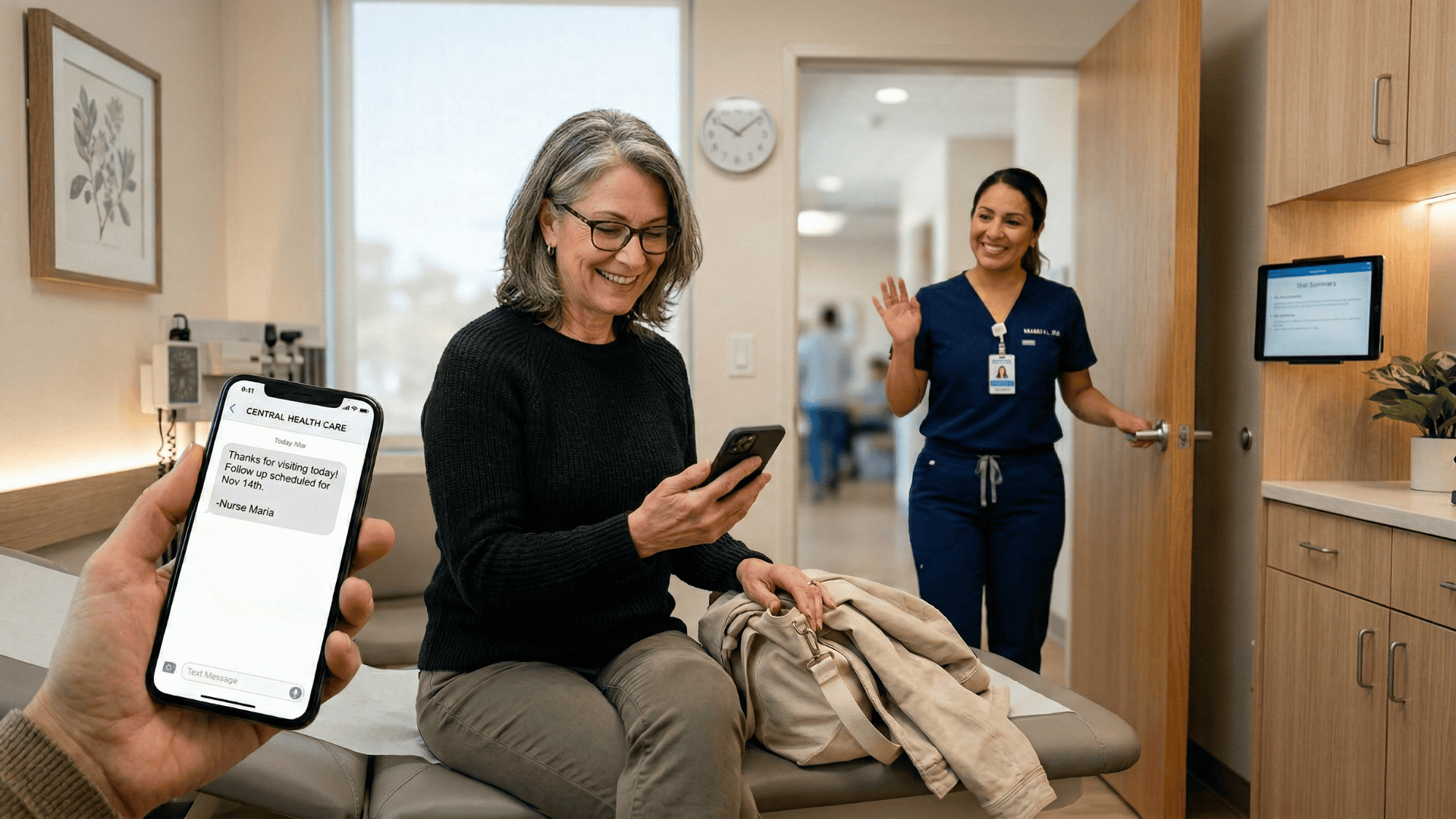
Patient checking text reminder on phone after visit while staff member waves goodbye

Hindsight Advice: What These Practices Would Change

When asked what they would do differently, the answers were surprisingly consistent across all five practices. The benefits of integration were so clear that every team wished they had moved faster.

If They Could Do It Over

  • Start sooner. Every practice said the same thing: waiting felt like a missed opportunity once they saw the results.
  • Dedicate more time to staff training. Even one additional session before go-live would have reduced early mistakes.
  • Communicate the change to patients in advance. A short message or in-office flyer explaining the new text-based system would have reduced initial confusion.
  • Test more thoroughly before full launch to catch edge cases early.
  • Budget for an optimization period after go-live rather than expecting perfection on day one.

One practice also recommended assigning a dedicated internal champion to manage the rollout. Having someone on your own team who owns the project keeps things moving and gives staff a go-to person for questions. That single role made a noticeable difference in how quickly teams adapted to the new workflow.

Change management came up in every conversation. Even when the technology works perfectly, people still need time to adjust. Practices that planned for that adjustment period, rather than expecting everything to click overnight, had a much better experience overall.

These are small adjustments that can save your team significant headaches during the transition. If integration is on your radar, there is no reason to delay.

Several practices also mentioned that they wish they had collected baseline data more carefully before going live. Knowing your exact no-show rate, average call volume, and staff hours spent on manual tasks before the switch makes it much easier to measure improvement afterward.

That data becomes your proof of ROI when leadership asks for results.

Your Roadmap to Similar Results

You have seen what five very different practices achieved with Curogram integration. Now it is time to map out your own path. These curogram integration case studies offer a practical blueprint you can follow step by step.

Step 1: Assess Your Current State

Start by looking at how your practice handles reminders, patient communication, and data entry today. Where are the gaps? Where is your team spending the most time on manual tasks? Compare your workflow to the examples in this article and identify what needs to change.

Be honest about what is working and what is not. If your staff is spending hours on confirmation calls or your no-show rate keeps climbing, those are clear signs that your current approach needs help. Writing down those pain points will make the next steps much easier.

Step 2: Find Your Closest Match

Find the case study that most closely mirrors your practice. If you are a small primary care office, the athenahealth story is your best starting point. If you run a multi-location group, the cardiology or orthopedic examples will be more relevant. Matching your situation to a proven path makes planning easier.

Do not worry if your practice does not match one of these examples exactly. The principles behind each success story, such as phased rollouts, early training, and clear ownership, apply to virtually any practice size or specialty. Focus on the strategies rather than the specifics, and adapt them to fit your own workflow.

Step 3: Follow Their Playbook

Use their implementation approach as your guide. Pay attention to the timelines, the rollout strategies, and the training steps each practice followed. At the same time, learn from the things they said they would change. Avoiding their pitfalls gives you a head start.

Consider creating a simple checklist based on the lessons in this article. Items like cleaning up patient data, assigning a project lead, scheduling staff training, and planning a phased rollout can all be mapped out before you even contact a vendor.

Walking into the conversation with that kind of preparation puts you in a much stronger position.

Step 4: Get the Right Support

Plan your integration project with the right partner. Curogram's team works with practices of every size and specialty to build a setup that fits your workflows. Whether you use athenahealth, eClinicalWorks, NextGen, Epic, DrChrono, or another EMR, the process starts with a conversation about your goals.

Resources are available to help you every step of the way. From initial workflow assessments to staff training materials and post-launch support, Curogram provides the guidance you need to succeed.

The practices in this article all credited that hands-on support as a key reason their integrations went smoothly.

Conclusion

These five stories prove one thing clearly: EMR integration is not just a technology upgrade. It is a practice workflow transformation that touches every part of your operation, from the front desk to the exam room to the patient's phone.

The practices in these case studies saw measurable results because they took action. They identified their pain points, chose a partner they could trust, and committed to a clear implementation plan. Every one of them will tell you the same thing: the hardest part was deciding to start.

Integration doesn’t just save time—it changes the day-to-day experience for everyone.

Front desk staff spend less time on repetitive tasks, clinicians have more accurate information at their fingertips, and patients feel more supported and informed. These improvements add up to a practice that runs smoothly, reduces errors, and builds stronger patient relationships.

Your practice deserves the same results. Whether you want to cut no-shows, save staff hours, improve patient satisfaction, or all three, Curogram can help you get there. The platform integrates with almost any EMR, and the team has guided hundreds of practices through the process.

Beyond a demo, Curogram provides ongoing support and optimization. Many practices find that once integration is live, the team continues to monitor performance, suggest improvements, and ensure the solution evolves with your practice. This is more than software—it’s a partnership designed to keep your clinic operating at peak efficiency.

The practices in this article wish they had started sooner. Do not make the same mistake. Your better workflow, happier staff, and more engaged patients are just one conversation away.

Book a demo with Curogram today and see exactly how integration would work for your practice. Bring your questions, your concerns, and your current workflows. The team will walk you through a plan built specifically for your needs.


Frequently Asked Questions

How long does a typical Curogram integration take?
It depends on the size and complexity of your practice. A small, single-location office can be up and running in as little as two weeks. Multi-location groups with complex EMR setups like Epic may need up to 12 weeks. Your Curogram implementation team will give you a realistic timeline based on your specific situation.
Does Curogram work with my EMR system?
Curogram integrates with almost any EMR, including athenahealth, eClinicalWorks, NextGen, Epic, DrChrono, and many others. If you are unsure whether your system is supported, the quickest way to find out is to reach out to the Curogram team directly.
What kind of results can I expect from integrating Curogram?

Results vary by practice, but the case studies in this article show no-show reductions of 28% to 40%, staff time savings of 12 or more hours per week, and patient response rate increases of up to 45%. Your specific outcomes will depend on your current workflows and how fully you adopt the platform.

Do I need to train my entire staff on Curogram?

Yes, it is best to train everyone who will interact with the system, especially front desk and scheduling staff. Curogram is designed to be simple and intuitive, so training typically takes just a few sessions. Practices that trained their teams early reported smoother launches and faster adoption.

Will patients need to download an app to communicate through Curogram?

No, patients do not need to download anything. Curogram uses standard text messaging, which means patients can receive and reply to messages right from their phone. This simplicity is one of the main reasons patients respond at such high rates.