

💡 Curogram vs Artera for medical groups comes down to one question: who runs the platform after go-live? Artera is a capable, well-funded platform built for organizations with staff whose job is integrations, template rules and message routing.

Curogram is built for the practice administrator with a full schedule. EMR upkeep and routing setup stay with Curogram's team, and front desk staff can learn the platform in under 10 minutes.

Think of it as the "Monday test." If no one in your building owns integrations, Curogram is the easier fit. Based on our internal data, Curogram clients average an appointment confirmation rate above 75%.


If you are comparing Curogram vs Artera for medical groups, start with one fact. Artera expects an organization with dedicated people whose job is managing integrations, while Curogram expects a practice administrator who already has a full schedule.

That single difference shapes nearly everything else on this page.

Most software decisions get made in a conference room, where a vendor shares a polished dashboard and everyone nods along. Nobody in the room asks the question that will matter most six months later.

Who logs in on Monday morning and keeps it running?

Ask any practice manager about a rollout that went sideways, and they rarely blame a missing feature. They describe the reminder nobody knew how to edit or the routing rule that sent refill requests to the wrong location. Most often, they describe the one person who understood the configuration and then accepted a job across town.

This is where the enterprise vs medical group patient engagement divide stops being a theory. It becomes a staffing problem with your name attached to it.

Both platforms are capable. Artera serves more than 1,000 healthcare organizations and has significant financial backing, while Curogram serves outpatient practices ranging from single doctors to groups with hundreds of providers.

Neither is a bad choice, but each one is designed for a different kind of building.

In this Curogram vs Artera comparison, we will skip price tags and integration diagrams, since other pages cover those in depth. Instead, you will see what rollout asks of your team, who owns changes from week to week, and what happens when your key person leaves.

By the end, you should be able to answer one question with confidence. What kind of building are you really running, and who in it will own this platform a year from now?

Two Strong Platforms Built for Two Kinds of Teams

Starting With the Fair Version

Let's be clear about Artera up front: it is an independent, well-funded company. In December 2025, it announced Artera's $65M growth investment and $100M CARR, led by Lead Edge Capital.

Its scale isn't in question either. Artera's stated customer base includes more than 1,000 healthcare organizations, from specialty groups and FQHCs to health systems and federal agencies. The company reports more than 2 billion patient messages a year.

So this is not a story about a weak vendor. Artera is a serious platform that does serious work for large, complex organizations.

The real question is fit. A tool can be excellent and still be wrong for the people who have to operate it every day. A commercial kitchen oven is an impressive machine, but it won't help much in a café with one cook. The rest of this page is about matching the platform to the team that will own it.

The Staffing Question

Enterprise platforms tend to assume someone on staff owns three responsibilities. The first is integration maintenance, which means keeping the connection to your EMR healthy as software versions change and credentials expire.

The second is template governance. Someone decides who can edit a reminder and makes sure 40 versions of the same message don't pile up across locations.

The third is escalation routing. When a patient texts about a billing issue at one location or a medication question at another, a rule decides where that message lands. Someone has to build those rules and repair them when they break.

Health systems usually have that person, and many have an entire team with titles like integration analyst or digital engagement manager. A twelve-provider group usually does not. Their version of that role is the practice administrator, who also handles payroll, staffing gaps and a leaking ceiling tile in exam room three.

It's the Role That Counts, Not the Headcount

It would be easy to read this as a small versus big comparison, but that framing misses the point.

The real test is simple. Does one named person in your organization own integration upkeep, template governance and escalation routing as part of their actual job? A side task they get to when things slow down doesn't count.

Some twelve-provider groups have that person, perhaps an operations lead with a technical background. Some forty-provider groups don't, even with eight locations and a busy call center.

You can see how other platforms groups compare against Artera measure up on this same test. For multi-location and large group practices without that role, the answer usually points one way.

What Your First 90 Days Actually Look Like

The Work Rollout Hands to Your Team

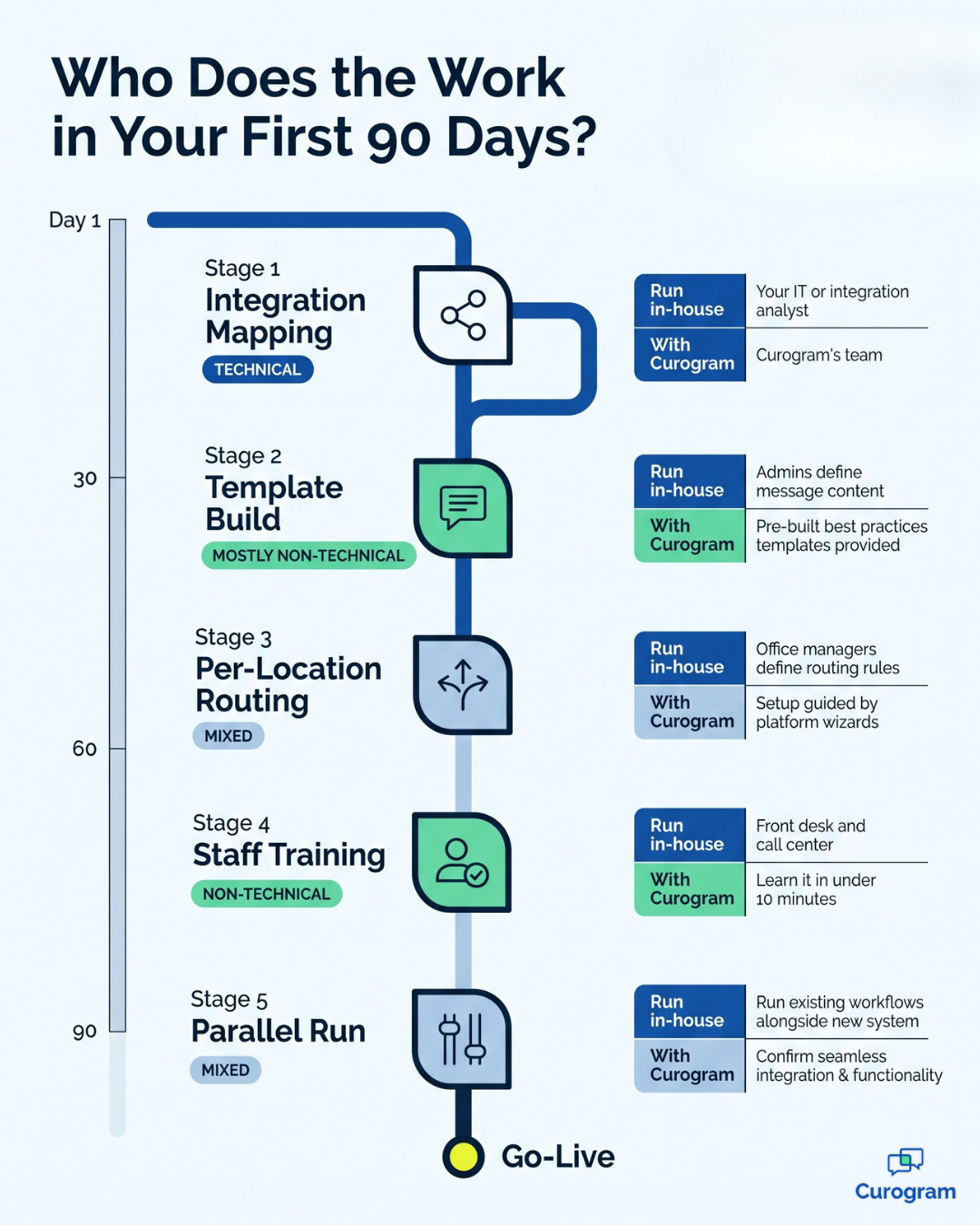
Every rollout moves through the same five stages. The difference is who does the work at each one.

  1. Integration mapping. Your EMR fields get matched to the platform, including appointment types, providers and locations. This step is technical.
  2. Template build. Reminders, confirmations and recall messages get written and approved. It's mostly non-technical, but someone must sign off.
  3. Per-location routing. Each site's messages get sent to the right inbox or team. This is part technical and part operational.
  4. Staff training. Front desk and call center teams learn the tools. No technical skill is needed.
  5. Parallel run. Old and new systems run side by side while you check that nothing drops. It needs someone watching closely.

Stages one and three are where a platform's design really shows. On an enterprise platform, your own team often carries more of that load, which suits a group with an integration analyst.

With Curogram, our team handles mapping and routing setup, so your staff can focus on templates and training. For a closer look at how the two integration architectures differ, see our side-by-side breakdown.

Where Rollouts Get Stuck

Here is the failure mode nobody puts in a proposal. The rollout is owned by someone whose real job is keeping the schedule full.

Take a practice administrator at a six-site orthopedic group. In week three, the vendor sends a configuration ticket. It asks her to confirm routing rules for two locations that share a phone line. It is a 20-minute task.

Tuesday brings three staff call-outs and a payer audit. Wednesday is worse. The ticket sits for three weeks, and the parallel run can't start without it. Patients keep getting the old reminders, and go-live slips into the next quarter.

Nobody did anything wrong. The project simply landed on a person with no spare hours. That's why you should ask each vendor who owns every open ticket during rollout, and you can review clinical workflow automation compared across both platforms to see where tasks land. If the honest answer is "your administrator," plan for delays.

Where Curogram and Artera Part Ways

Who Handles What Day to Day

On paper, feature lists make the two platforms look remarkably similar. Both send reminders, both handle two-way texting, and both connect to EMRs.

The difference appears in the daily division of responsibility. With Artera, a large group or health system often keeps configuration in-house. That gives an IT team tight control, which matters when you are setting one standard across dozens of sites.

With Curogram, everyday changes are designed for non-technical employees.

Based on our internal data, front desk teams can learn the platform in under 10 minutes. Larger changes, like adding a new location or adjusting the EMR connection, go through Curogram's support team instead of your own IT department.

Both platforms take patient data seriously. You can review Curogram's SOC 2 and HIPAA compliance standards, and any vendor you choose should follow HHS HIPAA guidance for covered entities. If budget is your main question, our full Curogram and Artera cost comparison covers it.

The Two Rows That Matter Most

  Curogram Artera
Designed for Outpatient practices and multi-location medical groups Health systems, large specialty groups, FQHCs and federal agencies
Typical rollout Curogram-led setup, scoped by location count and EMR Enterprise project, often with internal IT involvement
Who configures templates Front desk leads and administrators, with Curogram support Commonly an internal admin or digital team
Who maintains the EMR integration Curogram's team Often shared between Artera and your IT staff
Per-location routing Set up by Curogram, adjusted by your staff Configured to your org structure, usually by internal admins
Support model Direct support from Curogram's team Enterprise support structure (see Artera reviews on G2)
Public pricing Not published; quote-based Not published; quote-based

Two rows in that table deserve more of your time than the rest.

The first is who configures templates. Say flu season arrives and you need a new vaccine reminder across five locations. In one model, your staff edits it in minutes, while in the other, it may require a request to an internal administrator who is already juggling other projects.

The second is support. Think about late on a Friday, an hour before close, when you discover Monday's confirmations failed to send and 180 patients haven't been reminded.

Who answers the phone? Ask each vendor that exact question during your demo, and request specific names instead of a ticket portal.

Color-coded map of five patient engagement rollout stages and who owns each one

What Happens When Your Setup Expert Walks Out the Door

The Bus-Factor Question

Here's a question nobody asks during procurement. Almost everybody asks it about 18 months later.

If the one person who understands your setup leaves, what stops working?

On an enterprise platform run in-house, the answer can be a lot. Integration credentials expire with no one watching.

Routing rules for your call center solutions turn into guesswork, and review requests for healthcare reputation management quietly stop going out. Artera can help you through that gap, but the setup still belongs to your team, so the rebuild does too.

With Curogram, the technical setup sits with our team. If your administrator leaves, the EMR link and routing rules stay in place. The new hire learns the daily tools while everything underneath keeps running.

The Handoff File to Request at Go-Live

Don't wait until someone resigns to ask for documentation.

Request these four items at go-live, from whichever vendor you choose:

  • The integration credentials and their renewal date
  • A full template inventory, including who approved each one
  • The routing rules for every location
  • A named support escalation contact, with a backup

Stop playing phone tag! Reduce your call volume by 50% with Curogram's HIPAA-compliant 2-way texting platform.  

Keep them in a shared folder that at least two people can open. Review the file once a year, or any time someone in operations changes roles.

Pulling this together takes about an hour. Skipping it can cost you weeks of broken reminders and missed visits.

Who Owns the Platform From Week to Week

The People Who Log In Every Day

In most medical groups, three roles use the platform every day, and each one needs to make certain changes without filing a ticket.

The front desk lead needs to fix a patient's phone number, resend a reminder and reply to a reschedule text.

The practice administrator needs to edit a template, add a holiday closure message and pull a weekly confirmation report. The call center supervisor needs to reassign message queues when someone is absent and see which texts are still waiting.

If any of those tasks requires a ticket, the platform is working against your team's daily operations. Before you sign, have each role try their top three tasks during the demo.

If you plan to switch from Artera to Curogram, run the same test on your current setup first.

Results From Groups Like Yours

Numbers are useful here, so let's keep it to two.

1,064

New 5-star reviews in three months at one multi-location practice

75%+

Average appointment confirmation rate across Curogram clients

Both figures are based on our internal data. The first came from a multi-location practice that struggled with patient feedback and online visibility. Once it activated automated post-visit surveys tied to Google Reviews, patients left 1,064 new 5-star reviews in just three months.

The second is the confirmation rate across our clients.

Here's an illustrative example:

If your group books 4,000 visits a month, a 75% rate means about 3,000 patients have told you they're coming. Your front desk can then spend its calls on the other 1,000.

To estimate what that's worth for your group, try the no-show ROI calculator.

Which Kind of Practice Are You Running?

Deciding on Artera or Curogram for medical groups like yours usually comes down to a few practical signals about staffing and structure.

When Artera Is the Better Match

Artera is often the stronger choice when your organization looks like this:

  • You have an integration team, or at least one analyst whose job includes EMR connections.
  • You already manage a large collection of vendor tools and need a platform that fits into it.
  • You are a health system setting one messaging standard across many facilities.

In those settings, keeping control in-house is a genuine strength. Artera's depth pays off when you have the internal staff to use it.

When Curogram Is the Better Match

Curogram tends to fit better when:

  • You don't have dedicated IT staff for patient communication.
  • You run several locations, but not several hospitals.
  • You want one contract and one support team for texting, reminders and reviews.

If that sounds like your organization, the next step is straightforward. See how Curogram would work with your EMR, your locations and your team in a short, focused demo.

Pick the Platform Your Monday Team Can Actually Run

Every platform looks impressive on launch day. The real test arrives on an ordinary Monday, months later, when a template needs changing and the person who configured everything is busy or gone.

That's the lens that matters most in any Curogram vs Artera evaluation.

Artera is a strong, well-funded platform that performs best in organizations with integration staff, formal template governance and IT teams who want control. If that describes your organization, it deserves a serious look.

Many medical groups operate differently. The person managing patient messaging is also running payroll, covering sick calls and reporting to physician owners. That person needs a platform that is easy to manage and backed by a support team that owns the technical layer.

That is the gap Curogram was built to fill. Our engineers designed the platform after sitting beside front desk teams and observing their workflows, so daily tasks stay simple and your staff can learn it in minutes.

EMR upkeep and routing setup stay with our team, so an unexpected resignation doesn't turn into an operational crisis.

Here is a quick way to decide: write down the name of the person who will own your platform next year. Then ask whether integration upkeep is actually part of their job description.

If you can name that person, either platform could work. If you can't, the choice becomes considerably clearer.

You don't have to settle this decision on paper alone. Bring your EMR, your location list and your hardest routing question to a consultation.

We'll walk through how your first 90 days would look and who would own each step. You'll leave with a clear picture, even if you decide Curogram isn't the right fit.

Schedule a Demo with Curogram and see how a platform built for your team runs on Monday morning.


Frequently Asked Questions

Is Artera too big for a ten-location group?

Not automatically, because size isn't the real test. Ask whether one named person owns EMR integration upkeep, template governance and escalation routing as part of their job. If yes, Artera can work well at ten locations, but if no, keeping it running may be difficult. You can also see how other platforms groups compare against Artera.

How long does each platform take to roll out?

Timelines depend on three things: how many locations you have, which EMR you use, and whether templates are rebuilt or migrated. As a general guide, Curogram rollouts for multi-location groups are often measured in weeks. Enterprise rollouts, including Artera's, are more often measured in months, especially when internal IT carries the setup work.

What does each platform cost?

Neither Curogram nor Artera publishes public pricing. Both quote based on your size, number of locations and the features you need. For a full breakdown, see our full Curogram and Artera cost comparison. To estimate the value of fewer missed visits, try the no-show ROI calculator.

Which is the better pick: Artera or Curogram for medical groups with no IT team?

For a group with no dedicated IT staff, Curogram is usually the easier fit. Our team maintains the EMR integration and sets up routing, while your staff handles daily tasks they can learn in under 10 minutes. Artera fits better when you have in-house staff who want to own configuration and integration upkeep.

Can we switch from Artera to Curogram later?

Yes. Many groups move platforms once they realize the tool they chose needs more in-house staff than they have. A switch involves mapping your EMR, moving or rebuilding templates and setting up routing for each location. Our guide on how to switch from Artera to Curogram walks through each step.