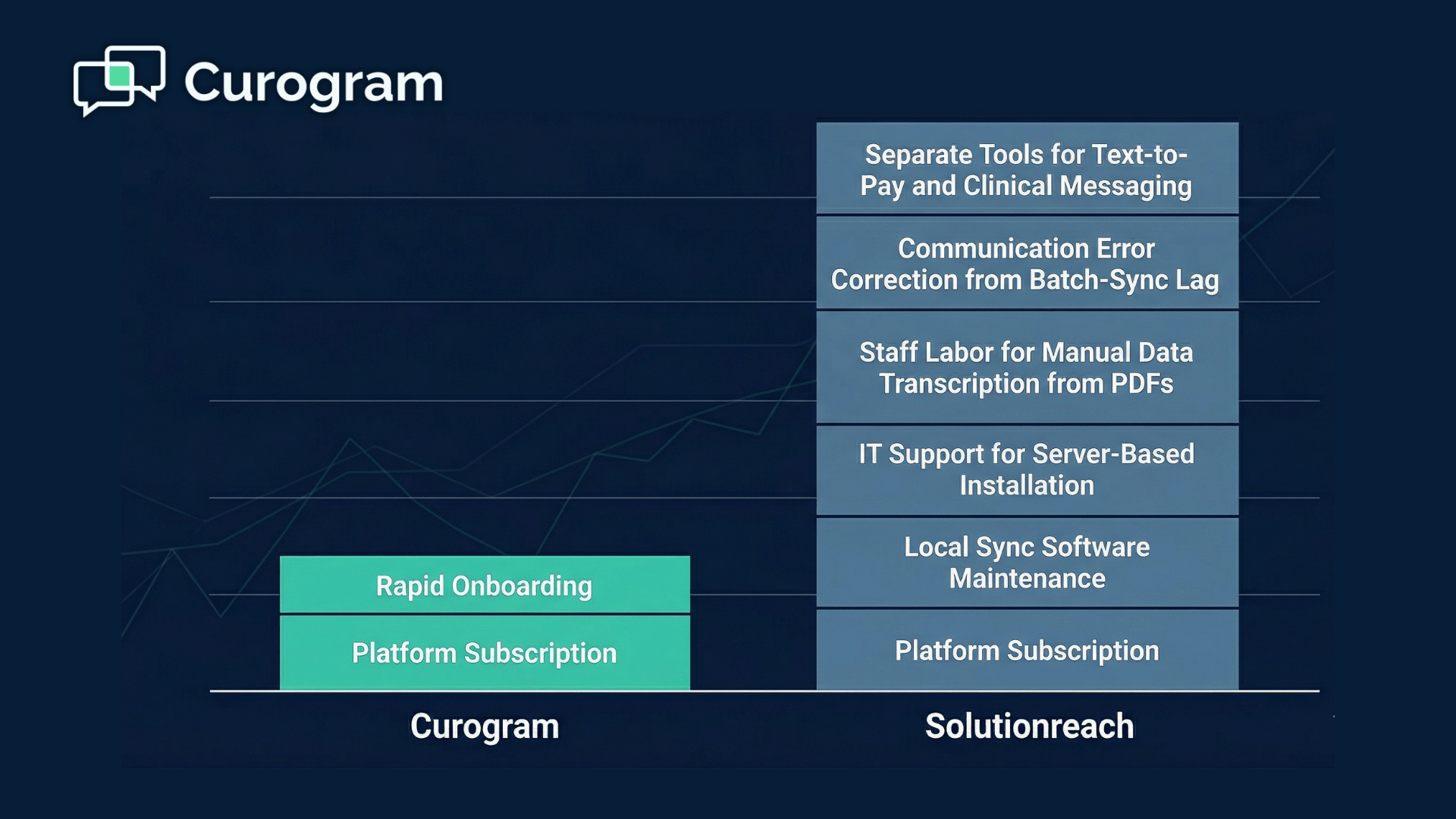

Curogram fits practices where patients text back and the schedule moves because of it. Both platforms send reminders, automate review requests and support text-to-pay, so a feature list will not separate them.
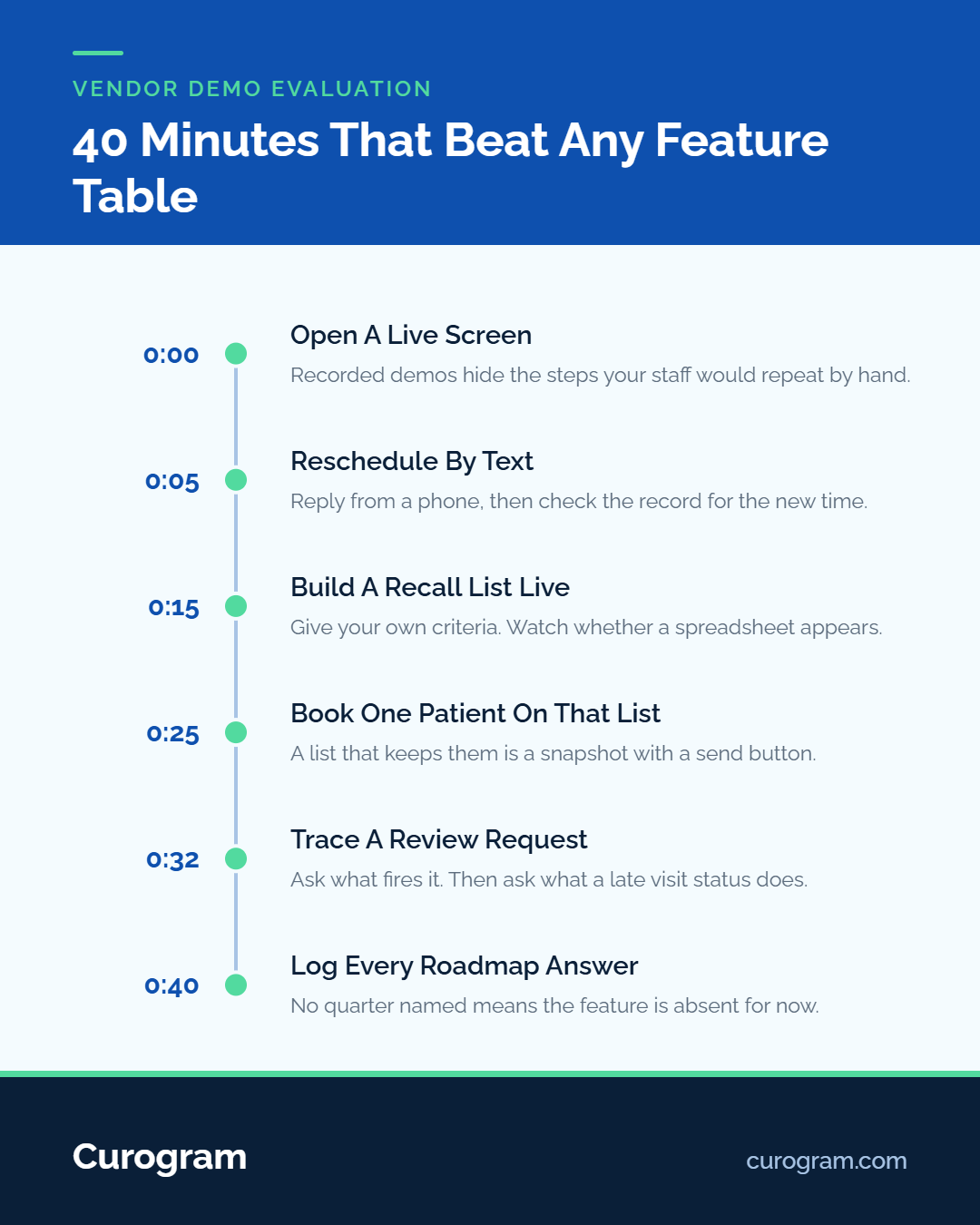
Forty minutes will, if you ask for three workflows live and watch what the rep does when the flow stalls
Feature-count comparisons are the easiest to write and the least useful to read. Line Curogram and Solutionreach up on published features and most rows tie: two-way texting, reminders, review invitations, text-to-pay, digital intake. Both companies ship all of it.
Depth is the thing a table cannot hold. What we mean by depth is narrow and testable: whether a patient's reply changes your schedule without somebody retyping it.
Solutionreach's own pricing FAQ says contracts run yearly, which is the reason to spend forty minutes on this before signing rather than after.
The 40-Minute Demo Script
Three workflows to ask for live
Ask for these three, in this order, on a live screen with a test patient. A recorded walkthrough does not count.
Reschedule by text with a write-back. Have the rep message a test patient, reply from a phone asking to move the appointment, then show you that appointment in the practice management system. Watch whether the new time is already sitting there, or whether somebody opens a second tab to key it in.
A same-week recall list. Give them a criterion your own practice uses, such as a lab result you follow up on or a visit type that needs a six-month check. Ask them to build the list in front of you, then send to it. Note how the list gets built and where it lives afterwards.
A post-visit review request. Ask what event fires it, then ask what happens when that event is entered late. Every practice enters visit statuses late sometimes, and the answer tells you whether the trigger is a real event or a nightly batch.
For the deeper version of all three traces, clinical workflow automation compared runs them step by step.
What a stalled demo tells you
Three tells, in rising order of seriousness.
The rep switches to a slide. That means the workflow exists as a described feature rather than a screen anyone is confident showing live. Ask them to come back with it next week, then see whether they do.
“That's on the roadmap.” Ask which quarter. An answer with a quarter in it is worth writing down. Without one, price the platform on what it does today and check the gap against the contract term you are being asked to sign.
An export to spreadsheet appears mid-flow. This is the one that costs you later. Any step where a list leaves the platform and comes back is a step somebody repeats every month, and it is the step that stops happening in August when two people are on leave.
What the Table Shows
Eight rows worth reading
Most Curogram vs Solutionreach features questions end in a tie, and the table shows where. Two-way texting, automated reminders, review automation, text-to-pay: both platforms publish all four, and Solutionreach includes all four in every one of its packages.
Two rows separate cleanly. Solutionreach publishes 400+ practice management and EHR integrations, which is more named systems than we carry.
Solutionreach's pricing tiers also list four packages with no prices attached, so a quote is the only route to a number. Curogram has no public rate card either, which is worth saying plainly rather than scoring as a win.
One row rewards a close read: monthly SMS volume. The published packages are metered at 1,750, 3,500 and 4,500 monthly messages, with the enterprise tier tailored.
That number decides more than it looks like it should, and the fourth section is about why. For the sync question sitting behind the integration row, how the two integration architectures differ covers it.
|
Curogram |
Solutionreach |
|
|---|---|---|
|
Vertical heritage |
Outpatient medical practices only |
Began in dental in 2000 as Smile Reminder; eye care and medical from around 2011 |
|
Named EMR integrations |
Outpatient EMR and practice management systems, including eClinicalWorks, Practice Fusion, athenahealth and DrChrono |
400+ practice management and EHR integrations, per its own published figure |
|
Conversational 2-way texting |
Yes |
Yes, in every published package |
|
Shared inbox with assignment |
Shared inbox yes; assignment behavior worth testing in the demo |
Team Chat for intra-office messaging; patient-thread assignment not specified publicly |
|
Automated reminders |
Yes |
Yes, in every published package |
|
Google review automation |
Yes, post-visit review requests |
Yes, review invitations to Google or Facebook, in every published package |
|
Text-to-pay |
Yes |
Yes, within Payment Technology, in every published package |
|
Public pricing |
No public rate card |
Four packages published, prices by quote; SMS metered at 1,750 / 3,500 / 4,500 / tailored |
Table sources: Solutionreach pricing and company pages, retrieved 12 September 2026; Curogram product documentation and internal data.
Two rows worth arguing about
In a Solutionreach comparison, reminders are the row everyone reads and the wrong row to decide on. Two others carry the real difference, and both need testing rather than reading.
Shared inbox with assignment. Solutionreach publishes Team Chat for secure intra-office messaging. Whether a patient thread can be assigned to one named person, with a status that changes when it closes, is not something either vendor's feature page settles. Put it in the demo: assign a thread, have a second user open it, watch what happens.
Conversational threading. A reminder, the patient's reply and the staff answer either live in one continuous thread against that patient, or they arrive as separate messages somebody has to assemble.
Ask to see a real thread with four exchanges in it, three weeks old. Solutionreach reviews on G2 are worth reading alongside whatever you see, because reviewers describe the daily version.
Recall Lists Built From Clinical Events
How the list gets assembled
A recall list is a query, and the question is what the query runs against.
Curogram builds the list from EMR fields a practice already keeps current: last visit date, visit type, provider, and the follow-up interval set for that visit type. Patients who cross the interval without a booked appointment enter the list. When one of them books, they leave it. Nobody edits a file.
Test that claim rather than taking it. Ask any vendor to add a patient to a recall list, book that patient, and show the list again on the same screen. A list that has not changed is a snapshot with a send button on it.
What breaks a static list
The failure mode is familiar to anyone who has run recall from a file. Somebody pulls a report on Tuesday, exports it to a spreadsheet, deletes the patients who already rebooked, adds a column of notes, and uploads it on Thursday.
By Thursday, the file is wrong. Patients called in on Wednesday. A few moved away. At least one has died, and a grieving family gets a text asking them to book a follow-up.
A list that refreshes against the schedule does not produce that message, because a patient leaves the list the moment they book. Ask both vendors which of those two things their recall actually is, and ask to watch a patient drop off the list live.
Where Solutionreach Is Genuinely Strong
Reminder breadth and vertical fit
Solutionreach was texting patients before most practices had a website. It started in 2000 as Communitect, became Smile Reminder after integrating with dental practice management systems, and took the Solutionreach name around 2011 as optometry and dermatology practices came on. Solutionreach's company history lays out that arc.
The history shows in the product. Reminder cadences across text, email and voice. Batch messaging, newsletters, patient surveys, refer-a-friend, and insurance eligibility built for dental practices.
Its own site counts 20+ years in the industry, 50,000+ practices helped and more than 2 million SMS messages sent daily. Named customers on its pricing page include West Coast Dental, EyeCare Partners, and Keplr Vision. For a dental or vision group, that fit is real, and no argument we make here changes it.
The condition that changes the answer
Reminder tooling stays the right product right up to a threshold. Our own operating rule of thumb, not a published statistic: once inbound patient replies run past roughly a quarter of your message volume, you have stopped buying reminders and started buying a conversation platform.
Four signs show up before the arithmetic does. Staff answering patient texts from a personal phone. A whiteboard of callbacks beside the monitor. Reminder replies that get read, then handled by phone anyway.
The fourth is the one people miss: a second tool bought to cover the gap. A separate texting app, a separate review tool, a separate forms vendor. Three logins is usually the point where reply volume outgrew the reminder platform, months before anyone said so out loud.
Message metering is the other signal. A package sized at 1,750 or 3,500 monthly messages fits an outbound reminder program comfortably. Back-and-forth with every third patient uses that allowance differently. Count one month of inbound replies before anyone picks a tier.
Evidence and the Compliance Floor
What we can evidence
Two numbers, both from our own client data, both narrow enough to argue with.
Appointment confirmation rate across current Curogram clients averages above 75%, based on our internal data. It counts patients who replied to confirm, measured against appointments where a confirmation request went out.
A multi-location practice generated 1,064 new five-star reviews in three months, with 90% of responding patients leaving five stars, also based on our internal data. Review requests fire on a completed visit, which is why the visit-status question in the demo script matters so much.
That trigger is the whole mechanism. A request sent on a nightly batch reaches patients who cancelled at the door, and staff learn to switch it off. Curogram's healthcare reputation management page carries the longer version of how the trigger is set.
No more proof points are coming. Two figures a practice can check beat eight it cannot. Ask us which practices, which months and what sat in the denominator, and ask the same of anyone else on your list.
The baseline both meet
Compliance is where comparison pages overreach, so take the floor flatly. HIPAA applies to both platforms, and both sign BAAs with covered entities.
Solutionreach publishes a HIPAA compliance page. Curogram publishes SOC 2 Type II and HIPAA compliance standards. Neither of us gets to claim a gap on the other side.
HHS HIPAA guidance for covered entities is the source that matters, because the obligation belongs to your practice rather than to whoever sends the message. A BAA splits duties between you and a vendor. Your own duties under the rule stay with you.
Two questions neither vendor will volunteer. What is the date on the current SOC 2 report? And how long do patient messages live in the platform, who can export them, and in what format if you leave?
The second one decides how a migration goes, and switch from Solutionreach to Curogram covers what that looks like in practice.
Where we would not argue
Three rows go to Solutionreach or tie, and pretending otherwise would make the rest of this page worth ignoring.
Reminder campaign breadth. Cadences, channels, batch sends, newsletters, surveys, referral campaigns. More surface area than we have built.
Vertical depth in dental and eye care. Two decades and more of practice management integrations in those two verticals, plus insurance eligibility built for dental. If you run a DSO, start there.
Install-base maturity. 50,000+ practices means the edge cases have been hit and handled by somebody before you. A younger platform cannot say that, and we do not. If budget rather than depth is deciding this, the no-show ROI calculator will get you a number faster than either sales team.
Making the Call
Solutionreach still wins when
Your practice is dental or eye care, and your PMS is one of the systems Solutionreach has integrated with for years. Vertical fit beats any argument we can make here.
Message flow runs mostly one direction. If patients receive reminders, confirm with a tap, and rarely type anything back, reminder tooling is the product you need, and the extra depth is spend you would not use.
Reminder surface area matters more to you than reply handling: multi-channel cadences, newsletters, surveys, and referral campaigns under one login. Switching to gain reply depth you will not use is a cost with no return.
Switch when
Patients reply, and somebody has to deal with it. Count a week of inbound texts. Past roughly a quarter of your volume, reminder tooling has become the bottleneck rather than the fix.
A reply changes the schedule, and nobody retypes it. That is the write-back test from the demo script, and it is the single row worth switching for.
Recall stops being a file. An export, an edit, and an upload means the list is stale before it sends, and whoever owns that file eventually leaves.
Book a demo and run the three-workflow script against us. Bring a test patient and a real recall criterion. Consultation only.
Run the Script Before You Sign
Solutionreach or Curogram for medical practices is a question a feature table answers badly, because most of the table ties. Forty minutes and three workflows answers it properly, and the answer differs for a dental group and for a primary care office whose patients text back all day.
Run the script against both of us. Whatever you find, you will have found it before signing a yearly contract rather than three months into one.
Book a demo and run the three-workflow script. Consultation only.
Frequently Asked Questions
Curogram assembles recall lists from EMR fields such as last visit date and visit type, so a patient leaves the list the moment they book. Solutionreach ships Recall in its higher packages. Mass text messaging for patient outreach covers the sending side.
Solutionreach began in dental in 2000 and still builds for it, including insurance eligibility verification offered for dental only, long-standing dental PMS integrations and DSO customers. Curogram serves outpatient medical practices, so vertical fit usually decides this one.
Solutionreach's pricing tiers list four packages with no prices, so every plan needs a quote. Curogram publishes no rate card either. The Curogram and Solutionreach cost comparison works through what drives each number rather than quoting one.
Reminder tooling assumes messages travel one way, and packages are metered at fixed monthly message counts.
Once replies climb toward a quarter of volume, staff handle conversations the platform was not sized for. That threshold is our rule of thumb, not a published figure.
Three moments: the rep switching to a slide, a feature described as being on the roadmap with no quarter attached, and any spreadsheet export appearing mid-workflow. Each marks a step staff will repeat by hand every month.