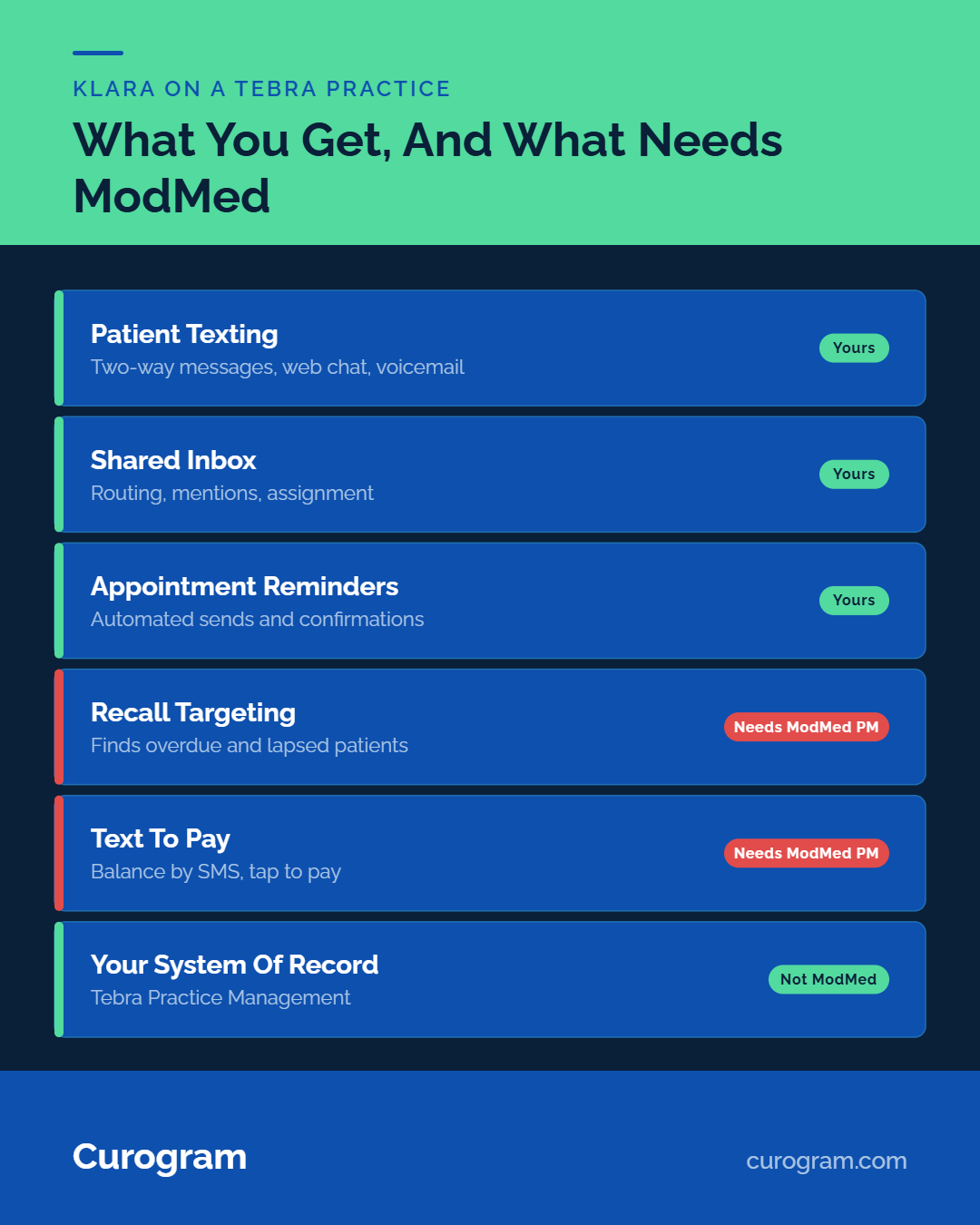

Klara sits oddly between them, because ModMed has owned it since February 2022 and several of its strongest pieces need ModMed Practice Management underneath them.
Tebra covers two-way texting, automated reminders and digital intake. Curogram adds a shared inbox, review automation, text-to-pay and SMS recall across both Tebra and legacy Kareo accounts.
Shopping for a messaging platform feels like comparing messaging platforms. For a Tebra practice it is not that. The real choice sits between a bundle you may already be paying for and an independent layer that connects to Tebra directly. Most shortlists online never name that split.
The friction shows up on a Thursday. Two staff have the same patient thread open. One of them answers, the other answers differently, and the patient ends up with two times for one appointment.
Nobody did anything wrong. The tool had no way to say who owned the conversation.
Klara appears on nearly every one of those shortlists, and for a Tebra practice it is the strangest option there. ModMed bought it in February 2022. The pieces that justify the price, recall targeting and text payments, read from ModMed Practice Management. Your practice management system is Tebra.
The claim this page defends: a practice with high message volume outgrows the bundled option before the bundle catches up. Not because the bundled tool is bad.
Message volume grows faster than any suite's release cycle, and messaging work queues behind charting, billing and claims.
One situation is in scope: you run Tebra and you are deciding what handles patient messages.
You Have Already Done This Once
Kareo Plus PatientPop, and What Carried Over
November 2021 brought the announcement of the Kareo and PatientPop merger that formed Tebra. Kareo carried the clinical and billing side. PatientPop carried patient acquisition, websites and reputation. One brand, two product lineages.
Practices that lived through it remember the parts that touched daily work: new logins, a renamed portal, and support articles that pointed at the old product names for months.
Tebra's own help center still opens with a banner saying Kareo and PatientPop are now Tebra and that becoming Tebra will take time.
Kareo PatientPop patient communication tools came together as a merger, and the seam still shows in how they are sold.
Clinical, billing and messaging sit in one place. Reputation, listings and website tools sit in the Practice Growth line, which is a separate purchase.
A practice buying the first group does not get the second. Worth reading what consolidation means for patient engagement buyers before assuming one logo means one product.
What That Taught Front Desks
A bundled tool ships when the bundle ships. Its roadmap answers to the whole platform, so messaging improvements queue behind billing, charting and claims work.
Here is the mild claim, and we will stand behind it: a practice with high message volume usually outgrows the bundled option before the bundle catches up. Not because the bundled tool is bad. Because message volume grows faster than a suite's release cycle.
You can see the design assumption in the settings. Tebra's reminder module has to be switched on for each service location. Preferences are then set patient by patient, on the Demographics profile.
That is a setup built for a practice adding patients steadily. It fits a busy inbox less well.
Front desks learned something from the last transition too. They kept the workaround. A spreadsheet, a second phone, a shared email account. Ask yours what they are still using.
Tebra's Own Messaging vs a Dedicated Layer
What Tebra Patient Experience Covers
Name it accurately, or you have not earned the comparison. Tebra's Patient Experience suite is real software. It does a real job for the practices it fits.
By Tebra's own account it covers HIPAA-compliant two-way messaging and reminders by text, email or phone. Digital intake forms and e-signatures come back before the visit. Finished forms sync to the Tebra EHR, so nobody retypes them.
The suite also carries a patient portal with 24/7 online booking that reads from the EHR calendar, post-visit surveys, and broadcast messaging for closures and campaigns.
In the help center the reminder engine is called Patient Communications, and patient confirmations post back to the Dashboard and Calendar.
For a single-location practice running a few dozen patient conversations a week, that list is close to complete. Reminders go out. Patients confirm.
Forms arrive filled in and land in the chart. Nobody needs a second vendor to make Tuesday work, and we would not pretend otherwise.
Where Volume Breaks a Bundled Tool
Four things start to matter once replies outnumber the people reading them. Assigning a thread so one person owns it. Templates that change by provider.
Then a rule for after hours, and a report a practice manager can act on.
Take a three-provider Tebra practice with two front desk staff and roughly 400 inbound patient texts a week. Those figures are illustrative.
Without assignment, both staff open the same thread, and one of them answers twice. Without per-provider templates, the same refill answer gets retyped nine times a day, slightly differently each time.
After hours is where this gets expensive. A message arriving at 6:40 pm on Friday needs a rule: auto-reply, route to an on-call queue, or hold until Monday. Without one, it sits unread. The patient calls the answering service instead, and you pay for that call.
Then the question a practice manager cannot answer today. How many patient messages went unanswered last week? Ask your current vendor whether that report exists and what it is called. The answer tells you more than any feature list.
When the Bundled Tool Is Genuinely Enough
Some Tebra practices should not switch. Saying so costs us nothing and saves you a bad quarter.
One location, one person on the inbox, replies cleared before lunch. Patient Experience covers that, and a second vendor would cost more in setup and training than it gives back. The same holds if Tebra billing is still going live. Do not stack one onboarding on another.
The table below sets out what each vendor publishes about six capabilities, from two-way texting to automated appointment reminders. These are their claims, not our reading of them.
|
Capability |
Tebra Patient Experience |
Klara |
Curogram |
|---|---|---|---|
|
2-way texting |
Included |
Included |
Included |
|
Shared team inbox with assignment |
Not named on the Patient Experience page |
Included, with routing and mentions |
Included |
|
Automated reminders |
Included, by text, email or phone |
Included |
Included, with reply to confirm |
|
Google review automation |
Practice Growth line, not Patient Experience |
Not named on ModMed's engagement pages |
Included |
|
Text-to-pay |
Payments sit in the billing product |
Via ModMed Pay, which needs ModMed PM |
Included |
|
Mass patient outreach |
Broadcast messaging included |
Included |
Included |

Why Klara Is the Odd One Out Here
Owned by an EMR You Do Not Run
ModMed acquired Klara on 8 February 2022. It is now sold as ModMed Patient Engagement, powered by Klara, and the naming is not cosmetic.
Read what ModMed says the suite does. It syncs with ModMed Practice Management to identify overdue patients, no-shows, recent cancellations, and lapsed patients.
ModMed's payments announcement carries a footnote of its own: text to pay and the quick pay page are available for clients using Practice Management for EMA.
Your practice management system is Tebra. So the recall targeting and the text payment path both sit behind a system you do not run. What a Tebra practice buys is the messaging, without the parts that need the house underneath.
There is a roadmap question here too, and we will ask it rather than answer it. When the company setting priorities sells the EHR you chose not to buy, whose requests get built first?
The Practical Test
Two requests. Both checkable. Both answerable in one email, which is the point.
First: what is the certification status of your Tebra connection, and against which Tebra release was it last tested? Second: send me the most recent dated release note that mentions Tebra by name.
A vendor investing in your EMR answers both in a day. A vendor treating Tebra as a long tail sends a capabilities deck instead. That difference costs ten minutes to find out.
The phrase people type into a search bar is Klara Tebra replacement texting, and what comes back is a vendor list rather than a way to decide. These two questions do the deciding.
Two things worth reading alongside. Klara reviews on G2 shows what current users say about running it at volume. Klara or Curogram for your practice takes the fit question head on.
Certification, Not Compatibility
Most buyers hear these as one word. They fail differently, and the failure lands at upgrade time.
Compatibility is a claim about today. The connection works, data moves, everyone is happy. Certification is a commitment tested against each release, with someone accountable when a field changes shape.
The practical difference lands on a Tuesday morning after your EMR updates. A compatible connection breaks and gets fixed when the ticket reaches the top of a queue. A certified one was tested before the release shipped.
So ask for the wording rather than the reassurance: "Is this connection certified against Tebra, and who tests it when Tebra ships an update?"
Write the answer down. It is the sentence you will point at in nine months when reminders stop firing for one appointment type and nobody can say why.
What a Tebra Practice Actually Gains
The Recall Workflow
Tebra patient messaging after Klara should buy you workflows, not a nicer inbox. One workflow done properly beats six described in a paragraph each.
Recall is where we would start, because those patients are already yours and already in the chart.
Pull the list from Tebra: patients with no visit in 12 or 18 months. Send a short text naming the practice and the reason to come back.
The patient replies with a window that suits them. Your front desk books it into the Tebra calendar. Slot filled. Nobody made a call.
Mass Messaging runs the send, and the replies land in the same inbox as everything else, so nobody manages a separate list. Practices usually start with a single 18-month cohort rather than the whole panel.
The numbers, based on our internal data in the Curogram Case Studies file: 35% of patients who received an SMS recall booked within a month. At one multi-location practice, 1,240 patients were seen from recall messages alone. More on the mechanics on our mass text messaging for patient outreach page.
Reviews Without a Second Contract
Post-visit review requests are the other workflow most Tebra practices are either paying twice for or not running at all. Both are common and neither is anyone's fault.
Tebra's review tools live in the Practice Growth line. A practice on the clinical and billing side alone is buying reputation separately, whether from Tebra or from someone else. Curogram includes it, which removes one contract and one login rather than adding them.
One rule matters more than the automation. Every patient gets the same request on the same schedule.
Routing the ask only to patients you expect to be happy is review gating, it breaks Google's policy, and it is a compliance problem before a marketing one.
Based on our internal data, one multi-location practice generated 1,064 new 5-star reviews in three months on automated post-visit requests, with 90% of surveyed patients leaving five stars. Our healthcare reputation management page covers the setup.
Reactivating Patients Who Drifted During the Merger
This one is specific to your history. Contact fields and messaging preferences moved during the Kareo to Tebra changeover. A preference that reset quietly does not announce itself.
A patient whose text consent came back blank has not heard from you since, not by reminder, recall or review request. They are still in the chart. They are still in your patient count.
One query answers it. Patients with no visit in 18 months, cross-checked against those with no mobile number or no messaging preference set. Run it before you evaluate any vendor, because that cohort is the honest measure of what a messaging layer is worth to you.
The Short Version for a Tebra Practice
Two options are real for you, and one is borrowed. Tebra's bundle is genuinely enough at low volume. An independent layer earns its place once replies outnumber the people reading them.
Klara is the odd option, because the pieces that make it compelling were built for a practice management system you chose not to buy.
Bring your unanswered-message count and book a Tebra-specific demo. We will work through what connects to Tebra, what it would replace, and whether it is worth doing at all.
Frequently Asked Questions
Curogram connects through Tebra's API and syncs appointments and patient records, and the same connection covers accounts still running on the legacy Kareo side. Our Tebra integration page lists what syncs and what setup involves. Typical go-live runs one to two weeks.
Volume and workflow, not quality. Once replies outrun the staff reading them, you need assignment inside a shared inbox, templates that differ by provider, after-hours routing, and a report showing unanswered threads. Those are the four things a bundled messaging tool tends to reach last.
Request the export before the cancellation date, because portal access usually ends with the contract. Ask for a machine-readable file with sender, timestamp, and patient identifier preserved.
Both read from ModMed Practice Management. ModMed's own pages say the engagement suite finds overdue and lapsed patients through its PM, and its payments footnote limits text to pay to clients running Practice Management for EMA. Your PM is Tebra, so neither one applies to you.
Run one query in Tebra: patients with no visit in 18 months, cross-checked against those with no mobile number or no messaging preference set.
Anyone in both groups has had no reminder, recall or review request since the changeover. That list is your first recall send.