
 Michael Hsu
HIPAA Privacy Policy Guide (Free Template Included)
Download our free HIPAA privacy policy template and build a compliant privacy policy to help protect patient data with confidence.

Most industries retired the fax machine years ago. Healthcare kept it on speed dial.
Walk into almost any medical office and you'll still hear the dial tone, the screech, and the slow crawl of paper through the tray. Staff members clear paper jams, squint at blurry lab results, and wait on busy lines while patients wait at the front desk. It's an outdated workflow running inside an otherwise modern practice.
So it makes sense that many practices want to go paperless with online faxing. HelloFax, now owned by Dropbox and sold as Dropbox Fax, is one of the best-known names in that space. You keep your existing fax number, get rid of the machine, and send documents from a browser or your email inbox.
It sounds like an easy upgrade. For a medical practice, it isn't that simple.
Every tool that touches protected health information (PHI) has to follow HIPAA regulations, including the service carrying your referrals, lab results, and records requests. If a vendor falls short, the responsibility lands on your practice, not on the vendor. Penalties are calculated per violation, so a few careless transmissions can become expensive quickly.
So, is HelloFax HIPAA compliant? The honest answer has several important layers. HelloFax uses solid security features, but security features alone don't make a service compliant. What matters most is whether the vendor will sign a business associate agreement (BAA) with your practice, and under what conditions.
In this guide, you'll learn how HelloFax works, which safeguards it offers, and where the BAA question stands today. You'll also see why the COVID-era exception no longer applies, what practical limits online faxing still has, and how a secure messaging platform can replace it permanently.
Let's start with the basics of how the service actually works and what has changed recently.
HelloFax offers online, paperless faxing that allows you to send and receive faxes without the clunky machine. You may be wondering how it’s different from email. Online faxing still uses fax numbers to transfer documents, so the other side can receive them on their fax machine. With HelloFax, you can continue to use your old fax number.
There are two ways to send faxes via HelloFax:
If you intend to send protected health information (PHI) using HelloFax, you need to ensure that this service can be configured to be HIPAA compliant. Communication channels such as HelloFax are considered your business associates (BAs) and need to have the same safeguards in place as you to keep PHI secure.
HelloFax seems to be using many of the HIPAA-prescribed security measures to protect your data, including:
You need a unique username and password to access your account, so only the people you authorize can see your faxes. Still, your team is responsible for not sharing logins, which is a common mistake in busy offices.
HelloFax uses SSL/TLS encryption to protect documents as they move between your device and its servers. This prevents files from being read if someone intercepts them online. Keep in mind that once a fax prints on a paper machine at the receiving office, that protection disappears.
All your documents are stored and protected by AES 256-bit encryption while at rest. This is considered a high level of security by HIPAA standards. Each document is further secured by regular master key rotation. This means that even if someone managed to access the hard drive, they would still be unable to decrypt your sensitive data.
The HelloFax physical data center has strict controls in place that ensure the physical security of their hard drives.
Even if HelloFax has all the HIPAA-prescribed safeguards in place, there is one crucial requirement that the provider needs to fulfill to be considered compliant—they need to enter a business associate agreement (BAA) with you.
There’s no reason to believe that HelloFax would sign a BAA with you. Their sister company HelloSign announced in 2017 that they would start offering this possibility to their customers. The relationship between these two services is not clear as HelloFax has a stand-alone site and is also listed among the products offered by HelloSign. Whether or not this means that you could get a business associate contract for HelloFax remains unclear.
Since we can’t know for sure if you could get a BAA for HelloFax, we can’t say for sure if this service is HIPAA compliant. Experience has taught us that, when a provider is willing to sign this agreement, they usually display that information on their site proudly. That’s why we recommend you avoid this faxing service.
|
Encryption protects your data. A BAA protects your practice. Before you send any PHI through a fax, texting, or file-sharing service, ask the vendor these three questions:
If any answer is unclear, treat the service as off-limits for patient data until you have the agreement in writing. |
Healthcare teams don't need fax for office-to-office communication anymore. Curogram gives you a modern option built for how practices work today. It's a messaging and telemedicine platform that lets you reach your staff, your patients, and other providers in a completely HIPAA-secure way.
Curogram can stand in for your fax line and do much more. Along with secure file sharing, you also get:
Instead of adding another single-purpose tool, you get one platform that covers several jobs at once.
According to the Notification of Enforcement Discretion issued by the HHS’ Office for Civil Rights (OCR), healthcare providers are allowed to use non-HIPAA compliant remote communication channels during the coronavirus nationwide emergency. The Notification has been put forward to make sure that everyone will have access to medical care.
This temporary regulation explicitly mentions “audio or video communication technology” in the context of treating patients, but it doesn’t say anything about other means of communication. It seems that the Notification only relates to telemedicine solutions for remote patient care, and it probably doesn’t include faxing.
If you are considering using HelloFax even if the company is unwilling to enter into a BAA with you during the COVID-19 pandemic, we advise against it. If you can’t justify the use of the faxing platform under this legislation, you could incur hefty fines.
If you’re still not convinced that you should leave faxing in the past, consider the following problems you’ll encounter using HelloFax that Curogram can solve:
A healthcare solution that doesn’t integrate with your EHR is a waste of time. You’ll waste tons of time on duplicate data entry. You also won’t be able to send documents directly from your EMR.
Curogram integrates with any EMR to make your job easier. Thanks to our special technology, the integration process is done in less than 48 hours. Other solutions could take as much as six months. The EHR integration allows you to pull documents from your system with a couple of clicks.
| Curogram EHR integrations | |
|---|---|
| eClinicalWorks | Athena |
| Epic | Cerner |
| DrChrono | NextGen |
| Practice Fusion | CareCloud |
| Kareo | Office Ally |
| See more integrations here |
Faxing is a limited communication option in general. Taking it online only means you don’t have to deal with a machine and a bunch of paper folders—the rest stays the same. You can only send and receive documents and can’t even communicate what you need to be faxed.
If a physician needs some lab results, they would have to call in and ask for them or text the office. This means that HelloFax only adds to the number of apps and platforms you need to use to get a simple message across.
With Curogram, you get an all-in-one messaging platform that allows you to reach anyone easily and send documents containing PHI in a HIPAA secure way. You can connect with other providers using our platform and IMessage them whenever you need a file. The transfer is instant, and you won’t have to worry about your file being intercepted because everything is encrypted.
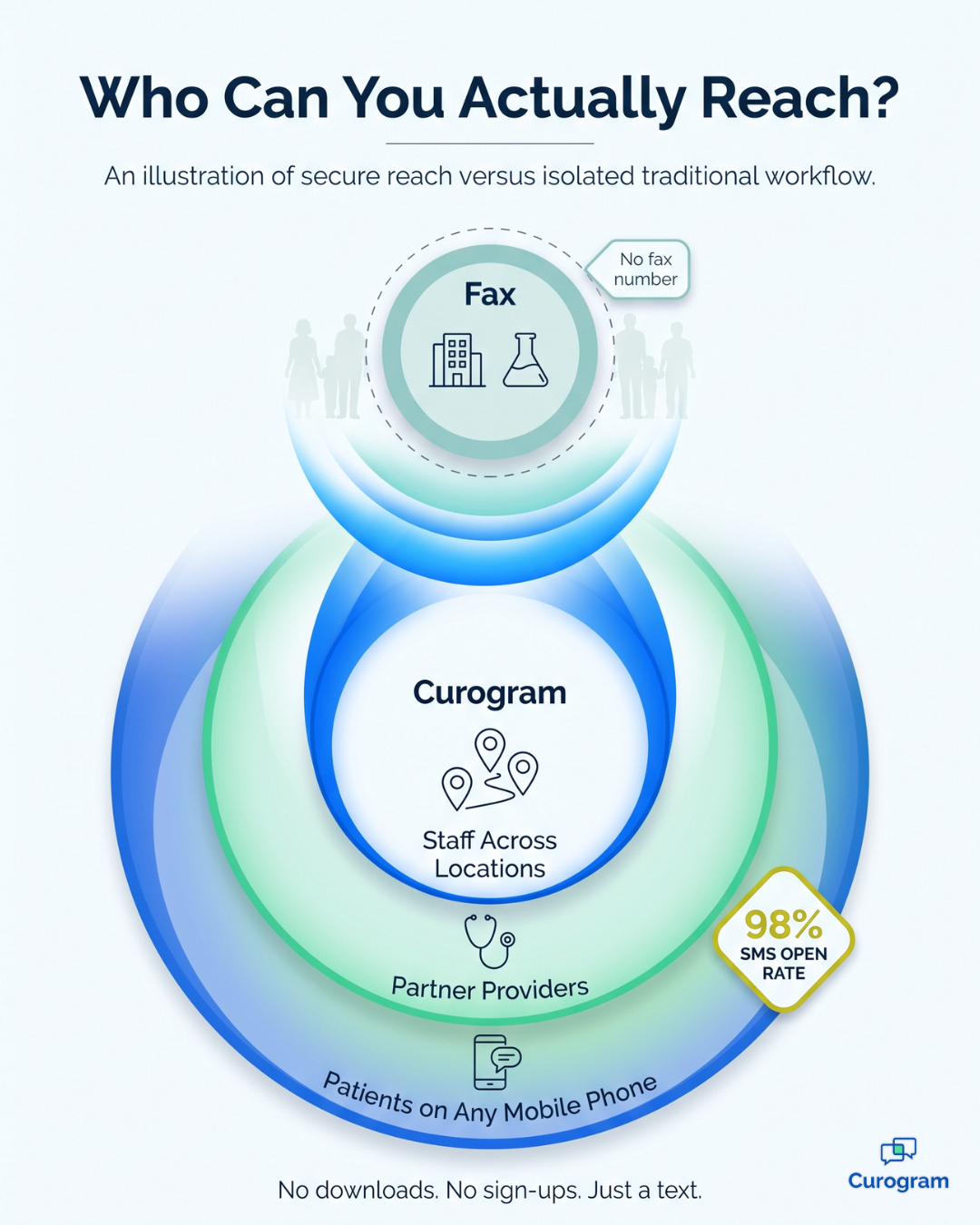
Online faxing still depends on telephone networks to transmit data; otherwise, it would simply be called messaging. That means you can only send faxes to people who own a fax machine or subscribe to an online fax service.
This is a significant limitation for a medical practice. Other offices usually have fax numbers, but your patients almost certainly don't.
Here's how the two options compare on reach:
HelloFax gives new users five free pages to try it out. For clinical use, that's not much of a reason to open an account.
Curogram lets you contact anyone from one dashboard, which also helps if you have offices in more than one location. Patients get your messages as regular SMS texts, so they don't need to download or sign up for anything. With a 98% SMS open rate, those messages actually get read.
Online faxing is more convenient than a traditional machine, but it still travels through telephone lines. When the receiving line is busy, the fax can't go through, and medical office fax lines are busy constantly.
Here's what a typical failed fax looks like:
Here's an illustrative example of the cost.
If 4 out of 40 daily faxes fail and each retry takes about 3 minutes, your staff loses 12 minutes every day. Over a month, that's roughly 4 hours of staff time spent pressing "resend" instead of helping patients.
With Curogram, you can message anyone at any time and often get a reply immediately. Attaching a document takes a couple of clicks, and delivery is instant, so there's no need to waste your team's energy chasing a fax confirmation.

A lack of a mobile app is one of the greatest shortcomings of this service. If you want to snap a photo of something and fax it, it will be a lot more complicated than it has to be. HelloFax proposes using their email-to-fax feature to send faxes using your phone. This is better than nothing, but it’s far from ideal as you can’t access your account if you need it.
Curogram has both provider and patient mobile apps. You can open it on any device you choose—laptop, phone, or tablet—and send files from there. This is a great way for your staff to communicate in a secure way wherever they are.
Our patient mobile app is the first such app that is completely HIPAA-secure. Your patients can take a photo of their insurance card or another document and send it to you without worrying about security. You can also send files to them, and all these documents will be stored in-app.
|
HelloFax |
Curogram |
|
|
Diverse communication options |
No |
Yes |
|
EHR integration |
No |
Yes |
|
Can reach anyone |
No |
Yes |
|
Fast data transfer |
No |
Yes |
|
No |
Yes |
Curogram can take your practice to a new level by offering numerous features that can automate time-consuming tasks and increase your patient satisfaction. There’s so much more to it than safe document transfer.
Here are some functions we haven’t talked about above:
As Curogram syncs with your schedule, it can send auto-generated appointment reminders to your patients. You can customize these to a tee by many different things, such as the visit type, office location, reminder frequency, etc.
Curogram is projected to send ten million auto-reminders in 2020, saving our customers thousands of dollars by eliminating no-shows. Curogram users reported experiencing a 75% drop in failures to show up.
Online reviews and ratings are essential for the reputation of a medical practice. Before a patient decides to put their health in your hands, they will at least skim through your Google reviews. A single nasty comment can deter dozens of people from choosing you.
Our platform has a simple reputation management tool that can get you more than ten five-star Google or Yelp ratings per month. You can send your patients one-line auto-surveys in an SMS message to rate their experience with you. If they are happy, the algorithm will send them a follow-up text that will allow them to give you a five-star rating with a single tap.
This feature can help you prevent bad reviews as well. It notifies you whenever there’s an unhappy patient so that you can appease them.
Curogram is also a telemedicine solution that lets you set up a virtual clinic. You can meet your patients online to provide them with remote care. As Curogram supports your practice’s natural workflows, you won’t have trouble going online. Your doctors and staff can keep doing their job the same way they do it in a physical setting.
Our platform lets you set a virtual waiting room, where your patients will be taken once they click the appointment link. The MAs or nurses can join them there to onboard them. Once they’re ready, doctors can take over. Our platform supports multi-user visits, which means another doctor, a nurse, or an assistant can join the primary doctor during the patient visit.
All these features and more band together to form a perfect, all-encompassing healthcare solution that already boasts 5,000+ satisfied customers.
|
|
Faxing has survived in healthcare far longer than anyone expected. Many practices still consider it the safest way to send records between different offices. The truth is, it never was particularly secure. Faxes reach the wrong number, sit in open trays, and leave PHI on paper where unauthorized people can easily see it.
Online faxing solves part of that problem. It eliminates the machine and the paper, and HelloFax supports it with strong encryption. But it can't solve the larger issues, because it still depends on busy phone lines, still can't reach patients, and still operates outside your EHR.
Then there's compliance. HelloFax's self-serve plans don't include a BAA, and the Dropbox agreement is limited to specific annual plans with a minimum contract value. Its HIPAA page doesn't even confirm that fax is covered. That's simply too much uncertainty for a service that would handle patient records every day.
Curogram takes a different approach. It gives you one secure platform where clinics can exchange documents safely and provider groups can coordinate care for the patients they share. Doctors can refer patients to each other within the same system, and patients can see the complete network of providers involved in their care.
Even when every clinic uses a separate EHR, Curogram becomes the shared workspace where your teams collaborate. You replace fax tones and resend buttons with instant, encrypted messages that your staff and patients actually use. The result is better care coordination, fewer delays, and less wasted time for everyone, all in one place.
Ready to retire your fax line? Book a demo to see how Curogram replaces faxing at your practice. In one short session, you'll see how secure messaging, EHR integration, and automated reminders fit into the workflow your team already follows, without adding another tool to manage.
%20-%20featured.png)
Download our free HIPAA privacy policy template and build a compliant privacy policy to help protect patient data with confidence.

 Michael Hsu : 7/26/19, 12:45 AM
Is Facebook Messenger HIPAA compliant? Learn why Messenger's HIPAA compliant status is critical to the success of your healthcare business.
 Carylee Gali : 4/29/22, 7:00 AM
Learn how to share patient lab results by text while staying HIPAA compliant, from the four safeguards required to the exact workflow your staff...