
 Carylee Gali
How Physician Groups Replace Phone Calls With Texting
 Jo Galvez : 7/20/26, 8:00 AM
A step-by-step guide for physician groups to replace phone calls with HIPAA-compliant two-way texting, speeding patient communication.
Most practices that avoid texting lab results believe HIPAA prohibits it. That belief is wrong, and it costs your front desk hours every week.
HIPAA is technology-neutral. The rules ask what safeguards protect the data, not which channel carries it. Plain SMS fails on four counts, so the instinct to avoid it isn't unreasonable. The mistake is treating "SMS isn't compliant" as "texting isn't allowed."
Those are different statements. One describes a limitation in a specific technology. The other describes a rule that doesn't exist.
The gap shows up as phone tag. A CBC comes back normal on Tuesday morning. Your medical assistant calls at 11, gets voicemail, and can't leave the result.
The patient calls back at 2 during a rooming rush. Nobody's free. By Thursday, three staff members have touched a result that needed nine seconds of the patient's attention.
Meanwhile the patient checks their phone 90 times a day and answers texts within minutes.
The compliant version isn't complicated. Your platform sends a notification with no clinical detail. The patient authenticates and opens the result behind a login. The message body stays empty of PHI, so a glance at a lock screen shows a name and nothing else.
What separates a compliant setup from a violation comes down to a handful of controls and a signed business associate agreement.
This piece walks through which controls the Security Rule requires, which ones it merely expects you to address in writing, and how the result actually moves from your EHR to the patient's phone.
The HIPAA Privacy Rule lets covered entities share protected health information (PHI) for treatment. Lab results are PHI. So whatever method sends them has to protect 3 things: confidentiality, integrity, and availability.
In plain terms, only the right people see the result, nobody alters it, and the patient can reach it when they need it.
HIPAA never banned short message service (SMS) outright. The rule cares about controls, not the channel itself. Standard texting simply doesn't carry those controls, and the gap shows up in four places.
| What The Security Rule Expects | What Standard SMS Does |
|---|---|
| Encryption so only authorized people can read the data | Messages travel and rest unencrypted, and previews surface on locked screens |
| PHI access limited to staff who need it | Anyone holding the phone can open the thread |
| A unique login for every user | A phone number identifies a device, not a person |
| PHI protected from changes or deletion | A thread can be wiped with no record left behind |
One nuance gets missed often. Encryption is an addressable specification, not a flat mandate. Your practice either uses it or documents in writing why an equal safeguard works instead. Most practices find the second path harder to defend than the first.
That's 4 controls, and plain SMS supplies none of them. Texting lab results this way puts you a lost phone away from a reportable disclosure. Texting can still meet the standard once the platform supplies the missing pieces.
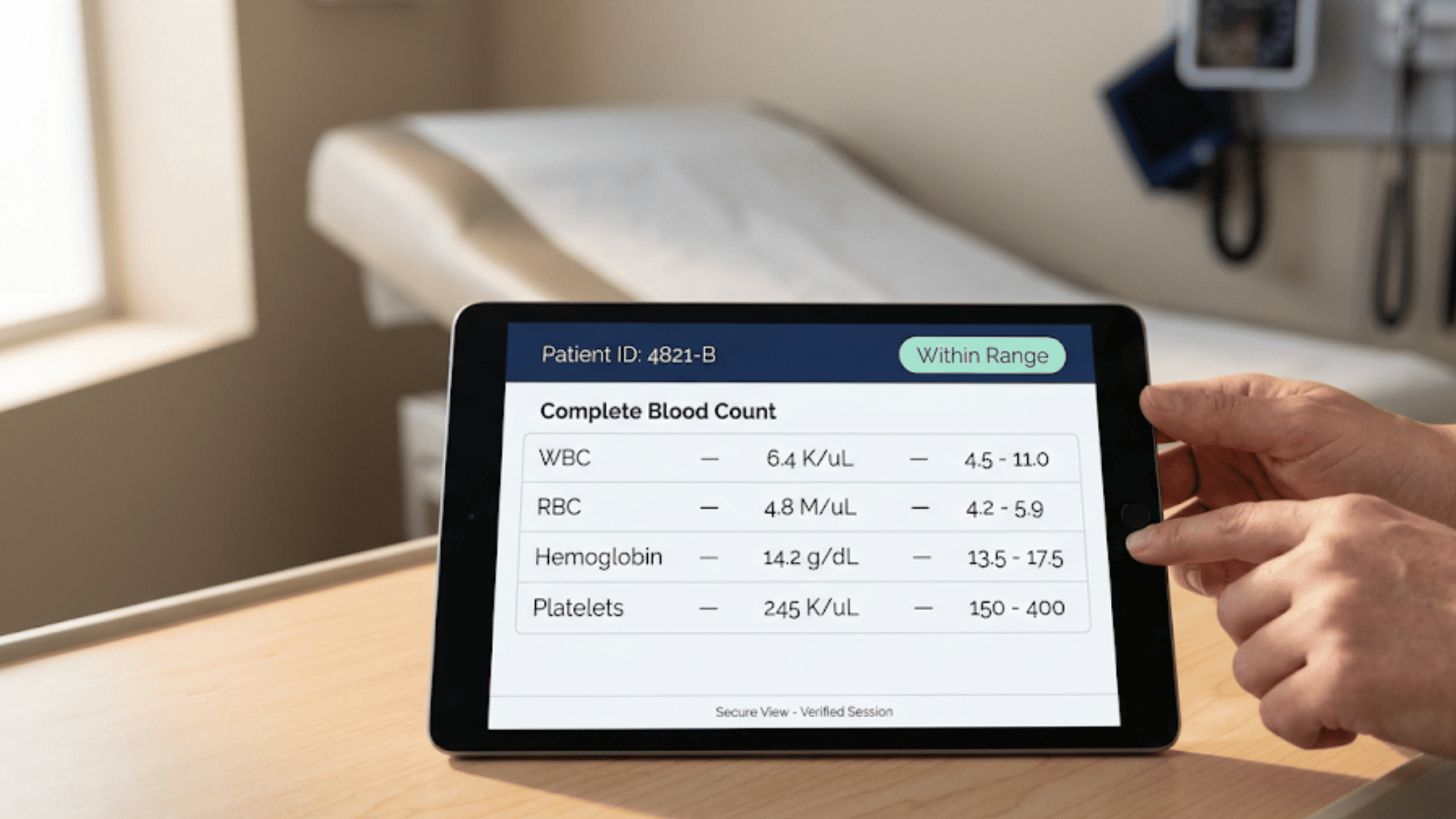
Texting lab results is allowed. The platform carrying them has to supply the controls that plain SMS lacks. Three matter most, and they map to specific Security Rule standards.
One distinction is worth knowing before you shop. Unique user identification is a required specification. Automatic logoff and encryption are addressable, which means you implement them or document in writing why an equal safeguard works instead.
Vendors rarely explain this, and it shapes what your compliance file needs to hold.
Every staff member who touches PHI needs their own user ID and password. Shared logins break the chain. When four people sign in as "frontdesk," no record shows who opened which chart.
A proper audit log captures the user, the action, the record touched, and the timestamp. That log answers the question every breach investigation opens with: who saw this, and when? Under a shared account, your practice has no answer.
Patient-side access works differently. The text itself carries a link, not the result. Patients tap it, verify who they are with their own credentials, and the lab result opens inside a secured session.
Two separate identity checks run here, one for your staff and one for the patient, and both need to hold.
Set the platform to sign users out after a stretch of idle time. HIPAA names no specific number. Most practices land between 10 and 15 minutes for shared workstations, and shorter for tablets that move between exam rooms.
The scenario this guards against is ordinary. A nurse pulls up a results thread on the hallway tablet, gets called into room 3, and leaves it face-up on the counter. Anyone walking past has the chart. Auto-logoff closes that window without asking anyone to remember anything.
Short timeouts frustrate staff who then prop sessions open, so pick a length your team will actually tolerate.
Encryption scrambles the message so only the intended recipient can read it. Look for two layers:
Encryption in transit - protects the message while it moves
Encryption at rest - protects it while it sits on the server. AES-256 and TLS 1.2 or higher are the common benchmarks.
The layer matters most when lab results leave your walls — to a referring specialist, an outside lab, or the patient's own phone. Outside your firewall, you control nothing about the network the message crosses.
Encryption also changes what happens after a loss. A stolen laptop holding properly encrypted PHI may fall under HHS's safe harbor, meaning no breach notification is triggered. The same laptop holding unencrypted results starts a reporting clock.
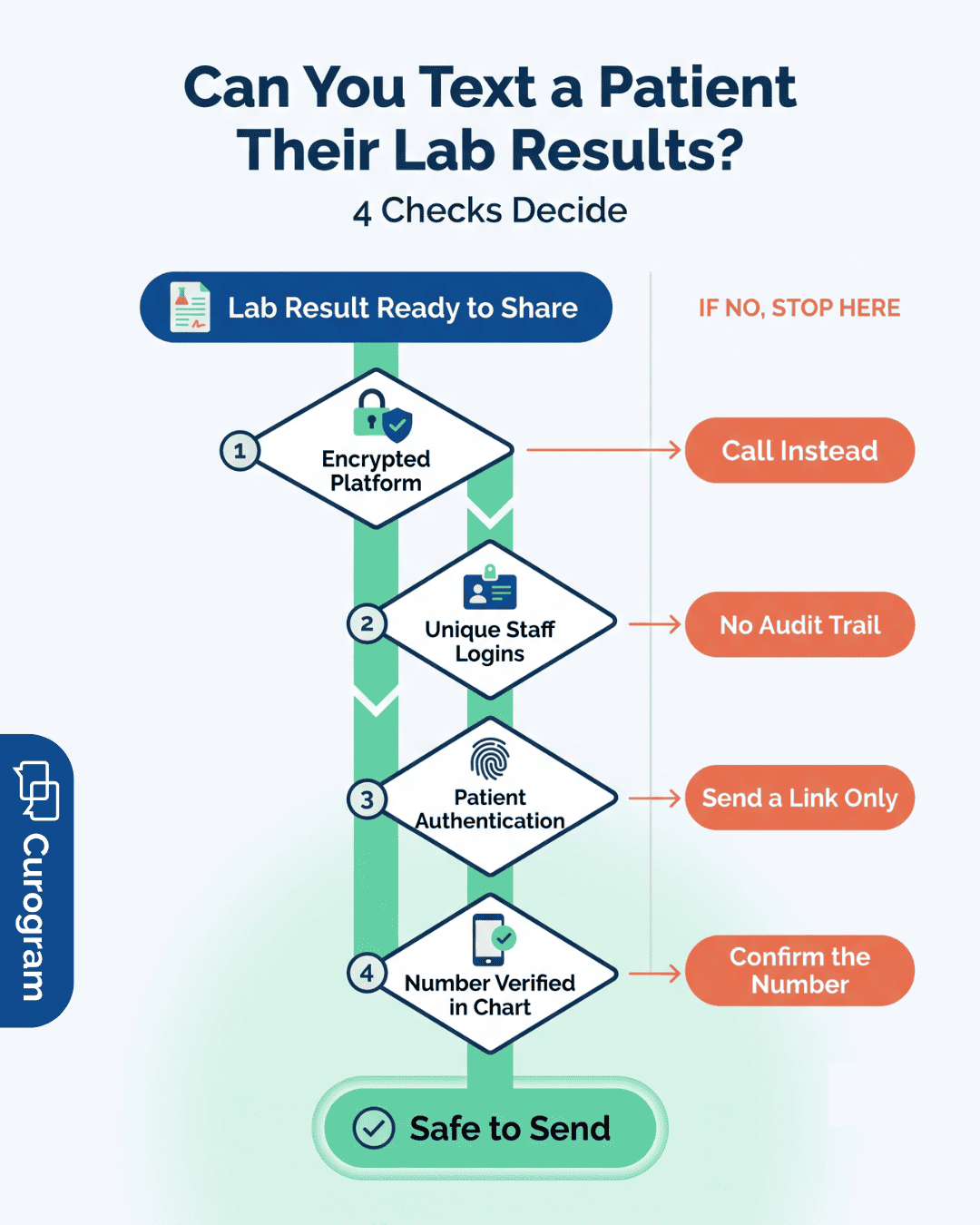
We built Curogram as an all-in-one communication platform for HIPAA-compliant 2-way texting. Your staff signs in before viewing or uploading ePHI, and every session runs inside that logged environment.
The result itself never rides on SMS. Here's the sequence your team follows:
Anyone glancing at that patient's lock screen sees a notification. They don't see a diagnosis.
Our system layers five safeguards under every message carrying PHI:
| Control | What It Does |
|---|---|
| Unique user IDs | Each provider on Curogram has their own credentials, so the audit log names a person |
| Automatic logoff | Sessions close after a stretch of idle time, without staff action |
| Encryption | Information stays encrypted as it moves through connected systems |
| Recipient verification | Messages reach only the number on file, not a mistyped one |
| Link-based delivery | Patients receive access to a document, and only they can open it |
Once secure texting is in place, the same thread handles the rest of your patient communication.
Your staff schedules and reschedules appointments, sends medical documents, delivers visit reminders, and collects patient data through the channel patients already answer.
HIPAA penalties scale with what your practice knew and when.
HHS assesses civil monetary penalties per violation across four tiers, from unknowing violations at the low end to willful neglect left uncorrected at the top, with annual caps that HHS adjusts for inflation. Willful violations can carry criminal charges alongside the fines.
A single mishandled result rarely stops at one violation. Every unsecured message counts separately, which is how a routine texting habit turns into a tiered penalty across hundreds of records.

Lab results are one file type among many. Your practice moves imaging reports, referral packets, intake forms, and discharge summaries every day. Each one carries the same exposure, and each one moves through the same set of hands, apps, and inboxes.
Compliance breaks at whichever point handles PHI with the least care. Staff, affiliates, and every third-party app touching patient data sit inside that perimeter.
Most practices audit their EHR closely and skip the smaller tools. The scheduling widget, the fax service, the transcription app, the survey platform — each one is a place where a lab result can land in an unprotected system.
Any vendor that creates, receives, maintains, or transmits PHI for your practice has to sign a business associate agreement. That contract binds them to HIPAA safeguards and defines what happens after a breach.
Ask for the BAA before you sign, not after. Vendors that hesitate have answered your question. Free tiers of consumer tools rarely offer one, which rules out most general messaging and file-sharing apps for clinical use.
Keep executed BAAs in one place. During an OCR investigation, a missing agreement is its own finding, separate from whatever prompted the review.
Standard email travels unencrypted between servers. A lab result sent from your practice inbox to a patient's personal address passes through systems your practice doesn't control.
Patients can request unencrypted email under the Privacy Rule's right of access. Document that request. Without it, the burden of the disclosure sits with your practice.
Most practices that avoid texting lab results aren't avoiding a rule. They're avoiding a decision nobody wants to own. So results go out by phone tag, patients wait 3 days for a callback, and staff burn afternoons on voicemails that get returned during clinic hours.
The rule was never the obstacle. HIPAA doesn't ban texting. It asks whether the delivery method carries the right controls, and standard SMS doesn't.
Once a platform supplies encryption, unique logins, automatic logoff, and link-based access, the question stops being may we text this and becomes how fast can the patient see it.
Practices that make the switch usually notice the phone volume first. Based on our internal data, one Curogram client saw a 24% drop in phone calls after moving routine patient communication to secure text. That's front desk time returned to the people standing at the counter.
Two things still belong to your practice. Train the staff who touch PHI, and get a signed BAA from every vendor that handles it. No platform does either for you.
The rest is setup. Configure the timeout, verify numbers against the chart, and let the link carry the result instead of the message body.
Book a demo and we'll show you exactly how a lab result moves from your EHR to a patient's phone inside our platform, including the audit trail your compliance file needs.
 Jo Galvez : 7/20/26, 8:00 AM
A step-by-step guide for physician groups to replace phone calls with HIPAA-compliant two-way texting, speeding patient communication.
.jpg?width=30&name=square-formal-photo%20(1).jpg) Mira Gwehn Revilla : 4/11/26, 3:00 PM
Mira Gwehn Revilla : 4/11/26, 3:00 PM
Discover how RCS messaging in healthcare upgrades patient communication. Compare RCS vs SMS features, review HIPAA compliance, and follow...

See how the benefits of text messaging in healthcare show up in real schedules, and learn the HIPAA rules that decide what you can safely send...