11 min read
RCS Messaging in Healthcare: Next-Gen Patient Communication
Mira Gwehn Revilla
:
April 11, 2026
With Apple now adding RCS support to iPhones and over 90% of Android users already set up, the reach keeps growing. For practices, this means fewer no-shows, faster payments, and better patient trust. RCS also brings read receipts and verified sender badges, so patients know exactly who is texting them.
While it's not yet approved for sending protected health info, it works well for reminders, surveys, and general updates. As the healthcare space moves toward more digital tools, RCS fills a gap between basic SMS and costly patient portals.
Think about the last time your front desk sent a text to a patient. Chances are, it was a plain, short SMS with no images, no buttons, and no branding. The patient may not have even known it came from your office. That's the limit of standard texting — and it's a real problem for medical practices that rely on fast, clear contact with patients.
Most patients today expect more. They're used to rich, visual chats in apps like iMessage and WhatsApp. When a clinic sends a bare-bones text, it feels out of date. Worse, it's easy to ignore.
This is where RCS messaging in healthcare comes in. RCS stands for Rich Communication Services, and it's the next step beyond SMS. It brings branded messages, tap-to-confirm buttons, high-quality images, and read receipts — all inside the phone's built-in texting app. No extra app needed. No login required.
For your practice, this means better patient response rates, fewer missed visits, and a smoother path to payment. Patients see your logo, trust the message, and take action in seconds. It turns every text into a mini app-like experience.
In this guide, we'll break down what RCS is, how it compares to SMS, and why it matters for your practice. You'll learn about enhanced features, HIPAA concerns, real-world use cases, and how to get started. Whether you run a small clinic or a large group, this article gives you a clear plan to move forward with confidence.
What Is RCS (Rich Communication Services)?
RCS, or Rich Communication Services, is a messaging standard built to replace old-school SMS. Think of it as a major upgrade to the texting you already use. Instead of plain, 160-character texts, RCS lets you send images, videos, buttons, and branded content — all within the phone's default messaging app.
The GSMA, a global group of mobile carriers, created RCS as a shared standard. This means it's not owned by one company. It works across carriers and devices, making it a neutral choice for business messaging. All three major US carriers — Verizon, AT&T, and T-Mobile — now support RCS through Google's Jibe platform.
On the patient side, the experience is seamless. They don't need to download a new app or create an account. The message just shows up in their texting app, but with a richer, more visual layout. Buttons let them confirm a visit with one tap. Images help them see care guides or maps to your office.
For a long time, RCS only worked on Android phones. That has changed fast. Apple added RCS support to iPhones with iOS 18, and as of early 2026, Apple is testing end-to-end encrypted RCS in the iOS 26.5 beta. This shift means that rich communication services in healthcare can now reach both Android and iPhone users — a huge leap in coverage.
So why does this matter for your practice? Because patients respond better to messages they trust and understand. A branded, visual message from your clinic feels very different from a random text from an unknown number. RCS bridges the gap between the basic SMS you use now and the full-featured patient portal many patients skip.
RCS vs SMS: Key Differences
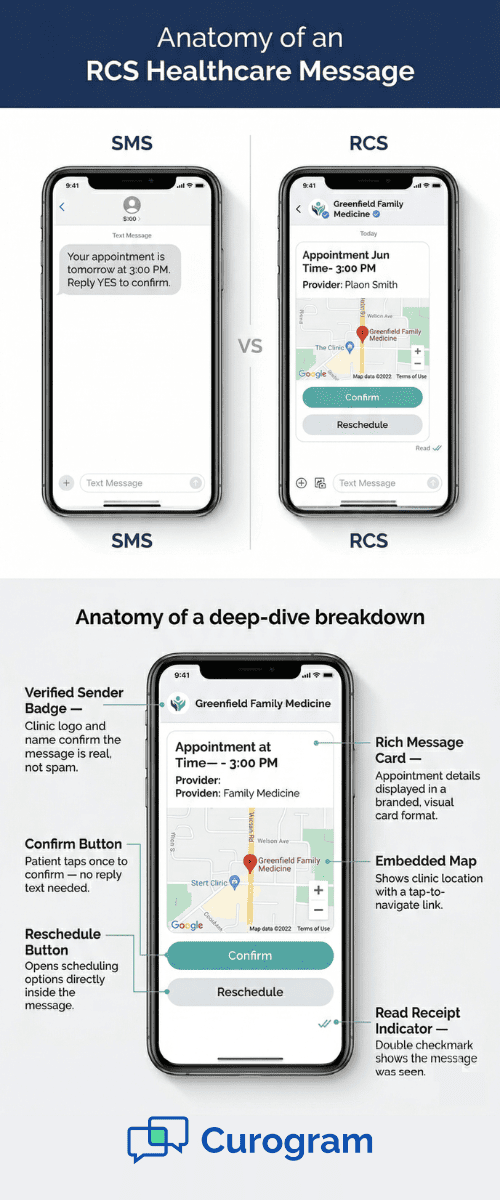
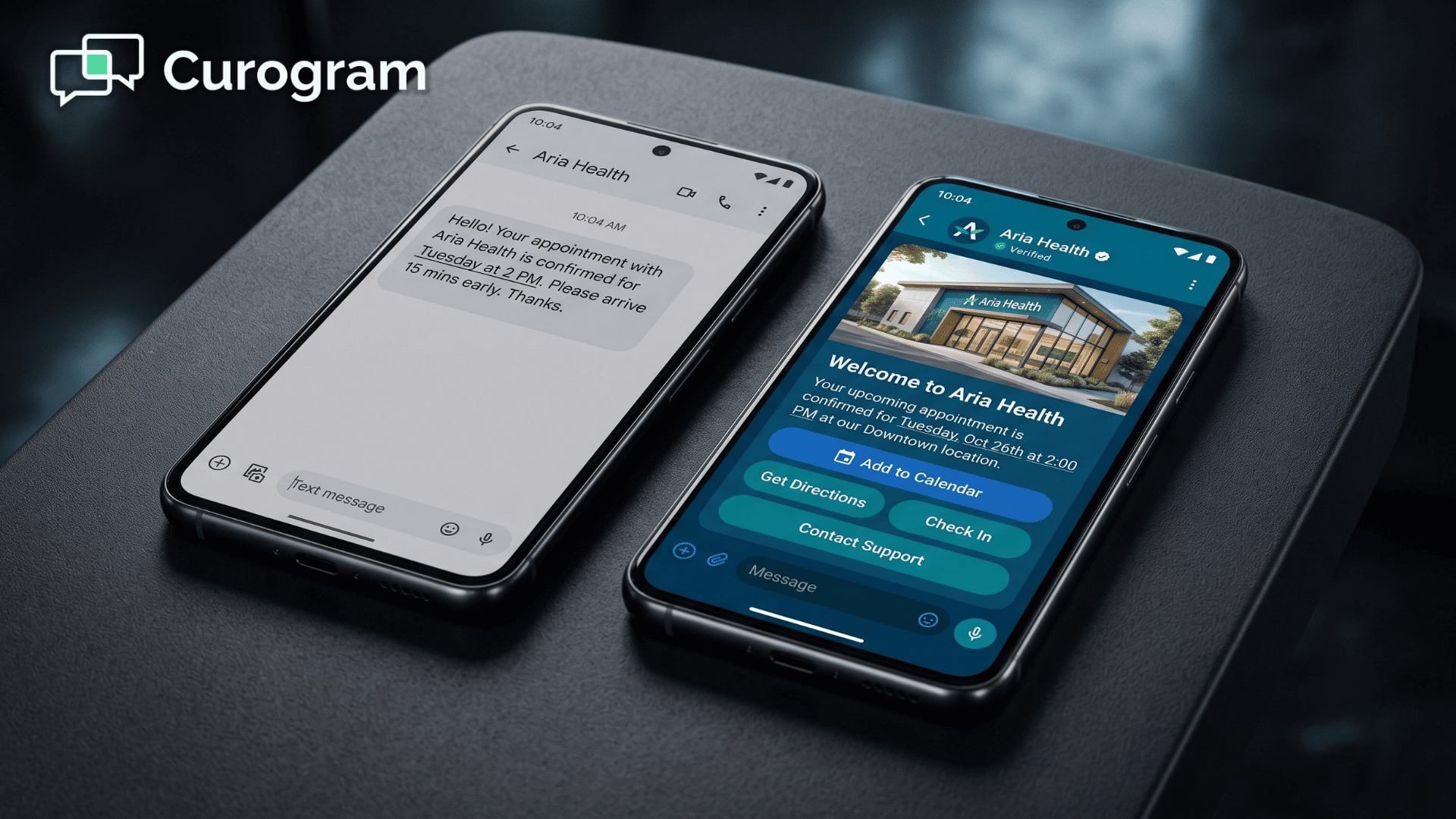
If you're weighing RCS vs SMS for medical communication, the differences are hard to ignore. SMS has served clinics well for years, but it comes with strict limits. Messages cap at 160 characters. There's no way to add images, buttons, or branding. And you never know if the patient actually read your text.
RCS removes most of those barriers. Here's a quick side-by-side look:
|
Feature |
SMS |
RCS |
|
Character limit |
160 per segment |
Up to 8,000+ characters |
|
Images & video |
MMS only (low quality) |
High-quality rich media |
|
Interactive buttons |
Not supported |
Confirm, reschedule, pay, etc. |
|
Read receipts |
Not available |
Built-in |
|
Typing indicators |
Not available |
Built-in |
|
Sender branding |
No logo or name |
Verified logo and business name |
|
Security |
No encryption |
Encryption in progress (E2EE testing in 2026) |
|
Fallback option |
N/A |
Falls back to SMS if RCS isn't available |
The impact of these features is real. Based on industry data, RCS messages achieve 3–7x higher click-through rates than SMS. Patients are also far more likely to read an RCS message compared to an email. The verified sender badge alone makes a big difference — studies show 42% of consumers trust branded messages more.
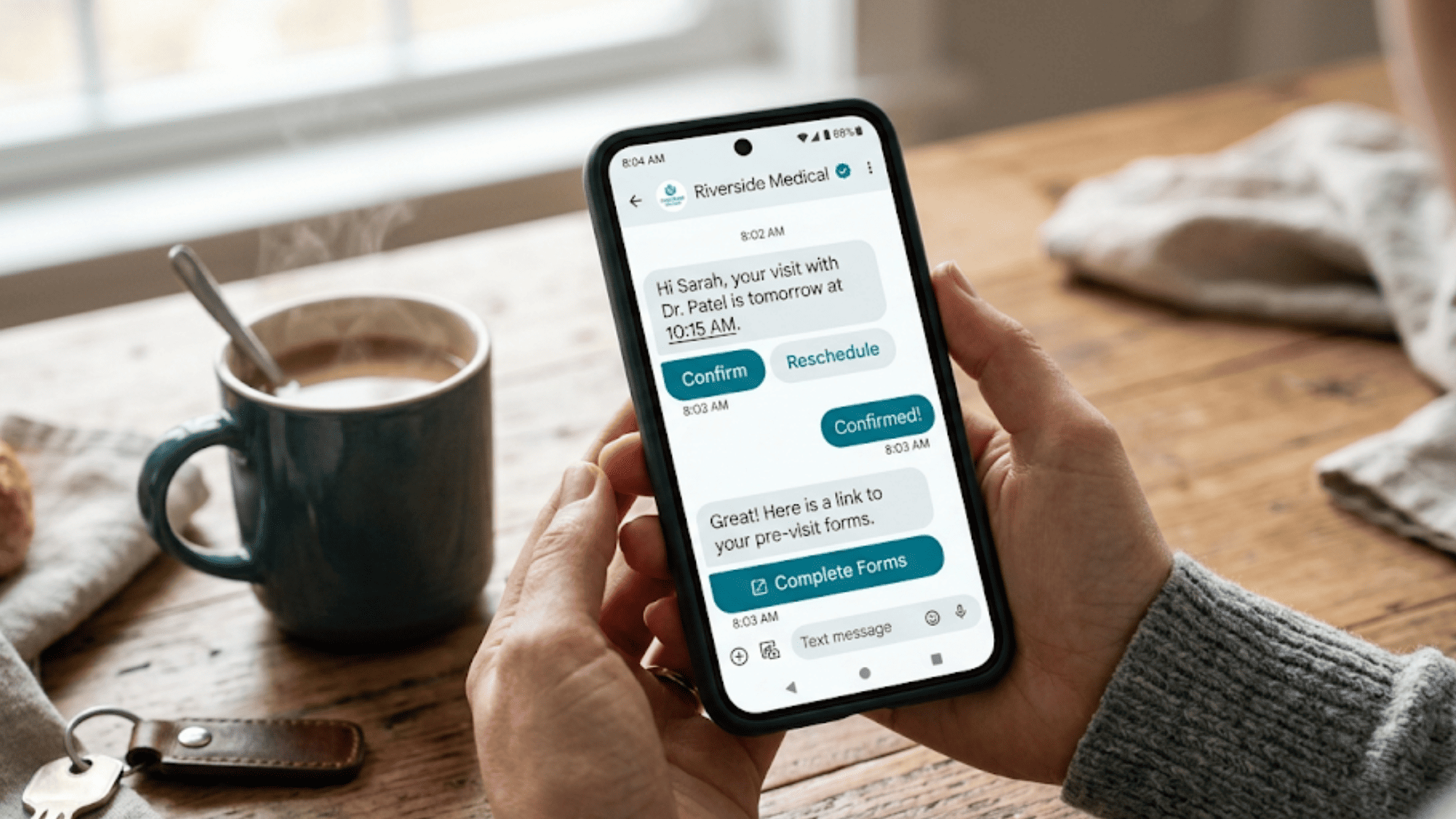
For medical practices, the gap between RCS vs SMS medical use cases is clear. Imagine sending a plain text that says "Your visit is tomorrow at 3 PM" versus an RCS message with your clinic's logo, a map, a "Confirm" button, and a link to pre-visit forms. The second option drives action. The first one gets lost in a sea of texts.
The good news is that RCS falls back to SMS on devices that don't support it yet. You won't lose any patients — you'll just give a better experience to those whose phones support it.

Enhanced Features for Healthcare Communication
What makes enhanced messaging in healthcare so useful is how it turns passive texts into active tools. With RCS, each message can include buttons, images, and links that let patients take action right away.
Here are the features that matter most for your practice:
Appointment Confirmations with Calendar Buttons
Instead of texting "Reply YES to confirm," you send a message with a "Confirm" button and an "Add to Calendar" option. The patient taps once, and it's done. Based on our internal data, automated appointment systems can achieve over 75% confirmation rates — and RCS makes that process even smoother.
Interactive Form Filling
RCS lets you send links to digital intake forms inside the message. Patients can tap, fill out their info, and submit — all before they walk in. This saves your staff time and cuts down check-in delays.
Image-Based Communication
A patient with a rash or wound can share a photo right in the chat. Your team can also send care guides with images, such as post-surgery wound care steps or physical therapy stretches. Visual instructions are easier to follow than text-only ones.
Payment Links and Buttons
You can embed a "Pay Now" button that takes the patient to a secure payment page. No portal login needed. Based on our internal research, text-based payment prompts see much higher open rates than email billing, leading to faster collections.
Location Sharing
For home health visits or patients heading to a new office, you can include a map pin. One tap opens their navigation app and guides them to the right spot.
Rich Media Patient Education
Short videos on managing chronic conditions, preparing for a test, or taking medication correctly can all be shared through RCS. This kind of interactive patient messaging keeps patients informed and engaged between visits.
HIPAA Compliance and Security
Any talk about patient messaging must address HIPAA. When it comes to RCS messaging in healthcare, the rules are evolving — and it's critical to know where things stand right now.
First, the good news: RCS is more secure than plain SMS. It supports verified sender profiles, which stop spoofing. It uses data channels instead of the older cellular network, which adds a layer of security. And as of 2026, Apple and Google are actively testing end-to-end encryption for RCS under the Universal Profile 3.0 standard.
Now, the important caveat. RCS is not yet approved for sending protected health information (PHI). Google's own RCS terms state that the platform should not be used to share healthcare data or any sensitive details. This means you should not use RCS to send test results, diagnoses, or medical records.
However, RCS works great for non-PHI messages. Think appointment reminders, payment links, general wellness tips, survey requests, and office updates. These are the high-volume messages that take up most of your staff's time — and they don't require HIPAA-level encryption.
For practices that need to send PHI, a HIPAA-compliant texting platform remains the right choice. Tools like Curogram offer secure two-way patient texting that meets HIPAA requirements and integrates with your EMR. You can use RCS for the front-door messages and a compliant platform for anything clinical.
There are also new rules to keep in mind. HIPAA encryption requirements that took effect in late 2025 now mandate AES-256 and TLS 1.3 standards. Any platform you choose — RCS or otherwise — should meet these benchmarks. And A2P 10DLC registration is already mandatory, with carriers blocking unregistered traffic.
The bottom line: use RCS where it shines (reminders, payments, surveys) and a compliant tool for PHI. Together, they cover the full spectrum of patient communication.
Current RCS Adoption and Limitations
RCS adoption in healthcare is growing fast, but it's not without limits. Knowing where things stand today helps you plan a smart rollout — not a rushed one.
On the Android side, the numbers are strong. Over 90% of Android users can receive RCS messages. Google Messages, the default app on most Android phones, has supported RCS for years. All three major US carriers run on Google's Jibe platform, so coverage is wide.
The bigger story is Apple. In late 2024, Apple added basic RCS support to iPhones with iOS 18. By early 2026, Apple began testing end-to-end encrypted RCS in the iOS 26.4 and 26.5 betas. This means full iPhone RCS support — with encryption — is expected to ship later in 2026. Once it does, RCS will reach nearly every smartphone user in the US.
Based on industry surveys, 36% of healthcare groups already use RCS. Another 46% plan to invest in it soon. And 56% of healthcare leaders call it a "game-changer" for patient contact. The market backs this up — RCS business messaging is expected to grow from $2.87 billion in 2025 to $8.89 billion by 2030.
Still, there are limits to consider:
- Carrier Support Varies - Not every carrier in every country supports RCS yet. Rural or smaller carriers may lag behind.
- Feature Gaps - Some advanced features, like end-to-end encryption, are still in beta for iPhone users.
- Fallback Needed - If a patient's phone doesn't support RCS, the message drops to SMS. You need a fallback plan baked into your workflow.
- No PHI - As noted, RCS isn't approved for protected health data at this time.
Despite these gaps, the direction is clear. RCS is moving toward universal coverage, and practices that start now will be ahead of the curve.
Use Cases for RCS in Medical Practices
The real value of RCS shows up in everyday practice workflows. Here are the use cases where interactive patient messaging makes the biggest impact.
Interactive Appointment Reminders
This is the most common starting point. Instead of a flat SMS, your RCS reminder shows your clinic name and logo, the visit date and time, and a "Confirm" or "Reschedule" button.
Based on our internal data, one practice reduced no-show rates from 14.20% to 4.91% in just three months using automated reminders — a rate three times better than the industry average. RCS takes that a step further by making the reminder itself actionable.
Post-Visit Satisfaction Surveys
After a visit, send a quick RCS survey with tap-to-rate buttons. Based on our internal research, one multi-location practice saw 90% of patients leave five-star reviews after adding automated post-appointment surveys tied to Google Reviews. RCS makes these surveys even easier to respond to with built-in buttons.
Visual Medication Instructions
A text saying "Take 2 pills twice a day" is easy to misread. An RCS message with an image of the pill, dosage info, and a timing reminder is much clearer. This is especially helpful for elderly patients or those managing chronic conditions.
Pre-Visit Prep with Rich Media
Send patients a message the day before their visit with a checklist: what to bring, fasting rules, parking tips, and a map.
For virtual visits, send an RCS message with a "Join Now" button, a photo of the provider, and a brief prep note. It reduces confusion and no-shows for telehealth sessions.
Send a bill summary with a "Pay Now" button. The patient taps, pays, and moves on. No portal login, no paper bill, no follow-up call.

Implementing RCS in Your Practice
Getting started with RCS doesn't have to be complex. Here's a step-by-step path to bring it into your daily workflows.
Step 1: Choose the Right Platform
Not all messaging tools support RCS yet. Look for a platform that offers RCS alongside SMS, so you can run both from one place.
The best options will also integrate with your EMR, keeping all patient data in sync. Solutions like Curogram already offer two-way texting, automated reminders, and payment links — the kind of features that pair well with an RCS upgrade.
Step 2: Set Up Sender Verification and Branding
RCS lets you display your clinic's name, logo, and colors in every message. This requires verification through your RCS provider and the carrier. The process usually takes a few days to a couple of weeks. Once set, patients instantly recognize your messages — boosting trust and open rates.
Step 3: Integrate with Existing Systems
Your RCS platform should plug into your EHR or practice management system. This ensures that patient names, visit dates, and other data flow into messages without manual entry. Based on our internal data, practices that automate confirmations handle over 1,100 confirmed visits per month — all without staff effort.
Step 4: Educate Your Patients
Most patients won't know what RCS is. That's fine — they don't need to. The messages just show up in their texting app, looking cleaner and more visual. A brief note on your website or at check-in can help set expectations.
Step 5: Build a Fallback Strategy
Not every patient's phone supports RCS today. Make sure your system sends SMS as a backup when RCS isn't available. This way, no patient falls through the cracks.
Step 6: Watch the Costs
RCS messages may cost more per message than SMS, depending on your provider. But the higher engagement — more confirms, fewer no-shows, faster payments — often more than covers the extra cost. Run a pilot with one use case, track results, and scale from there.
The Future of RCS in Healthcare
The future of RCS in healthcare is bright — and closer than most practices think. Several trends are shaping what's next.
Universal Adoption is Near
With Apple rolling out encrypted RCS support in 2026 and all major US carriers already on board, near-total device coverage is on the horizon. Within two to three years, RCS will likely be the default messaging standard for most phones. Practices that test it now will have a head start when that shift happens.
AI Integration Will Change the Game
Imagine an RCS thread where a smart assistant answers scheduling questions, sends prep guides, and collects patient info — all without staff involvement. AI-powered patient engagement is already the top investment focus in healthcare.
Based on industry data, leading AI tools resolve up to 85% of routine patient questions without human help. When you combine that with the rich format of RCS, the result is powerful self-service at scale.
Video Messaging Within RCS
The RCS standard is evolving to support richer video experiences. Soon, you may be able to send short care instruction clips, virtual tour previews, or provider greetings directly inside a text thread. This opens the door for more personal, visual patient contact.
Potential for Health Data Integration
As the standard matures, there's talk of linking RCS workflows with health data systems like FHIR. This could one day allow appointment data, care plans, or lab updates to flow right into the messaging thread in a structured format — though this will require clearing major compliance hurdles first.
Industry Predictions Point to Rapid Growth
The RCS business messaging market is expected to more than triple by 2030. Healthcare is one of the top sectors driving this growth, alongside retail and finance. Practices that wait too long risk falling behind patient expectations.
The bottom line: RCS is not a future concept. It's here now, getting better fast, and already changing how top practices connect with patients.
Conclusion
RCS messaging in healthcare represents a real shift in how practices talk to patients. It takes the simplicity of texting and adds the visual, interactive features that patients have come to expect. From tappable confirm buttons to branded sender profiles, every message feels more trustworthy and useful.
The key takeaways are clear. RCS offers far more than SMS — richer media, better engagement, and higher response rates. It's not a replacement for HIPAA-compliant tools when PHI is involved, but it fills a critical gap for reminders, payments, surveys, and general updates.
With Apple now supporting RCS on iPhones and encryption on the way, the reach of this technology is about to cover almost every patient in your panel.
If you're ready to act, start small. Pick one use case — such as appointment reminders — and test it through an RCS-capable platform. Measure your results against your current SMS workflow. Track confirmation rates, no-shows, and patient feedback.
Based on our internal data, practices that switched to automated messaging saw major drops in no-show rates and freed up significant staff time. RCS can take those gains even further.
You don't need to overhaul your entire system at once. The best approach is to layer RCS into your existing communication tools. Pair it with a platform like Curogram that already handles two-way texting, automated reminders, and secure messaging. This way, you build on what already works while giving patients a better experience.
The practices that move first will set the standard. Patients notice when their doctor's office feels modern, responsive, and easy to reach. RCS gives you the tools to deliver that experience — starting today.
Ready to move beyond plain SMS and give your patients a better messaging experience? Book a demo to explore the tools that make one-tap confirmations, surveys, and text-to-pay possible.
Frequently Asked Questions
Start with one use case, like appointment reminders. Choose a platform that supports both RCS and SMS fallback. Run a 30-day pilot, then compare no-show and confirmation rates to decide on scaling.
RCS systems include automatic fallback to SMS. If a patient's device can't receive RCS, the message is delivered as a standard text instead. No patient is left without a message.
Verified sender profiles show your clinic's name and logo, which builds patient trust. Studies show 42% of consumers are more likely to engage with messages from a verified, branded sender.