


Professional Text Communication in Healthcare: A Complete Guide
💡 Professional text communication in healthcare refers to the use of secure, HIPAA-compliant patient texting to manage appointments, share...

16 min read
Alvin Amoroso : Updated on July 31, 2026
Most practices that "do texting" are running two systems without knowing it. The front desk uses an approved platform for reminders. A nurse texts three patients from her own phone because it's faster, and a scheduler sends a fasting instruction through the same app she uses for her kids' carpool.
Both halves send patient information. Only one leaves a record.
That split is the real state of text messaging in healthcare at a lot of clinics, and it's what makes the topic worth more than a feature list. Texting works — the schedule numbers are hard to argue with.
Atlas Medical Center dropped its no-show rate from 14.20% to 4.91% in three months on confirmations alone, based on our internal data, and Covina Arthritic Clinic now confirms more than 1,100 appointments a month. Confirmation rates across our client practices sit above 75%.
The failures happen somewhere else entirely. They happen in setup — a consent form that never mentioned billing texts, a reminder template still carrying the visit reason because nobody edited the vendor default, a STOP keyword nobody tested before a mass send to 4,000 patients.
Our claim for this article is narrow: healthcare texting is an operations decision, not a software purchase, and the practices that treat it as software are the ones that end up writing breach letters.
What follows covers fifteen ways practices use texting, the four risks that account for most of what goes wrong, ten setup steps, and the two laws — HIPAA and HITECH — that decide what happens when a phone goes missing.
Text messaging in healthcare means using short message service (SMS) and secure messaging apps to reach patients and staff. We use it for appointment reminders, lab result notifications, refill nudges, intake forms, and quick handoffs between clinical staff.
Healthcare texting covers both directions. Outbound reminders go out on a schedule, and patient replies land in one shared inbox the whole front desk can see.
Mostly it replaces the phone. A confirmation call runs four steps for the front desk: dial, wait, leave a voicemail, mark the chart. A text does the same job in one, and the patient can answer with a single character while standing in line at the grocery store.
Schedules feel that difference first. Atlas Medical Center dropped its no-show rate from 14.20% to 4.91% in three months after moving confirmations to text, based on our internal data. Across our client practices, confirmation rates sit above 75%.
Texting in healthcare only counts as compliant when three things are true: messages are encrypted, the platform logs who opened what, and the vendor signs a BAA. Plain carrier SMS stores copies on servers we don't control. A nurse texting from her own phone gets none of that protection.
Phone calls, voicemails, and paper mail carried patient communication for decades. One direction, on the practice's clock, at the practice's pace.
Phone tag has a shape most front desks know by heart:
Text messaging in healthcare collapses those four steps into one. We send the reminder, the patient replies with a single character, and the schedule updates.
Covina Arthritic Clinic confirms more than 1,100 appointments a month this way, based on our internal data. Recall texts to lapsed patients brought 1,240 people back onto the schedule, a 35% reconversion rate.
Speed is only part of it. Nearly every patient carries a phone, and a text needs no app download, no portal password, and no login.
Messages land on the lock screen where people already look. That reach holds up for an 82-year-old with a flip phone and for a parent who forgot her portal credentials two years ago.
The rest of this guide covers where healthcare texting earns its place, the HIPAA rules that govern every message carrying patient information, and the setup steps that keep a texting program out of trouble.
Fifteen uses follow. Some cut phone minutes at the front desk, others protect revenue that walks out the door with a no-show or an unpaid balance. Each entry includes the mechanic — the timing, the wording, and who handles the reply.
An empty 2:30 slot rarely fills itself. We send a reminder 48 hours out carrying the date, time, and provider name, then a second one at 24 hours if nobody has answered. Patients reply with one character to confirm or cancel.
A cancellation that arrives a day early still leaves the front desk time to work the waitlist, which is where the money is recovered.
Atlas Medical Center cut its no-show rate from 14.20% to 4.91% in three months on that cadence, based on our internal data. Confirmation rates across our client practices hold above 75%.
Prescriptions get filled once, then forgotten around week four. We set refill reminders against the days-supply written on the script, so a 30-day prescription fires a message on day 26. The patient replies to request the refill and the thread routes to whoever handles pharmacy calls.
Different drugs need different rhythms. A daily blood thinner gets a morning prompt; a monthly injection gets one message a month tied to the injection date. Both are configured once per patient at setup and run untouched after that, which is the only way a small staff sustains them.
The first two weeks after discharge decide whether a patient comes back through the emergency department. Three scheduled messages cover that window: one at 48 hours asking how recovery is going, one at day 7 confirming the follow-up visit is booked, one at day 14.
Replies come back as plain language — a pain level, a question about a dressing, a medication the pharmacy didn't have. Anything worrying gets flagged to a nurse inside the shared inbox. Patients who would never phone about a small worry will answer a text about it.
Waiting on results turns a week into a month for the patient. Our notification says results are ready and carries a portal link.
The value itself, the interpretation, and any hard conversation stay in the portal or on a call with the ordering provider. That division keeps every message inside the Minimum Necessary rule, which limits how much patient information any single communication can carry.
It also clears the fifteen daily callbacks that open with "did my labs come in yet." Sensitive results — oncology, genetics, infectious disease — should route to a phone call regardless.
Overhead paging interrupts every room in the building to reach one person. Secure messaging replaces it with threads tied to a patient or a task. A medical assistant marks a room ready, a nurse asks a physician about a dose, a front desk lead checks a copay question with billing.
Each message sits inside a HIPAA-compliant platform with an audit log, so we can show who opened what and when. Staff running WhatsApp or plain SMS on personal phones produce no such record, and one lost handset turns into a breach investigation.

Statements mail out, sit on a kitchen counter, and come back weeks later or never. Text-to-pay shortens the loop to a single tap. We send a message the day the balance posts, with a secure link that opens a payment page on the phone already in the patient's hand. No portal password, no envelope, no check.
Practices that currently mail three statement cycles before writing a balance off can run one text against one mailed cycle and compare 30-day collections. Print and postage costs vary by vendor, so measure your own rather than borrowing a benchmark.
A visit goes well and nobody outside the room ever hears about it. A short survey text sent the day after the appointment catches the patient while the visit is still fresh, and responders get an invitation to post publicly.
One group of our clients collected 1,064 new five-star reviews in three months, with roughly 90% of all responses landing at five stars, based on our internal data.
A caution on setup: sending only satisfied patients to Google while routing unhappy ones to a private form is review gating. It conflicts with FTC guidance and Google's own policy. Invite everyone.
Flu season starts with a list. We segment by age, condition, or last visit date, then send one message to that group — a vaccine invitation to patients over 65, a diabetes class notice to everyone with an A1C order in the past year.
Every message carries one link and one action. Blasting the same wellness content to the full panel teaches patients to ignore us, and once they tune out, the reminders that actually matter get ignored too. Reply rates by segment tell us which topics to keep and which to drop next quarter.
A patient who eats breakfast before a 10 a.m. procedure costs the practice the slot, the room, and the anesthesia block. Instructions go out in stages rather than all at once: medication holds a week ahead, the fasting start time the night before, arrival and parking details the morning of.
We ask for a reply confirming the fasting instruction was read. That reply gives the surgical coordinator a working list — who acknowledged, who needs a phone call today. A printed sheet handed over three weeks earlier gives her nothing to check against.
Patients sit on questions they think are too small to phone about. A prescription name they can't read. A form they lost. Whether swelling on day three is normal. Two-way texting gives those questions somewhere to land, and every thread arrives in one inbox the whole front desk can see, so nobody answers the same message twice.
Ownership is the part practices skip. Without a rule assigning who handles which conversation type, messages sit unread while three people each assume a colleague replied. Set owners before turning inbound messaging on.
Front desk phones ring hardest between 8 and 10 a.m., which is the same stretch when patients are physically checking in. Shifting confirmations, reminders, and review requests to automated texts pulls that traffic out of the queue.
One practice we work with saw call volume fall 24% over the period it rebuilt its review profile, based on our internal data. The savings arrive in small pieces — a four-minute call avoided, a callback that never gets added to the list. Staff stop working from a stack of callback slips.
Recruiting usually means running a chart query, then calling through it and reaching voicemail. Text outreach covers the same list in one send, and interested patients reply on their own schedule instead of waiting for a callback window.
Enrolled participants need a separate cadence keyed to the protocol: visit reminders on study dates, prompts on dosing days, a message the morning of each appointment. Missed windows damage the data set, and a reminder costs nothing to send. Consent and opt-out rules cover trial messages exactly as they cover clinical ones.
Video visits usually fail before they start. The patient can't find the link buried in an email from last Tuesday, or the app demands an update while the provider waits.
Sending the join link by text ten minutes ahead puts it at the top of the phone's message list, one tap from opening in the browser. If the patient hasn't joined by the start time, staff can text the same thread instead of calling a line that may be busy.
A mailed outbreak notice arrives after the window it was meant to cover has closed. Mass texting reaches a full patient list in minutes, and segmentation lets us split the message — clinic hours and vaccine availability to everyone, a specific exposure notice to patients seen at one location on one date.
Opt-out language belongs in every mass send, and STOP must work on the first try. Volume raises the stakes. A blast to an entire panel with a broken opt-out keyword becomes a TCPA problem, so test the keyword before the send.
Ninety days between visits is a long stretch to manage blood pressure or blood sugar without contact. Automated care plans fill the gap lightly: a weekly prompt to log a reading, a monthly symptom check, a nudge two weeks before the next appointment.
Patients text their numbers back into the same thread. A care manager scanning replies can spot the patient whose readings climbed three weeks running and pull him in early, months before the scheduled visit would have caught it. Each message asks one question and expects one answer.
The moment a text leaves the building, patient information sits on systems we don't own. Carrier servers hold a copy. So does a lock screen in a coat pocket, and a personal phone left on a car seat.
Four risks account for most of what goes wrong.
HIPAA sets the standard for protecting patient data, and plain carrier SMS meets almost none of it. Three gaps do the damage:
| Gap | What it means in practice |
|---|---|
| No encryption | Messages travel the carrier network unscrambled and can be read if intercepted |
| No access control | Anyone holding an unlocked phone can open the whole thread |
| No storage limit | Copies sit on telecom servers indefinitely, past any date we could delete them |
The HIPAA Security Rule closes those gaps by requiring technical safeguards on any message carrying patient information — encryption in transit, controls over who can open what, and an audit trail showing when they did.
A dedicated healthcare texting platform supplies all three. A phone's built-in messaging app supplies none, which is why the platform choice isn't optional.
Consent comes before the first message, not after a patient complains. HIPAA governs the health information inside the text; the Telephone Consumer Protection Act (TCPA) governs the act of texting a mobile number at all. Both want documented, written permission on file.
Two pieces make consent hold up. The opt-in form has to name the message types a patient is agreeing to — appointment reminders, balance notices, notifications that lab results are ready — and flag the risk that a standard SMS channel isn't encrypted for certain alerts.
Vague blanket permission to "receive communications" won't cover a program that later adds billing texts.
Opting out has to be one step. A patient replies STOP and the sending stops immediately, with no phone call to the office and no form to sign. We test that keyword before any mass send, because a broken STOP turns one campaign into a TCPA problem across an entire patient panel.
Nothing in a text carries tone. A message reading "your results came back abnormal, please call the office" lands at 8 p.m. on a Friday, and the patient sits with it until Monday morning without a single question answered.
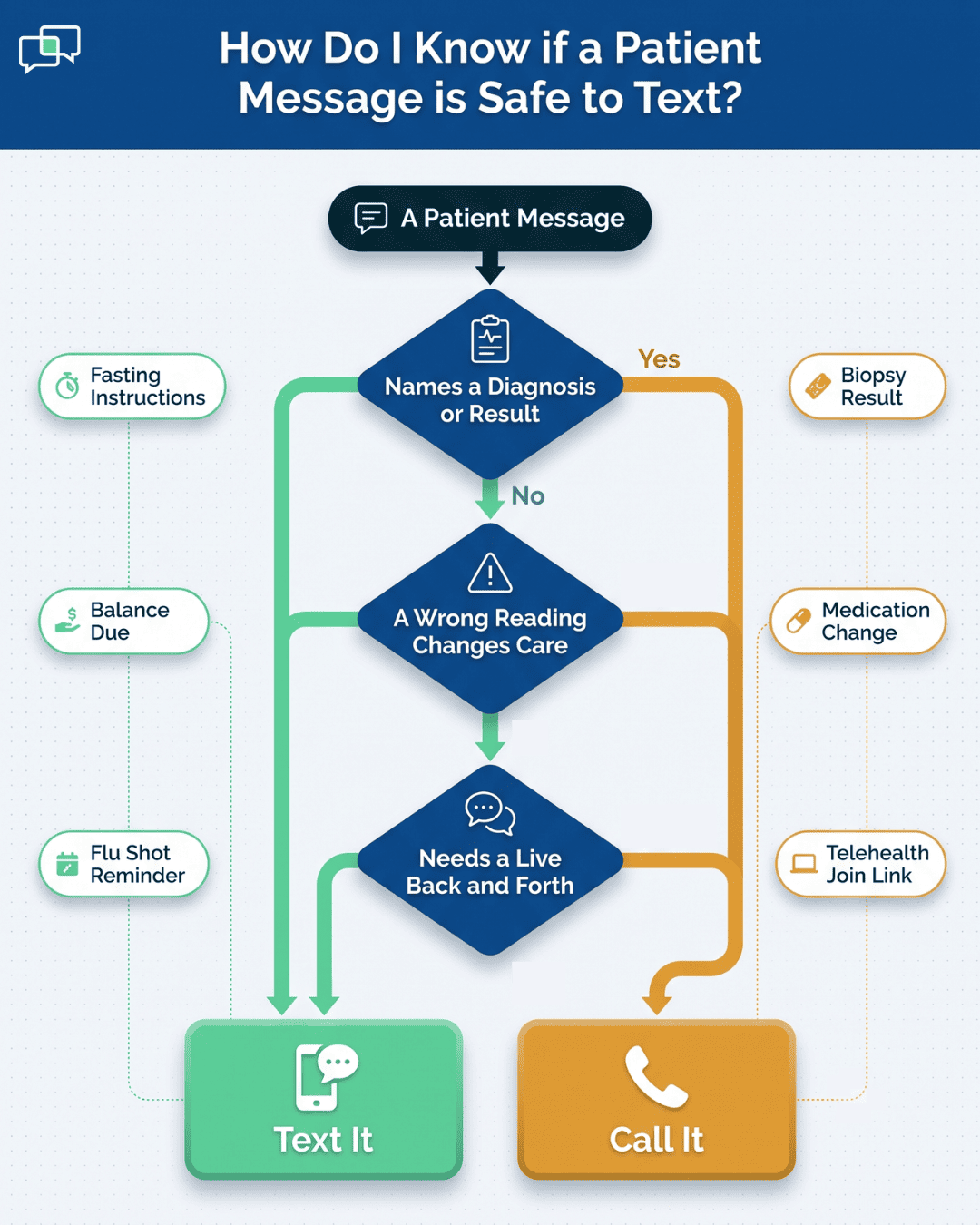
Write a policy that names what goes by text and what doesn't. Anything carrying a diagnosis, a result value, or news a patient will have questions about belongs in a phone call or an exam room. Texts handle the logistics around care: fasting times, arrival details, balance due, a join link for a video visit.
The test we use at the front desk is short. If a wrong reading of the message could change what the patient does about their health, someone calls instead.
A nurse texting a patient from her own phone is the most common version of this problem, and it looks harmless right up until the phone is stolen from a gym locker. Every thread on it becomes a breach question, and the practice has no way to reach the device.
A workable BYOD policy runs on three requirements:
Staff follow the third rule only when the approved app is easier than the workaround. If sending a patient a message inside the platform takes six taps and the native app takes two, the policy loses.

Most texting programs fail on setup, not on technology. Ten decisions made before the first message goes out determine whether the program holds up under an audit.
Start with the Business Associate Agreement. A BAA is the contract that makes the vendor legally responsible for protecting patient information, and any vendor handling patient messages has to sign one before go-live.
Ask for it in writing during the sales conversation rather than after the contract. A vendor who hesitates, offers a "compliance statement" instead, or points to a general terms page has answered the question.
One document should answer four questions: what information can go in a text, who is allowed to send, how consent gets collected and recorded, and what happens the day a phone goes missing. That last one is where most policies stop short.
Name the person who gets called, the timeline for reporting, and who decides whether a breach notification is required. A policy that ends at "report incidents promptly" leaves the front desk guessing at 6 p.m. on a Friday.
Consent belongs in the intake packet, signed before the first message and stored in the patient's chart where anyone can find it. The form names the message types the patient is agreeing to — reminders, balance notices, result-ready alerts — and says plainly that standard SMS isn't encrypted.
Two failures show up in audits: consent collected verbally with no record, and a form written years ago that never mentioned billing texts the practice added later. Re-paper the panel when the program expands.
Training sticks when it runs on real messages. Pull five texts staff actually sent last month and work through them as a group: which ones carried more information than the visit required, which should have been a phone call, which went out before consent was on file.
Run it once a year and again whenever the policy changes or a new module turns on. New hires get it during onboarding, not at the next annual session.
The rule limits every message to the smallest amount of patient information the task needs. An appointment reminder doesn't need the visit reason, the room number, or a full legal name.
"Reminder: You have an appointment with Dr. Smith's office tomorrow at 10 AM" does the whole job. Compare that against the reminder template currently live in the system, because default templates from a vendor library often carry fields nobody chose to include.
Device settings are a one-time configuration that protects every message afterward. Three settings matter: a passcode or fingerprint lock on any phone or tablet that opens patient messages, automatic log-off inside the app after a few idle minutes, and remote wipe enabled and tested while the device is still in hand.
Testing remote wipe on a spare device takes twenty minutes. Discovering it was never enabled takes one stolen phone.
Role-based access decides what each staff member sees when the inbox opens. A billing clerk works balance and payment threads and has no reason to open clinical conversations.
A scheduler sees appointments. A nurse sees the clinical queue. Set these when accounts are created, then review them the week someone changes roles or leaves — a former employee with an active login is the easiest finding an auditor will ever write up.
Pull the audit log quarterly and read it for three things: accounts opening conversations outside their role, messages sent to patients with no consent on file, and logins from people who no longer work at the practice.
Twenty minutes covers a small practice. If the Office for Civil Rights (OCR) ever asks how we monitor the program, a quarterly review with dates and initials answers the question. "We check occasionally" does not.
Plain SMS, WhatsApp, and Facebook Messenger all sit outside the audit log, which means a message sent through them leaves no record the practice can produce. The policy should say so directly, and the enforcement should be practical.
Staff reach for a personal app when the approved one is slower, so watch for the workaround rather than assuming the rule holds. If a nurse is texting patients from her own number, the fix is usually a permissions problem, not a discipline problem.
A texting platform that connects with the EHR or practice management system pulls the appointment schedule automatically, so reminders fire without anyone building a list.
Message history writes back to the patient's record, which keeps the documentation in one place instead of two. Without that connection, someone exports a schedule each morning and uploads it by hand — a step that gets skipped the first busy week and stays skipped.
Two laws govern every patient message we send. HIPAA sets the rules. HITECH decides what happens when the rules break.
HIPAA passed in 1996 to protect the privacy and security of patient health information. Two of its rules reach directly into a texting program.
The Privacy Rule sets national standards for who may access and use Protected Health Information. PHI covers any detail that identifies a patient, paired with anything about their health, their care, or their bill.
A name attached to an appointment time meets that definition, which surprises most front desks — a plain reminder text is already PHI before it mentions anything clinical.
The Security Rule covers the electronic version, ePHI, and requires three kinds of safeguards:
| Safeguard | What it covers | In a texting program |
|---|---|---|
| Administrative | Policies and procedures | Risk analysis, written texting policy, annual staff training |
| Physical | Protecting equipment and space | Locked server room, controlled access to the front desk area |
| Technical | The technology itself | Encryption, role-based access, audit logs |
Text messaging in healthcare sits squarely in the third row. Encryption, access controls, and a log showing who opened which conversation are the safeguards an auditor asks about first.
HITECH arrived in 2009 to push adoption of health information technology, and it sharpened HIPAA's teeth on the way through. Three changes matter to a practice sending texts.
Fines climbed. Maximum penalties for HIPAA violations now reach into the millions of dollars per violation, which moved compliance out of the IT budget conversation and into the practice's risk register.
The Breach Notification Rule requires us to tell affected patients when unsecured PHI gets exposed, and to notify the Department of Health and Human Services — plus the media, above a certain size.
Encryption is the practical defense here. A breach of encrypted data may not trigger notification at all, because the information stays unreadable to whoever took it. That single technical control decides whether a lost phone becomes a letter to 4,000 patients.
HITECH also made business associates directly liable. A texting vendor can be penalized on its own for a HIPAA violation, and the Business Associate Agreement is the contract that binds it to protect patient information.
Signing a BAA doesn't transfer the practice's responsibility. It adds a second party who carries one too.
Most practices already know texting works. What stalls them is the gap between knowing it and running it without creating a compliance problem.
Start narrow. Pick one message type — appointment confirmations — and get the pieces right on that one before adding anything else. Consent on file, the reminder template stripped to date, time, and provider, a working STOP keyword, and a BAA signed with whoever handles the sending.
Text messaging in healthcare goes wrong in predictable places. Blanket consent that never mentioned billing texts. A reminder template carrying the visit reason because nobody edited the vendor default. A nurse texting patients from her own phone because the approved app takes six taps.
Each of those is a setup decision, made once, before the first message goes out. Fixing them later means re-papering a full patient panel.
The practices that get value from healthcare texting treat it as an operations change, not a software purchase. Someone owns the inbox. Someone reviews the audit log each quarter. Someone decides which messages route to a phone call instead.
See it running against your own schedule. Book a demo and we'll walk through your appointment workflow, the reminder cadence that fits your no-show pattern, and how messages write back into your EHR.
Text messaging in healthcare is used for a wide range of administrative and clinical communications. The most common uses include sending automated appointment reminders, confirming appointments, notifying patients that lab or test results are ready, sending prescription refill reminders, delivering health education tips, and collecting patient feedback through surveys. It is also used internally by clinical teams for secure, real-time care coordination.
Historically, standard SMS text messaging has been avoided in medical practice primarily due to security and privacy concerns under HIPAA. Standard texts are not encrypted, meaning they can be intercepted. They also lack the necessary access controls and audit trails required by the HIPAA Security Rule to protect electronic Protected Health Information (ePHI). However, this avoidance applies to standard SMS, not modern, secure healthcare texting platforms that are specifically designed to be HIPAA-compliant.
When using messaging apps in healthcare, the single most important factor is ensuring the platform is HIPAA-compliant. This involves several key features: end-to-end encryption, secure data storage, unique user authentication (logins/passwords), access controls to limit who sees what, and audit trails to log all activity. It's also critical to obtain a signed Business Associate Agreement (BAA) from the vendor, develop clear usage policies, and train staff on them.
In a general context, the purpose of text messaging is to provide quick, convenient, and asynchronous communication. In the specific context of texting in healthcare, this purpose is harnessed to achieve several goals: improving operational efficiency by automating routine communications, reducing patient no-shows, increasing patient engagement and adherence to treatment plans, and providing a convenient channel for patients to interact with their providers, all while maintaining the security and privacy of their health information.
Ask whether a wrong reading could change what the patient does about their health. Diagnoses, result values, and medication changes route to a call. Fasting times, balance due, and telehealth join links are safe to text.
💡 Professional text communication in healthcare refers to the use of secure, HIPAA-compliant patient texting to manage appointments, share...
💡 When comparing text vs phone calls in healthcare, data shows that text messaging wins on speed, cost, and patient preference, while phone calls...
In today's hyper-connected world, text messaging has become a dominant form of communication – quick, convenient, and almost universally adopted....